Ensembl Assembly Mismatch: Common Problems and Fixes
By Dr. Zubair Khalid, DVM, MS, PhD ·

The most common cause of an Ensembl assembly mismatch is simple: two files in the same analysis come from different versions of the reference genome. A count matrix of near zeros, an aligner that maps almost nothing, or gene coordinates that disagree between two tools almost always trace back to one FASTA file and one annotation file that describe different genomes. The first thing to check takes about two minutes. Open the first line of your genome FASTA and the first line of your GTF file, compare the chromosome names, and compare the assembly version recorded in the download path or header. If the chromosome naming styles differ, or if one file says GRCh37 while the other says GRCh38, you have found the problem before running anything else.
This article walks through the causes of assembly mismatch in order of frequency, explains the mechanism behind each one, gives a short diagnostic sequence you can follow with standard tools, and closes with prevention practices that keep reference files consistent across a project. The worked examples use human and mouse genomes because those produce most real-world cases, but the same logic applies to every species Ensembl hosts.
What an Assembly Mismatch Actually Means
A few definitions make every later section easier to read.
A reference genome assembly is a curated set of DNA sequences, each called a contig (a contiguous stretch of assembled sequence), that represents one version of a species' genome. For human, the Genome Reference Consortium (GRC) publishes assemblies such as GRCh37 and GRCh38. For mouse, the same consortium publishes GRCm38 and GRCm39. An assembly can also carry a patch number, such as GRCh38.p14, which indicates small sequence additions that do not change the coordinates of existing sequence.
A coordinate system is the numbering convention used to locate bases on a contig. Most file formats use 1-based coordinates, where the first base of a contig is position 1. The BED format uses 0-based starts, where the first base is position 0. Mixing these conventions produces a classic off-by-one error.
An Ensembl release is a numbered snapshot of Ensembl's entire data offering, produced on a regular cycle. The underlying assembly changes rarely. The annotation, gene models, and file formats change with every release. A mismatch can therefore happen in two ways: between two different assemblies, or between two releases of the same assembly where contig content or annotation structure shifted.
An assembly mismatch means any of these layers disagree. A GTF annotation file built for GRCh38 coordinates applied to a GRCh37 FASTA will point genes at the wrong sequence. A BAM alignment file sorted against Ensembl chromosome names will not intersect cleanly with a UCSC-style BED file that uses the chr prefix. Every symptom in the troubleshooting table below reduces to a disagreement in one of these layers: assembly version, contig naming, patch or haplotype content, or coordinate convention.
Using Ensembl to Identify a Genome Build
Before fixing anything, you need to know exactly what you have. Ensembl provides three practical ways to identify a build, and a short Ensembl genome browser tutorial belongs here because the browser itself is the fastest diagnostic tool you have.
Confirm the assembly in the browser
Start at the Ensembl website and search for your species, for example Homo sapiens. The species homepage states the current assembly name and version in the assembly information panel. When you navigate to any region view, such as the Location tab for a gene, the page header shows the assembly name. A short way to confirm a coordinate: search for a gene with a well-known position, such as BRCA1 on human chromosome 17, and compare the reported start and end positions with the coordinates in your own files. If the numbers differ by thousands or millions of bases, the files describe a different assembly. If they differ by exactly one base, suspect the 0-based versus 1-based problem described later.
The browser footer on every page states the Ensembl release number. For archived versions, Ensembl maintains separate archive sites for older assemblies and releases, so you can view GRCh37 annotation even though current Ensembl serves GRCh38. This matters when you need to reproduce an older analysis exactly.
Query the REST API
The Ensembl REST API reports assembly information in machine-readable form. A quick check from the command line:
curl "https://rest.ensembl.org/info/assembly/human?content-type=application/json"The response includes the assembly name, the accession, and the list of top-level regions with their lengths. You can compare a contig name and length from this response against the contig names and lengths in your FASTA index. If a contig named 1 in your FASTA has a length that matches GRCh38 chromosome 1 but not GRCh37 chromosome 1, you have identified the version of your file without trusting its filename.
Check the FTP path and file headers
Ensembl distributes files through its FTP site in paths that encode both the release number and the assembly. A path such as pub/release-110 identifies Ensembl release 110, and the file name itself typically contains the assembly name. When you download a FASTA or GTF, record the full URL and the release number in a project notes file. The FASTA headers inside a downloaded file begin with a contig identifier and often include assembly metadata after the description fields, which gives a second confirmation.
A Short Diagnostic Sequence
Run these checks in order whenever an assembly mismatch is suspected. Each step takes minutes and each one eliminates a cause.
- Compare chromosome naming. List the first field of your GTF and the contig names in your FASTA index:
cut -f1 annotations.gtf | sort -u | head
cut -f1 genome.fa.fai | head
If one set starts with chr and the other does not, or one uses MT while the other uses chrM, you have a naming mismatch, covered in Cause 2.
- Compare contig sets. Count how many contigs appear in each file:
cut -f1 genome.fa.fai | wc -l
cut -f1 annotations.gtf | sort -u | wc -l
A large difference suggests one file includes scaffolds, patches, or haplotypes that the other omits, covered in Causes 4 and 5.
- Compare contig lengths. Join the FASTA index lengths against known lengths for the candidate assemblies, or simply look up one chromosome length in the Ensembl REST response described above. Different assemblies give different chromosome lengths for the same chromosome name.
- Check for an off-by-one pattern. Take one annotated gene, look up its coordinates in your GTF, and view the same gene in the Ensembl browser at the assembly you believe you are using. A shift of exactly one base points to coordinate convention. A shift of thousands or millions of bases points to an assembly version difference.
- Confirm release pairing. If your FASTA and GTF claim the same assembly, check that both came from the same Ensembl release by examining your recorded download paths. Releases of the same assembly rarely change chromosome coordinates, but they do change gene models and occasionally contig content, which causes its own class of failures.
Troubleshooting Table
The table below is the core of this guide. Work from top to bottom. Most real projects hit the first four rows.
| Symptom | Likely cause | How to confirm | Fix |
|---|---|---|---|
| Count tools such as featureCounts or HTSeq assign nearly every read as unassigned or no feature | GTF and FASTA come from different assemblies, or chromosome names differ | Compare GTF chromosome names against FASTA index names | Download a matched FASTA and GTF pair from the same Ensembl release |
| Aligner reports a very low mapping rate, or a huge fraction of unmapped reads | Genome index built on a different assembly or naming style than the reads' expectations, or reads from a different build pipeline | Check the aligner log and the FASTA index used to build the index | Rebuild the index from a verified FASTA and rerun a small test sample |
| R or Bioconductor errors mention sequence levels, seqnames, or styles that do not match | Chromosome naming convention mismatch between object and reference | Print seqlevels() on both objects and compare | Rename sequence levels with GenomeInfoDb utilities before intersecting |
| Ensembl browser and your VCF annotation disagree on a variant position | Files describe different assembly versions, or one tool used 0-based coordinates | Query one variant in the Ensembl browser on the assembly you think you have, compare coordinates | Re-fetch all files from one assembly, or convert coordinates with a chain file and validate on known variants |
| Ensembl and UCSC or NCBI views disagree by large offsets for the same gene | Assembly version difference between the two sources | Compare the assembly label on each source page | Convert coordinates with liftOver or CrossMap using the correct chain file |
| Many reads pile up on unplaced contigs or ALT contigs, or mapping statistics look inflated | Haplotype and alternate contigs present in one reference but absent in the other | Run samtools idxstats and inspect contig names and read counts | Use primary assembly consistently, or use a full assembly with an alt-aware aligner, in all steps |
| Genes at chromosome ends or on small contigs are missing from annotation | One file includes scaffolds and patches, the other contains only chromosomes | Compare the full contig name lists between FASTA and GTF | Use the same contig set in both files, typically toplevel or primary assembly from the same release |
| Every annotation is off by exactly one base | 0-based start mixed into a 1-based format or the reverse | Convert one BED interval to GTF by hand and check the boundary base | Apply the correct convention per format in all conversion scripts |
| liftover or CrossMap drops a large fraction of intervals | Wrong chain file, or source coordinates in the wrong convention | Count mapped versus dropped intervals, check the chain file name against the source and target builds | Match the chain file to the exact assembly pair and confirm input coordinate convention |
| Results differ between two publications using the same species | Different releases of the same assembly with changed gene models | Compare release numbers and annotation versions in each methods section | Pin a single release for your project and document it in your methods |
Cause 1: Two Different Assembly Versions (Most Common)
This is the dominant cause in human genomics and the first thing to rule out. GRCh37, released in 2009 and also called hg19 in UCSC naming, and GRCh38, released in 2013 and also called hg38, differ substantially. Between them, chromosome sequences were updated, centromere representations changed, new alternate and patch contigs were added, and the unplaced and unlocalized contig sets grew. A gene can sit at a coordinate that differs by hundreds of thousands or millions of bases between the two builds, and a whole chromosome can carry a different length.
The failure looks like this. You download a GTF from a paper's supplement or a tool documentation page that used GRCh37. Your FASTA came from Ensembl's current human page, which serves GRCh38. Gene annotation points into sequence that, in your FASTA, belongs to a different locus or an intergenic region. Downstream, splice junction extraction produces strange junctions, quantification collapses, and variant annotation reports impossible consequences. The same story repeats for mouse with GRCm38, also called mm10, and GRCm39, also called mm39, where several chromosomes differ in length and content between builds.
How to fix it
The clean fix is always to re-download a matched set. Ensembl guarantees that the FASTA and GTF published under the same release number and assembly describe the same genome. Go to the Ensembl FTP area, choose your release, download the DNA primary assembly FASTA and the GTF for the same species and release, and verify with checksums. The archive sites let you fetch older assemblies when a collaborator or a published method requires GRCh37.
When re-downloading is impossible because an upstream result is locked to old coordinates, convert instead of rebuilding. Tools such as liftOver from UCSC and CrossMap convert BED, VCF, GFF, and other interval formats between assemblies using a chain file, which is a collated set of alignment blocks between two assemblies. The chain file must match the exact pair of assemblies in the right direction. Converting GRCh37 to GRCh38 with a chain file built for the reverse direction silently produces garbage. After conversion, validate on a handful of variants with known positions in both builds before trusting the whole file.
Do not convert a genome FASTA itself. Chain files map intervals, not full sequence reconciliation, and a converted FASTA is neither assembly. Always keep each assembly's own FASTA and align reads to the assembly the reads belong to.
Cause 2: Chromosome Naming Conventions That Disagree
Ensembl names human chromosomes 1, 2, through 22, then X, Y, and MT, with no prefix. UCSC names the same chromosomes chr1 through chr22, then chrX, chrY, and chrM. NCBI's own records often use accession identifiers such as NC_000001.11 for chromosome 1 of GRCh38. All three names describe the same sequence, and none of the tools involved can guess which convention a given file uses.
The mismatch appears the moment two files meet. A BED file exported from the UCSC table browser uses chr prefixes. Your Ensembl GTF does not. An intersection tool that matches chromosome names as literal strings finds zero overlaps and reports an empty result, which looks exactly like an assembly version problem even though the coordinates themselves are fine. The reverse failure happens with aligners: a BAM sorted against reference names that carry no prefix will not intersect a chr-prefixed BED without renaming.
How to fix it
Pick one convention per project and convert at the boundary. A minimal, auditable rename for Ensembl to UCSC style on a GTF:
awk 'BEGIN{OFS="\t"} {!/^#/}{$1="chr"$1; print}' genes.gtf > genes.chr.gtfThe mitochondrial contig needs special handling because Ensembl calls it MT and UCSC calls it chrM, so a plain prefix adds a wrong name. Handle that contig explicitly in your rename script rather than as part of a bulk rule.
In R with Bioconductor, the GenomeInfoDb package detects and converts styles:
library(GenomeInfoDb)
seqlevelsStyle(gr) <- "UCSC"
This approach uses the built-in mapping tables and correctly handles MT to chrM, which makes it safer than hand-written string edits for species with many small contigs.
One caution belongs here. Renaming contigs fixes labels only. If coordinates disagree because the files describe different assemblies, renaming the chromosomes to match will hide the version mismatch and produce silently wrong results. Renaming is the fix only when the underlying sequences and coordinates already agree.
Cause 3: Files From Different Ensembl Releases of the Same Assembly
The assembly stayed the same but the release changed. Ensembl updates annotation on a regular release cycle, and each release can add genes, retire models, adjust transcript structures, and refine the representation of small contigs. For most chromosomes the coordinates of existing sequence are stable within an assembly, so this cause produces subtler symptoms than a version mismatch. Gene counts in a quantification step change modestly between releases. A gene model you validated in one release gains or loses an exon in another. A contig that existed in an older release was reorganized or merged.
This cause also bites through cached resources. Variant effect predictors and annotation databases distribute caches keyed to a specific Ensembl release. A cache from an older release paired with a current release annotation produces inconsistent transcript references across your results.
How to fix it
Decide on one release for the entire project and fetch every reference resource from that release. Ensembl archives every release, so a release number you record today remains retrievable. Record the release number, the assembly, and file checksums in your project README or workflow configuration. If a paper or a tool requires an older release, take all reference files for that project from the archive rather than mixing one old annotation with one new FASTA.
Cause 4: Primary Assembly, Toplevel, and Patch Confusion
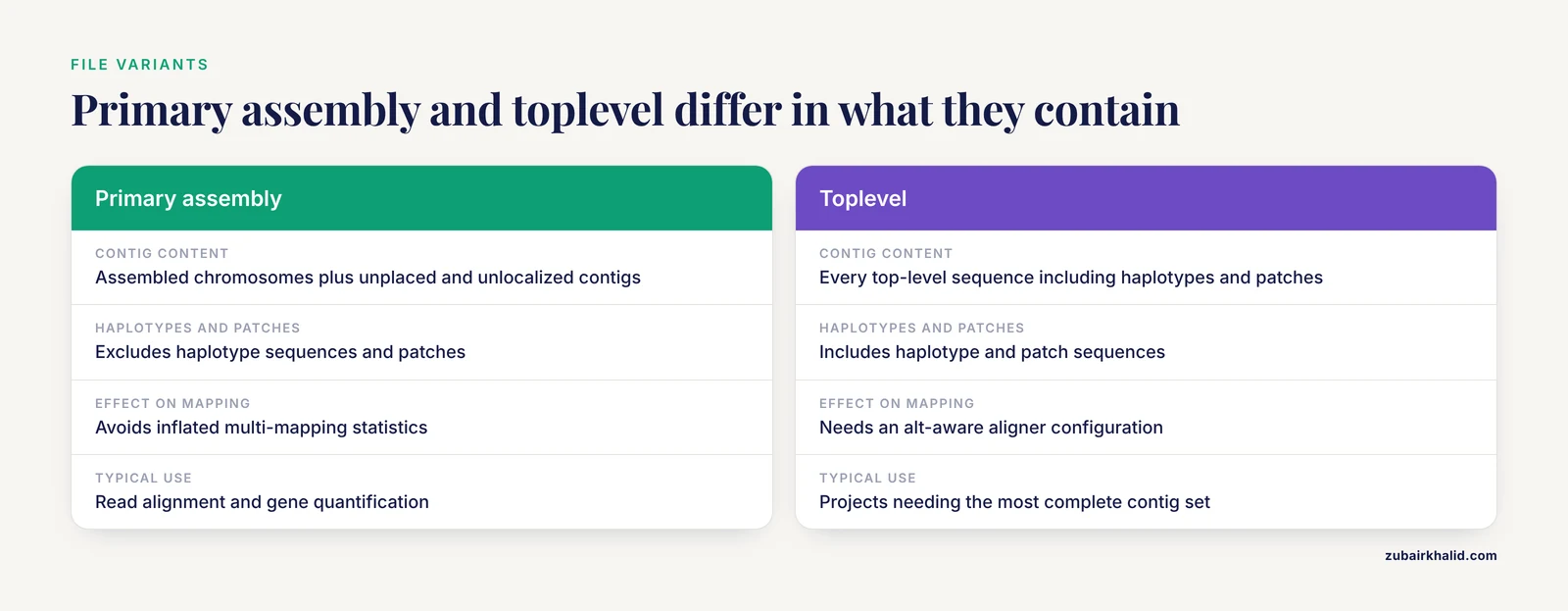
Ensembl offers the same genome in several file variants, and choosing the wrong variant produces a mismatch between files you downloaded yourself. The primary assembly contains the assembled chromosomes plus unplaced and unlocalized contigs, and it excludes haplotype sequences and patches. The toplevel set includes every top-level sequence, including haplotypes and patches. File names on the Ensembl FTP reflect this distinction, with DNA PRIMARY and DNA TOPLEVEL variants for the FASTA.
Patch releases add a second layer. GRCh38 has been updated through a series of patches without changing the coordinates of existing chromosomes. A file describing a later patch level can contain additional sequences. If your FASTA is the primary assembly from an early patch level and your GTF includes annotation on patch or novel patch sequences from a later patch, the annotation refers to contigs that do not exist in your FASTA. Tools either error out or silently skip those genes.
How to fix it
Match the file variant across your reference set. For most read alignment and gene quantification work, the primary assembly from a single release is the right choice, because including haplotypes inflates multi-mapping statistics and complicates counting. If your project specifically requires alternate haplotypes or the most complete contig set, take the toplevel FASTA and an annotation built for that same contig set from the same release. Compare the contig name lists between your FASTA index and your GTF after download. They should be identical, or differ only by the naming convention issue covered in Cause 2.
Cause 5: Haplotype and Alternate Contigs
GRCh38 includes alternate contigs, often called ALT contigs, which represent common haplotypes at loci too variable for a single representation. Files downloaded from different providers treat these differently. Some preparations include them under full accession names, some strip them, and some collapse them. An analysis that mixes a reference with ALT contigs against an annotation without them, or the reverse, produces the symptoms of a mismatch: genes missing, reads mapping to unexpected contigs, and inflated multi-mapping rates concentrated on specific loci such as the highly polymorphic regions of chromosomes 6 and 8.
This cause interacts with the aligner. Modern splice-aware and short-read aligners have modes designed for references that include alternate contigs, and those modes assume a particular contig naming scheme that mirrors the coordinates of the main chromosome. If you renamed contigs inconsistently, that assumption breaks.
How to fix it
Decide once whether your project uses the primary assembly or the full assembly with alternates, and apply that decision to every file: FASTA, index, GTF, and any variant or interval files. If you use the full assembly, read the aligner documentation on alternate contig handling and use the recommended configuration. If you use the primary assembly, confirm that your downloaded FASTA is the primary variant and that no alternate contig names remain in your index.
Cause 6: Coordinate System Errors, 0-Based Versus 1-Based
This cause produces a mismatch of exactly one base, everywhere, which makes it easy to confuse with sloppy annotation until you look closely. The BED format stores intervals with a 0-based start and a 1-based end, meaning a BED line of chr1 100 200 describes bases 101 through 200 in 1-based language. GTF, GFF, VCF, SAM, and most other formats use 1-based starts throughout. Scripts that read a BED start position and write it into a GTF without adding one, or the reverse, shift every interval by a single base.
The symptom is subtle. Coding sequence boundaries land one base early or late. A translation starts at the wrong codon and the protein appears truncated or frameshifted. Variant consequence prediction changes from synonymous to missense at single-base resolution. Comparing one known variant against the Ensembl browser resolves the question in seconds.
How to fix it
Use libraries that handle conventions internally. Bioconductor's GenomicRanges treats 1-based, closed intervals as standard and converts BED on import. Command-line tools in the BEDtools suite document their convention in each command and convert correctly between formats. If you write your own conversion code, include one worked example as a test: take a gene with a known start codon position from Ensembl, express it in BED, convert it back, and assert the round trip reproduces the original number.
Cause 7: Masking, Mitochondrial Naming, and Edge Cases
Three smaller causes round out the list.
Soft-masked versus hard-masked FASTA. A soft-masked genome file represents repeat regions in lowercase while keeping the full sequence. A hard-masked file replaces repeats with N characters. Aligners tolerate both, but tools that count GC content, search for motifs, or compute sequence statistics give different answers on the two variants, and a k-mer or motif analysis built on one will mismatch results built on the other. Ensembl distributes unmasked and soft-masked DNA files as separate downloads, so confirm which variant you have before comparing sequence statistics across files.
Mitochondrial contig naming. Human assemblies represent the mitochondrial genome with the rCRS reference sequence, but tools name it differently: MT in Ensembl, chrM in UCSC. Some downstream tools hard-code one name. When a mitochondrial analysis returns empty results, check whether the contig was renamed at some step.
Lineage and strain differences. In species with many strains, such as mouse, Ensembl serves the reference strain while a project may have generated reads from a different strain. This is not an assembly mismatch in the strict sense, but it produces overlapping symptoms: poor mapping at strain-variable loci and apparent deletions or insertions relative to the reference. Confirm that your reads, reference, and annotation all describe the same strain or isolate.
Worked Example: Reconciling a GTF and a FASTA
A concrete sequence shows how the diagnostics combine in practice. Suppose a gene quantification step returns almost no counts.
First, list the contig names on both sides:
cut -f1 genome.fa.fai | sort > fasta_contigs.txt
awk '!/^#/{print $1}' annotation.gtf | sort -u > gtf_contigs.txt
diff fasta_contigs.txt gtf_contigs.txt
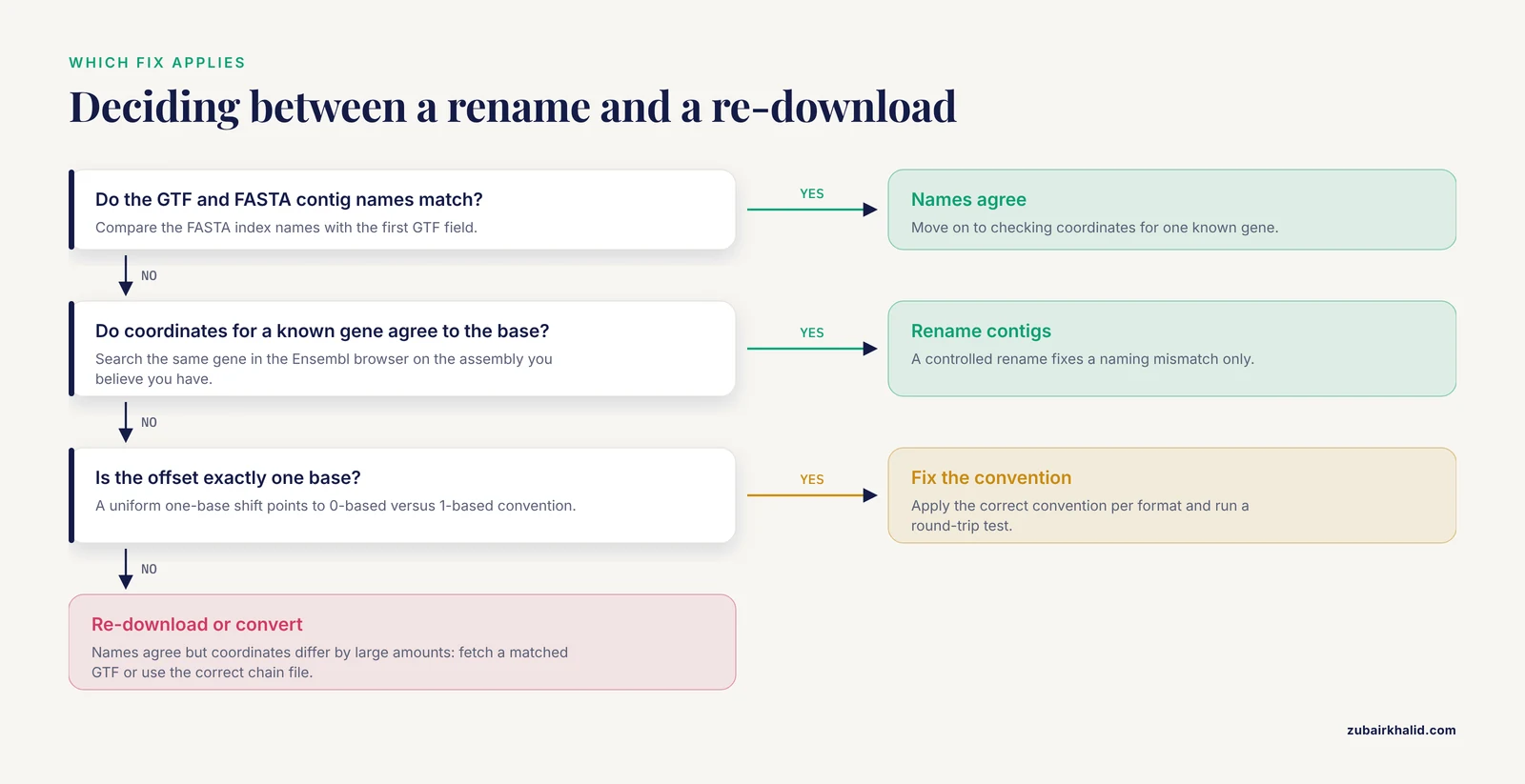
Suppose the diff shows every GTF name carries a chr prefix that the FASTA lacks. The coordinate system question is still open, so verify one gene. Take the BRCA1 line from the GTF, strip the prefix, and search the same gene on the Ensembl browser for human on the assembly you believe you have. The start coordinates agree to the base. You have a naming mismatch only, and a controlled rename fixes it.
Suppose instead that the names match perfectly but a known gene sits roughly 500,000 bases away from its browser position. Names agreeing while coordinates disagree is the signature of an assembly version difference. Look up the chromosome length in your FASTA index and compare it with the length reported by the Ensembl REST API for the candidate assemblies. The length match identifies which assembly your FASTA actually is. Then re-download the GTF from the matching assembly, or convert your intervals with the correct chain file.
This example illustrates the general habit: resolve naming first because it is cheap, then resolve version because it is structural, then resolve convention because it is uniform and testable.
Common Mistakes and Limitations
A few recurring errors deserve their own list, because each one silently converts a diagnosable problem into a wrong result.
Trusting filenames. A file named GRCh38 can contain GRCh37 data after an unclear chain of downloads. Verify with contig lengths and a known gene position, not with the name.
Renaming chromosomes to make an error go away. If sequences differ, renaming contigs to identical names makes two different genomes look compatible. Every intersection after that step is wrong in a way no tool will warn you about. Rename only after confirming that coordinates agree.
Fixing the symptom in one file and not the pipeline. Renaming a GTF for one script while the aligner index still uses the original names guarantees the next mismatch. Apply a single naming and version decision to every file in the project.
Mixing providers half-heartedly. Using a UCSC BED file with Ensembl annotation is fine when coordinates and versions match and naming is converted. The mistake is doing the conversion informally, in an untracked script, so the next person on the project cannot reproduce it.
Assuming two files from the same species match. Species is not assembly. Two human files can describe GRCh37 and GRCh38, and two mouse files can describe different strains. Match on assembly and release, never on species alone.
Overlooking the off-by-one. A one-base shift survives visual inspection of big pictures and only appears at the single-base level. Any script that converts between BED and 1-based formats needs a round-trip test.
A limitation on interpretation applies here as everywhere in genomics. Coordinate reconciliation is a computational task with computable answers, but the biological and clinical interpretation of any variant or gene-level result requires appropriate domain expertise and, for human clinical questions, a qualified genetics professional.
Prevention Practices
Prevention costs minutes. Diagnosis after the fact costs days.
Record the exact provenance of every reference file. For each FASTA, GTF, VCF, or chain file, store the source URL, the assembly name, the release number, and the download date in a plain text manifest inside the project directory.
Verify checksums at download time. Ensembl publishes checksum files alongside its data files. Running a checksum utility on each download and comparing the result catches truncated or corrupted files immediately, before they become mysterious failures two weeks later.
Pin versions in workflow configuration. Tools such as Nextflow and Snakemake let you declare reference paths in a configuration file that travels with the pipeline. One configuration per assembly and release, referenced by every process in the workflow, makes the mismatch structurally impossible.
Containerize reference-sensitive steps. A container image built with a specific FASTA, index, and annotation guarantees that everyone running the image uses the same reference, regardless of what sits in their own directories.
Use a naming convention decision document. One short paragraph in the project README stating the chosen chromosome naming style, the assembly, the release, and the file variant prevents the most common cause of all: two people fetching reference files independently and never comparing them.
Validate with a canary gene or variant. Keep a small file with a handful of genes or variants whose coordinates are known on your chosen assembly. Before running a full pipeline, check that your annotation and FASTA reproduce those coordinates. Thirty seconds of checking catches every version and naming mismatch in this article.
Frequently Asked Questions
Why do my gene coordinates differ between Ensembl and NCBI?
Most often the two sites are showing you different assembly versions, and the coordinates differ by large amounts. Check the assembly label on each page, such as GRCh37 versus GRCh38, and compare only after both views report the same assembly. If the coordinates differ by exactly one base, a 0-based versus 1-based convention is the likely explanation.
How do I tell which assembly a FASTA file uses?
Look up the length of one or two chromosomes in the FASTA index file and compare those lengths with the chromosome lengths reported for candidate assemblies through the Ensembl REST API or the Ensembl browser assembly pages. Contig lengths differ between assemblies, so a match identifies the version without trusting the filename.
Can I convert coordinates from GRCh37 to GRCh38?
Yes, with a liftOver or CrossMap chain file built for that exact pair and direction. The conversion maps most intervals and drops a small fraction that do not align cleanly between builds. Validate a handful of known variants after conversion, and never attempt to convert a genome FASTA itself.
Why does Ensembl use chromosome names without the chr prefix?
Ensembl follows the naming delivered by the Genome Reference Consortium, which uses plain numbers and MT for the mitochondrial contig, while UCSC adds the chr prefix as its own convention. Neither is wrong. The mismatch only matters when files from both conventions meet, and a one-time rename or a library that converts styles resolves it.
What is the difference between an Ensembl release and a genome assembly?
The assembly is the underlying sequence set from the Genome Reference Consortium and changes rarely. A release is a numbered Ensembl data snapshot that pairs that assembly with current annotation, gene models, and file exports. Two files can share an assembly and still mismatch if they come from different releases.
Why do some genes have multiple coordinate sets on the same assembly?
Alternate haplotype contigs and patches give some genomic regions more than one representation on the same assembly. A gene near such a region can appear on the main chromosome and on an alternate contig with different coordinates. Choose primary assembly files when you want a single representation per locus.
How do I check which assembly my BAM file was aligned against?
Compare the contig names and lengths in the BAM header, which you can view with samtools quickcheck or by printing the header directly, against the chromosome lengths for candidate assemblies from Ensembl. A length match identifies the assembly. If the BAM header names disagree with your annotation file, that naming mismatch is a separate, additional problem to fix.
Does the Ensembl REST API report assembly information?
Yes. The info assembly endpoints return the assembly name, accession, and the list of top-level regions with their lengths for a species in JSON form. Comparing those lengths against your FASTA index is one of the fastest ways to identify an unknown reference file.