How to Encrypt Genomic Data in the Cloud
By Dr. Zubair Khalid, DVM, MS, PhD ·

By the end of this guide you will be able to create a customer-managed encryption key, enforce encryption at rest on a storage bucket, upload encrypted FASTQ and BAM files, verify that every object is actually encrypted, and close the two gaps that most cloud genomics deployments miss: data in transit and data on compute nodes. The walkthroughs use the AWS CLI, the Google Cloud CLI, and the Azure CLI. You will need an account on at least one of the three platforms, the matching CLI installed and configured with credentials, permissions to create keys and buckets, and one test file such as a compressed FASTQ.
Why bother with anything beyond defaults? Because a whole-genome sequence identifies a person. Reviews of genomic data management in the cloud describe how the scale of next-generation sequencing pushed laboratories onto cloud services, along with regulatory obligations that follow the data there [1]. A scoping review of genomic data stewardship frames responsible management as protecting accuracy, privacy, integrity, and appropriate access across the entire data lifecycle, not just the moment of upload [2]. Encryption is the control that makes all four possible at technical depth.
Why Genomic Data Needs Layered Encryption in the Cloud
A genome is simultaneously a research dataset, a clinical record, and an identifier that cannot be de-identified away. Once you store one, several regulatory regimes can attach to it, most prominently HIPAA in the United States and the GDPR in the European Union. Clinical laboratories in the US regulatory environment face specific compliance duties for genetic information in patient care, research, and public databases, and cloud storage does not remove those duties [1]. European infrastructure proposals for health data sharing likewise make GDPR-compliant security a design requirement rather than an afterthought [3].
A systematic review of cybersecurity risks in healthcare cloud computing identified ten recurring challenges: data breaches and unauthorized access, compliance with HIPAA and GDPR, data sovereignty and jurisdictional issues, shared infrastructure vulnerabilities, insider threats, data loss and availability concerns, inadequate security measures by providers, application vulnerabilities, limited visibility and control, and the sheer complexity of cloud security management [4]. Encryption, correctly configured, directly blunts the first, fourth, and ninth of those. It does nothing about the fifth, which is why key policy and access control sit alongside it in this guide.
Two additional facts shape the design. First, genomic data is large. A single 30x whole-genome BAM runs roughly 100 GB, and a cohort can reach petabytes, so encryption must be applied automatically by infrastructure rather than by hand. Second, genomic workflows copy data constantly: from a sequencer to object storage, from storage to a virtual machine, from a VM to a results bucket. Every hop is an opportunity for a plaintext copy to persist somewhere you forgot about. Reviews of cloud adoption in biomedical research consistently flag that moving workloads is not trivial and that security must be designed for the whole workflow, not just the storage layer [5].
The Four Encryption Layers in Cloud Bioinformatics
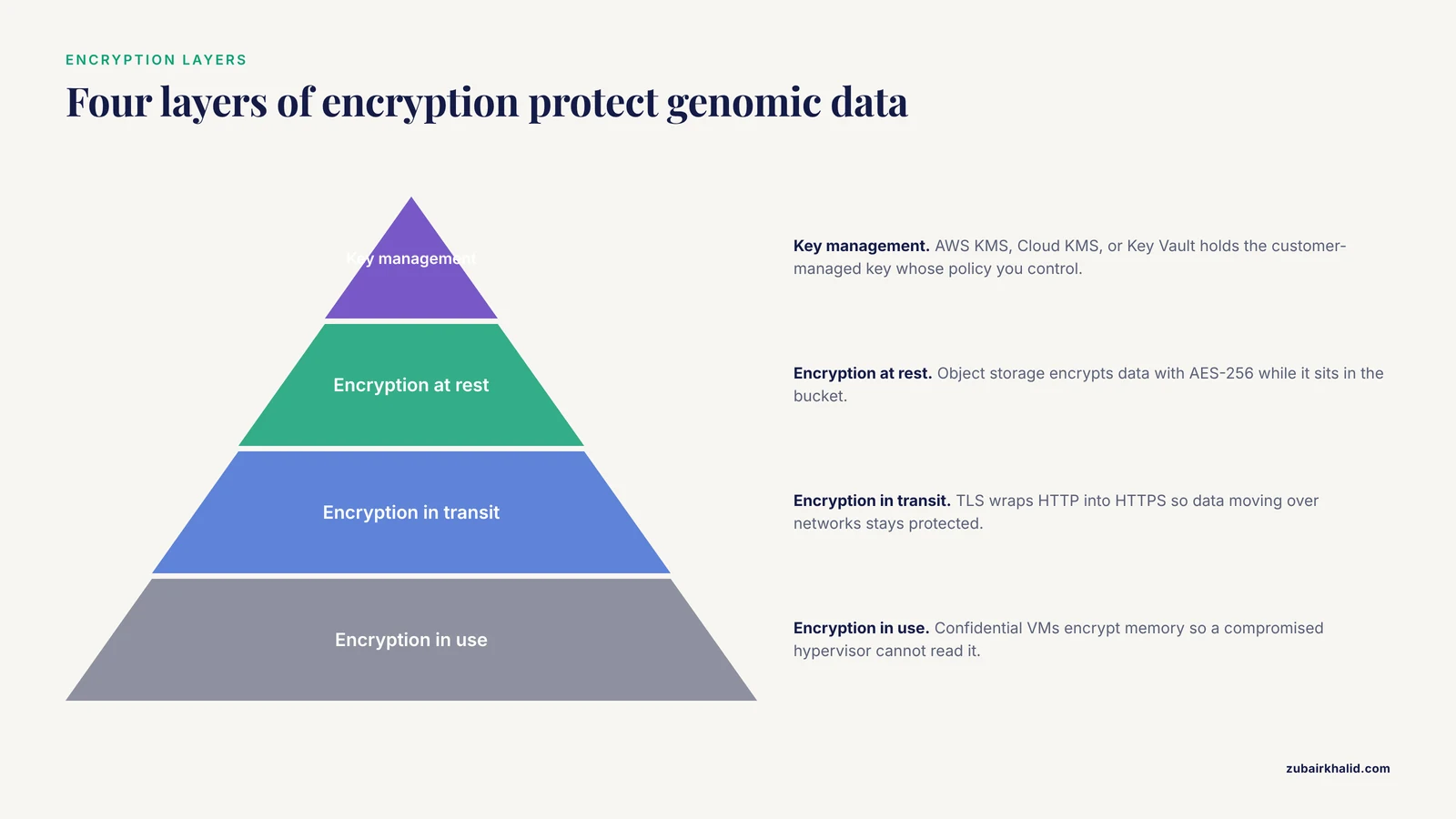
Before running commands, get the vocabulary straight. Every term below appears in official platform documentation.
Encryption at rest protects data while it sits in storage. All three major cloud providers encrypt object storage at rest by default with AES-256, a standard symmetric block cipher. Default encryption uses keys the provider manages. You can usually upgrade to keys you control.
Encryption in transit protects data moving over networks. The standard is TLS (Transport Layer Security), which wraps HTTP into HTTPS. All three providers enforce or support TLS on their storage APIs, but older tools and misconfigured endpoints can still negotiate plaintext.
Encryption in use protects data while a CPU processes it. Confidential computing technologies such as AMD SEV or Intel SGX, exposed by providers as confidential VMs, encrypt memory so that even a compromised hypervisor cannot read it.
Key management is the service that creates, stores, and controls cryptographic keys. AWS KMS, Google Cloud KMS, and Azure Key Vault. A customer-managed key (CMK) is a key whose policy you control, versus a provider-managed key you cannot inspect or restrict.
Most production deployments use envelope encryption: the provider encrypts each object with a unique data key, and encrypts that data key with your CMK. This gives per-object keys without key-management overhead. A hash-based message authentication code, or HMAC, is a related construct used to sign requests, and a checksum such as SHA-256 verifies that a file arrived bit-for-bit identical.
One table summarizes the mapping across providers. Command details follow in the walkthroughs.
| Layer | AWS | Google Cloud | Azure |
|---|---|---|---|
| Key service | AWS KMS | Cloud KMS | Azure Key Vault |
| Object storage | S3 | Cloud Storage | Blob Storage |
| Default at-rest encryption | SSE-S3 (AES-256) | AES-256, provider keys | Storage Service Encryption (AES-256) |
| Customer-managed key for storage | SSE-KMS with a KMS key | CMEK on the bucket | CMK via Key Vault on the storage account |
| Object upload with CMK | aws s3 cp, sse aws:kms | gcloud storage cp after CMEK default | Inherited from account-level CMK |
| In-transit enforcement | Bucket policy aws:SecureTransport condition | Bucket policy noIp or CAA plus TLS-only clients | -min-tls-version TLS1_2 on the storage account |
| Verify an object | aws s3api head-object | gcloud storage objects describe | az storage blob show |
Step-by-Step: Encrypt Genomic Data on AWS
AWS is the most common starting point for cloud bioinformatics and genomics workloads, so this section is the most detailed. The goal is a bucket where every object is encrypted with a key you control, uploads over plaintext HTTP are impossible, and you can prove both from the command line.
1. Create a customer-managed KMS key
aws kms create-key \
  --description "Genomic data key for prod bucket" \
  --key-usage ENCRYPT_DECRYPT \
  --origin AWS_KMS
Expected output (truncated):
{
    "KeyMetadata": {
        "KeyId": "1234abcd-12ab-34cd-56ef-1234567890ab",
        "Arn": "arn:aws:kms:us-east-1:111122223333:key/1234abcd-...",
        "Enabled": true
    }
}
Give it a stable alias so policies and humans refer to the same key:
aws kms create-alias \
  --alias-name alias/genomics-data \
  --target-key-id 1234abcd-12ab-34cd-56ef-1234567890ab
Parameters that matter:
-key-usage ENCRYPT_DECRYPTis the only correct value for storage encryption. Asymmetric or signing keys will fail silently later.- The key policy attached at creation defines who can call
kms:Encryptandkms:Decrypt. Keep the default policy, which grants your account's IAM administrators, then narrow it per role. - Key deletion is destructive. KMS enforces a waiting period before a scheduled key is destroyed, and data encrypted with a deleted key becomes permanently unreadable. Treat key deletion with the same gravity as bucket deletion.
2. Create a private bucket and force encryption on it
aws s3api create-bucket --bucket acme-genomics-prod --region us-east-1

aws s3api put-public-access-block \
  --bucket acme-genomics-prod \
  --public-access-block-configuration \
  BlockPublicAcls=true,IgnorePublicAcls=true,BlockPublicPolicy=true,RestrictPublicBuckets=true
Now set default encryption so any upload without explicit settings is still protected by your CMK, and enable a bucket key to reduce KMS request costs on large genomic buckets:
aws s3api put-bucket-encryption \
  --bucket acme-genomics-prod \
  --server-side-encryption-configuration '{
    "Rules": [{
      "ApplyServerSideEncryptionByDefault": {
        "SSEAlgorithm": "aws:kms",
        "KMSMasterKeyID": "alias/genomics-data"
      },
      "BucketKeyEnabled": true
    }]
  }'
SSEAlgorithm: aws:kmsselects SSE-KMS, meaning per-object data keys wrapped by your CMK. The alternativeAES256selects SSE-S3 with a provider-managed key, which protects against storage-layer compromise but cannot restrict decryption by IAM policy.BucketKeyEnabled: truereuses a bucket-level key for many objects, cutting KMS API calls when a pipeline writes thousands of CRAM shards.
3. Deny unencrypted uploads and plaintext transport
Default encryption is a safety net, not an enforcement mechanism, because a client can still explicitly request SSE-S3 or no header at all. Attach a bucket policy that rejects both:
{
  "Version": "2012-10-17",
  "Statement": [
    {
      "Sid": "DenyUnencryptedUploads",
      "Effect": "Deny",
      "Principal": "*",
      "Action": "s3:PutObject",
      "Resource": "arn:aws:s3:::acme-genomics-prod/*",
      "Condition": {
        "StringNotEquals": {
          "s3:x-amz-server-side-encryption": "aws:kms"
        }
      }
    },
    {
      "Sid": "DenyInsecureTransport",
      "Effect": "Deny",
      "Principal": "*",
      "Action": "s3:*",
      "Resource": [
        "arn:aws:s3:::acme-genomics-prod",
        "arn:aws:s3:::acme-genomics-prod/*"
      ],
      "Condition": {
        "Bool": { "aws:SecureTransport": "false" }
      }
    }
  ]
}
aws s3api put-bucket-policy \
--bucket acme-genomics-prod \
--policy file://deny-policy.jsonThe first statement rejects any PUT that does not request aws:kms encryption. The second rejects every request that did not arrive over TLS. Together they convert your encryption intent into infrastructure that refuses violations.
4. Upload with explicit encryption
aws s3 cp run123/sample_R1.fastq.gz \
  s3://acme-genomics-prod/raw/run123/ \
  --sse aws:kms --sse-kms-key-id alias/genomics-data
Expected output:
upload: run123/sample_R1.fastq.gz to s3://acme-genomics-prod/raw/run123/sample_R1.fastq.gz-sse aws:kmsrequests SSE-KMS.-sse-kms-key-idpins the specific CMK so you are never dependent on bucket defaults.- For a multipart upload from a large BAM, the same flags work with
aws s3api create-multipart-upload, server-side-encryption aws:kms. - If you want integrity proof on upload, add
-checksum-algorithm SHA256(AWS CLI v2). S3 stores the checksum and can verify it on any later download.
5. Verify the result
aws s3api head-object \
  --bucket acme-genomics-prod \
  --key raw/run123/sample_R1.fastq.gz \
  --query '{SSE: ServerSideEncryption, KeyID: SSEKMSKeyId, Checksum: ChecksumSHA256}'
Expected output:
{
    "SSE": "aws:kms",
    "KeyID": "arn:aws:kms:us-east-1:111122223333:key/1234abcd-...",
    "Checksum": "..."
}
If SSE shows anything other than aws:kms, the upload bypassed your policy, which means the policy is wrong or was applied to the wrong bucket. Also confirm the negative case, that plaintext upload is refused:
aws s3api put-object \
  --bucket acme-genomics-prod \
  --key raw/test-noenc.bam \
  --body test-noenc.bam
Expected error: AccessDenied, because the bucket policy denies uploads without the KMS header. Seeing that error is a pass, not a failure.
Common AWS errors and fixes
AccessDenied on upload with a message naming kms:Encrypt. The IAM principal uploading lacks permission to use the key. Grant the uploader role kms:Encrypt, kms:Decrypt, kms:GenerateDataKey, and kms:DescribeKey on the key ARN. Pipelines that read data back also need kms:Decrypt, and forgetting the decrypt half is the most common cause of a pipeline that writes successfully but fails at the first read.
Upload succeeds but head-object shows AES256. The upload command did not pass -sse and bucket default encryption was either not set or was set to AES256. Re-run the put-bucket-encryption command from step 2 and check the JSON quoting, which is the usual culprit.
InvalidBucketState when applying the policy. The public access block must be fully applied before some policies validate. Re-run the policy command after a few seconds.
Step-by-Step: Encrypt Genomic Data on Google Cloud
Google Cloud uses CMEK (customer-managed encryption keys) for the same purpose as SSE-KMS, with one extra wiring step that trips up nearly everyone: the Cloud Storage service account must be granted permission to use your key.
1. Create the keyring and key
gcloud kms keyrings create genomics --location us-central1

gcloud kms keys create fastq-key \
  --keyring genomics \
  --location us-central1 \
  --purpose encryption \
  --rotation-period 90d
-rotation-period 90dschedules automatic rotation of the key material. Old versions remain available for decryption, so rotation is safe for archived data.- Location matters. A CMEK key must live in the same location as the bucket that uses it.
2. Grant the storage service account access to the key
PROJECT_NUMBER=$(gcloud projects describe YOUR_PROJECT_ID \
  --format='value(projectNumber)')

gcloud kms keys add-iam-policy-binding fastq-key \
  --keyring genomics --location us-central1 \
  --member "serviceAccount:service-${PROJECT_NUMBER}@gs-project-accounts.iam.gserviceaccount.com" \
  --role roles/cloudkms.cryptoKeyEncrypterDecrypter
This single binding is what makes CMEK work. The Cloud Storage service agent performs the actual encrypt and decrypt operations on behalf of every read and write in the bucket.
3. Create the bucket with a CMEK default
gcloud storage buckets create gs://acme-genomics-prod \
  --location=us-central1 \
  --default-encryption-key=projects/YOUR_PROJECT_ID/locations/us-central1/keyRings/genomics/cryptoKeys/fastq-key \
  --public-access-prevention \
  --uniform-bucket-level-access
Every object written without an explicit key now uses fastq-key.
4. Upload and verify
gcloud storage cp run123/sample_R1.fastq.gz gs://acme-genomics-prod/raw/run123/

gcloud storage objects describe gs://acme-genomics-prod/raw/run123/sample_R1.fastq.gz \
  --format="value(kmsKeyName)"
Expected output:
projects/YOUR_PROJECT_ID/locations/us-central1/keyRings/genomics/cryptoKeys/fastq-key/cryptoKeyVersions/1A returned key path confirms envelope encryption with your CMK. Empty output means the object was written with a provider-managed key, which happens if the bucket was created before the CMEK default was set. CMEK does not retroactively re-encrypt existing objects, so set the default at bucket creation time or rewrite the objects.
Common GCP errors and fixes
A 400 error saying the Cloud KMS key does not exist, or the service account lacks permission. You skipped step 2. Run the add-iam-policy-binding command and upload again.
CMEK key location mismatch. The keyring location does not match the bucket location. Recreate the key in the same region, for example us-central1 for both.
403: AccessDenied on gcloud storage cp. Your user identity needs roles/storage.objectCreator on the bucket and roles/cloudkms.cryptoKeyEncrypterDecrypter on the key. The service account binding covers storage-to-key traffic, not you-to-bucket traffic.
Step-by-Step: Encrypt Genomic Data on Azure
Azure applies storage service encryption to every storage account by default. The upgrade path is a customer-managed key in Key Vault applied at the account level, which then covers all blobs, files, queues, and tables in that account.
1. Create a vault and a key
az group create --name rg-genomics --location eastus

az keyvault create \
  --name acme-genomics-vault \
  --resource-group rg-genomics \
  --location eastus

az keyvault key create \
  --vault-name acme-genomics-vault \
  --name genomic-key \
  --protection software \
  --size 256
-protection softwarestores the key in vault-managed HSM-backed storage. Hardware-protected keys require a premium vault tier.-size 256sets a 256-bit RSA key, appropriate for envelope encryption of storage accounts.
2. Grant the storage account permission to use the key
Azure needs a managed identity on the storage account and permission for that identity to read and unwrap the key:
az storage account update \
  --name stgenomics01 \
  --resource-group rg-genomics \
  --assign-identity

PRINCIPAL_ID=$(az storage account show \
  --name stgenomics01 --resource-group rg-genomics \
  --query identity.principalId -o tsv)

az keyvault set-policy \
  --name acme-genomics-vault \
  --object-id $PRINCIPAL_ID \
  --key-permissions get unwrapkey wrapkey
The three permissions map exactly to envelope encryption: get to fetch the key, wrapkey and unwrapkey to wrap and unwrap per-object data keys.
3. Attach the CMK and harden transport
az storage account update \
  --name stgenomics01 \
  --resource-group rg-genomics \
  --encryption-key-name genomic-key \
  --encryption-key-vault https://acme-genomics-vault.vault.azure.net/ \
  --encryption-key-source Microsoft.Keyvault

az storage account update \
  --name stgenomics01 \
  --resource-group rg-genomics \
  --min-tls-version TLS1_2 \
  --https-only true
-min-tls-version TLS1_2rejects connections from older clients that would negotiate deprecated TLS versions.-https-only truerejects plaintext HTTP at the account level, the Azure equivalent of the AWSSecureTransportdeny policy.
4. Upload and verify
az storage container create \
  --account-name stgenomics01 \
  --name raw \
  --auth-mode login

az storage blob upload \
  --account-name stgenomics01 \
  --container raw \
  --name run123/sample_R1.fastq.gz \
  --file run123/sample_R1.fastq.gz \
  --auth-mode login \
  --overwrite

az storage account show \
  --name stgenomics01 \
  --resource-group rg-genomics \
  --query "encryption.keyVaultProperties"
Expected output:
{
    "keyName": "genomic-key",
    "keyVaultUri": "https://acme-genomics-vault.vault.azure.net/",
    "keyVersion": "..."
}
Unlike S3 and GCS, Azure reports CMK configuration at the account level rather than per object. Confirm the vault URI and key name are populated, then confirm blob-level properties show the account encryption is active:
az storage blob show \
  --account-name stgenomics01 \
  --container raw \
  --name run123/sample_R1.fastq.gz \
  --auth-mode login \
  --query "properties"
Common Azure errors and fixes
KeyBasedEncryptionNotSupportedForAccountType. Some account kinds and premium configurations predate CMK support. Create a standard general-purpose v2 account, which is the default today, and migrate the data.
Operation ... 'unwrapKey' is not permitted on reads. The Key Vault access policy is missing unwrapkey or the managed identity was recreated and its principal ID changed. Re-run az keyvault set-policy with the current principal ID.
Uploads stall after attaching the CMK. If the key was disabled or its version was hard-pinned and then rotated, storage operations fail until the account can reach a valid key. Check the key's enabled state in Key Vault and update the account to the latest key version.
Client-Side Encryption: Encrypt Before Upload
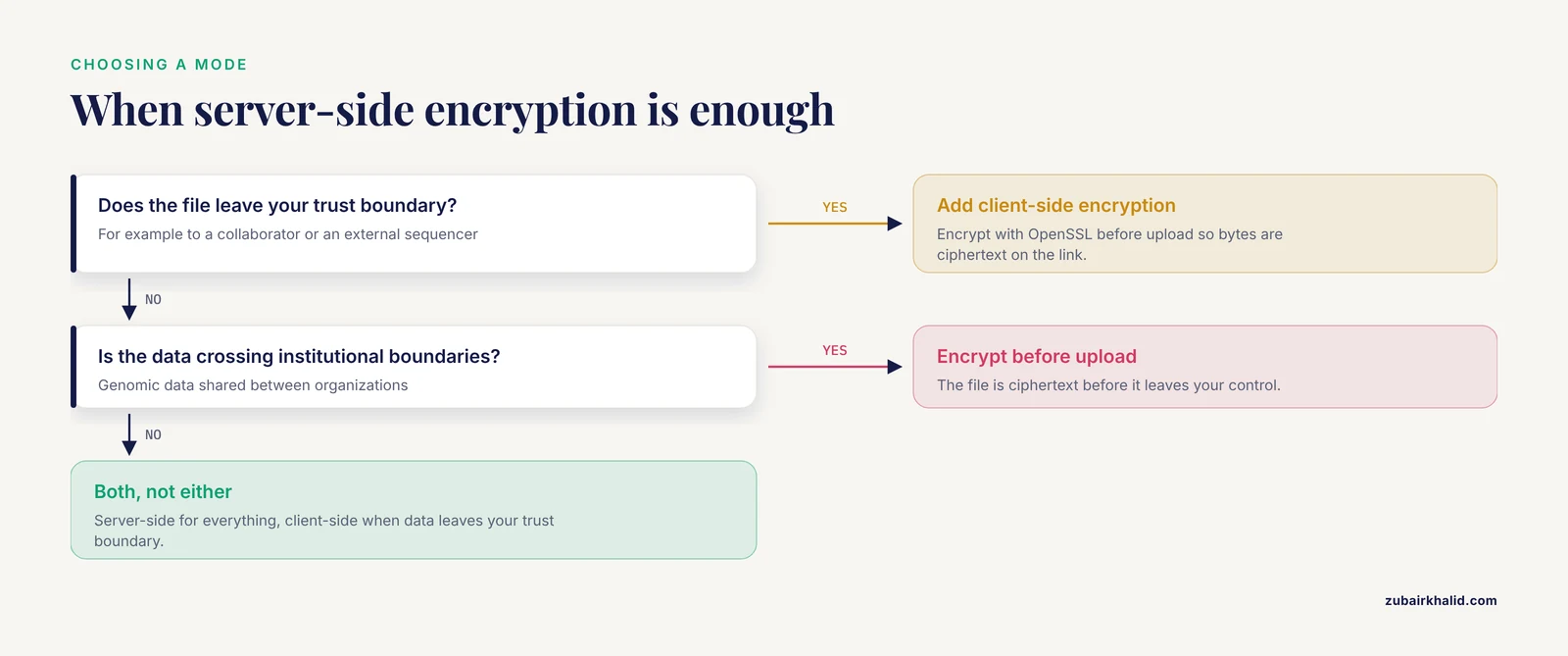
Server-side encryption protects data inside the provider's boundary. Client-side encryption protects the bytes on your laptop, on the transfer link, and in any staging area, because the file is ciphertext before it leaves your control. For genomic data crossing institutional boundaries, this is a meaningful addition rather than a redundancy.
A minimal, auditable approach with OpenSSL:
openssl enc -aes-256-cbc -pbkdf2 -iter 600000 \
  -in sample_R1.fastq.gz \
  -out sample_R1.fastq.gz.enc \
  -pass file:passphrase.txt

md5sum sample_R1.fastq.gz sample_R1.fastq.gz.enc > checksums.md5-aes-256-cbcselects AES with a 256-bit key in CBC mode, the classic OpenSSL file-encryption recipe.-pbkdf2 -iter 600000derives the key from the passphrase with a deliberately slow function, which is what makes a short passphrase expensive to brute-force. Older OpenSSL advice used far fewer iterations, so if you find legacy scripts, raise this.- The passphrase file needs the same protection as a key. Store it in your secret manager, not next to the ciphertext.
Decrypt with the inverse:
openssl enc -d -aes-256-cbc -pbkdf2 -iter 600000 \
  -in sample_R1.fastq.gz.enc \
  -out sample_R1.fastq.gz \
  -pass file:passphrase.txt

md5sum -c checksums.md5
Expected output on verification:
sample_R1.fastq.gz: OK
sample_R1.fastq.gz.enc: OK
For team-scale use, replace passphrase files with tooling that integrates your cloud KMS, so data keys are wrapped by the same customer-managed keys from the walkthroughs above. The rule of thumb: server-side encryption for everything, client-side encryption when the data leaves your trust boundary.
Encrypting Compute: Pipelines, Containers, and Analysis
Storage encryption is necessary and insufficient. Genomic analysis copies data onto virtual machines, and an unencrypted scratch disk or an over-shared VM image quietly recreates the exposure you just closed.
Encrypt disks and scratch volumes. All three providers support encryption of EBS volumes, Persistent Disks, and managed disks with your CMK. Create compute instances with those disk settings rather than provider-managed defaults, and treat instance store as ephemeral data that vanishes with the instance, which is often exactly what you want for intermediate files.
Run pipelines in containers. Containers give a consistent, versioned computational environment for NGS pipelines and, when built with least-privilege principles, help keep protected health information handled only by validated, pinned software [6]. Pull images from a private registry, pin digests rather than tags, and run the container role with only kms:Decrypt on the specific key, never full key administration.
Use confidential VMs for the most sensitive work. When the threat model includes infrastructure-level compromise, confidential computing instances encrypt memory during processing and are offered by all three providers. The performance cost is real, so reserve them for workloads where the data justifies it, such as re-identification-risk analyses or clinical secondary findings.
Log and monitor decryption. CloudAudit Trails, Cloud KMS activity logs, and Azure Key Vault diagnostic logs record every encrypt and decrypt call. A sudden spike in Decrypt against your genomics key is one of the clearest signals of an insider exfiltrating a dataset, a risk category that healthcare cloud security reviews rank as a top challenge [4]. Route these logs to a sink nobody in the analysis team can edit.
Governance: Keys Are Policy Objects Too
Encryption answers the technical half of stewardship. The governance half decides who may use the key, under what agreement, for what purpose, and that is where genomic repositories diverge from generic cloud storage.
The five-safes framework, implemented in the RAPTOR repository at the Genome Institute of Singapore, structures this as safe people, safe projects, safe settings, safe data, and safe outputs, with regulators increasingly mandating specific access patterns and security protocols for genomic data in the cloud [7]. Encryption with a customer-managed key is the enforcement point for several of those safes: key policy binds safe people, bucket policy binds safe settings, and per-key logging evidences both.
Federated architectures change the pattern again. Instead of moving genomes to an analyst, the analysis moves to the data, and only results leave. Survey work on federated biomedical infrastructure such as the FEAST platform shows that institutions consistently prioritize secure, authorized-access analysis with compliance and interoperability built into the backend, which pushes encryption and key policy into the platform design rather than leaving them to individual projects [8]. Large-scale European proposals make the same point at the infrastructure level, calling for certified interoperability and security standards plus a robust ethical and legal framework before data moves at all [3].
The practical translation for a working group: your key policy is a governance document that machines enforce. Name the roles that may decrypt, tie them to a data access agreement, review quarterly, and let the KMS log be the audit trail. That combination, described across the stewardship literature as aligning authorized access with ethical use throughout the data lifecycle, is what reviewers and auditors actually look for [2].
Common Mistakes and Limitations
Relying on bucket defaults as enforcement. Defaults apply to uploads that request nothing. A client that explicitly requests weaker encryption, or an old tool version that omits the header, writes a differently protected object. Enforce with deny policies, not defaults alone.
Granting the pipeline full key rights. A container that runs variant calling needs Decrypt on one key, not Encrypt, Decrypt, and key administration on everything. Broad KMS permissions turn a pipeline compromise into a bulk exfiltration capability, the insider-threat pattern that security reviews rank among the top healthcare cloud risks [4].
Encrypting storage but not transit or scratch space. An AES-256-encrypted bucket feeding an unencrypted NFS scratch mount on a shared VM gives back most of the protection you paid for. Encrypt disks, endpoints, and the traffic between them.
Treating encryption as access control. Encryption at rest does not stop anyone the KMS policy already authorizes. Genomic access control needs identity, purpose, and logging on top of crypto, which is the core lesson of the five-safes repository literature [7].
Forgetting that key loss is data loss. Deleting or disabling a customer-managed key makes every object it protected unreadable, in every region, immediately. Before scheduling key deletion, confirm the blast radius, and never point production genomic archives at a key that a test script also uses.
Assuming default encryption satisfies clinical or regulatory obligations. Provider-managed default encryption protects against storage-layer compromise but gives you no control over who can decrypt. HIPAA-scoped workloads in the US and GDPR-scoped collaborations in Europe both typically require demonstrable control over key access, which customer-managed keys provide.
Sharing variant summaries without thinking about re-identification. Small-cohort VCFs and rare-variant lists can identify individuals even after encryption in transit and at rest, because the risk lives in the analytical content. Access agreements and output controls, not crypto, carry that risk.
Copying plaintext to cheap convenience services. Sticky notes on a bastion, an unencrypted public staging bucket for a collaborator, a laptop cache under ~/.cache all recreate plaintext outside your encrypted perimeter. Audit where pipelines write intermediates.
One honest limitation of this guide. Individual deployments face institution-specific requirements, existing contracts, and edge cases that no general walkthrough covers, so have your compliance and security teams review the key policies before production data lands.
Frequently Asked Questions
Do AWS, GCP, and Azure encrypt genomic data by default?
Yes. Object storage on all three platforms applies AES-256 encryption at rest using provider-managed keys by default. The upgrade decision is whether to switch to customer-managed keys, which give you control over who can decrypt and an independent audit trail.
Should I use server-side or client-side encryption for FASTQ and BAM files?
Use server-side encryption as your baseline for all data, and add client-side encryption when files cross institutional or trust boundaries, such as sending data to a collaborator or an external sequencer. Client-side encryption protects the bytes before upload, server-side encryption protects them inside the provider.
What is a customer-managed key and why use one for genomic data?
A customer-managed key is a key in AWS KMS, Google Cloud KMS, or Azure Key Vault whose access policy you control, unlike a provider-managed key. For genomic data the benefit is enforceability: you can name exactly which roles may decrypt, log every decryption, and disable access without touching the data itself.
How do I verify that a file is actually encrypted?
On AWS, run aws s3api head-object and check that ServerSideEncryption shows aws:kms. On Google Cloud, run gcloud storage objects describe and confirm kmsKeyName points to your key. On Azure, check the storage account's encryption.keyVaultProperties with az storage account show, since Azure applies the customer-managed key at the account level.
Does encryption protect against someone I gave access to?
No. Anyone or anything your key policy authorizes can decrypt, so encryption does not address insider misuse. Mitigate that with least-privilege key grants, separate encrypt-only and decrypt-only roles, immutable KMS activity logs, and access agreements that define permissible use.
Can encrypted genomic data still be shared with collaborators?
Yes, and the design goal is sharing without losing control. Grant the collaborator's role kms:Decrypt on one key, scope the bucket policy to a prefix, and log every read. For stronger isolation, use federated analysis patterns where only computed results leave your environment.
What happens if I delete or lose my KMS key?
Every object encrypted with that key becomes permanently unreadable once the key is gone, including backups encrypted with it. Schedule deletions only after confirming nothing depends on the key, and use the provider's enforced waiting period to reverse mistakes.
Do I still need encryption if my bucket is private?
Yes. Bucket permissions and encryption answer different questions. A private bucket prevents unauthorized list and read requests, while encryption protects the data if storage media, snapshots, or credentials leak. Strong genomic deployments use both, plus TLS enforcement in transit.
Sources
- Considerations for Genomic Data Privacy and Security when Working in the Cloud.
- Characterizing core outcomes of responsible stewardship for human genomic data in the cloud.
- Towards a European health research and innovation cloud (HRIC).
- The Challenges of Data Privacy and Cybersecurity in Cloud Computing and Artificial Intelligence (AI) Applications for EQA Organizations.
- Biomedical research in the Cloud: considerations for researchers and organizations moving to (or adding) cloud computing resources.
- Containers in Bioinformatics: Applications, Practical Considerations, and Best Practices in Molecular Pathology.
- A five-safes approach to a secure and scalable genomics data repository.
- From use cases to infrastructure: a cross-institutional survey of priorities in data-driven biomedical research.