How to Debug Workflow Failures with Dry-Runs and Test Data
By Dr. Zubair Khalid, DVM, MS, PhD ·
By the end of this guide you will be able to take a failing Nextflow or Snakemake pipeline, run a dry-run against a small test dataset, and decide whether the fault sits in the pipeline logic, the configuration, the software environment, or the data itself. You will know how to read the job graph, how to dump channel contents in Nextflow, how to trace scheduling decisions in Snakemake, and how to interpret the exact error messages both tools print.
A bioinformatics workflow manager is software that runs multi-step analysis pipelines for you, working out job order, parallelism, and restarts from the dependencies between files or data streams. Nextflow and Snakemake are the two managers most widely used in genomics, and both ship first-class dry-run modes. To follow along you need a recent Java runtime (Java 17 or later for current Nextflow releases), Python 3, a conda or mamba installation, graphviz for rendering job graphs, and a tiny test dataset, which this guide shows you how to build in a few minutes.
Why a Dry-Run Comes First
Both tools solve the same problem. They take a multi-step analysis, build a DAG (directed acyclic graph, a dependency graph in which arrows flow one way and cycles are forbidden), run jobs in parallel where the graph allows it, and restart cleanly after failures. When a pipeline fails, the cause falls into one of four categories:
- Syntax and wiring errors. The DAG never builds at all. Typos, undefined variables, missing input files, contradictory wildcards.
- Configuration errors. The DAG builds but points at the wrong inputs, wrong profiles, or wrong resource limits.
- Environment errors. The DAG is sound but the tools are missing, the wrong version, or under-resourced.
- Runtime and data errors. The tools themselves fail on your data.
A dry-run is an execution mode in which the manager resolves the DAG and reports what it would run without launching the actual commands. It catches categories 1 and 2 cheaply and safely, it partially covers category 3 (Snakemake can build conda environments without running any jobs), and it almost never catches category 4. That limitation is exactly why dry-runs pair with test data. The dry-run proves the pipeline is wired correctly. A short test run proves the tools actually work end to end. Debugging in that order, cheapest check first, is the fastest route to a fix.
What You Need Installed and On Hand
Set up a dedicated environment so pipeline debugging never pollutes your host Python or Java installation:
java -version

# Nextflow
curl -s https://get.nextflow.io | bash
./nextflow -v

# Snakemake and graphviz in a dedicated environment
mamba create -n wf-debug -c conda-forge -c bioconda snakemake graphviz seqkit
conda activate wf-debug
snakemake --version
Bioconda is the standard conda channel for bioinformatics software and carries both tools. Pin the versions you use in a requirements.txt or environment file so that your test environment matches production. On hand you should also have:
- The failing pipeline itself (
main.nffor Nextflow, aSnakefilefor Snakemake). - Its configuration (
nextflow.configor aconfig.yaml). - A test profile pointing at small test data, which the next section builds.
Building a Minimal Test Dataset
Good test data is the smallest dataset that exercises every rule and every branch of the pipeline. For a typical read-processing pipeline that means two or three paired samples with 100 to 1,000 reads each and a small reference sequence. A FASTQ record is four lines, so taking the first 400 lines of a FASTQ gives you exactly 100 reads:
mkdir -p test-data/raw
zcat full/sample1_R1.fastq.gz | head -n 400 | gzip > test-data/raw/sample1_R1.fastq.gz
zcat full/sample1_R2.fastq.gz | head -n 400 | gzip > test-data/raw/sample1_R2.fastq.gz
The seqkit utility offers a cleaner alternative and reads gzip input directly:
seqkit head -n 1000 full/sample2_R1.fastq.gz | gzip > test-data/raw/sample2_R1.fastq.gzTwo details matter. First, subsample R1 and R2 to the same number of reads, because paired tools fail or warn on mismatched pairs. Second, use a small reference so alignment steps finish in seconds. A virus genome of about 30 kilobases or a slice of one human chromosome both work well. Keep the test data in the repository and checksum it so every developer and every CI run uses identical files:
md5sum test-data/raw/*.gz > test-data/checksums.md5
md5sum -c test-data/checksums.md5
Then wire the data in through a test profile. In Nextflow, add this to nextflow.config:
profiles {
    test {
        params.reads     = "$projectDir/test-data/raw/*_R{1,2}.fastq.gz"
        params.reference = "$projectDir/test-data/reference.fa"
        process.cpus     = 1
        process.memory   = 2.GB
    }
}
In Snakemake, keep a config.test.yaml alongside the production config.yaml and pass it with -configfile config.test.yaml. A workable test dataset checklist:
- One small file per input type, covering paired and single-end data if the pipeline supports both.
- At least one sample per branch, so every rule fires at least once.
- Files stored in the repository with checksums and a note on their origin.
- A
testprofile or config file that points at them. - Sample names that include hyphens and dots, which catch quoting bugs early.
- Total size small enough that a full test run finishes in under a minute.
nf-core pipelines follow exactly this convention and ship a test profile with bundled small data, so nextflow run nf-core/rnaseq -profile test,docker -stub-run exercises an entire published pipeline in minutes. Borrow the pattern for your own work.
Running a Nextflow Dry-Run, Step by Step
The running example is a minimal DSL2 pipeline with one process:
nextflow.enable.dsl=2

params.reads     = "raw/*_R{1,2}.fastq.gz"
params.reference = "$projectDir/reference.fa"

process ALIGN {
    tag "${sample}"

    input:
    tuple val(sample), path(reads1), path(reads2)
    path reference

    output:
    path "${sample}.sam"

    stub:
    touch "${sample}.sam"

    script:
    """
    bwa mem ${reference} ${reads1} ${reads2} > ${sample}.sam
    """
}

workflow {
    reads = Channel.fromFilePairs(params.reads, checkIfExists: true)
    ALIGN(reads, params.reference)
}
1. Preview the execution plan
nextflow run . -preview -profile testThe -preview flag tells Nextflow to evaluate the script and build the DAG but skip every task. Expected output (abridged, your version and random run name will differ):
N E X T F L O W  ~  version 24.10.2
Launching `main.nf` [silly_pasteur] DSL2 - revision: 1a2b3c4
preview mode: showing processes to be executed but not running them
[skipped] process > ALIGN (sample1)
[skipped] process > ALIGN (sample2)
One caveat shapes everything else in this section. Nextflow executes your Groovy code during a preview. Channel definitions, operators, and filters all run. Only the task commands are skipped. A preview therefore catches channel wiring bugs, missing files, and syntax errors, but it can still crash on a bug in your own channel code.
2. Verify the resolved configuration
nextflow config -flat -profile testThis prints the fully merged configuration, defaults included, one key = value pair per line:
params.reads = '/path/to/pipeline/test-data/raw/*_R{1,2}.fastq.gz'
params.reference = '/path/to/pipeline/test-data/reference.fa'
process.cpus = 1
process.memory = '2.GB'
Read it top to bottom and confirm the paths, executor, container flags, and resource limits are what you intend. A surprising number of failures are config problems that this command exposes in ten seconds.
3. Run the whole DAG with stubs
A stub is a placeholder shell block inside a process that creates empty output files instead of running the real command. The example process above has one. Launch the pipeline with -stub-run:
nextflow run . -profile test -stub-runExpected output (abridged):
N E X T F L O W  ~  version 24.10.2
Launching `main.nf` [silly_pasteur] DSL2 - revision: 1a2b3c4
executor >  local (2)
[6a/1b2c3d] process > ALIGN (sample1) [100%] 2 of 2 ✔
Every task should finish in well under a second. This validates the full DAG including downstream processes, because each task sees real (empty) input files from the previous task. Two rules make stubs work: the stub block must create every file declared in the output block, and processes without a stub block still run their real script, so add stubs to the expensive steps you want to skip. If a stub run fails with a missing output error, the stub block is not touching a declared output.
4. Dump channel contents
Recent Nextflow releases (24.04 and later) can write the contents of every channel to disk, which turns invisible dataflow into readable text:
nextflow run . -profile test -preview -dump-channels dump/The command writes one file per channel into dump/, each listing the items that flowed through that channel. When a downstream process receives the wrong samples, the wrong number of files, or mangled tuples, this shows the exact moment the data went wrong. For older releases, the equivalent trick is a temporary .view() operator, covered in the tips section.
5. Inspect the pipeline structure
nextflow inspect .nextflow inspect renders the pipeline structure, including each task with its inputs, outputs, and container, without executing anything. Use it to confirm that the resolved pipeline matches what you think you wrote, especially after refactoring modules.
6. Run the real test run with instrumentation
nextflow run . -profile test -with-trace trace.tsv -with-dag dag.html -ansi-log false-with-trace writes a TSV with one row per task, including status, exit code, duration, and peak memory. -with-dag renders the job graph as an HTML file. -ansi-log false removes animated console output so logs stay grep-friendly. After the run, check the trace:
column -t -s $'\t' trace.tsv | less -SEvery row should show a status of COMPLETED and an exit code of 0. Any FAILED row is your starting point.
7. Inspect history after a failure
nextflow log
nextflow log silly_pasteur -f process,tag,exit,status,duration
The first command lists previous runs. The second lists every task of a named run with the fields you ask for:
process    tag       exit    status    duration
ALIGN      sample2   127     FAILED    1.2s
With the failing task hash from the first column of the console output (the [6a/1b2c3d] prefix), go straight to its work directory, covered in the logs section below.
Running a Snakemake Dry-Run, Step by Step
The running example is a two-rule Snakefile:
SAMPLES = ["sample1", "sample2"]

rule all:
    input:
        expand("aligned/{sample}.sam", sample=SAMPLES)

rule trim:
    input:
        "raw/{sample}_R1.fastq.gz"
    output:
        "trimmed/{sample}_R1.fastq.gz"
    log:
        "logs/trim/{sample}.log"
    shell:
        "cutadapt -a ADAPTER -m 20 -o {output} {input} 2> {log}"

rule align:
    input:
        reads="trimmed/{sample}_R1.fastq.gz",
        ref="reference.fa"
    output:
        "aligned/{sample}.sam"
    log:
        "logs/align/{sample}.log"
    shell:
        "bwa mem {input.ref} {input.reads} > {output} 2> {log}"
A wildcard is a named placeholder such as {sample} in a file pattern. Snakemake matches output patterns against targets, back-fills the required inputs, and builds the DAG from those matches.
1. Dry-run the default target
snakemake -n --cores 1-n (long form -dry-run) builds the DAG and prints the job list without executing anything. Expected output:
Building DAG of jobs...
Job stats:
job        count
--------    -----
align          2
all            1
trim           2
total          5

This was a dry-run (flag -n). For order of execution, see the dag.
Check the counts before anything else. With two samples and three rules you expect a total of 5. A rule with a count of 0 never fires, which almost always means a wildcard mismatch or a config problem rather than a bug inside the rule.
2. Show commands and reasons
snakemake -n -p -r --cores 1-p (-printshellcmds) prints the shell command of each job and -r (-reasons) prints why each job is scheduled:
rule trim:
    input: raw/sample1_R1.fastq.gz
    output: trimmed/sample1_R1.fastq.gz
    jobid: 3
    reason: Missing output files: trimmed/sample1_R1.fastq.gz

        cutadapt -a ADAPTER -m 20 -o trimmed/sample1_R1.fastq.gz raw/sample1_R1.fastq.gz
The reason line is the single most useful debugging field in Snakemake. It tells you whether a job runs because output is missing, because an input updated, or because code or parameters changed.
3. Render the DAG
snakemake --dag --cores 1 | dot -Tsvg > dag.svg
snakemake --rulegraph --cores 1 | dot -Tpng > rulegraph.png
Both commands emit Graphviz DOT. -dag draws one node per file per sample, so it shows multiplicity. -rulegraph collapses the graph to one node per rule, which is easier to read for large workflows. Cycles or unexpected edges are visible here in seconds.
4. Summarize file status
snakemake -n --summary --cores 1
snakemake -n --detailed-summary --cores 1
Each row lists an output file, the rule that produces it, the input it comes from, and why it needs updating. Use this when you cannot tell why Snakemake wants to rerun half the pipeline. -detailed-summary adds columns for parameter, code, and software environment changes.
5. Diagnose unexpected reruns
snakemake -n --list-code-changes --cores 1
snakemake -n --list-params-changes --cores 1
snakemake -n --list-input-changes --cores 1
snakemake -n --rerun-triggers mtime,input --cores 1
Since version 7, Snakemake reruns jobs not only when files change on disk but also when rule code, parameters, or the software environment change. That behavior is correct but surprising after an upgrade. The -list-* flags name the affected files, and -rerun-triggers lets you scope a dry-run to a subset of triggers, for example only modification time and input changes.
6. Build software environments without running jobs
snakemake --software-deployment-method conda --conda-create-envs-only --cores 1   # Snakemake 8 and later
snakemake --use-conda --conda-create-envs-only --cores 1                          # Snakemake 7
-conda-create-envs-only creates every conda environment declared in the workflow and exits. This isolates environment errors (wrong package versions, unsolvable dependencies, missing channels) from logic errors before you run anything. Snakemake 8 renamed the deployment flags, so use the form that matches your version.
7. Trace scheduling decisions
snakemake -n --debug-dag --cores 1-debug-dag prints the reasoning behind every scheduling decision, including why a job is or is not considered up to date. The output is verbose, so pipe it through less and search for the file or rule name that puzzles you.
8. Run the real test run
snakemake --cores 4 --software-deployment-method conda --keep-incomplete -k-k (-keep-going) continues with independent jobs after a failure, and -keep-incomplete preserves the partial outputs and metadata of failed jobs so you can inspect them. Then confirm success:
snakemake -n --cores 1Expected output after a complete run:
Building DAG of jobs...
Nothing to be done (all requested files are up to date).
That single line is the cleanest possible confirmation that the pipeline ran fully and the DAG is consistent.
Reading Logs and Work Directories After a Failure
Nextflow
Every task runs in an isolated work directory under work/. The console line [6a/1b2c3d] is the path prefix, so the task directory is work/6a/1b2c3d.../. Inside you find:
.command.sh, the exact script that ran..command.err, the tool's stderr, which holds the real error..command.out, the tool's stdout..command.run, the full wrapper Nextflow generated..exitcode, the task exit code, written on failure.
The fastest diagnosis is almost always:
cat work/6a/1b2c3d*/.command.err
cat work/6a/1b2c3d*/.command.sh
The launcher log .nextflow.log in the launch directory records everything, including stack traces from Groovy-level failures:
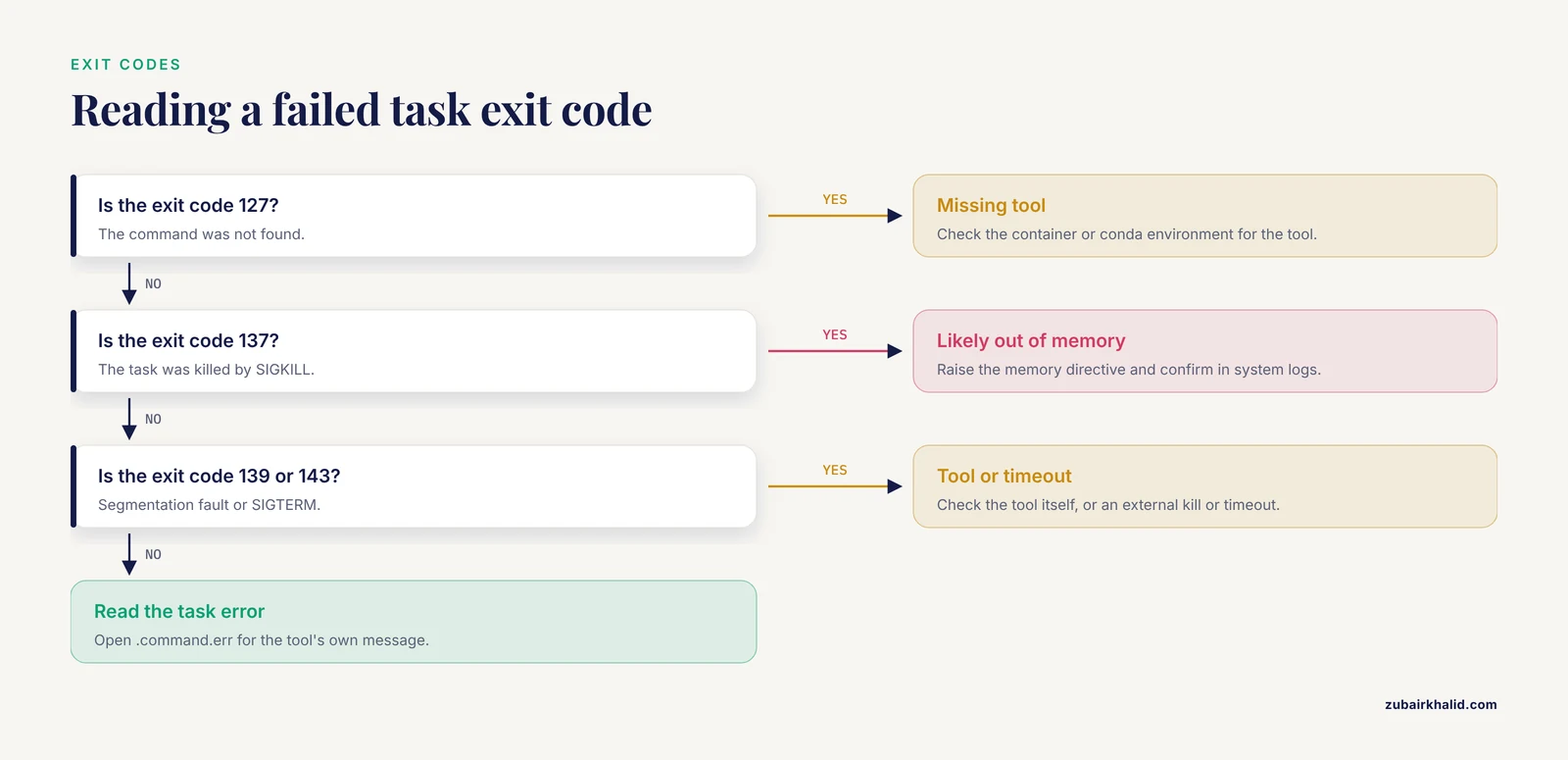
grep -i "error" .nextflow.log | tail -n 20Interpret exit codes with the standard Unix convention. Exit 127 means the command was not found, usually a missing tool in the container or conda environment. Exit 137 means the task was killed by SIGKILL, in practice the kernel out-of-memory killer or a scheduler memory limit. Exit 139 means a segmentation fault in the tool. Exit 143 means SIGTERM, typically an external kill or a timeout. Exit 137 in particular is not a pipeline bug until you have ruled out memory.
Snakemake
Snakemake writes logs to .snakemake/log/ with a timestamped filename per invocation:
ls -t .snakemake/log/ | head -n 3
tail -n 60 .snakemake/log/<latest>.log
Declare a log: directive in every rule, as the example Snakefile does, so each job's stderr lands in a per-sample file you can read after the fact. When a job fails, the console names the log file explicitly. A failed job looks like this:
Error in rule trim:
    jobid: 2
    input: raw/sample1_R1.fastq.gz
    output: trimmed/sample1_R1.fastq.gz
    log: logs/trim/sample1.log (check log file(s) for error details)

    (one of the commands exited with non-zero exit code; note that snakemake uses bash strict mode!)
Open the named log file first. Snakemake runs commands in bash strict mode, so an unset variable or a failed intermediate command aborts the job with a clear message. After a failed run, .snakemake/incomplete/ records partially finished jobs, which -keep-incomplete preserves. For a human-friendly overview of a finished or failed run, generate the interactive report:
snakemake --report report.html --cores 1Common Error Messages and Their Fixes
Nextflow
Process 'ALIGN' input file name collision, There are multiple input files for each of the following file names: 'sample1_R1.fastq.gz' Two inputs stage files with the same name into the task directory. Fix with stageAs:
input:
tuple val(sample), path(reads1, stageAs: 'R1.fastq.gz'), path(reads2, stageAs: 'R2.fastq.gz')
Missing output file(s) 'results/trimmed/sample1.sam' expected by process 'ALIGN (sample1)' The task ran but did not create a declared output. Check that the tool's actual output name matches the output declaration, that relative paths are correct, and that a stub block touches every declared output.
Process 'ALIGN (sample2)' terminated with an error exit status (137) The task was killed, almost always out of memory. Raise the memory directive, confirm with system or scheduler logs, and only then look for a tool bug.
No such property: sample A Groovy variable is undefined or misspelled at the point of use. Check that the variable is defined before the line that uses it and that params names match the config file exactly, since params.reads and params.read are silently different values.
Snakemake
MissingInputException in line 24 of /path/Snakefile: Missing input files for rule align: raw/sample1_R1.fastq.gz A required input does not exist and no rule produces it. Check the path for typos, confirm the sample name exists in your config, and confirm some rule's output pattern matches the missing file exactly.
CyclicGraphException in line 12 of /path/Snakefile: Cyclic dependency in rule graph. Loop between rules: align, index A rule consumes its own output, directly or through a chain. Break the cycle by splitting the rule or by making the shared file an explicit input of only one rule.
AmbiguousRuleException in line 18 of /path/Snakefile: Rules trim_pe and trim_se are ambiguous for the file trimmed/sample1_R1.fastq.gz Two rules can produce the same file. Give them non-overlapping output patterns, or disambiguate deliberately with ruleorder.
WildcardError in line 31 of /path/Snakefile: Wildcards in output files must be consistent. 'sample1' is not consistent with 'sample2' A wildcard value inferred from one pattern conflicts with another. Check that input and output patterns use the same wildcard names and constrain ambiguous wildcards with wildcard_constraints.
MissingOutputException in rule trim: Job completed successfully, but some output files are missing. (missing: trimmed/sample1_R1.fastq.gz) The command exited 0 but the declared output is absent. The classic cause is a mismatch between the declared output pattern and the filename the tool actually writes, for example tools that prefix output names with the input basename. Run the command by hand on one sample and compare names.
Directory cannot be locked. Please make sure that Snakemake is not already running... the remaining lock was likely caused by a kill during a previous run or power failure - then use, unlock. A previous run died without releasing its lock. Confirm no snakemake process is still running with ps aux | grep snakemake, then run snakemake, unlock, cores 1 once. Never unlock while a run is active, because parallel runs in one directory corrupt outputs.
Key Dry-Run Options at a Glance
| Goal | Nextflow | Snakemake | |
|---|---|---|---|
| , - | , - | , - | |
| List jobs without running | nextflow run . -preview | snakemake -n, cores 1 | |
| Show shell commands | nextflow run . -stub-run (runs stubs) | snakemake -n -p, cores 1 | |
| Execute the full DAG with empty outputs | nextflow run . -stub-run | not built in, use tiny test data | |
| Render the job graph | nextflow run . -with-dag dag.html or nextflow inspect | `snakemake, dag, cores 1 \ | dot -Tsvg > dag.svg` |
| Dump dataflow contents | nextflow run . -dump-channels dump/ | not applicable, no channels | |
| Print resolved configuration | nextflow config -flat | snakemake -n -p reflects config, -list-params-changes | |
| Explain scheduling decisions | nextflow log <run> -f process,tag,status | snakemake -n -r or -debug-dag | |
| File-level status report | -with-trace trace.tsv on a run | snakemake, summary or -detailed-summary | |
| Create software environments only | not applicable, containers are pulled per task | -conda-create-envs-only | |
| Mark outputs complete without running | not applicable | -touch (use with care) |
Dry-Run Debugging Tips for Nextflow and Snakemake
- Disable ANSI logs whenever you grep.
-ansi-log falsein Nextflow keeps log files plain text. Animated progress lines otherwise fragment yourgrepresults. - Keep a debug profile. One CPU, small memory, local executor, test data.
nextflow run . -profile debugshould be a habit, not an improvisation. - Watch channels with
view(). On Nextflow releases without-dump-channels, insert a temporary operator:ch.view { r -> "DEBUG reads: ${r}" }. Every item prints as it flows, and you remove the line when done. - Ask why before what. In Snakemake,
-rand-debug-daganswer why a job is scheduled. Fixing the reason fixes the pipeline, fixing the job often does not. - Fail fast, then retry deliberately. Nextflow's default
errorStrategy 'terminate'stops at the first failure, which is what you want while debugging. For flaky tasks in production, use the documented retry pattern:
process ALIGN {
    errorStrategy 'retry'
    memory { 2.GB * task.attempt }
    script:
    """
    bwa mem ${reference} ${reads1} ${reads2} > ${sample}.sam
    """
}- Use retries in Snakemake too. A
retries: 2directive in a rule, or-retries 2on the command line, reruns failed jobs automatically in recent versions. - Pin everything. Container tags, conda package versions, reference versions. A test run against
fastqc:latestproves nothing about production. - Put dry-runs in CI. Two commands on every commit catch wiring regressions before they reach production:
nextflow run . -profile test -stub-run
snakemake -n -p --cores 1- Preview full reruns before triggering them.
snakemake -n, forceall, cores 1shows the cost of a complete rerun, andnextflow run . -resumeshows how much the cache already covers.
Nextflow vs Snakemake for Debugging
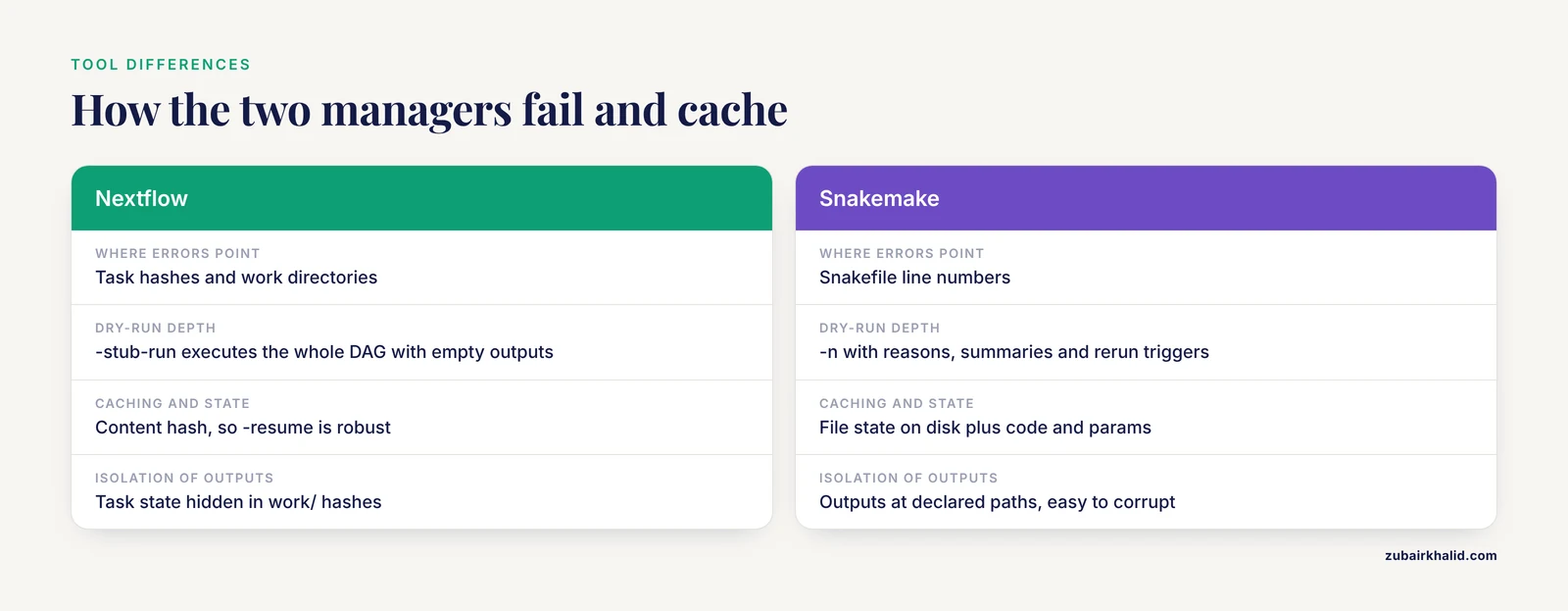
Both tools are mature, and neither is objectively easier to debug. They fail differently, and knowing the differences saves time.
Error locality. Snakemake errors point at Snakefile line numbers, which makes logic errors fast to locate. Nextflow errors point at task hashes and work directories, which makes runtime errors fast to locate. The failure mode you hit most often should influence your choice less than ecosystem fit, but it is a real difference in daily work.
Dry-run depth. Snakemake's -n is the richer first-class dry-run, with reasons, summaries, rerun triggers, and DAG debugging built in. Nextflow answers with -stub-run, which actually executes the whole DAG with empty outputs, something Snakemake does not offer, plus nextflow inspect and -dump-channels for structure and dataflow.
Caching and state. Nextflow caches by content hash, so -resume is robust against timestamps and works across machines. Snakemake tracks file state on disk with modification time plus code, parameter, input, and environment triggers, which is transparent and easy to inspect but needs -rerun-triggers knowledge after upgrades.
Isolation. Nextflow hides task state in work/ hashes, which protects outputs but adds a layer to search. Snakemake writes outputs to their declared paths, which are easy to inspect and equally easy to corrupt by hand. Neither is wrong, they are different mental models.
Common Mistakes and Limitations
- Treating a passing dry-run as proof the pipeline works. A dry-run validates wiring. It never runs the tools, so a broken command, a wrong flag, or a data-dependent crash stays invisible until a real run.
- Forgetting that Nextflow executes your Groovy during preview and stub runs. Channel code, filters, and map operations all run. A heavy script or a bug there can crash a "dry" run or even hammer a login node.
- Using test data that is too small or too clean. Two tiny samples hide memory pressure, disk limits, wildcard collisions, and parallelism bugs. A pipeline that passes on 2 samples can fail on 200 for reasons of scale alone.
- Letting test and production environments drift. Different container tags or conda versions between the test profile and production make the test run meaningless. Pin versions in one place and reference them from both.
- Editing code while a run is in progress, then resuming. Nextflow caches by content, so mid-run edits split the cache and produce confusing partial reruns. Finish or kill the run first, then edit.
- Assuming
-resumefixes a failing task. Resume reuses successful upstream tasks and reruns a task only when its inputs, code, or container changed. If the task failed for a resource reason, resume reruns it into the same wall unless you also raise the limits. - Reading exit 137 as a tool bug. Exit 137 means SIGKILL, in practice the out-of-memory killer or a scheduler limit. Check memory directives and system logs before debugging the command.
- Leaving
-touchartifacts behind. Snakemake's-touchmarks outputs complete by updating timestamps without producing real data. Downstream jobs then run against empty files and produce plausible garbage. Delete touched outputs before any real run. - Dry-running with production parameter files on a shared login node. Nextflow evaluates all channel code during a preview, so a params file pointing at a full production cohort can still do real work at parse time. Preview with the test profile.
- Upgrading Snakemake and triggering a full rerun. Newer versions added code and parameters to the default rerun triggers, so old workflows rerun everything after the upgrade. Scope it with
-rerun-triggersonce you understand the change.
The honest limitation of the whole approach is that dry-runs and toy data cannot validate tool behavior, resource sizing, or data-dependent failures. Keep a third tier between the toy set and production: a staging dataset of a few real samples that runs in minutes and catches the scale-dependent failures tiny data hides. Production runs still need monitoring, because the first contact with real data is where the last bugs live.
A Repeatable Debugging Routine
- Reproduce on test data. Run the pipeline with the test profile. A failure that reproduces on 100 reads is worth debugging directly. A failure that does not reproduce is a scale or data problem, and the staging dataset is your next probe.
- Dry-run.
nextflow run . -preview -profile testorsnakemake -n, cores 1. If the DAG does not build, fix syntax and wiring here, where nothing executes. - Validate the wiring end to end.
nextflow run . -profile test -stub-runorsnakemake -n -p -r, cores 1. Check job counts against expectations and read the reason lines. - Run for real with instrumentation. Trace and DAG in Nextflow,
-keep-incomplete -kand alog:directive in every Snakemake rule. - Read the first failure, not the last. Downstream failures are usually echoes of one upstream cause. Fix the earliest failed task in the DAG.
- Open the task directory or rule log.
.command.errin Nextflow, thelog:file in Snakemake. The tool's own message is almost always more specific than the wrapper's. - Fix and re-enter the cache.
nextflow run . -profile test -resumeor a plainsnakemake, cores 4. Both skip everything already done correctly. - Lock the fix in. Commit the fix together with the test data and the dry-run commands in CI, so the same regression cannot return silently.
Frequently Asked Questions
What is a dry-run in Nextflow or Snakemake?
A dry-run is an execution mode in which the workflow manager builds the job graph and reports what it would run without launching any commands. In Snakemake you get it with -n, in Nextflow with -preview or, for a full pass over the DAG with empty outputs, -stub-run.
Does a Nextflow dry-run still execute my Groovy code?
Yes. Nextflow evaluates the entire script during a preview or stub run, including channel definitions and operators. Only the task commands are skipped, so a bug in channel code still crashes the run and a heavy script still consumes resources.
How do I see the exact commands a Snakemake dry-run would run?
Add -p and -r to the dry-run: snakemake -n -p -r, cores 1. Each job block then lists its shell command and the reason it is scheduled, such as a missing output file or a changed input.
Why does my pipeline pass a dry-run but fail on real data?
Dry-runs validate wiring, not tool behavior. Real runs add software environments, memory limits, and data-dependent behavior that a dry-run never touches, which is why a test run on small real data must follow every dry-run.
How much test data do I need for workflow debugging?
Enough to exercise every rule and branch, typically two to four tiny samples of 100 to 1,000 reads each plus a small reference. Keep it in the repository with checksums so every developer and CI run uses identical files.
What is the difference between -preview and -stub-run in Nextflow?
-preview lists the processes that would run without executing anything, while -stub-run actually executes the pipeline end to end, running stub blocks that create empty output files. Stub runs validate the complete DAG including downstream tasks, previews validate only that the plan resolves.
What does exit code 137 mean in a Nextflow or Snakemake task?
Exit 137 means the task was killed by SIGKILL, most often the kernel out-of-memory killer or a scheduler memory limit. Raise the memory directive and confirm with system or scheduler logs before treating it as a tool bug.
Which is easier to debug, Nextflow or Snakemake?
Snakemake gives more informative dry-runs out of the box, with reasons, summaries, and line-numbered errors. Nextflow counters with stub runs, content-hash resume, and isolated work directories. Both are debuggable once you learn where each tool keeps its state.