How to Download NCBI Conserved Domain Data
By Dr. Zubair Khalid, DVM, MS, PhD ·

By the end of this guide you will be able to download NCBI conserved domain data in the form that fits your project: single-protein annotations through CD-Search, bulk annotations for hundreds or thousands of proteins through Batch CD-Search, the complete domain model set and search database from the NCBI FTP site, and locally computed annotations using RPS-BLAST+ together with the rpsbproc post-processor. You will also be able to fetch the underlying protein sequences programmatically with E-utilities and paint domain information onto protein networks in Cytoscape.
You need a web browser and a terminal with curl or wget (both ship with macOS and Linux, and with Windows through the Windows Subsystem for Linux). For the local pipeline you also need the free BLAST+ command-line toolkit. Python 3 and Cytoscape are optional extras. Everything described here is free and public.
The Conserved Domain Database (CDD) is the National Center for Biotechnology Information's (NCBI) freely available resource for annotating protein sequences with the locations of conserved domain footprints, along with functional sites and motifs inferred from those footprints [1]. A conserved domain is an evolutionarily persistent unit of protein structure and function, and a footprint is the stretch of your query sequence that matches a domain model. If you are still learning how to use NCBI beyond PubMed and GenBank, the CDD is one of the most rewarding databases to master, because it connects raw sequence to function in one step.
What the Conserved Domain Database Contains
The CDD holds two kinds of domain models. Curated models are built and maintained by NCBI staff, who use protein 3D structures to set domain boundaries and to annotate conserved features such as active-site residues and binding motifs [2], [3]. Imported models come from public collections such as Pfam, SMART, COG, and TIGRFAM, which makes the CDD a partially redundant collection by design [2]. Release v3.17, from April 2019, contained more than 57,000 domain models, of which almost 15,000 were curated in house [1].
Each model is a multiple sequence alignment of representative domain fragments plus a position-specific scoring matrix (PSSM). A PSSM records, for every position in the alignment, which amino acids the family tolerates and how strongly each position is conserved. RPS-BLAST (reverse position-specific BLAST) is the search program that compares a protein sequence against a library of these PSSMs rather than against other sequences [1].
Curated models are organized into hierarchies that group related families, from broad superfamilies down to narrowly defined subfamilies [2]. Because imported and curated models overlap, the CDD clusters redundant and homologous models into superfamilies. By default, annotations report the superfamily designation, with a specific family name added only when the assignment is high confidence [3].
The CDD maintains two access modes. The live search computes annotations on demand for any sequence you supply. The archive holds precomputed annotations for protein sequences tracked by NCBI's Entrez protein database, and those stored results can be retrieved one at a time or in bulk [1], [2]. Knowing which mode produced your data matters, because live results exist only for the sequences you submitted, while archived results exist only for Entrez-tracked proteins.
Choose a Download Route
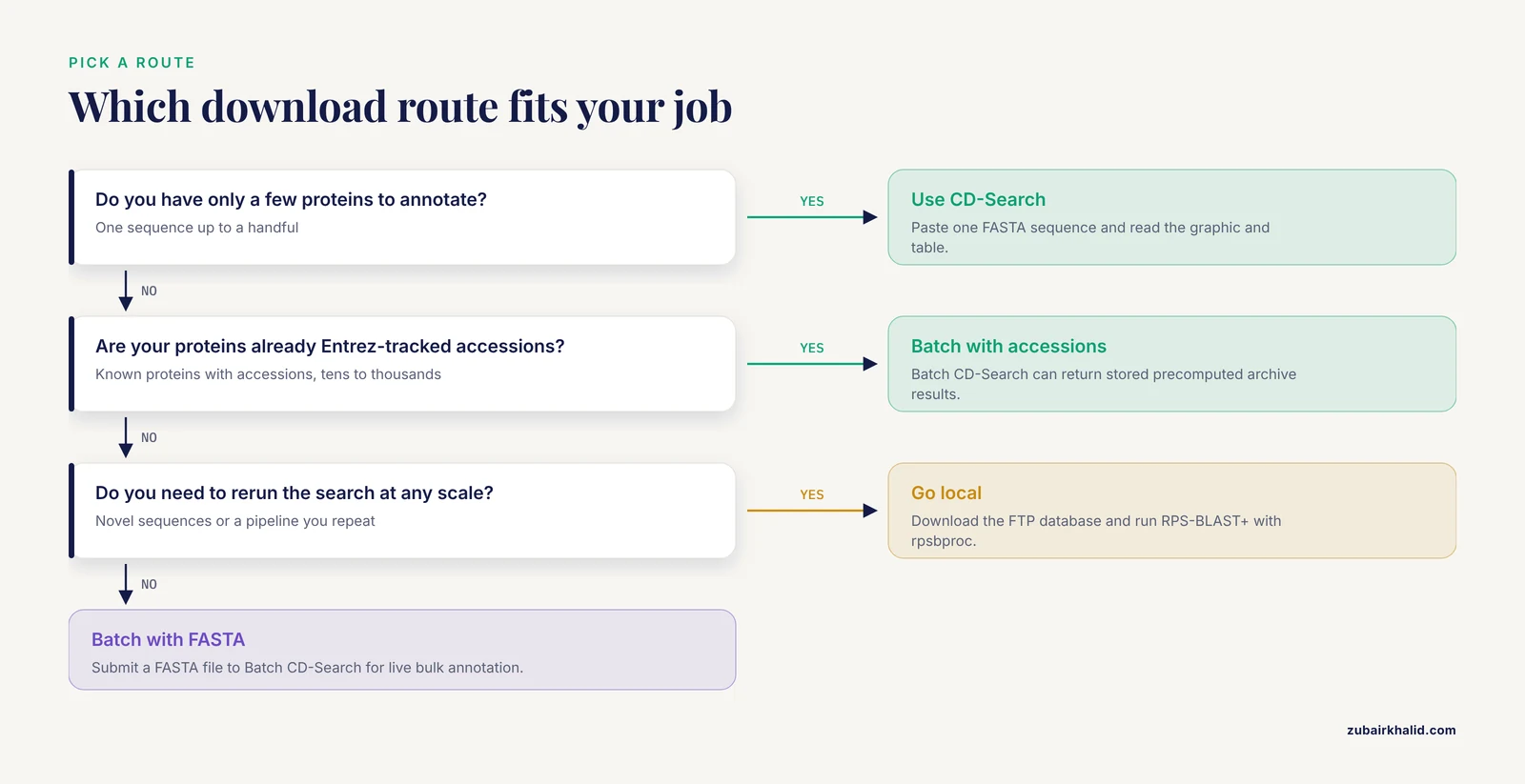
Treat the table below as a compact NCBI databases guide for protein annotation work. Each row is a different service, and most real projects combine two or three of them.
| Route | What you get | Practical scale | What you need |
|---|---|---|---|
| , - | , - | , - | , - |
| CD-Search (web) | Graphical and tabular annotation for one sequence | 1 to a few proteins | Browser |
| Batch CD-Search (web) | Bulk annotations with downloadable reports | Tens to thousands of proteins | Browser, FASTA file or accession list |
| Precomputed archive | Stored annotations for Entrez-tracked proteins, retrieved in bulk | Any set of Entrez accessions | Batch CD-Search with accessions |
| CDD FTP site | Complete model set, alignments, PSSMs, RPS-BLAST database | Everything | wget or curl |
| RPS-BLAST+ plus rpsbproc (local) | Annotations computed on your own machine | Unlimited, reproducible | BLAST+ and the FTP download |
| E-utilities | Protein sequences and records, programmatically | Any | curl, API key for high volume |
| cddApp (Cytoscape) | Domain and site annotation painted onto networks | Network-sized datasets | Cytoscape plus the cddApp plugin |
NCBI's own protocol literature describes three supported routes: a single-sequence CD-Search, a Batch CD-Search, and a standalone RPS-BLAST plus rpsbproc workflow [1]. Pick the web routes for convenience. Pick the FTP and local route for scale, reproducibility, and freedom from web timeouts.
Route selection in one line each:
- A few sequences: CD-Search.
- Dozens to thousands of known proteins: Batch CD-Search with an accession list, which can return stored precomputed results.
- Novel sequences not yet in Entrez: Batch CD-Search with a FASTA file, or the local pipeline.
- The whole database, or a pipeline you can rerun next year: FTP plus RPS-BLAST+.
- Domain information on an interaction network: cddApp.
How to Download NCBI Conserved Domain Data Step by Step
The six steps below move from the smallest job to the largest. Steps 2, 3, and 5 share the same example files, so you can run the whole chain end to end.
Step 1: Annotate a Single Protein with CD-Search
- Open the CDD home page at https://www.ncbi.nlm.nih.gov/Structure/cdd/cdd.shtml and follow the CD-Search link. You can also reach the same information from any Entrez protein record, where the Conserved Domains panel shows stored precomputed results [1], [2].
- Paste one protein sequence in FASTA format. A FASTA record is a header line beginning with > followed by the sequence in single-letter amino acid codes:
>NP_000537.3 tumor protein p53 [Homo sapiens]
MEEPQSDPSVEPPLSQETFSDLWKLLPENNVLSPLPSQAMDDLMLSP...- Submit the search. The live service compares your sequence against the PSSM library and returns hits ranked by statistical significance [1].
- Read the graphic. Hits appear as labeled bars positioned along the query, and the table beneath the graphic lists each hit's model name, score, E-value, and aligned residue range. The E-value estimates how many matches of that quality chance alone would produce against a database of this size, so smaller means more significant.
- Save what you need. For one sequence the graphic and table are usually enough. When you need machine-readable files, move to Batch CD-Search in the next step.
- Check the result. For human p53 (NP_000537) you should see a strong central hit for the p53 DNA-binding domain family, with the largely disordered amino- and carboxy-terminal tails left mostly unannotated. If your protein returns nothing, confirm that you pasted protein and not DNA, and check the sequence for stray characters before touching the E-value threshold.
Step 2: Download Bulk Annotations with Batch CD-Search
Batch CD-Search is the bulk interface that computes and downloads annotations for large sets of protein queries [3], and it is the route NCBI's protocols recommend for anything beyond a handful of sequences [1].
- Prepare your input. Batch CD-Search accepts a FASTA file or a plain list of Entrez protein accessions, one per line. An accession list is the fastest option for known proteins because the service can return stored precomputed results [1], [2]:
cat > p53_ids.txt <<EOF
NP_000537
NP_031164
EOF- Open Batch CD-Search at https://www.ncbi.nlm.nih.gov/Structure/bwrpsb/bwrpsb.cgi, which is also linked from the CD-Search results pages [1].
- Upload the file, keep the default search set (the CDD set includes curated and imported models), and leave the E-value threshold at its default of 0.01 unless you have a specific reason to change it.
- Choose how hits are reported. Specific-hits reporting mirrors the default annotation philosophy, in which overlapping lower-scoring models are suppressed in favor of the best-supported assignment [3]. Reporting all hits is useful when you want to see alternative overlapping models yourself.
- Submit and wait for the job to finish. Live computation runs against your supplied sequences, and when you supply Entrez accessions the service can return the stored archive results where they exist [1], [2].
- Download both outputs: the tabular report, which is machine-readable, and the per-query graphical summary, which is easier to eyeball.
The exact columns depend on the report format you pick, but each row identifies the query, the domain model, the score, and the aligned residue range. An illustrative excerpt looks like this:
query         subject                  evalue     from    to
NP_000537     p53 DNA-binding family   2.1e-96     102    292
NP_031164 p53 DNA-binding family 3.4e-95 100 290- Check the result. The row count should roughly match the number of domains you expect per protein. A single-domain protein with ten hit rows means you are looking at overlapping or superfamily-level hits rather than clean specific calls, which the next section helps you interpret.
Key options at a glance:
| Option | Default | When to change it |
|---|---|---|
| , - | , - | , - |
| Search set | CDD (curated plus imported) | Restrict to curated models when you only want NCBI-annotated families |
| E-value threshold | 0.01 | Tighten for very large screens where marginal hits accumulate |
| Hit reporting | Specific hits | Report all hits to inspect overlapping alternative models |
| Input type | FASTA or accession list | Accessions can pull precomputed archive results |
Step 3: Fetch Protein Sequences and Records with E-utilities
E-utilities are NCBI's URL-based programmatic interface to Entrez, the integrated search system that spans NCBI's sequence, literature, and structure databases. You will use them to fetch the sequences behind your domain work.
- Search for records:
curl -s "https://eutils.ncbi.nlm.nih.gov/entrez/eutils/esearch.fcgi?db=protein&term=TP53%5Bgene%5D+AND+human%5Borgn%5D&retmax=3"Expected output (trimmed):
<eSearchResult>
  <Count>1</Count>
  ...
  <IdList>
    <Id>...</Id>
  </IdList>
</eSearchResult>
The returned identifiers are internal numeric UIDs, not accessions.
- Fetch sequences. EFetch accepts accessions directly, so you can skip the search step when you already know the proteins:
curl -s "https://eutils.ncbi.nlm.nih.gov/entrez/eutils/efetch.fcgi?db=protein&id=NP_000537,NP_031164&rettype=fasta&retmode=text" > p53.faExpected output:
>NP_000537.3 tumor protein p53 [Homo sapiens]
MEEPQSDPSVEPPLSQETFSDLWKLLPENNVLSPLPSQAMDDLMLSP...
The mouse record follows in the same file. You now have a FASTA file ready for Batch CD-Search or the local pipeline in Step 5.
- Respect the posted rate limits. NCBI's E-utilities documentation asks for no more than three requests per second without an API key, and ten with one. Generate a key from your NCBI account settings and append it to each URL as &api_key=YOUR_KEY. For very large id lists, send ids in chunks and use HTTP POST, as the documentation recommends.
- Go domain-first when that fits the question better. The Conserved Protein Domain Architecture Retrieval Tool, linked from the CDD pages, identifies all proteins containing a specific domain or domain architecture. The standard workflow is to retrieve that protein set, download the amino acid sequences through Entrez, then tabulate and clean the data, a process documented step by step by Dougherty and Hudak [4]. That route inverts the usual order: instead of annotating proteins you chose, you discover proteins by their domain content and download them.
Step 4: Download the Full CDD from the NCBI FTP Site
The FTP site distributes the domain models, alignments, PSSMs, and the RPS-BLAST search database themselves, which is what you need for local annotation at any scale [1].
- List what is available:
curl -s https://ftp.ncbi.nlm.nih.gov/pub/mmdb/cdd/ | grep -oE 'href="[^"]+"'You should see the little_end/ and big_end/ subdirectories alongside documentation and release files. The little_end directory holds the RPS-BLAST database in little-endian byte order, the format used by Intel, AMD, and ARM processors, so it is the right choice for nearly all modern laptops and servers. big_end exists for big-endian platforms, which are rare today.
- Mirror the directory you need:
mkdir -p ~/cdd && cd ~/cdd
wget -r -np -nH -R "index.html*" https://ftp.ncbi.nlm.nih.gov/pub/mmdb/cdd/little_end/
The flags mean the following: -r recurses into the directory, -np prevents wget from ascending to parent directories, -nH skips creating a folder named after the host, and -R rejects the generated index files. The download is large, so use a stable connection and confirm the transfer completes.
- Verify the files:
ls ~/cdd/little_endLook for the RPS-BLAST database files, which share one basename with the extensions .pin, .psq, and .phr. In recent distributions the basename is Cdd_NCBI, but confirm the names from your own directory listing because they can change between releases.
- Record the release. The CDD is versioned (for example, release v3.17 in April 2019 [1]), and the FTP area carries release information. Note the download date and version in your methods file. Your results are only reproducible if you can name the version you searched.
Step 5: Run the Search Locally with RPS-BLAST+ and rpsbproc
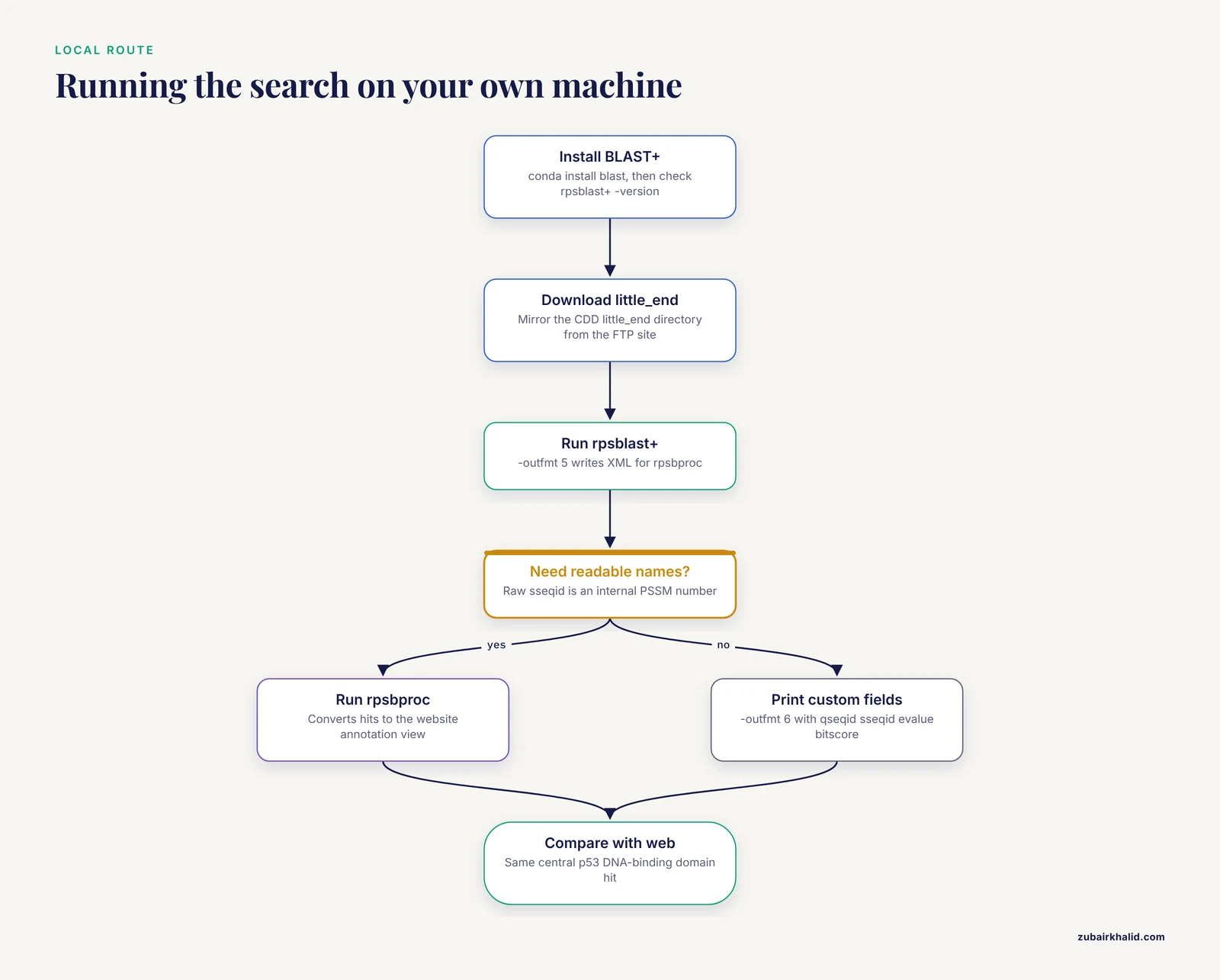
Local annotation removes web timeouts from the equation and makes the pipeline rerunnable, which matters for large or recurring jobs.
- Install BLAST+, NCBI's command-line BLAST suite, which includes the rpsblast+ binary:
conda install -c conda-forge -c bioconda blast
rpsblast+ -version
Expected output is a version string such as rpsblast+: 2.15.0+. Alternatively, download an installer for your platform from https://ftp.ncbi.nlm.nih.gov/blast/executables/blast+/LATEST/.
- Run the search against the database you downloaded in Step 4:
rpsblast+ -query p53.fa -db ~/cdd/little_end/Cdd_NCBI -evalue 0.01 -outfmt 5 -out p53_rps.xmlParameter notes: -outfmt 5 writes XML, which is the structured format rpsbproc consumes. -evalue 0.01 matches the web default. -db points at the database basename, including the path to its folder.
- Post-process the raw hits:
rpsbproc -i p53_rps.xml -o p53_annot.txtrpsbproc converts raw RPS-BLAST output into the same annotation view as the website, with domain model names, functional sites, and superfamily links [1]. Run rpsbproc -h to see the current output modes, which range from concise to full detail.
- If you want raw tabular output instead, skip rpsbproc and print a custom field list:
rpsblast+ -query p53.fa -db ~/cdd/little_end/Cdd_NCBI -evalue 0.01 -outfmt "6 qseqid sseqid evalue bitscore qstart qend"Illustrative output:
NP_000537.3    1973    4.2e-55    201    95    292
NP_031164.2    1973    6.1e-54    199    95    291
The sseqid column is an internal PSSM number, not a readable domain name. That is exactly why rpsbproc exists, so prefer the two-step route for anything you plan to publish.
- Check the result. The annotated file should show the same central DNA-binding domain hit for p53 that the web CD-Search showed in Step 1. Agreement between the web and local routes is your strongest sanity check.
Step 6: Annotate Protein Networks with cddApp in Cytoscape
For network-scale questions, cddApp is a free Cytoscape app that loads CDD domain and site information onto protein network nodes annotated with NCBI protein numbers or UniProt identifiers, optionally pulling Protein Data Bank (PDB) structures, the public archive of experimentally determined 3D structures [5]. It integrates with the structureViz2 and enhancedGraphics apps so you can see domain decorations in both network and structural contexts [5].
- Install Cytoscape, the open-source network visualization platform, from cytoscape.org.
- Install cddApp from the Cytoscape app store at http://apps.cytoscape.org [5].
- Import your protein interaction network and make sure node names are NCBI accessions or UniProt identifiers.
- Run the cddApp annotation command and inspect the domain and site decorations on the nodes.
- Documentation and source code are available through the cddApp project page at http://github.com/RBVI/cddApp [5].
Viewing Curated Alignments with CDD Pages, Cn3D, and CDTree
Every CDD record page shows the curated multiple sequence alignment behind the model, which is worth inspecting before you trust a boundary call. For deeper work, the Cn3D and CDTree software, downloadable from http://www.ncbi.nlm.nih.gov/Structure/cdtree/cdtree.shtml, opens these alignments together with 3D structures [6]. The CORAL method, which aligns structurally conserved core regions as gap-free blocks, improved alignment accuracy for over 80 percent of CDD families in benchmark comparisons, reaching a balanced score of 0.57 against 0.45 for the best general profile methods, and is included in Cn3D/CDTree [6].
Reading the Results You Downloaded
E-values first. The default threshold of 0.01 is a reasonable starting point for single proteins and moderate batches. For very large screens, marginal hits accumulate, so tighten the threshold and report the value you used.
Interpretation level second. CDD clusters redundant and homologous models into superfamilies, and the default annotation reports the superfamily designation, with a specific family name added only when the assignment is high confidence [3]. A superfamily-level label means the region is homologous to the family, not that the protein is a confirmed member of it. If your analysis needs family or subfamily resolution, look specifically at the specific-hit rows and the model hierarchy.
Subfamily calls deserve the most caution. Curated domains are organized into hierarchies, and choosing the right model among closely related, overlapping models is harder than choosing between non-overlapping ones. CD-Search incorporates heuristics based on sorted alignment scores and domain-specific thresholds to make that choice, and in the published test set those heuristics replaced almost 90 percent of missing-subfamily misclassifications with safer, more generic assignments [7]. Practical translation: treat a specific subfamily call as a hypothesis, and check the hierarchy on the CDD record page when two overlapping models score similarly.
Functional sites third. Curated models annotate conserved motifs and functional sites inferred from the underlying alignments, so your downloaded annotations can include active-site and binding-site positions, not just domain spans [1], [3]. These site annotations are among the most valuable things the CDD provides and are easy to overlook in tabular output.
Finally, a sense of what people do with this data. A recent in silico drug-target study used the NCBI conserved domain database to predict functional protein domains before protein-protein docking and molecular dynamics simulations [8]. Conserved domain profiles have also been used to improve protein secondary structure prediction [9]. In vaccine and epitope work, researchers retrieved viral glycoprotein sequences from NCBI, identified the conserved domain shared across variants, and mapped epitopes onto that conserved region [10]. And for building datasets rather than single annotations, the domain-architecture-first workflow of Dougherty and Hudak takes you from a domain query to a cleaned, tabulated protein set with taxonomy and predicted physicochemical properties [4].
Tips for Smooth, Reproducible Downloads
- Record the CDD release version and download date before you analyze anything. Releases change, and a result that cannot name its release cannot be reproduced.
- Prefer accession lists over FASTA for known proteins, because the service can return stored precomputed results, and reserve live search for novel sequences [1].
- Batch your EFetch calls with comma-separated ids instead of one request per protein, and get an API key before any large run.
- Save Batch CD-Search outputs as soon as the job finishes rather than planning to revisit the results link later.
- Keep a small methods file listing every URL, parameter, and file name you used, plus sha256 checksums of downloaded files (
sha256sum ~/cdd/little_end/*). - Test the local pipeline on two or three sequences before pointing it at thousands.
- Validate a random sample of hits against the CDD record pages, especially before relying on subfamily-level names.
- For very large jobs, run locally through the FTP database instead of pushing everything through the web forms.
Common Mistakes and Limitations
- Querying with DNA. The CDD annotates proteins, so a nucleotide sequence returns nothing useful. Fix: translate the coding sequence with your favorite tool, or fetch the RefSeq protein accession that encodes it.
- Pasting HTML-formatted sequence. Copying from a web page often brings line numbers, spaces, or markup, and the search then fails or misaligns. Fix: use plain text FASTA with one header line starting with > and sequence letters only after it.
- Reading superfamily labels as family calls. The default annotation reports the superfamily designation, with family-level names reserved for high-confidence assignments [3]. Fix: filter for specific hits when you need family resolution, and say which level you used in your methods.
- Trusting the top-scoring model among overlapping curated models. Choosing between closely related models is the hard case, and score alone is not decisive [7]. Fix: inspect the model hierarchy on the record page before assigning a subfamily.
- Downloading the wrong byte-order database. Installing the big_end files on a standard laptop gives a database RPS-BLAST+ cannot use properly. Fix: use little_end on Intel, AMD, and ARM systems.
- Pointing -db at the wrong path. With a missing or misplaced database you will see
BLAST Database error: No alias or index file found for protein database [Cdd_NCBI] in search path. Fix: point -db at the folder and basename that actually contain the .pin, .psq, and .phr files. - Calling a binary that is not installed. If BLAST+ is missing or not on your PATH, the shell prints
rpsblast+: command not found. Fix: install BLAST+ (Step 5) or add its bin directory to your PATH. - Hard-coding FTP file names that later change. Archive and database names can change between releases, and a stale name earns a
404 Not Foundfrom wget. Fix: list the directory first, download the current names, and record them. - Hammering E-utilities. Rapid-fire requests get throttled and your download job stalls. Fix: honor the documented rate limits, use an API key, and chunk large id lists.
- Assuming every model is NCBI-curated. Imported models from public collections are part of the CDD by design, but they are not curated in house [2]. Fix: check the source tag on each record.
- Expecting one giant file of annotations for every NCBI protein. The FTP site distributes models, alignments, PSSMs, and the search database, while precomputed per-protein annotations live in the archive and are retrieved in bulk through the CD-Search tools [1], [2]. Fix: use Batch CD-Search with accession lists for stored annotations, and the FTP database for local computation.
- Walking away from a Batch job. Result links are stored on the server for a limited period, so a job you ignore today may be gone next week. Fix: download the tabular report and graphics when the job completes.
On limitations: the CDD covers proteins, not nucleotides, and the precomputed archive covers Entrez-tracked sequences rather than arbitrary custom ones [1], [2]. Releases change over time, so version discipline is part of the method. Automated domain annotation is a strong starting point, and individual protein-function questions still need expert review and experimental follow-up.
Frequently Asked Questions
Is NCBI conserved domain data free to download?
Yes. The CDD is a freely available resource [1], and the model files and search databases on the NCBI FTP site carry no access restrictions or fees.
What is the difference between CD-Search, Batch CD-Search, and RPS-BLAST?
CD-Search annotates one sequence on the web, Batch CD-Search annotates a whole file of sequences and provides downloadable reports, and RPS-BLAST+ with rpsbproc runs the same kind of search on your own machine [1].
Can I download domain annotations for every NCBI protein in one file?
No. NCBI stores precomputed annotations for Entrez-tracked proteins and retrieves them in bulk through the CD-Search tools, while the FTP site distributes the domain models and search databases themselves [1], [2].
How do I know which CDD release I downloaded?
Check the release information on the CDD pages and the FTP site, and record the version and download date in your methods before you start analyzing.
Do I need an NCBI API key?
Only for programmatic E-utilities work beyond casual use. The key raises the documented request-rate ceiling and reduces throttling during large download jobs.
Can CD-Search annotate nucleotide sequences?
No. The CDD annotates proteins, so translate a coding sequence to protein first, or fetch the RefSeq protein that encodes it.
Which E-value cutoff should I use?
Start with the default shown on the search form. Tighten it for very large screens, and treat closely related subfamily-level calls with extra care regardless of the cutoff [7].
How should I cite the CDD in a paper?
Cite the CDD database publications together with the CDD URL, and name the specific tools you used, such as CD-Search, Batch CD-Search, or standalone RPS-BLAST with rpsbproc [1], [2].
Sources
- NCBI’s Conserved Domain Database and Tools for Protein Domain Analysis
- CDD: NCBI's conserved domain database
- CDD: a Conserved Domain Database for the functional annotation of proteins
- Computational curation and analysis of publicly available protein sequence data from a single protein family.
- cddApp: a Cytoscape app for accessing the NCBI conserved domain database.
- CORAL: aligning conserved core regions across domain families.
- Protein subfamily assignment using the Conserved Domain Database
- Exploring Placental Protein-Target Protein Interactions: In Silico and In Vitro Approaches for Osteoarthritis Therapy.
- Protein Secondary Structure Prediction Using Sequence Profile and Conserved Domain Profile
- Epitope mapping of gp350/220 conserved domain of epstein barr virus to develop nasopharyngeal carcinoma (npc) vaccine