How to Download Gene Family Alignments from Ensembl Compara: A Guide
By Dr. Zubair Khalid, DVM, MS, PhD ·

By the end of this guide you will be able to download a multiple sequence alignment for a gene family from Ensembl Compara using four different routes: the Ensembl genome browser, the Ensembl REST API, the public FTP site, and the Ensembl Compara Perl API with a direct MySQL connection. You will know which route fits a single gene versus a genome-scale batch download, how to verify that what you downloaded is actually aligned, and how to avoid the errors that waste the most time.
Before you start, have the following on hand:
- A Linux, macOS, or Windows Subsystem for Linux shell with
curlandwgetinstalled - Python 3 with the Biopython package for quick validation, installed with
pip install biopython - Optional but recommended for bulk work: a MySQL client and Perl with the Ensembl API installed
- A stable Ensembl gene ID for your gene of interest, for example ENSG00000012048 for human BRCA1
- A note of the Ensembl release you want to work against, for example release 112, so your results are reproducible
What Ensembl Compara Actually Provides
Ensembl Compara is the comparative genomics infrastructure behind the main Ensembl and Ensembl Genomes services. It computes pairwise and multiple whole-genome alignments, and it uses gene alignments to define Ensembl Protein Families, GeneTrees, and homology calls for both protein-coding and non-coding RNA genes across all supported species [1]. Those GeneTrees are the product you are after when you want a gene family alignment. Each GeneTree contains a set of homologous genes, a phylogenetic tree, and a multiple sequence alignment of the family members.
One caveat frames everything else in this guide. A benchmark study that compared seven orthology databases, including Ensembl Compara, eggNOG, HOGENOM, InParanoid, OMA, OrthoDB, and Panther, found generally high specificity of orthology assignments for well-conserved families, but also found that differences between databases come mostly from different underlying database concepts rather than from the algorithms. None of the databases provided a fully correct and comprehensive protein classification [2]. Treat a Compara gene tree as a high-quality automated prediction, not as a manually curated phylogeny, and you will use it appropriately.
The same infrastructure extends beyond vertebrates. Ensembl Plants performs comparative analyses on DNA and protein sequence alignments and makes the resulting genome alignments and gene trees available for visualization and download, with specific extensions for polyploid genomes such as bread wheat [3]. Ensembl Metazoa and Ensembl Plants reuse the same Compara infrastructure for non-vertebrate species, which is why researchers routinely retrieve gene families from those divisions for phylogenetic work [1][4].
Why People Download These Alignments
Gene family alignments are not a niche product. They drive a substantial share of comparative and clinical genomics work:
- Variant interpretation. In a genome-wide study of neurodevelopmental disorders, gene family information was collected from Ensembl, paralog-conserved sites were defined from paralog sequence alignments, and disease-associated missense variants were shown to be enriched at those paralog-conserved sites [5].
- Essential region discovery. One large-scale analysis generated 2,871 gene family protein sequence alignments involving 9,990 genes, mapped over 2.2 million population variants into those alignments, and found that missense variants inside the identified enriched regions were 111-fold more likely to be classified as pathogenic than benign [6].
- Clinical conservation checks. Published clinical genetics workflows routinely test candidate variant conservation with multiple sequence alignments built from homologous sequences, for example using ClustalX to assess conservation of a missense mutation in the FLNC gene in a family with restrictive cardiomyopathy [7].
- Database building and cross-species annotation. Species-specific gene family databases catalogue their genes into families and identify orthologs for comparative analysis, and many of those resources build directly on Ensembl-style pipelines or Ensembl genome content [8][9][10][11].
If your downstream goal is cross-species mapping, note that the default many-to-many homology mappings in Ensembl homology tables can overweight expanded gene families during single-cell transcriptome integration, which matters when you design your download strategy [12].
Five Access Routes at a Glance
| Route | Best for | Format you get | Skill needed |
|---|---|---|---|
| Ensembl genome browser | One gene family at a time, visual checks | FASTA alignment, Newick tree | None |
| Ensembl REST API | Scripting tens to thousands of genes | JSON, FASTA, NHX | Basic shell |
| FTP TSV and tree files | Bulk species-pair homology tables, whole releases | Gzipped TSV and tree files | Basic shell |
| FTP MySQL table dumps | Local copy of Compara tables for SQL queries | SQL and text table dumps | Intermediate |
| Perl Compara API | Full gene tree objects, alignment export, custom pipelines | FASTA, BioPerl alignment objects | Intermediate |
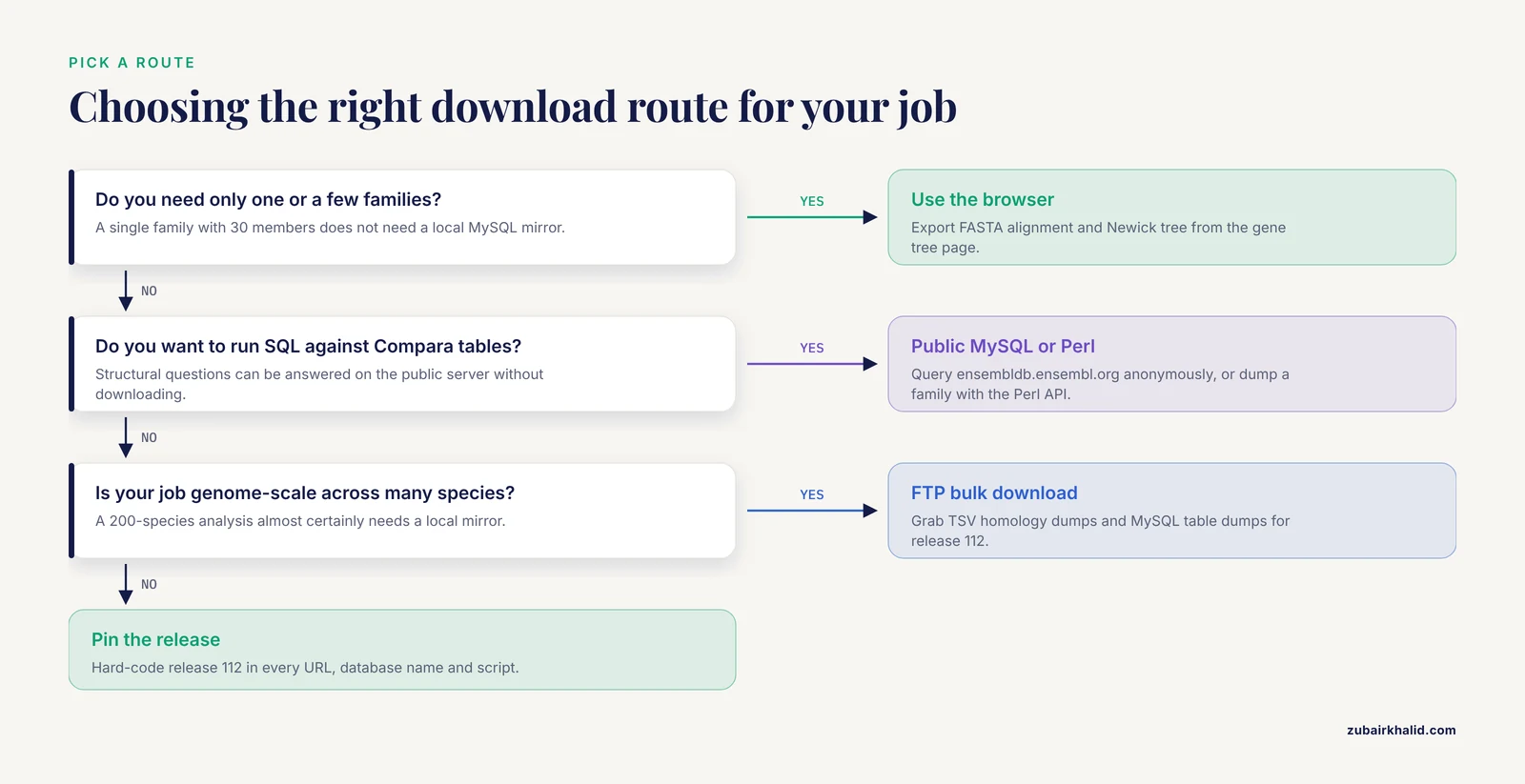
Pick the lightest route that satisfies your need. A single family with 30 members does not need a local MySQL mirror. A 200-species genome-scale analysis almost certainly does.
How to Download Gene Family Alignments from Ensembl Compara, Step by Step
The walkthrough below uses human BRCA1 (ENSG00000012048) and release 112 as concrete examples. Replace the gene ID and the release number with your own values.
Step 1. Confirm your gene and its stable ID in the Ensembl genome browser
If you are still learning how to use Ensembl, start at the browser because it gives you a visual ground truth to compare every downloaded file against.
- Open
https://www.ensembl.organd type your gene name, for exampleBRCA1, into the search box. - Choose the human BRCA1 hit and open the Gene tab. Note the stable ID in the page header, ENSG00000012048.
- In the left-hand menu, find the comparison section and select Gene tree. The URL pattern looks like
https://www.ensembl.org/Homo_sapiens/Gene/Compara_Tree?db=core.
The gene tree page shows the phylogenetic tree for the family, with colored nodes marking gene duplication events, and expandable labels for each member. This is a short ensembl genome browser tutorial in itself, and it is the fastest way to sanity-check whether the family you are about to download contains the species you expect. The browser presentation of comparative data, including collapsible gene tree plots and alignment views, is documented in the Ensembl comparative genomics resources paper [1].
Take a moment here to note the homology types shown next to each member, such as one2one orthologue or one2many orthologue. You will need that vocabulary later.
Step 2. Download the alignment directly from the gene tree page
On the gene tree page, open the export or download options attached to the tree view. You can obtain the multiple sequence alignment for the displayed family in FASTA format and the tree structure in Newick format without writing any code. This is the right route when you need one or a few families and want files you can immediately open in a desktop alignment viewer.
Limitations of this route: it is per-family, it gives you whatever member set the default tree contains, and it is not scriptable. Anything beyond a handful of genes should move to the API or FTP routes below.
Step 3. Fetch homologs with aligned sequences from the REST API
The REST API is the workhorse for scripted downloads. For a single human gene, request its homologies with aligned protein sequences:
curl -s -H "Content-Type: application/json" -H "Accept: application/json" \
  "https://rest.ensembl.org/homology/id/ENSG00000012048?compara=vertebrates;type=proteins;sequence=protein;aligned=1" \
  -o brca1_homology.json
Inspect the structure before parsing:
jq '.data | keys' brca1_homology.json
jq '.data.homologies | keys' brca1_homology.json
A trimmed example of what the response looks like, with values shortened for readability:
{
  "data": [
    {
      "id": "ENSG00000012048",
      "homologies": [
        {
          "type": "orthologue_one2one",
          "species": "mus_musculus",
          "target_id": "ENSMUSG0000...",
          "aligned_sequence": "MDNALELSLN..."
        }
      ]
    }
  ]
}
The parameters that matter:
| Parameter | Common values | Effect |
|---|---|---|
| compara | vertebrates, plants, fungi, metazoa, protists | Selects the Compara division. Use the division that contains your species |
| type | proteins, sequences, gene_tree | What to return. proteins returns homology pairs, sequences returns family members, gene_tree returns the tree |
| sequence | none, protein, cdna | Which sequence flavor to attach |
| aligned | 0 or 1 | With 1, returned sequences include alignment gap characters. With 0 you get raw unaligned sequences |
The aligned=1 parameter is the single most important one. If you leave it out or set it to 0 you will receive ungapped sequences and will silently build your own misaligned dataset.
Convert the JSON to a FASTA file with jq:
jq -r '.data.homologies[] | ">" + .species + "|" + .target_id + "\n" + .aligned_sequence' \
  brca1_homology.json > brca1_orthologs.aln.fasta
Field names can shift slightly between releases. If a field comes back empty, print all keys with jq '.data.homologies' and adapt. The homology endpoint accepts one gene ID per request. For thousands of genes, batch your requests, add a small sleep between calls, and respect the API rate limits documented by Ensembl, which sit around 55 requests per second per IP address. Exceeding them returns HTTP 429 errors.
For an existing family where you already know the gene tree stable ID, an ENSGT identifier, you can fetch the whole tree with embedded aligned sequences:
curl -s -H "Accept: text/x-nhx" \
  "https://rest.ensembl.org/genetree/id/ENSGT00390000003602?compara=vertebrates;sequence=protein;aligned=1" \
  -o brca1_tree.nhx
NHX is New Hampshire Extended, a Newick tree format with per-node annotations carried inside the tree string. The aligned sequences are attached to the leaf nodes, so one file carries both the phylogeny and the alignment.
Step 4. Validate the downloaded alignment
Never skip this step. A file that parses is not necessarily aligned.
from Bio import AlignIO

aln = AlignIO.read("brca1_orthologs.aln.fasta", "fasta")
print("Members:", len(aln))
print("Alignment columns:", aln.get_alignment_length())
Expected output for a real BRCA1 vertebrate family is a member count in the dozens and an alignment length of roughly 1,800 to 1,900 columns, matching the size of the BRCA1 protein. Then check the alignment properties:
import collections
gap_counts = collections.Counter()
for rec in aln:
    gap_counts[rec.id] = str(rec.seq).count("-")
print(dict(gap_counts))
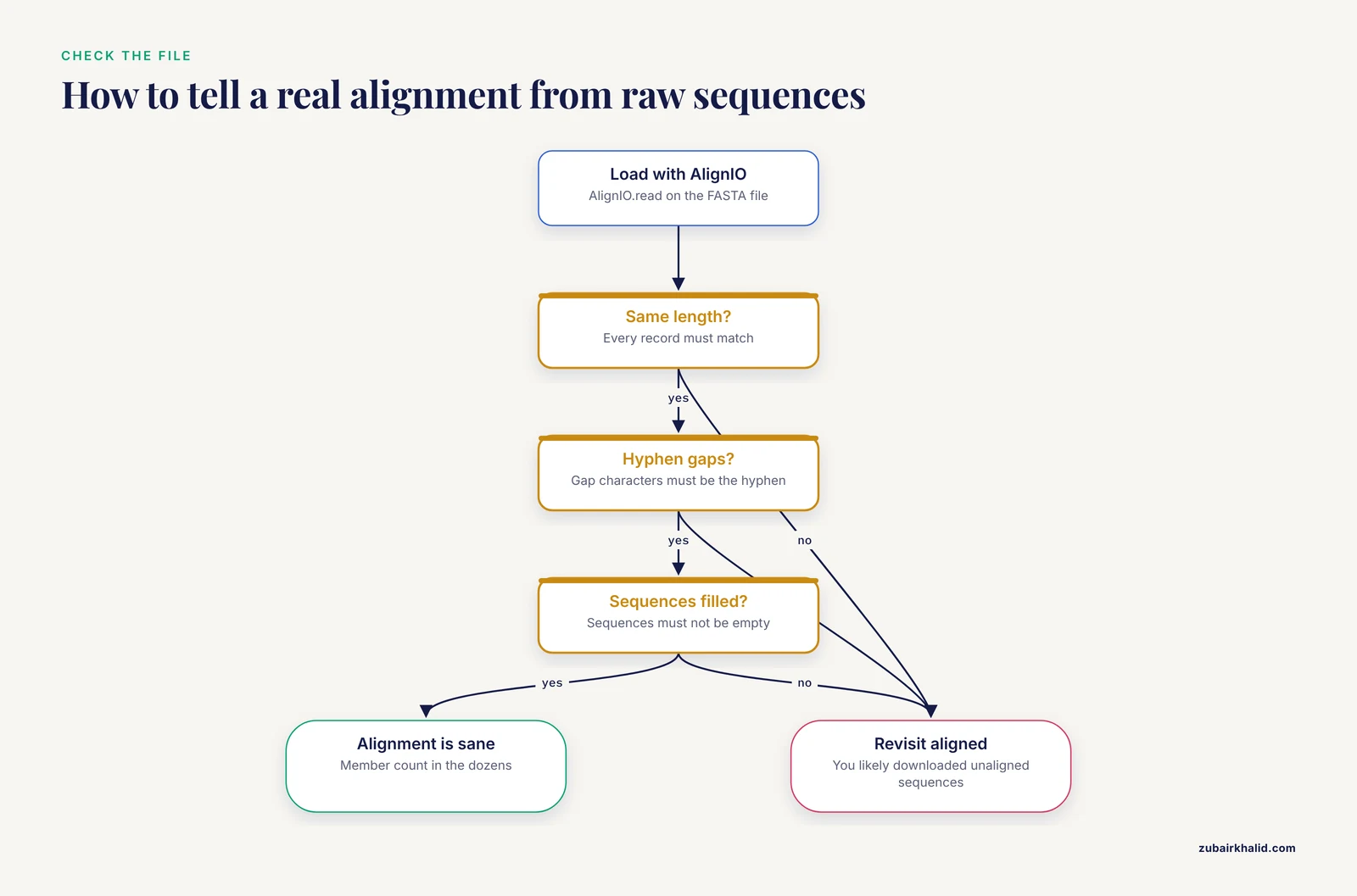
Three checks tell you the file is sane. Every record must have the same length, which AlignIO enforces when it reads a clean alignment. Gap characters must be the hyphen. And sequences must not be empty. If your records have wildly different lengths, you downloaded unaligned sequences by mistake and should revisit the aligned parameter or your export source.
Step 5. Bulk download from the FTP site
For genome-scale work, download precomputed files instead of issuing thousands of API calls. Ensembl publishes Compara dumps on the public FTP server under https://ftp.ensembl.org/pub/, organized by release number.
List what is available for your release:
curl -s "https://ftp.ensembl.org/pub/release-112/tsv/ensembl-compara/homologies/" | grep -o 'href="[^"]*"'The homologies directory contains tab-separated files named after species pairs, with one row per homology call including the homology type and the member identifiers. Grab the pair you need:
wget "https://ftp.ensembl.org/pub/release-112/tsv/ensembl-compara/homologies/homo_sapiens_mus_musculus.tsv.gz"
gunzip homo_sapiens_mus_musculus.tsv.gz
head -5 homo_sapiens_mus_musculus.tsv
Confirm the exact file names in the listing for your release before scripting the download, because file naming and directory layout can change between releases. The same release directory tree also hosts gene tree dumps and the EMF files behind the Ensembl multiple whole-genome alignments [1].
For a true local mirror of the Compara database tables, use the MySQL dumps:
wget "https://ftp.ensembl.org/pub/release-112/mysql/ensembl_compara_112/homology.sql.gz"
wget "https://ftp.ensembl.org/pub/release-112/mysql/ensembl_compara_112/homology.txt.gz"
wget "https://ftp.ensembl.org/pub/release-112/mysql/ensembl_compara_112/homology_member.sql.gz"
wget "https://ftp.ensembl.org/pub/release-112/mysql/ensembl_compara_112/homology_member.txt.gz"
Create a local schema from the .sql.gz file, then load the rows:
zcat homology_member.sql.gz | mysql -u myuser -p mycompara
zcat homology_member.txt.gz | \
  mysql -u myuser -p --local-infile mycompara \
  -e "LOAD DATA LOCAL INFILE '/dev/stdin' INTO TABLE homology_member"
Repeat for member, homology, gene_tree_node, and gene_tree_root if you want to walk trees locally. Expect the full set to be large, so check file sizes on the FTP listing before committing disk space.
Step 6. Query the public Compara MySQL server directly
Ensembl hosts a public MySQL server that supports anonymous read access. This is the fastest way to answer structural questions without downloading anything.
mysql -u anonymous -h ensembldb.ensembl.org -P 3306 \
  -D ensembl_compara_112 -e "
SELECT m.stable_id AS protein_id, m.species, h.description
FROM member m
JOIN homology_member hm ON m.member_id = hm.member_id
JOIN homology h ON h.homology_id = hm.homology_id
WHERE m.gene_stable_id = 'ENSG00000012048'
LIMIT 20;"
Expected output resembles:
protein_id         species          description
ENSP00000338645    homo_sapiens     ortholog_one2one
ENSMUSP000000...   mus_musculus     ortholog_one2one
...
The description column is where homology type lives, with values such as ortholog_one2one, ortholog_one2many, ortholog_many2many, and within_species_paralog. Filtering on this column is how you build clean one-to-one ortholog sets for downstream analyses, which matters because many-to-many mappings across expanded families can distort cross-species comparisons [12].
The multiple alignment itself is not stored as one flat table row. It is reconstructed from the gene tree, which brings you to the Perl API.
Step 7. Dump a full family alignment with the Perl Compara API
The Perl API gives you the gene tree as an object and can hand you a BioPerl alignment ready to write as FASTA.
#!/usr/bin/env perl
use strict;
use warnings;
use Bio::EnsEMBL::Compara::DBSQL::DBAdaptor;

my $compara = Bio::EnsEMBL::Compara::DBSQL::DBAdaptor->new(
    -host   => 'ensembldb.ensembl.org',
    -port   => 3306,
    -user   => 'anonymous',
    -dbname => 'ensembl_compara_112',
);

my $member_adaptor = $compara->get_GeneMemberAdaptor;
my $member = $member_adaptor->fetch_by_source_stable_id(
    'ENSEMBLGENE', 'ENSG00000012048'
);

my $tree_adaptor = $compara->get_GeneTreeAdaptor;
my $tree = $tree_adaptor->fetch_default_tree_for_gene($member->gene_member_id);

my $aln = $tree->get_SimpleAlign(
    -IDENTIFIER_TYPE => 'STABLE_ID',
    -UPPER_CASE      => 1,
);
$aln->write_fasta(\*STDOUT);
Run it and redirect to a file:
perl dump_family_alignment.pl > brca1_family.aln.fastaExpected output is a standard FASTA file whose header lines carry Ensembl stable IDs and whose sequences are all the same length with hyphens as gaps. Method names in the Compara API do change between releases, so if fetch_default_tree_for_gene is not found, check the API documentation bundled with the release you installed and use the equivalent accessor it lists. This friction is normal and is the main reason the REST API is the friendlier scripted route for most users.
Ensembl's own protocols for accessing its data through the browser, FTP, and programmatic interfaces, written for the livestock community, describe the same access philosophy and are a useful companion read for any species set [13].
Practical Tips for Cleaner Ensembl Compara Downloads
- Pin the release. Hard-code the release number in URLs, database names, and scripts. Ensembl updates its comparative resources frequently, and a script pointed at the current release will give different answers after the next release cycle [1][13].
- Match the division to your species. Vertebrates live under
compara=vertebrates. Crop and plant families sit in Ensembl Plants, where gene trees and genome alignments are generated by the same pipeline family but maintained per division [3]. Medical insect work, for example retrieving gustatory and odorant receptor transcripts across dozens of arthropod species for alignment and phylogenetics, uses Ensembl Metazoa [4]. - Prefer protein alignments for coding genes. Protein-level alignments are what the gene tree pipeline is built around for protein-coding families, and they behave better for deep evolutionary comparisons than codon-level alignments of divergent sequences.
- Know what a tree-based alignment is. The alignment comes from the gene tree pipeline and is influenced by how the pipeline selected representative transcripts per gene, a choice that itself affects gene tree accuracy because of alternative splicing [14]. If your analysis is exquisitely sensitive to alignment details, download the tree, inspect the member set, and consider whether you want to retrim or realign the raw sequences yourself.
- Consider tree correction for deep or hard families. Gene trees inferred solely from alignments can contain weakly supported branches, and methods that use species tree information to correct them have been applied to the whole Ensembl Compara database to produce an alternative, arguably more plausible set of gene trees [15]. For most projects the default trees suffice. For duplication and loss counting across many species, evaluate this class of methods.
- Keep a manifest. Log the URL, release, download date, and file checksum for every file.
sha256sum *.fasta.gz > manifest.txtcosts seconds and saves weeks. - Batch politely. When looping over genes with the REST API, run a few requests, time them, then set your sleep interval so you stay comfortably under the rate limit. Handle HTTP 429 responses with exponential backoff rather than retrying immediately.
- Check homology type before you trust a set. A many2many call means expansion in at least one lineage. For cross-species expression mapping, filtering to one2one pairs changes your gene pair count, a tradeoff documented in cross-species integration work built on Ensembl homology tables [12].
Common Mistakes and Limitations
Mistake 1. Downloading unaligned sequences and calling them an alignment. The most frequent error is omitting aligned=1 or exporting raw sequences from the browser. The telltale sign is records with different lengths. Re-request with alignment enabled and revalidate.
Mistake 2. Using the wrong Compara division. A vertebrate gene queried against the wrong division returns empty homologies or errors. Match the division to your species and state it explicitly in the URL or API call.
Mistake 3. Confusing gene family alignments with whole-genome alignments. Compara produces two distinct products. GeneTrees and their alignments are per-family, built from gene alignments that define Protein Families, GeneTrees, and homologies. Separate pairwise and multiple whole-genome alignments support synteny, per-base conservation scores, and constrained elements [1]. If you need per-base conservation across a locus, you want the whole-genome alignment products, not a gene tree dump.
Mistake 4. Pointing scripts at the current release. Results drift with every release. Pin the release and record it.
Mistake 5. Ignoring homology type. Pulling every row for a gene mixes one2one orthologs, one2many relationships, many2many relationships, and within-species paralogs into one undifferentiated pile. Downstream enrichment or conservation analyses often assume a cleaner definition. Filter on the homology description and document what you kept.
Mistake 6. Assuming the member set is complete and correct. The cross-database benchmark found that no orthology database provides a fully correct and comprehensive protein classification, and that differences between databases stem largely from database concepts rather than method quality [2]. For gene families with recent duplications or poor annotations, expect uncertainty and consider cross-checking against a second resource.
Mistake 7. Letting expanded families distort downstream statistics. Gene family expansion is real biology, but default many-to-many homology mappings can overweight expanded families in cross-species integrative analyses and create mapping-associated artifacts [12]. Decide deliberately whether you want all members or a restricted mapping scheme.
Limitation. Representative transcript choice affects alignment quality. Genes produce multiple transcripts, and tree construction typically uses one representative transcript per gene. The choice of representative transcript shapes the resulting multiple sequence alignment and the estimated gene tree [14]. For families where alternative splicing is biologically central, inspect which transcript was used.
Limitation. Polyploid and newly assembled genomes behave differently. Polyploid genomes such as bread wheat required specific extensions to the Compara pipelines and web interface [3]. Newly incorporated assemblies may have less mature comparative data than long-standing reference species [16].
Limitation. This is a computational resource question, not a clinical one. If your work feeds variant interpretation for a patient or family, gene family conservation is one line of evidence among many, and individual cases require qualified clinical geneticists and counselors, consistent with the multidisciplinary workflow described in the FLNC family study [7].
Frequently Asked Questions
What is the difference between a gene tree and a gene family alignment in Ensembl Compara?
The gene tree is the inferred phylogenetic tree of the homologous members, and the alignment is the multiple sequence alignment of those members that was computed as part of building that tree. Compara uses gene alignments to define Protein Families, GeneTrees, and homologies, and both objects are available for the same family [1].
Can I download gene family alignments for plants and non-vertebrate species?
Yes. The Compara infrastructure is reused across Ensembl Plants, Ensembl Metazoa, and other divisions, so gene trees and alignments exist for those species sets, and Ensembl Plants specifically extended its comparative analyses and interfaces for polyploid crops such as wheat [1][3][4].
How do I get an alignment for a whole gene family rather than just one gene's orthologs?
Fetch the family's gene tree by its ENSGT stable ID through the genetree REST endpoint or the Perl API, then export the embedded aligned sequences. In the browser, open the gene tree page for any member and export the full tree alignment in FASTA.
Why is the aligned sequence different from the transcript sequence I see elsewhere?
The aligned sequence contains gap characters where sequences have insertions or deletions relative to other family members, and it reflects the transcript the pipeline selected to represent the gene. Representative transcript selection is a known influence on alignment and gene tree quality [14].
How do I make my download reproducible?
Pin the Ensembl release number in every URL, API call, and database name, save a manifest with URLs, dates, and SHA256 checksums, and archive the exact files you analyzed. Ensembl's comparative resources update frequently, so an unpinned analysis is not reproducible [1].
Can I download the entire Compara dataset in one go?
Yes, through the FTP site. The release directories contain tab-separated homology dumps, gene tree files, and full MySQL table dumps for local loading. Check sizes on the FTP listing first, because a complete mirror is large.
Which homology type should I use for my analysis?
It depends on the question. One-to-one orthologs give the simplest cross-species correspondence, while one2many and many2many calls capture genuine gene family expansion. Cross-species single-cell integration work shows that keeping many-to-many mappings versus restricting to one-to-one changes both gene pair counts and downstream artifacts, so choose deliberately [12].
How should I cite Ensembl Compara in a paper?
Cite the Ensembl comparative genomics resources paper, which describes the infrastructure, the gene tree and homology pipelines, and the web and programmatic access routes [1]. Also note the release number you used in your methods section.
Sources
- Ensembl comparative genomics resources
- Conceptual framework and pilot study to benchmark phylogenomic databases based on reference gene trees.
- Triticeae Resources in Ensembl Plants
- Stop Codon Usage of Three Gene Families in Selected Medical Insects, and their Phylogenetic Relationships
- Gene family information facilitates variant interpretation and identification of disease-associated genes in neurodevelopmental disorders
- Identification of pathogenic variant enriched regions across genes and gene families
- Identification of a Missense Mutation in the FLNC Gene from a Chinese Family with Restrictive Cardiomyopathy
- SpinachDB: A Well-Characterized Genomic Database for Gene Family Classification and SNP Information of Spinach
- Databases of homologous gene families for comparative genomics
- TWGFD: an integrative platform for tetraploid wheat gene family analysis
- PlantTribes: a gene and gene family resource for comparative genomics in plants
- Protein large language model assisted one-to-one gene homology mapping in cross-species single-cell transcriptome integration
- Accessing Livestock Resources in Ensembl
- Choosing representative proteins based on splicing structure similarity improves the accuracy of gene tree reconstruction
- Efficient Gene Tree Correction Guided by Genome Evolution
- An updated reference genome sequence and annotation reveals gene losses and gains underlying naked mole-rat biology