Debugging Logic Errors in Workflow Rules: A Step-by-Step Approach
By Dr. Zubair Khalid, DVM, MS, PhD ·
After working through this guide you will be able to reproduce a failing rule on a single sample, read the logs and work directories a workflow manager leaves behind, tell logic errors apart from syntax and runtime errors, isolate one rule and rerun only what your fix affects, and add a small test so the same bug cannot return silently next month.
Have on hand:
- A current stable release of Nextflow (with a modern Java runtime) or Snakemake (with a recent Python 3). The examples cover both tools, and you only need the one your lab uses.
- A terminal, plus Conda or Mamba, or a container engine such as Docker or Apptainer, so the tools your rules call are actually installed.
- Graphviz, if you want dependency-graph images from Snakemake.
- A small test dataset, two or three samples with a few thousand reads each, and your pipeline in a git repository so every edit is reversible.
A bioinformatics workflow manager runs each analysis step in dependency order, records what succeeded, and reruns only what changed. Snakemake calls a step a rule. Nextflow calls it a process. This article says rule for both unless the difference matters, because the debugging method is the same.
Logic errors deserve their own method because they are the failures a manager cannot catch for you. The manager only knows what you declare. If you declare the wrong input pattern, the wrong output name, or the wrong dependency, it will build a wrong plan with complete confidence, or accept a wrong result with a green check mark.
Logic Errors Versus Syntax and Runtime Errors
Every failure in a workflow lands in one of three classes, and the class tells you where to look.
| Class | What you observe | Representative message | Where the truth lives |
|---|---|---|---|
| Syntax | The workflow never starts | A Python SyntaxError naming a Snakefile line, or a Groovy script compilation error | The workflow file itself |
| Runtime | A task starts, then dies | Nextflow: Process 'ALIGN' terminated with an error exit status (1). Snakemake: a rule failure with the tool exit code | The task stderr, in the work directory or rule log |
| Logic | The plan is wrong, or a task succeeds with the wrong result | Missing output file(s) ... expected by process, MissingInputException, or no error at all | The gap between your declarations and what the tools actually wrote |
Three terms come up constantly:
- A DAG (directed acyclic graph) is the dependency map the manager builds from your declared inputs and outputs. A logic error often shows up as a wrong DAG, for example a step that never connects to the rest.
- A wildcard is the
{sample}placeholder in a Snakemake file pattern. Snakemake matches wildcards by name between a rule's input and output patterns, so a renamed wildcard breaks the match. - A channel is the Nextflow data stream that carries values between processes. Wiring the wrong channel, or a channel that matches no files, produces empty or mispaired data.
The core skill in debugging logic errors in workflow rules is comparing what you declared against what actually happened. Everything in the loop below serves that comparison.
Build a Small, Reproducible Test Case
Large datasets hide bugs behind long runtimes and make you reluctant to experiment. Before debugging, shrink the problem.
git add -A && git commit -m "checkpoint before debugging"
nextflow run main.nf -profile test -ansi-log false
snakemake -n -p --cores 1- The git commit gives you a one-command undo. Commit again after each accepted fix.
-profile testselects a named block of settings (innextflow.configor Snakemake's profile files) that points at a tiny dataset. If your pipeline has no test profile, make one, it pays for itself the first time you debug.-nis a dry run, which builds the plan and prints jobs without executing anything.-pprints the shell command each job would run.
Expected output for a healthy two-job Snakemake dry run:
Building DAG of jobs...
Job stats:
job      count
-----    -----
all      1
fastqc   2
If the dry run already fails, you have a syntax or declaration error and the loop below still applies, starting at Step 2. If it passes, run the real pipeline on the test data and keep the failure in front of you.
How to Debug Logic Errors in a Bioinformatics Workflow, Step by Step
The loop has nine steps. You will usually cycle through Steps 3 to 7 several times before a fix sticks. Keep this cheat sheet open, the sections after it explain each command.
| Command | Tool | What it does | |
|---|---|---|---|
snakemake -n -p, cores 1 | Snakemake | Dry run with printed commands, nothing executes | |
| `snakemake, dag \ | dot -Tsvg > dag.svg` | Snakemake | Renders the job graph (needs Graphviz) |
snakemake, rulegraph | Snakemake | Rule-level graph, less cluttered than the job DAG | |
snakemake, until RULE, cores 1 | Snakemake | Runs the DAG up to and including RULE, nothing after | |
snakemake, omit-from RULE, cores 1 | Snakemake | Skips RULE and everything downstream of it | |
snakemake -R RULE, cores 1 | Snakemake | Forces RULE to rerun even if outputs look current | |
snakemake, summary | Snakemake | Per-output report, which rule produced each file | |
nextflow run main.nf -resume | Nextflow | Reruns, reusing cached tasks whose hash is unchanged | |
nextflow run main.nf -stub-run | Nextflow | Replaces stub-enabled process bodies with placeholders to test wiring | |
nextflow run main.nf -entry NAME | Nextflow | Runs only the named workflow block | |
nextflow log RUN -f task_id,process,status,exit,workdir | Nextflow | Table of tasks with their work directories | |
nextflow config -flat | Nextflow | Prints the fully merged configuration |
Step 1. Reproduce the Failure on the Smallest Possible Input
Run the failing pipeline on one sample, or the one sample that fails, with the test profile.
nextflow run main.nf -profile test -ansi-log false
snakemake --cores 1 -p
A failure you can reproduce in under a minute is a failure you can fix. If the pipeline only fails on the full cohort, bisect: run half the samples, then half of that, until one sample reproduces it. Corrupt or truncated input files, duplicate sample identifiers, and unexpected file naming are the usual culprits that one sample exposes.
Step 2. Classify the Error Before Editing Anything
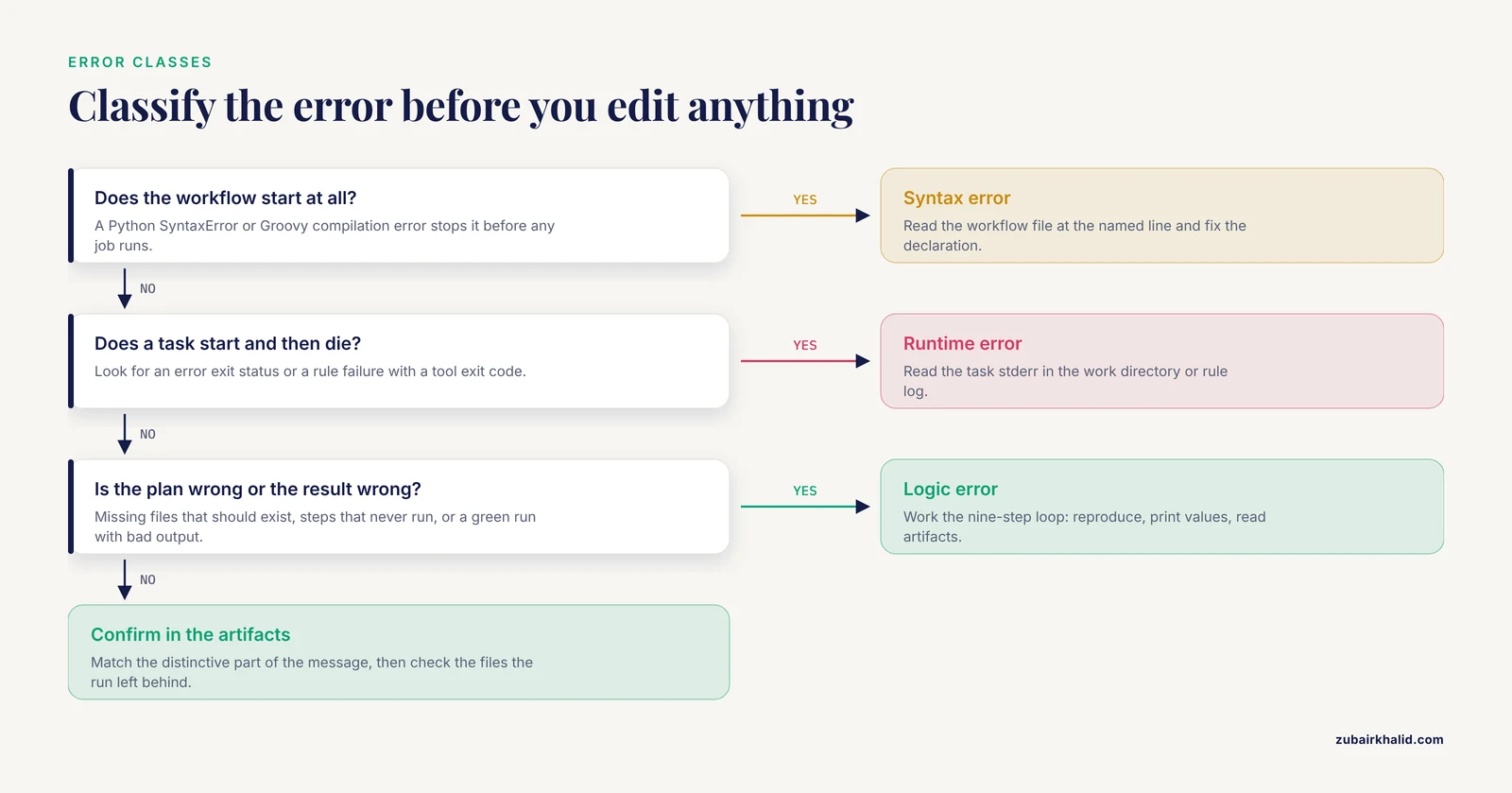
Read the first lines of the failure and decide the class. Do not edit code yet.
Nextflow failures print a block that names the process and the cause:
ERROR ~ Error executing process > 'ALIGN (sampleA)'

Caused by:
  Missing output file(s) `sampleA.bam` expected by process `ALIGN (sampleA)`
The block also prints the task work directory. Copy that path, it is your evidence locker.
Snakemake failures print the exception class, the rule, and the Snakefile line:
MissingInputException in line 12 of /path/Snakefile:
Missing input files for rule fastqc:
    data/sampleA_1.fq.gz
Decision rule: if the workflow never starts, it is syntax. If a task starts and dies, it is runtime, go read the task stderr. If the plan itself is wrong (missing files that should exist, outputs that never appear, steps that never run) or a task succeeds but the result is wrong, it is logic, which is the rest of this loop. Exact wording varies a little between releases, so match on the distinctive parts of the message.
Step 3. Read What the Run Actually Executed
Both managers record exactly what they ran, which is where debugging logic errors in workflow rules gets concrete.
Nextflow writes every task into work/<two characters>/<hash>/. The failure message gives you the path. Inside you find:
cd work/9a/1b2c3d4e5f6a7b8c9d0e1f2a3b4c5d6
ls
cat .command.sh    # the exact script, with all variables resolved
cat .command.err   # the tool stderr
cat .command.out   # the tool stdout
cat .exitcode      # the exit code of the task
.command.sh is the single most useful file in Nextflow debugging. It shows the command after Groovy interpolation, so you see the real sample names, real paths, and real flag values. You can rerun the command by hand from this directory to iterate quickly, remembering that the staged inputs and task environment differ from your login shell.
Snakemake prints commands with -p and writes logs under .snakemake/log/. If a job was killed mid-run, its outputs stay marked incomplete, and -keep-incomplete preserves them for inspection while -rerun-incomplete clears the state once you understand it.
Step 4. Print the Values the Workflow Is Carrying
Logic errors usually mean the workflow is carrying values you did not expect. Make it show you.
In Nextflow, add a view to any channel. It prints each item to the console without changing the stream:
reads.view { s, r1, r2 -> "DEBUG: ${s} ${r1} ${r2}" }Expected output for a healthy pair channel:
DEBUG: sampleA /home/you/demo/data/sampleA_R1.fq.gz /home/you/demo/data/sampleA_R2.fq.gz
DEBUG: sampleB /home/you/demo/data/sampleB_R1.fq.gz /home/you/demo/data/sampleB_R2.fq.gz
Nothing printed means the channel is empty, which is itself the diagnosis. To see resolved settings, run nextflow config -flat and search for the parameter you think you set.
In Snakemake, drop a print() at the top level to inspect the sample list or config, and use snakemake, summary to see which rule produced each existing output file. Sample sheets deserve special suspicion. Invisible characters cause real failures:
cat -A samples.csv
# sampleA,data/sampleA_R1.fq.gz^M$
The ^M$ shows Windows line endings. The trailing carriage return becomes part of the last field, the path does not exist, and the failure message shows a file name that looks identical to one that does exist.
Step 5. Check the Dependency Graph
Wrong declarations produce wrong graphs, and a wrong graph is easy to see drawn.
snakemake --dag | dot -Tsvg > dag.svg
snakemake --rulegraph | dot -Tsvg > rulegraph.svg
Open the images and look for the three classic defects: a target rule with no incoming edge from the step that should feed it, a rule that appears twice with different inputs, and any cycle. -rulegraph shows rules only, which is cleaner when the job graph has hundreds of nodes.
Nextflow does not have a one-flag DAG image, but you can validate wiring end to end with stubs. Give each process a stub block that creates the declared outputs as empty files:
stub:
"""touch ${sample}.bam"""
Then run:
nextflow run main.nf -stub-run -resumeEvery process should execute in milliseconds, publishing should still work, and the run should complete. If a process never runs under a stub, its channel is empty or disconnected, which is exactly the kind of logic error that hides behind real runtimes.
Step 6. Isolate a Single Rule
Shrink the blast radius before you experiment with fixes.
In Snakemake, run the graph up to the suspect rule, or cut it out entirely:
snakemake --cores 1 --until fastqc      # run everything up to and including fastqc
snakemake --cores 1 --omit-from multiqc # run everything except multiqc and its dependents
snakemake --cores 1 -R fastqc           # force fastqc to rerun right now
-until and -omit-from take rule names. -R (short for force-run) ignores the up-to-date check for that rule. If outputs already exist, combine -until with -R or delete the outputs first.
In Nextflow, put the suspect section in a named workflow and run only that entry:
workflow DEBUG_ALIGN {
    reads = Channel
        .fromFilePairs("data/*_{R1,R2}.fq.gz", checkIfExists: true)
        .map { sample, pair -> tuple(sample, pair[0], pair[1]) }
    ALIGN(reads)
}
nextflow run main.nf -entry DEBUG_ALIGN-entry executes only that workflow block, with its own channels, so you can loop on one process in seconds.
Step 7. Apply One Fix and Rerun the Minimum
Change one thing, then rerun only what the change affects. Resist fixing three suspicions at once, because then a passing run cannot tell you which fix worked.
Nextflow caches tasks by a hash that covers the input values, the process script, the container or environment, and key directives. Run with resume:
nextflow run main.nf -resumeExpected console, abridged:
executor >  local (1)
[9a/1b2c3d] process > ALIGN (sampleA)   [100%] 1 of 1 ✔
Tasks whose hash is unchanged print as cached and cost seconds. Editing the ALIGN script reruns ALIGN and everything downstream of it, while unrelated branches stay cached. Changing a parameter cascades to every task that consumed it, which is correct behavior, not a bug.
Snakemake 8 and later treat changes to rule code, params, inputs, and the software environment as rerun triggers by default, alongside file timestamps. That is why a one-character edit can schedule a large rerun, and it is the correct response to a change that could alter results. To restrict the check to timestamps while you debug, use -rerun-triggers mtime. To see why each job is scheduled, add -r, which prints a reason per job such as a missing output or changed code. If a file genuinely never changes and the trigger scan is noisy, wrap it in ancient().
Step 8. Verify the Result, Not the Exit Code
A green run proves the commands executed, not that the output is right. Close the loop with cheap checks:
# reads in the input FASTQ (every 4th line starting at line 2)
zcat data/sampleA_R1.fq.gz | awk 'NR % 4 == 2' | wc -l
# 20000

# alignment records in the output BAM
samtools view -c -F 4 results/align/sampleA.bam
# 39542
The numbers are illustrative, the comparison is not. If the input has 20000 reads per mate and the BAM holds roughly 40000 records with most mapped, the pipeline did not silently drop data. If the BAM holds 200 records, something upstream truncated the input and no exit code told you.
For refactors that should not change results at all, compare checksums before and after with md5sum, remembering that some parallel tools are not byte-deterministic across thread counts. Also open one output with head or a viewer and confirm the content matches the sample you asked for. Swapped read pairs and off-by-one sample mappings produce perfectly valid files for the wrong sample.
Step 9. Turn the Fix Into a Test
A bug you fixed by hand will come back unless something guards it. Pick the cheapest guard that would have caught this bug:
- Keep the tiny test dataset and test profile, and run them in continuous integration on every commit.
- For Nextflow, nf-test provides a test framework built around pipeline processes and workflows.
- For Snakemake, pytest-workflow or a short shell script that runs the pipeline on
test/and checks outputs works well. - Add assertion rules that fail loudly on empty or implausible results:
rule check_counts:
    input:
        "results/align/{sample}.bam"
    shell:
        "test $(samtools view -c -F 4 {input}) -gt 0"
A rule like this converts the worst kind of logic error, silent garbage, into a loud failure on the next run.
Worked Example: Two Nextflow Bugs, One Silent and One Loud
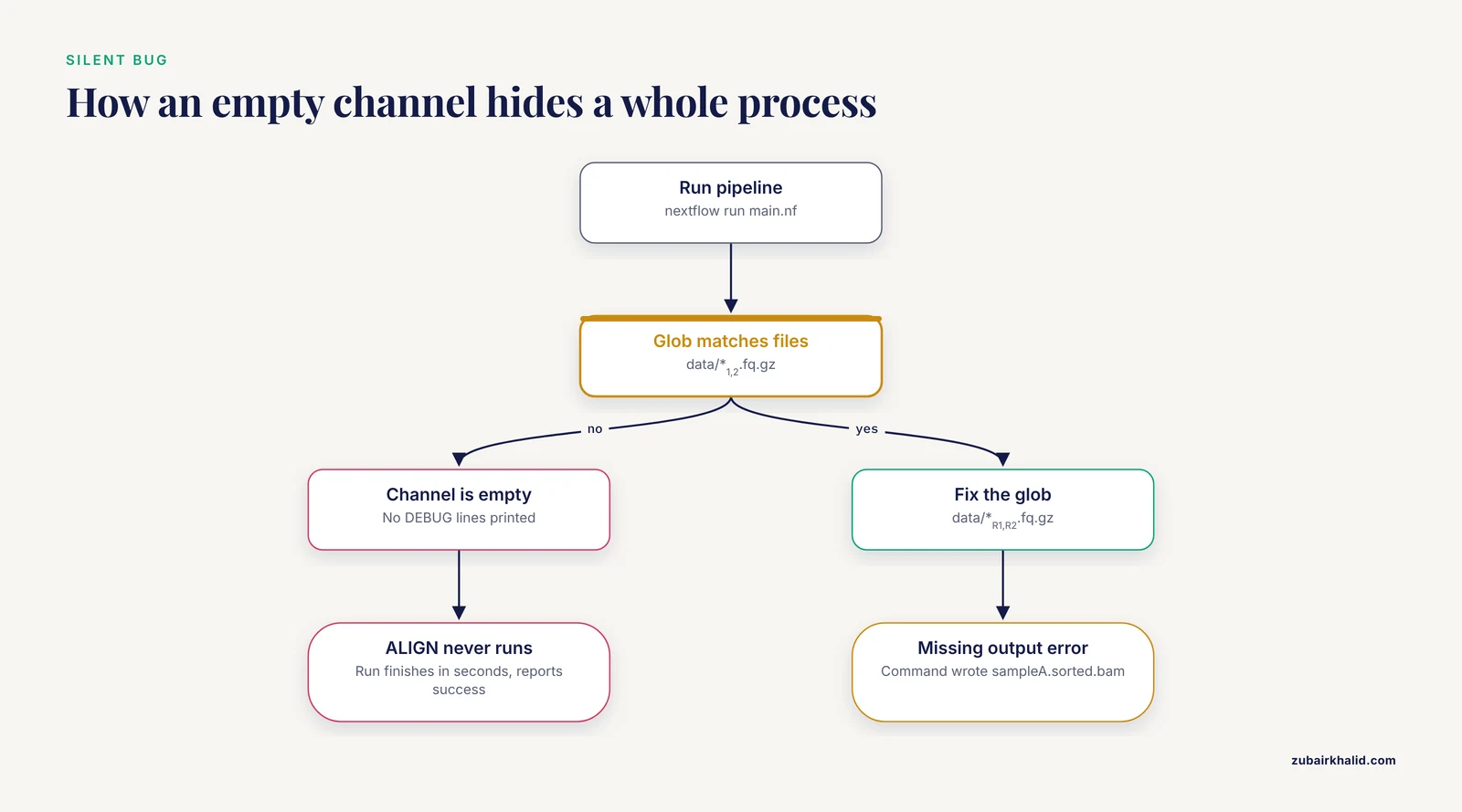
This minimal alignment pipeline contains two classic logic errors.
process ALIGN {
    publishDir "results/align", mode: "copy"

    input:
    tuple val(sample), path(reads1), path(reads2)

    output:
    path "${sample}.bam"

    script:
    """
    set -o pipefail
    bwa mem -t ${task.cpus} refs/genome.fa ${reads1} ${reads2} | samtools sort -o ${sample}.sorted.bam -
    """
}

workflow {
    reads = Channel
        .fromFilePairs("data/*_{1,2}.fq.gz", checkIfExists: true)
        .map { sample, pair -> tuple(sample, pair[0], pair[1]) }

    reads.view { s, r1, r2 -> "DEBUG: ${s} ${r1} ${r2}" }
    ALIGN(reads)
}
Run it:
nextflow run main.nfThe run finishes in seconds, prints no task lines, and reports success. No DEBUG: lines appear. That silence is the first bug: the glob data/*_{1,2}.fq.gz matches nothing, the channel is empty, and ALIGN never executes. Test the glob at the shell level, where brace expansion works the same way:
ls data/*_{1,2}.fq.gz
# ls: cannot access 'data/*_1.fq.gz': No such file or directory
# ls: cannot access 'data/*_2.fq.gz': No such file or directory

ls data/
# sampleA_R1.fq.gz  sampleA_R2.fq.gz  sampleB_R1.fq.gz  sampleB_R2.fq.gz
Fix the glob to data/*_{R1,R2}.fq.gz and rerun. The debug lines now appear:
DEBUG: sampleA [data/sampleA_R1.fq.gz, data/sampleA_R2.fq.gz]
DEBUG: sampleB [data/sampleB_R1.fq.gz, data/sampleB_R2.fq.gz]
Now the second bug surfaces:
ERROR ~ Error executing process > 'ALIGN (sampleA)'

Caused by:
  Missing output file(s) `sampleA.bam` expected by process `ALIGN (sampleA)`
The failure block prints the work directory. Go there and read the evidence:
cd work/9a/1b2c3d4e5f6a7b8c9d0e1f2a3b4c5d6
ls
cat .command.sh
.command.sh shows the command wrote sampleA.sorted.bam, while the process declares ${sample}.bam. The declaration and the command disagree, so Nextflow refuses to accept the task. Align them, here by writing ${sample}.bam in the command, then rerun with resume:
nextflow run main.nf -resumeexecutor > local (1)
[9a/1b2c3d] process > ALIGN (sampleA) [100%] 1 of 1 ✔ls results/align/
# sampleA.bam sampleB.bamThe silent bug (empty channel) is the dangerous one, because nothing complains. The loud bug (missing output) is the manager protecting you from a declaration that does not hold. Both fixes came from the same loop: reproduce, print the values, read the artifacts, align declarations with reality.
Worked Example: A Snakemake Wildcard Mismatch
This quality-check pipeline has one logic error in its wildcard names.
SAMPLES = ["sampleA", "sampleB"]

rule all:
    input:
        expand("results/fastqc/{sample}.html", sample=SAMPLES)

rule fastqc:
    input:
        "data/{sample_id}_1.fq.gz"
    output:
        "results/fastqc/{sample}.html"
    shell:
        "mkdir -p results/fastqc && fastqc -o results/fastqc {input}"
Dry run first:
snakemake -n -p --cores 1WildcardError in rule fastqc in file Snakefile, line 9:
Wildcard 'sample' in output does not correspond to a wildcard in input filesThe output pattern uses {sample}, the input pattern uses {sample_id}. Snakemake matches wildcards by name, so when it tries to derive the input for target results/fastqc/sampleA.html, it cannot fill {sample_id} from a wildcard value it only knows as {sample}. The fix is to use one name everywhere, and to declare the file name FastQC actually writes. FastQC names its HTML after the input file, so sampleA_1.fq.gz becomes sampleA_1_fastqc.html:
SAMPLES = ["sampleA", "sampleB"]

rule all:
    input:
        expand("results/fastqc/{sample}_1_fastqc.html", sample=SAMPLES)

rule fastqc:
    input:
        "data/{sample}_1.fq.gz"
    output:
        "results/fastqc/{sample}_1_fastqc.html"
    shell:
        "mkdir -p results/fastqc && fastqc -o results/fastqc {input}"
Dry run again:
Building DAG of jobs...
Job stats:
job      count
-----    -----
all      1
fastqc   2
Run for real, then confirm the steady state:
snakemake --cores 1 -p -r
snakemake --cores 1 -n
# Nothing to be done.
Nothing to be done. is the healthy answer when everything is current. The same sentence can also be a trap, which the mistakes section covers.
Common Error Messages and What They Usually Mean
Wording shifts between releases, so match on the distinctive part and confirm in the artifacts.
| Message (representative) | Tool | Usual cause | First fix to try |
|---|---|---|---|
Missing output file(s) 'X' expected by process 'Y' | Nextflow | The command wrote a different name or path than the output block declares | Read .command.sh, run the command by hand, align the names |
Process 'Y' terminated with an error exit status (1) | Nextflow | The tool itself failed | Read .command.err in the task work directory |
Missing file: /path/x.fq.gz | Nextflow | An input named in a sample sheet or glob does not exist | Fix the sheet or the glob, check for CRLF endings |
MissingInputException ... Missing input files for rule X | Snakemake | Typo, absent file, or an upstream rule that never produces it | ls the path, then check the producer rule's output pattern |
MissingOutputException ... Job completed successfully, but some output files are missing | Snakemake | The tool wrote different names, or the file arrived late on a shared filesystem | Compare ls with the declaration, raise -latency-wait on NFS or Lustre |
WildcardError ... Wildcard 'sample' in output does not correspond to a wildcard in input files | Snakemake | Wildcard names differ between a rule's input and output patterns | Use identical names in both patterns |
AmbiguousRuleException ... Rules X and Y produce the same output | Snakemake | Two rules can produce the same file | Add ruleorder, or restructure so targets are unique |
CyclicGraphException ... Cyclic dependency in rule graph | Snakemake | A rule consumes its own output | Rename intermediates or split the rule |
InputFunctionException ... KeyError or AttributeError ... Wildcards: ... | Snakemake | An input function hit a missing sample sheet key | Print the wildcards and the record, fix the sheet or the function |
Nextflow vs Snakemake for Debugging
Teams ask which bioinformatics workflow manager is easier to debug. Honest answer: they give you different forensics, and the loop is identical.
Nextflow is stronger at task-level forensics. Every task gets a content-addressed work directory containing the resolved script, captured stdout and stderr, and the exit code, so the question "what exactly ran" always has an answer. Resume is content-based, which makes minimal reruns automatic. The tradeoff is the Groovy layer, channel wiring bugs live outside any task, in code that produces no log of its own, so view() and stub runs do the work that .command.sh does inside tasks.
Snakemake is stronger at plan-level forensics. Dry runs, DAG and rule graphs, per-job reasons with -r, and per-output summaries with -summary let you inspect the plan before anything executes, and rerun triggers tell you why the plan changed. The tradeoff is that wildcard resolution and input functions are implicit, so wildcard mismatches surface as errors that point at patterns rather than at the conceptual mistake.
Practical guidance: learn the artifacts of whichever manager your lab already runs, and port your debugging habits across when you adopt the other. Both leave enough evidence to debug any logic error in this article, and both reward the same discipline, small test data, one change at a time, and verification beyond the exit code.
Common Mistakes and Limitations
These are the mistakes that cost people the most time, followed by the honest limits of any debugging guide.
- Trusting exit code 0. In a shell pipeline, the exit status comes from the last command unless you set pipefail. Add
set -o pipefailat the top of any script that pipes tools together, in either manager. In Nextflow, also remember thaterrorStrategy 'ignore'turns failures into silent successes, which is almost never what you want while debugging. - Editing while a run is in flight. Nextflow hashes the script text per task, and Snakemake hashes rule code, so edits mid-run produce runs that mix old and new logic. Stop the run, edit, rerun with resume.
- Wildcard drift. Renaming
{sample}to{sample_id}in one rule but not its neighbors breaks matching. Grep your workflow for each wildcard name after any rename. - Sample sheet sins. Duplicate sample identifiers overwrite each other's outputs, trailing spaces and CRLF endings produce paths that look right and do not exist, and relative paths break when you launch from another directory. Check with
cat -A, and make identifiers unique before anything else. - Assuming resume means nothing changed. Resume is correct precisely because it reruns what your edit could affect. A changed parameter cascading through half the pipeline is the tool working, not a bug.
- Deleting
work/or.snakemake/mid-debug. You are throwing away the cache and the evidence at the same time. Prune only after a verified run. - Debugging only sample one. The first sample is often the cleanest. Reproduce on the sample that actually fails.
- Quoting and brace traps. In a Nextflow
script:block,$varis Groovy interpolation and shell variables need\$var, while ashell:block uses!{var}for Groovy values and leaves$varto bash. In Snakemake shell strings,{}is a format field, so awk bodies need doubled braces like{{print $1}}. - Reading
Nothing to be done.as success. It means the targets exist and look current. If you just fixed the code and expected a rerun, check the rerun triggers or force with-R. - On shared filesystems, output files can appear seconds late on every node. A
MissingOutputExceptionfor a file you can see often means the grace period was too short, so raise-latency-waitbefore you rewrite a working rule.
Two limits to keep in view. First, exact error wording varies between releases, so treat the messages here as close representatives and always confirm in the artifacts. Second, a green run proves the declarations held together, not that the biology is right. Spot-check results against known-good references, and have a second analyst or a core facility review production pipelines before their outputs inform decisions.
Frequently Asked Questions
How do I debug logic errors in a bioinformatics workflow step by step?
Reproduce the failure on the smallest input, classify the error, read the run artifacts, print the values flowing through the workflow, check the dependency graph, isolate the rule, apply one fix, rerun the minimum, then verify the output and add a test. The nine steps above expand each of those into commands you can run today.
What is the fastest way to find the rule that is wrong?
Isolate it. In Snakemake use a dry run, then -until or -omit-from to cut the graph around the suspect. In Nextflow use -entry with a debug workflow or -stub-run to find the process that never runs. Then read that task's artifacts, .command.sh and .command.err for Nextflow, the rule log for Snakemake.
Why does my pipeline report success but produce wrong output?
Exit codes only say the commands ran, not that the declarations were right. Pipes without pipefail hide the first failure, empty channels skip work silently, and swapped sample mappings produce valid files for the wrong sample. Check record counts and checksums against the input, and add assertion rules that fail on empty results.
Nextflow vs Snakemake, which is easier to debug?
Neither is uniformly easier. Nextflow gives per-task forensics, work directories with the resolved script and captured stderr, plus content-based resume. Snakemake gives plan-level forensics, dry runs, DAG images, per-job reasons, and configurable rerun triggers. Pick based on your team's language preference and infrastructure, then learn that tool's artifacts.
How do I rerun only the rule I fixed?
In Nextflow, run with -resume, which reruns only tasks whose hash changed and caches the rest. In Snakemake, just rerun, because changed rule code is a rerun trigger by default in recent versions, and -r shows you why each job is scheduled. To force one rule regardless, use -R RULE.
Why does Snakemake want to rerun everything after a tiny edit?
Recent Snakemake versions treat changes to code, params, inputs, and the software environment as rerun triggers, because any of them could change results. Restrict the check with -rerun-triggers mtime while debugging, or let the rerun happen once and enjoy a fully consistent state afterward.
How do I see the exact command a workflow executed?
In Nextflow, open the task work directory and read .command.sh for the resolved script and .command.err for stderr. In Snakemake, run with -p to print each shell command and read the logs under .snakemake/log/. Both show the command after all variables and wildcards were resolved, which is where mismatches become visible.
How do I keep a fixed bug from coming back?
Guard it with a test. Keep a tiny test dataset and profile, run them in continuous integration on every commit, use nf-test for Nextflow or pytest-workflow for Snakemake, and add assertion rules that fail loudly on empty or implausible outputs. A bug with a failing test behind it stays fixed.