How to Debug Your Bioinformatics Python Pipeline: Common Errors
By Dr. Zubair Khalid, DVM, MS, PhD ·

The single most common failure in a bioinformatics Python pipeline is a file path problem. Your script runs on your laptop, then breaks on the cluster, or breaks the moment you move the data directory, because a hard-coded relative path no longer points at a real file. The first thing to check, before touching any code, is the exact file path in the traceback. Read the last line of the error message first, open the path it names, and confirm the file exists from the directory where you launched the script. In practice, this one check resolves a large share of the crashes that stop a pipeline on its first run.
Debugging the rest of a pipeline is a learnable skill, not guesswork. Python is the dominant language for bioinformatics work precisely because its clean syntax, straightforward semantics, and large library ecosystem make analysis scripts accessible to scientists who are not full-time programmers [1]. That accessibility has a cost: many research pipelines are written by people learning the language as they go, so the same categories of errors appear over and over across labs. This article walks through those categories in order of how often they occur, explains the mechanism behind each failure, gives you a repeatable diagnostic sequence, and ends with the habits that prevent the errors from returning.
Why Bioinformatics Pipelines Fail in Patterns
A bioinformatics pipeline is a chain of steps that parse biological data, transform it, and hand results to the next stage. TeachOpenCADD, an open teaching platform for structural bioinformatics and cheminformatics pipelines, emphasizes that setting up and maintaining computational pipelines is challenging and time-consuming, especially for novice scientists, and addresses that by applying software best practices such as automated testing and idiomatic Python style [2]. That framing matters for debugging: most pipeline errors are not exotic algorithm bugs. They are failures at the boundaries between steps, where a file changes format, a coordinate system changes convention, or an environment changes underneath the code.
Several structural facts of the field drive the error patterns you will see:
- Input files are large and heterogeneous. A single FASTQ file can hold tens of millions of reads. Parsing mistakes that would be trivial with a hundred rows become out-of-memory crashes.
- Data formats carry implicit conventions. Genomic coordinates are zero-based in some formats and one-based in others. Confusing them produces off-by-one errors that never raise an exception, which makes them the most dangerous class of bug in this field.
- Pipelines run in multiple environments. Code developed in a Jupyter notebook on a workstation often moves to an HPC scheduler or a container, and the environment rarely matches exactly. Dockerized, FAIR-compliant metagenomics workflows exist partly because reproducibility across machines is such a persistent pain point in community analysis [3].
- Scripts are often written once and reused for years. A pipeline built to merge outputs from multiple tools, as in a recent antisense oligonucleotide design workflow that combined NCBI sequence retrieval, miRanda interaction prediction, ViennaRNA structural analysis, and custom Python scripts for merging results into one dataset [4], will keep running long after the original author forgot its assumptions.
When you debug bioinformatics Python pipeline errors, you are usually hunting for a broken assumption at one of these boundaries, not a flaw in the science.
A Diagnostic Sequence You Can Reuse
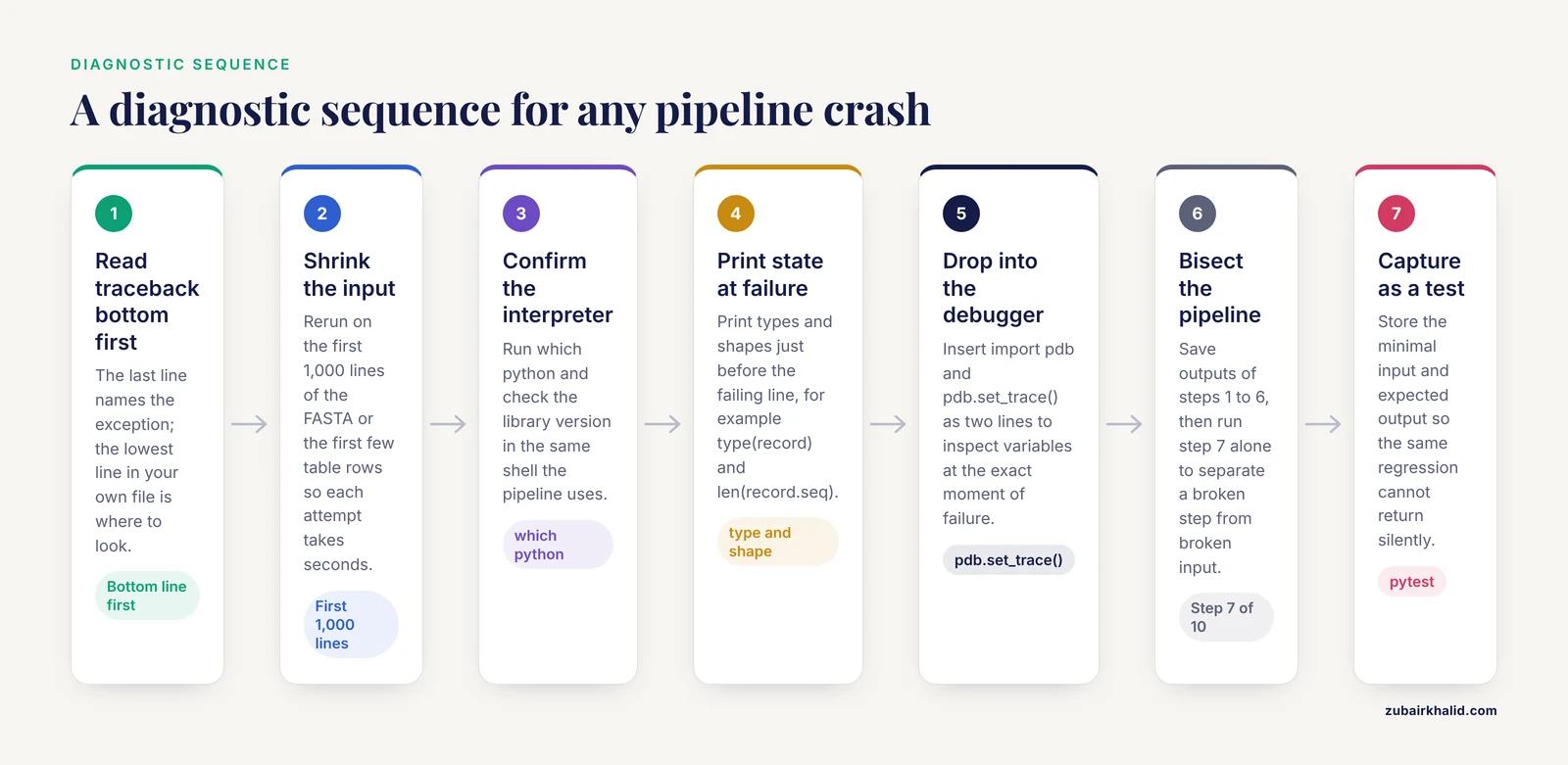
Before going error by error, here is the sequence that works for almost any pipeline crash. Follow it top to bottom every time. The discipline matters more than the specific bug.
- Read the full traceback, bottom line first. The last line names the exception type and message. The lines above it show the call chain. The bottom-most line in your own file is usually where to look.
- Reproduce the error with the smallest possible input. Take the first 1,000 lines of the FASTA or the first few rows of the table and rerun. Small inputs run in seconds, which lets you iterate on the fix instead of waiting an hour for the pipeline to reach the failure point again.
- Confirm the environment. Run
which pythonandpython -c "import Bio; print(Bio.version)"(or the equivalent for the library in question) in the same shell where the pipeline runs. A surprising number of errors are caused by running the script with a different interpreter than the one you tested with. - Print the actual state at the failure point. Insert a print of the variable types and shapes just before the failing line, for example
print(type(record), len(record.seq)). Type confusion between a string, a Seq object, and a list is one of the most frequent mechanisms behind bioinformatics Python errors. - Drop into the debugger at the failure point. Insert
import pdb; pdb.set_trace()... wait, that line uses a semicolon. Write it as two lines instead:
import pdb
pdb.set_trace()
You can then inspect variables interactively at the exact moment of failure. Python's built-in debugger is standard library tooling and works everywhere, including on clusters where you cannot install anything.
- Bisect the pipeline. If the failure is in step 7 of 10, run steps 1 through 6 and save their outputs. Then run step 7 alone on those saved outputs. This separates "the step is broken" from "the input the step received is broken," a distinction that halves debugging time on long pipelines.
- Write the failing case as a test. Once fixed, capture the minimal input and expected output in a test so the same regression cannot return silently. Continuous integration and automated testing are the recommended practice for research Python code [2].
Most errors fall into one of the eight categories below. They are ordered from most to least common.
The Troubleshooting Table
This table is the core reference for the article. Each row names a symptom, the likely cause, how to confirm it, and the fix. The sections after the table explain the mechanisms in depth.
| Symptom | Likely cause | How to confirm | Fix |
|---|---|---|---|
FileNotFoundError on a file you are sure exists | Relative path resolved from the wrong working directory, or a moved data directory | Run pwd in the launch shell, list the path with ls, compare against the path in the script | Use paths relative to the script location with pathlib.Path(file).parent, or pass all paths as arguments |
ModuleNotFoundError: No module named 'Bio' | Script run with a different interpreter or environment than the one where Biopython is installed | which python, then python -m pip show biopython in the same shell | Activate the intended conda or virtual environment, or launch with the environment's explicit interpreter path |
KeyError on a sequence or sample identifier | Identifier appears in one file but not the other, often due to differing header conventions, whitespace, or case | Print the set difference between the two identifier sets: set(a_ids) - set(b_ids) | Normalize identifiers (strip, case-fold) at load time and fail early with a clear message when an ID is missing |
ValueError: could not convert string to float on a data table | Missing values encoded as text (NA, -, empty cells) inside a numeric column | Print df.dtypes for a pandas DataFrame and inspect the offending column | Pass an explicit na_values list when reading, or coerce with pd.to_numeric(..., errors="coerce") and then handle the NaNs |
MemoryError or a frozen machine partway through a run | Reading a whole genome or full FASTQ file into memory instead of streaming it | Watch memory with htop or the cluster's accounting tools while the job runs | Iterate record by record with SeqIO.parse() instead of SeqIO.to_dict(), and process in chunks |
| Pipeline completes but results are shifted by one base | Zero-based versus one-based coordinate confusion between BED, GFF, and VCF-style conventions | Check a variant or feature with a known position against both conventions manually | Pick one internal convention, convert at every file boundary, and document it in the script header |
| Empty or truncated output file after a long run | The step downstream of a silent failure never received data, or an exception was caught and swallowed | Check the exit code of the previous step and the log it wrote | Let errors propagate, check return codes when shelling out, and fail loudly on empty inputs |
| Works in a notebook, fails in the pipeline | Notebook state hides an undeclared variable, file, or version dependency | Run the notebook top to bottom with "Restart and Run All" and diff the environment with pip freeze or conda list | Export the notebook to a script, pin the environment, and run the script as the pipeline stage |
| Different results on the cluster than on the laptop | Different library versions or different thread counts changing results (for example in parallel reduction steps) | Record and diff library versions on both machines | Pin exact versions in an environment file and set thread counts explicitly |
KeyError or StopIteration when parsing a record | Malformed or truncated input file, often a truncated download or an interrupted write | Count records with a quick parse loop, check file size against the source, and validate checksums | Re-download or re-generate the file and validate formats on ingest |
| Hangs forever with no error, high CPU but no output | An infinite loop in a parser hitting unexpected input, or a subprocess waiting on a prompt | Interrupt with Ctrl-C and read the traceback showing where it was stuck | Log progress every N records, add timeouts to subprocess calls |
| Results differ between reruns with identical input | Unset random seed, dictionary iteration over unordered sources, or leftover files from a previous run | Rerun in a clean output directory with a fixed seed | Seed every RNG, clean or version the output directory, and hash inputs |
Error Category 1: File Paths and Working Directories
This is the error you will hit most often, and its mechanism is simple. Python resolves relative paths against the current working directory of the process, which is the directory you were in when you launched the script, not the directory where the script file lives. A script that opens "data/genome.fa" works when launched from the project root and fails the moment you launch it from inside the scripts/ folder, even though nothing in the code changed.
The same failure appears in subtler forms. Pipeline configuration files sometimes contain paths that were correct on the author's machine. A workflow that ran fine on a workstation breaks on the cluster because the scheduler launches jobs from a different directory, or because the data directory was mounted at a different location. Multi-stage pipelines built by custom Python scripts that glue together tool outputs are especially vulnerable, because each stage may inherit or construct paths independently.
Diagnostic steps, in order:
- Read the path in the error message and check it with
lsfrom the exact directory where you launched the pipeline. - Print
os.getcwd()at the top of the failing script. Compare it with what you assumed. - Check whether the file itself is the problem. A truncated download, a zero-byte file from a failed transfer, or a file still being written by the previous stage all produce path-adjacent errors. Verify integrity against a checksum when the file came from a remote source.
The durable fix is to stop depending on the launch directory. Two standard patterns:
from pathlib import Path

# Paths relative to the script's own location
SCRIPT_DIR = Path(__file__).resolve().parent
DATA_DIR = SCRIPT_DIR.parent / "data"

fasta_path = DATA_DIR / "genome.fa"
Or, better for pipelines, require every path as an explicit argument:
import argparse

parser = argparse.ArgumentParser()
parser.add_argument("--fasta", required=True)
parser.add_argument("--outdir", required=True)
args = parser.parse_args()
Then have the workflow manager (Snakemake, Nextflow, or even a shell driver) supply the paths, so no stage invents its own. As an extra guard, fail early and loudly:
fasta_path = Path(args.fasta)
if not fasta_path.is_file():
    raise FileNotFoundError(f"Input FASTA not found: {fasta_path}")
Failing at step 1 with a clear message beats failing at step 6 with a confusing one. Checking input existence at ingest is a core defensive habit in production-quality research code.
Error Category 2: Environments, Dependencies, and Version Drift
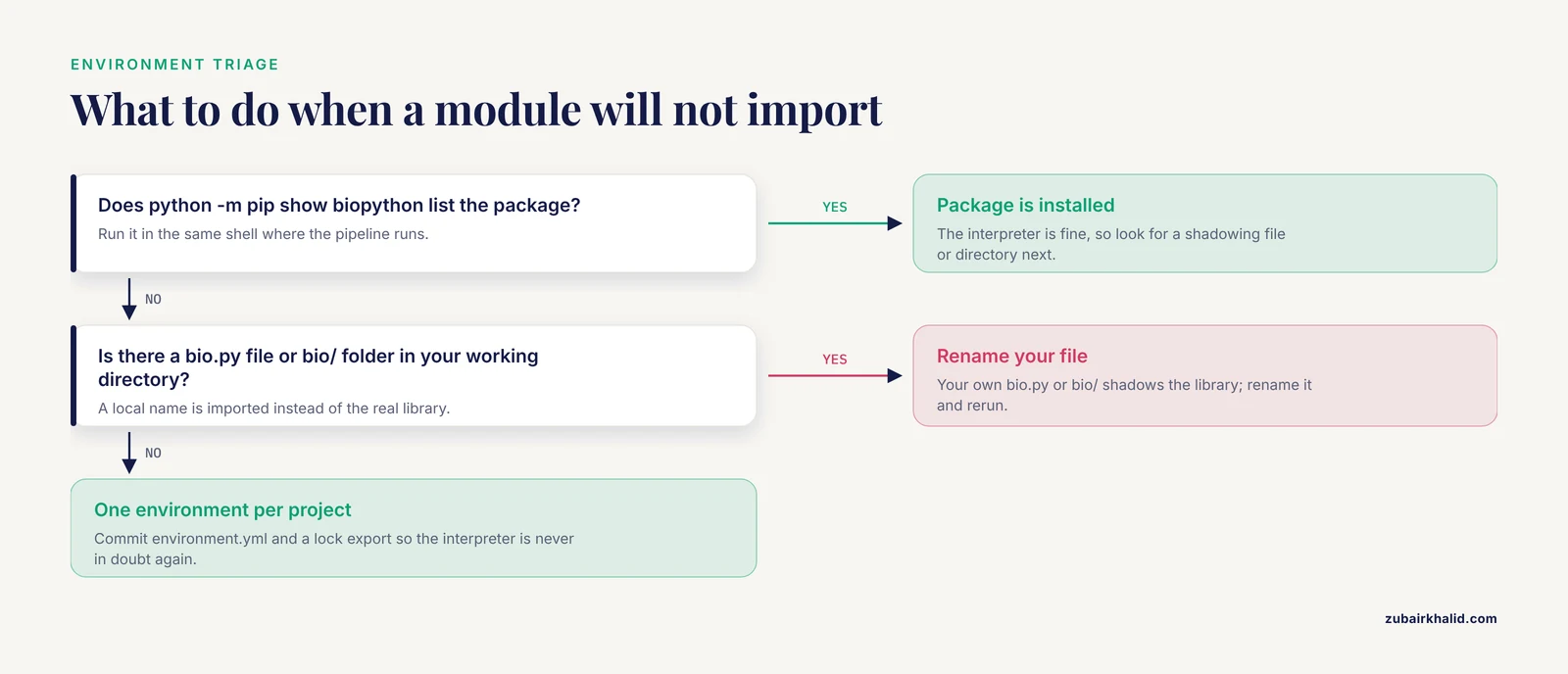
ModuleNotFoundError almost never means the library is missing. It means the library is missing from the interpreter that is actually running your script. On a typical machine there are several Pythons: the system Python, one or more conda environments, virtualenvs inside project folders, and sometimes a Homebrew or cluster-module Python. Biopython installed in one of them is invisible to the others.
The mechanism: when you run python script.py, the shell searches your PATH for the first python executable. When you run pip install biopython, the shell finds the first pip, which may belong to a different environment than the python you will use later. The result is the classic trap of installing a package and then still getting ModuleNotFoundError for it.
Diagnostic steps:
- In the same shell where the pipeline runs, execute
which pythonandpython, version. - Run
python -m pip show biopython. Usingpython -m pipguarantees the pip you inspect belongs to the interpreter you are asking about, which removes the ambiguity entirely. - If the package is present but still fails to import, check for a shadowing problem: a file in your working directory named
bio.pyor a directory namedbio/will be imported instead of the real library. Rename your own file if so.
The durable fix is one environment per project, with pinned versions. Conda is the de facto standard for this in bioinformatics because many core tools have non-Python dependencies. A minimal, reproducible environment file:
name: mypipeline
channels:
  - conda-forge
  - bioconda
dependencies:
  - python=3.11
  - biopython=1.83
  - pandas=2.2
Create it with conda env create -f environment.yml, activate it with conda activate mypipeline, and export a snapshot of the exact solved environment with conda env export > environment.lock.yml once the pipeline works. Commit both files. Version drift between a laptop and a cluster is a common reason identical code produces different results, and pinning is the standard answer.
A related trap: code that works in a Jupyter notebook and fails when exported to the pipeline. Notebooks accumulate hidden state. A variable defined in cell 3 and used in cell 40 survives across edits in ways that a fresh script process will not reproduce. The habit that prevents this is to restart the kernel and run all cells from the top before trusting a notebook result, then to move stable logic into a real script. Interactive frameworks built on Python 3 and Jupyter are excellent teaching and exploration tools, and production pipelines should consume scripts derived from them rather than the notebooks themselves.
Error Category 3: File Format and Parsing Errors
Biological file formats are forgiving to humans and unforgiving to parsers. FASTA headers vary between databases and between versions of the same database. FASTQ quality encoding shifted historically from Phred+64 to Phred+33. GenBank, GFF, BED, VCF, and SAM each carry their own coordinate and field conventions. A parser written against yesterday's file breaks silently or loudly against today's.
The loudest failure mode is an exception during parsing. The quiet failure mode is far worse: the parser accepts the file and produces subtly wrong objects. This is where a Biopython-based refresher on correct usage pays off, so here is a compact Biopython tutorial passage covering the parsing patterns where errors concentrate.
Reading sequences record by record, which is the correct default for large files:
from Bio import SeqIO

count = 0
for record in SeqIO.parse("reads.fastq", "fastq"):
    count += 1
    if count <= 3:
        print(record.id, len(record.seq))
print(f"Total records: {count}")
The mistake to avoid is SeqIO.to_dict(SeqIO.parse(...)) on a large file. to_dict() materializes every record in memory at once. Streaming with parse() holds one record at a time. On a 30-million-read FASTQ file, the difference between these two lines is the difference between a working script and an out-of-memory kill.
Extracting an identifier from a FASTA header is a recurring source of KeyError when joining files:
for record in SeqIO.parse("contigs.fa", "fasta"):
    full_header = record.description   # e.g. "sp|P12345|ALBU_HUMAN Reviewed..."
    short_id = record.id               # e.g. "sp|P12345|ALBU_HUMAN"
record.id and record.description are not the same string, and neither may match the identifier style used in a second file. When a join between a sequence file and an annotation table produces KeyError, print the set difference between the two identifier collections before touching any other logic:
fasta_ids = {r.id for r in SeqIO.parse("contigs.fa", "fasta")}
table_ids = set(table["gene_id"])
missing = fasta_ids - table_ids
print(f"{len(missing)} IDs in FASTA but not in table, e.g.:", list(missing)[:5])
Diagnostic steps for parsing errors:
- Open the actual failing file with
headand look at the raw bytes. Ten seconds of looking at real data beats twenty minutes of guessing what the parser expects. - Count the records. A record count of zero from a file you know is nonempty usually means the format string is wrong (
"fasta"versus"fastq"versus"genbank"). - Check line endings and compression. A
.fa.gzfile passed to a parser expecting plain text produces garbage or an immediate failure. Decompress explicitly or use a gzip-aware open. - Validate on ingest. When your pipeline accepts input files, parse a few records at startup and abort with a clear message if the format is wrong. This converts a crash at step 7 into a rejection at step 1.
Error Category 4: Memory Errors
Memory failures in bioinformatics pipelines follow one mechanism: the code holds all data in memory when it should stream. The symptom is a MemoryError, or more commonly on clusters, the scheduler kills the job without a Python traceback at all, leaving only an out-of-memory marker in the job log.
The mechanism in detail. Python objects carry substantial per-object overhead, and a parsed sequence record is far larger on the heap than the characters it contains. Loading a 3-billion-base genome into individual Python string objects can consume tens of gigabytes where the raw file occupies a few. Machine learning workflows on large feature tables hit the same wall: teaching platforms built around Python data analysis for bioinformatics-scale problems emphasize streaming and chunked processing for exactly this reason [6].
Diagnostic steps:
- Watch memory during the run with
htopon a workstation orsacctplus the scheduler's accounting on an HPC system. If usage climbs linearly until the job dies, you are accumulating something in a list, dictionary, or DataFrame. - Look for accumulator patterns in your code:
records = []followed by appends inside a parse loop, orpd.concatinside a loop, which rebuilds the frame on every iteration.
The fix is streaming and chunking:
from Bio import SeqIO

total_bases = 0
n_gc = 0
for record in SeqIO.parse("genome.fa", "fasta"):
    seq = str(record.seq).upper()
    total_bases += len(seq)
    n_gc += seq.count("G") + seq.count("C")

print("GC fraction:", n_gc / total_bases)
This loop computes a whole-genome statistic in constant memory. The general rule: reduce or write out as you go, never accumulate the full dataset unless you have proven it fits. When accumulation is genuinely required, prefer purpose-built compressed structures (such as k-mer counting libraries or database-backed stores) over plain Python containers.
Error Category 5: Type and Data Structure Errors
These errors raise exceptions, which makes them the friendliest category. The exception message tells you the type involved, and your job is to find where that type was created.
The recurring bioinformatics variants:
String versus Seq object. Biopython's Seq objects support slicing and many string operations but are not strings. Code like record.seq.startswith("ATG") works, while some functions that expect a plain str will fail with a TypeError or produce unexpected behavior. Convert explicitly with str(record.seq) at the boundary where a plain string is needed.
Numeric columns silently containing strings. A tabular results file with missing values encoded as NA, NaN, hyphens, or empty strings loads as object dtype instead of numeric, and the first arithmetic operation raises ValueError: could not convert string to float. Confirm with df.dtypes, fix at read time with pd.read_csv(..., na_values=["NA", "-", ""]), and then decide explicitly how to treat missing values. A machine-learning pipeline that merges tool outputs into a single feature table, combining numeric and categorical predictors, is a typical place where this class of error surfaces, because every contributing tool encodes missingness differently.
Index confusion. Python indexes from zero. Pandas DataFrames carry their own index, which after a filter or sort is no longer a clean 0-to-n range. df.iloc and df.loc return different rows, and df.loc raises a KeyError if no row has that label. Call df.reset_index(drop=True) when the positional meaning matters.
Iteration over a scalar. for x in record.id iterates over the characters of the string, a bug that produces bizarre downstream results rather than an exception. When an iteration behaves oddly, print type() of the thing being iterated first.
Diagnostic steps: print types and shapes at the failure boundary (print(type(x), len(x) if hasattr(x, "len") else "")), and add assertions for the types your code actually requires. An assertion that fires with a clear message is a debugging gift. An implicit type error three functions later is a debugging tax.
Error Category 6: Silent Logic Errors, Especially Coordinates
Silent logic errors are the most dangerous category because nothing crashes. The pipeline finishes, the output looks plausible, and the result is wrong.
The dominant mechanism in genomics is coordinate convention. BED files count bases from zero with an exclusive end (a feature at BED position 100 with end 200 covers bases 100 through 199 in one-based human terms). GFF, GTF, and most human-facing genomic coordinates count from one with an inclusive end. VCF uses one-based positions. When a script slices a sequence with coordinates taken from one format and applies them in another convention, every extracted feature is shifted by one base, or truncated at one end. No exception fires. Downstream translations, motif searches, or variant annotations are wrong in ways that can survive review.
The second mechanism is strand. A reverse-complement feature translated without record.seq.reverse_complement() produces a plausible-looking peptide of nonsense. The third is off-by-one loop bounds in custom parsers, for example reading a fixed-width quality line with one character too few.
How to catch what does not raise:
- Test against a known answer. Pick one gene or feature whose correct sequence you can verify by eye or from a reference database, run it through the pipeline, and compare. A single verified positive case catches most coordinate and strand errors.
- Check lengths at boundaries. If you extract a feature spanning 150 bases, assert that the extracted object has length 150. Length assertions catch coordinate-convention errors with near-perfect sensitivity.
- Round-trip sanity checks. Reverse-complementing a sequence twice must return the original. Translating and back-translating a coding sequence must reproduce its length. Cheap round-trip checks embedded as assertions catch whole classes of silent errors.
- Log intermediate statistics. Record counts, sequence length distributions, and GC content at each stage. A stage that suddenly emits half the expected records, or sequences of implausible length, announces the bug even when no exception does.
This category is where automated testing earns its keep. TeachOpenCADD's maintainers apply automated continuous-integration testing to research pipeline code precisely because silent errors in scientific code are too costly to catch by eye [2]. A test that feeds a 3-record synthetic FASTQ through each stage with a hand-computed expected output is worth more than an hour of manual inspection.
Error Category 7: Subprocesses, Parallelism, and Workflow Managers
Many bioinformatics Python scripts are orchestrators: they call external tools such as aligners or assemblers through subprocess, or fan work out across threads and processes. Errors here have their own signatures.
Swallowed exit codes. By default, a failing external command does not raise. subprocess.run(["tool", "args"]) returns a result object, and if you never inspect result.returncode, a tool that failed with a fatal error looks like a successful step. Every downstream stage then processes an empty or partial file, and the real error surfaces far from its cause. The fix is one line: subprocess.run(cmd, check=True), which raises CalledProcessError with the tool's own stderr attached. When you need the tool's error text in your log, capture it explicitly and print it before raising.
Invisible stderr. Tools write warnings and progress to stderr, which a pipeline may discard. When a step behaves oddly, rerun it manually in a shell and watch stderr. The pipeline should mirror stderr to a per-stage log file, not swallow it.
Parallel result collection. With multiprocessing or thread pools, an exception inside a worker often appears only when the result is collected, with a traceback that points at collection rather than the real failure. Run the same work single-threaded on a small input to see the true traceback, then reintroduce parallelism once the logic is correct. Nondeterministic results across runs usually mean an unordered merge of per-worker results, fixed by sorting or keying results before combining.
Hangs. A stage that hangs with high CPU is often a parser loop hitting unexpected input. A stage that hangs with no CPU is often a subprocess waiting on an interactive prompt (a tool asking for confirmation) that the pipeline never answers. The interrupt-and-inspect method works for both: press Ctrl-C, read the traceback showing exactly where execution was stuck, and fix the input or add the missing flag. Timeouts on subprocess calls convert silent hangs into catchable errors.
Scheduler interactions. On HPC systems, jobs inherit a different environment, a different working directory, and strict memory and time limits. Stages that work interactively fail under the scheduler for reasons of resource accounting rather than code. Confirm the stage's actual memory and wall-clock use from the scheduler's accounting output before changing code, and request resources based on measured use plus a modest margin.
Modular design reduces this category of pain. Experience from building a modular open-source 3D viewer in Python showed that attention to modularization and code organization made it feasible for new contributors with no software development background to add working modules [7]. The same principle applies to pipelines: a stage that is a self-contained function or script with explicit inputs, outputs, and a return code can be debugged alone. A stage that reaches into shared global state cannot.
Error Category 8: Reproducibility and State Leakage
The rarest and most corrosive category: the pipeline runs, produces results, and then produces different results on the next identical run.
Mechanisms, in order of likelihood:
- Unset random seeds. Any step using randomness (simulations, bootstraps, train-test splits) must set a seed. Without one, results differ by design.
- Leftover state in the output directory. A stage that appends to an existing file, or skips work when it finds an output file already present, incorporates history from previous runs into the current result. The test is simple: delete the entire output directory and rerun. If results change, the pipeline depends on its own leftovers.
- Unpinned inputs. A database that updates, a remote URL that now serves a different version, or a tool upgraded between runs changes results without any code change. Record versions of every external resource at run time and write them into the log.
- Implicit dependency on files outside the declared inputs. A stage that reads a cache, a config default, or a file in the home directory carries state the workflow manager cannot see.
The fix for the whole category is the same discipline that containerized, FAIR-compliant metagenomics workflows formalize: make every input explicit, version every dependency, and make the output directory a pure function of the inputs [3]. Run the pipeline from a clean directory as a periodic integrity check, not only when something seems wrong.
Debugging Tools Worth Learning
Four tools cover nearly every need, and all are standard Python.
The built-in debugger, pdb. Insert import pdb and pdb.set_trace() at the failure point, rerun, and you can print variables, step line by line, and inspect the call stack. In Python 3.7 and later, breakpoint() achieves the same with less typing. This is the fastest route from "I do not understand this error" to "I see exactly which variable is wrong."
Logging instead of print. Prints scattered through a pipeline become noise. The logging module lets each stage write timestamped messages at named levels to a file, so a long pipeline leaves an auditable record. Log one line per input file processed, per record-count checkpoint, and per stage boundary. When a run fails, the log tells you the last successful checkpoint, which converts a bisect search into a direct lookup.
Assertions and schema checks. An assertion is a one-line contract: assert len(seq) % 3 == 0, "CDS length not a multiple of 3". Assertions are free documentation and free testing. For tabular inputs, a short validation block at load time (expected columns present, dtypes as expected, identifier sets overlapping as expected) rejects bad inputs before they propagate.
pytest for regression capture. Every bug you fix becomes a test. Store the minimal failing input as a small fixture file, write a test asserting the correct output, and the bug can never silently return. This practice, combined with continuous integration, is the software-engineering baseline recommended for research Python pipelines [2].
Jupyter notebooks deserve a balanced mention. They are outstanding for exploration and for interactive teaching of bioinformatics fundamentals [5], and structured multi-domain Python teaching platforms use them to connect learners with research practice [6]. Their weakness is hidden state, which is why the rule is: explore in a notebook, then restart the kernel, run all cells, and promote the validated logic into a script the pipeline calls.
Common Mistakes and Limitations
These are the mistakes that cost the most time in real bioinformatics projects, stated plainly.
Editing code while an old process still runs. If a long job is executing a script you then edit, the running process uses the old code from memory. Confirm no stale job is running before assuming your edit had no effect.
Testing only on the happy path. A pipeline tested on one clean sample will meet a truncated file, an empty FASTA, or a sample with zero reads in production. Feed each stage a deliberately broken small input and confirm it fails with a clear message rather than silently producing garbage.
Trusting output plausibility. A GC content of 0.52 looks right for bacterial data, which is exactly why a coordinate bug producing plausible numbers survives. Plausibility is not validation. Verify at least one known-positive case per stage.
Ignoring warnings. Python warnings and library deprecation messages are pre-exceptions. A FutureWarning today is a changed behavior or a crash after the next dependency upgrade. Fix warnings when they appear, not after they become errors in the middle of a paper deadline.
Debugging on full-size data. Iterating on a 30-minute run costs hours. Reduce every bug to the smallest input that reproduces it. If you cannot reduce it, add logging checkpoints until you can localize the failing record.
Assuming the environment is the environment. Conda environments get edited, cluster modules get swapped, and containers get rebuilt. Verify versions at the top of every significant run and write them to the log.
Conflating correlation of failure with cause. The stage that crashes is often not the stage that failed. A downstream KeyError may be caused by an upstream parsing quirk three stages back. Bisect with saved intermediate outputs rather than patching symptoms at the crash site.
One limitation belongs to the field rather than to any script. Debugging practices documented here address code correctness, not scientific validity. A pipeline free of runtime errors can still encode a wrong assumption about the biology, and no debugger detects that. Peer review, domain expertise, and validation against independent data remain the checks for scientific errors.
Prevention: Habits That Remove Whole Error Categories
Prevention is cheaper than debugging, and the habits are small.
- One pinned environment per project. An
environment.ymlor lock file, committed to the repository, eliminates version drift and mostModuleNotFoundErrorevents. Export the solved environment after every deliberate change. - All paths as arguments, none hard-coded. The workflow manager owns paths. Scripts own logic. This single rule removes the most common error category entirely.
- Validate inputs at ingest. Existence, format, record counts, identifier conventions, and file sizes checked in the first seconds of a run convert late crashes into early rejections with actionable messages.
- Fail loudly. Use
check=Trueon subprocess calls, never catch exceptions without re-raising or handling them meaningfully, and raise on empty or implausible outputs. Silent failure is the enemy. A pipeline that stops at the first real problem with a clear message is a pipeline that can be trusted. - Log stage boundaries and counts. One log line per stage with records in, records out, and elapsed time gives you a map of every run. When something breaks, the map points at the boundary.
- Stream by default. Parse large files record by record. Accumulate only proven-small results.
- Fix one known answer per stage. For each transformation, keep one tiny input with a hand-verified expected output, ideally as an automated test. Coordinate, strand, and indexing errors cannot survive this check.
- Seed and snapshot. Set random seeds, record tool and database versions in the log, and rerun from a clean output directory periodically to confirm the pipeline is a pure function of its inputs.
- Promote notebooks to scripts. Restart and run all before trusting notebook results, then move stable code into scripts under version control. Notebooks explore, scripts produce.
- Version control everything, including the workflow definition. The ability to diff the exact code and configuration that produced a result is what makes a debugging session an investigation rather than an archaeology project.
These practices mirror what mature research-pipeline projects do. TeachOpenCADD applies testing with automated continuous integration and idiomatic Python style to notebooks serving structural bioinformatics and cheminformatics [2], and modular, well-organized codebases are demonstrably easier for newcomers to extend safely [7]. The payoff is not elegance. The payoff is that when something breaks at 2 a.m. before a deadline, the traceback points at a small, tested, logged unit with a known environment, and the fix takes minutes instead of days.
Frequently Asked Questions
What is the first thing to check when my bioinformatics Python pipeline crashes?
Read the last line of the traceback and check the file path it names. Path and working directory errors are the most common cause, so confirm the file exists from the exact directory where you launched the script before investigating anything else.
Why does Python say a module like Biopython is not installed when I installed it?
Because the interpreter running your script is not the environment where you installed it. Run which python and python -m pip show biopython in the same shell to see which interpreter is in use, then activate the correct conda or virtual environment.
Why does my script run out of memory on large FASTQ files?
Because the code loads the whole file into memory instead of streaming it. Replace SeqIO.to_dict(SeqIO.parse(...)) with a plain loop over SeqIO.parse(...) so only one record is held at a time, and accumulate statistics rather than records.
How do I find bugs that do not raise any error, like coordinate off-by-one mistakes?
Test each stage against a known answer, assert expected lengths at every boundary, and log per-stage statistics such as record counts. Silent errors are caught by verification, not by exception handling.
How do I debug a step that calls an external command-line tool?
Use subprocess.run(cmd, check=True) so a failed tool raises immediately with its stderr attached, and mirror tool stderr to a log file. Then rerun the failing command manually in a shell to see its full output.
My notebook works but the pipeline version of the same code fails. Why?
The notebook carried hidden state from earlier cells, such as a variable, file, or library version the fresh script process does not have. Restart the kernel, run all cells from the top, then export the validated logic to a script and run that script as the pipeline stage.
How do I make my pipeline give the same results on every run?
Set a random seed for every stochastic step, run from a clean output directory, pin all dependency versions, and record the versions of external databases and tools in the log. If results still differ, some file outside the declared inputs is being read.
What debugging tools should I learn first as a beginner in Python for bioinformatics?
Learn the built-in debugger via breakpoint(), the logging module, assertions for input validation, and pytest for capturing fixed bugs as tests. These four standard tools cover the vast majority of debugging needs without any installation.
Sources
- An Introduction to Programming for Bioscientists: A Python-Based Primer
- TeachOpenCADD 2022: open source and FAIR Python pipelines to assist in structural bioinformatics and cheminformatics research
- Biofilm marker discovery with cloud-based dockerized metagenomics analysis of microbial communities
- Regression-Based Modeling of Antisense Oligonucleotide Efficacy Using Sequence, Structural, and Off-Target Features
- An Introduction to Applied Bioinformatics: a free, open, and interactive text.
- A multi-dimensional and hierarchical comprehensive experimental platform based on Python
- ABOUT CREATING OPEN-SOURCE 3D MODULAR VIEWER IN PYTHON