How to De-identify Genomic Data in the Cloud
By Dr. Zubair Khalid, DVM, MS, PhD ·

By the end of this guide you will be able to take a human sequencing dataset (FASTQ, BAM or CRAM, and VCF files), remove or replace the identifiers embedded in file names, headers, and metadata, verify that the scrubbing worked, and move the de-identified files into a locked-down cloud bucket on AWS with encryption, private access, and audit logging in place. You will also understand why genomic de-identification is fundamentally harder than removing names from a spreadsheet, and which mistakes most often cause accidental re-identification.
What you need on hand before you start:
- A Linux or macOS workstation with
samtools(version 1.9 or later),bcftools(1.9 or later),tabix, Python 3.8+, and the AWS CLI v2 installed and configured with credentials that have least-privilege access to your target account. - A complete inventory of the files you plan to move, including sidecar files such as
.bai,.csi,.tbi, index files, MultiQC or pipeline logs, and any spreadsheet of sample metadata. - A written agreement on the pseudonym scheme (who holds the linkage key, where it lives, who can rotate it) signed off by your institution's privacy or compliance office before a single byte leaves your environment.
Why genomic de-identification is different
Most data de-identification guidance assumes you can strip direct identifiers and the residual data is safe. Genome sequences break that assumption. A genome is a biometric that cannot be rewritten. Two copies of the same individual's sequence are comparable across any study, any platform, and any decade, so a dataset that is "anonymous" today can be re-identified tomorrow when a relative or the individual themself uploads their own sequence to a consumer genealogy service. This is why the iDASH National Center for Biomedical Computing has argued that protecting genomes requires specialized infrastructure and tools beyond what HIPAA, the Common Rule, and GINA alone provide, and has run critical assessment competitions to evaluate cryptographic techniques that allow computation directly on encrypted genomes in public clouds [1] [2].
The iDASH secure computation challenges showed that analyses such as genome-wide association tasks can be run on encrypted data in working software, though the techniques must still be evaluated for efficiency and cost at production scale [2]. In practice, most laboratories today combine three layers rather than relying on any single one:
- De-identification: removing or replacing direct identifiers in files, headers, metadata, and logs before data leaves your control.
- Technical controls: encryption at rest and in transit, private networking, least-privilege access, and audit trails on the cloud side.
- Governance: data use agreements, authorized-access policies, and stewardship outcomes that define how data can be used, retained, and shared [3].
These layers are complementary. A perfectly de-identified file sitting in a public bucket is still a breach. An encrypted file that still carries the patient's medical record number in its BAM header is also a failure.
The regulatory backdrop in the United States matters for clinical and research laboratories alike. Reviews of genomic data management in the cloud describe how laboratories must contend with HIPAA obligations, research regulations, and public database submission rules simultaneously, and how cloud adoption was driven largely by the sheer volume of next-generation sequencing data overwhelming on-premise infrastructure [4]. More recent systematic work on cloud cybersecurity in laboratory medicine catalogs the recurring risk categories that apply to any genomic workflow: data breaches and unauthorized access, HIPAA and GDPR compliance, data sovereignty, shared infrastructure vulnerabilities, insider threats, and limited visibility and control over cloud environments [5].
The three rules that drive every step
Before the walkthrough, internalize three rules that prevent most failures:
Rule 1: identifiers hide in more places than you think. Patient identifiers appear in FASTQ and BAM file names, BAM read group (@RG) tags, VCF sample columns, CRAM headers, index file names, pipeline log files, MultiQC reports, S3 object keys and metadata, and spreadsheet sidecars. A scrubbing procedure that only touches one file type is incomplete.
Rule 2: the linkage key never travels with the data. De-identification is reversible pseudonymization. The mapping between real identifiers and codes is itself protected health information. Keep it on an access-controlled local system, not in the same bucket, project, or account as the de-identified data.
Rule 3: verify, then upload. Scan the finished files for identifier patterns before they leave your environment. Once data is in the cloud, undoing a leak means deletion requests, audit reviews, and possibly incident reports.
Step-by-step: de-identifying genomic data in the cloud
The walkthrough below uses a concrete example. You have three files from patient TUMOR-12-3456 (a BAM, its index, and a joint-called VCF) plus a FASTQ pair, and you are moving them into an AWS account for cloud bioinformatics analysis.
Step 1: inventory every file and every identifier
List all files, including hidden sidecars, and record what each contains:
find ./project_tumor12/ -type f | sortExpected output:
./project_tumor12/logs/multiqc_report.html
./project_tumor12/logs/pipeline_run.log
./project_tumor12/sample-sheet.csv
./project_tumor12/sequences/TUMOR-12-3456_R1.fastq.gz
./project_tumor12/sequences/TUMOR-12-3456_R2.fastq.gz
./project_tumor12/alignments/TUMOR-12-3456.bam
./project_tumor12/alignments/TUMOR-12-3456.bam.bai
./project_tumor12/variants/cohort.vcf.gz
./project_tumor12/variants/cohort.vcf.gz.tbi
Now check where the identifier TUMOR-12-3456 appears:
grep -rl "TUMOR-12-3456" ./project_tumor12/ --include="*.csv" --include="*.log" --include="*.html"
samtools view -H ./project_tumor12/alignments/TUMOR-12-3456.bam | grep "@RG"
bcftools query -l ./project_tumor12/variants/cohort.vcf.gz
Expected @RG output, showing the identifier sitting in the header:
@RG ID:TUMOR-12-3456.lane1 SM:TUMOR-12-3456 LB:TWIST-EXOME-01 PL:ILLUMINA PU:HFY5LALXX.1Expected bcftools output (sample column names):
TUMOR-12-3456
NORMAL-12-3456
This inventory step is where you discover the scope of the job. The log files and the MultiQC report matched the grep, which means they are PHI and cannot be uploaded as-is.
Step 2: build the pseudonym map locally
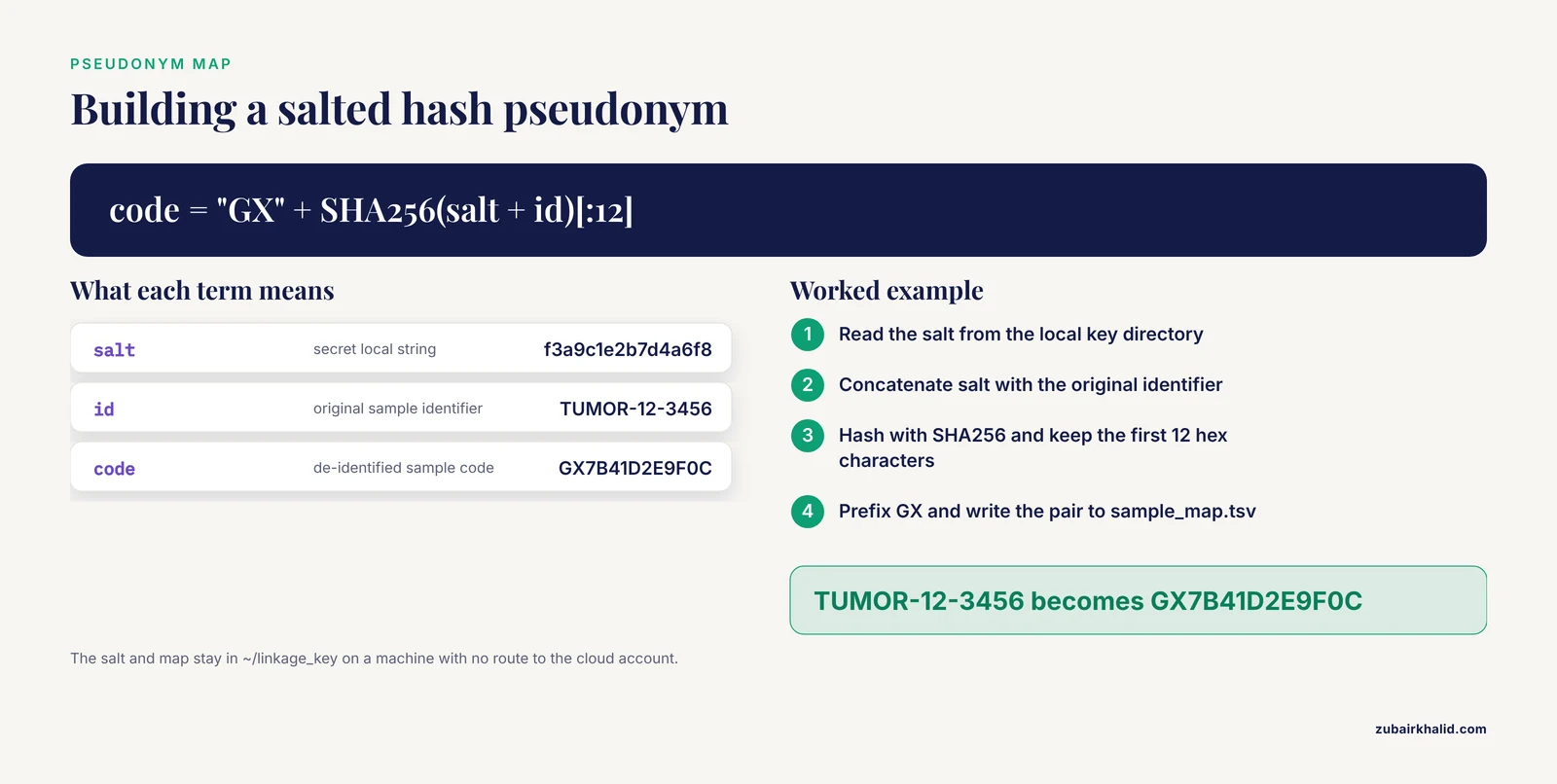
Generate a deterministic code for each sample using a salted hash so the same individual always receives the same code across files and batches, but the code reveals nothing about the original identifier. Do this on a local machine that never uploads the salt or the map.
chmod 700 ~/linkage_key && mkdir -p ~/linkage_key
printf 'f3a9c1e2b7d4a6f8' > ~/linkage_key/salt.txt
chmod 600 ~/linkage_key/salt.txt

python3 - <<'PY'
import hashlib
salt = open('/home/analyst/linkage_key/salt.txt','rb').read().strip()
samples = ["TUMOR-12-3456", "NORMAL-12-3456"]
with open('/home/analyst/linkage_key/sample_map.tsv','w') as out:
    out.write("original_id\tdeid_code\n")
    for s in samples:
        code = "GX" + hashlib.sha256(salt + s.encode()).hexdigest()[:12].upper()
        out.write(f"{s}\t{code}\n")
PY

cat ~/linkage_key/sample_map.tsv
Expected output:
original_id	deid_code
TUMOR-12-3456	GX7B41D2E9F0C
NORMAL-12-3456	GX5A88C31B6D2
The salt file and sample_map.tsv stay in ~/linkage_key/ on a machine with no route to the cloud account used for analysis. Back this directory up to your institution's controlled storage, because losing the key permanently orphans the dataset.
A note on determinism versus randomness: deterministic codes (same input, same output) are what make cross-file joins possible without the key. If your project does not need cross-batch joins, random codes with the key in a database are slightly safer against dictionary attacks on the code space, though a 12-hex-character salted hash space is already resistant to guessing.
Step 3: rename the FASTQ files
FASTQ sequence headers from standard Illumina bcl conversion (@ST-E00276:158:HFY5LALXX:1:1101:23455:9794 1:N:0:ATCACG) contain instrument, flowcell, and tile coordinates but usually not a patient identifier. The patient identifier lives in the file name and in any sample sheet. Rename the files to the pseudonym and recompute nothing inside the gzip stream:
cp sample_map.tsv /tmp/ 2>/dev/null || true
deid=GX7B41D2E9F0C
mv TUMOR-12-3456_R1.fastq.gz ${deid}_R1.fastq.gz
mv TUMOR-12-3456_R2.fastq.gz ${deid}_R2.fastq.gz
Then verify the header itself carries no personal identifier:
zcat GX7B41D2E9F0C_R1.fastq.gz | head -n 4Expected output:
@ST-E00276:158:HFY5LALXX:1:1101:23455:9794 1:N:0:ATCACG
GATCGGAAGAGCACACGTCTGAACTCCAGTCA
+
CCCCCCCIIIIIIIIIIIIIIIIIIIIIIIII
If your sequencing provider embeds accession or patient identifiers in the FASTQ header line (some LIMS configurations do), you must rewrite the first token of every four-line record. A simple awk pass over a streamed gzip handles this, but confirm checksums change as expected and read counts stay identical afterward.
Step 4: scrub the BAM header
The @RG SM: (sample) and ID: (read group) tags are the classic leak. Build a corrected header and apply it:
samtools view -H TUMOR-12-3456.bam > header.sam
sed -e 's/ID:TUMOR-12-3456.lane1/ID:GX7B41D2E9F0C.lane1/' \
    -e 's/SM:TUMOR-12-3456/SM:GX7B41D2E9F0C/' header.sam > header_deid.sam
diff header.sam header_deid.sam
Expected diff, confirming exactly two changed lines:
2c2
< @RG	ID:TUMOR-12-3456.lane1	SM:TUMOR-12-3456	LB:TWIST-EXOME-01	PL:ILLUMINA	PU:HFY5LALXX.1
---
> @RG	ID:GX7B41D2E9F0C.lane1	SM:GX7B41D2E9F0C	LB:TWIST-EXOME-01	PL:ILLUMINA	PU:HFY5LALXX.1
Apply the new header and rebuild the index:
samtools reheader header_deid.sam TUMOR-12-3456.bam > GX7B41D2E9F0C.bam
samtools index GX7B41D2E9F0C.bam
mv TUMOR-12-3456.bam.bai GX7B41D2E9F0C.bam.bai 2>/dev/null || rm TUMOR-12-3456.bam.bai
Two things to watch here:
samtools reheadercopies the entire file, so for large WGS BAMs run it against the final storage volume with enough free space, or usesamtools reheader -i header_deid.sam file.bamfor an in-place update when the file is CRAM or when the new header is the same length as the old one in BAM format.- Always regenerate or rename the index. An index file named after the original identifier is a leak, and a stale index against a reheaded BAM will cause downstream tools to fail with offset errors.
Step 5: rename samples in the VCF
For a single-sample VCF, bcftools reheader -s takes a two-column or ordered-list mapping. For a multi-sample joint VCF, provide a file with one new name per line, in the same order as the existing samples (confirm the order first with bcftools query -l):
bcftools query -l cohort.vcf.gz > old_names.txt
# Create new_names.txt with the matching pseudonym on each line, same order
paste old_names.txt new_names.txt
Expected output for the mapping check:
TUMOR-12-3456	GX7B41D2E9F0C
NORMAL-12-3456	GX5A88C31B6D2
bcftools reheader -s new_names.txt cohort.vcf.gz -o cohort_deid.vcf.gz
bcftools query -l cohort_deid.vcf.gzExpected output:
GX7B41D2E9F0C
GX5A88C31B6D2
Then re-index and scan the header and structured annotations for residual identifiers:
tabix -p vcf cohort_deid.vcf.gz
zcat cohort_deid.vcf.gz | grep -iE 'mrn|patient|subject|TUMOR-12|NORMAL-12' || echo "clean"
Expected output:
cleanDo not forget VCF header lines such as ##tumor_sample= and ##normal_sample= in somatic pipelines. Mutect2-style output writes these into the header, and bcftools reheader -s only renames the sample columns. Strip or replace those lines with bcftools annotate -h or by editing the header through bcftools reheader -h new_header.txt.
Step 6: handle logs, reports, and derived files
Pipeline logs and QC reports frequently reproduce command lines, file paths, and sample names verbatim. Options, in order of preference:
- Regenerate reports from de-identified inputs (rerun MultiQC against the renamed files).
- Redact with a scripted find-and-replace applied to every mapped identifier across all text artifacts, then verify with grep.
- Exclude the artifacts from upload entirely.
Also review S3 object keys and object metadata at upload time. Uploading logs/TUMOR-12-3456/multiqc_report.html to a bucket leaks the identifier into the path even if the content is clean.
Step 7: run a verification scan
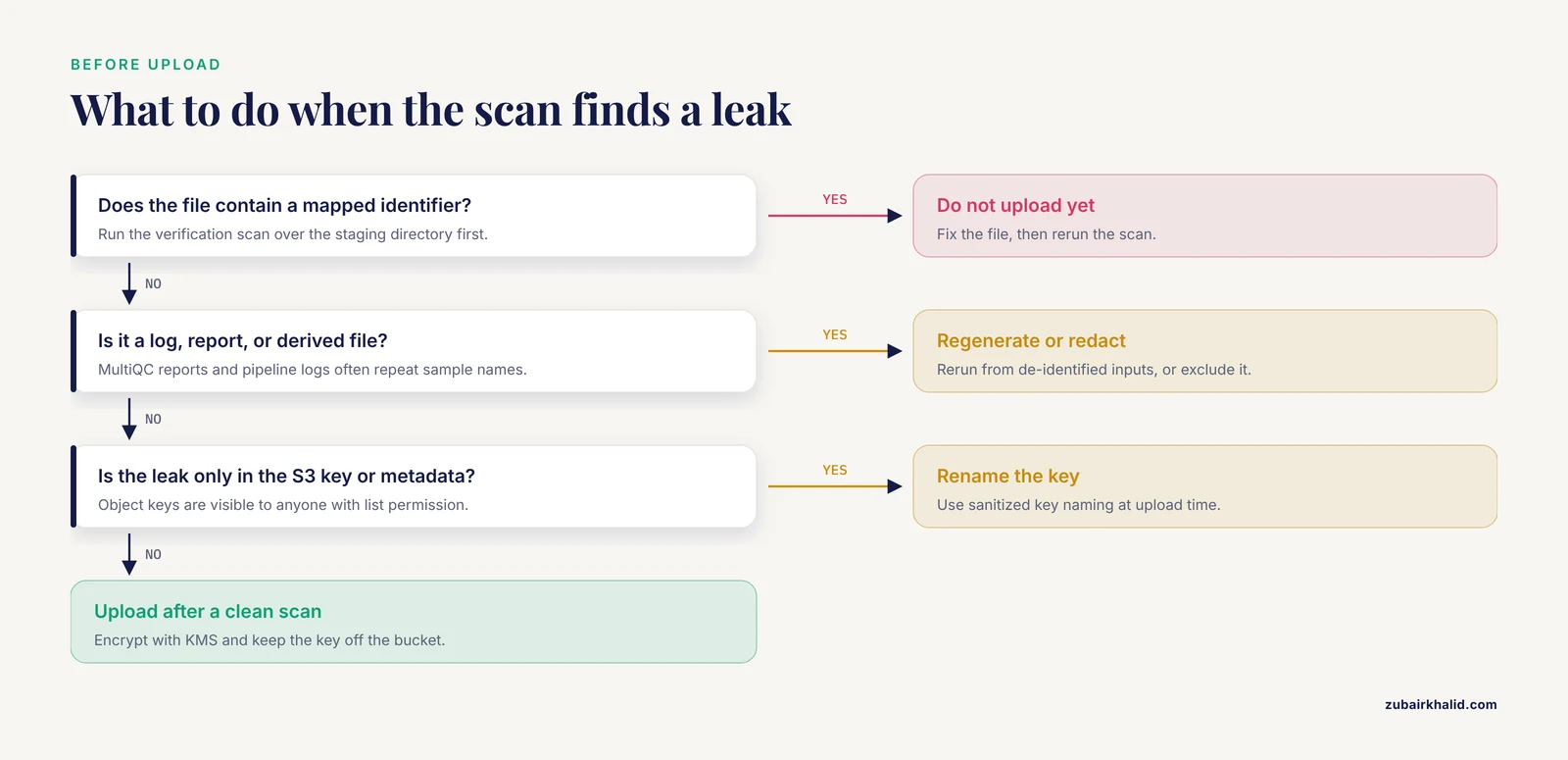
Before upload, run a scripted pass over every file you intend to move. For text-representable formats (VCF, headers extracted from BAM, logs, CSV):
#!/usr/bin/env bash
# verify_deid.sh: fail if any mapped identifier appears anywhere
map_file="$HOME/linkage_key/sample_map.tsv"
tail -n +2 "$map_file" | cut -f1 | while read -r ident; do
    if grep -rqi -- "$ident" ./upload_staging/; then
        echo "LEAK FOUND: $ident"
        exit 1
    fi
done
echo "All clear"
Expected output:
All clearFor the binary files themselves, the header check in Step 4 is your verification, because grep will not reliably match across BAM's BGZF blocks. A defensible habit is to run samtools view -H on every BAM in the staging directory and diff the @RG and @PG lines against expectations. Note that @PG (program) lines record command lines and can embed original file paths, so inspect them too.
Step 8: prepare the AWS destination with encryption and private access
In your AWS account, create a dedicated bucket with public access blocked and default KMS encryption. This is standard AWS genomics hygiene and aligns with the shared-responsibility model: the cloud provider secures the infrastructure, but bucket configuration, encryption, and access policy are yours.
aws s3api create-bucket --bucket genomic-deid-prod-01 --region us-east-1

aws s3api put-public-access-block \
  --bucket genomic-deid-prod-01 \
  --public-access-block-configuration \
  BlockPublicAcls=true,IgnorePublicAcls=true,BlockPublicPolicy=true,RestrictPublicBuckets=true
Expected output (empty confirmation, then verify):
aws s3api get-public-access-block --bucket genomic-deid-prod-01{
"PublicAccessBlockConfiguration": {
"BlockPublicAcls": true,
"IgnorePublicAcls": true,
"BlockPublicPolicy": true,
"RestrictPublicBuckets": true
}
}Set default encryption with a customer-managed KMS key:
aws kms create-key --description "genomics deid data key" --output json | grep -E '"KeyId"'
aws s3api put-bucket-encryption \
  --bucket genomic-deid-prod-01 \
  --server-side-encryption-configuration \
  '{"Rules":[{"ApplyServerSideEncryptionByDefault":{"SSEAlgorithm":"aws:kms","KMSMasterKeyID":"alias/genomics-key"}}]}'
Upload with explicit KMS encryption requested per object (defense in depth against a misconfigured default):
aws s3 cp GX7B41D2E9F0C.bam \
  s3://genomic-deid-prod-01/alignments/GX7B41D2E9F0C.bam \
  --sse aws:kms --sse-kms-key-id alias/genomics-key
Expected output:
upload: ./GX7B41D2E9F0C.bam to s3://genomic-deid-prod-01/alignments/GX7B41D2E9F0C.bamAdd a bucket policy that denies any request that is not over TLS and denies uploads that do not carry the KMS header:
{
  "Version": "2012-10-17",
  "Statement": [
    {
      "Sid": "DenyInsecureTransport",
      "Effect": "Deny",
      "Principal": "*",
      "Action": "s3:*",
      "Resource": [
        "arn:aws:s3:::genomic-deid-prod-01",
        "arn:aws:s3:::genomic-deid-prod-01/*"
      ],
      "Condition": {
        "Bool": { "aws:SecureTransport": "false" }
      }
    }
  ]
}
Step 9: lock down access and enable audit logging
- Create an IAM role for the analysis pipeline with read access to the de-identified bucket only, and no access to the account holding the linkage key.
- Enable CloudTrail data events and S3 server access logging on the data bucket so every read and write is recorded.
- Restrict network paths with VPC endpoints for S3 so traffic stays off the public internet.
- Put the linkage key under a separate control plane entirely: different account, different credentials, different access approval workflow.
This pattern mirrors the "five safes" framework used by cloud-native genomic repositories such as the RAPTOR platform developed at the Genome Institute of Singapore, which structures controls around safe people, safe projects, safe settings, safe data, and safe outputs so that contributors and regulators can see which guarantees apply at each layer [6]. It also reflects a broader finding from cross-institutional surveys of cloud biomedical infrastructure: research teams consistently need authorized-access patterns, security compliance, and interoperability designed into the platform rather than bolted on afterward [7].
Step 10: document everything
Write a short data provenance record that captures, for each de-identified file: the source accession, the pseudonym applied, the tool and version used for scrubbing (samtools 1.19.2, bcftools 1.19), the date, and the location of the linkage key by reference (never its contents). Reproducibility matters here for the same reason it matters anywhere in cloud bioinformatics. Containerized pipelines with pinned versions make the scrubbing step itself auditable and repeatable, which is the same argument made for container technology in clinical molecular pathology pipelines generally: consistent environments enable version control, validation, and the documentation that regulatory compliance requires [8].
Quick reference: where identifiers hide and how to fix them
| Location | Example leak | Tool or fix |
|---|---|---|
| , - | , - | , - |
| FASTQ file names | TUMOR-12-3456_R1.fastq.gz | Rename to pseudonym before upload |
| FASTQ header line | LIMS-injected accession token | Streamed awk rewrite of first token |
BAM @RG SM: tag | SM:TUMOR-12-3456 | samtools reheader with edited header |
BAM @RG ID: and @PG lines | Read group ID, recorded command paths | Same header edit, inspect @PG manually |
| VCF sample columns | TUMOR-12-3456 column name | bcftools reheader -s new_names.txt |
| VCF header meta-lines | ##tumor_sample= | Replace header with bcftools reheader -h |
| Index files | TUMOR-12-3456.bam.bai | Rename or regenerate after reheadering |
| Logs and QC reports | MultiQC sample names, command lines | Regenerate from de-identified inputs |
| S3 object keys and metadata | Bucket path containing the identifier | Sanitized key naming at upload |
| Linkage key itself | sample_map.tsv in the same bucket | Keep on isolated local system |
Common errors and their fixes
upload failed: ... An error occurred (AccessDenied) when calling the PutObject operation: Access Denied. Your IAM identity lacks s3:PutObject on the bucket, or a bucket policy condition (such as the deny-insecure-transport rule above) rejected the request. Check whether you used HTTPS (the AWS CLI does by default) and verify the policy's Resource ARNs match the bucket name exactly.
samtools reheader: fail to load the header (message text varies by version, but the shape is a header load failure). This usually means the edited header file has broken tabs or a truncated final line. @RG fields are tab-delimited. If you edited the header in a spreadsheet or an editor that converted tabs to spaces, samtools view -H on the output will show mangled read groups and GATK will later fail with read group errors. Regenerate the header with samtools view -H and edit it with sed on the specific tags rather than by hand.
bcftools reheader exits with a sample count mismatch. The -s file must contain exactly one new name per existing sample, in the same order as bcftools query -l reports. A trailing blank line or a reordered list silently pairs the wrong pseudonym with the wrong sample, which is worse than an error because it corrupts the mapping. Always run the paste old new check shown in Step 5 before applying the rename.
Downstream GATK error: "Sample names in file X differ from head of file Y" (paraphrased from GATK's sample-mismatch validation). After renaming a VCF in a multi-sample cohort, any sample-name cross-references in index files, sample maps used by joint calling, or previously generated .sample_map files must be updated. Regenerate indices and any per-sample metadata rather than patching them.
Index offset errors after reheadering. If a .bai or .tbi was copied from the original file rather than regenerated, tools can fail with messages such as "the index file is older than the data file" or truncated random-access reads. Always run samtools index or tabix -p vcf against the de-identified output.
De-identification tips for cloud genomics pipelines
- Scrub at the point of egress, not in the pipeline. Build the de-identification step as a distinct, versioned stage that runs once, on files that are about to leave your environment. Scrubbing inside a busy pipeline invites partial coverage of file types.
- Use containers for the scrubbing step itself. Pinning
samtoolsandbcftoolsversions in a container guarantees that a re-run next year produces the same transformation, which is precisely the reproducibility and validation benefit containers bring to molecular pipelines on-premise and in the cloud [8]. - Treat cloud cost and complexity as a design constraint, not an afterthought. Moving biomedical workloads to the cloud offers scalability and collaboration benefits but is neither trivial nor free, and it is not the right choice for every scenario, so scope the de-identified dataset to what the analysis actually needs [9].
- Consider federated analysis instead of data movement. When the analysis involves multiple institutions, platforms that bring the computation to the data, such as federated cloud frameworks developed for authorized-access biomedical data, can reduce how often identifiable data moves at all [7].
- Test re-identification risk with your own hashes. Take the de-identified outputs and search them for every identifier in your map, every date of birth, every address fragment, and every free-text field in your VCF header. This five-minute scripted check catches more leaks than any policy document.
- Log access to de-identified data too. De-identification changes the sensitivity of the content but not the stewardship obligation. Cloud governance literature emphasizes that authorized access must be aligned with ethical use throughout the data lifecycle, and that repositories demonstrate trustworthiness through visible, documented access and management practices [3].
Common Mistakes and Limitations
Mistake 1: treating the bucket as the de-identification control. Encryption and private access protect data in transit and at rest. They do nothing about the medical record number sitting in a BAM header that an authorized collaborator downloads. De-identification and access control are separate controls and you need both.
Mistake 2: forgetting that the genome itself is an identifier. No amount of header scrubbing changes the fact that the sequence is a biometric. Genomic data sharing therefore depends on governance (data use agreements, authorized access, oversight of downstream use) in addition to technical measures, a conclusion reached both in early iDASH work on cloud privacy [1] and in the recent scoping review of responsible stewardship outcomes, which synthesized 46 articles into outcome domains for cloud-based genomic data management [3].
Mistake 3: uploading the linkage key with the data. The single most damaging error in this workflow. Keep the key on an isolated system with its own credentials, approval workflow, and backup.
Mistake 4: leaking identifiers through S3 paths, object metadata, and tags. Teams sanitize file contents and then upload to s3://genomics/phase2/TUMOR-12-3456/. Object keys are visible to anyone with list permission on the bucket.
Mistake 5: ignoring logs, MultiQC reports, and CRAM/BAI sidecars. These files are PHI if they contain identifiers, and they are the files most often uploaded by habit.
Mistake 6: assuming cloud security is the provider's job entirely. Systematic reviews of healthcare cloud cybersecurity list data breaches, insider threats, compliance failures, and limited visibility among the persistent challenges, and conclude that organizations must implement robust security practices and continuous monitoring themselves rather than assuming the provider covers everything [5].
Mistake 7: skipping the regulated-laboratory angle. Laboratories operating in clinical contexts face additional obligations around variant data, public database submissions, and patient care records that pure research pipelines do not, and reviews of cloud adoption in molecular diagnostics emphasize planning for these compliance requirements before migration rather than after [4].
Limitation. De-identification reduces, but does not eliminate, re-identification risk for genomic data, because the sequence itself is an immutable identifier. Formal privacy guarantees for computation over genomes, such as the cryptographic approaches assessed in the iDASH competitions, remain active research areas whose production efficiency and cost must be evaluated case by case [2]. Any real dataset handled under clinical or institutional policy requires sign-off from your institution's privacy and compliance office, and clinical cases require appropriate professional oversight, not a generic workflow.
Frequently Asked Questions
Is de-identifying genomic data in the cloud ever truly complete?
No. Removing identifiers from files, headers, and metadata is necessary but not sufficient, because the genome sequence itself is a permanent biometric identifier that can be matched against other datasets. Treat de-identification as one layer combined with encryption, access control, audit logging, and governance.
What is the difference between de-identification and encryption?
De-identification removes or replaces identifiers in the data so files can be used without knowing who they belong to. Encryption protects the data from people who lack the key but does nothing for authorized users who see the plaintext, identifiers included. You need de-identification for content hygiene and encryption for transport and storage protection.
Which identifiers should I remove before uploading sequencing files?
Remove patient names, medical record numbers, accession numbers, dates of birth, dates of service, and free-text clinician notes from file names, FASTQ headers, BAM @RG and @PG lines, VCF sample columns and header lines, index file names, logs, QC reports, and S3 object keys. The HIPAA Safe Harbor framework's list of direct identifiers is a reasonable baseline for what to target in file metadata.
What AWS services are relevant for secure genomics workflows?
S3 with public access blocked, KMS-backed default encryption, IAM roles with least privilege, CloudTrail data events, S3 access logging, and VPC endpoints form the core pattern for aws genomics work. These controls implement the shared-responsibility model, where configuration and access policy remain the customer's obligation.
Can I re-link the pseudonymized data back to patients later?
Yes, if you hold the linkage key. That reversibility is exactly why the key must live on an isolated, access-controlled system and never in the same bucket, account, or backup set as the de-identified files.
Do I need to scrub CRAM files differently from BAM files?
The header structure is the same, so the same @RG and @SM fields must be corrected. samtools reheader supports in-place header replacement for CRAM, which avoids rewriting the whole file, but you should still regenerate the CRAM index and run the same verification scan afterward.
Are containers useful for de-identification workflows?
Yes. Pinning samtools and bcftools in a container makes the scrubbing step reproducible, version-controlled, and auditable, which supports the validation and documentation that regulated environments require. Containers are a standard approach for secure, reproducible NGS pipelines on-premise and in the cloud [8].
Is it safe to run the analysis directly on de-identified data in the cloud?
It is safe in the sense that the technical controls, if configured correctly, meet common regulatory expectations, but residual re-identification risk from the sequence data itself remains. For multi-institution collaborations where even authorized environments are untrusted, cryptographic techniques that compute on encrypted genomes are an emerging option evaluated by the iDASH community, though their efficiency and cost at scale require case-by-case assessment [2].
Sources
- Genomes in the cloud: balancing privacy rights and the public good.
- Protecting genomic data analytics in the cloud: state of the art and opportunities.
- Characterizing core outcomes of responsible stewardship for human genomic data in the cloud.
- Considerations for Genomic Data Privacy and Security when Working in the Cloud.
- The Challenges of Data Privacy and Cybersecurity in Cloud Computing and Artificial Intelligence (AI) Applications for EQA Organizations.
- A five-safes approach to a secure and scalable genomics data repository.
- From use cases to infrastructure: a cross-institutional survey of priorities in data-driven biomedical research.
- Containers in Bioinformatics: Applications, Practical Considerations, and Best Practices in Molecular Pathology.
- Biomedical research in the Cloud: considerations for researchers and organizations moving to (or adding) cloud computing resources.