Comparing Data Versioning Tools for Bioinformatics
By Dr. Zubair Khalid, DVM, MS, PhD ·

Data versioning tools differ mainly in what they treat as the unit of change. Git-style tools version text and small files, content-addressed stores version large binaries by checksum, package-style registries version curated datasets as releasable units, and pipeline-coupled systems version data together with the code that produced it. The rule of thumb is simple: match the tool to the size of your files, the size of your team, and whether your pipeline needs to reproduce a specific byte-for-byte snapshot of its inputs. Small text-heavy projects belong in plain Git. Large sequencing data belongs in a checksum-addressed store such as DVC or git-annex with Git for metadata. Reusable public datasets fit a registry such as BioBricks.ai, and recurring large public data pulls fit a purpose-built acquisition system such as TCGA Expedition.
This article compares the data versioning tools that bioinformaticians actually deploy, explains the pros and cons of each option on its own terms, and gives worked scenarios so you can pick one with confidence. Everything here assumes the standard reality of bioinformatics data management: raw reads, alignment indexes, variant catalogs, and expression matrices that often dwarf what ordinary developer tooling was designed to handle.
Why Bioinformatics Data Versioning Is Different
Software versioning assumes small, text-based, fast-changing files. Bioinformatics data violates every one of those assumptions. A single whole-genome alignment index can run tens of gigabytes. A FASTQ file for one lane of a sequencing run is measured in gigabytes, and compressed BAM or CRAM files for a cohort reach terabytes before anyone analyzes a single variant. Version control systems that were built to diff source code simply cannot hold this content in their working model.
The scale problem is documented at the project level. The Cancer Genome Atlas (TCGA), a National Cancer Institute effort to profile at least 500 cases across 20 tumor types with genomic platforms, publishes more than 1.2 Petabyte of data spanning whole genome sequence, whole exome sequence, methylation, RNA expression, proteomic, and clinical datasets [1]. A single collaboration covering a fraction of one such project produces more data than most software repositories have ever handled. Any honest data versioning tools bioinformatics comparison has to start from that fact.
Three properties make this domain distinct:
- Immutability and checksums. Sequencing files change rarely but must be provably identical across systems. A checksum such as MD5 or SHA-256 becomes the de facto version identifier. Tools built around content addressing (storing data by the hash of its content) fit this naturally.
- Metadata sensitivity. Clinical and human genomic data carry regulatory constraints on where they can be copied and who can read them. Versioning infrastructure must respect access boundaries, as the TCGA Expedition architecture does with security and regulatory controls designed to conform to federal best practices [1].
- Derived data everywhere. Most bioinformatics data is generated, not observed. An alignment, a count matrix, and a variant call set are all functions of raw inputs and code. Versioning that tracks only the final artifact loses the ability to rebuild it.
Because of the third property, data versioning in bioinformatics is inseparable from pipeline reproducibility. The tool you pick determines whether a reviewer asking "which exact build of the reference did you align against?" gets a one-line answer or a week of archaeology.
What a Data Versioning Tool Must Actually Do
Before comparing options, define the job. A data versioning tool for bioinformatics data management should satisfy most of the following:
- Identify data states. Every meaningful state of a dataset gets a stable identifier, usually a checksum, a commit, or a semantic version tag.
- Store content efficiently. Large files live once, on storage appropriate to their size, and copies are avoided.
- Track provenance. The tool records or makes it easy to record where data came from, what transformed it, and when.
- Support collaboration. Team members can share, fetch, and update datasets without rsync roulette or emails containing hard drives.
- Integrate with pipelines. Workflow engines such as Snakemake, Nextflow, or CWL-based runners can consume versioned inputs and emit versioned outputs.
- Handle deletion and retention. Old versions remain retrievable for the retention period your funder or journal requires, without silently filling disks.
No single tool excels at all six. The comparison that follows groups the main options by their underlying model, which predicts their strengths and weaknesses better than feature lists do.
The Main Options at a Glance
| Tool or approach | Unit of versioning | Underlying model | Strengths | Weaknesses | Best fit |
|---|---|---|---|---|---|
| Plain Git | Text files, small code | Commit graph with diffs | Universal, zero new infrastructure | Useless for large binaries | Code, small metadata, configs |
| DVC | Files and directories tracked by checksum | Git commits plus a remote content cache | Git-native workflow, pipeline definition, works with S3, SSH, and similar remotes | Requires discipline so caches and Git stay in sync, no built-in public dataset registry | Lab pipelines with reproducible inputs and outputs |
| git-annex | Files managed by checksum, content stored outside Git | Git tracks symlinks, content lives in annexes | Scales to very large collections, granular location tracking, works on plain filesystems | Steeper learning curve, less pipeline-native than DVC | Archival collections, multi-site data sharing |
| Git LFS | Individual large files | Pointer files in Git, blobs in an LFS server | Familiar to Git users, low setup cost | Server storage and bandwidth costs, weak provenance for derived data | Mixed repositories with modest large-file needs |
| Quilt and object-store packages | Immutable data packages | Package manifests over versioned object storage | Simple sharing, S3-native, good for data products | Less pipeline-integrated, package design is manual | Publishing curated data products to a team |
| BioBricks.ai | Versioned "bricks", each a DVC Git repository with an ETL pipeline | Package-manager interface over a unified backend | Installs and updates curated public datasets like dependencies, resolves dependencies, composite resources assemble in minutes | Curated public data only, not for your internal raw data | Projects consuming public biological and chemical datasets |
| TCGA Expedition | Full downloads of a large public corpus, versioned and archived | Bash, Python, and Java scripts that download, extract, harmonize, version, and store data and metadata | High-performance-computing-native, command line access, harmonized TCGA data with regulatory controls | Project-specific, not a general-purpose versioning layer | Labs building long-term TCGA or similar large public corpora |
| Cloud object versioning (S3-style) | Individual objects | Object store keeps every write as a version | Durable, cheap retention, auditable | No semantics, no provenance, easy to misuse | Backstop retention layer under any other tool |
The Options Explained
Plain Git for code, metadata, and small tables
Git versions snapshots of a repository through a directed acyclic graph of commits, each commit pointing to the full tree of its parent. For bioinformatics, Git remains the correct home for pipeline code, configuration, sample sheets, and small result summaries such as multiQC-style reports and tables of counts. Commit hashes give you free, universally understood version identifiers that pair naturally with tagged pipeline releases.
The failure mode is also universal. Attempting to commit a 5 GB BAM bloats the repository, slows every clone to a crawl, and often cannot be undone without rewriting history. Git diffing is meaningless on binary sequencing formats. Treat Git as the metadata layer of your bioinformatics data management stack and route large files elsewhere.
DVC: Git commits plus a content cache
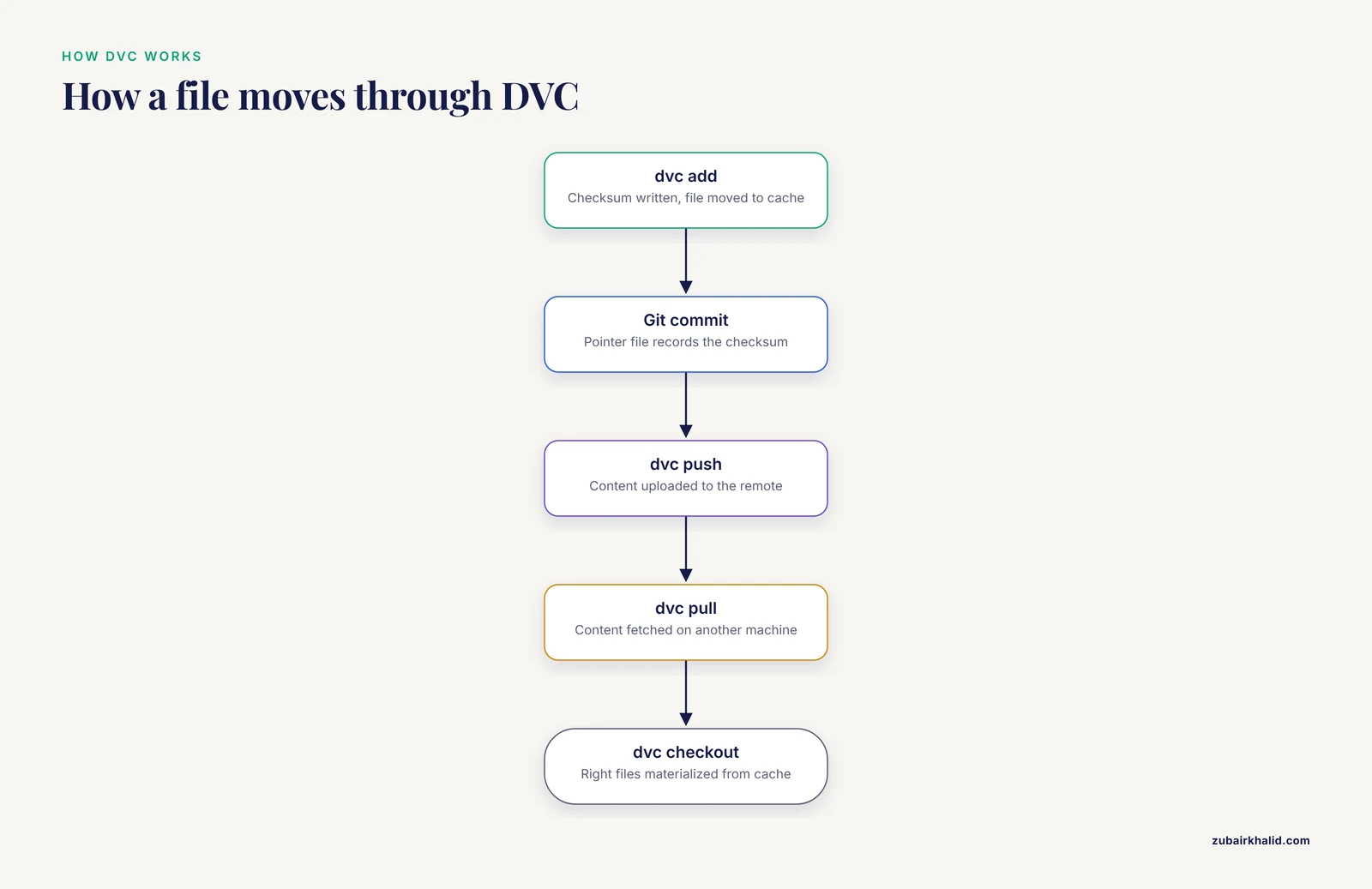
DVC (Data Version Control) extends the Git workflow to large data. Git tracks small pointer files that contain checksums, while the actual content lives in a cache, typically on an object store such as Amazon S3, Google Cloud Storage, Azure Blob Storage, an SSH host, or a network filesystem. dvc add data/cohort.bam writes the checksum, moves the file into the cache, and records a pointer. dvc push uploads content to the remote, and dvc pull brings it back on another machine. Switching versions is a Git checkout followed by dvc checkout, which materializes the right files from the cache.
DVC also encodes pipelines. A dvc.yaml file declares stages with dependencies, outputs, and commands, in the same spirit as a Makefile. When an input changes, dvc repro reruns exactly the affected stages, and each stage output receives a checksum recorded in Git. This makes the pipeline definition and the data state version together, which addresses the derived-data problem directly.
Pros:
- One mental model, Git, for code and data pointers.
- Remote backends your institution probably already runs.
- Pipeline stages give coarse but usable provenance for derived files.
- Works well with small teams on shared infrastructure.
Cons:
- The Git repository and the cache can drift if someone bypasses the tool, so enforcement of process matters.
- Checksumming terabyte-scale directories takes real time, and people frequently turn verification off, which quietly removes the guarantee they adopted the tool for.
- There is no built-in notion of publishing a dataset to outside users, only of sharing a cache among collaborators.
DVC also forms the substrate of at least one community data registry. In BioBricks.ai, each curated public dataset is packaged as a DVC Git repository containing an extract-transform-load pipeline, and a package-manager-like interface handles installation, dependency resolution, and updates over a unified backend [2]. This shows the model scaling beyond a single lab, which is worth knowing when you weigh the data versioning tools bioinformatics comparison options.
git-annex: checksum-managed files across many locations
git-annex solves the same problem as DVC with a different architecture. Git tracks a small symlink per managed file, and the actual content sits in "annex" directories on one or more machines, external drives, or special remotes such as S3. Because Git only ever sees pointers, repositories stay small even when they describe tens of terabytes. Commands such as git-annex get and git-annex drop move content between locations, and the tool tracks which repository holds which file so a collaborator can always find a copy.
git-annex shines for archival, multi-site collections where files arrive once and are read many times, and where you need a record of every copy of every file. It runs on plain filesystems without a server component, which suits HPC environments where installing services is hard.
Pros:
- Extremely scalable for large, slow-changing collections.
- Per-file location tracking across many repositories and remotes.
- No special server required.
Cons:
- The command surface is larger and less familiar than DVC's Git-flavored workflow.
- It is a file transport and tracking layer, not a pipeline engine, so provenance for derived data has to come from your workflow tool.
- The symlink model confuses software that does not follow links, which occasionally bites genomics tools reading "missing" files.
Git LFS: pointer files with a central blob store
Git Large File Storage (LFS) replaces large files in a repository with pointer files and stores the blobs on an LFS server, typically one integrated into a hosted Git service. Cloning and committing work normally, and content downloads on demand. For a lab whose repository contains a handful of reference genomes, a few large configuration artifacts, and mostly code, LFS is the lowest-friction choice because it requires no new concepts beyond an extra fetch step.
The limits show quickly in genomics. LFS servers commonly meter storage and bandwidth, and a pipeline that regenerates large intermediates every run will exhaust both. LFS has no concept of data pipelines, no checksum verification workflow, and no mechanism for representing directories of files as a unit. It is a fine tool inside its envelope and the wrong tool outside it.
Quilt and package-style versioning over object storage
A different model treats datasets as immutable, named packages with semantic versions, stored on object storage with a manifest describing contents and metadata. Quilt is the best-known implementation of this pattern, with packages addressed as user/package/hash on S3-backed storage. Data producers publish a package once, and consumers pin to a specific hash, so everyone in a downstream analysis knows precisely which bytes they read.
This model suits data products, meaning datasets that are curated, reviewed, and consumed by people who did not produce them. It is weaker as a day-to-day working layer because building packages is manual, and the tools do not track how a package was generated. Many mature organizations combine the two patterns, using package versioning for published data products and DVC or git-annex for working data.
BioBricks.ai: data versioning as a package registry
BioBricks.ai takes the package-registry idea and applies it to public life sciences data. The platform packages public biological and chemical datasets as modular "bricks", where each brick is a Data Version Control Git repository containing an extract-transform-load pipeline. A package-manager-like interface handles installation, dependency resolution, and updates, with data delivered through a unified backend. The current release provides more than 90 curated datasets spanning genomics, proteomics, cheminformatics, and epidemiology, and bricks can be combined programmatically to build composite resources [2].
The benchmark claim is concrete and useful for planning: assembling multi-dataset analytic cohorts, which previously took days of bespoke scripting, is reduced to minutes with the brick interface [2]. By treating data as version-controlled software, the platform encourages community contributions and reduces redundant engineering effort, and continued expansion of brick coverage and automated provenance tracking are described as directions that further support FAIR (Findable, Accessible, Interoperable, Reusable) data principles [2].
Pros:
- Curated, versioned access to public datasets without writing your own scraper and cleaning scripts for every source.
- Dependency resolution across datasets, the feature that makes composite resources practical.
- The DVC substrate means bricks carry ETL logic, not just raw dumps, so you inherit harmonization rather than reinventing it.
Cons:
- Coverage is bounded by what has been curated, more than 90 datasets at the described release [2], so your specific public source may not be a brick yet.
- It is a consumption layer. Your own raw sequencing data and internal clinical extracts still need DVC, git-annex, or an equivalent under your control.
- As with any registry, you depend on the maintainers' update cadence for upstream sources.
TCGA Expedition: pipeline-coupled versioning for a large public corpus
Some versioning problems are corpus-shaped, and TCGA Expedition is the clearest published example. The system exists because TCGA data, at more than 1.2 Petabyte, are difficult to navigate and use through public portals alone [1]. TCGA Expedition consists of scripts in Bash, Python, and Java that download, extract, harmonize, version, and store all TCGA data and metadata [1]. Data obtained, versioned, and archived this way supports command line access at high-performance computing facilities as well as functionality with third-party tools [1].
Two design choices are worth copying even outside TCGA. First, versioning is coupled to acquisition and harmonization, so a version identifies not just bytes but a whole harmonization state, which is what downstream analyses actually depend on. Second, the architecture treats security and regulatory controls as part of the versioning system, conforming to federal best practices, which matters whenever human-derived data are involved [1].
Pros:
- Purpose-built for the real shape of a huge public corpus, including harmonization and re-association with de-identified electronic health record data at the source institution [1].
- Command line orientation fits HPC queues and shared filesystems.
Cons:
- It is specific to TCGA. The scripts and schema do not generalize to arbitrary data sources without substantial adaptation.
- Running your own mirrored corpus requires storage and curation commitment that smaller labs cannot always sustain.
Cloud object versioning as a retention layer
Amazon S3 and comparable object stores can retain every write to a bucket as a separate object version, with per-object delete markers. This is not a data management system, but it is an excellent safety net under one. If a DVC push overwrites content or a cleanup job deletes the wrong prefix, object versioning makes recovery a restore operation rather than a loss. Pair it with lifecycle rules that expire noncurrent versions after a defined retention window so costs stay bounded. Use it as a backstop, never as your primary version identifier, because it records nothing about provenance and offers no semantics beyond "this object changed".
The Criteria That Decide Real Choices
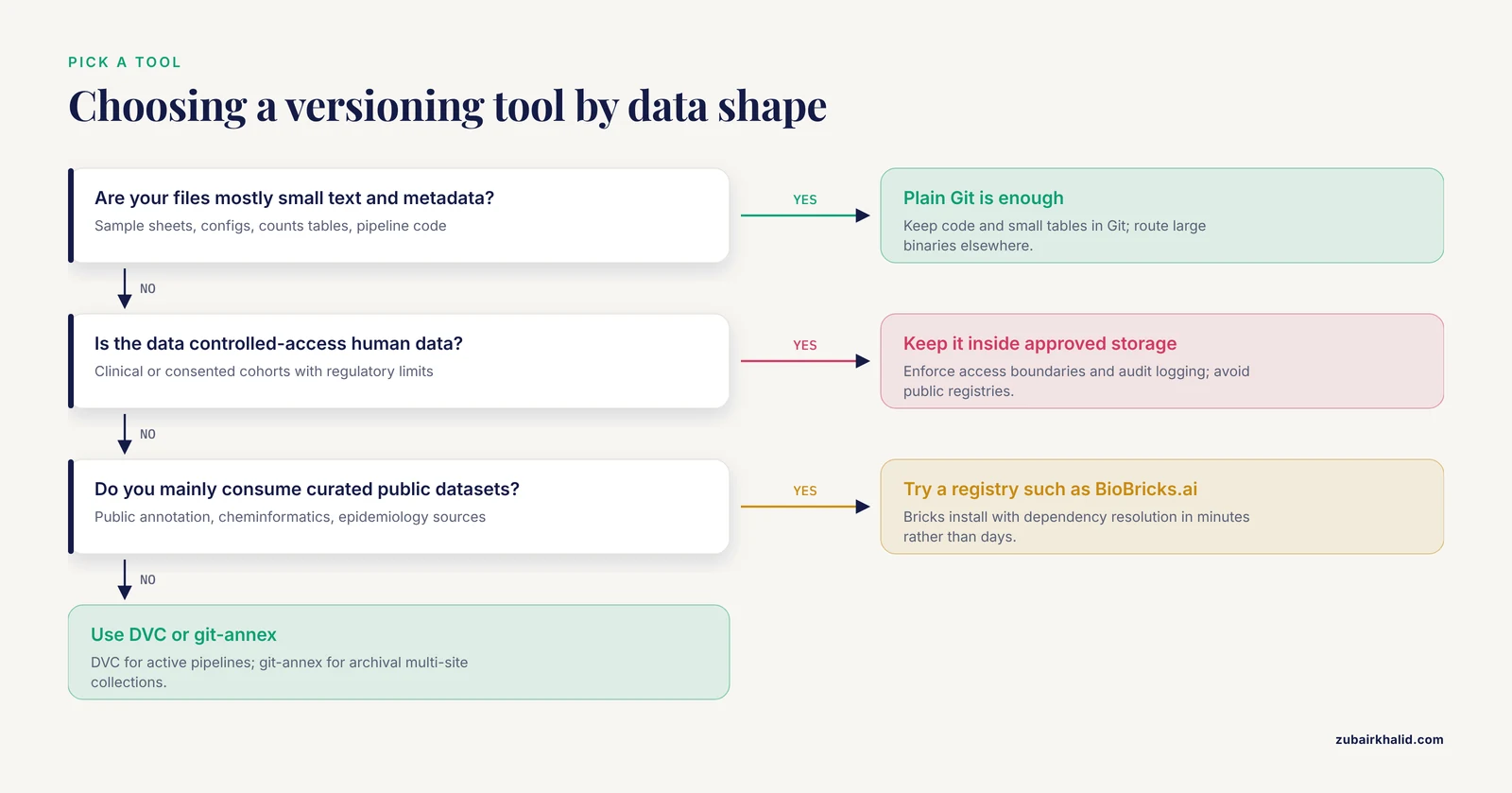
Feature tables hide the tradeoffs that actually decide deployments. Compare the options on these axes instead.
File size and growth rate
Below roughly tens of megabytes per file, plain Git is fine. Between that and a few gigabytes per repository, Git LFS is acceptable. Beyond that, only content-addressed models (DVC, git-annex) or package stores remain workable, and at corpus scale, exemplified by the 1.2 Petabyte TCGA collection [1], you need infrastructure designed for the purpose, such as TCGA Expedition's dedicated download, harmonize, version, and store pipeline [1]. Estimate your five-year volume before choosing, because migrating a mis-sized versioning layer later is expensive.
Who consumes the data
- Only your own pipeline: DVC or git-annex, whichever matches your team's Git fluency.
- Your pipeline plus external collaborators: DVC with a shared remote, or a package store if collaborators should pin releases rather than track a branch.
- The broad community: a registry model. BioBricks.ai demonstrates how a package-manager interface plus DVC-backed bricks serves community consumption with dependency resolution [2].
Provenance depth
There are three levels. Transport-level provenance, a checksum proving the file you fetched matches the source, is provided by DVC and git-annex. Pipeline-level provenance, the exact stages and parameters that transformed inputs into outputs, comes from DVC pipelines or your workflow engine's logs. Publication-level provenance, a curated, documented, versioned release others can cite, is what brick-style registries provide, and BioBricks.ai's designers explicitly treat packaging with ETL pipelines as a route to reproducible workflows and FAIR compliance [2]. Decide which level your journal, funder, or collaborator actually requires before paying for more.
Access control and regulatory posture
Human-derived data cannot simply live in the cheapest bucket. The TCGA Expedition architecture explicitly embeds security and regulatory controls conforming to federal best practices alongside its versioning and storage functions [1]. When comparing options, check whether the tool lets you enforce who can push and pull content, whether access logs are retained, and whether storage regions can be constrained. A tool that is technically excellent but stores data outside your approved boundary is the wrong tool.
Operational cost of correctness
Every versioning system has a discipline cost, the ongoing work required to keep it truthful. For DVC that is running pushes and pulls consistently and accepting checksum time. For git-annex it is keeping location tracking accurate when drives move. For package stores it is the curation effort of deciding what constitutes a release. For object versioning it is lifecycle management. Choose the system whose discipline cost your team will actually pay, not the one with the most impressive feature list.
Worked Scenarios
Scenario 1: a three-person lab running RNA-seq and variant calling
A small lab with a Snakemake or Nextflow pipeline, one HPC cluster, and no dedicated data engineer should standardize on DVC. Keep code and sample metadata in Git, track the reference genome, annotation, and each cohort's outputs with DVC, and push content to an S3 bucket or an SSH remote on institutional storage. Each analysis gets a tagged release, so "rerun analysis X" means checking out a tag and running dvc repro. Git LFS would suffice only if large files were rare, which is never true in sequencing. When the lab needs public annotation or cheminformatics data, pull it as a brick rather than writing another bespoke download script, since curated bricks install with dependency resolution in minutes rather than days [2].
Scenario 2: a cancer genomics core serving many investigators
A core maintaining a long-term local mirror of TCGA, plus its own cohorts, faces corpus-scale problems. The published pattern is instructive: automated download, extraction, harmonization, versioning, and storage of the full corpus with command line access on HPC facilities and regulatory controls built into the architecture [1]. Replicate that pattern with your own scripts or adapt TCGA Expedition directly for the TCGA portion. For the core's own cohorts, layer DVC on top so individual project outputs are versioned independently of the shared corpus. Object versioning on the underlying buckets provides the retention backstop.
Scenario 3: a methods group publishing reproducible benchmark datasets
A group producing benchmark datasets consumed by outside laboratories should version working data with DVC or git-annex and publish releases as packages. If the datasets are public and general-purpose, contributing them as bricks extends the registry model, which is designed for community contributions and reducing redundant engineering effort across the community [2]. Pin every benchmark result to a brick version or package hash so that reviewers can retrieve identical inputs.
Scenario 4: a hospital-affiliated research program with controlled-access data
Regulatory constraints dominate here. Every component must support access boundaries, audit logging, and storage-region control. Follow the federal-best-practices posture described for TCGA Expedition's repository architecture [1]: keep versioning metadata in Git, keep content inside approved storage, and treat any external sync target as a compliance decision rather than an engineering convenience. Avoid public registries for controlled data entirely.
Common Mistakes and Limitations
- Versioning outputs but not inputs. Teams carefully commit result BAMs and then lose the exact reference build, index version, or annotation release that produced them. Version the full dependency closure, which is exactly what DVC pipeline stages are designed to capture.
- Trusting checksums you never verify. Turning off content verification to save time is common with terabyte directories. An unverified checksum is decoration. Schedule periodic verification runs and accept the compute cost.
- Splitting code and data provenance across systems nobody reconciles. If your pipeline logs live in one tool, data versions in another, and the paper's methods in a third, reproduction requires manual stitching. Prefer tooling that ties them, such as DVC's pipeline definitions or a registry brick that carries its own ETL pipeline [2].
- Choosing a tool by feature list instead of data shape. The largest real-world deployments, such as the TCGA Expedition system built for a 1.2 Petabyte corpus [1], look nothing like a developer repository. Size your choice to your actual file sizes and growth, not to the tool's changelog.
- Ignoring retention policy. Journals and funders increasingly expect data availability for years. Object versioning with lifecycle rules, or an archived git-annex remote, satisfies this. An unmanaged working directory does not.
- Mixing mutable and immutable data in one store. Raw sequencing reads should be immutable from the moment they pass quality review. Intermediates are disposable. Encoding that distinction in your versioning scheme prevents the most expensive class of mistake, which is silently overwriting primary data.
- Assuming a registry replaces local management. BioBricks.ai accelerates access to curated public data [2], but internal clinical extracts, consented cohorts, and proprietary data still need locally controlled versioning. Plan for both layers.
- Forgetting that versioning is not backup. A DVC remote, an LFS server, or an object store with versioning is not a backup strategy by itself. Independent copies on distinct failure domains remain necessary.
A final limitation applies to individual research decisions. The right tooling depends on your institution's storage, compliance, and staffing situation, and a data engineer or research computing group should review any deployment that touches controlled-access human data.
Frequently Asked Questions
Which data versioning tool is best for bioinformatics?
DVC is the best default for most bioinformatics labs because it extends the Git workflow to large files with checksums, works against common remotes such as S3 and SSH, and versions pipeline inputs and outputs together. git-annex is the better choice for very large, slow-changing archival collections across multiple sites, and registry-style systems such as BioBricks.ai fit teams consuming curated public datasets [2].
Can Git alone handle genomic data?
No. Git cannot efficiently store, diff, or transfer gigabyte-scale sequencing files, and committing them degrades the repository for everyone. Use Git for code and small metadata, and pair it with a content-addressed layer such as DVC or git-annex, or with Git LFS for modest large-file needs.
What is the difference between DVC and git-annex?
Both manage large files by checksum while Git tracks pointers. DVC integrates with pipeline definitions so data and the commands that produced it version together, which suits active analysis work. git-annex focuses on tracking which repository holds which file across many locations, which suits archival and multi-site sharing, and it runs on plain filesystems without a server.
How do I version very large public datasets like TCGA?
Follow the pattern demonstrated by TCGA Expedition, which uses scripts in Bash, Python, and Java to download, extract, harmonize, version, and store the full corpus and its metadata, with command line access on high-performance computing facilities [1]. Adopting or adapting that system, or replicating its download-harmonize-version-store architecture for your own corpus, is more realistic than forcing general-purpose tools to handle petabyte-scale acquisition.
Is BioBricks.ai a replacement for DVC?
No. BioBricks.ai is built on DVC, with each curated public dataset packaged as a DVC Git repository containing an ETL pipeline, and a package-manager interface handling installation and dependency resolution [2]. It replaces the work of finding, cleaning, and integrating public datasets, not the versioning of your own internal data, which still needs DVC or an equivalent.
Do I need both object storage versioning and a data versioning tool?
Yes, they do different jobs. A tool such as DVC or git-annex provides meaningful version identifiers, provenance, and workflow integration, while object-store versioning is a durable, low-effort retention layer that lets you recover from accidental overwrites and deletions. Use the tool as your primary system and the object store as the safety net beneath it.