How to Create a Pull Request for Research Code
By Dr. Zubair Khalid, DVM, MS, PhD ·

By the end of this guide you will be able to take a change to an analysis script, a pipeline, or a software package, put that change on a branch, push it to GitHub, open a pull request, respond to reviewer comments, and get the work merged. You will also know how to avoid the mistakes that most often slow down code review in research labs, including the accidental commit of patient data or credentials.
To follow along you need four things on hand:
- Git installed on your computer. Check with
git versionin a terminal. Any release from the last few years works. - A free account on GitHub, the hosting platform most researchers use for code.
- A text editor or integrated development environment. Visual Studio Code is a common choice among biologists because it runs code and manages GitHub versioning from one window [1].
- Either a web browser or the GitHub command line tool
gh, which lets you open pull requests from the terminal.
If your lab works in R and you want the whole version control workflow wrapped up for you, the workflowr package integrates Git, literate programming with R Markdown, automatic reproducibility checks, and a browsable website for sharing results [2]. workflowr pushes to GitHub for you, and the pull request steps in this guide still apply when you want a collaborator to review your changes before they land.
Why Pull Requests Matter in Research
A pull request is a proposal to merge one set of changes into another set of changes, displayed on a hosting platform so that colleagues can read the differences, leave comments, and approve or request fixes. In research settings the pull request serves three jobs at once.
First, it is a quality gate. Someone other than the author looks at the code before it becomes the version everyone runs. Second, it is a discussion record. The comments and decisions stay attached to the change, which matters when a reviewer for a journal later asks how an analysis was performed. Major journals now request code availability statements at publication, and a clean pull request history is direct evidence of how the code evolved [3]. Third, it is a teaching tool. A graduate student who reads the review comments on ten merged pull requests learns the project conventions faster than any document can teach them.
Git, the version control system underneath all of this, solves a problem that researchers know well. Teams of specialists from different fields generate and share data of different formats and sizes, and without versioning of both data and code, teamwork quickly devolves into unmanageable confusion [4]. Information systems built around Git give every participant access to the current state of a project while preserving the history of every prior state [4]. The pull request is the human-facing checkpoint on top of that machinery.
Four Concepts You Need First
Git has exactly four mental models that explain nearly everything you will do. They apply whether you are analyzing a retrospective clinical registry or building a taxonomic database [3].
- Repository. A folder whose full history Git tracks. The repository lives on your computer and, usually, on a hosting platform such as GitHub.
- Commit. A saved snapshot of the repository at one moment, with a message you write describing what changed and why. Every commit has a unique identifier.
- Branch. A movable label pointing at a line of work. The default branch, usually named
main, holds the agreed-upon version. A feature branch holds work in progress. - Remote. A copy of the repository on another computer, most often on GitHub. You push commits to the remote to share them and pull from it to receive other people's work.
The daily rhythm of Git for scientists is the edit, stage, commit cycle. You edit files, you select the changes you want to keep, you save them as a commit, and you repeat. A pull request simply packages a series of these commits on one branch and asks for review.
Step by Step: Creating a Pull Request for Research Code
The walkthrough below uses a realistic scenario. Your lab maintains a repository called lab/rnaseq-pipeline. You have fixed a plotting bug in scripts/qc_plots.R and want your change reviewed and merged into the main branch.
Step 1. Configure Git so your commits are attributed to you
Open a terminal and set the name and email that Git attaches to every commit you make. Use the email linked to your GitHub account so GitHub links your commits to your profile.
git config --global user.name "Jane Doe"
git config --global user.email "[email protected]"
Verify the settings.
git config --global user.name
git config --global user.email
Expected output:
Jane Doe
[email protected]
If you skip this step, Git will refuse to commit and print a message asking you to identify yourself, so this configuration problem surfaces early and is easy to fix.
Step 2. Get a copy of the repository
If you have write access to the repository, clone it directly. Cloning downloads the full history and connects your copy to the remote on GitHub.
git clone https://github.com/lab/rnaseq-pipeline.git
cd rnaseq-pipeline
Expected output:
Cloning into 'rnaseq-pipeline'...
remote: Enumerating objects: 412, done.
Receiving objects: 100% (412/412), 2.31 MiB | 4.20 MiB/s, done.
Resolving deltas: 100% (178/178), done.
If you do not have write access, for example when contributing to someone else's published pipeline, click the Fork button on the repository page in your browser. A fork is your personal copy of the repository on GitHub. Clone your fork instead of the original, and GitHub will remember that your copy descends from the original so the pull request can be routed correctly.
Step 3. Create a branch for your change
Never make a proposed change directly on main. Create a branch with a short, descriptive name.
git switch -c rnaseq-qc-fixesExpected output:
Switched to a new branch 'rnaseq-qc-fixes'The -c flag means create. The branch name should describe the work, not you. rnaseq-qc-fixes tells a reviewer what to expect. Names like janes-changes tell them nothing.
One branch should carry one logical piece of work. If you are fixing a plotting bug and also upgrading a dependency, make two branches and two pull requests. Small pull requests get reviewed quickly. Large ones sit unread for weeks.
Step 4. Protect data with a .gitignore file before you touch anything
This step matters more in research than in ordinary software work. Identifiable patient data must never enter a version-controlled repository, and a .gitignore file is the primary safeguard against inadvertent commits [3]. The file lists patterns that Git should refuse to track.
Before you edit anything, check that the repository has a .gitignore covering the files your analysis produces. A reasonable research .gitignore excludes raw and processed data files, large result files, and editor scratch files.
# .gitignore for a research project
data/
results/
*.csv
*.fastq.gz
*.RData
*.h5seurat
.env
.DS_Store
If you realize a sensitive file is already tracked, remove it from tracking and from the repository history, then contact the repository owner immediately. Once data has been pushed to a public remote, treat it as exposed and follow your institution's data breach procedures. Prevention through .gitignore is far easier than cleanup [3].
Step 5. Make your change and run it
Edit the code with your usual tools. Then run it. A pull request that has never been executed is the single fastest way to lose a reviewer's trust.
For an R script, run it in a fresh R session. For a Python package, run the test suite if one exists.
python -m pytest tests/Expected output:
======================== 42 passed in 18.3s ========================If your project uses workflowr, its automated checks verify that each analysis file was run in a clean session and that results match the committed code, which removes an entire class of "it ran on my machine" disputes before review even starts [2].
Step 6. Inspect exactly what changed
Two commands show the state of your work.
git statusExpected output:
On branch rnaseq-qc-fixes
Changes not staged for commit:
  modified:   scripts/qc_plots.R

no changes added to commit
git diffThe diff prints each changed file with removed lines prefixed by - and added lines prefixed by +. Read it. Half of all pull request mistakes, from leftover debug statements to a stray print(df) that should never have shipped, are visible in the diff and cost nothing to fix now.
Step 7. Stage and commit your change
Staging selects which changes go into the next commit. Committing saves them.
git add scripts/qc_plots.R
git commit -m "Fix read trimming threshold in QC plots"
Expected output:
[rnaseq-qc-fixes 3f2a91c] Fix read trimming threshold in QC plots
 1 file changed, 4 insertions(+), 2 deletions(-)
The first line of the commit message should complete the sentence "this commit will". Write the summary line in the imperative, under roughly 50 characters, and add a blank line followed by a longer explanation when the change needs context.
If a colleague stood next to you and helped write the fix, credit them directly in the commit with the Co-Authored-By: trailer. GitHub and GitLab both support this mechanism, and empirical studies of large open source projects show that these co-authored commits are a real and growing form of collaboration that standard commit attribution misses [5].
git commit -m "Fix read trimming threshold in QC plots

Add tolerance for low-complexity adapters near the trimming
threshold and update the figure legend to match.

Co-Authored-By: Priya Sharma <[email protected]>"
Step 8. Push the branch to GitHub
git push -u origin rnaseq-qc-fixesExpected output:
Enumerating objects: 7, done.
Counting objects: 100% (7/7), done.
Writing objects: 100% (4/4), 612 bytes | 612.00 KiB/s, done.
Total 4 (delta 2), reused 0 (delta 0)
remote: Resolving deltas: 100% (2/2), done.
remote: Create a pull request for 'rnaseq-qc-fixes' by visiting:
remote:      https://github.com/lab/rnaseq-pipeline/pull/new/rnaseq-qc-fixes
To github.com:lab/rnaseq-pipeline.git
 * [new branch]      rnaseq-qc-fixes -> rnaseq-qc-fixes
branch 'rnaseq-qc-fixes' set up to track 'origin/rnaseq-qc-fixes'.
The -u flag links your local branch to the remote branch so that future pushes need only git push.
Step 9. Open the pull request
You have two ways to create the pull request.
In the browser. Visit the address GitHub printed in the push output, or go to the repository page, where GitHub offers a Compare & pull request button for recently pushed branches. You land on a form with a title, a description box, and a diff of every change.
From the terminal. If you installed the GitHub CLI, authenticate once with gh auth login, then run:
gh pr create -t "Fix read trimming threshold in QC plots" -b "Details in the description"The -t flag sets the title and -b sets the body. Opening the pull request in an editor for a longer description works with gh pr create on its own.
Fill in the description properly. A strong research pull request description answers four questions.
## What does this change do?
Corrects the read trimming threshold in scripts/qc_plots.R from a
hard-coded value to the adaptive threshold described in the method
notes, and regenerates Figure 2.

## Why is it needed?
The hard-coded threshold dropped 12% of reads from sample S7 in a
way that did not match the trimmed files on disk.

## How was it tested?
Reran the QC step on all 8 samples in the pilot dataset. Output
figures attached to this pull request match the trimmed FASTQ files.

## Anything reviewers should look at closely?
The threshold logic in lines 40 to 52 of qc_plots.R.
That "what did I actually run" paragraph is what makes a pull request useful for reproducibility later. The goal of making analyses reproducible, well documented, and easily shareable is the whole reason research groups adopt these tools in the first place [2].
Click Create pull request. The pull request now has a number, a URL, and a discussion thread.
Step 10. Keep the branch updated while the pull request is open
While you wait for review, other people may merge their work into main. Update your branch so the review happens against current code.
git switch rnaseq-qc-fixes
git fetch origin
git merge origin/main
If the merge reports conflicts, Git marks each conflicted file and pauses. Open the file, look for the conflict markers <<<<<<<, =======, and >>>>>>>, choose the correct code by hand, delete the markers, then stage and commit.
git add scripts/qc_plots.R
git commit -m "Merge main into rnaseq-qc-fixes"
git push
The pull request updates automatically. Every additional push to the same branch appears in the same pull request, which is exactly what you want during review.
Step 11. Respond to review
Your reviewer leaves comments pinned to specific lines. Work through them in order.
For each comment, either make the change and commit it, or reply explaining why you kept the code as written. Push new commits to the same branch. Never open a second pull request for the same work. When the reviewer is satisfied, they approve, and someone with write access clicks Merge. The squash merge option, which collapses your branch into a single commit on main, keeps the project history readable when a branch contains many small fix-up commits.
Step 12. Clean up after the merge
Delete the branch locally and on GitHub.
git switch main
git pull
git branch -d rnaseq-qc-fixes
git push origin -d rnaseq-qc-fixes
GitHub also shows a Delete branch button on the merged pull request page. Your commit is now part of main, reachable in the permanent history.
Key Commands Reference
| Command | What it does | When to use it |
|---|---|---|
| , - | , - | , - |
git switch -c NAME | Creates and enters a new branch | Before starting any proposed change |
git status | Shows modified files and staging state | Before every commit |
git diff | Prints unstaged changes line by line | Before staging, to self-review |
git add FILE | Stages a file for the next commit | When the file is ready |
git commit -m "MESSAGE" | Saves staged changes as a commit | Each logical unit of work |
git push -u origin BRANCH | Uploads the branch and links it | The first push of a new branch |
git fetch origin | Downloads new work from GitHub without merging | Before updating your branch |
git merge origin/main | Brings merged work from main into your branch | While a pull request is open |
gh pr create | Opens a pull request from the terminal | When you prefer not to use the browser |
Tips for Pull Requests That Get Merged
These tips come up repeatedly in code review practice across research and open source projects.
Write the description for a reader six months from now. Include the motivating question, the datasets touched, and how you verified the result. Reviewers reward this, and future you depends on it.
Run the code from a clean start. Delete generated outputs, rerun the analysis, and confirm the results reproduce. Automated checks in tools such as workflowr exist precisely because humans skip this step under deadline pressure [2].
Keep commits purposeful. One commit per logical change, each with a message that stands alone. A reviewer reading the commit list should be able to follow the reasoning without opening any file.
Credit collaborators in the commit. The Co-Authored-By: trailer exists so that shared work is visible in project history, and research on large projects shows contributors value this recognition [5].
Agree on review expectations before the work starts. Define the task the tool should solve, then set requirements and monitor whether the workflow actually gets followed, which is the same discipline recommended for adopting any information system in a research group [4]. A pull request process nobody agreed to is a pull request process nobody follows.
Answer every comment. Even a one-word reply such as "fixed" in response to a suggestion keeps the thread legible for the next reader.
Learn your editor's Git integration. Visual Studio Code and similar tools handle staging, branching, and pull requests through a graphical interface, which lowers the barrier for biologists adopting versioned collaborative work [1]. The underlying Git operations are identical to the terminal commands in this guide.
Common Mistakes and Limitations
Committing data or secrets. The most serious mistake in research version control is letting identifiable patient data, credentials, or API keys into a repository. Use a .gitignore file from day one, and never commit raw clinical files [3]. Once pushed to a public remote, removal is difficult and exposure is permanent.
Making the pull request enormous. A pull request that changes 40 files across five topics will not get reviewed. Split it. Three small pull requests beat one large one in every setting.
Proposing from a stale branch. If you cloned months ago, your pull request may conflict with work already merged. Fetch and merge main before you ask for review, not after the reviewer complains.
Vague commit and pull request titles. "Update code" and "fixes" tell a reviewer nothing. "Fix trimming threshold in QC plots" tells them everything.
Editing on main. Committing directly to main and then trying to turn those commits into a pull request creates avoidable friction. Start on a branch, always.
Pushing debug leftovers. Hard-coded file paths, commented-out lines, and personal scratch notebooks in a pull request signal that the diff was never self-reviewed. Read your own diff before you open the request.
Mixing reformatting with logic. If you reformat an entire file and change its behavior in the same commit, the reviewer cannot see the meaningful change inside the noise. Separate the two.
Assuming the pull request is documentation. A pull request records intent and discussion, but the durable record of an analysis is the repository itself, its history, and any rendered output the project publishes [2]. Do not delete the branch history reasoning later. Merge messages persist.
Force pushing during review. Rewriting the branch history while a reviewer is reading it discards their ability to follow what changed. Push new commits instead.
One honest limitation of the pull request workflow: it adds ceremony. For a two-line fix you make alone, a branch, push, and review cycle can feel heavy. Many labs handle this with a lightweight convention, such as allowing direct commits for typos while requiring pull requests for anything touching analysis logic. Choose the threshold deliberately as a lab, write it down, and hold to it.
Frequently Asked Questions
Do I need to fork the repository, or can I just push a branch?
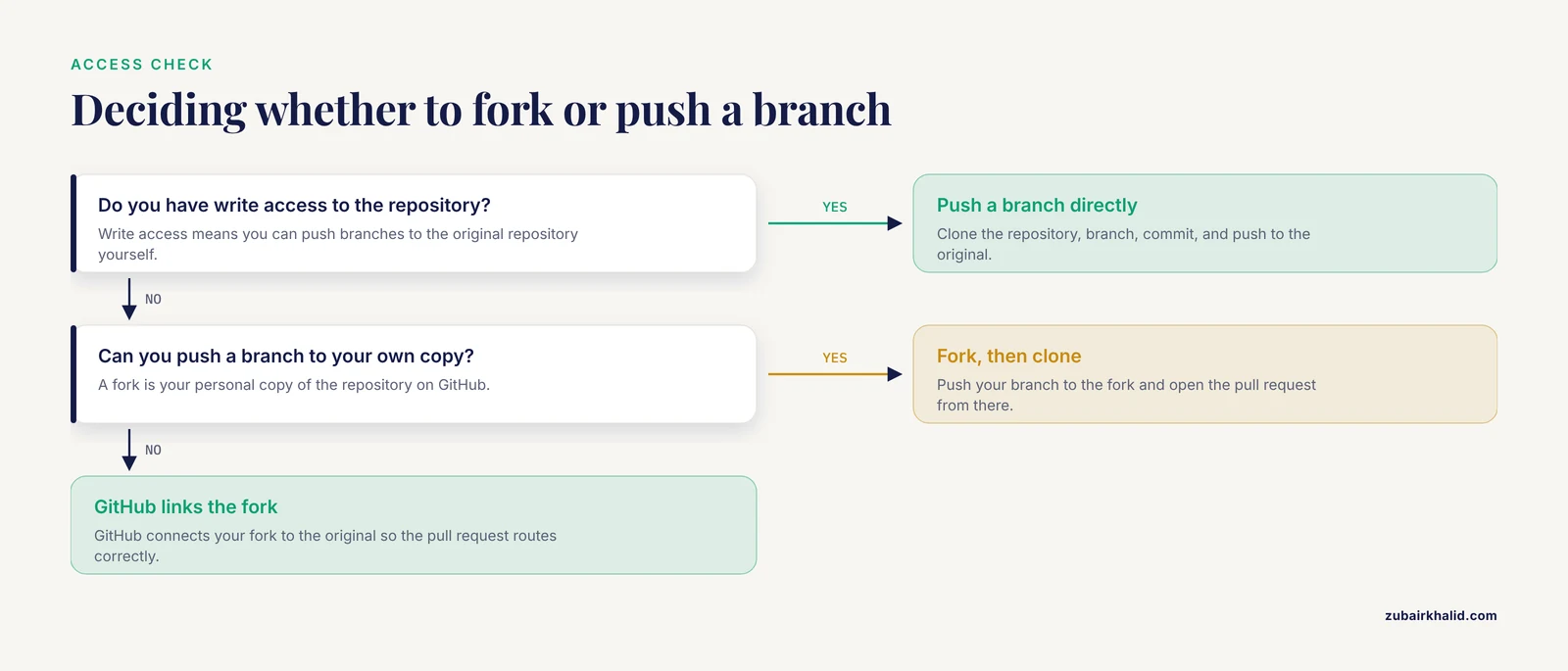
If you have write access to the repository, push a branch directly. If you do not have write access, fork first, then clone your fork, push your branch to the fork, and open the pull request from there. GitHub connects the fork to the original automatically.
What is the difference between a commit and a pull request?
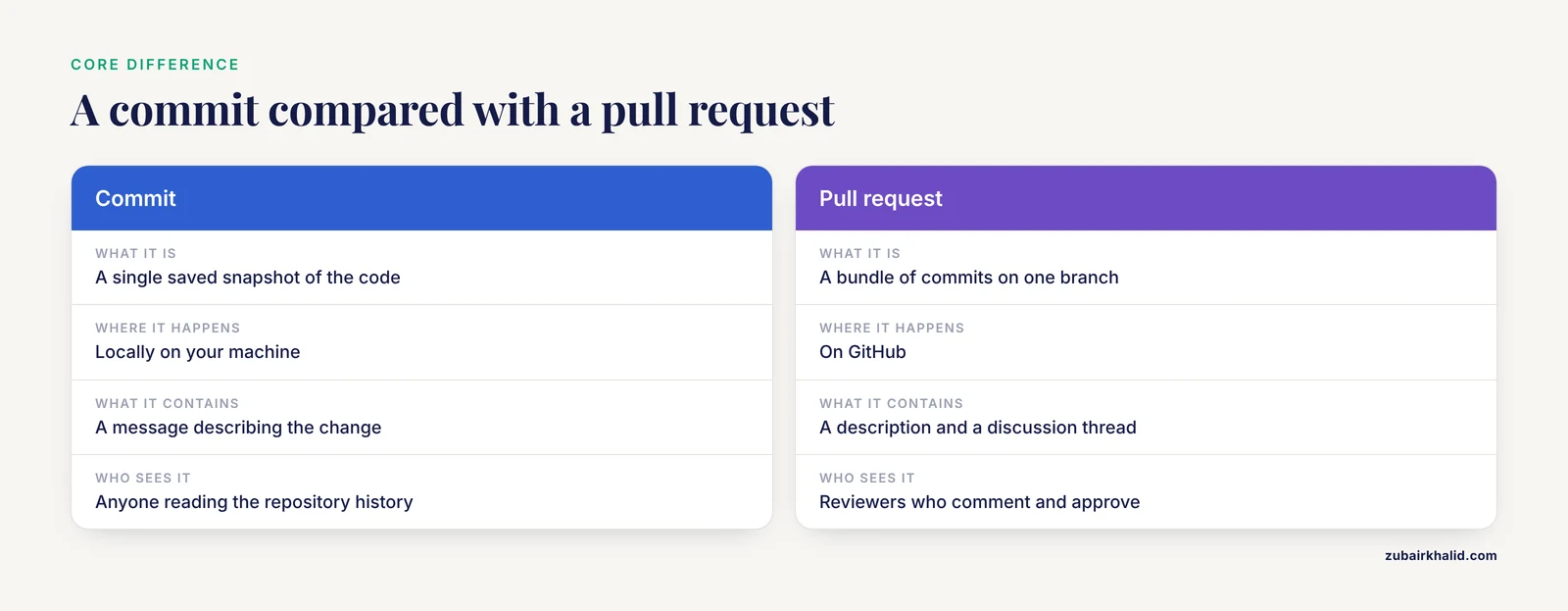
A commit is a single saved snapshot of the code with a message describing the change. A pull request is a bundle of commits on one branch, plus a description and a discussion thread, proposed for merging into another branch. Commits happen locally on your machine. Pull requests happen on GitHub.
How large should a pull request be?
Small enough that a reviewer can read the whole diff in one sitting. As a practical rule, aim for one logical change per pull request, which usually means a handful of files. If the description takes longer to read than the diff, the diff is in good shape.
What should I do when my pull request has merge conflicts?
Fetch the latest main, merge it into your branch, open each conflicted file, resolve the marked sections by hand, delete the conflict markers, stage the files, commit, and push. The pull request updates automatically. Resolve conflicts on your own branch rather than asking the reviewer to do it.
How do I give credit to a colleague who helped write the code?
Add a Co-Authored-By: trailer at the end of the commit message with the collaborator's name and email. GitHub and GitLab both recognize this trailer and display the co-author on the commit, making shared contributions visible in project history.
Can I use this workflow with GitLab or my university's server instead of GitHub?
Yes. The Git commands are identical on any platform, because branch, commit, push, and merge are Git concepts, not GitHub features. GitLab and self-hosted servers call the feature a merge request instead of a pull request, and the review workflow works the same way.
What belongs in a .gitignore file for a research project?
Exclude anything that is raw data, patient-identifiable, very large, machine-generated, or secret. Common entries are the data directory, FASTQ and CSV files, saved R or Python workspace images, environment files holding credentials, and editor scratch files. The goal is that only code, documentation, and small configuration files are ever tracked.
How do I check that my pull request did not break anything before asking for review?
Run the code end to end in a fresh session, run the project's test suite if one exists, and rerun any analysis that touches the files you changed. If the repository has automated checks configured, confirm they pass on the pull request page before you tag a reviewer.
Sources
- TypeTaxonScript: sugarifying and enhancing data structures in biological systematics and biodiversity research.
- Creating and sharing reproducible research code the workflowr way.
- Version Control for Surgical Data Science: A Primer on Git and GitHub.
- Laboratory information systems for research management in biology.
- A mixed-methods analysis of micro-collaborative coding practices in OpenStack.