How to Count Reads in a FASTQ File on Linux
By Dr. Zubair Khalid, DVM, MS, PhD ·

By the end of this article you will be able to count the reads in any FASTQ file on Linux, whether the file is plain text or gzip compressed, verify that paired-end files contain the same number of reads, count only the reads that contain a specific sequence, and decide when a one-liner is enough and when a dedicated tool such as 2FAST2Q is the better choice. Everything here runs on a stock Linux install with the standard core utilities: wc, grep, awk (any of gawk, mawk, or busybox awk), zcat, and gzip. No root access, conda environment, or reference genome is required.
Read counting sounds trivial, and the core operation is one line. The mistakes that cost people hours are subtler: a truncated file that silently divides by a wrong number, a quality line that begins with @ and fools a naive grep, a paired-end set where R1 and R2 disagree, or a pipeline that counts filtered reads and reports them as raw reads. This walkthrough covers all of those cases with exact commands and expected output.
What a Read Is in a FASTQ File
FASTQ is a four-line text format. Every read occupies exactly four lines:
@ Illumina_Controller:1:1101:24319:1184 1:N:0:ATCACG
GATCGGAAGAGCTCGTATGCCGTCTTCTGCTTGAAA
+
IIIIIIIIIIIIIIIIIIIIIIIIIIIIIIIIIIII
Line 1 starts with @ and carries the read name plus, on Illumina data, the paired-end indicator and index sequence. Line 2 is the raw nucleotide sequence. Line 3 begins with + and may repeat the header or contain nothing after the plus sign. Line 4 holds the Phred quality scores, one ASCII character per base, and always has the same length as line 2.
Because the format is strictly four lines per record, the total line count divided by four gives the read count. That arithmetic is the basis of every fast counting method below. The one caveat, which causes most of the real-world errors, is that the division is only correct when the file is complete, uncompressed, and contains no stray blank lines. A file cut off mid-record has a line count that is not a multiple of four, and a trailing newline appended by a careless cat can shift the modulus.
One more terminology note. Sequencing facilities and tools report "reads" and "reads passing filter" as different numbers on the flowcell level, but in a FASTQ file every four-line record is a read. When a QC tool reports a smaller count than your own count of the same file, the usual reason is that the tool counted reads after trimming or filtering, not that your count was wrong.
The Fastest Ways to Count Reads in a FASTQ File on Linux
Three commands cover almost every situation. Run them from the directory that holds your file.
Method 1, awk on record boundaries (most reliable):
awk 'NR%4==1{n++} END{print n+0}' sample_R1.fastqExpected output:
18743172This counts the first line of every four-line record, which is the header line. It is immune to quality lines that happen to start with @ and to + lines that carry a repeated header. The +0 in the print statement forces a zero rather than an empty line if the file has no reads.
Method 2, line count divided by four:
wc -l sample_R1.fastqExpected output:
74972688 sample_R1.fastqThen divide by 4:
echo $(( 74972688 / 4 ))Output:
18743172This is the fastest method because wc -l only counts newline bytes and never parses content. It is correct only if the file is a clean multiple of four lines, so verify that first (the step-by-step section shows how).
Method 3, count the delimiter lines:
grep -c '^+$' sample_R1.fastqThis counts every line that consists of exactly a single +. It works on most real data because most writers emit a bare +, but the FASTQ format allows the third line to repeat the read header after the +. Files from some older or nonstandard writers will be undercounted by this method. Prefer Method 1 unless you have confirmed your files use bare + lines.
A warning about the tempting shortcut grep -c '^@': quality score lines are ASCII text and the @ character is a legal quality encoding, so some quality lines start with @ and get counted as reads. This error is silent, meaning the command exits normally with a plausible-looking number. It is the single most common wrong answer to the question of counting reads in a FASTQ file on Linux.
Count Reads in a FASTQ File on Linux, Step by Step
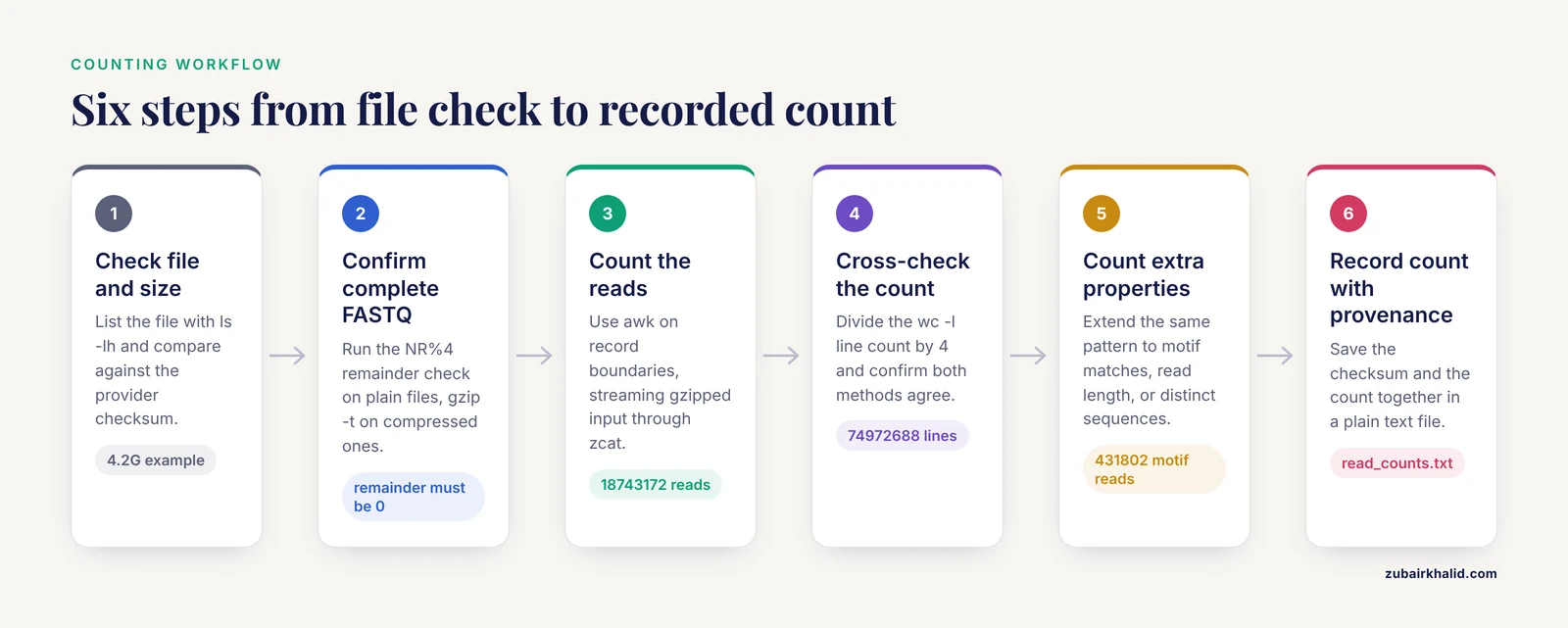
This is the full workflow I use on new data. Follow the steps in order on one file before scripting anything.
Step 1. Confirm the file exists and check its size
ls -lh sample_R1.fastq.gzExpected output:
-rw-r--r-- 1 user user 4.2G Nov 11 09:14 sample_R1.fastq.gzThe -h flag gives human-readable sizes. A zero-byte file or a file dramatically smaller than expected for your run is the first sign of a truncated transfer. Compare against the checksum your sequencing provider supplied if one exists, using md5sum or sha256sum.
Step 2. Check the file is a complete FASTQ
For an uncompressed file:
awk 'NR%4==1{h++} END{print NR, h, NR%4}' sample_R1.fastqExpected output:
74972688 18743172 0The three numbers are total lines, header count, and the remainder of total lines divided by 4. The remainder must be 0. If it is 1, 2, or 3, the file was truncated during transfer or generation, and any count you produce is the count of a partial file.
For a gzipped file, the compression container itself must be intact:
gzip -t sample_R1.fastq.gz && echo "gzip OK"Expected output:
gzip OKIf gzip -t fails with an unexpected end of file message, the archive is incomplete. Recopy or redownload it before counting.
Step 3. Count the reads
For plain text:
awk 'NR%4==1{n++} END{print n+0}' sample_R1.fastqFor gzip compressed input, stream through zcat and never write an uncompressed copy to disk:
zcat sample_R1.fastq.gz | awk 'NR%4==1{n++} END{print n+0}'Expected output:
18743172The streaming form reads the file once, uses a few megabytes of memory, and works on files of any size. Do not run gunzip sample_R1.fastq.gz just to count reads. Decompressing a multi-gigabyte file wastes disk space and time when the pipe does the same job.
zcat is equivalent to gzip -dc. On macOS, zcat behaves differently, so if you ever run this on a Mac use gzip -dc instead. This article assumes Linux throughout.
Step 4. Cross-check with a second method
zcat sample_R1.fastq.gz | wc -lExpected output:
74972688Divide by 4 and confirm the two methods agree. If awk and wc disagree, the most likely cause is a blank line somewhere in the file or a record whose quality line is missing. Find the first bad record with:
zcat sample_R1.fastq.gz | awk 'NF==0{print NR; exit}'Expected output for a clean file is nothing at all. If a line number prints, that is the first blank line and the location of your problem.
Step 5. Count reads with additional properties
The same record-boundary pattern extends to any per-read statistic. To count only reads whose sequence contains a specific adapter or target sequence:
zcat sample_R1.fastq.gz | awk 'NR%4==2 {
  if (index($0, "ACGTACGTAC") > 0) n++
}
END { print n+0 }'
Expected output:
431802To count reads of exactly 150 bases:
zcat sample_R1.fastq.gz | awk 'NR%4==2 && length($0)==150 {n++} END{print n+0}'To count the number of distinct sequences in the file:
zcat sample_R1.fastq.gz | awk 'NR%4==2{c[$0]++} END{print length(c)}'Expected output:
12487190This last command holds a hash of every distinct sequence in memory, so on deep-sequencing files it can consume many gigabytes of RAM. For a quick complexity check on the first million reads, add | head -n 4000000 before the awk command.
Step 6. Write the count down with provenance
A count without context is useless three weeks later. Record it alongside the file checksum:
md5sum sample_R1.fastq.gz > sample_R1.md5
zcat sample_R1.fastq.gz | awk 'NR%4==1{n++} END{print n+0, FILENAME}' >> read_counts.txt
Expected contents of read_counts.txt:
18743172 sample_R1.fastq.gzEvery command in this section is a standard Linux command for bioinformatics that ships with every major distribution, which is exactly why the counting workflow is portable across servers, HPC login nodes, and containers.
Counting Reads in Compressed FASTQ Files
Nearly all sequencing data arrives gzip compressed, and a few points deserve their own treatment.
Stream, never decompress to disk. The pattern zcat file.fastq.gz | awk ... is the correct idiom. A 5 GB compressed FASTQ expands to roughly 15 to 30 GB, and on a shared server an uncompressed copy can fill a home directory and fail mid-write, which leaves you with a corrupt partial file.
Multiple gzip members are legal and often missed. Some long-running writers concatenate gzip streams, producing a file that gzip -dc handles correctly but that some graphical tools and older libraries read only up to the first member. If gzip -l reports a different uncompressed size than zcat file | wc -c, you likely have concatenated members. zcat still counts the whole stream correctly.
Do not confuse .gz integrity with FASTQ integrity. gzip -t passing tells you the compression container is whole. The four-line record check from Step 2 tells you the content is whole. Run both on files you did not generate yourself.
bzip2 and zstd inputs. If your data arrived as .fastq.bz2 or .fastq.zst, the same streaming pattern applies with bzcat or zstdcat in place of zcat. The awk program does not change.
Paired-End Files and Read Count Validation
Paired-end sequencing produces two files, conventionally named *_R1 and *_R2, where each DNA fragment was read from both ends. Three checks matter before any downstream alignment or counting.
Check 1, equal read counts. Run the counter on both files and compare:
zcat sample_R1.fastq.gz | awk 'NR%4==1{n++} END{print n+0, "R1"}'
zcat sample_R2.fastq.gz | awk 'NR%4==1{n++} END{print n+0, "R2"}'
Expected output:
18743172 R1
18743172 R2
Unequal counts mean one file was filtered independently, truncated, or is simply the wrong file. Almost every aligner and merge tool expects equal counts and will either fail or silently drop reads.
Check 2, read names correspond in order. Equal counts are not sufficient. The ith read in R1 must be the mate of the ith read in R2. Verify with:
paste <(zcat sample_R1.fastq.gz | awk 'NR%4==1{print $1}') \
      <(zcat sample_R2.fastq.gz | awk 'NR%4==1{print $1}') |
awk '$1!=$2{bad++} END{print bad+0, "mismatches"}'
Expected output:
0 mismatchesThis strips the trailing /1 and /2 or the Illumina mate tag so the base names compare cleanly. A nonzero mismatch count after sorting or a partial reprocessing step means the files are out of order and must be repaired before alignment, not counted and forgotten.
Check 3, index reads. If your run produced *_I1 or *_I2 index files, their record counts should match the read files as well. Demultiplexing tools rely on that correspondence.
Using Dedicated Tools Instead of One-Liners
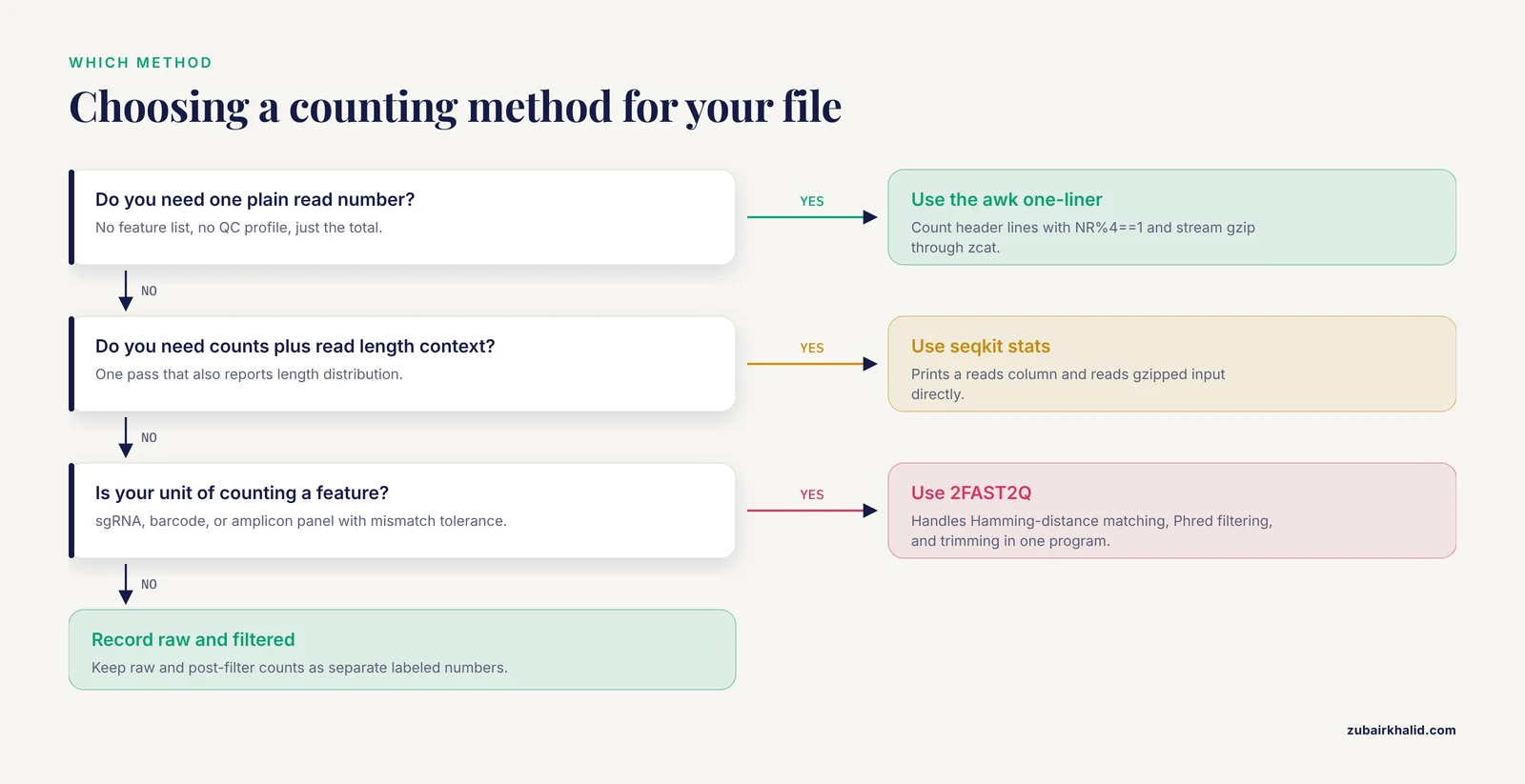
One-liners answer the question "how many reads are in this file." Quality control tools answer a broader question and report the read count as one of many statistics. All three of the tools below are standard in Linux for bioinformatics workflows.
FastQC. Run fastqc sample_R1.fastq.gz and open the resulting HTML report. The Basic Statistics module reports Total Sequences, which is the read count after FastQC's internal sampling behavior is accounted for. FastQC is designed for QC profiling, not bulk counting, so for a large number of samples the awk one-liner remains the faster path to a plain number.
seqkit. The command seqkit stats sample_R1.fastq.gz prints a table with a reads column among other summary statistics, and it reads gzipped input directly. seqkit is a Go-based toolkit built for exactly this kind of FASTA and FASTQ bookkeeping, and it is a good default when you want counts plus read length distributions in one pass.
fastp. Run fastp -i sample_R1.fastq.gz -o trimmed_R1.fastq.gz and read the JSON or HTML report it produces. The summary section reports before-filter and after-filter read counts. The distinction matters: the before-filter number is your raw count, the after-filter number is what survives adapter and quality trimming. Pipelines that report the after-filter number as the library size inflate downstream apparent depth. Always record both.
The general rule: use a one-liner when you need one number, use seqkit or fastp when you need the number plus context, and use FastQC when you need a full QC profile. Counting itself never requires installing anything beyond coreutils and awk.
Feature-Level Counting with 2FAST2Q
Plain read counting tells you how many records a file holds. Many experiments need a different quantity: how many reads match each member of a defined set of sequences, such as sgRNA cassettes in a CRISPR screen, a barcode panel, or amplicon variants. A one-liner per feature becomes impractical when the feature list runs to thousands of entries, and simple exact matching loses reads that contain a sequencing error.
2FAST2Q addresses this problem. It is a standalone Python program, with published executable builds for Windows, macOS, and Linux, that extracts and counts occurrences of user-supplied feature sequences directly in FASTQ files [1]. The program was originally described as the counting component of a CRISPRi-seq analysis pipeline and has since been documented as a general-purpose sequence search and counting tool for FASTQ input [1].
Several capabilities distinguish it from shell one-liners for this task. It uses a custom sequence-searching algorithm that supports Hamming-distance based mismatch alignment, so reads containing a small number of mismatches relative to a reference feature are still assigned rather than discarded [1]. It applies nucleotide-wise Phred score filtering and custom read trimming within the same program, which means low-quality bases can be masked or removed before matching without a separate preprocessing step [1]. It also records per-feature read counts suitable for direct downstream statistical analysis.
The published validation used CRISPRi datasets in which gene essentiality was assessed in Escherichia coli and Mycobacterium tuberculosis, along with a host-cell dataset on sensitivity toward SARS-CoV-2 infectivity. Across those datasets, 2FAST2Q recapitulated the read counts per feature reported in the original published analyses [1]. The authors also examined how different FASTQ filtering parameters change downstream results and proposed default usage parameters, which is a useful reminder that the count you get depends on the filtering choices you make before you count [1].
In practical terms, choose 2FAST2Q when your unit of counting is a feature rather than a file, when you need mismatch tolerance, or when you want Phred-based filtering and counting fused into one reproducible step. Choose the awk one-liner when your unit of counting is the read itself and you want zero dependencies.
Performance Tips for Large FASTQ Files
A modern flowcell produces FASTQ files measured in tens of gigabytes. The one-liners above are all single-pass and streamable, which is the right algorithmic shape, but implementation details change runtime substantially.
Choose your awk implementation. On Debian and Ubuntu systems, /usr/bin/awk usually points to mawk, which is typically the fastest awk for this kind of streaming arithmetic. gawk is more featureful but often slower on simple counting loops. If counting is a frequent task on large files, installing mawk and confirming awk, version resolves to it is a cheap win.
Set the locale for grep. Locale-aware character handling can slow grep dramatically on ASCII data. Prefixing a grep invocation with LC_ALL=C forces byte-wise comparison and is a standard trick in Linux commands for bioinformatics:
LC_ALL=C grep -c '^+$' sample_R1.fastqAvoid writing intermediate files. Every pipe stage should stream. A pattern like zcat file.gz > tmp.fastq followed by counting doubles disk I/O for no benefit and risks filling the volume.
Parallelize across files, not within a file. Counting a single FASTQ is I/O bound, so splitting one file across threads rarely helps on a spinning disk and gives modest gains on fast SSDs. When you have hundreds of files, run one single-threaded counter per file in parallel with GNU parallel or a simple shell loop over batches. Aggregate throughput scales with the number of files, and each job stays simple and debuggable.
Count during decompression once. If you must produce an uncompressed file for a downstream tool anyway, count it in the same pass with tee:
zcat sample_R1.fastq.gz | tee uncompressed.fastq | awk 'NR%4==1{n++} END{print n+0}'Command Cheat Sheet
| Task | Command | Notes | |
|---|---|---|---|
| Count reads, plain file | awk 'NR%4==1{n++} END{print n+0}' f.fastq | Robust to @ in quality lines | |
| Count reads, gzipped | `zcat f.fastq.gz \ | awk 'NR%4==1{n++} END{print n+0}'` | Streams, no temp files |
| Fast raw line count | wc -l f.fastq | Divide by 4, verify multiple of 4 first | |
Count bare + lines | LC_ALL=C grep -c '^+$' f.fastq | Fails if + line repeats header | |
| Verify record structure | awk 'END{print NR%4}' f.fastq | Must print 0 | |
| Count reads containing a motif | awk on NR%4==2 with index($0, "MOTIF") | Works gzipped via zcat pipe | |
| Count distinct sequences | awk hash on NR%4==2 | Memory hungry on deep data | |
| Mean read length | awk sum of length($0) on NR%4==2 | Divide total by read count | |
| Paired-end name check | paste two header streams, compare | Must print 0 mismatches | |
| Test gzip integrity | gzip -t f.fastq.gz | Run before trusting any count |
How to Verify Your Read Count
A count is only useful if you can defend it. Four independent checks cover the realistic failure modes.
First, agreement between methods. awk on record boundaries and wc -l divided by 4 use different code paths and should produce identical numbers on a clean file. Agreement is strong evidence the file structure is what you think it is.
Second, plausibility against the run metric. If your sequencing facility reported roughly 20 million reads per sample and your count says 18.7 million, that gap is explained by demultiplexing and low-quality read removal. If the count says 1.9 million or 187 million, something went wrong, most likely a wrong file, a partial transfer, or an off-by-factor in a script that processed a subset.
Third, cross-file consistency. In a multi-sample experiment, read counts should fall in a similar range across samples prepared together. One sample at a tenth of the others usually indicates a pipetting failure or a file corruption, and it is better to catch that before alignment.
Fourth, downstream reconciliation. After alignment, the number of mapped reads in your BAM cannot exceed the FASTQ count. Tools such as samtools flagstat report total reads in the BAM, and comparing that number against your FASTQ count closes the loop between raw data and processed results.
Common Mistakes and Limitations
Dividing an unchecked line count by four. A truncated FASTQ has a line count that is not a multiple of 4, and the division yields a fractional number or a silently wrong integer depending on your tool. Always run the NR%4 remainder check before trusting any /4 arithmetic.
Counting @-prefixed lines with grep. As covered above, quality lines can begin with @. The error is silent and produces an inflated count. Use record-boundary awk counting instead.
Assuming the + line is bare. grep -c '^+$' undercounts files whose third line repeats the header after the +. The FASTQ specification permits both forms.
Counting filtered reads as raw reads. If a trimming or filtering tool wrote the file you are counting, the number you get is the post-filter count. Reporting that as library size misleads depth calculations. Keep the raw file counts and the filtered file counts as separate, labeled numbers.
Counting a file twice that was concatenated by accident. A cat a.fastq b.fastq > a.fastq typo doubles the record count of a.fastq. If a count is suspiciously close to exactly double an earlier count, check the file history before debugging anything else.
Forgetting that file size is not read count. Compression ratios vary with sequence complexity and quality string entropy, so a smaller gzipped file can contain more reads than a larger one. Never infer counts from file size.
One-liners cannot do feature-level accounting. Counting reads per sgRNA, per barcode, or per amplicon variant with shell tools becomes a correctness risk as feature lists grow and mismatch tolerance becomes necessary. Purpose-built tools exist for this. As discussed above, 2FAST2Q was built for feature extraction and counting from raw reads and supports mismatch alignment, Phred filtering, and trimming in a single program [1].
Counts alone say nothing about quality. A file can contain 20 million reads of which 30 percent are low quality at their 3-prime ends. Pair every count with at least one quality summary from FastQC or fastp before making decisions about the sample.
Memory limits on sequence-uniqueness counting. Counting distinct sequences loads them into RAM. On a 32-bit awk or a small container this fails with an allocation error rather than giving a wrong answer, but on a large shared machine it can trigger the out-of-memory killer and disturb other jobs. Run uniqueness counts on head subsets or with tools designed for the purpose.
Next Steps
Once your counts are validated, the natural sequence in most projects is quality profiling with FastQC, adapter and quality trimming with fastp or cutadapt, alignment or pseudoalignment, and then per-feature quantification. When you reach the quantification stage and your experiment is a screen or a targeted panel, the feature-based counting model described above, in which each read is assigned to a known sequence with tolerance for a small number of mismatches, is the framework to reach for, and 2FAST2Q is a documented example of it [1]. For bulk RNA-seq and whole-genome work, standard aligners and their own counting stages take over from here.
Keep a single plain-text file in every project directory that records, per sample, the checksum, the raw read count, the post-filter read count, and the date counted. That one habit resolves most count disputes before they start.
Frequently Asked Questions
Does wc -l divided by 4 always give the correct read count?
No. It is correct only when the file is a complete, uncompressed FASTQ with no blank lines. Run the remainder check with awk first, and if the remainder is not 0, find the corruption before counting.
How do I count reads in a gzipped FASTQ file?
Stream the file through zcat and count with awk, for example zcat file.fastq.gz | awk 'NR%4==1{n++} END{print n+0}'. Never decompress to disk just to count.
Why do my R1 and R2 files have different read counts?
Usually one file was filtered or truncated independently of the other, or the two files came from different processing batches. Equal counts and matching read names in order are both required before alignment.
Is grep -c '^@' a reliable way to count reads?
No. The character @ is a valid quality score encoding, so some quality lines start with @ and get counted as reads. This produces a silently inflated number. Use awk record-boundary counting instead.
How do I count only reads that contain a specific sequence?
Use awk on the sequence lines, for example checking index($0, "MOTIF") on lines where NR%4==2, and increment a counter when the motif is found. For large feature panels with mismatch tolerance, use a dedicated tool such as 2FAST2Q.
Does a zero read count mean my file is empty?
A count of zero can mean an empty file, but it can also mean a command error such as a wrong path or an unreadable gzip stream. Check that the file exists, passes gzip -t if compressed, and that the command exited without an error message before concluding the library is empty.
Do I need to decompress the FASTQ file before counting?
No. zcat decompresses on the fly inside the pipe, so counting a gzipped file is as accurate and usually faster than counting an uncompressed copy, and it saves disk space.
How long should it take to count reads in a large FASTQ file?
Counting is a single sequential pass, so runtime scales with file size and disk speed. On typical hardware, counting proceeds at hundreds of megabytes per second of throughput for the awk one-liner, so a multi-gigabyte file takes seconds to a few minutes. If it takes hours, look for network filesystem latency or an accidentally quadratic command, not for a problem with the data.