How to Convert Gene Symbols to UniProt IDs
By Dr. Zubair Khalid, DVM, MS, PhD ·

By the end of this guide you will know how to convert gene symbols to UniProt IDs, meaning you can take a list such as TP53, EGFR, BRCA1 and GAPDH and turn it into a clean table of UniProt accessions using four different routes: the UniProt website, the UniProt REST API, the Python package mygene, and R packages from Bioconductor. You will also know how to break ties with sequence-based cross-referencing when a symbol refuses to map cleanly, and how to verify a mapping before it reaches a pipeline, a figure, or a manuscript.
Here is what to have on hand:
- A plain text file or spreadsheet column of gene symbols, one symbol per row.
- A web browser for the website methods.
- Optional: Python 3 with the
requestsandmygenepackages for scripted conversions. - Optional: R with BiocManager installed, for the Bioconductor route.
Every service in this guide is public and free to query. The only local setup is the optional Python or R tooling.
The reason this task deserves a careful workflow rather than a quick find-and-replace is structural. Each major protein database assigns identifiers under its own conventions, and those identifiers can be unstable over time, a mismatch serious enough that researchers built dedicated cross-referencing services to reconcile protein identifiers across databases [1]. A gene symbol sits even further from a protein entry than a foreign protein identifier does, because symbols are short human-friendly labels that get reused across species, across aliases, and across decades of renaming. Treat the conversion as a mapping problem with built-in quality control and it stays reproducible. Treat it as loose string matching and it will eventually produce wrong results that look perfectly plausible.
Why Gene Symbols Are Unreliable Database Keys
A gene symbol is a short mnemonic label for a gene, such as TP53 for the gene encoding tumor protein p53. For human genes the official symbols are maintained by the HUGO Gene Nomenclature Committee, and the literature commonly refers to them as HUGO Gene Symbols [2]. Symbols exist for human convenience, not for machines, and that design choice creates four recurring failure modes.
First, species reuse. The string TP53 names a human gene, Tp53 names the mouse gene, and lowercase conventions apply in other organisms. The proteins differ, the accessions differ, and an organism-blind lookup happily returns all of them.
Second, aliases. TP53 has been called p53, LFS1 and other names over the years. An alias can point at one gene, at several genes, or at a gene that has since been renamed, so alias-based matching widens your result set in ways you did not choose.
Third, renames. Nomenclature committees retire and replace symbols when conflicts surface. Old datasets, old supplement tables and old scripts carry dead symbols that no longer resolve to the entry you mean.
Fourth, collisions. The same short string can serve as a symbol in one context and something unrelated in another, and pseudogenes plus predicted genes add near-duplicate symbols that differ by a single character.
Protein databases compound the problem by minting their own identifier flavors with their own rules, and reconciling those identifiers across sources is a recognized challenge in its own right [1]. A symbol-to-protein mapping therefore inherits every ambiguity of the symbol and adds the one-to-many nature of protein annotation on top. The practical consequence is that any static mapping table you downloaded once and reuse forever is quietly rotting, and any mapping that skips organism and review-status filters is silently inflating your result set.
A Short UniProt Database Tutorial Before You Convert Anything
If you are still learning how to use UniProt, three concepts carry you through every conversion task: the entry, the query syntax, and the export. Think of this section as a compressed UniProt database tutorial that pays off in every method below.
The UniProt Knowledgebase, abbreviated UniProtKB, is the core database. It has two sections. Swiss-Prot contains reviewed entries, checked and annotated by human curators with literature evidence. TrEMBL contains unreviewed entries, annotated computationally, and it holds the majority of entries in UniProtKB. When someone says "UniProt ID" they almost always mean a UniProtKB accession.
An accession is the permanent unique identifier of an entry. Older accessions have six characters starting with a letter, for example P04637. Newer entries use longer accessions such as A0A024RBG1. Each entry also carries an entry name such as TP53_HUMAN. Accessions are the stable element, entry names can change, so accessions belong in your output files and entry names belong in your reading.
Reading a UniProt Entry the Right Way
Open the entry for P04637 and you see the fields that matter for verification. The gene names block lists TP53 as the primary gene name, with synonyms such as p53 listed below it. The protein name reads Cellular tumor antigen p53. The organism is Homo sapiens. The sequence length is 393 amino acids. Every one of those fields is a checkpoint you can use later to confirm that a mapping landed where you intended.
UniParc: The Sequence Archive Behind Cross-References
UniParc is the UniProt sequence archive. It stores every distinct protein sequence the consortium has processed, assigns each one a stable identifier called a UPI, and tracks cross-references tying that sequence to records about it in dozens of source databases. Because UniParc links identical sequences across databases, it is the natural backbone for identifier reconciliation, and at least one service was built directly on that design [1]. Keep UniParc in mind, because the sequence-based method later in this guide depends on it.
Method 1: The UniProt Website, Step by Step
The website handles both single lookups and batch conversion, and it is the fastest way to build intuition before scripting anything.
Route A: One Symbol at a Time in the Search Box
- Open https://www.uniprot.org in your browser.
- In the UniProtKB search box, enter
gene_exact:TP53 AND organism_id:9606. - Run the search. The top result should read accession P04637, entry name TP53_HUMAN, gene TP53, organism Homo sapiens.
- Open the entry and confirm the gene name, the synonym list, the protein name and the organism all match your expectation.
Why gene_exact and not gene? The gene field matches loosely and can pull in entries whose gene names merely contain your term. gene_exact demands the complete gene name. The organism_id filter pins the species, and the standard taxonomy identifiers are 9606 for human, 10090 for mouse and 10116 for rat. Adding reviewed:true restricts results to the reviewed Swiss-Prot section.
Route B: Batch Conversion with the ID Mapping Tool
- Open https://www.uniprot.org/id-mapping.
- Set the source database to Gene Name.
- Paste your symbols. Newlines, commas, spaces and tabs all work as separators:
TP53
EGFR
BRCA1
GAPDH- Set the target database to UniProtKB.
- Restrict the job to your organism when the tool offers taxonomy selection, for example human. This single setting prevents most cross-species noise.
- Start the mapping job.
- On the results page, group by input symbol, check the review status of each suggested accession, and drop unreviewed entries unless your analysis needs them.
- Export the accepted pairs as TSV (tab-separated values) or Excel.
Exported rows look like this:
From	To
TP53	P04637
EGFR	P00533
BRCA1	P38398
GAPDH	P04442
If a symbol returns several accessions, the tool shows all of them, and that is correct behavior rather than an error. The mistakes section below explains how to choose among them.
Convert Gene Symbols to UniProt IDs with the REST API, Step by Step
The REST API (an interface you call over HTTP with ordinary requests) runs the same mapping service as the website, so scripts and browser sessions stay in sync. The workflow has three server steps and one local cleanup step. An API key is not required for this service.
Step 1: Submit the Mapping Job
curl -X POST -F "from=Gene_Name" -F "to=UniProtKB" \
-F "identifiers=TP53,EGFR,BRCA1,GAPDH" \
https://rest.uniprot.org/idmapping/run
The response contains a job handle:
{"jobId": "69b0ae4e0b4f8a2c1d3e5f7a9b1c3d5e7f9a1b3c"}The parameters that matter:
| Parameter | Example value | What it controls |
|---|---|---|
| from | Gene_Name | Input identifier type. The same endpoint accepts protein-level inputs such as UniProtKB accessions or RefSeq protein identifiers |
| to | UniProtKB | Target database for the mapping |
| identifiers | TP53,EGFR,BRCA1 | Comma-separated input list |
| format | tsv | Result format in the results stream, with tsv, xlsx and json supported |
| fields | accession,id,gene_primary | Columns returned in tabular output |
| download | true | Returns the file as an attachment instead of inline text |
The from and to vocabularies are exact strings. Gene_Name covers gene symbols, and UniProtKB returns both reviewed and unreviewed entries.
Step 2: Poll the Job Status
curl https://rest.uniprot.org/idmapping/status/69b0ae4e0b4f8a2c1d3e5f7a9b1c3d5e7f9a1b3cWhile the job runs you get:
{"jobStatus": "RUNNING"}When it completes you get:
{"jobStatus": "FINISHED"}Save the jobId the moment it appears. Jobs of this size finish in seconds to minutes, job handles expire, and a script that submits and polls within one session avoids most surprises.
Step 3: Fetch the Results
curl "https://rest.uniprot.org/idmapping/uniprotkb/results/stream/69b0ae4e0b4f8a2c1d3e5f7a9b1c3d5e7f9a1b3c?format=tsv&fields=accession,id,gene_primary,organism_name,reviewed"Expected output:
accession	id	gene_primary	organism_name	reviewed
P04637	TP53	TP53	Homo sapiens	true
P00533	EGFR	EGFR	Homo sapiens	true
P38398	BRCA1	BRCA1	Homo sapiens	true
P04442	GAPDH	GAPDH	Homo sapiens	true
Append &download=true to receive the file as an attachment rather than inline text.
Step 4: Clean and Collapse the Results
One symbol can legitimately return several rows, so decide the collapse rule before you look at the data. For most human analyses the rule is: keep reviewed entries, keep the correct organism, then keep one accession per symbol, preferring the canonical entry, which is the one UniProt designates as the representative product of the gene.
import io
import time
import requests
import pandas as pd

BASE = "https://rest.uniprot.org"
symbols = "TP53,EGFR,BRCA1,GAPDH"

job = requests.post(
    f"{BASE}/idmapping/run",
    data={"from": "Gene_Name", "to": "UniProtKB", "identifiers": symbols},
).json()
job_id = job["jobId"]
print("jobId:", job_id)

while True:
    status = requests.get(f"{BASE}/idmapping/status/{job_id}").json()
    if status.get("jobStatus") == "FINISHED":
        break
    time.sleep(2)

resp = requests.get(
    f"{BASE}/idmapping/uniprotkb/results/stream/{job_id}",
    params={
        "format": "tsv",
        "fields": "accession,id,gene_primary,organism_name,reviewed",
    },
)

df = pd.read_csv(io.StringIO(resp.text), sep="\t")
keep = df[(df["reviewed"] == "true") & (df["organism_name"] == "Homo sapiens")]
final = keep.groupby("gene_primary", as_index=False).first()
print(final[["gene_primary", "accession", "id"]])
Expected final table:
  gene_primary accession          id
0       BRCA1    P38398  BRCA1_HUMAN
1        EGFR    P00533   EGFR_HUMAN
2       GAPDH    P04442  GAPDH_HUMAN
3        TP53    P04637   TP53_HUMAN
One detail saves headaches: UniProt writes booleans as lowercase strings in TSV output, so the filter compares against the string "true" rather than relying on truthiness.
The Direct Search Alternative
For short lists you can skip the job machinery and query UniProtKB directly:
curl "https://rest.uniprot.org/uniprotkb/search?query=(gene_exact:TP53)%20AND%20(organism_id:9606)%20AND%20reviewed:true&format=tsv&fields=accession,id,gene_primary,protein_name&size=25"The size parameter caps at 500 rows per page, and the Link response header carries the cursor for the next page when more results exist. This route shines when you want reviewed entries only, because reviewed:true lives directly in the query string.
Method 3: Bulk Conversions in Python with mygene
MyGene.info is a gene-centered web service that aggregates gene annotations, including UniProt cross-references, and the mygene Python package queries it in bulk.
pip install mygenefrom mygene import MyGeneInfo
mg = MyGeneInfo()
hits = mg.querymany(
["TP53", "EGFR", "BRCA1", "GAPDH", "NOTAREALGENE"],
scopes="symbol",
fields="uniprot",
species="human",
)
for hit in hits:
swiss = hit.get("uniprot", {}).get("Swiss-Prot")
print(hit.get("query"), swiss, hit.get("notfound"))Expected output:
TP53 ['P04637'] None
EGFR ['P00533'] None
BRCA1 ['P38398'] None
GAPDH ['P04442'] None
NOTAREALGENE None True
Four behaviors deserve attention:
scopes="symbol"tells the service how to interpret your input. Addaliasto the scopes list when your input may contain outdated or alternative symbols, and expect a wider result set when you do.species="human"prevents cross-species matches. Pass 10090 for mouse or 10116 for rat.- A symbol that matches nothing comes back with
notfoundset to True rather than raising an exception, so scan the output for it instead of waiting for a crash. - A symbol that matches several genes produces several hits carrying the same query value, so group by query before collapsing anything.
Method 4: Conversions in R with AnnotationDbi and biomaRt
AnnotationDbi with an Organism Package
Install from Bioconductor:
install.packages("BiocManager")
BiocManager::install(c("org.Hs.eg.db", "AnnotationDbi"))
Then convert:
library(AnnotationDbi)
library(org.Hs.eg.db)

symbols <- c("TP53", "EGFR", "BRCA1", "GAPDH")
res <- select(
  org.Hs.eg.db,
  keys = symbols,
  keytype = "SYMBOL",
  columns = c("UNIPROT")
)
print(res)
Expected output:
   SYMBOL  UNIPROT
1    TP53   P04637
2    EGFR   P00533
3   BRCA1   P38398
4   GAPDH   P04442
select() prints a note when a key maps to several rows: 'select()' returned 1:many mapping between keys and columns. That note is informative, not a failure. Keep the extra rows and filter deliberately. For mouse work, swap in org.Mm.eg.db and use sentence-case symbols such as Tp53.
One structural caveat: annotation packages ship as fixed snapshots that update with Bioconductor releases, so record the package version alongside your results.
biomaRt When Your Pipeline Is Ensembl-Centered
library(biomaRt)

ensembl <- useEnsembl(
  biomart = "genes",
  dataset = "hsapiens_gene_ensembl"
)

res <- getBM(
  attributes = c("hgnc_symbol", "uniprotswissprot", "uniprotsptrembl"),
  filters = "hgnc_symbol",
  values = symbols,
  mart = ensembl
)
head(res)
Expected output:
  hgnc_symbol uniprotswissprot uniprotsptrembl
1        TP53           P04637
2        EGFR           P00533
3       BRCA1           P38398
4       GAPDH           P04442
The two UniProt attributes separate reviewed (uniprotswissprot) from unreviewed (uniprotsptrembl) cross-references, which makes selective filtering trivial. If a call fails with a message about an unknown attribute or filter, list the valid names with listAttributes(ensembl) and listFilters(ensembl) and use them exactly.
Method 5: Sequence-Based Mapping with PICR and UniParc
Name-based mapping breaks down exactly when you need it most: ambiguous symbols, outdated aliases, non-model organisms with thin annotation, or proteomics results where the only trustworthy thing you hold is a sequence. The robust fallback is to stop mapping names and map sequences instead.
The Protein Identifier Cross-Referencing service (PICR) was built for this purpose. It uses UniParc as its data warehouse and returns cross-references based on 100 percent sequence identity to proteins from more than 70 source databases, with interactive access plus programmatic SOAP and REST interfaces [1]. You can paste identifiers or upload FASTA sequences, and you can restrict mappings by source database, taxonomic ID and activity status in the source database [1].
The workflow:
- Translate your coding sequence into a protein sequence, or take the sequence straight from your mass spectrometry or cloning records.
- Format it in FASTA (a plain text sequence format whose header line starts with a greater-than sign):
>my_sequence_human_TP53_candidate
MEEPQSDPSIEPPLSQETFSDLWKLLPENNVLSPLPSQAMDDLMLSPDDIEQWFTEDPGP- Submit the sequence through the PICR web interface or its REST or SOAP endpoint, requesting UniProt among the target sources.
- Apply the taxonomic filter for your organism so near-identical orthologs from other species do not clutter the result.
- Collect the UniProt accessions among the returned cross-references and treat them as verified mappings, because a 100 percent identity match over the submitted sequence is far stronger evidence than a shared symbol.
The 100 percent identity rule cuts both ways. A sequence with even one residue difference relative to a UniProt entry, such as a variant or a different isoform (a protein variant produced from the same gene by alternative splicing), will not match under this design [1]. Use name-based methods for those cases and sequence-based methods for confirmation. PICR was published in 2007, so check the current service documentation before scripting against it, and keep the original paper at hand as the specification of what its mappings mean [1].
Method 6: Quick Human Lookups with the biodb.jp ID Converter
For fast, human-focused checks there is a lighter option. The Hyperlink Management System (HMS) builds corresponding tables of identifiers for human genes and proteins every day, covering HUGO Gene Symbols along with UniProt, PDB, H-InvDB and nucleotide accession numbers, and its companion ID Converter System (ICS) exposes those tables as a straightforward conversion service at biodb.jp [2]. The same daily tables keep cross-database hyperlinks working without manual upkeep, which is how 23,297 H-InvDB Locus pages remain reachable directly from HUGO Gene Symbols [2].
Practical use: paste a human gene symbol into the ICS web form, request UniProt among the outputs, and read off the accession. The service works well as an independent second opinion when a UniProt tool returns something surprising, and as a zero-install option when you cannot add software to your environment. Its scope is human data, so reach for the other methods for mouse, rat or any other species.
Which Method Should You Use
| Method | Input | Scope | Output | Watch out for |
|---|---|---|---|---|
| UniProt search box | One symbol | Any organism | One entry page | Loose gene matches, prefer gene_exact |
| UniProt ID mapping tool | Batch symbols | Any organism | TSV or Excel download | Many-to-many rows need review |
| REST API idmapping | Batch symbols or IDs | Any organism | JSON or TSV | Asynchronous job, save the jobId |
| mygene (Python) | Batch symbols, aliases | Gene-centered | Dictionaries with a uniprot field | Missing and duplicate hits need handling |
| AnnotationDbi (R) | Symbols per organism package | One organism per package | data.frame | Package snapshots age between releases |
| biomaRt (R) | Symbols via Ensembl filters | Ensembl datasets | data.frame | Attribute names differ from UniProt terms |
| PICR [1] | Sequences or protein identifiers | More than 70 source databases | Cross-references | Requires exact sequence identity |
| biodb.jp ICS [2] | Human symbols | Human | Identifiers and URLs | Human focus |
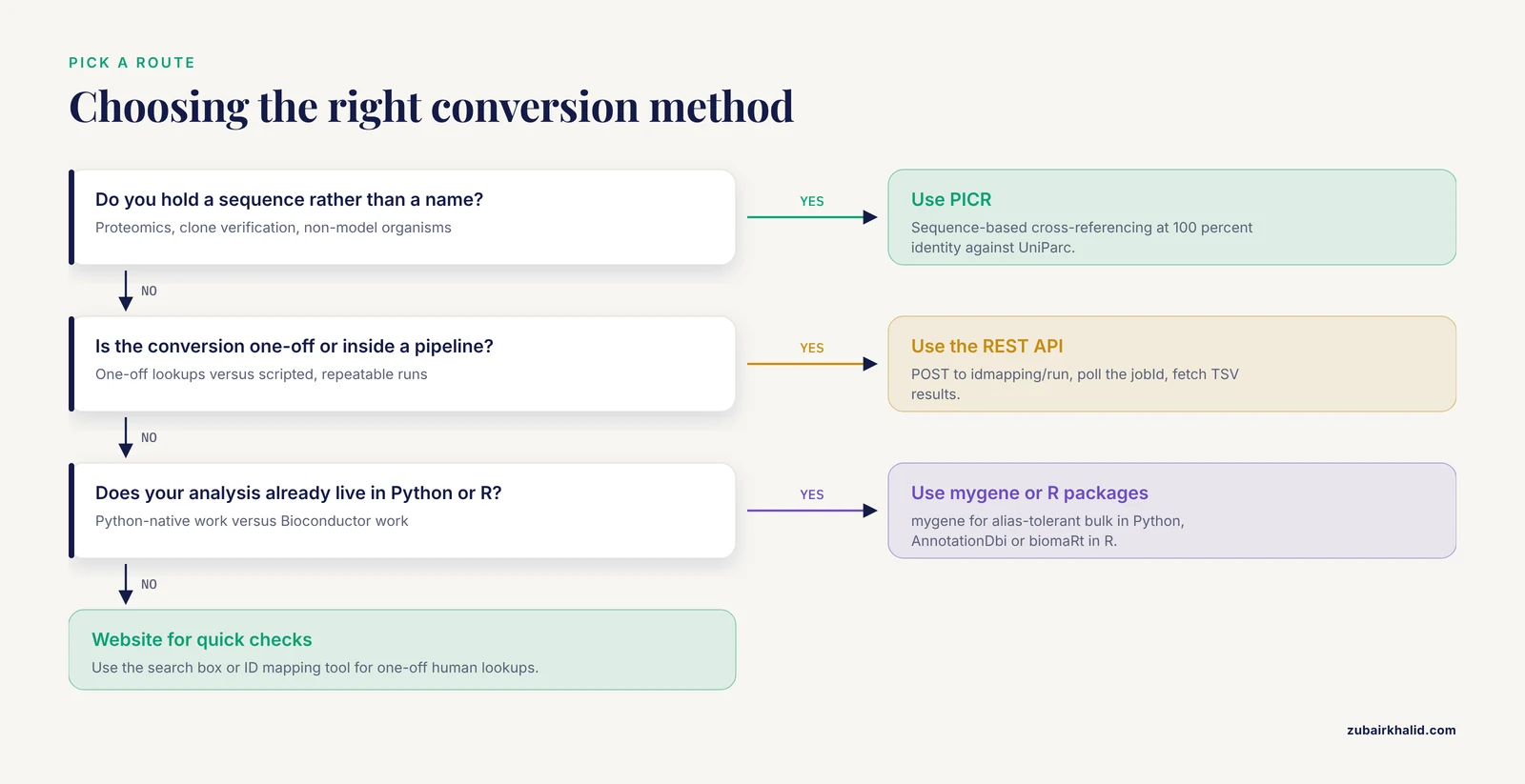
A simple decision rule covers most situations. Use the website for one-off lookups and for learning the data model. Use the REST API when the conversion must live inside a pipeline. Use mygene when your analysis is Python-native and you want alias tolerance in bulk. Use the R packages when the downstream analysis already lives in R. Use PICR when you hold sequences and certainty matters [1]. Use biodb.jp for a quick human cross-check [2].
How to Check That a Mapping Is Right
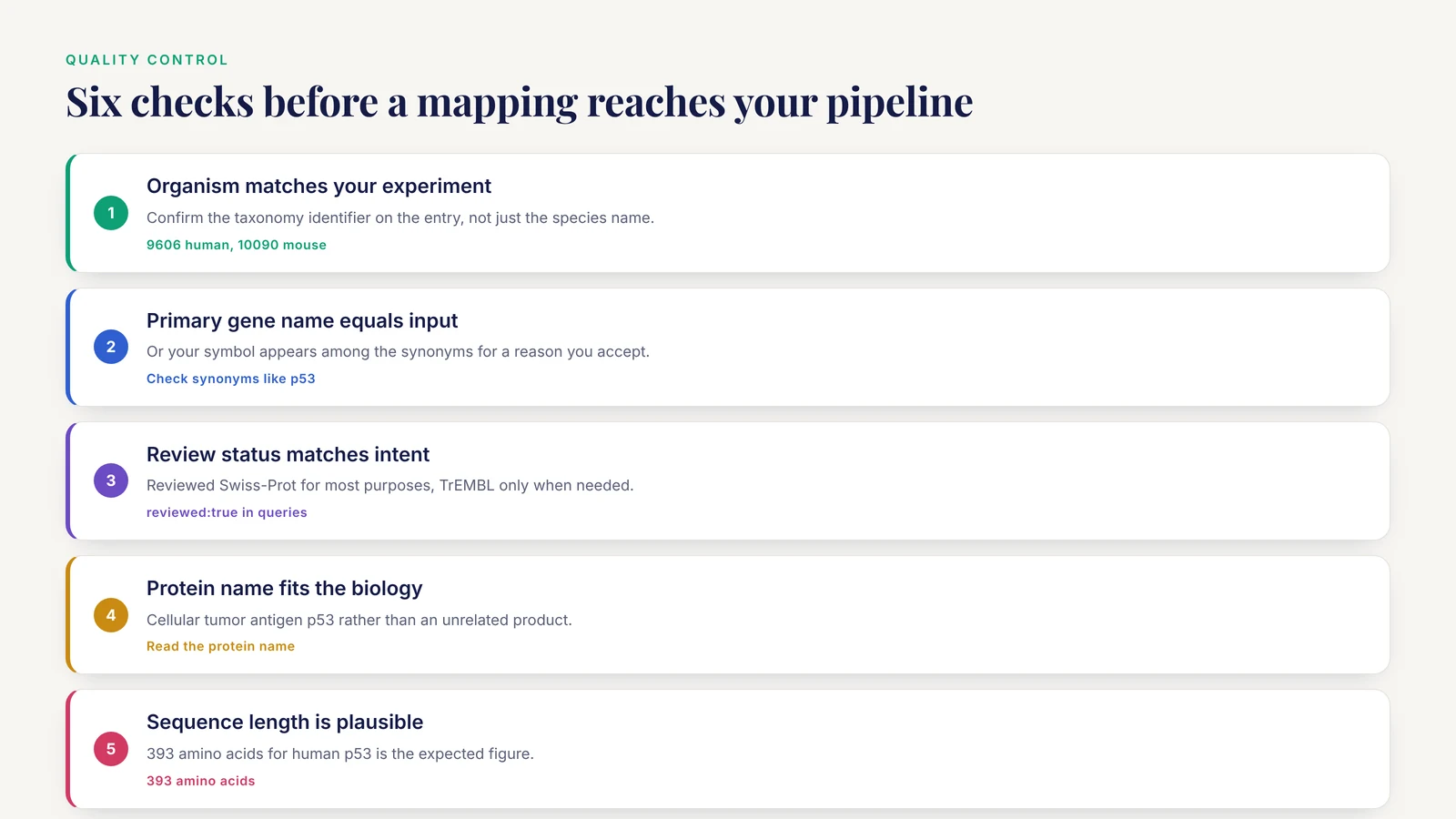
Verification takes a minute per entry and prevents the classic silent failures. Run this checklist on a sample of your mappings, and on any mapping that surprised you:
- The organism on the entry matches your experiment, confirmed by the taxonomy identifier.
- The primary gene name on the entry equals your input symbol, or your symbol appears among the listed synonyms with a reason you accept.
- The review status matches your intent, reviewed Swiss-Prot for most purposes.
- The protein name matches the biology you expect, for example Cellular tumor antigen p53 rather than an unrelated product.
- The sequence length is plausible for the protein, for example 393 amino acids for human p53.
- The accession round-trips: paste it back into UniProt and the same entry comes up.
Practical Tips for Reliable Conversions
- Pin the organism before anything else. Most wrong mappings are cross-species mappings.
- Prefer reviewed entries and write that choice into your methods section, so reviewers can reproduce the mapping.
- Use
gene_exactin queries and reserve the loosergenefield for exploratory searches where you want breadth. - Carry accessions, not entry names, in downstream files, because accessions are the stable identifier.
- Record provenance for every conversion: the date, the service or package version, the parameters, and the jobId for API runs.
- Split very large inputs into chunks of a few thousand symbols, so one malformed line cannot sink an entire job and retries stay cheap.
- Reverse-check a random sample by pasting accessions back into UniProt and confirming gene, organism and protein name.
- Guard spreadsheets against date autocorruption. Import filters in spreadsheet software can convert symbols such as SEPT1 and MARCH1 into calendar dates, which quietly replaces gene names with dates before you ever map them. Force the symbol column to text on import, or do the conversion in code.
- When a symbol refuses to resolve, consult the current nomenclature record for that gene and look for retired symbols and aliases before concluding the gene is absent from UniProt.
Common Errors and How to Fix Them
ModuleNotFoundError: No module named 'mygene' The package is not installed in the environment your interpreter is using. Run pip install mygene in that same environment, then confirm with python -c "import mygene".
curl: (6) Could not resolve host: rest.uniprot.org This is a DNS or connectivity failure, sometimes caused by proxy settings on institutional networks. Verify general connectivity, then retry, and check proxy environment variables if your lab routes external traffic through a gateway.
HTTP 400 from the idmapping/run call The service rejected a parameter value. The from and to values must be spelled exactly as documented, so Gene_Name and UniProtKB must match case and wording. A malformed identifiers payload triggers the same class of error.
HTTP 404 when polling status or fetching results The jobId is mistyped or the job has expired. Resubmit the job and capture the new jobId immediately in your script rather than copying it by hand.
Empty result rows for a symbol that should exist Check species-specific capitalization first, Tp53 for mouse rather than TP53. Then confirm the symbol is current rather than retired. As a last resort, broaden gene_exact to the looser gene field to catch name variants, then filter the wider result set by hand.
'select()' returned 1:many mapping between keys and columns This AnnotationDbi message is a notice, not a failure. The result contains multiple rows per symbol because one gene connects to several identifiers. Keep the rows and apply your collapse rule.
None of the keys entered are valid keys for 'SYMBOL' AnnotationDbi rejected every key. Usual causes are lowercase input, stray whitespace, or passing identifiers of the wrong type, such as Ensembl IDs against a symbol keytype. Clean the input or change keytype to match what you actually hold.
biomaRt complains about an attribute or filter Attribute and filter names are dataset-specific. Call listAttributes(ensembl) and listFilters(ensembl) and use the exact names, which for UniProt are uniprotswissprot and uniprotsptrembl.
Common Mistakes and Limitations
- Treating a symbol as unique. GAPDH exists in human and mouse with different accessions, P04442 and P16858 respectively, and an organism-blind mapping returns both. Filter by organism on every job.
- Accepting every returned row. Unreviewed TrEMBL entries multiply results with fragment-level and isoform-level records. Filter on review status unless the analysis specifically needs predicted products.
- Letting aliases widen results invisibly. An alias can match several genes, and an official symbol today was an alias yesterday. Resolve inputs through the current nomenclature record.
- Working from stale local mapping tables. Cross-references between databases drift as entries merge, split and rename, and keeping those links current used to be a manual chore until services began regenerating corresponding tables daily [2]. Regenerate your mappings for each project instead of recycling an old file.
- Quoting entry names instead of accessions. TP53_HUMAN can change, P04637 does not. Accessions are the citable identifier.
- Collapsing one-to-many mappings silently. Decide on a tie-break rule, such as reviewed first, correct organism second, canonical entry third, and document it.
- Skipping validation. Reverse-check a sample of mappings by opening the UniProt entries and confirming gene, organism and protein names.
- Using name matching where sequence evidence exists. For proteomics and clone verification, sequence-based cross-referencing at 100 percent identity is the stronger standard [1].
- Letting spreadsheet software mangle symbols during import, which replaces symbols with dates and leaves you mapping the wrong strings without any error message.
One limitation frames all of the above. Symbol-to-protein mapping is inherently many-to-many at its edges, so ambiguous cases deserve manual inspection of the UniProt entry itself and a judgment call recorded in your methods, rather than blind automation.
Where to Go Next
Once the mapping table exists, three follow-ups use it directly. Fetch sequences for the accepted accessions through the UniProt REST API in FASTA format for downstream alignment or peptide design. Join the accessions against functional annotation sets for enrichment analysis. Archive the mapping table with its provenance alongside your raw data, so the conversion is reproducible when the databases have moved on.
Frequently Asked Questions
What exactly is a UniProt ID?
A UniProt ID is the accession of an entry in UniProtKB, for example P04637 for human TP53. It identifies a protein entry, not a gene record.
Is a UniProt ID the same as a gene ID?
No. Gene identifiers describe loci, while UniProt accessions describe protein entries, and one gene can connect to several protein entries through isoforms and annotation history.
How do I convert a long list of gene symbols at once?
Use the UniProt ID mapping tool in the browser for interactive work, or POST the list to the idmapping/run endpoint of the REST API for scripted work. Both accept batch input.
Why does one gene symbol return several UniProt IDs?
Symbols are shared across species, reused as aliases, and attached to multiple entries, including unreviewed and isoform-level records. Filter by organism and review status to narrow the set.
Which UniProt entry should I choose when several come back?
Choose the reviewed entry for your organism unless you specifically need a predicted or isoform-specific record, then document the rule you applied.
Can I convert UniProt IDs back to gene symbols?
Yes. Query UniProtKB with the accession and request the gene_primary field, or run the ID mapping service in the reverse direction from UniProtKB to Gene_Name.
Do mouse and rat symbols work the same way?
The workflow is identical, but mouse and rat symbols use sentence case, such as Tp53, and you must switch the taxonomy filter to the correct species.
How often should I redo a symbol to UniProt conversion?
Refresh mappings at the start of each analysis cycle and store the date and source with your results, because cross-references change as databases update.