How to Convert Between Bioinformatics File Formats in Python
By Dr. Zubair Khalid, DVM, MS, PhD ·

By the end of this guide you will be able to convert FASTA to GenBank in Python, convert GenBank records back to FASTA, turn FASTQ reads into FASTA, normalize legacy FASTQ quality encoding, and move alignments between Clustal, Phylip, and NEXUS. You will also know how to attach annotations during a conversion, how to verify that every sequence survived intact, and how to fix the small set of errors that causes most failed conversions.
You need Python 3.8 or newer, the Biopython package installed locally, and a small FASTA file to practice on. No internet connection is required after installation. Biopython is the standard toolset for this work. The project provides Python libraries for a wide range of bioinformatics problems, including modules for reading and writing different sequence file formats and multiple sequence alignments [1].
Why Bioinformatics File Formats Keep Multiplying
Every format exists because someone needed fields the older formats could not hold. FASTA is the simplest. It stores one header line starting with > and the sequence itself. GenBank adds annotation: a locus line, organism fields, and a FEATURES table describing genes, coding sequences (CDS), and other elements with position coordinates and key-value qualifiers. FASTQ adds a per-base quality score for sequencing reads. Alignment formats such as Clustal, Phylip, and NEXUS store aligned columns so that every sequence has the same length. Tree formats such as Newick and NeXML store branching topology and metadata.
The proliferation is a documented engineering problem. The JPhyloIO project, a Java library for phylogenetic formats, describes the situation directly: a variety of formats exists, classical ones are limited in their data model, newer ones offer richer metadata support, and most software supports only the classical formats [2]. The same fragmentation appears outside phylogenetics. Antibody repertoire tools such as IgBLAST and IMGT/High V-QUEST each emit different output formats and can label the same rearrangement result with different names, which is why the VDJML format was created to standardize those results [3].
Conversion is therefore a routine task in Python for bioinformatics, and Biopython centralizes it behind one interface, so you learn a single API instead of writing a parser for every format [1].
The Core Pattern for Converting Between Bioinformatics File Formats in Python
Every Biopython conversion follows the same three moves:
- Parse the input file into SeqRecord objects. A SeqRecord is a Biopython object that holds a sequence plus its identifier, description, per-letter annotations, features, and a free-form annotations dictionary.
- Change anything that needs changing, such as adding an annotation the target format requires.
- Write the records out with the target format name.
Bio.SeqIO gives you three entry points:
from Bio import SeqIO

# 1. Stream every record in a file (memory safe for huge files)
records = SeqIO.parse("input.fasta", "fasta")

# 2. Read exactly one record (raises an error if there are 0 or 2+ records)
record = SeqIO.read("single_record.gb", "genbank")

# 3. Convert in one call, returns the number of records written
count = SeqIO.convert("input.fasta", "fasta", "output.gb", "genbank")
The format arguments are plain strings. In a convert FASTA to GenBank Python script, the two names you pass are fasta and genbank. The name gb is an accepted alias for genbank. Biopython's documentation and tutorial list every registered format name, and an unregistered name raises a ValueError immediately [1].
What the Format Name Controls
Biopython dispatches on the format string, not on the file extension. SeqIO.write(records, "output.fastq", "fasta") happily writes FASTA text into a file named output.fastq. Extensions are for humans and for tools that sniff extensions. The format argument is the contract. This matters when you chain conversions in a pipeline, because a mislabeled extension will not raise an error, it will simply confuse the next tool that trusts the name.
Installing Biopython and Preparing a Test File
Install Biopython from the terminal:
python --version
pip install biopython
If you use conda, install with conda install -c conda-forge biopython. Confirm the install:
import Bio
print(Bio.__version__)
Expected output (your version number may differ):
1.85Create a tiny FASTA file so every example in this article is reproducible:
printf '>ABC1_scaffold1 synthetic construct scaffold 1, whole genome\nATGCGTACGTAGCTAGCTAGGCTTAAGGC\n' > scaffold.fasta
cat scaffold.fasta
>ABC1_scaffold1 synthetic construct scaffold 1, whole genome
ATGCGTACGTAGCTAGCTAGGCTTAAGGCThe sequence is 29 bases long, which keeps the GenBank output short enough to read on screen.
Convert FASTA to GenBank in Python: Step by Step
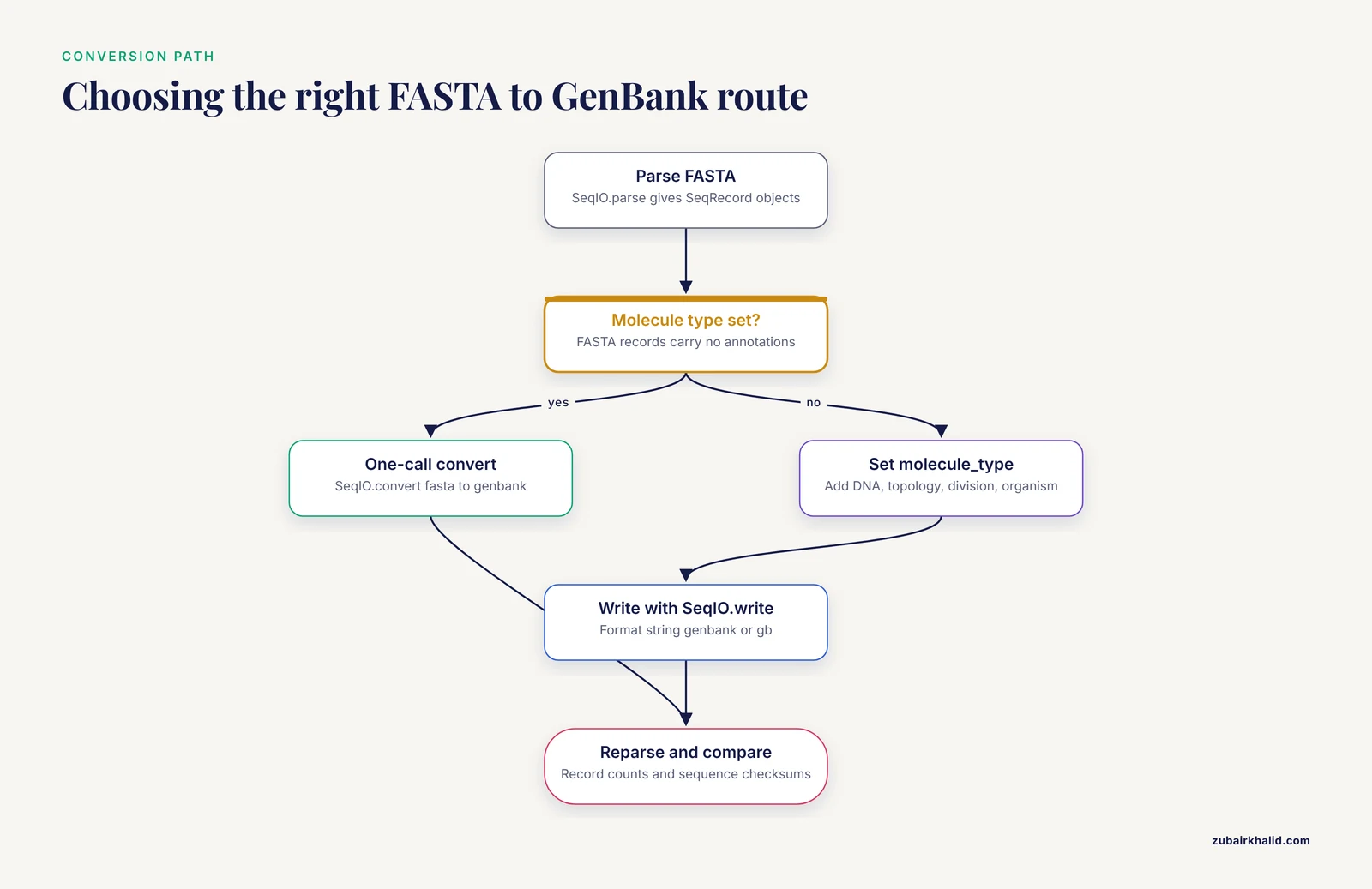
This section is a complete convert FASTA to GenBank Python example, including the failure you will hit first and the fix for it.
Step 1: Inspect the Input
from Bio import SeqIO

for record in SeqIO.parse("scaffold.fasta", "fasta"):
    print(record.id)
    print(record.description)
    print(len(record.seq))
    print(record.annotations)
Expected output:
ABC1_scaffold1
ABC1_scaffold1 synthetic construct scaffold 1, whole genome
29
{}
Two things stand out. The id is only the first word of the header, up to the first space. The annotations dictionary is empty, because FASTA carries no annotation. That emptiness is the root cause of everything that follows.
Step 2: Attempt the Minimal Conversion
from Bio import SeqIO

records = SeqIO.parse("scaffold.fasta", "fasta")
count = SeqIO.write(records, "scaffold.gb", "genbank")
print(f"Wrote {count} records")
This fails with an exact, helpful message:
ValueError: GenBank files require a molecule type to be setThe GenBank LOCUS line must state what kind of molecule the sequence is, such as DNA or RNA. Biopython will not guess it from the letters, so you set it yourself. The fix:
from Bio import SeqIO

records = []
for record in SeqIO.parse("scaffold.fasta", "fasta"):
    record.annotations["molecule_type"] = "DNA"
    record.annotations["topology"] = "linear"
    record.annotations["data_file_division"] = "SYN"
    record.annotations["organism"] = "synthetic construct"
    record.annotations["source"] = "synthetic construct"
    records.append(record)

count = SeqIO.write(records, "scaffold.gb", "genbank")
print(f"Wrote {count} records")
Expected output:
Wrote 1 recordsmolecule_type is the only annotation the GenBank writer refuses to fill in for you. Everything else gets a default if you omit it, for example the division defaults to ENV and the date defaults to the current date.
Step 3: Read the Generated GenBank File
head -12 scaffold.gbOutput (spacing follows the GenBank flat file layout):
LOCUS       ABC1_scaffold1          29 bp    DNA     linear   SYN 11-NOV-2026
DEFINITION  synthetic construct scaffold 1, whole genome.
ACCESSION   ABC1_scaffold1
VERSION     ABC1_scaffold1
KEYWORDS    .
SOURCE      synthetic construct
  ORGANISM  synthetic construct
FEATURES             Location/Qualifiers
ORIGIN
        1 atgcgtacgt agctagctag gcttaaggc
//
Reading the fields in order: the LOCUS line carries the record name, the length in bp, the molecule type, the topology, the data file division (SYN marks synthetic entries), and the date. DEFINITION holds the description. A period in KEYWORDS means no keywords. The FEATURES table is empty here, which is the honest consequence of converting from FASTA. ORIGIN holds the sequence wrapped at 60 characters per line, grouped in blocks of 10, written in lowercase by convention. The // line terminates the record.
This is a valid GenBank file, and many tools will accept it. But a GenBank record with no features carries almost no information beyond FASTA. The next two steps fix that.
Step 4: Add Features with SeqFeature and FeatureLocation
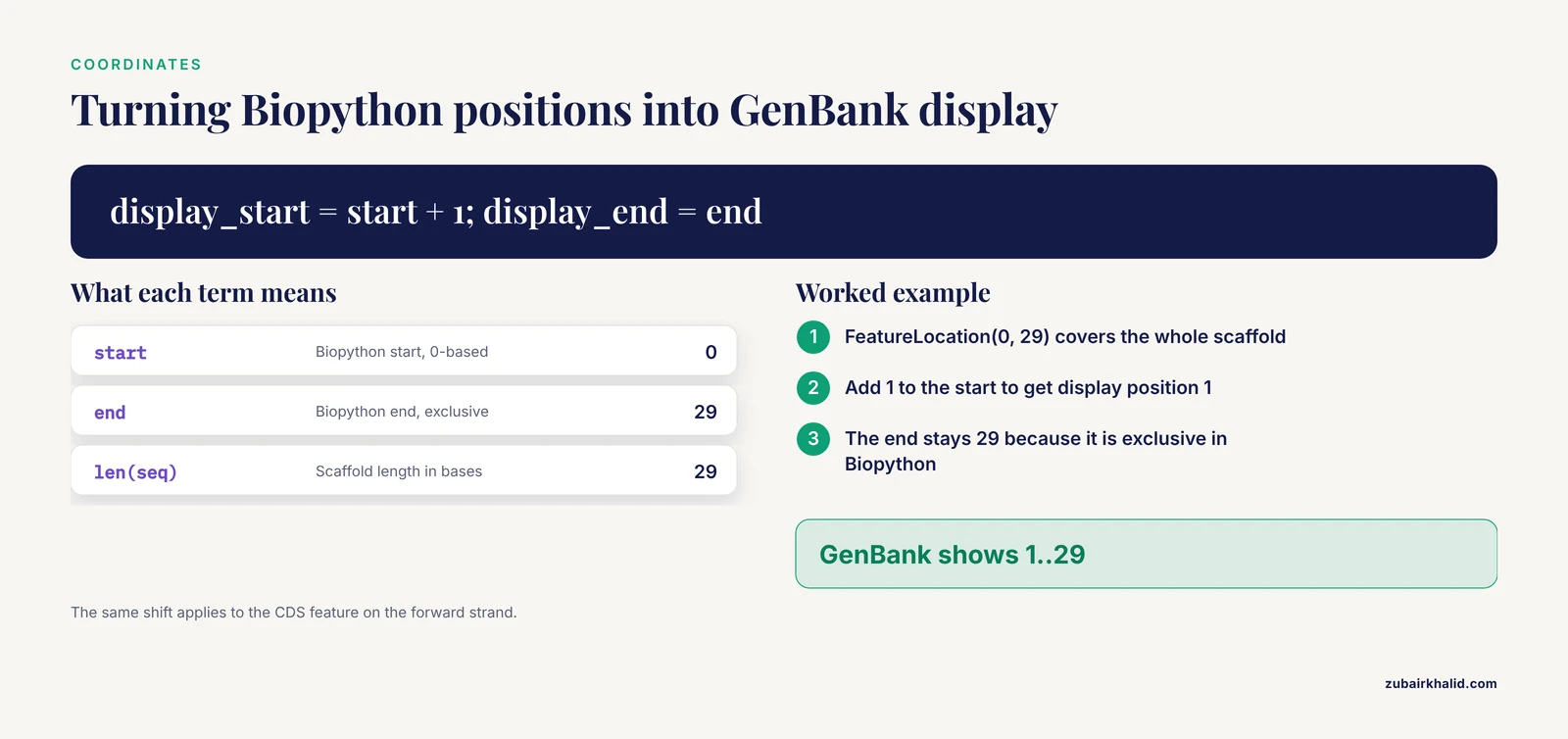
Features live in record.features as SeqFeature objects. Each has a type string such as source, gene, or CDS, a location, and a qualifiers dictionary that maps qualifier names to lists of strings. Coordinates in Biopython are 0-based with the end position exclusive, while GenBank displays 1-based inclusive positions, so FeatureLocation(0, 29) prints as 1..29.
from Bio import SeqIO
from Bio.SeqFeature import SeqFeature, FeatureLocation

record = next(SeqIO.parse("scaffold.fasta", "fasta"))
record.annotations["molecule_type"] = "DNA"
record.annotations["organism"] = "synthetic construct"
record.annotations["source"] = "synthetic construct"

source = SeqFeature(FeatureLocation(0, len(record.seq)), type="source")
source.qualifiers = {
    "organism": ["synthetic construct"],
    "mol_type": ["genomic DNA"],
}
record.features.append(source)

cds = SeqFeature(FeatureLocation(0, 29, strand=1), type="CDS")
cds.qualifiers = {
    "gene": ["orfX"],
    "codon_start": ["1"],
    "transl_table": ["11"],
}
record.features.append(cds)

count = SeqIO.write([record], "annotated.gb", "genbank")
print(f"Wrote {count} records")
Notes on the parameters that matter here. strand=1 marks the forward strand, strand=-1 the reverse strand, and strand=None leaves the strand unspecified. transl_table=11 selects the bacterial translation code and is shown as an example of a qualifier that controls how other tools interpret the feature. The FEATURES table now reads:
FEATURES             Location/Qualifiers
     source          1..29
                     /organism="synthetic construct"
                     /mol_type="genomic DNA"
     CDS             1..29
                     /gene="orfX"
                     /codon_start="1"
                     /transl_table="11"
Step 5: Use an Existing GenBank Record as a Template
When a colleague's GenBank file already has the annotation structure you need, use it as a template. Read the template, swap in the new sequence and identifiers, and write it back out. This is the practical meaning of a convert FASTA to GenBank Python template: the annotations come from the template, the sequence comes from the FASTA.
from Bio import SeqIO

template = SeqIO.read("template.gb", "genbank")
new = SeqIO.read("scaffold.fasta", "fasta")

if len(new.seq) != len(template.seq):
    raise ValueError(
        f"Template has {len(template.seq)} bases but the FASTA has "
        f"{len(new.seq)}. Feature coordinates will not fit, review "
        "record.features before writing."
    )

template.seq = new.seq
template.id = new.id
template.name = new.name
template.description = new.description
template.annotations["molecule_type"] = "DNA"
template.annotations["date"] = "11-NOV-2026"

count = SeqIO.write([template], "annotated.gb", "genbank")
print(f"Wrote {count} records")
Two cautions. If the new sequence is a different length, feature coordinates can point past the end of the sequence and produce a record that other tools reject, so the code above stops you first. The template's organism, taxonomy, and reference fields also still describe the template's origin, so update anything that would now be wrong.
Step 6: Verify the Conversion
Never trust a conversion you have not reparsed. Three checks catch almost every problem: record counts, sequence lengths, and sequence content.
from Bio import SeqIO
from hashlib import md5

def digests(path, fmt):
    return {
        r.id: md5(str(r.seq).upper().encode()).hexdigest()
        for r in SeqIO.parse(path, fmt)
    }

before = digests("scaffold.fasta", "fasta")
after = digests("annotated.gb", "genbank")

assert len(before) == len(after), "Record counts differ"
assert before == after, "Sequence content changed"
print("Conversion verified:", len(after), "identical sequences")
Expected output:
Conversion verified: 1 identical sequencesCalling upper() on both sides makes the check insensitive to case, because the GenBank ORIGIN block is traditionally lowercase while FASTA files are usually uppercase.
Converting GenBank to FASTA and Extracting Features
The reverse direction is simpler because FASTA needs less than GenBank has. The loss is the point to understand: features, taxonomy, references, and database cross-references are dropped because FASTA cannot hold them.
from Bio import SeqIO

count = SeqIO.convert("annotated.gb", "genbank", "annotated.fasta", "fasta")
print(f"Converted {count} records")
Expected output:
Converted 1 recordscat annotated.fasta>ABC1_scaffold1 synthetic construct scaffold 1, whole genome
ATGCGTACGTAGCTAGCTAGGCTTAAGGCBiopython writes the FASTA header as the record id followed by the description. If the description is empty or identical to the id, you get the id alone. To carry selected annotation into the header, rewrite the description before writing:
from Bio import SeqIO

for record in SeqIO.parse("annotated.gb", "genbank"):
    organism = record.annotations.get("organism", "unknown")
    record.description = f"{record.description} organism={organism}"
    SeqIO.write([record], f"{record.id}.fasta", "fasta")
To pull out annotated subsequences such as coding sequences, iterate over the features and use extract:
from Bio import SeqIO

record = SeqIO.read("annotated.gb", "genbank")
for feature in record.features:
    if feature.type == "CDS":
        cds = feature.extract(record.seq)
        gene = feature.qualifiers.get("gene", ["?"])
        print(gene, len(cds), cds)
Expected output:
orfX 29 ATGCGTACGTAGCTAGCTAGGCTTAAGGCfeature.extract applies the location and the strand, so it returns the correct subsequence even when the feature sits on the reverse strand.
Converting FASTQ to FASTA and Between FASTQ Variants
FASTQ stores each read as four lines: a header starting with @, the sequence, a + line, and per-base quality characters. Each quality character encodes a Phred score, the standard measure of base-call confidence. Two encodings dominate. The Sanger standard, which Biopython calls fastq, adds 33 to the score. The legacy Illumina 1.3 to 1.7 encoding, which Biopython calls fastq-illumina, adds 64. A third, older variant is the Solexa scale, fastq-solexa.
Converting reads to FASTA:
from Bio import SeqIO

count = SeqIO.convert("reads.fastq", "fastq", "reads.fasta", "fasta")
print(f"Converted {count} reads")
The quality scores are gone after this call. FASTA has nowhere to put them, so run it only when the downstream tools do not need qualities.
Normalizing a legacy encoding to the modern Sanger standard:
from Bio import SeqIO

count = SeqIO.convert("legacy_reads.fastq", "fastq-illumina", "reads.fastq", "fastq")
print(f"Re-encoded {count} reads")
Passing the wrong input variant does not raise an error. Biopython reinterprets the same characters with a different offset, so every quality score shifts by 31 points and downstream quality filters go quietly wrong. Confirm which encoding your instrument or archive exported before converting.
If you try to write FASTQ from FASTA-derived records, which carry no per-letter qualities, Biopython raises:
ValueError: No suitable quality scores found in recordThat error is a feature. It stops you from writing a FASTQ file full of fabricated quality values.
Converting Alignment Formats with AlignIO
Alignment files need a column-aware parser, because every sequence must stay the same length as the others. Bio.AlignIO mirrors the SeqIO API for exactly that purpose, and it raises an error if the sequences in a file are not all the same length.
from Bio import AlignIO

alignment = AlignIO.read("alignment.clw", "clustal")
print(alignment)
Expected output for a small alignment:
Alignment with 3 rows and 29 columns
ATGCGTACGTAGCTAGCTAGGCTTAAGGC ABC1_scaffold1
ATGCGTACGTAGCTAGCTAGGCTTAAGAT ABC2_scaffold1
ATGCGTACGTAGCTAGCTAGGCTTAAGAC ABC3_scaffold1
Conversions use the same one-call pattern as SeqIO:
from Bio import AlignIO

AlignIO.convert("alignment.clw", "clustal", "alignment.nex", "nexus")
AlignIO.convert("alignment.phy", "phylip", "alignment.sto", "stockholm")
One format-specific trap: the classic phylip writer follows the fixed-width standard and truncates identifiers to 10 characters. If your identifiers are longer, write phylip-relaxed instead, or pick a format that preserves full names such as stockholm or nexus.
The phylogenetics community has long felt this pain. The JPhyloIO library was built so that a Java application can implement one event-based reader and writer and thereby support the most common alignment and tree formats, nine in the release described, with memory efficiency for large datasets [2]. Biopython's SeqIO and AlignIO serve the same unifying purpose in Python for the formats they register [1].
When a Format Needs Its Own Library: The VDJML Lesson
Some formats sit outside SeqIO entirely. Immune repertoire sequencing is a good example. Tools such as IgBLAST and IMGT/High V-QUEST infer V(D)J rearrangements, and each emits results in its own format with its own labels, which blocked comparison across tools. The VDJML format and its tooling were created to capture those rearrangement results in one standardized structure [3]. Biopython does not read VDJML. The general lesson still applies: before writing a custom parser, look for a domain library, and when you must convert such files, keep the parse, transform, write pattern and verify the result with the checksum approach shown in Step 6.
Converting Large Files Without Running Out of Memory
SeqIO.parse returns an iterator that reads one record at a time. Keep it that way. The moment you write list(SeqIO.parse(...)) on a file with tens of millions of reads, every record sits in memory at once, and a conversion that should use a few hundred megabytes can consume many gigabytes.
import gzip
from Bio import SeqIO

with gzip.open("reads.fastq.gz", "rt") as handle:
    count = SeqIO.write(SeqIO.parse(handle, "fastq"), "reads.fasta", "fasta")

print(f"Converted {count} reads")
Three details make this work. gzip.open with the text mode argument rt yields decoded lines, SeqIO.parse accepts any file handle, and SeqIO.write consumes the iterator record by record, so memory stays flat regardless of file size. The same pattern handles a batch FASTA to GenBank conversion, with the per-record fix applied by a generator expression:
import gzip
from Bio import SeqIO

def add_genbank_defaults(record):
    record.annotations["molecule_type"] = "DNA"
    return record

with gzip.open("contigs.fasta.gz", "rt") as handle:
    records = (add_genbank_defaults(r) for r in SeqIO.parse(handle, "fasta"))
    count = SeqIO.write(records, "contigs.gb", "genbank")

print(f"Wrote {count} records")
Format Names You Will Actually Use
The table below summarizes the SeqIO and AlignIO names that cover most day-to-day conversions, along with what each conversion can lose.
| Format name | Stores | Typical conversion | What can be lost |
|---|---|---|---|
fasta | header plus sequence | to genbank, embl, tab | everything except id, description, sequence |
fasta-2line | same, sequence on one line | round trips cleanly | same as fasta |
fastq | reads plus Phred+33 qualities | to fasta, to other fastq variants | qualities when the target is fasta |
fastq-illumina | reads plus Phred+64 qualities | to fastq to normalize | nothing, if the variant is stated correctly |
genbank (alias gb) | annotated records | to fasta, embl | features, taxonomy, references when going to fasta |
embl | annotated records | to genbank, fasta | format-specific fields |
clustal | alignment | to nexus, stockholm, phylip | annotation lines |
phylip | fixed-width alignment | to nexus, stockholm | identifiers beyond 10 characters |
phylip-relaxed | alignment, long names allowed | to other alignment formats | little of practical value |
nexus | alignment, sometimes trees | to phylip, stockholm | nexus-only metadata |
stockholm | annotated alignment | to fasta, phylip | per-column annotation |
tab | id and sequence in two columns | to fasta | description beyond the id |
uniprot-xml | rich UniProt records | to fasta, genbank | most cross-references and evidence tags |
Two names cover most work: fasta and genbank, with fastq close behind.
Common Errors and Their Exact Fixes
ValueError: Unknown format 'genbankx'. The format string is misspelled or unregistered. Fix the name, for examplegenbankor its aliasgb. Biopython checks the format string before it opens anything, so this error appears immediately.
ValueError: GenBank files require a molecule type to be set. You wrote to thegenbankformat from records that lackrecord.annotations["molecule_type"], which is always the case for FASTA input. Set it to"DNA"or"RNA"as appropriate. Note that the one-lineSeqIO.convertcannot bypass this requirement, so use the loop from Step 2.
ValueError: No records found in handle. Raised bySeqIO.readwhen the file holds zero records. The usual cause is a format mismatch, for example parsing a GenBank file with thefastaformat, which finds no>header and yields nothing. Match the format string to the file, or switch toSeqIO.parsefor multi-record files.
ValueError: Multiple records found in handle. Raised bySeqIO.readwhen the file holds more than one record. UseSeqIO.parseand iterate.
ValueError: No suitable quality scores found in record. You wrote FASTQ from records that have nophred_qualityletter annotation, typically FASTA-derived records. Convert to FASTA instead, or attach real quality values underrecord.letter_annotations["phred_quality"].
- A TypeError when passing a single SeqRecord to
SeqIO.write.SeqIO.writeexpects an iterable of records, and a single SeqRecord is not iterable. Wrap it:SeqIO.write([record], "out.gb", "genbank").
- Silent quality shift from a wrong FASTQ variant. No error appears, which is the trap. Reading Phred+64 data as
fastqor writing it asfastq-illuminashifts every score by 31 points. Confirm the encoding at the source.
- LOCUS line trouble with long identifiers. The classic GenBank LOCUS line reserves 16 characters for the record name, and very long identifiers can produce output that strict parsers reject. Keep
record.nameshort for GenBank output and put the full name in the description.
When an error is not on this list, the fastest diagnosis is a round trip: convert the output back to the input format and compare checksums with the code from Step 6. The step where the round trip breaks is the step to investigate.
Common Mistakes and Limitations
- Treating conversion as translation of meaning. Conversion moves data between containers. It does not create annotation. A FASTA to GenBank conversion with no added features yields a valid but information-poor file.
- Assuming round trips are lossless. GenBank to FASTA back to GenBank loses every feature. Keep the richest format as your working copy and treat flatter formats as exports.
- Guessing the molecule type. Biopython does not infer DNA versus RNA from the letters. Setting
DNAon an RNA sequence writes a misleading record that downstream tools may misinterpret. - Mixing FASTQ variants. The wrong input name shifts quality scores silently, as described above.
- Forgetting 0-based coordinates.
FeatureLocation(0, 29)covers bases 1 through 29 in GenBank display. Off-by-one errors here produce features that start one base late. - Building lists of records for large files. Stream with
SeqIO.parseinstead, as shown in the gzip examples. - Trusting output without reparsing. The checksum check takes seconds and catches truncation, encoding drift, and format mismatches.
- Using a general library for domain-specific formats. Specialized formats exist precisely because general ones cannot hold their data. The VDJML effort exists because repertoire tools labeled the same results differently [3], and phylogenetic metadata can exceed what classical formats carry [2].
- One general limitation. The right conversion target depends on the downstream pipeline and the archive you submit to, so validate the output against the requirements of the specific tool or database that will consume it.
Where to Go Next
Once conversions are routine, the natural next step is fetching annotated records directly instead of converting annotation-poor files. NCBI's Entrez service, accessed through Biopython, returns fully annotated GenBank records that make ideal templates for the Step 5 workflow:
from Bio import Entrez, SeqIO

Entrez.email = "[email protected]"
handle = Entrez.efetch(db="nucleotide", id="NM_000518", rettype="gb", retmode="text")
record = SeqIO.read(handle, "genbank")
print(record.id, len(record.seq), len(record.features), "features")
From there, Bio.AlignIO covers alignment conversion, Bio.Phylo reads and writes tree formats such as Newick and NeXML, and the Biopython documentation and tutorial catalog the full set of supported formats and modules [1].
Frequently Asked Questions
How do I convert FASTA to GenBank in Python?
Parse the FASTA with Bio.SeqIO.parse, set record.annotations["molecule_type"] to "DNA", then write with SeqIO.write using the genbank format. The one-line SeqIO.convert shortcut fails for plain FASTA input because the GenBank writer requires a molecule type that FASTA records do not carry.
Why is my converted GenBank file missing features and annotations?
FASTA stores only an identifier, an optional description, and the sequence, so there is nothing to convert into GenBank features. You must add features and qualifiers yourself with SeqFeature, or start from an existing annotated record used as a template.
What is the difference between SeqIO.parse, SeqIO.read, and SeqIO.convert?
SeqIO.parse returns an iterator over all records in a file, SeqIO.read returns exactly one record and raises an error if the file holds zero or several, and SeqIO.convert runs a parse and a write in one call and returns the number of records written.
Can I convert FASTQ to FASTA without losing quality scores?
No. FASTA has no field for per-base qualities, so any FASTQ to FASTA conversion discards them. Keep the FASTQ file, or convert between FASTQ variants if you only need to fix the quality encoding.
Which format names does SeqIO accept?
SeqIO accepts registered strings such as fasta, fasta-2line, fastq, fastq-illumina, genbank with the alias gb, embl, clustal, phylip, nexus, stockholm, tab, and uniprot-xml. An unregistered name raises a ValueError naming the bad format.
How do I convert a very large FASTQ file without running out of memory?
Stream it. Pass the iterator from SeqIO.parse directly to SeqIO.write instead of building a list, and open gzip files with gzip.open in text mode, so records are converted one at a time with flat memory use.
How do I convert between alignment formats such as Clustal, Phylip, and NEXUS?
Use Bio.AlignIO, which works like SeqIO but keeps aligned columns together. For example, AlignIO.convert with the input format phylip and the output format nexus converts a Phylip alignment to NEXUS.
Does converting between bioinformatics file formats lose data?
Usually yes. A conversion keeps what both formats can represent, so identifiers and sequences normally survive while features, quality scores, and metadata may be dropped. Verify important conversions by reparsing the output and comparing record counts and sequence checksums.
Sources
- Biopython: freely available Python tools for computational molecular biology and bioinformatics.
- JPhyloIO: a Java library for event-based reading and writing of different phylogenetic file formats through a common interface.
- VDJML: a file format with tools for capturing the results of inferring immune receptor rearrangements.