How to Convert Ensembl IDs to UCSC or NCBI: A Step-by-Step Guide
By Dr. Zubair Khalid, DVM, MS, PhD ·

By the end of this guide you will be able to take any Ensembl identifier, such as the gene ID ENSG00000012048, and find the matching NCBI Gene ID, RefSeq accession, or UCSC Genome Browser location for it. You will know how to do this for one ID, for a list of hundreds, and for genome coordinates, and you will know which assembly your result belongs to.
You need three things on hand:
- The Ensembl ID or IDs you want to convert, ideally with the species and genome assembly they came from.
- A web browser and a terminal with
curl, Python, or R installed. - Optional but recommended, R with the
biomaRtpackage from Bioconductor if you work with gene lists regularly.
Everything below uses the documented public services run by Ensembl (EMBL-EBI), NCBI, and the UCSC Genome Browser. No paid accounts or API keys are required for the volumes covered here.
Why Ensembl, UCSC, and NCBI Use Different Identifiers
Ensembl, NCBI, and UCSC are three independent annotation resources. Each assigns its own identifiers to genes and transcripts, and each builds its annotation on its own schedule.
- Ensembl IDs look like
ENSG00000012048for a human gene,ENST00000012061for a transcript, orENSP00000269305for a protein. The prefix encodes the species, so a mouse gene starts withENSMUSG. The first three lettersENSplus the species code plus one letter for the object type (G, T, or P) is the standard pattern. A decimal suffix such asENSG00000012048.20is a version number that increments when the annotation model changes. - NCBI Gene IDs are plain integers, for example
672for human BRCA1. NCBI RefSeq accessions such asNM_007294identify transcript records that NCBI curates. - UCSC does not use a standalone gene ID system in the same way. You address the UCSC Genome Browser with a genome assembly name (hg38, hg19, mm39) plus a position, for example
chr17:43,044,295-43,125,482. UCSC track tables carry their own identifiers, and cross-reference tables such asknownToEnsemblconnect them to Ensembl IDs.
Because all three projects annotate the same underlying reference genome assemblies (GRCh38 for human, GRCm39 for mouse, and so on), you can almost always move between them. The mapping is not always one to one, which is the root cause of most conversion problems.
Before You Start: Three Things to Check
Skipping these checks is the single largest source of wrong results, so do them every time.
1. Know your assembly. Ensembl labels builds GRCh38, GRCh37, GRCm39. UCSC labels the equivalent builds hg38, hg19, mm39. Coordinates are only comparable when both sides use the same build. A GRCh38 coordinate pasted into hg19 lands on the wrong sequence, sometimes by millions of bases.
2. Know your ID type. ENSG is a gene, ENST is a transcript, ENSP is a protein. NCBI Gene IDs map most cleanly to ENSG. RefSeq transcript accessions map to ENST. If you feed transcript IDs into a gene-level filter, you will get zero rows.
3. Know your version suffixes. If your list contains ENSG00000012048.20, the version suffix will fail filters that expect the bare ID. Strip it with a regular expression before converting. The version number is also a clue about which Ensembl release produced your file.
Method 1: Convert a Single ID with the Ensembl REST API
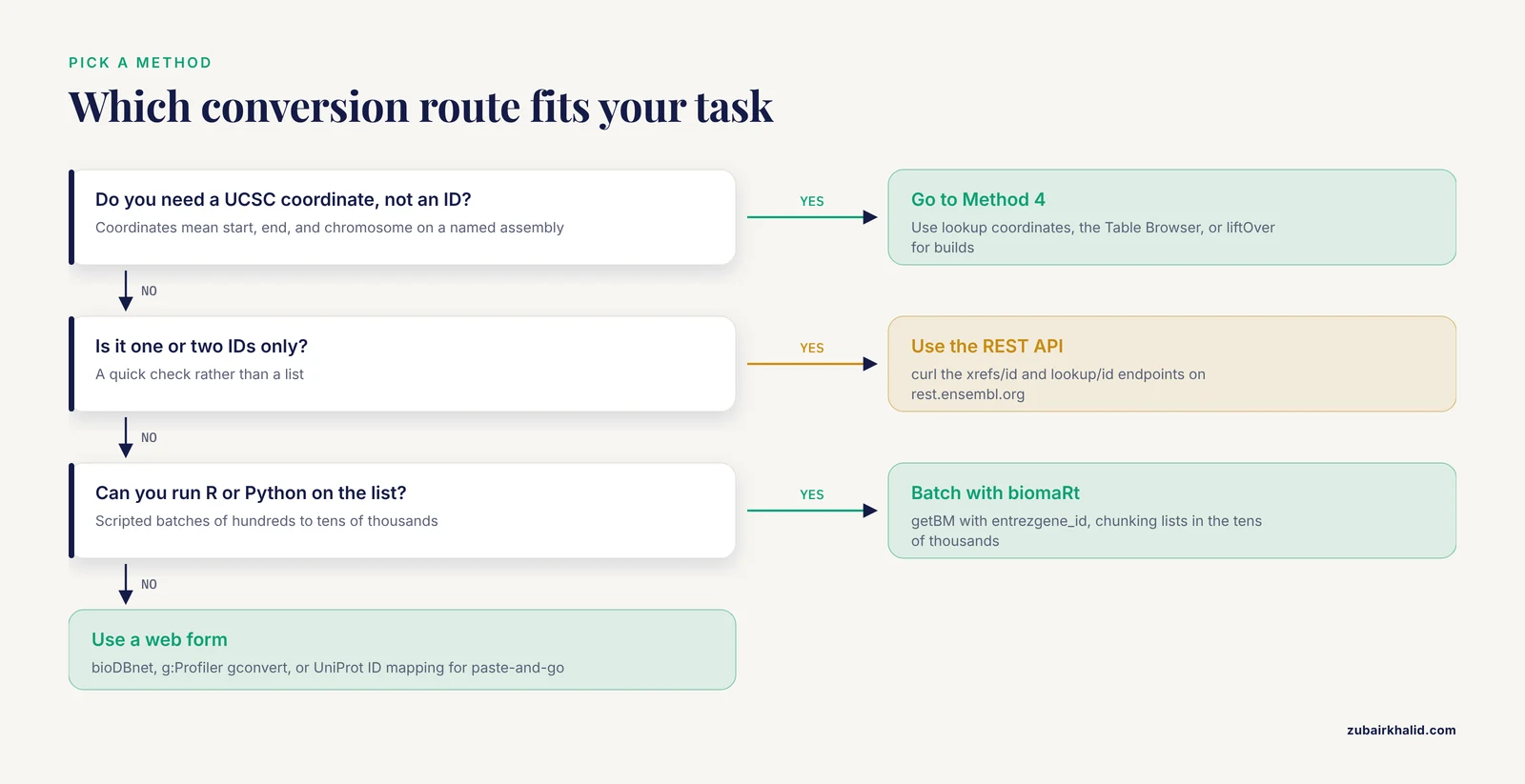
For one or a handful of IDs, the Ensembl REST API at rest.ensembl.org is the fastest route. Two endpoints matter here.
Step 1. Get NCBI and RefSeq cross references
The xrefs/id endpoint returns the cross references Ensembl stores for a stable ID. Restrict it with external_db to keep the output short.
curl -s -H "Content-Type: application/json" -H "Accept: application/json" \
  "https://rest.ensembl.org/xrefs/id/ENSG00000012048?external_db=EntrezGene"
The response is a JSON array. For this gene it looks like this, trimmed for readability:
[
  {
    "primary_id": "672",
    "display_id": "672",
    "dbname": "EntrezGene",
    "info_type": "DIRECT"
  }
]
The primary_id value 672 is the NCBI Gene ID. Change the filter to external_db=RefSeq_gene to pull RefSeq gene accessions, or drop the filter entirely to see every cross reference Ensembl holds.
Step 2. Get coordinates you can paste into UCSC
The lookup/id endpoint returns genomic location, assembly, and the symbol:
curl -s -H "Content-Type: application/json" \
  "https://rest.ensembl.org/lookup/id/ENSG00000012048?expand=0"
Expected output, trimmed:
{
  "id": "ENSG00000012048",
  "display_name": "BRCA1",
  "seq_region_name": "17",
  "start": 43044295,
  "end": 43125482,
  "strand": -1,
  "assembly_name": "GRCh38"
}
Two parameters matter. expand=0 keeps the response to the gene alone, while expand=1 would add every transcript and exon and balloon the output. assembly_name in the response tells you which build the coordinates belong to, and you should always record it.
Step 3. Do the same thing in Python
For scripts, the same calls with requests look like this:
import requests

server = "https://rest.ensembl.org"
ext = "/xrefs/id/ENSG00000012048?external_db=EntrezGene"

r = requests.get(server + ext, headers={"Content-Type": "application/json"})
r.raise_for_status()
for record in r.json():
    print(record["dbname"], record["primary_id"])
Expected output:
EntrezGene 672Ensembl documents a rate limit on the public REST service of roughly 55 requests per second per IP for light use, and it asks heavy users to throttle politely. If you have more than a screenful of IDs, skip the API and use biomaRt, which batches queries server side.
Method 2: Batch Convert with biomaRt in R
The biomaRt package from Bioconductor is the standard tool for converting long ID lists. It queries the same Ensembl BioMart service that the Ensembl website exposes, and it keeps the mapping on Ensembl's own annotation, which is what you want.
Step 1. Connect to the Ensembl gene mart
library(biomaRt)

ensembl <- useEnsembl(biomart = "genes", dataset = "hsapiens_gene_ensembl")
useEnsembl(biomart = "genes") selects the core gene annotation. The dataset argument picks the species, so mmusculus_gene_ensembl for mouse or cfamiliaris_gene_ensembl for dog. If your IDs came from an older release, pass a release number to version so you query the matching archive, because ID mappings drift between releases.
Step 2. Run the conversion
ids <- c("ENSG00000012048", "ENSG00000141510")

results <- getBM(
  attributes = c(
    "ensembl_gene_id",
    "external_gene_name",
    "entrezgene_id",
    "refseq_mrna",
    "uniprotswissprot"
  ),
  filters    = "ensembl_gene_id",
  values     = ids,
  mart       = ensembl
)
print(results)
Expected output:
  ensembl_gene_id external_gene_name entrezgene_id        refseq_mrna uniprotswissprot
1 ENSG00000012048              BRCA1           672 NM_007294,NM_007300         P38398
2 ENSG00000141510                TP53           715             NM_001,...         P04637
Each attribute is a column you are requesting. entrezgene_id is the NCBI Gene ID, refseq_mrna is the RefSeq transcript accession or a comma-separated set of them, and uniprotswissprot gives curated UniProt accessions. external_gene_name returns the HGNC symbol for human datasets.
Step 3. Strip version suffixes first
If your input carries versions, clean it before querying, because a filter value like ENSG00000012048.20 returns nothing:
ids <- gsub("\\..*$", "", ids)Step 4. Split very large lists
For lists in the tens of thousands, chunk the query. This keeps each request well inside server timeouts:
chunks <- split(ids, ceiling(seq_along(ids) / 500))
results <- do.call(rbind, lapply(chunks, function(chunk) {
  getBM(
    attributes = c("ensembl_gene_id", "entrezgene_id", "external_gene_name"),
    filters    = "ensembl_gene_id",
    values     = chunk,
    mart       = ensembl
  )
}))
Watch for these biomaRt errors in practice:
Timeout was reachedmeans the server gave up on the query. Smaller chunks fix it.Zero rows retrievedusually means the filter and the values do not match, most often a version suffix or a transcript ID fed to a gene filter.- A warning about invalid
filtersorattributesmeans you misspelled one. RunlistAttributes(ensembl)andlistFilters(ensembl)to see the exact valid names.
Method 3: Use NCBI and Web Mapping Tools
If you prefer not to script at all, three established web services handle the conversion.
Ensembl xrefs to NCBI Gene, then NCBI E-utilities
Once the Ensembl REST call in Method 1 gives you the Gene ID, NCBI's E-utilities give you the full record:
curl -s "https://eutils.ncbi.nlm.nih.gov/entrez/eutils/esummary.fcgi?db=gene&id=672&retmode=json"The JSON document contains the official symbol, synonyms, chromosome, map location, and the cross references NCBI stores back to Ensembl. NCBI asks that scripted E-utilities clients stay under three requests per second, so add a short sleep if you loop.
You can also simply type an Ensembl ID into the search box at the NCBI Gene database. NCBI indexes Ensembl cross references, so ENSG00000012048 resolves directly to Gene ID 672.
bioDBnet and g:Profiler for paste-and-go batches
The bioDBnet service at biodbnet.abcc.ncifcrf.gov offers a db2db converter where you paste Ensembl Gene IDs, select the input database as Ensembl Gene ID and the output as Gene ID, and receive a table. The g:Profiler service at biit.cs.ut.ee/gprofiler has a gconvert tool with the same purpose. Both are fine for one-off tables, and both let you download results as a spreadsheet.
UniProt ID Mapping
The UniProt ID mapping tool at uniprot.org/id-mapping accepts Ensembl protein and gene identifiers and maps them to UniProtKB, GeneID, RefSeq, and dozens of other databases. Paste your IDs, pick the source and target databases from the dropdowns, and download the result. For proteins, this is often the most complete option because UniProt maintains explicit cross links to all three annotation projects.
Method 4: Convert Ensembl IDs to UCSC Positions
Converting to UCSC means converting to a coordinate on a UCSC assembly, and there are three ways to do it depending on what you actually need.
Option A. Paste Ensembl coordinates into UCSC
Take the start, end, and seq_region_name from the Ensembl lookup call, add the chr prefix, and open the UCSC Genome Browser gateway at genome.ucsc.edu:
chr17:43,044,295-43,125,482Select the matching assembly, hg38 for GRCh38, and UCSC scrolls to the locus with the gene models displayed. The UCSC position search also recognizes Ensembl gene IDs directly on assemblies where UCSC loads an Ensembl gene track, so typing ENSG00000012048 into the position box often works without any conversion at all. When it fails, it is because that track is not loaded on that assembly, and the coordinate route always works.
Option B. Use the UCSC Table Browser with knownToEnsembl
If you need the reverse direction, UCSC gene table rows to Ensembl IDs, use the Table Browser. Choose the clade, genome, and assembly, set the track to a gene track such as UCSC Genes or GENCODE, and in the output section select the cross-reference table knownToEnsembl, which stores the Ensembl gene ID for each UCSC gene entry. This is the practical answer when you start from a UCSC track file and need Ensembl IDs for downstream analysis.
Option C. Lift coordinates between assemblies with liftOver
If your Ensembl coordinates are GRCh37 and your UCSC work is on hg38, convert the build first. The UCSC liftOver web tool at genome.ucsc.edu/cgi-bin/hgLiftOver takes a BED file and moves coordinates between assemblies using UCSC chain files.
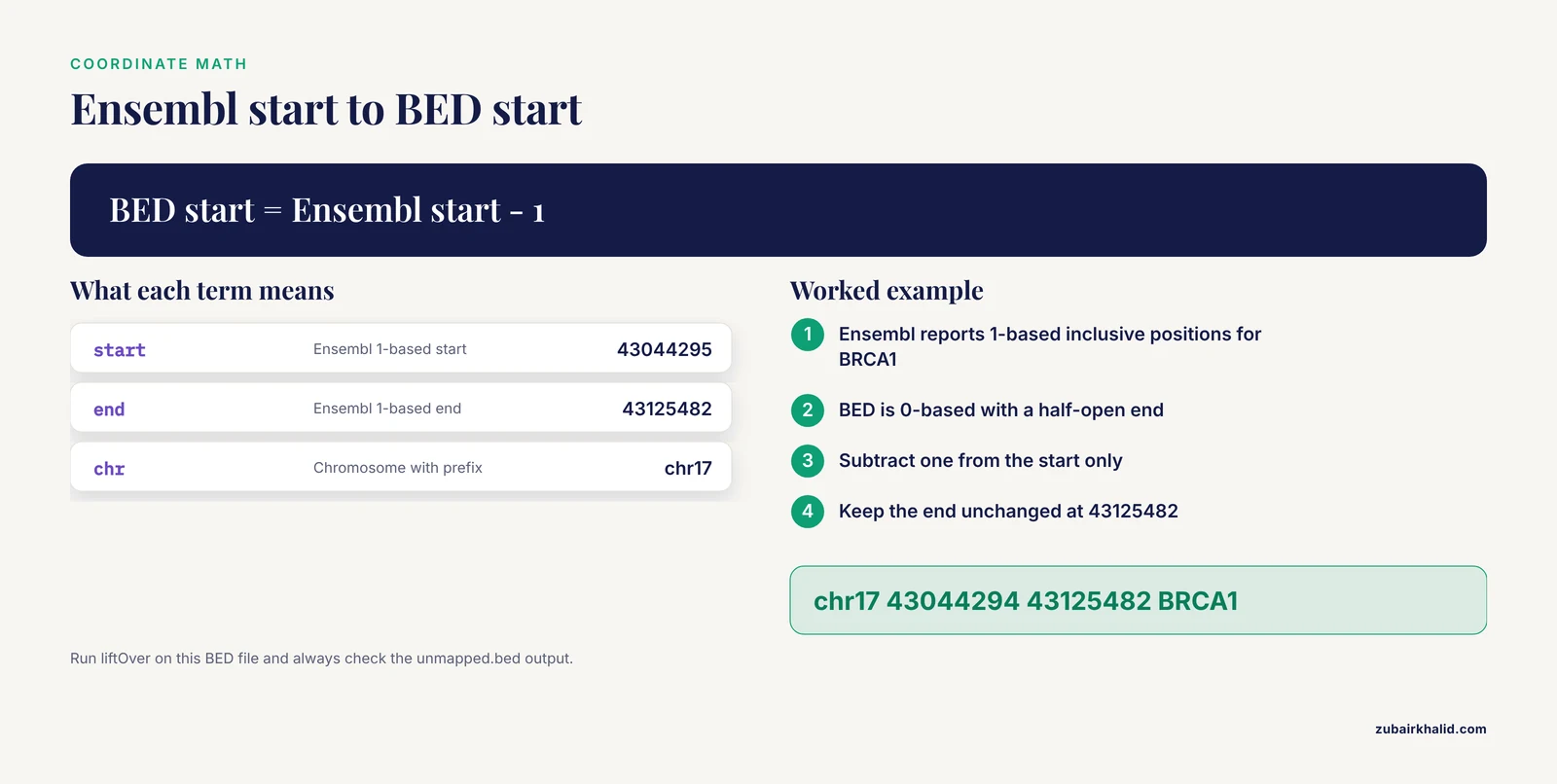
A worked example of the coordinate math. Ensembl reports BRCA1 as 1-based inclusive positions 43044295 to 43125482. A BED file, which is what liftOver consumes, is 0-based with a half-open end, so the BED interval is:
chr17 43044294 43125482 BRCA1The start drops by one and the end stays the same. Run the command-line version like this:
liftOver input.bed hg19ToHg38.over.chain.gz output.bed unmapped.bedThe -minMatch parameter controls how much of the interval must map, with a default of 0.95. Intervals that fail, for example because they span an assembly patch or a region whose sequence changed, land in unmapped.bed, and you should always check that file rather than assume every line moved cleanly. Never lift coordinates without recording the source and target builds in your file names, because a converted BED file looks identical to an unconverted one.
A Short Ensembl Genome Browser Tutorial
The keyword phrase "how to use Ensembl" mostly describes a few repeatable habits on the Ensembl site itself. This walk-through doubles as the manual route for every conversion above.
- Go to
ensembl.organd pick your species page, for example Human under GRCh38. - Type an Ensembl ID, symbol, or sequence into the search box and choose the matching hit. The search handles stable IDs directly.
- On the gene page, the Summary tab shows the symbol, synonyms, and external cross references, including NCBI Gene and RefSeq links. This tab alone solves most one-off ID conversions.
- The Location tab shows the genomic span in both the base-pair readout and a contig view. The coordinates in the URL of this page are exactly what you paste into UCSC.
- The Export data button on the Location tab downloads sequence, GTF, GFF3, or tab-delimited data for the region you are viewing, in the assembly you are viewing.
- For lists, use BioMart from the tools menu. Choose the Ensembl Genes database, the species dataset, set a filter of Ensembl stable ID and paste your list, then tick the attributes you want back, including Entrez Gene ID, RefSeq, and UniProt. The web BioMart and the R biomaRt package expose the same service, so results agree.
- If your IDs came from an older release, switch to
archive.ensembl.org, which hosts every previous Ensembl release with its own BioMart and REST service. This matters because an ID retired from the current release still resolves on the archive where it was current.
Summary Table: Which Method to Use When
| Situation | Method | Direction | Tool or command | Keeps assembly info |
|---|---|---|---|---|
| One or two IDs, quick check | Ensembl REST xrefs | Ensembl to NCBI | curl on rest.ensembl.org/xrefs/id/ | Yes, via lookup |
| List of 100 to 50,000 IDs | biomaRt | Ensembl to NCBI, UniProt, RefSeq | getBM() with entrezgene_id | Yes, set release in useEnsembl |
| One-off spreadsheet, no coding | bioDBnet, g:Profiler, UniProt ID mapping | Ensembl to NCBI, UniProt | Web forms | Depends on the service, record it yourself |
| Ensembl ID to a browser view | Coordinates to UCSC gateway | Ensembl to UCSC | Paste chr:start-end | Yes, choose the assembly in UCSC |
| UCSC gene row to Ensembl ID | Table Browser | UCSC to Ensembl | knownToEnsembl table | Yes, set assembly in the form |
| GRCh37 coordinates for hg38 work | liftOver | Assembly to assembly | liftOver input.bed hg19ToHg38.over.chain.gz | Yes, name your output files |
Common Mistakes and Limitations
These are the failures that actually happen in real pipelines, with the fix for each.
Mixing assemblies. Ensembl GRCh37 and UCSC hg19 are not perfectly identical builds, and GRCh38 versus hg38 has the same caveat, because UCSC assemblies include some UCSC-specific patch and alternate sequence. Coordinates shifted between "equivalent" builds can be off by bases or lost entirely. Always convert between builds with liftOver rather than treating hg19 and GRCh37 as interchangeable in scripts.
Forgetting the chromosome prefix. Ensembl and NCBI write chromosome 17, UCSC writes chr17. Ensembl writes MT, UCSC writes chrM. Raising an error is the correct behavior for a script that sees the wrong prefix, and a one-line gsub("^chr", "", chr) or its inverse fixes it at the boundary between tools.
Using BED coordinates as 1-based coordinates. Ensembl and NCBI report 1-based inclusive positions. BED files, UCSC database tables, and most genome arithmetic tools such as bedtools use 0-based half-open intervals. The one-base start shift described above is the entire fix, but forgetting it silently moves every feature by one base, which can shift a restriction site or a primer off target.
Feeding the wrong ID type to a filter. Passing ENST transcript IDs to the ensembl_gene_id filter returns nothing, and the error message does not tell you why. Check the prefix of every ID before it enters a query.
Expecting one-to-one mapping. A single Ensembl gene can carry several RefSeq accessions, and some Ensembl genes have no NCBI Gene ID or RefSeq model at all, because the three projects make independent curation decisions. A result column full of NA values is usually a true negative, not a bug. Similarly, one Gene ID can correspond to more than one Ensembl ID when the projects disagree about gene boundaries, so a naive many-to-many join can double-count rows. Check for duplicated output rows after every bulk conversion.
Ignoring version suffixes. Joining a versioned Ensembl ID against a non-versioned table fails silently, returning empty matches rather than errors. Strip versions on both sides of the join, or make both sides versioned by pulling ensembl_gene_id_version from biomaRt.
Assuming a converted ID is current. Ensembl merges and retires IDs between releases, and NCBI occasionally splits or merges Gene IDs. If a file predates a release change, resolve it on the matching Ensembl archive release, then map forward using Ensembl's ID history converter, which reports each old ID's replacement chain. Records that end in a merged state need the successor ID, not the original.
Trusting liftOver output without reading the unmapped file. An interval that fails to lift is informative, often marking a region that changed between builds. Deleting the unmapped file is how off-target coordinates creep into downstream analyses.
One general limitation applies to any interpretation built on converted identifiers. Annotation databases update continuously, and any analysis whose biological or clinical conclusions depend on a specific mapping should be reviewed by a qualified professional, such as a clinical geneticist or a veterinarian for animal health applications, before decisions are made from it.
Frequently Asked Questions
How do I convert Ensembl gene IDs to NCBI Gene IDs for thousands of genes?
Use biomaRt in R with entrezgene_id as an output attribute, or the UniProt ID mapping tool or bioDBnet if you prefer a web form. Both routes batch the work and return a table in one pass.
Why does my Ensembl ID have a decimal point and number after it?
The suffix is the annotation version, which increments when Ensembl revises the transcript model. Strip it for database joins by removing everything after the dot, or match it explicitly if versioning matters to your analysis.
Is hg38 the same as GRCh38?
They refer to the same underlying human assembly, but UCSC's hg38 build includes some UCSC-specific handling of alternate and patch sequences. For most genes the coordinates match exactly, and for regions where they might not, convert with liftOver rather than assuming equivalence.
How do I convert an Ensembl ID to UCSC coordinates?
Fetch the gene's start, end, and chromosome from the Ensembl lookup endpoint or the Location tab, add chr to the chromosome, and paste the position string into the UCSC Genome Browser with the matching assembly selected.
Why does biomaRt return NA for some RefSeq IDs?
Some Ensembl genes have no RefSeq model because NCBI has not annotated an equivalent transcript record. The NA is a genuine absence, and you can cross-check those cases through the UniProt ID mapping tool.
Can I convert between mouse and human Ensembl IDs?
Yes, but that is an orthology question, not an identifier conversion. Ensembl's BioMart and the Ensembl Comparative Genomics pages map one-to-one and one-to-many orthologues between species, and the mapping is many to one in places.
How do I check which Ensembl release my IDs come from?
Version suffixes narrow it down, and the Ensembl archive at archive.ensembl.org lets you test the ID against each release. If the ID resolves on release N and fails on release N plus one, your data comes from release N.
What is the fastest way to convert a single Ensembl ID?
Type it into the NCBI Gene search box for an NCBI Gene ID, or into the UCSC position box for a genome view. For the full cross-reference list in one response, use the Ensembl REST xrefs/id endpoint with curl.