Conda vs. Containers for Bioinformatics Workflows: When to Use Each
By Dr. Zubair Khalid, DVM, MS, PhD ·

Conda is a package manager that installs individual tools and their dependencies into isolated software environments on your system, while a container (Docker or Apptainer) packages your tools together with an entire operating system userland into a single portable image. The difference between Conda and Docker in bioinformatics comes down to scope: Conda manages software on top of the system you already have, and containers bundle the system itself.
The rule of thumb is simple. Use Conda when you are prototyping, installing tools on a machine you control, or need fast iteration on an interactive analysis. Use containers when an analysis must run identically on a server, a cluster, or the cloud, or when you are delivering a final workflow that others will rerun. In mature production pipelines, the two are usually combined, with Conda environments baked inside container images.
This article explains what each technology actually does, compares them on the criteria that decide real choices, walks through worked scenarios, and covers where workflow managers like Nextflow and Snakemake fit into the picture.
What Conda Is and What It Does Well
Conda is an open-source, cross-platform package and environment manager. It installs precompiled software binaries from channels (online package repositories) into self-contained directories called environments. Each environment holds its own versions of every tool and every library that tool depends on, isolated from every other environment on the machine.
The most important channel for our field is Bioconda, a community repository dedicated to bioinformatics software. Bioconda, together with the general-purpose conda-forge channel, hosts thousands of packages covering aligners, assemblers, variant callers, QC tools, and R and Python libraries. Installing a classic RNA-seq toolset looks like this:
conda create -n rnaseq -c bioconda -c conda-forge star hisat2 samtools fastqc
conda activate rnaseq
That single command resolves dependencies across four tools and installs them without touching anything else on the system. This dependency resolution is the core value of Conda. Bioinformatics tools have notoriously tangled requirements: old samtools builds against specific ncurses versions, R packages demand particular Bioconductor releases, and Python 2-era scripts still run in production. Environments let incompatible software coexist on one machine. You can hold a Python 2.7 environment for a legacy annotation script next to a Python 3.12 environment for a modern single-cell pipeline, and switch between them with one command.
Environments are also shareable at the specification level. The command conda env export > environment.yml writes a text file listing every package and version in an environment. A collaborator can recreate that environment with conda env create -f environment.yml. This is environment-level reproducibility: the recipe is shared, and the package manager rebuilds it on each machine.
Mamba (and its drop-in replacement status in modern Miniforge distributions) deserves a mention here because it changes daily usability. The classic Conda solver, written in Python, can take many minutes or effectively hang while resolving large dependency trees. Mamba reimplements the solver in C++ and resolves the same requests orders of magnitude faster. For anyone working with Bioconda packages on a regular basis, a Mamba-based distribution is now the practical default.
Strengths of Conda
- Fast to install and iterate. Adding one tool to an existing environment takes seconds to minutes, not a full image rebuild.
- Low overhead. Tools run directly on the host filesystem with no virtualization layer, so there is no measurable performance cost.
- Fine-grained mixing. One environment can hold command-line tools, R packages from Bioconductor, and Python libraries together, which suits interactive analyses.
- Human-readable recipes. An
environment.ymlfile is auditable and easy to version control. - Flexible installation targets. It works on laptops, on lab servers, and on HPC systems where users cannot install system software but can write to their home directories.
Weaknesses of Conda
Conda environments are not fully self-contained. They rely on the host operating system for the kernel, the C library (glibc), system drivers, and anything the package authors assumed would be present. A Conda environment built on Ubuntu 22.04 can fail on CentOS 7 if it needs a newer glibc. Package builds are also compiled per platform and per architecture, so an environment exported from an x86-64 Mac or Linux box will not run on ARM hardware without re-solving.
Reproducibility is similarly bounded. Re-solving an environment.yml on a different date can pull different package builds, even with identical version strings, because builds are rebuilt against updated dependencies. Full bit-for-bit reproducibility requires locking the exact builds, which Conda supports through explicit export files but which most users do not do in practice.
What Containers Are and What They Do Well
A container image is a snapshot of a complete, self-contained filesystem: the tool, its dependencies, its language runtime, its system libraries, and a minimal operating system userland, all packaged together. Containers run from that image using kernel features of the host, which isolates the container's filesystem and processes without the overhead of a virtual machine.
Two container technologies matter in bioinformatics:
- Docker is the dominant container format and the de facto standard for cloud and workstation use. Images are defined by a Dockerfile, a plain-text recipe with instructions such as
FROM(base image),RUN(shell commands), andCOPY(files from your directory). Docker requires a daemon running with elevated privileges, which is why it is usually unavailable on shared HPC login and compute nodes. - Apptainer (formerly Singularity) is the container runtime built for scientific computing and HPC. It runs without root privileges, integrates with parallel filesystems and schedulers such as Slurm, and can execute Docker images directly, for example with
apptainer pull docker://quay.io/biocontainers/samtoolsfollowed byapptainer run samtools.sif samtools view.
The container ecosystem in bioinformatics is well developed. The BioContainers project maintains community guidelines for standardizing container metadata, versions, licenses, and dependencies, and supports multiple packaging technologies including Conda, Docker, and Singularity (the predecessor of Apptainer). Its registry indexes more than 9,000 bioinformatics tools, including over 200 proteomics and mass spectrometry tools, so that researchers can find and retrieve ready-made packages and containers that follow a common structure [1]. In practice, this means that for most mainstream tools, someone has already built the container for you.
Strengths of Containers
- Stronger reproducibility. Because the image contains the operating system userland, a specific image tag (for example, a digest or versioned tag) defines the entire execution environment. The same image run on a laptop and on a cloud instance behaves the same way, modulo the host kernel.
- Portability. Container virtualization is popular in the bioinformatics domain precisely because it improves the portability and reproducibility of software deployment, and it pairs naturally with standardized workflow descriptions to move analyses between computing environments, including on-demand cloud platforms [2].
- System-level dependencies solved. Tools needing specific compiler toolchains, CUDA libraries for GPU acceleration, or pinned system libraries all work, because those components ship inside the image.
- Clean delivery. A container image is a single artifact you can register, share, and cite.
Weaknesses of Containers
Building good images takes more work. A Dockerfile that merely says RUN apt-get install ... tends to be fragile and undocumented in its exact versions. Iteration is slower: changing one tool means rebuilding the image (though layer caching mitigates this). Docker itself is often prohibited on shared clusters for security reasons, which forces an Apptainer workflow and adds a translation step. Images also consume significant disk space, since every image carries its own copy of the OS userland, and duplicated base images can fill cluster scratch directories quickly.
Side-by-Side Comparison
The table below is the core of the Conda versus containers decision. It compares the two on the dimensions that actually drive choices in bioinformatics work.
| Dimension | Conda (with Bioconda) | Containers (Docker / Apptainer) |
|---|---|---|
| What it packages | Software packages and their dependencies, per environment | Tools plus dependencies plus an OS userland, per image |
| Unit of sharing | environment.yml recipe, rebuilt on each machine | Image file or registry reference, run as-is |
| Reproducibility level | Good at the version level, weaker at the build level | Strong, down to the system libraries, when image tags are pinned |
| Portability across hosts | Good across Linux machines with compatible glibc | Near-total across Linux hosts and clouds, with Apptainer bridging HPC |
| Runs on HPC without root | Yes, installs into home or scratch directories | Yes via Apptainer, no via Docker |
| Performance overhead | None beyond normal execution | Negligible for CPU work, with correct setup for GPU and MPI |
| Iteration speed | Seconds to minutes to add a tool | Minutes to rebuild an image, faster with layer caching |
| Disk footprint per project | Shared package cache across environments | Duplicated OS layers per image, larger total footprint |
| Handles GPU, CUDA, compilers | Only if packages provide them | Yes, inside the image |
| Learning curve | Low to moderate | Moderate to high, especially image building |
| Best suited for | Interactive analysis, prototyping, workstation installs | Production pipelines, publication, cloud execution, delivery |
Neither column wins outright. The honest answer to the question "Conda or Docker for bioinformatics" is that they are complementary layers, and the choice is about which layer solves the problem in front of you.
The Criteria That Decide Real Choices
Reproducibility, in degrees
Reproducibility is not binary. It is a spectrum, and Conda and containers sit at different points.
A shared environment.yml gives you version-level reproducibility. Anyone can recreate an environment with the same package versions, which resolves the most common failure mode in bioinformatics: results that change because a tool was silently upgraded. What it does not guarantee is build-level identity, since the same version can be rebuilt against different dependency builds over time.
A pinned container image gives you system-level reproducibility. The image defines the compiler, the C library, the Python or R runtime, and everything else. This is why containers, often combined with standardized workflow descriptors such as the Common Workflow Language (CWL), have become the standard approach for analyses that must move between computing environments or run in the cloud [2].
The literature on tooling reflects this gap. Reproducibility problems in bioinformatics stem from inconsistencies and lack of standardization in the analysis process, which can produce discrepant results and undermine confidence in the research. Tools such as CREDO were built specifically to address this by generating Dockerfiles that embed heterogeneous packages and environments, including Bioconductor and Conda environments, inside Docker images, storing the required package information in a GitHub-compatible format so images can be recreated from scratch [3]. Note what that design implies: even a container-first tool reaches inside and uses Conda as the package layer. That is the ecosystem converging on a hybrid answer.
Portability and where the analysis will run
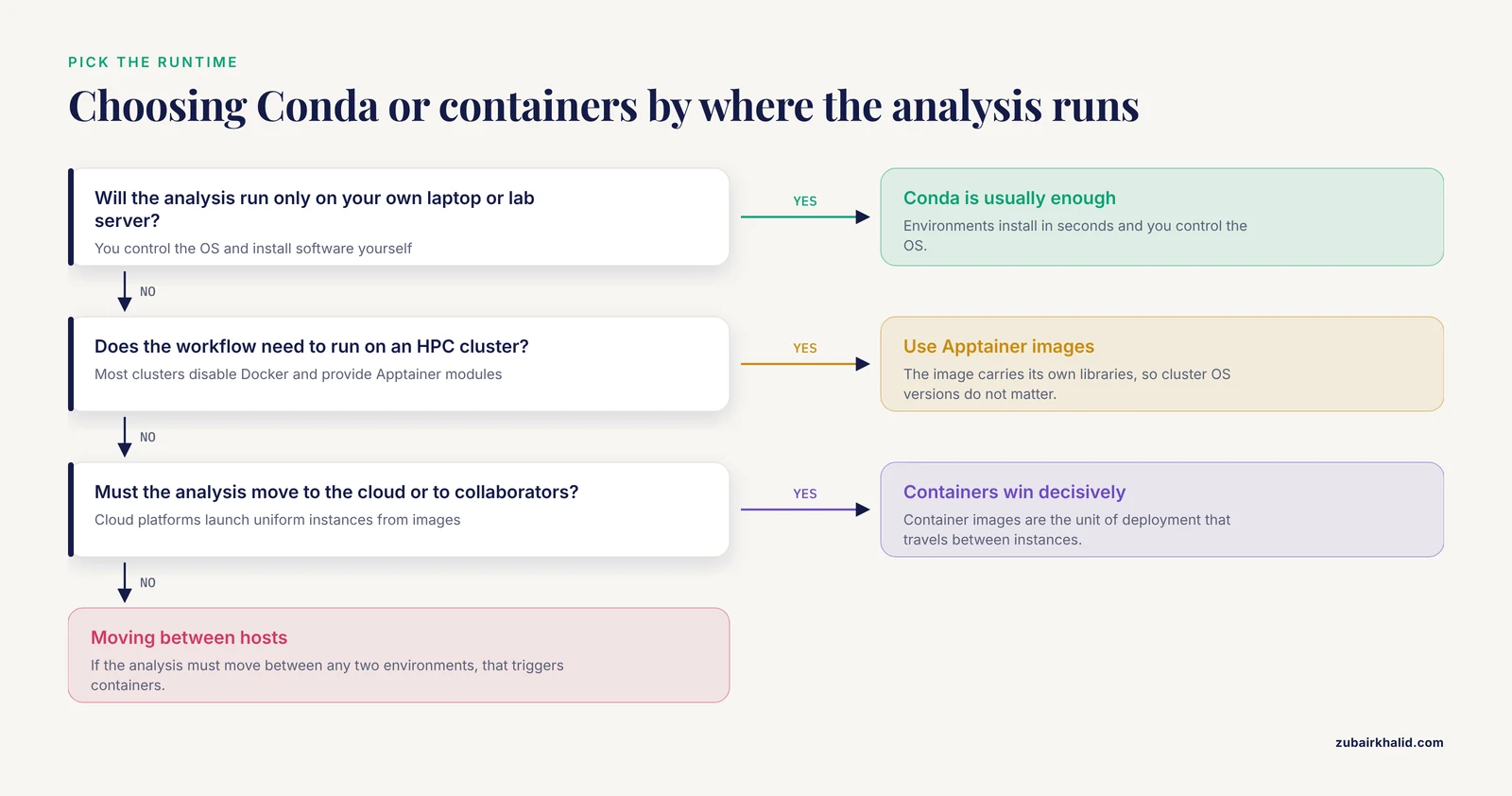
Ask where the workflow needs to run, not just where it runs today.
- On your own laptop or lab server: Conda is usually enough. You control the OS, and environments install in seconds.
- On an HPC cluster: Conda works if the cluster's OS libraries are compatible with your packages. Apptainer works regardless, because the image carries its own libraries. Most clusters provide Apptainer modules and expect containers for production runs.
- In the cloud: containers win decisively. Cloud platforms scale by launching uniform instances, and container images are the unit of deployment that travels between them. Resource-profiling tools built around containerized workflows, such as CWL-metrics, which collected runtime metrics from Docker containers across workflow executions, exist precisely because the cloud deployment model assumes containerized software [2].
If your analysis must move between any two of these environments, that is the trigger for containers.
Performance
For CPU-bound command-line tools, both approaches perform essentially the same. Conda tools run natively, and containers add a negligible virtualization overhead because they share the host kernel.
The differences appear with specialized hardware. GPU-accelerated tools need matching CUDA library versions, and MPI-based tools need the same MPI implementation inside the container as on the cluster. Conda can sometimes supply CUDA packages, but matching a cluster's specific driver and scheduler configuration is far more reliable inside a container built for that environment. If your workflow depends on GPUs or tightly coupled parallel tools, test early and assume containers.
Disk space and environment sprawl
Conda's package cache deduplicates well. Ten environments using the same samtools build store that build once. Containers duplicate their base layers per image, and on a busy cluster this can consume hundreds of gigabytes unless you reuse base images and clean caches. On storage-limited systems, this practical difference matters more than any architectural argument.
Human factors
Conda has a gentler learning curve. A wet-lab-trained scientist moving into computation can get a working environment in an afternoon. Container building requires understanding image layers, base images, and multi-stage builds before producing something worth sharing. Tools like CREDO lower this barrier with a graphical interface that generates modular Docker images and stores their package information in a GitHub-compatible format, aimed at life scientists rather than software engineers [3]. But even with generators, someone on the team should understand what the Dockerfile does.
Where Workflow Managers Fit: Nextflow vs. Snakemake
Conda and containers answer "how do I install the software?" A bioinformatics workflow manager answers a different question: "how do I orchestrate hundreds of steps across many samples, with parallelism, restarts, and logging?" The two leading open-source workflow managers in our field are Nextflow and Snakemake, and both are designed to consume either Conda environments or containers as their execution backends.
Nextflow is written in Groovy and runs on the JVM. Its strengths are cloud-native execution (built-in support for AWS Batch, Google Life Sciences-style backends, and Kubernetes), streaming data handling, and a large shared pipeline ecosystem in nf-core, where community pipelines ship with prebuilt Docker, Singularity, and Conda support out of the box.
Snakemake is Python-based and reads like a Python-idiomatic makefile. Its strengths are tight Python integration (you can embed arbitrary Python in rules), a gentler ramp for Python users, and first-class Conda integration, where each rule can declare its own Conda environment file and Snakemake builds and activates it automatically.
On the "nextflow vs snakemake" question as it relates to packaging, the honest summary is this: both support both packaging approaches, and the choice between the two managers should be driven by your team's language preference (Groovy-style vs. Python-style syntax), your target infrastructure, and which ecosystem your collaborators use. What is not optional in either is that a production pipeline should pin its software. A Nextflow pipeline might declare, per process, a container reference such as a BioContainers image hosted on a registry [1]. A Snakemake rule might declare a Conda environment YAML or a container directive. The best pipelines define both, letting the same workflow run with Conda on a laptop and with Apptainer images on a cluster.
A brief Snakemake example showing Conda wiring:
rule map_reads:
    input:
        reads="results/trimmed/{sample}.fq.gz"
    output:
        bam="results/aligned/{sample}.bam"
    conda:
        "envs/star.yaml"
    shell:
        "STAR --readFilesIn {input.reads} --outFileNamePrefix {output.bam}"
The equivalent Nextflow process would set a container directive pointing at an image registry instead. The orchestration logic looks similar. The packaging backend is what changes.
Worked Scenarios
The scenarios below map the common situations in real bioinformatics work to a concrete recommendation.
Scenario 1: Exploratory analysis for a single study
You are a postdoc analyzing 20 RNA-seq samples. You will run FastQC, an aligner, featureCounts, and DESeq2 in R. Most steps are exploratory: you will re-run QC, try different filters, and make many plots.
Recommendation: Conda. Create one environment for the command-line tools and one for R with Bioconductor. Install in minutes, iterate freely, and never leave your workstation. Export the environment.yml files at the end and commit them alongside your scripts. If the analysis later becomes a published pipeline, those environment files are the seed for the container build.
Scenario 2: A pipeline your collaborators will rerun
You have finalized a variant-calling workflow and clinical collaborators at two other institutions need to run it on their own servers. Their systems differ from yours in OS version and scheduler.
Recommendation: Containers, wrapped in a workflow manager. Build one Docker or Apptainer image per tool (or one image for the whole toolchain), pin the image tags, and deliver the pipeline in Nextflow or Snakemake with the container directives filled in. Your collaborators pull the same images you tested, which eliminates the "works on my cluster" class of failure. If some collaborators cannot run Docker, Apptainer's ability to execute images converted from Docker format covers them.
Scenario 3: Cloud execution at scale
A research group needs to run its whole-genome pipeline over hundreds of samples, bursting onto a cloud provider when the local cluster is full. Cost and runtime both matter, and the group wants to select cloud instance types that match the workflow's actual resource needs.
Recommendation: Containers plus a workflow manager with cloud support. This is the setting where the container-plus-descriptor model shows its full value. Containerized workflows paired with standardized descriptors like CWL can be analyzed for their computational resource requirements and run across cloud instances, and profiling tools can collect per-container runtime metrics to guide instance selection. In one published demonstration, CWL-metrics was used to analyze seven transcriptome quantification workflows across six instance types, showing that the choice of instance type affects both execution time and financial cost, with profiling data enabling better matching of resources to workload [2]. You cannot get that kind of per-tool resource accounting from bare Conda environments on ad hoc machines.
Scenario 4: A legacy tool with brutal dependencies
You need a 2017-era variant annotator that requires Python 2.7, an old NumPy, and a specific system library, while the rest of your pipeline is modern Python 3.
Recommendation: Either, but containers are safer. A Conda environment can hold Python 2.7 and old packages fine, and on a compatible host this is the fastest fix. The risk is that the legacy stack's system-level assumptions break on newer OSes, exactly the failure mode Conda cannot fix because it does not control the system layer. If the tool must keep working across machines for years, wrap it in an image with a pinned old base system. This is also the natural use case for container generators, which exist to package heterogeneous stacks that would otherwise resist containerization [3].
Using Conda and Containers Together
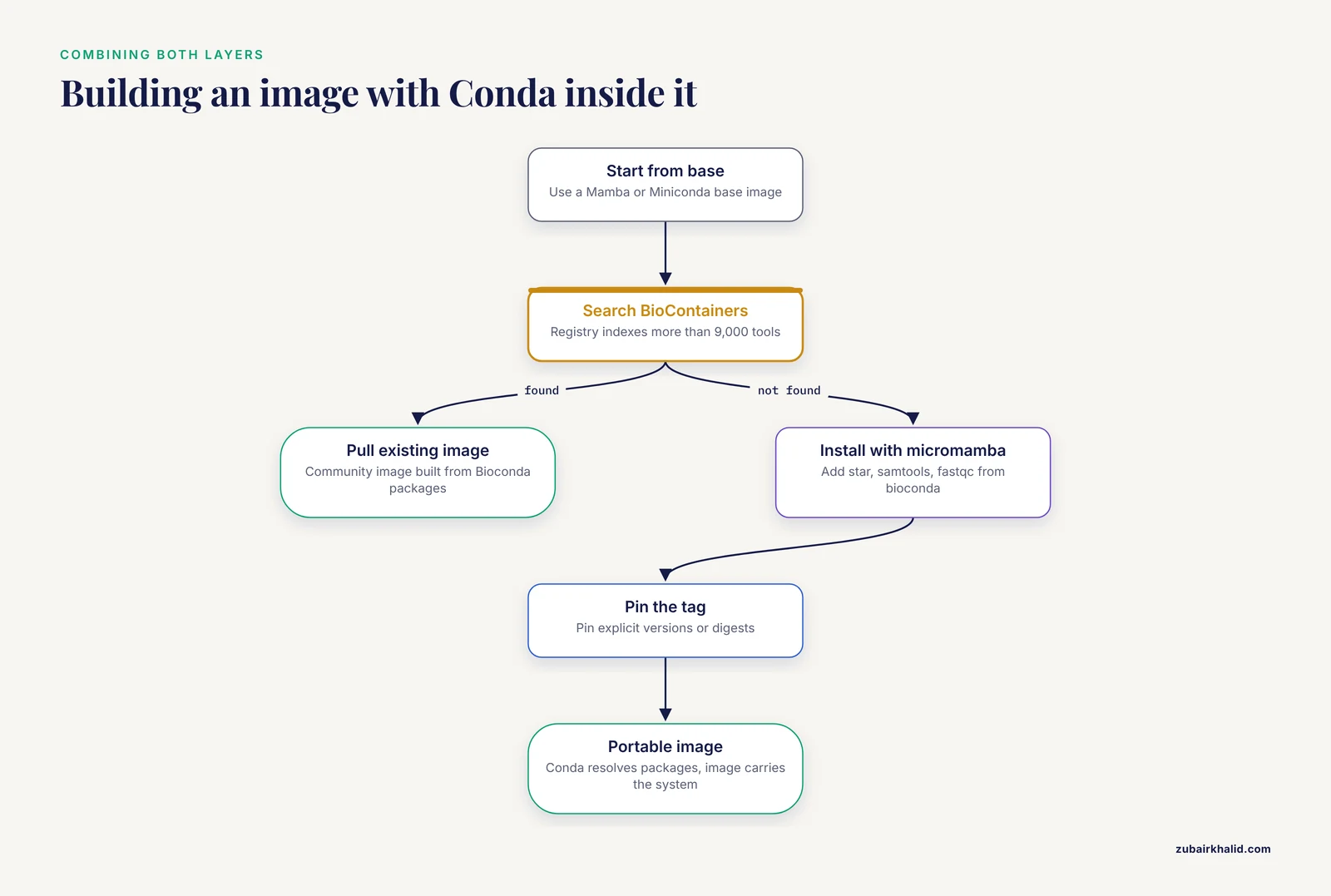
In practice, the strongest setups use both, with clear division of labor: Conda manages package selection, and containers manage system encapsulation and portability.
The standard pattern is a Dockerfile that installs a Conda environment inside the image:
FROM mambaorg/micromamba
RUN micromamba install -y -n base -c bioconda -c conda-forge star samtools fastqc
The image is then portable as a unit, while the Conda layer inside keeps dependency resolution and package sourcing consistent. This hybrid is common enough that tooling has grown around it. CREDO, for example, was designed to generate Docker images for bioinformatics applications that incorporate heterogeneous packages and environments, including Conda and Bioconductor, and to store the package information needed to recreate the image in a GitHub-compatible format [3].
The other hybrid direction is Conda-based container content provided by the community. Because BioContainers supports Conda, Docker, and Singularity packaging under one set of standardization guidelines, many of the images in its registry of more than 9,000 tools are built from Bioconda packages and distributed as containers for Docker and Singularity users alike [1]. The practical consequence: before building anything, search the BioContainers registry. The image you need, built from the same Bioconda packages you would have chosen, probably already exists.
Common Mistakes and Limitations
- Using the latest tag in production. A Dockerfile or pipeline that references an unpinned base image will silently change underneath you when the upstream image is rebuilt. Pin explicit versions or digests. This is the container-world equivalent of not pinning Conda versions, and it is equally fatal to reproducibility.
- Assuming
environment.ymlguarantees bit-for-bit reproducibility. It pins package versions, not package builds. Two rebuilds of the same environment months apart can differ in compiled dependencies. If exact reproducibility matters, export explicit build strings or move to a container. - Ignoring glibc and OS compatibility with Conda. Conda packages are built against minimum system C library versions. An environment that works on one Linux distribution can fail on an older one. Test on the actual target system before committing to a Conda-only delivery.
- Treating containerization as automatic reproducibility. A container guarantees that the software environment is fixed. It does nothing about fixed reference data versions, database snapshots, random seeds, or parameter sets. Reproducible workflows need the data versions and configuration under version control too.
- Building from-scratch images that already exist. Rebuilding community containers wastes time and fragments the ecosystem. Search BioContainers first [1], and only build custom images when you genuinely need combinations or versions the community does not provide.
- Mixing package managers inside one image ad hoc. Installing some tools with apt, some with pip as root, and some with Conda in the same Dockerfile creates images nobody can reason about. Pick one primary package layer (usually Conda via a Mamba base image) and justify exceptions explicitly.
- Assuming Docker runs everywhere you need it. Docker daemons are frequently disabled on shared HPC systems. If cluster execution is in scope, build and test with Apptainer from the start rather than discovering the incompatibility at delivery time.
- Confusing the workflow manager with the packaging layer. Nextflow and Snakemake orchestrate steps. Conda and containers package the steps. Choosing a workflow manager does not resolve the packaging question, and vice versa. Decide both, explicitly.
One limitation on scope applies to this whole comparison: the right choice depends on your institution's policies, your cluster configuration, and your collaborators' infrastructure. Evaluate on your own systems, and treat the scenarios above as starting points rather than verdicts.
Frequently Asked Questions
Is Conda or Docker better for bioinformatics?
Neither is universally better. Conda is faster for installing and iterating on tools on machines you control, and it is the friendliest entry point for new analysts. Containers provide stronger reproducibility and portability because they include the operating system layer, which makes them the right choice for production pipelines, cloud execution, and delivery. Most mature groups use both: Conda environments for daily work, container images for anything that must run elsewhere.
What is the actual difference between Conda and Docker in bioinformatics?
Conda installs packages and their dependencies into isolated environments that sit on top of your existing operating system. Docker packages a tool together with its dependencies and an entire OS userland into an image that runs identically on any compatible host. Conda solves dependency hell at the software level. Containers solve it at the system level, at the cost of larger artifacts and slower iteration.
Can I use Conda inside a Docker container?
Yes, and it is a standard pattern. A Dockerfile can start from a Mamba or Miniconda base image and install Bioconda packages during the build, producing an image that combines Conda's dependency resolution with Docker's portability. Tools such as CREDO exist specifically to generate Dockerfiles that embed Conda and Bioconductor environments for bioinformatics applications [3]. This hybrid is often the cleanest way to deliver a final workflow.
Do I need Apptainer or Singularity on an HPC cluster?
If your cluster does not allow Docker (most do not, because the daemon requires root), Apptainer is the container runtime to use. It runs without elevated privileges, works with schedulers like Slurm, and can pull and convert Docker images directly. Many production bioinformatics pipelines support an Apptainer profile for exactly this reason. Conda remains a valid cluster option when the cluster's OS libraries are compatible with your packages.
Which workflow manager should I use, Nextflow or Snakemake?
Both are excellent, and both support Conda and containers as execution backends, so packaging does not decide the choice. Nextflow tends to fit teams targeting cloud execution and the nf-core pipeline ecosystem. Snakemake tends to fit Python-heavy teams and projects where per-rule Conda environments are convenient. The decisive factors are your team's language preference, your target infrastructure, and what your collaborators already use. Pick one, learn it well, and pin your software either way.
How do I find ready-made containers or packages for a bioinformatics tool?
Search the BioContainers registry first. It indexes more than 9,000 bioinformatics tools, including over 200 proteomics and mass spectrometry tools, with standardized metadata for versions, licenses, and dependencies, and it supports Conda, Docker, and Singularity packaging in one place [1]. For most mainstream tools, a community-built container that follows those guidelines already exists, and you can pull it rather than building your own image from scratch.
Sources
- BioContainers Registry: Searching Bioinformatics and Proteomics Tools, Packages, and Containers.
- Accumulating computational resource usage of genomic data analysis workflow to optimize cloud computing instance selection.
- CREDO: a friendly Customizable, REproducible, DOcker file generator for bioinformatics applications.