How to Compress and Decompress FASTA and FASTQ Files with gzip
By Dr. Zubair Khalid, DVM, MS, PhD ·

By the end of this guide you will be able to compress FASTA and FASTQ files with gzip, choose a compression level that matches your hardware and your deadline, decompress files without risking data loss, read gzipped sequence data without ever unpacking it, and prove with checksums that a compressed file is a perfect copy of the original. You need a Linux or macOS terminal (or WSL2 on Windows), the gzip program, which comes preinstalled on virtually every Unix-like system, a few gigabytes of free disk space, and one FASTA or FASTQ file to practice on. No cluster, root access, or special software is required.
Few linux for bioinformatics skills pay off faster than fluent file compression. A single lane of whole-genome sequencing produces FASTQ files measured in tens of gigabytes, public repositories ship their data gzipped, and most downstream tools expect .gz files as their normal input. Gzip is simple, but the details around it, compression levels, verification, streaming, and its real limitations, are where beginners lose hours or, worse, lose data.
Why gzip is the default format for sequence data
Gzip dominates bioinformatics for three practical reasons. First, it is universal. The pyfastx authors note that gzip is extensively adopted by most public databases to compress data for saving storage [1], and any pipeline you download, from a ChIP-seq workflow that begins with gzip-compressed FASTQ inputs [2] to a metagenomics suite [3], assumes you can handle .gz files. Second, gzip is lossless. Every byte you compress comes back exactly, which matters when the bytes are reads, quality scores, and identifiers that must survive round trips intact. Third, gzip is old, stable, and available everywhere, from a Raspberry Pi to an HPC login node.
That ubiquity has a cost. The authors of a recent indexing tool observe that the compression, storage, transmission, and decompression of gzip-compressed FASTQ files has become a substantial scalability bottleneck for modern, massively parallel genomics tools [4]. Another parsing framework reports that gzip decompression speed limits I/O-heavy applications, and that optimized parsing of plain versus gzip-compressed files produces very different runtimes in tools like fastp and Mash [5]. Knowing how to use gzip well, and knowing when to reach past it, is therefore a working skill rather than trivia.
How gzip and DEFLATE actually work
Gzip uses the DEFLATE algorithm, which combines two classic ideas. LZ77 scans the input and replaces repeated byte sequences with back-references to earlier occurrences. Huffman coding then assigns shorter bit patterns to symbols that appear more often. Sequence data compresses well under this scheme because biology is repetitive: the same adaptors, the same genomic regions sequenced many times over, and highly skewed base composition all create redundancy.
Two structural facts follow, and both will affect your daily work.
First, FASTQ does not compress as well as most text. A FASTQ record has four lines, an identifier, sequence, a separator, and quality scores. The authors of a benchmark of fifty-seven compression methods note that while most text formats compress well with traditional methods such as tar and gzip, FASTQ files are generally large and do not compress well with these methods, making FASTQ storage a persistent cost driver on shared filesystems [6]. Quality strings in particular have relatively high entropy, so they resist DEFLATE more than the sequence lines do.
Second, a gzip stream is a single chain of blocks. You cannot jump to byte 40 billion and start decoding there, because each block may reference data from earlier blocks. As Kerbiriou and Chikhi put it, decompressing an arbitrary location in a gzip file is in principle impossible due to the nature of DEFLATE, which is why no ordinary program can parallelize gzip decompression [7]. Workarounds exist, and this guide covers them in the tips section.
How to Compress FASTA and FASTQ Files with gzip, Step by Step
The walkthrough below uses a toy FASTQ file called reads.fq and a toy FASTA file called contigs.fa. Substitute your own filenames throughout. Every command works identically on FASTA and FASTQ input, because gzip is format-agnostic and treats both as text.
Step 1. Check your tools and inspect the file
Confirm gzip is installed and note the version:
gzip --versionExpected output on a typical Linux box:
gzip 1.12
Copyright (C) 2007-2022 Free Software Foundation, Inc.
Then look at the file before you touch it. Size, type, and the first few lines:
ls -lh reads.fq
file reads.fq
head -8 reads.fq
Expected output:
-rw-r--r-- 1 user user 4.8G Nov 11 09:14 reads.fq
reads.fq: ASCII text
@SRR1234567.1 1 length=150
GATCGGAAGAGCTCGTATGCCGTCTTCTGCTTGAA
@SRR1234567.2 1 length=150
...
The head -8 command shows the first two complete FASTQ records, since each record is exactly four lines. If the first record looks odd, for example if the sequence line wraps, stop and inspect the format before compressing, because downstream read counters often assume four lines per record.
Step 2. Compress with the simplest possible command
gzip reads.fq
ls -lh
Expected output:
-rw-r--r-- 1 user user 1.3G Nov 11 09:14 reads.fq.gzTwo things happened. The file shrank, and the original reads.fq is gone. gzip replaces the input file with the compressed file and appends .gz to the name. This default behavior surprises new users, so before you compress anything irreplaceable, make a habit of the next step.
Step 3. Keep the original with -k or -c
The safe daily habit is the -k flag, which keeps the input file:
gzip -k reads.fq
ls -lh reads.fq*
Expected output:
-rw-r--r-- 1 user user 4.8G Nov 11 09:14 reads.fq
-rw-r--r-- 1 user user 1.3G Nov 11 09:20 reads.fq.gz
The alternative is -c, which writes the compressed stream to standard output and requires you to redirect it:
gzip -c reads.fq > reads.fq.gzThis form is more flexible, because the output name is whatever you choose, but forgetting the > redirect sends binary compressed data spewing into your terminal. Use -k interactively and -c inside scripts where you control the redirection.
Step 4. Choose a compression level
gzip accepts levels 1 through 9. Level 6 is the default. Lower numbers run faster and produce larger files, higher numbers run slower and squeeze out a few more percent. The tradeoff is steep at the top end, and the extra space saved by level 9 over level 6 on real sequence data is usually small, while the time cost is large.
| Level | Flag | Behavior | Best use |
|---|---|---|---|
| 1 | gzip -1 | Fastest, weakest ratio | Working files you will rewrite often, slow storage |
| 6 | gzip (default) | Balanced, the standard | Most FASTA and FASTQ archival, what repositories ship |
| 9 | gzip -9 | Slowest, marginally smaller | Long-term archive where CPU time is cheap |
The same scale applies to the parallel compressor pigz described below. To pick a level explicitly:
gzip -9 -k contigs.faStep 5. Time and size the run
Measure before you commit to a level for very large files. The time builtin reports real, user, and system seconds:
time gzip -6 -k reads.fq
ls -lh reads.fq*
Illustrative output on a laptop with one core devoted to the job:
real    4m30s
user    4m21s
sys     0m08s
-rw-r--r-- 1 user user 4.8G Nov 11 09:14 reads.fq
-rw-r--r-- 1 user user 1.3G Nov 11 09:29 reads.fq.gz
The compression ratio is original size divided by compressed size, here about 4.8 divided by 1.3, roughly 3.7-fold. On some deeply sequenced datasets gzip can do better. In a two-step sequencing data compression study, the authors report that their repaq compressor reached ratios above 25 on some deep sequencing data, which they describe as almost four times the ratio of gzip [8]. That gives you a sense of both ends of the spectrum, a routine 3 to 4 fold for gzip on typical FASTQ, and much larger headroom for specialized tools.
Step 6. Verify the compressed file before deleting anything
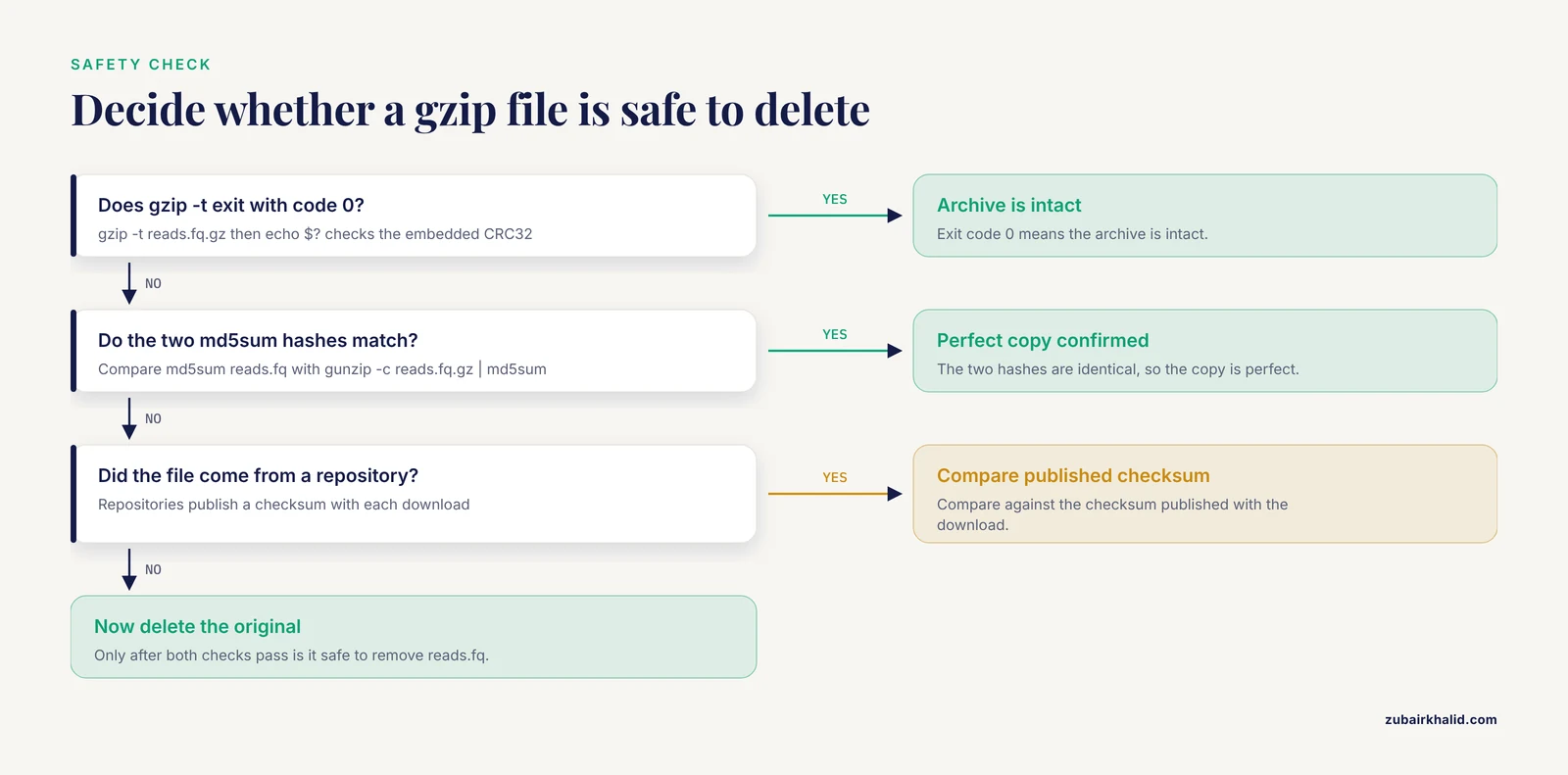
gzip embeds a CRC32 checksum in the file trailer and checks it during decompression. To test integrity without unpacking to disk:
gzip -t reads.fq.gz
echo $?
Exit code 0 means the archive is intact. Expected output:
0For a stronger guarantee that the compressed file is a perfect copy, decompress to a checksum rather than to disk, and compare against the original:
md5sum reads.fq
gunzip -c reads.fq.gz | md5sum
Expected output, two identical hashes:
d41d8cd98f00b204e9800998ecf8427e  reads.fq
d41d8cd98f00b204e9800998ecf8427e  (stdin)
(Your hash values will differ, the point is that the two lines must match each other.) If your data came from a repository, compare against the checksum published with the download. This procedure is the lossless guarantee in practice. In an independent evaluation, the GeneSqueeze authors tested gzip head to head against their domain-specific compressor and confirmed that gzip achieved 100 percent lossless compression across all elements of the FASTQ files, meaning the read identifier, sequence, quality score, and separator lines [9]. Losslessness is a property of the format, not luck, but only if the transfer itself was clean, which is exactly what the checksum comparison proves.
Step 7. Decompress safely
The natural inverse of gzip is gunzip:
gunzip reads.fq.gzThis replaces reads.fq.gz with reads.fq and deletes the compressed copy. If you want to decompress while keeping the archive, use the same flags as compression:
gunzip -k reads.fq.gzor stream to a chosen destination:
gunzip -c reads.fq.gz > restored_reads.fqgzip -d is a synonym for gunzip and behaves identically.
Step 8. Read gzipped data without decompressing it
Most of the time you do not need to materialize the uncompressed file at all. zcat decompresses to standard output on the fly:
zcat reads.fq.gz | head -8Expected output, the first two reads:
@SRR1234567.1 1 length=150
GATCGGAAGAGCTCGTATGCCGTCTTCTGCTTGAA
+
FFFFFFFFF:FFFFFF,FFFFFFFF:FFF,F:FFF
@SRR1234567.2 1 length=150
...
Count records without touching disk. Standard FASTQ has four lines per record, so line count divided by four gives the read count:
echo $(( $(zcat reads.fq.gz | wc -l) / 4 ))Expected output:
32000000This arithmetic assumes no wrapped lines, which holds for the overwhelming majority of FASTQ from modern instrument pipelines, but verify on a small sample with head -12 before trusting it on a critical file. On macOS, zcat and gzcat both work in current releases.
Streaming composes with anything. For example, to count occurrences of an adaptor prefix across a whole file without decompressing to disk:
zcat reads.fq.gz | grep -c GATCGGAAGAGCStep 9. Handle paired-end files
Paired-end sequencing produces two mate files, conventionally named with _1 and _2. Compress each separately:
gzip -k sample_R1.fq sample_R2.fqgzip accepts multiple input files and compresses each independently, producing sample_R1.fq.gz and sample_R2.fq.gz. Keep the pair synchronized. Every read in file 1 must have its mate at the same position in file 2, so if you filter or trim one member of a pair, you must apply an identical, record-for-record operation to the other. Tools that trim or filter FASTQ handle paired synchronization for you, but ad hoc filtering with grep or awk on one mate will silently desynchronize the pair and wreck downstream mapping.
Step 10. Batch compress a directory
A short shell loop handles a folder of files:
for f in raw_data/*.fastq; do gzip -k "$f"; doneFor anything large, replace gzip with pigz, the parallel implementation that uses all available cores while producing standard gzip output:
pigz -k -p 8 raw_data/*.fastqThe -p 8 flag requests eight compression threads. Output from pigz is an ordinary gzip file that any .gz reader accepts, including zcat, gunzip, and every bioinformatics tool.
Tips for better results when you compress FASTA and FASTQ with gzip
These are the adjustments that separate a casual gzip user from someone who runs tight, reproducible workflows.
Match the level to the file's lifetime. A FASTQ you will re-map three times this week does not deserve level 9. A FASTA reference you will archive for years does. The mixed-use HPC benchmark reached a similar conclusion for throughput clusters, recommending pzstd at medium settings as a good all-around method for FASTQ because it delivers high ratios at fast speeds while performing well on CPU and memory efficiency, an explicit nod to the reality that computing platforms are shared resources where compression must be balanced against allocation [6].
Decide deliberately between archiving and working copies. Gzip trades CPU time for disk space. If a file will be read dozens of times by tools that decompress it on every pass, leaving it uncompressed, or compressed at a low level, can be the faster overall choice. Modern fast storage shifts this calculus, since parsing speed on plain files can outpace the decompress-then-read overhead, as the RabbitFX evaluation of plain versus gzip-compressed inputs showed for I/O-intensive tools [5].
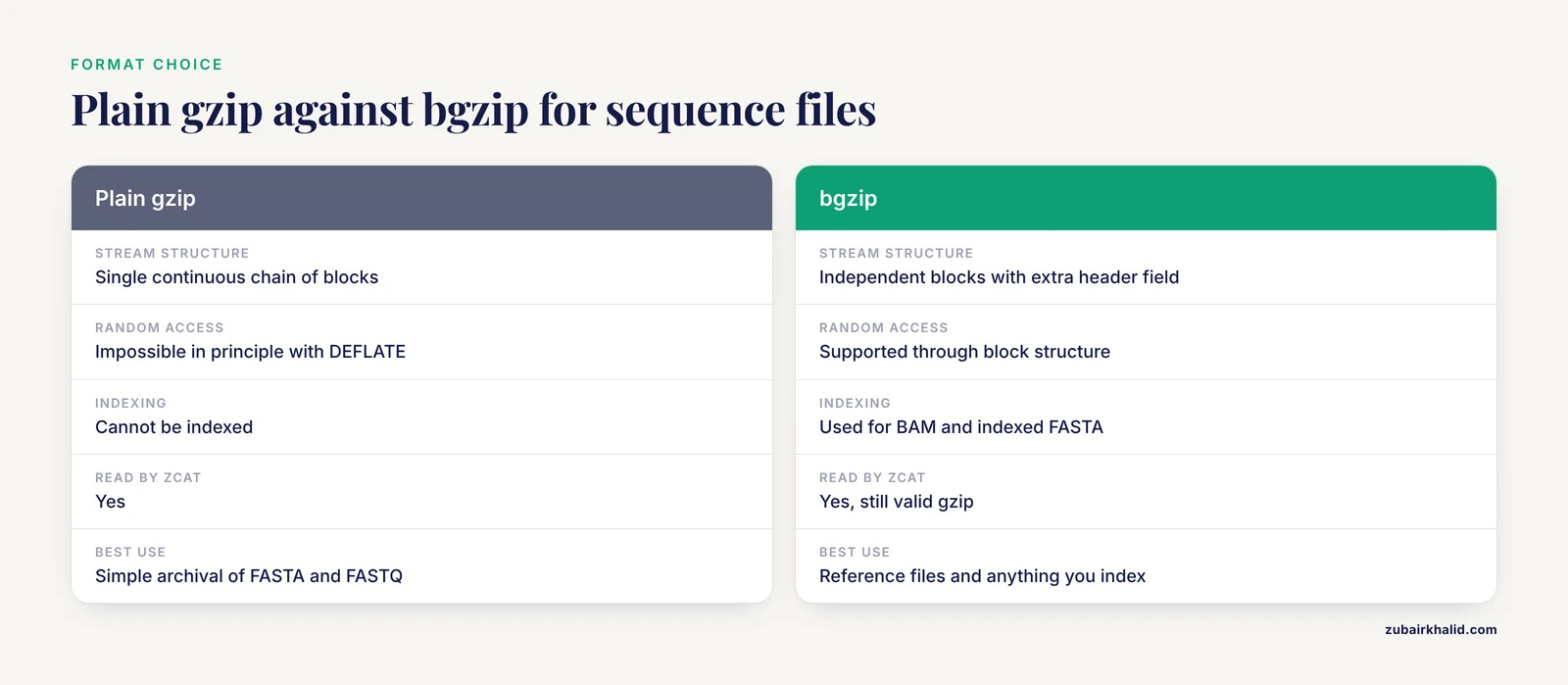
Use bgzip when you need random access into the compressed file. The bgzip tool from the htslib and samtools project produces BGZF, a gzip-compatible format built from independent blocks with a small extra header field. Because each block decodes alone, bgzip files support indexed random access, which is why alignment formats like BAM and indexed FASTA references use it. A bgzip file is still a valid gzip file, so zcat reads it, but a plain gzip file is not block-structured and cannot be indexed.
Build an index instead of recompressing. For existing gzipped FASTQ that you cannot rewrite, the mim project offers a lightweight auxiliary index that enables fast, parallel parsing of compressed FASTQ. Index creation costs about 20 percent overhead over a single decompression pass, the index itself is a small fraction of the compressed file, and crucially the approach is purely additive, it modifies neither the original gzipped file nor requires any recompression of back-catalog data [4].
Random access without new formats. pyfastx can retrieve sequences or subsequences directly from gzip-compressed FASTA and FASTQ files without decompressing them first, and it handles large files with hundreds of millions of sequences while keeping its memory footprint manageable [1]. For searchable compressed archives, BEETL-fastq demonstrated that 6.6 terabytes of human reads could be stored as 1.7 terabytes of indexed files while supporting rapid k-mer search that returns full FASTQ records piped straight into standard tools [10]. The Slot Machine transform compresses multi-FASTA by roughly 66 percent and supports searching and partial decompression of only the regions you need [11].
Exploit parallel decompression. The pugz tool performs exact parallel decompression of gzip text files and was reported an order of magnitude faster than gunzip and about five times faster than a highly optimized sequential implementation [7]. The same study examined random access into gzip-compressed FASTQ and found it nearly always feasible at low compression levels but approximate at higher levels, one more reason not to reflexively reach for level 9.
Watch header metadata in reproducible pipelines. gzip stores the original filename and modification timestamp in the file header. Recreating a FASTQ with a new timestamp and recompressing produces a .gz whose bytes differ from the previous run even though the sequence content is identical. If a pipeline step hashes compressed files for provenance, hash the decompressed content instead.
Compress collections with tar first. A directory of thousands of small FASTA files compresses poorly file by file because each gzip stream starts from a cold dictionary. Bundle with tar -czf collection.tar.gz dir/, which applies DEFLATE across the whole archive and shares redundancy between files.
When gzip is not the right tool
Gzip is the floor, not the ceiling. A large research literature on omics compression exists precisely because general-purpose compressors treat sequencing data as unstructured bytes, and specialized tools exploit format structure for major gains. Know the landscape so you can choose with intent.
For multi-FASTA data, MFCompress was designed specifically for FASTA and multi-FASTA files and provides additional average compression gains of almost 50 percent over gzip on multi-FASTA input, potentially doubling available storage at the cost of more computation time, with up to 8-fold size reductions on highly redundant datasets [12]. For whole-assemble archival, the Nucleotide Archival Format (NAF) encodes nucleotides at close to two bits per symbol and offers lossless, reference-free compression of FASTA and FASTQ with dramatically faster decompression than gzip, bzip2, xz, brotli, or zstd [13]. Applied to pandemic-scale data, the NAF authors calculated that adopting it would improve efficiency 52.2-fold over gzip-compressed GISAID datasets and 40-fold over gzip-compressed data at DDBJ, with a 29.3-fold acceleration for GenBank and ENA compared with uncompressed FASTA distribution [14].
Recent work pushes further. NYX applies a reversible, format-specific transform for FASTA, FASTQ, BED, and VCF and reaches compression ratios up to 2.3 times those of the strongest general-purpose codecs such as zstd -19 and xz -9e while compressing up to two orders of magnitude faster, and on mammalian FASTA assemblies it lands within 3 to 5 percent of NAF while compressing 57 to 73 times faster [15]. Reference-aware and assembly-aware approaches take different routes. TARG encodes genome sequences reference-free with a two-bit coding scheme, motivated by the observation that general-purpose compressors fail on genome sequences due to their highly repetitive nature and the absence of optimization for genomic data patterns [16]. KungFQ targets FASTQ compression directly [17]. GeneSqueeze auto-tunes its protocol to each file's distribution and preserves IUPAC ambiguity codes, though its Python implementation made it slower than gzip in wall-clock time [9]. repaq repacks FASTQ into a binary stream before LZMA encoding and, for paired-end data, eliminates redundancy between mates, achieving ratios the authors report as much higher than other FASTQ compressors [8]. For metagenomic collections, MetaCRAM integrates taxonomy identification with reference-based CRAM-style compression [3], and specialized compressors can be deployed inside MapReduce-Hadoop and Spark environments for distributed storage [18].
The practical takeaway is not that gzip is wrong. It is that gzip is the interoperable baseline, and you should know which questions to ask before committing terabytes to it. If your priority is compatibility with every tool on earth, gzip wins. If your priority is minimum bytes for long-term archive, format-aware codecs like NAF, MFCompress, or NYX deserve a benchmark on your own data.
Common Mistakes and Limitations
These are the errors seen most often in real lab filesystems, with exact symptoms and fixes.
Losing your only copy. Plain gzip file.fq deletes the original. If the process dies halfway or the disk fills, you can be left with neither a complete original nor a complete archive. Fix it by habit, always run gzip -k on data you cannot regenerate, and always run gzip -t before deleting anything.
Compressing to the terminal. gzip -c reads.fq with no redirect floods your terminal with binary garbage and writes nothing to disk. The symptom is a screen full of noise and a missing output file. Fix, remember that -c means "to stdout", so it must be followed by > output.gz.
Re-compressing what is already compressed. Running gzip on a .gz, .bam, or other compressed file wastes CPU and can grow the file slightly, because DEFLATE cannot compress high-entropy data and adds its own header and trailer. file names the real type, so check before batch operations. A common sign of trouble is a file named .gz that is not actually gzip, which produces this error:
gzip: data.fq: not in gzip formatThat message usually means a truncated download or a misnamed file, and the fix is to re-download or rename.
Decompressing just to look at the file. Unpacking a 40 GB FASTQ to read ten lines wastes time and disk. Use zcat file.fq.gz | head instead.
Breaking read pairing. Filtering one mate of a pair with grep or awk desynchronizes R1 and R2, and the failure usually surfaces much later as inexplicable mapping statistics. Filter both mates with a paired-aware tool, or verify record counts match after any manual operation.
Renaming away the .gz suffix. gunzip decides how to name and validate output based on the suffix. If you strip .gz from a compressed file, decompression complains with an "unknown suffix" message and refuses. Fix, restore the suffix, or decompress explicitly with gzip -dc renamed > restored.fq.
Trusting truncated transfers. An interrupted download produces the classic:
gzip: stdin: unexpected end of fileNever feed a file with this symptom to a pipeline. Re-download and compare the published checksum.
Assuming random access or parallel decompression. A plain gzip stream must be decoded from the beginning, which blocks random access and parallelism [7]. If you need either, plan for bgzip, an index such as mim [4], pyfastx [1], or pugz at compression time, not after the archive is built.
Burning shared-cluster CPU on level 9. On a shared HPC filesystem, the difference between level 6 and level 9 is minutes of CPU per file and a fraction of a percent of space. The benchmark literature explicitly frames compression as a resource allocation problem on shared platforms and recommends mid-tier settings for real-world FASTQ work [6].
Expecting ratio gains gzip cannot deliver. Gzip sits well below the specialized state of the art on genomics data. MFCompress reports average gains of nearly 50 percent over gzip on multi-FASTA [12], repaq reports ratios on deep sequencing data that approach four times gzip's [8], and NYX reports ratios up to 2.3 times the strongest general-purpose codecs with far greater speed [15]. If storage cost is measured in terabytes, benchmarking one purpose-built tool against gzip is usually worth an afternoon.
Reproducibility drift from headers. Because gzip records the input filename and timestamp, recompressing regenerated data changes the .gz bytes even when content is identical. For provenance, checksum uncompressed content, or use tools with deterministic output.
Frequently Asked Questions
Does gzip lose any sequence or quality data from FASTQ files?
No. gzip is a lossless compressor, and an independent evaluation confirmed gzip achieved 100 percent lossless compression across all elements of FASTQ files, including identifiers, sequences, quality scores, and separator lines [9]. Decompression returns the exact original bytes, which is what the checksum comparison in Step 6 verifies.
What compression level should I use for FASTQ files?
Level 6, the default, for almost everything. Level 9 costs several times more CPU for a marginal size reduction, and level 1 is a good choice for working files on fast storage. On shared HPC systems, the benchmark literature recommends mid-tier settings as the best balance of ratio, speed, CPU, and memory efficiency.
How do I view a gzipped FASTQ file without decompressing it?
Run zcat file.fastq.gz | head -8 to see the first two complete four-line records. zcat streams decompressed bytes to standard output, so you can pipe into wc, grep, or any tool without writing an uncompressed file to disk.
Can analysis tools read .gz files directly?
Most modern ones can. Aligners, trimmers, QC tools, and many parsers accept gzipped FASTA and FASTQ natively, and published pipelines routinely begin from gzip-compressed FASTQ inputs [2]. Some tools speed up dramatically when the input parsing itself is optimized for gzipped data, which is the problem the RabbitFX and mim projects address [5] [4].
Why is my gzipped FASTQ still so large?
FASTQ is one of the least compressible common text formats, because quality strings carry high entropy and the benchmark literature notes FASTQ does not compress well with traditional methods relative to its size [6]. Expect several-fold reduction rather than the ten-fold or better seen on repetitive plain text, and consider a specialized FASTQ compressor if the storage budget is tight.
What is the difference between gzip and bgzip?
bgzip produces BGZF, a gzip-compatible format built from independently decodable blocks, so bgzip files support indexed random access while remaining readable by ordinary gzip tools. Plain gzip produces a single continuous stream that must be decoded from the start, which is why random access into it is impossible in principle [7]. Use bgzip for reference files and anything you will index, plain gzip for simple archival.
How can I speed up compressing or decompressing large FASTQ files?
Use pigz for parallel compression, since it emits standard gzip output across all cores. For parallel decompression of existing gzip files, pugz was reported an order of magnitude faster than gunzip on text files [7]. For repeated processing of the same archive, an auxiliary index like mim enables parallel parsing without touching the compressed file [4], and switching the whole archive to zstd-based tooling is a documented alternative for shared clusters [6].
How do I verify that a downloaded .gz file is not corrupted?
Run gzip -t file.gz, which checks the embedded CRC and exits 0 on success, then compare md5sum output against the checksum published by the repository. An "unexpected end of file" error means the transfer was truncated, and the only fix is a clean re-download.
Sources
- Pyfastx: a robust Python package for fast random access to sequences from plain and gzipped FASTA/Q files
- ChIPSeqFPro, a pipeline for sequential processing of ChIP-Seq fastq to bigwig files
- MetaCRAM: an integrated pipeline for metagenomic taxonomy identification and compression
- mim: A lightweight auxiliary index to enable fast, parallel, gzipped FASTQ parsing
- RabbitFX: Efficient Framework for FASTA/Q File Parsing on Modern Multi-Core Platforms
- FASTQ File Compression Benchmarking Using Lossless General Purpose Algorithms
- Parallel Decompression of Gzip-Compressed Files and Random Access to DNA Sequences
- Efficient sequencing data compression and FPGA acceleration based on a two-step framework
- Lossless and reference-free compression of FASTQ/A files using GeneSqueeze
- BEETL-fastq: a searchable compressed archive for DNA reads
- Slot Machine: A Compression Transform for Multi-FASTA Files
- MFCompress: a compression tool for FASTA and multi-FASTA data
- Nucleotide Archival Format (NAF) enables efficient lossless reference-free compression of DNA sequences
- Efficient compression of SARS-CoV-2 genome data using Nucleotide Archival Format
- Byte-exact, format-aware compression for FASTA, FASTQ, BED and VCF files
- TARG: A Reference-Free, Lossless, Customized General-Purpose Encoder for Genome Sequence in Raw, FASTA, or Multi-FASTA Formats
- KungFQ: A Simple and Powerful Approach to Compress fastq Files
- FASTA/Q data compressors for MapReduce-Hadoop genomics: space and time savings made easy