How to Write Commit Messages for Lab Notebooks and Manuscripts
By Dr. Zubair Khalid, DVM, MS, PhD ·

By the end of this article you will be able to write commit messages that turn a git repository into a searchable, citable extension of your lab notebook, install a reusable commit message template for your manuscript repository, and recover exactly who changed what, when, and why, months or years later. You will need Git installed (version 2.20 or newer works for everything shown here), any plain-text editor, and optionally a free account on GitHub, the hosting service most researchers use to back up and share repositories.
If you have never used Git before, read the first three sections, run the walkthrough in order, and do not skip the "Common Errors and Their Fixes" section. Almost every problem a first-time user hits is listed there with the exact error text and the command that resolves it.
Why Scientists Need Better Commit Messages
Most scientists who start using Git treat commit messages as an afterthought. They type "update", "fixes", or "final2" and move on. Six months later, when a reviewer asks why Figure 2 changed between the preprint and the revised submission, or when you need to reproduce a result from a specific analysis run, those messages are useless. The history exists but cannot be interrogated.
Git for scientists differs from Git for software teams in one respect that matters here. In software, the code itself is the record. In research, the commit history is one layer of a provenance chain that also includes your paper or electronic lab notebook, your raw data files, your protocol versions, and your analysis environment. A good commit message is the connective tissue between those layers. It should say what changed, why it changed, and where the supporting evidence lives (notebook page, sample identifiers, protocol version, or issue number).
This matters beyond personal convenience. Funders increasingly require data management and sharing plans that describe how records will be preserved and attributed, and journals increasingly ask for code and data availability statements. A repository with informative commit history, readable with a single git log command, is one of the cheapest ways to satisfy both. GitHub for researchers adds collaboration features on top: issues that act as shared to-do lists, pull requests that capture co-author review, and releases that freeze a manuscript state at submission time.
A Commit Message Template for Scientific Manuscripts and Lab Notebooks
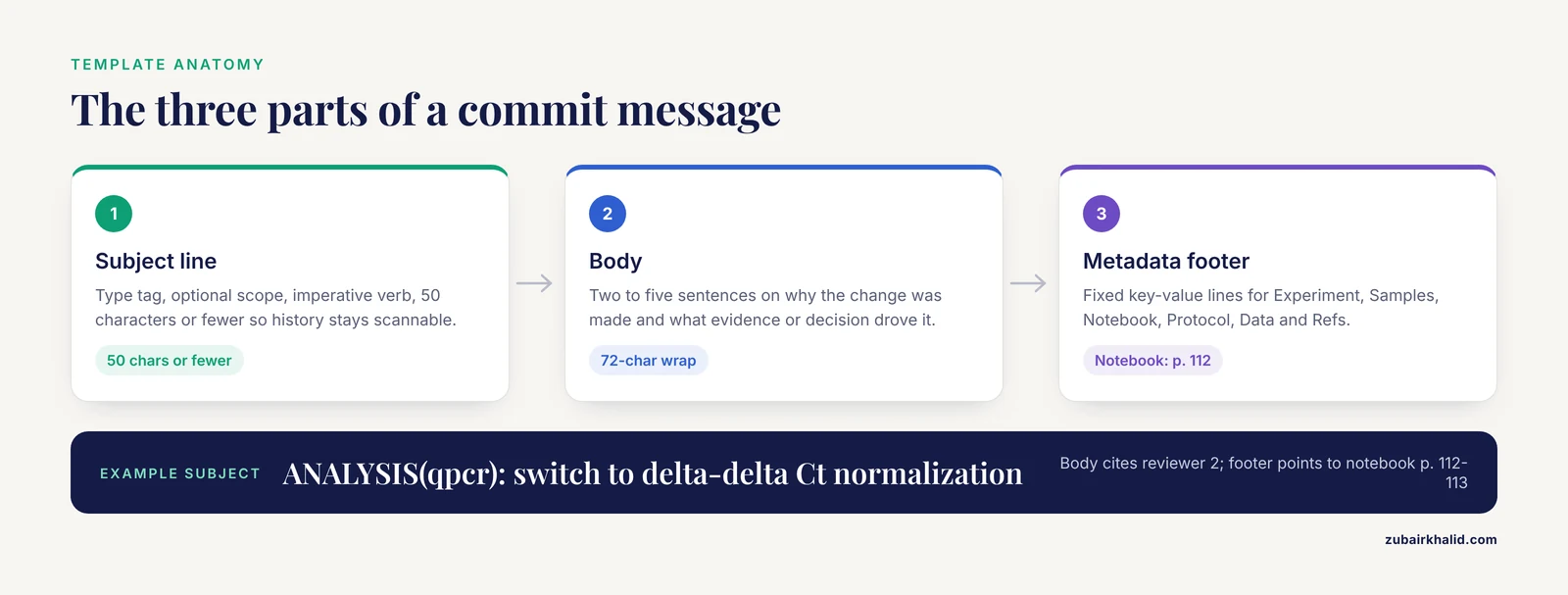
This is the core of the article. The commit message template scientific manuscript format below follows the structure the Git project itself recommends (a short subject line, a blank line, then a longer body), extended with a metadata footer that links each commit to your lab notebook and data. The Git community convention is a subject line of roughly 50 characters or fewer and body lines wrapped at about 72 characters, so the history renders cleanly in terminals, GitHub, and git log output.
The template has three parts.
1. Subject line. One line, written in the imperative mood ("Add", "Fix", "Remove", not "Added" or "Fixes"). The imperative reads naturally against Git's implicit prefix: "Add bootstrap analysis to Figure 3" completes the sentence "This commit will...". Prefix the subject with a short type tag so the history can be filtered (the type tags are defined in the table later in this article).
2. Body. Two to five sentences answering two questions: why the change was made, and what evidence or decision motivated it. This is where you write the part of your notebook entry that concerns the change. Record the reasoning ("Reviewer 2 flagged the Western blot quantification, switched to densitometry with ImageJ") rather than restating what the diff already shows.
3. Metadata footer. A fixed block of key-value lines linking the commit to the rest of your provenance chain. Consistent field names turn git log, grep="Notebook:" into a working search index over your notebook.
Here is the free commit message template scientific manuscript users can copy directly into a file:
<TYPE>(<scope>): <imperative summary, 50 characters or fewer>

<Why this change was made. Reference the decision, experiment,
or review comment that motivated it. Wrap lines at 72 characters.>

Experiment: <experiment ID or "none">
Samples: <sample IDs or range, or "n/a">
Notebook: <page or entry date, e.g. "p. 47" or "2026-03-14">
Protocol: <protocol name and version, or "n/a">
Data: <relative path to relevant data, or "n/a">
Refs: <issue number, preprint DOI, or reviewer comment, or "n/a">
Every field except the subject can be filled with a sensible default, so the template never blocks a commit. The point is not to force completeness on trivial changes. The point is that when a commit is not trivial, the fields are already there, staring at you, so the provenance gets written instead of remembered.
A filled-in example of the format:
ANALYSIS(qpcr): switch to delta-delta Ct normalization

Reviewer 2 questioned the relative-quantification method in the
original submission. Reanalyzed all 24 samples using the housekeeping
genes Gapdh and Actb as reference, per the MIQE guidance we cited.

Experiment: EXP-2026-041
Samples: S01-S24
Notebook: p. 112-113, 2026-03-09
Protocol: qpcr-v2.1
Data: results/qpcr/2026-03-09_run2
Refs: reviewer-2-comment-3
The type tags used in the subject line keep the history scannable. They are plain text conventions, not something Git enforces. You can filter on them with git log, oneline, grep="MANUSCRIPT".
| Tag | Use it for | Example subject |
|---|---|---|
EXP | Recording that an experiment was run, added, or corrected | EXP(exp041): record second qPCR run |
DATA | Adding or replacing data files that scripts consume | DATA: add flow cytometry FCS files for exp041 |
CODE | Writing or modifying analysis scripts | CODE: fix sample ordering bug in counts.py |
ANALYSIS | Running or updating a statistical analysis or pipeline | ANALYSIS(qpcr): switch to delta-delta Ct normalization |
FIGURE | Regenerating or editing a figure or table | FIGURE: rebuild Figure 3 with corrected axis units |
MANUSCRIPT | Prose edits to the manuscript itself | MANUSCRIPT(intro): tighten aims paragraph per R1 |
REVIEW | Responding to reviewers or tracking revision decisions | REVIEW: add response to reviewer 2 on normalization |
DOC | Protocols, README files, and instructions | DOC: document conda environment in README |
Use the scope field sparingly. A scope is a short label in parentheses that narrows the subject, such as the manuscript section, experiment ID, or figure number. If you cannot think of a scope, leave it out. An empty parenthesis pair is noise.
Step-by-Step: Installing and Using the Template
This walkthrough sets up the template, makes an initial commit in a manuscript repository, and shows what each step should print. Commands are shown in fenced code blocks. Lines beginning with $ are what you type (do not type the $ itself). Lines without $ show representative output.
Step 1. Install and configure Git
On macOS, install Git with the Xcode command-line tools (xcode-select, install) or Homebrew. On Windows, install Git for Windows, which includes the Git Bash terminal. On Linux, use your distribution's package manager (sudo apt install git on Debian and Ubuntu). Then verify the installation:
$ git --version
git version 2.44.0
Tell Git who you are. Every commit permanently records this identity, which is what makes authorship traceable:
$ git config --global user.name "Zubair Khalid"
$ git config --global user.email "[email protected]"
Set your default editor. This is the program that opens when you run git commit with the template. On a Mac or Linux machine, nano is the simplest choice. On Windows with Git Bash, notepad works:
$ git config --global core.editor "nano"Step 2. Create the template file
Create a plain-text file that holds the template. A conventional location is a hidden file in your home directory so it applies to every repository on the machine:
$ nano ~/.gitmessagePaste the template from the previous section into the file and save it. One detail matters: Git removes every line that starts with a # character from the final commit message, so you can make each field a comment that documents itself. A self-documenting version looks like this:
# <TYPE>(<scope>): <imperative summary, 50 chars or fewer>
#
# Types: EXP, DATA, CODE, ANALYSIS, FIGURE, MANUSCRIPT, REVIEW, DOC

# Why was this change made? Reference the decision, experiment, or
# review comment that motivated it. Wrap lines at 72 characters.

# Experiment: experiment ID or "none"
# Samples: sample IDs or range, or "n/a"
# Notebook: notebook page or entry date
# Protocol: protocol name and version, or "n/a"
# Data: relative path to relevant data, or "n/a"
# Refs: issue number, preprint DOI, or reviewer comment, or "n/a"
When you commit, you delete the # from the lines you fill in and leave the rest. Git strips the remaining comment lines automatically. This self-documenting version is the one most people end up preferring, because the field definitions are visible at the moment of writing.
Step 3. Point Git at the template
The single configuration parameter that drives all of this is commit.template, which tells Git to prefill the commit editor with the contents of a file:
$ git config --global commit.template ~/.gitmessageThree parameters matter in this step.
- The path must be absolute or start with
~. A relative path silently fails to load when you commit from a different directory, which is a common and confusing failure. The tilde (~) means your home directory and always resolves correctly. -globalapplies the template to every repository on this machine. Omit it (usegit config commit.template ...inside a repository) to apply it to one repository only, which is useful if your lab repo and your teaching repo need different templates.- Run
git config, global, get commit.templateafterward to confirm the value was stored. It should print the path you set.
Step 4. Start the manuscript repository
Create a directory, turn it into a repository, and add a .gitignore file that keeps generated and bulky files out of version control:
$ mkdir mypaper && cd mypaper
$ git init
Initialized empty Git repository in /Users/zk/mypaper/.git/
$ nano .gitignore
A reasonable .gitignore for a manuscript repository looks like this:
# Compiled outputs, rebuilt from source
*.pdf
*.docx~

# Editor and OS noise
.DS_Store
*.swp

# Large intermediate files
*.fastq
*.bam
Then make the initial commit:
$ git add .gitignore
$ git commit -m "DOC: initialize manuscript repository with gitignore"
[master (root-commit) a1b2c3d] DOC: initialize manuscript repository with gitignore
 1 file changed, 12 insertions(+)
 create mode 100644 .gitignore
The line [master (root-commit) a1b2c3d] confirms the commit succeeded. a1b2c3d is the short commit hash, the identifier you will use to refer to this exact state forever. On newer Git versions the default branch may be called main instead of master. The name does not affect anything in this article.
Step 5. Write your first templated commit
Add a manuscript file and stage it. Staging (the git add step) tells Git which changes belong in the next commit. Commits work best when each one is atomic, meaning it contains one logical change rather than a week of unrelated edits:
$ nano manuscript.md
$ git add manuscript.md
$ git commit
Your editor opens with the template prefilled. Fill in the subject, delete the # markers from the fields you complete, and save and close the editor. Git then prints a summary line like:
[main e4f5a6b] MANUSCRIPT: draft intro and methods skeleton
 1 file changed, 84 insertions(+)
 create mode 100644 manuscript.md
Step 6. Commit from the command line when you cannot use an editor
Sometimes you want a fast commit without opening an editor, for example when logging the fact that a run finished. Pass -m twice. The first -m becomes the subject, the second becomes the body, and Git inserts the blank line between them automatically:
$ git commit -m "DATA: add raw counts table for exp041" -m "Exported from the plate reader software after run 2. Notebook p. 112."
[main 7c8d9e0] DATA: add raw counts table for exp041
 1 file changed, 1 insertion(+)
 create mode 100644 data/exp041_counts.csv
For longer messages, pipe a prepared file into Git with -F, which reads the message from standard input:
$ cat draft-message.txt | git commit -F-Step 7. Read the history back
The template pays off the moment you query the history. The three commands worth memorizing:
$ git log --oneline
7c8d9e0 (HEAD -> main) DATA: add raw counts table for exp041
e4f5a6b MANUSCRIPT: draft intro and methods skeleton
a1b2c3d DOC: initialize manuscript repository with gitignore
-oneline compresses each commit to one hash and one subject line. This is why the 50-character subject limit exists: every line above stays readable and aligned.
To see the full message plus exactly which files a commit touched:
$ git show --stat 7c8d9e0
commit 7c8d9e0f...
Author: Zubair Khalid <[email protected]>
Date:   Tue Mar 10 09:14:22 2026 -0500

    DATA: add raw counts table for exp041

    Exported from the plate reader software after run 2. Notebook p. 112.

 data/exp041_counts.csv | 25 +++++++++
 1 file changed, 25 insertions(+)
To find every commit connected to a notebook page or experiment, search the message text:
$ git log --grep="Notebook: p. 112" --oneline
7c8d9e0 DATA: add raw counts table for exp041
That last command is the whole reason the metadata footer exists. It is a full-text search over the provenance of your project, available offline, in seconds.
Step 8. Push the repository to GitHub
Create an empty repository on GitHub (do not let GitHub initialize it with a README, or your first push will conflict), then connect and push:
$ git remote add origin [email protected]:zk-lab/mypaper.git
$ git push -u origin main
Enumerating objects: 9, done.
Counting objects: 100% (9/9), done.
Writing objects: 100% (6/6), 1.21 KiB | 1.21 MiB/s, done.
To github.com:zk-lab/mypaper.git
 * [new branch]      main -> main
branch 'main' set up to track 'origin/main'.
origin is the conventional name for the remote copy. -u links your local branch to the remote one so that future pushes need only git push. Every commit message you wrote is now visible on GitHub, searchable from the repository's commit page, and backed up off your laptop.
On GitHub, three features pair naturally with the template. Issues act as a shared experiment log or task list, and writing Refs: #12 (or Fixes #12) in a commit message makes GitHub automatically link that commit to issue 12. Pull requests collect a series of commits as a reviewable unit, which is how co-authors should exchange manuscript edits rather than emailing files. Releases freeze a branch state and attach an archive to it, which is the natural place to snapshot the exact repository contents at submission.
Worked Commit Message Examples
The commit message template scientific manuscript example below covers the three situations researchers hit most often. Copy the structure, not the content.
Example 1. A manuscript revision responding to reviewers. The body records the decision trail that you will otherwise have to reconstruct when writing the response letter:
MANUSCRIPT(discussion): rewrite limitations paragraph

R2 asked us to address the single-center design explicitly. Added
two sentences on [generalizability](/blog/data-analysis/generalizability-in-research) and one on the sampling frame,
per the response letter draft (issue #14).

Experiment: none
Samples: n/a
Notebook: n/a
Protocol: n/a
Data: n/a
Refs: #14
Example 2. A corrected analysis. This is the highest-value commit type, because analysis changes are the ones you will be asked to justify after publication:
CODE(stats): correct paired t-test call in model.R

The original call treated repeated measures as independent
samples, inflating the effective n. Switched to a paired test
matching the within-subject design described in Methods.

Experiment: EXP-2026-041
Samples: S01-S12 (paired pre/post)
Notebook: p. 118, 2026-03-11
Protocol: n/a
Data: data/exp041_counts.csv
Refs: none
Example 3. A figure regenerated after the code fix. Notice that this commit does not re-explain the bug. It points at the commit that fixed it, using the short hash from git log, oneline:
FIGURE: rebuild Figure 3B with corrected statistics

Regenerated after the paired-test fix in commit 3f2a1b8. Effect
sizes unchanged in direction, error bars now reflect within-subject
variability.

Experiment: EXP-2026-041
Samples: S01-S12
Notebook: p. 118-119
Protocol: n/a
Data: figures/fig3/fig3B.pdf
Refs: #14
The chain these three commits form (data, corrected code, regenerated figure) is a minimal, auditable record of a post-review correction. That is the standard you are aiming for.
Command Reference
| Task | Command | Notes |
|---|---|---|
| Set the template globally | git config, global commit.template ~/.gitmessage | Path must be absolute or start with ~ |
| Verify the template setting | git config, global, get commit.template | Should print the path |
| Stage a file | git add manuscript.md | Stage before every commit |
| Commit with the editor and template | git commit | Editor opens with the prefilled template |
| Commit without an editor | git commit -m "SUBJECT" -m "BODY" | Two -m flags, subject first |
| Commit from a file | git commit -F- | Reads the message from standard input |
| Fix the last commit's message | git commit, amend | Only before the commit has been pushed |
| Show one-line history | git log, oneline | Check that subjects stay short |
| Show full message and files | git show, stat HEAD | HEAD means the most recent commit |
| Search history by metadata | git log, grep="EXP-2026-041", oneline | Works on any footer field |
| Freeze a version | git tag -a v1.0-submission -m "Initial submission" | Then git push, tags |
| Copy a remote repository | git clone [email protected]:user/repo.git | Cloning brings the full history with it |
Common Errors and Their Fixes
These are the failures you will actually hit, with the exact messages and the command that resolves each one.
"fatal: not a git repository (or any of the parent directories): .git"
You ran a Git command outside a repository. Git looks for a hidden .git directory in the current folder and all parent folders, and did not find one. The fix is either cd into your project directory, or run git init if the directory is meant to become a repository. Running git init in your home directory by accident is a real mistake that creates a repository tracking your entire home folder, so check your location with pwd first.
"Please tell me who you are" followed by "fatal: unable to auto-detect email address"
Git refuses to create a commit without an author identity. Run the two git config, global user.name and user.email commands from Step 1, using the email associated with your GitHub account if you want your commits linked to your GitHub profile. Then retry the commit. No work is lost. The commit simply never happened.
"no changes added to commit" or "nothing added to commit but untracked files present"
You ran git commit with nothing staged. This usually means you edited files but skipped git add. Run git status to see the state. Files listed under "Changes not staged for commit" need git add <file>. Files listed under "Untracked files" are new and have never been committed. Add what you intend to commit, then commit again.
"fatal: unable to access ... Could not resolve host" or authentication failures on push
The git remote add origin URL is wrong, your network cannot reach GitHub, or your credentials are stale. Check the URL with git remote -v. GitHub no longer accepts account passwords for push over HTTPS, so if you use an HTTPS remote, create a personal access token in your GitHub account settings under Developer settings and use it as the password, or switch to the SSH URL form ([email protected]:user/repo.git) and add an SSH key to your account.
"! [rejected] main -> main (fetch first)" and "error: failed to push some refs"
The remote has commits you do not have locally, typically because a collaborator pushed or you edited a file through the GitHub website. Fetch and integrate their work before pushing:
$ git pull --rebase origin main
$ git push
-rebase replays your local commits on top of the fetched ones, keeping the history linear. If the same file was edited in both places, Git reports a conflict and names the file. Open the file, edit the marked sections to the correct content, then git add <file> and git rebase, continue.
A push rejected because of large files
GitHub rejects individual files above 100 megabytes and warns above 50 megabytes, per GitHub's documentation. The push fails with a remote error naming the oversized file. Fastq files and raw images frequently trigger this. The fix is to keep bulk raw data out of Git (extend .gitignore, move the data to institutional storage or a data repository, and record the location in the commit's Data: field), or to install Git Large File Storage if the file genuinely must live in the repository. Do not simply delete the file and commit again. The rejected commit still contains it, so you must either rewrite history with a tool such as git filter-repo or start the repository over. Prevention through .gitignore is far easier than the cure.
"HEAD detached at <hash>"
This appears when you checked out a specific commit instead of a branch, for example with git checkout a1b2c3d. Any commits you make in this state are not attached to a branch and are easy to lose. If you did it by accident, return with git checkout main (or master, whatever your branch is named). If you made commits while detached and want to keep them, create a branch at the current position with git switch -c my-new-branch before leaving.
How to Verify Your History Is Sound
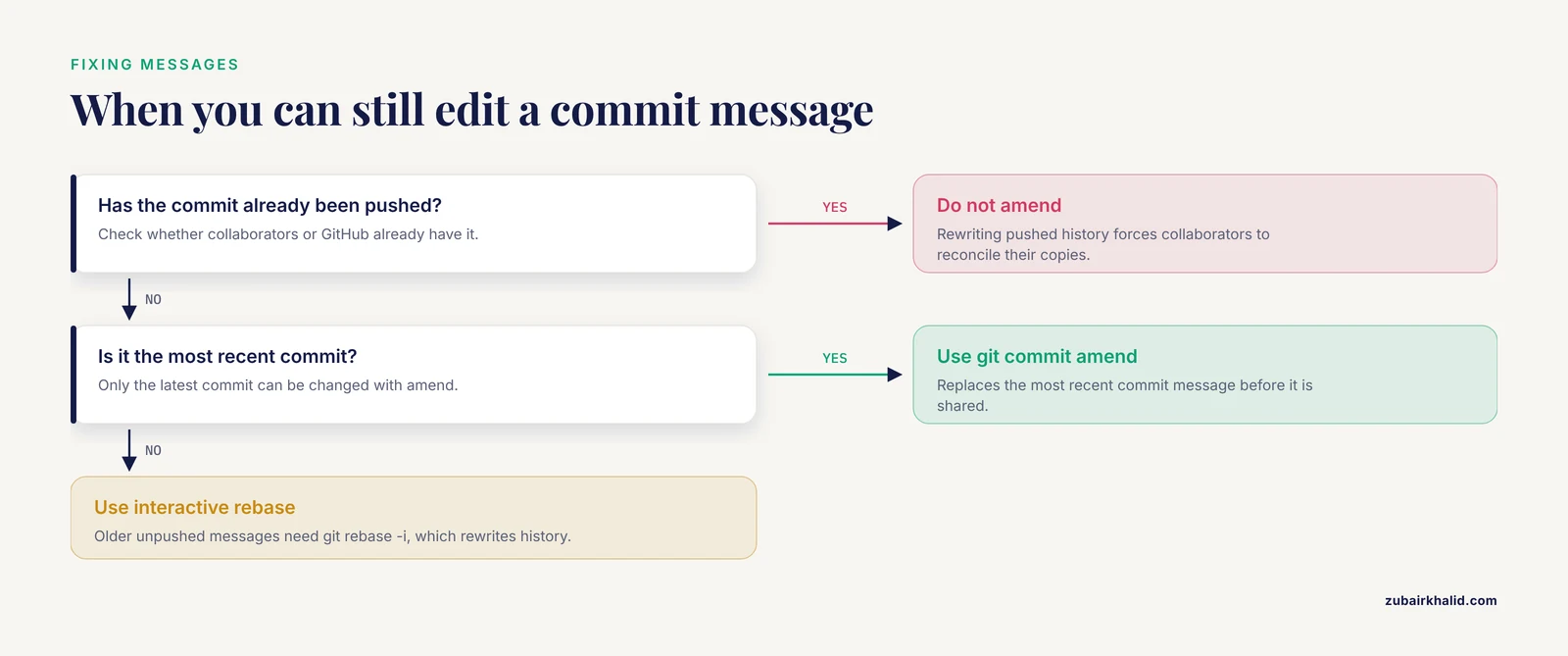
A history built with this template has three testable properties. Check them occasionally the same way you would proofread a notebook.
Every subject is scannable. Run git log, oneline. You should be able to read the list top to bottom and reconstruct the project's story. Any line reading "update" or "fixes" is a message you will regret. If it has not been pushed yet, git commit, amend replaces the most recent commit's message. Older messages can be edited with interactive rebase (git rebase -i), but only before sharing, because rewriting pushed history forces collaborators to reconcile their copies.
Every footer field is greppable. Run git log, grep="EXP-2026-041", oneline for one of your experiment IDs. Every commit touching that experiment should appear. Then try a notebook page: git log, grep="p. 112", oneline. If searches return nothing, the footer fields were skipped in some commits, and you should figure out which ones before the gap matters.
The repository contains no junk. Run git ls-files to list everything under version control. Compiled PDFs, editor backup files, and multi-gigabyte data files should not be present. Add them to .gitignore as you find them.
Sensible Next Steps
Once the basic loop is working, three upgrades deliver most of the remaining value.
Tag every milestone. Before submitting to a journal, freeze the state:
$ git tag -a v1.0-submission -m "Manuscript as submitted, 2026-03-15"
$ git push --tags
Tags are named bookmarks on commits. When the revision is requested, tag again. The two tags now bracket the review period, and git diff v1.0-submission v2.0-revision shows the editor and reviewers precisely what changed.
Publish an archived copy with a DOI. Zenodo integrates directly with GitHub repositories, so that creating a GitHub release can automatically deposit a snapshot and mint a DOI, which you can then cite in your paper's data availability statement. Configure it once through Zenodo's GitHub interface, and every future release is archived without extra work.
Move co-author collaboration onto pull requests. Instead of emailing Word files, have co-authors open branches, commit their edits with the same template, and open pull requests. The pull request conversation becomes the peer-review record of your own team, attached permanently to the exact lines it discusses. This is the single biggest cultural shift, and the biggest payoff, in adopting GitHub for researchers in a lab.
Common Mistakes and Limitations
Committing everything. Git tracks text superbly and binary blobs poorly. Commit the manuscript source (LaTeX, Markdown), scripts, small tables, and figure source files. Keep raw sequencing data, large images, and proprietary instrument output in a proper data repository or institutional storage, and point to them in the Data: field. Word and Excel files do commit, but they diff poorly, so two people cannot meaningfully compare versions line by line. For heavily collaborative documents, plain-text formats or collaborative editors work better.
Committing too rarely. A commit is cheap. A weekly "lots of work" commit that mixes prose edits, code changes, and new data defeats the purpose of the history. Commit each logical change. If you cannot write a one-line summary of what a commit does, it is probably several commits.
Amending pushed commits. git commit, amend rewrites history. It is safe on commits that exist only on your machine and disruptive on commits others have already pulled. The rule: amend freely before pushing, never after, unless you are the only person with a copy.
Treating commit messages as the lab notebook. The template links to the notebook. It does not replace it. Detailed observations, images of gel photographs, calibration notes, and failed-run documentation belong in the notebook, with the commit pointing at the notebook page. Commit messages are an index into the notebook, not a substitute for it. Some institutions and journals also have specific recordkeeping expectations for primary data and laboratory records, so check your institution's policy on what the official record of experimentation must contain.
Assuming GitHub equals preservation. A GitHub repository is a backup and a collaboration hub, but it is not an archival record. Services can change terms, accounts can lapse, and private repositories vanish with their owners. For anything cited in a published paper, deposit an archived, DOI-minted copy in a recognized repository.
Blinded submissions. If your journal requires double-blind review, do not push the manuscript repository to a public GitHub account linked to your name during review. Keep the review repository private or on institutional infrastructure, and anonymize authorship in the files themselves.
Individual compliance questions, such as what your specific funder or institution requires for record retention and data sharing, should go to your institutional research office or data librarian, who sees these questions constantly and will usually have a template for you.
Frequently Asked Questions
What is a good commit message format for a scientific manuscript?
Use a subject line of 50 characters or fewer with a type tag and imperative verb, a blank line, a short body explaining why the change was made, and a metadata footer linking to your experiment ID, notebook page, protocol version, and data location. The full free template appears in the middle of this article and can be copied into a file and installed with git config, global commit.template.
How long should a commit message be?
Keep the subject under about 50 characters and the body between one and five sentences. If the body grows longer than that, the change probably needed to be split into several commits, or the detail belongs in your notebook with a pointer from the commit.
Should I commit raw data to Git?
Generally no. Git handles large binary files poorly, and hosting services reject very large files. Commit small text tables and metadata, keep bulk raw data in institutional storage or a domain repository, and record the data's location and checksum in the commit's Data: footer field.
How do I link a commit to my paper lab notebook?
Include a Notebook: line in the metadata footer with the page number or entry date, and keep the field name identical in every commit. You can then list all commits tied to a given page with git log, grep="Notebook: p. 47".
Can I edit a commit message after committing?
Yes, if the commit has not been pushed. Run git commit, amend to change the most recent commit's message. Older messages require git rebase -i, which rewrites history and should not be used on commits that collaborators already have.
How does GitHub help resolve authorship or priority questions?
Every commit permanently records the author name, email, timestamp, and exact content changes, and this record survives pushes, clones, and forks. That timeline, readable with git log or git blame, is strong internal evidence of who contributed what and when, though formal authorship decisions should still follow your journal's and institution's authorship criteria rather than the commit log alone.
What is the difference between committing and publishing a manuscript version?
A commit is a local, private snapshot. Publishing a citable version means pushing the repository and creating a tagged release, optionally archived with a DOI through a service such as Zenodo. Commit early and often, tag and release only at meaningful milestones such as submission and acceptance.
How should I write commit messages during reviewer revisions?
Use a REVIEW or MANUSCRIPT tag, quote or cite the reviewer comment in the body, and reference the issue tracking that revision. When the revision is complete, tag the state. The chain of commits between the two tags then writes most of your response letter for you, because it documents exactly what changed and why.