Troubleshooting Multi-Omics Workflow Failures in the Cloud
By Dr. Zubair Khalid, DVM, MS, PhD ·

The most common cause of a failed cloud workflow in multi-omics analysis is a single scattered task running out of memory or disk, and the first thing to check is the stderr log and exit code of that one failed shard, not the workflow-level error message. Workflow engines such as Cromwell, Nextflow, and cwltoil aggregate thousands of parallel tasks. When one shard dies, the engine reports a generic failure at the workflow level. The specific, actionable detail lives in the per-task log file. Reading the wrong log is the single most common wasted hour in cloud bioinformatics.
This article walks through the causes of cloud workflow failures in multi-omics pipelines, from the most common to the rarest, explains the mechanism behind each one, gives a repeatable diagnostic sequence, and closes with prevention practices. The framing is infrastructure and policy because most failures in production genomics environments are not algorithm failures. They are failures of resource sizing, data placement, environment consistency, and orchestration at scale.
Why Multi-Omics Workloads Fail Differently in the Cloud
Multi-omics pipelines compound failure modes. A genomics-only pipeline takes FASTQ files in and produces a VCF out. A multi-omics pipeline chains genomics, transcriptomics, epigenomics, and sometimes imaging or proteomics, then integrates the outputs. Each additional modality adds its own toolchain, its own reference data, and its own integration logic. A failure in any single layer fails the whole run.
The scale of modern cloud genomics makes this worse in specific, predictable ways. The Celeste infrastructure, built for the All of Us Research Program, processes fluctuating workloads of up to 9,000 whole-genome sequencing samples per month using serverless technology and container orchestration within a single AWS Region [1]. In 12 months of production, Celeste coordinated roughly 200 million serverless functions and over 20 million messages to execute 1.8 million bioinformatics, quality control, and clinical reporting jobs [1]. At that volume, even a 0.1 percent per-task failure rate produces thousands of failed tasks per month. Failure handling is not an edge case in cloud genomics. It is a core system behavior.
National-scale biobank projects, including the UK Biobank, the All of Us Research Program, Singapore's PRECISE, Biobank Japan, and Korea's national bio-big-data project, have converged on cloud-based computing solutions combined with optimized storage formats and improved variant-calling methods precisely because on-premise clusters could not absorb the failure-retry cycle at this scale [2].
Quick Triage: The First 15 Minutes
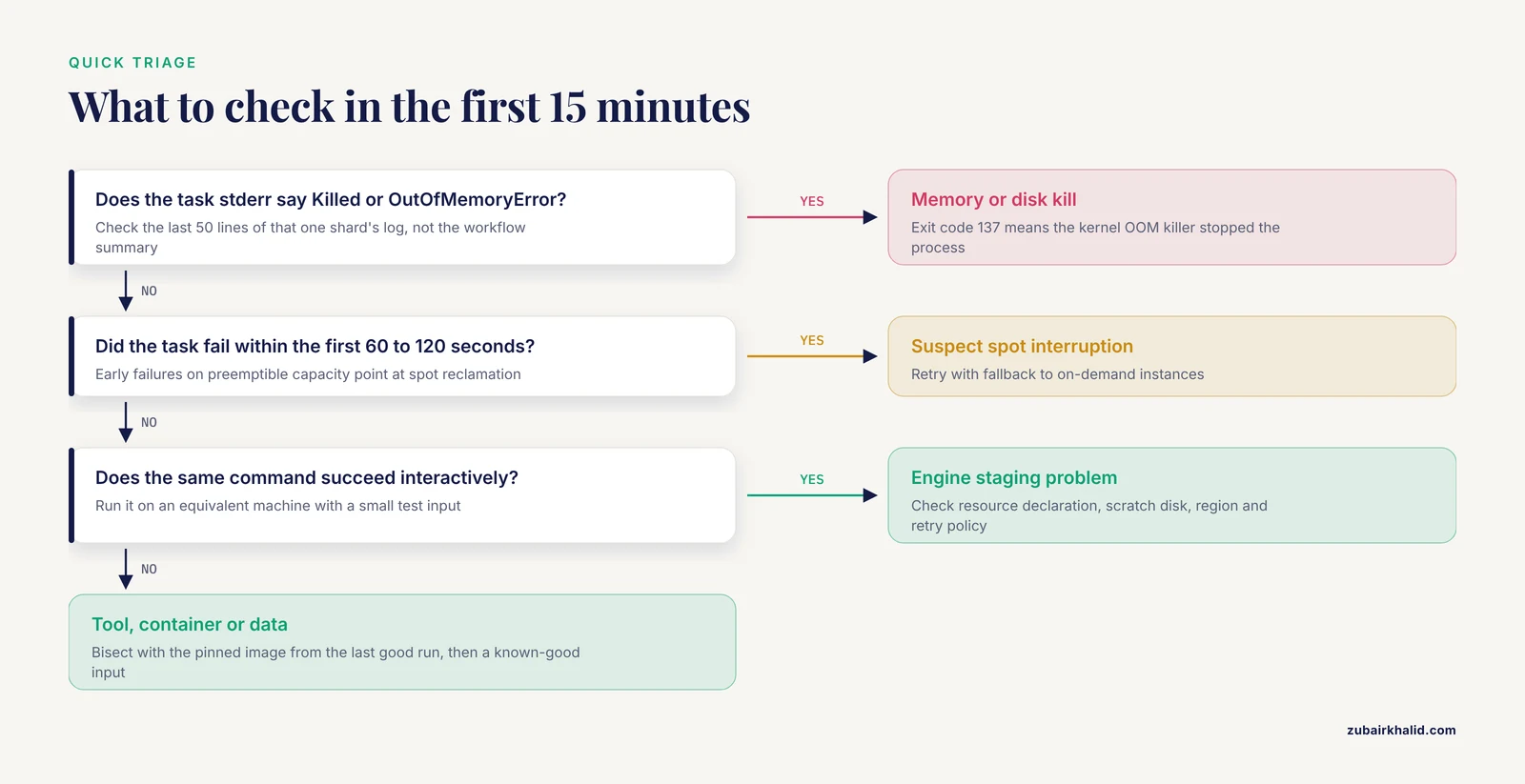
Before reading anything else, follow this sequence. It resolves or correctly classifies the majority of failures.
- Open the workflow engine UI (Terra, Seven Bridges CGC, Seqera, or a Cromwell/Nextflow server) and find the specific task that failed, not the workflow summary.
- Read the last 50 lines of that task's stderr. Look for the literal phrases "Killed", "OutOfMemoryError", "No space left on device", "CUDA out of memory", or a stack trace from the tool itself.
- Check the exit code. Exit code 137 almost always means the Linux kernel OOM (out-of-memory) killer terminated the process. Exit code 139 means a segmentation fault. Exit code 2 or 1 with a tool message means the tool itself rejected an input.
- Confirm the inputs actually arrived. Check that the task's input file list shows real files with nonzero sizes, and that reference files point to the correct bucket paths for the region you are running in.
- Check whether the failure happened at task start (environment or input problem), mid-run (resource or data problem), or at output upload (disk, permission, or network problem).
- If the task failed within the first 60 to 120 seconds and you are using preemptible instances, suspect a spot interruption and simply retry.
- Run the identical command interactively on an equivalent machine with a small test input to separate "the tool is broken" from "the environment is broken".
Step 7 is the discipline that separates experienced operators from everyone else. If the command succeeds interactively with the same image and the same input, the problem is in how the workflow engine staged, sized, or scheduled the task. If it fails interactively too, the problem is in the tool, the container, or the data.
The Master Troubleshooting Table
| Symptom | Likely cause | How to confirm | Fix |
|---|---|---|---|
| Task dies around peak memory usage, exit code 137 | OOM kill, memory setting below tool need | "Killed" in stderr, dmesg shows oom-killer | Raise task memory in the WDL/CWL/Nextflow resource block, set Java heap flags explicitly |
| Task slows then dies with "No space left on device" | Local disk too small for intermediates | Output files stopped growing, engine logs show disk ceiling | Request larger local SSD or add scratch disk, stream or delete intermediates |
| Tasks fail randomly across many samples, mostly early | Spot (preemptible) instance reclamation | Failures cluster at task start, engine marks preemption | Rely on automatic retry with fallback to on-demand pricing |
| "Manifest unknown" or image pull error at task start | Container image missing, renamed, or blocked | docker pull <image> fails locally | Pin image by digest, verify registry credentials, check network policy |
| Task cannot read its input file at start | Wrong bucket path, wrong region, or missing permission | File listed as 0 bytes or 404/403 in log | Correct the path, copy inputs to the same region, fix IAM or storage policy |
| Whole workflow reruns despite successful tasks | Call caching or resume not matching | Engine reports cache miss on unchanged tasks | Pin container digests, stabilize input ordering, verify cache backend is enabled |
| Workflow fails at tool startup with version or API errors | Tool version drift inside a floating tag | Compare tool version output across runs | Pin all images to immutable digests, rebuild once, never use :latest |
| Run dies after hours of pending tasks | Cloud service quota or account limit | Engine reports capacity or throttling errors | Request a quota increase or spread work across regions |
| Final integration step produces wrong or empty merged table | Cross-omics join key mismatch or coordinate system conflict | Row counts before and after the join, sample ID audit | Standardize sample IDs, harmonize genome builds, validate row counts at every merge |
| Costs spike while results stall | Data egress or repeated re-downloads of large inputs | Storage and egress line items in the bill | Co-locate compute and data in one region, keep intermediates in cloud storage |
Failure Causes, From Most Common to Rarest
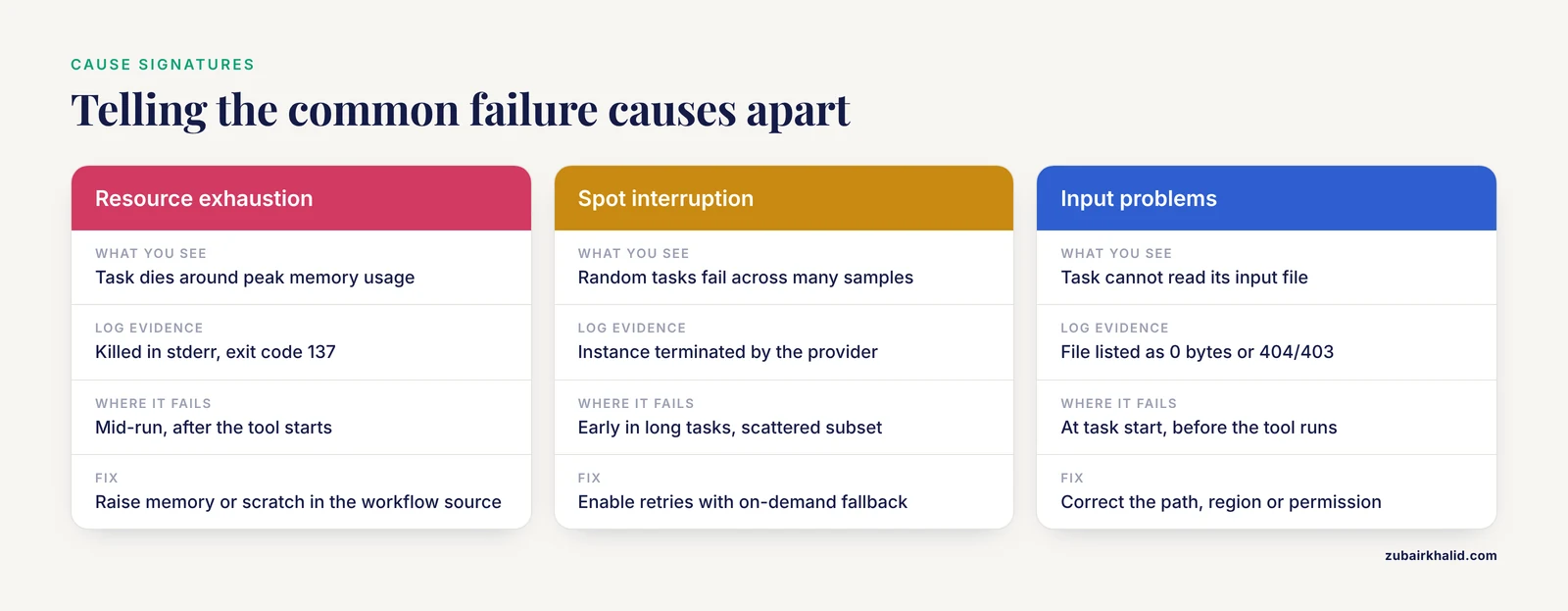
1. Resource exhaustion: memory and disk
This is the number one cause of cloud workflow failures in multi-omics troubleshooting. Whole-genome and whole-transcriptome tasks are both compute-intensive and IO-intensive, a combination the GT-WGS system on AWS was explicitly designed to address because a single 50x WGS analysis historically took 30 to 40 hours on conventional infrastructure [3].
Memory failures follow a predictable mechanism. The workflow language lets you declare a memory requirement per task, for example memory: "32 GB" in WDL or with: memory: 64.Gi in Nextflow. If the declared value is below what the tool actually needs for a given input size, the container runs, consumes all available memory, and the kernel OOM killer terminates it. The workflow engine sees a nonzero exit code and marks the task failed. Common aggravating factors include Java tools that ignore container limits unless heap flags are set explicitly, aligners whose memory footprint scales with the number of concurrent threads, and de novo assembly or single-cell steps whose memory need scales with sample complexity rather than file size.
Disk failures follow a similar pattern. A WGS BAM and its index for a 30x human genome are large, but the intermediate files during sorting and duplicate marking are often several times larger than the final outputs. If the engine mounts a small scratch disk, the task fails partway through with "No space left on device". The fix is to request larger local scratch, clean intermediates in the task script, and write final outputs to object storage rather than relying on local disk.
The diagnostic is straightforward. For memory, look for exit code 137 and the word "Killed" in stderr. For disk, look for the device-full error and check the disk size the engine actually allocated. The fix for both is sizing the task declaration to match the tool's real requirement on your data, which you learn by running one representative sample interactively and watching peak usage with standard tools such as time -v or the container runtime's stats output.
2. Spot instance interruptions and retry policy
Most cloud bioinformatics platforms run large batch workloads on preemptible or spot instances because they cost substantially less than on-demand capacity. GT-WGS made full use of the dynamic pricing mechanism on AWS to drive the cost of a complete WGS analysis down to 16.50 US dollars in its best-case benchmark [3]. The tradeoff is that the cloud provider can reclaim a spot instance at short notice. When that happens, the task dies, and the failure looks like an unexplained crash.
The failure signature is distinctive. Spot interruptions cluster at the beginnings and middles of long tasks, they hit a random subset of thousands of parallel tasks rather than all of them, and the engine logs often show the instance was terminated by the provider rather than by the tool. Large-scale projects treat this as normal weather, not a bug. The imaging curation study on NCI Cancer Research Data Commons platforms ran more than 21,000 virtual machines over the course of a single computation, completing in under 9 hours what was estimated at 522 days on a single workstation [4]. At that VM count, spot reclamation is guaranteed to happen continuously, so the platform's retry behavior, not the application code, absorbs it.
How to fix it: confirm the workflow engine is configured to retry failed tasks on preemptible capacity and to fall back to on-demand instances after a set number of attempts. Modern engines on Terra and similar platforms do this by default, but a workflow that has retries disabled or a task marked non-retryable will surface every interruption as a hard failure.
3. Input, reference, and metadata problems
The third most common cause is the pipeline being fed something other than what it expects. This includes missing files, truncated uploads, wrong genome build references, mismatched sample metadata, and path errors that point to the wrong bucket. Multi-omics pipelines raise the stakes because each modality brings its own reference assets, and a mismatch between the FASTA used for alignment and the annotation used downstream produces silently wrong results or a crash far from the actual error.
Two defenses are standard. The first is checksums. Store an MD5 or SHA-256 value for every input object alongside the object, and have the workflow verify it before the task starts. Standard utilities such as md5sum on a downloaded object, or the checksum field exposed by most object storage services, make this a one-line check. The second is reliable bulk transfer. The Galaxy-based cloud workflow platform described by Liu and colleagues added Globus Transfer specifically because moving large quantities of sequencing data into cloud storage needed to be efficient and reliable, and paired it with semantic verification tools for validating workflow correctness [5]. If your data ingestion step is ad hoc browser uploads, you have skipped both defenses.
A related failure in aws genomics environments is regional mismatch. If your reference bundle lives in one region and your compute runs in another, the task either cannot resolve the path or pays egress costs and latency on every read. The standard practice, and the one used by production systems such as Celeste, is to keep compute and data co-located within a single region [1].
4. Container and environment drift
A workflow that ran successfully last month can fail this month with no code change if any container image referenced by a floating tag has been rebuilt upstream. The mechanism is simple. A tag such as :latest or :1.4 is a mutable pointer. When the image maintainer pushes a new build, every new task pull gets the new build. New dependency versions can change tool behavior, break command-line interfaces, or fail to install at all.
The fix is to pin every container image by digest, which is the immutable content hash of the image, and to treat that digest as part of the workflow source. The Cancer Genomics Cloud platform was designed around this principle, providing over 200 preinstalled, curated tools and workflows so researchers get consistent, reproducible execution rather than ad hoc environments [6]. The hybrid cloud system built for Japanese genomic research similarly emphasized distributing analysis pipelines across multiple sites while ensuring reproducibility, combining an on-premise supercomputer, science clouds, and AWS for a demonstration on over 11,000 human genome sequences [7].
To confirm drift as a cause, print the tool's version banner inside the failing task and compare it against a known-good run. To fix it, replace every mutable tag in your workflow with a digest, rebuild, and rerun.
5. Workflow engine and orchestration failures at scale
At population scale, the orchestration layer itself becomes a failure domain. Celeste's architecture, based on serverless functions and message passing, illustrates both the power and the risk. With around 200 million function invocations and over 20 million coordination messages per year, transient service errors, message duplication, and throttling become routine statistical events rather than anomalies [1]. Well-designed orchestrators handle this by making tasks idempotent, meaning a task can be retried safely without duplicating outputs, and by storing per-task state so a retry resumes cleanly.
When you troubleshoot at this layer, the symptoms are different from task-level failures. Tasks may sit in a queued state indefinitely, the workflow may stall with no failed task at all, or duplicate outputs may appear. Check the engine's own logs, not the task logs, and check the message queue or event service dashboards for redelivery counts and throttling metrics. The fix is usually architectural: ensure task outputs are deterministic and idempotent, use unique output keys per shard, and keep per-task work small enough that a retry is cheap.
6. Platform quotas, concurrency ceilings, and regional capacity
Cloud accounts carry default quotas on how many concurrent instances, IP addresses, or API requests you can use. A workflow that scatters 10,000 tasks at once can hit these limits and fail or stall in ways that look like random task failures. The imaging study cited earlier consumed more than 21,000 VMs in under 9 hours [4], which is only possible on an account with elevated quotas and a platform that manages concurrency deliberately.
Confirming this cause involves looking at the cloud provider's service quota pages and the engine's logs for throttling or capacity errors. The fix is to request quota increases ahead of large runs, or to cap the workflow's concurrency so it stays within existing limits, accepting a longer wall-clock time.
7. Cross-omics integration failures
These failures are unique to multi-omics work and are among the most expensive because they happen late in a long pipeline. The pipeline runs perfectly on every modality, and then the final integration step produces a merged table with missing rows, duplicated rows, or nonsense associations.
The mechanisms are consistent. Sample identifiers differ across modalities because different labs or processing teams used different naming conventions. Genome build versions differ, so a variant called against one reference build does not align to a transcript or an annotation from another. Feature identifiers differ, for example gene symbols that have been renamed between annotation releases. The cloud-specific twist is that integration often happens in a data warehouse rather than in a script. The CytoConverter project, for example, mapped over 70,000 karyotype cases to genomic coordinates and published them in Google BigQuery for integrative analysis with other cancer datasets in the ISB-CGC resource [8], and warehouse-level joins fail on exactly the key and coordinate mismatches described above.
How to fix it: validate before you join. Check row counts at every merge, assert that sample ID sets match exactly across modalities, record the genome build and annotation version as metadata on every artifact, and use one canonical identifier mapping table applied identically to every modality. A precomputed resource approach also helps. The Functional Genomics Platform stores relationships across 200,000 curated genomes and over 68 million genes in a relational database precisely so that cross-entity queries do not have to be rebuilt, and possibly rebuilt incorrectly, by every analysis [9].
8. Data transfer and IO bottlenecks
Some failures are not crashes at all. The workflow runs, but each task spends most of its wall-clock time waiting on data. WGS analysis is IO-intensive as well as compute-intensive [3], and machine learning workloads that read whole-genome matrices are similarly demanding. VariantSpark, a distributed machine learning framework, was built to scale to datasets with 100 million genomic variants and 100,000 samples, and its efficiency comes from multi-layer parallelization over the data itself [10]. Systems that do not parallelize data access in a similar way simply starve.
Symptoms include task runtimes dominated by time not attributed to CPU, storage request throttling errors in the cloud provider's metrics, and costs driven by repeated downloads. Fixes include keeping compute in the same region as the data, using the provider's high-throughput transfer tools for bulk movement as the Galaxy cloud platform did with Globus Transfer [5], and structuring tasks so each machine reads its own shard rather than all tasks reading one shared large file concurrently.
9. Portability failures when moving between platforms
A growing failure class is a workflow that runs on one platform but fails when moved to another. The cause is almost always implicit assumptions: hard-coded paths, region-specific bucket names, engine-specific declarations, or tool versions baked into a platform image rather than the workflow.
The rMATS-cloud project is the clearest published counterexample. The authors packaged the rMATS alternative splicing workflow so it runs in virtually any cloud environment suited for biomedical research, validated it on three platforms, Cavatica, Terra, and Seqera, and published it in CWL, WDL, and Nextflow versions on Dockstore so other labs can run it as-is on datasets with thousands of samples [11]. DeepVariant-on-Spark took a similar portability path on GCP, packaging the DeepVariant pipeline so users can deploy it and begin analyzing whole-genome datasets within about 20 minutes of setup [12].
The fix for portability failures is to externalize every environment assumption into the workflow definition: all containers by digest, all references as declared inputs, all resource needs declared per task, and no reliance on platform-preinstalled tools. If a pipeline is only described in one workflow language, porting it through a converter will surface the implicit assumptions as errors, which is a cheaper way to find them than a failed production run.
A Repeatable Diagnostic Sequence
For any failed multi-omics run, work through this list in order. Each step either fixes the problem or eliminates a cause.
- Isolate the failed task. Open the engine UI, find the exact task and shard, and stop looking at the workflow-level error.
- Read the task stderr tail. Classify the failure as OOM kill, disk full, tool error, image error, or input error based on the actual text.
- Check the exit code against the classification. 137 means OOM kill, 139 means segfault, anything else points at the tool's own error handling.
- Verify inputs. Every input file exists at the resolved path, has the expected size, and passes its checksum.
- Reproduce interactively. Launch a single machine with the same image and resources, mount or copy the same inputs, and run the task command by hand.
- If interactive reproduction succeeds, the fault is in staging, sizing, or scheduling. Check the resource declaration, the scratch disk, the region, and the retry policy.
- If interactive reproduction fails, the fault is in the tool, the container, or the data. Bisect by swapping in the pinned image from the last good run, then by substituting a known-good input.
- Check for spot interruption if failures are scattered and early. Enable retries with on-demand fallback.
- Check quotas and concurrency if tasks are pending or throttled rather than failing outright.
- If the pipeline completed but the integrated results are wrong, shift to cross-omics validation: row counts, ID sets, build versions, and annotation releases at every merge point.
Document the outcome of each step. A run diagnosed this way produces a written record that makes the next identical failure a five-minute fix instead of a five-hour investigation.
Cost and Scale Reality Checks
Two published numbers calibrate expectations for cloud multi-omics work. The AI-based curation of more than 126,000 CT volumes from over 26,000 patients used more than 21,000 VMs, finished in under 9 hours instead of an estimated 522 days on a single workstation, and cost 1,011.05 US dollars in total [4]. GT-WGS completed a 55x WGS benchmark on a 400 GB FASTQ input in 18.4 minutes for 16.50 US dollars using AWS dynamic pricing, with results 99.9 percent consistent with the GATK best-practice pipeline [3]. Both numbers carry the same lesson for troubleshooting: well-architected cloud pipelines are cheap per unit of work, which means a failed run is almost never a cost problem. It is a correctness or configuration problem, and the right response is to fix the cause, not to downsize the workflow until it limps through.
A short safety note on runaway spending: set a budget alert and a hard cost cap on the cloud account before running any large scatter. A misconfigured workflow that retries a 10,000-task scatter in a loop can consume a month's budget in hours. Treat budget alerts as a safety interlock, equivalent to a fume hood in a wet lab, and check them before every large launch.
Prevention Practices
Prevention in cloud bioinformatics is mostly a short list of habits that eliminate the causes above before they occur.
Pin every container by digest. Floating tags are the root cause of the "it worked last month" class of failures. Immutability is the whole point of containerized workflows.
Declare resources per task from measured values. Run one representative sample of each modality interactively, record peak memory and disk, and set task declarations with headroom. Update the declarations when inputs change materially.
Enable and verify retries with preemption fallback. Spot capacity is the economic engine of large-scale cloud genomics [3]. Configure retries so interruptions are absorbed silently.
Checksum every input, verify at task start. This turns silent data corruption and wrong-file errors into loud, immediate failures.
Co-locate data and compute. Keep every modality's data in the same region as the compute that processes it, as production systems such as Celeste do within a single AWS Region [1].
Make tasks idempotent and small. At the scale of millions of coordinated jobs, retries are statistical certainty [1]. Idempotent tasks make retries free rather than dangerous.
Validate the join, not just the pipeline. Add explicit assertions to the integration step: sample ID set equality, row count expectations, genome build labels on every artifact. Catch cross-omics mismatches at the merge, not in a reviewer's inbox.
Test for portability deliberately. If you may ever move platforms, maintain the workflow in an interoperable language and validate it on a second platform, the way rMATS-cloud was validated across Cavatica, Terra, and Seqera [11].
Consider a hybrid design for sensitive or constrained workloads. The Japanese hybrid cloud model, combining on-premise supercomputing with science clouds and AWS, and adding GPU nodes only for workflows that need them, shows how to keep stable workloads on owned hardware while bursting to the cloud for peaks [7].
Use managed platforms for collaboration-heavy work. Platforms such as the Seven Bridges Cancer Genomics Cloud exist to remove environment management from the researcher's failure surface, providing secure on-demand access to data, tools, and compute in one place [6].
Data Governance and Safety Note
Human genomic data is sensitive identifiable data, and multi-omics projects link it to longitudinal clinical information, which raises the stakes of any data-handling failure [2]. Before running any workflow on human data, confirm that the data is in a compliant storage location, that access credentials used by the workflow are scoped to the minimum needed, and that no log file, debug output, or copied test input leaves the controlled environment. All of Us, UK Biobank, and comparable programs operate under explicit controlled-access frameworks for this reason [2]. Also confirm that test datasets used for debugging are synthetic or permissioned, because the fastest way to leak protected data is a careless small test case copied to a personal bucket. If your institution has a data governance office, involve it before the first large run, not after the first incident.
Common Mistakes and Limitations
The most common mistakes in cloud workflow failures and multi-omics troubleshooting cluster into five patterns.
Reading the wrong log. Workflow-level errors describe symptoms. Task-level stderr describes causes. Everything else follows from reading the task log first.
Fixing the symptom, not the declaration. Manually rerunning a failed task on a bigger machine gets the data out, but unless the workflow's resource declaration is updated, the next full run fails identically. Fix the workflow source, not the instance.
Treating spot interruptions as tool bugs. Hours have been spent debugging aligner crashes that were simply the cloud provider reclaiming capacity. Check the interruption pattern before debugging the tool.
Assuming cached equals correct. Call caching and resume features save enormous cost, but a cache hit returns the outputs from the first run, whatever they were. If you changed a tool version inside a floating-tag container without changing the workflow inputs, the cache may serve stale results silently. Pinning digests keeps the cache honest.
Testing on toy data only. A pipeline validated on one small sample will fail at population scale for reasons that never appear in testing: quotas, disk sizing, memory that scales with cohort complexity, and orchestration-level contention. The published scale benchmarks, from 9,000 WGS samples per month at Celeste [1] to 21,000 VMs in the imaging study [4], exist because scale itself is a failure mode.
One limitation on scope: the specific resource numbers that fix a given task depend on your data, your tool versions, and your platform, and the published literature establishes ranges and architectures rather than universal values. Benchmark one representative sample on your own workload and set declarations from measurement. Individual analyses also need qualified review by a bioinformatician or data steward familiar with the project's data governance requirements before clinical or publication use.
Frequently Asked Questions
What is the first thing to check when a cloud workflow fails?
Check the stderr log and exit code of the specific failed task or shard, not the workflow-level error. The workflow message tells you where to look, and the task log tells you what actually happened.
Why does my workflow pass locally but fail in the cloud?
Local and cloud executions differ in resource limits, disk layout, data staging, and concurrency. A task that passes locally usually fails in the cloud because of a memory or disk declaration, a missing input at the staged path, or an image that was never actually the one you tested with.
How do I fix out-of-memory failures in scattered tasks?
Raise the memory declaration for that task in the workflow source, set explicit heap flags for JVM-based tools, and re-derive the correct value by running one representative sample interactively while watching peak usage. Do not just rerun on a bigger ad hoc machine.
Why does my workflow keep rerunning instead of reusing cached outputs?
Cache matching requires inputs, commands, and container digests to be identical. Floating container tags, reordered file lists, or nondeterministic inputs cause cache misses. Pin image digests and stabilize inputs, then verify the cache backend is enabled.
Is a random scattering of task failures across many samples a bug?
Usually no. Random, early, scattered failures across thousands of tasks are the signature of spot instance reclamation, which is expected behavior on preemptible capacity. Configure retries with fallback to on-demand instances and move on.
How do I make a workflow portable between cloud platforms?
Externalize every assumption into the workflow definition: container digests in the workflow file, references and inputs declared explicitly, resources declared per task, and no reliance on platform-preinstalled tools. Publishing in an interoperable format such as CWL, WDL, or Nextflow and validating on a second platform is the practical test.
Where should I look when the pipeline runs fine but the merged multi-omics results are wrong?
Look at the integration step. Validate that sample ID sets match exactly across modalities, that genome builds and annotation versions are consistent, and that row counts behave as expected at every merge. Most integration failures are identifier or coordinate mismatches, not computation errors.
Do I need to worry about cost when troubleshooting failures?
Worry about cost as a safety issue, not a diagnosis. Set budget alerts and hard caps before large runs so a misconfigured retry loop cannot burn the account. Once that interlock is in place, focus on fixing the actual failure cause, because well-architected cloud genomics work is cheap per unit of output.
Sources
- Celeste: A cloud-based genomics infrastructure with variant-calling pipeline suited for population-scale sequencing projects
- Lessons from national biobank projects utilizing whole-genome sequencing for population-scale genomics
- GT-WGS: an efficient and economic tool for large-scale WGS analyses based on the AWS cloud service
- Cloud-based large-scale curation of medical imaging data using AI segmentation
- Cloud-based bioinformatics workflow platform for large-scale next-generation sequencing analyses
- The Cancer Genomics Cloud: Collaborative, reproducible, and democratized-a new paradigm in large-scale computational research
- Design and implementation of a hybrid cloud system for large-scale human genomic research
- A cloud-based resource for genome coordinate-based exploration and large-scale analysis of chromosome aberrations and gene fusions in cancer
- Functional Genomics Platform, A Cloud-Based Platform for Studying Microbial Life at Scale
- VariantSpark: Cloud-based machine learning for association study of complex phenotype and large-scale genomic data
- rMATS-cloud: Large-scale Alternative Splicing Analysis in the Cloud
- DeepVariant-on-Spark: Small-Scale Genome Analysis Using a Cloud-Based Computing Framework