A Step-by-Step Guide to Using Cloud Storage for Genomics Data Sharing
By Dr. Zubair Khalid, DVM, MS, PhD ·

By the end of this guide you will be able to classify a genomics dataset for sharing, choose between a managed scientific platform and a self-managed object store, upload files with verifiable integrity checks, configure tiered access for collaborators, and let partners run analysis next to the data instead of downloading it. You will need a cloud account (Amazon Web Services or Google Cloud are the most common), the AWS CLI version 2 or the Google Cloud CLI installed on your workstation, a text editor for a checksum manifest, and written institutional approval if your dataset contains human genomic data.
Genomics data storage has outgrown hard drives and FTP servers. A single 30x whole-genome sequence occupies roughly 100 GB as FASTQ and BAM files, and population-scale projects now sequence hundreds of thousands of participants. The All of Us Research Program, which will generate genetic data for more than one million individuals, relies on a cloud architecture called Celeste that routinely processed fluctuating workloads of up to 9,000 whole-genome samples per month, coordinating about 1.8 million bioinformatics and quality-control jobs over 12 months of production [1]. At that scale, shipping disks and emailing passwords is not an option. Cloud storage for genomics data sharing solves three problems at once: capacity that grows on demand, controlled access that satisfies funders and regulators, and analysis that runs close to the data.
This guide walks through the full lifecycle in eight steps, with real commands and expected output, then covers common mistakes and practical tips for day-to-day bioinformatics data management.
What Cloud Storage for Genomics Actually Means
Three architectures dominate genomics data storage, and choosing among them is the first real decision you will make.
A data commons collates datasets together with cloud computing infrastructure, commonly used software services, tools, and applications into a single biomedical resource for analysis, harmonization, and sharing [2]. The NCI Cancer Research Data Commons is the canonical example. Its Proteomic Data Commons node houses annotated data from more than 160 datasets across 19 cancer types and lets researchers connect proteomic findings with genomic and imaging data from the same samples [3]. A data lake is simpler. It provides access to data in whatever format it arrived, and defers curation and analysis to whoever downloads it later [2]. A federated platform inverts the traditional model entirely. Instead of moving data to the analyst, it moves the analyst's computation to the data. The NHGRI AnVIL (Analysis, Visualization, and Informatics Lab-space) is the leading genomics example. By eliminating data movement, AnVIL adds security measures for active threat detection and monitoring while providing scalable shared computing for any researcher [4]. Federated platforms are also emerging as a way to keep clinical-genomic data inside its organizational or jurisdictional boundaries while still enabling global collaboration, which improves representation of populations that sequencing efforts have historically under-served [5].
The practical difference matters for your workflow. In a commons or a federated platform, a collaborator receives authorization to a workspace and runs a workflow against the data in place. In a plain bucket, a collaborator downloads files and analyzes them on their own hardware, which means egress traffic, local storage costs, and version drift.
Step-by-Step: Cloud Storage for Genomics Data Sharing
Step 1: Classify your data and pick the access model
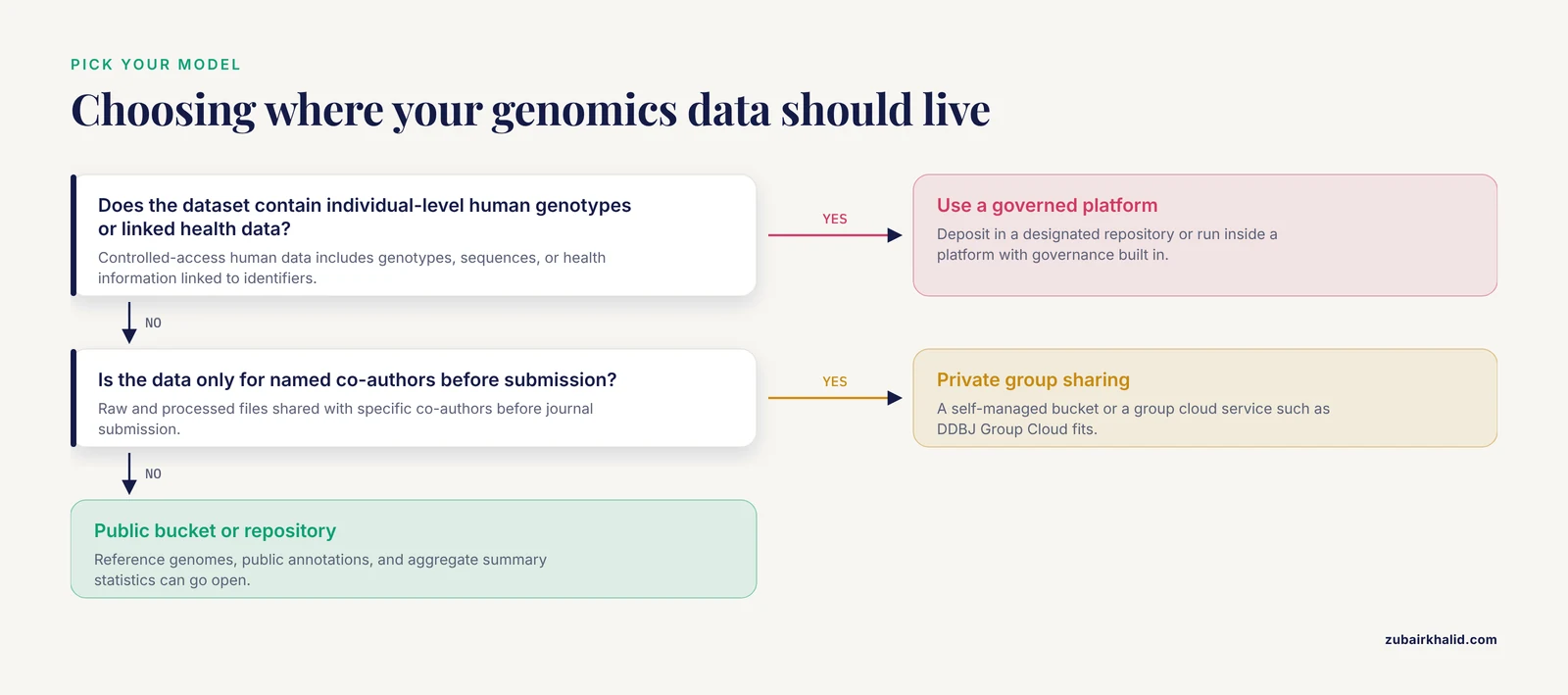
Before touching any cloud console, sort your data into one of three categories, because the category determines everything downstream.
Open data includes reference genomes, public annotations, and aggregate results such as genome-wide association summary statistics. These can go in a public bucket or an open-access repository. Controlled-access human data includes any dataset with individual-level genotypes, sequences, or health information linked to identifiers. In the United States, NIH-funded human genomic data must follow the NIH Genomic Data Sharing Policy, and designated repositories exist for exactly this purpose. NIAGADS, the National Institute on Aging-designated repository for Alzheimer's disease genomics, stores whole-genome and exome data from about 211,000 samples and shares them through a Federal Information Security Modernization Act moderate compliant cloud platform that fully supports the NIH Genomic Data Sharing Policy [6]. You do not build this tier yourself. You deposit into a repository, or you run inside a platform that has already implemented the governance controls. Pre-publication collaborative data includes raw and processed files you want to share with specific co-authors before journal submission. This tier is where self-managed buckets and group cloud services shine. The DDBJ Center runs the DDBJ Group Cloud specifically for sharing and analysis of pre-publication data among research groups, built on the same infrastructure as its public archives [7].
An international expert panel has proposed a Code of Conduct for data sharing in genomics covering consent, governance, and researcher responsibilities across borders [8]. Reading it before you classify your data takes an hour and prevents months of renegotiation later.
Step 2: Choose your platform
Use this table to match your situation to an option.
| Option | Type | Access model | Best suited for |
|---|---|---|---|
| NHGRI AnVIL (Terra, Gen3, Galaxy, Dockstore, Jupyter, RStudio) | Federated platform | Controlled tiers with authentication | Human genomics under NIH policy, population-scale analysis without data movement [4] |
| NIH disease-area platforms (All of Us, BioData Catalyst, GDC, Kids First) | Data commons | Multiple access tiers, formal ingestion | Research aligned with a specific NIH program [9] |
| NIAGADS | Domain repository | Controlled access, FISMA moderate | Alzheimer's disease and related dementia genomics [6] |
| NCI CRDC nodes such as the Proteomic Data Commons | Data commons | Tiered, cross-referenced with genomic and imaging data | Multi-omics cancer research [3] |
| DDBJ Group Cloud | Group cloud service | Private groups, pre-publication | Collaborative sharing before journal submission [7] |
| Commercial object storage (S3, Google Cloud Storage) with your own controls | Self-managed | You configure buckets, policies, and encryption | Non-human data, machine-generated intermediates, lab-scale sharing |
| Private OpenStack cloud such as GenoVault | Self-hosted object storage | Public or private per container | Institutions that must keep data on their own infrastructure [10] |
Two decision rules follow from the literature. First, if human data subject to the NIH Genomic Data Sharing Policy is involved, work inside a platform that has already implemented ingestion, authentication, auditing, and sanctions processes. A 2023 analysis of 94 publicly available documents across five NIH cloud platforms and dbGaP found substantial similarity in these governance elements, including formal data ingestion, tiered access with varying authentication requirements, and auditing for inappropriate data use [9]. Second, if your collaborators span institutions or countries and moving the data is legally or practically hard, prefer a federated design. Federated platforms can enable collaboration without the data physically leaving its boundary [5].
Step 3: Prepare files, formats, and metadata
Good bioinformatics data management starts before the first upload. Three artifacts must leave your lab together: the data files, a checksum manifest, and a metadata table.
For sequencing data, keep the raw reads in FASTQ format, aligned reads in BAM or its compressed cousin CRAM, and, for nanopore sequencing, retain the raw signal data in formats such as SLOW5 or BLOW5 if reanalysis with future basecallers is a goal [11]. Compress everything. Generate a checksum for every file so collaborators can verify integrity after transfer:
$ md5sum sample_A1_R1.fastq.gz > manifest.md5
$ sha256sum sample_A1_R1.fastq.gz >> manifest.md5
$ cat manifest.md5
9f2a1c...b4  sample_A1_R1.fastq.gz      (illustrative values)
c19b3e...7a  sample_A1_R1.fastq.gz
For metadata, one row per sample with at minimum: sample identifier, organism, tissue, sequencing platform, library strategy, capture or assay kit, read length, and the consent or access tier. The Proteomic Data Commons experience shows why this matters. Multi-omics datasets require extensive metadata including clinical, biospecimen, experimental, and workflow annotations for the data to be interpretable at all [3]. Metadata captured at upload time is also what makes a repository queryable. GenoVault, for example, uses the metadata a user provides during file upload as the basis for later database queries [10].
A practical naming convention avoids heartache: use one directory per study, one subdirectory per data type (raw, aligned, called, reports), and never rename a file after upload. Renaming breaks every checksum, provenance record, and workflow input pointing at the old key.
Step 4: Upload with verification
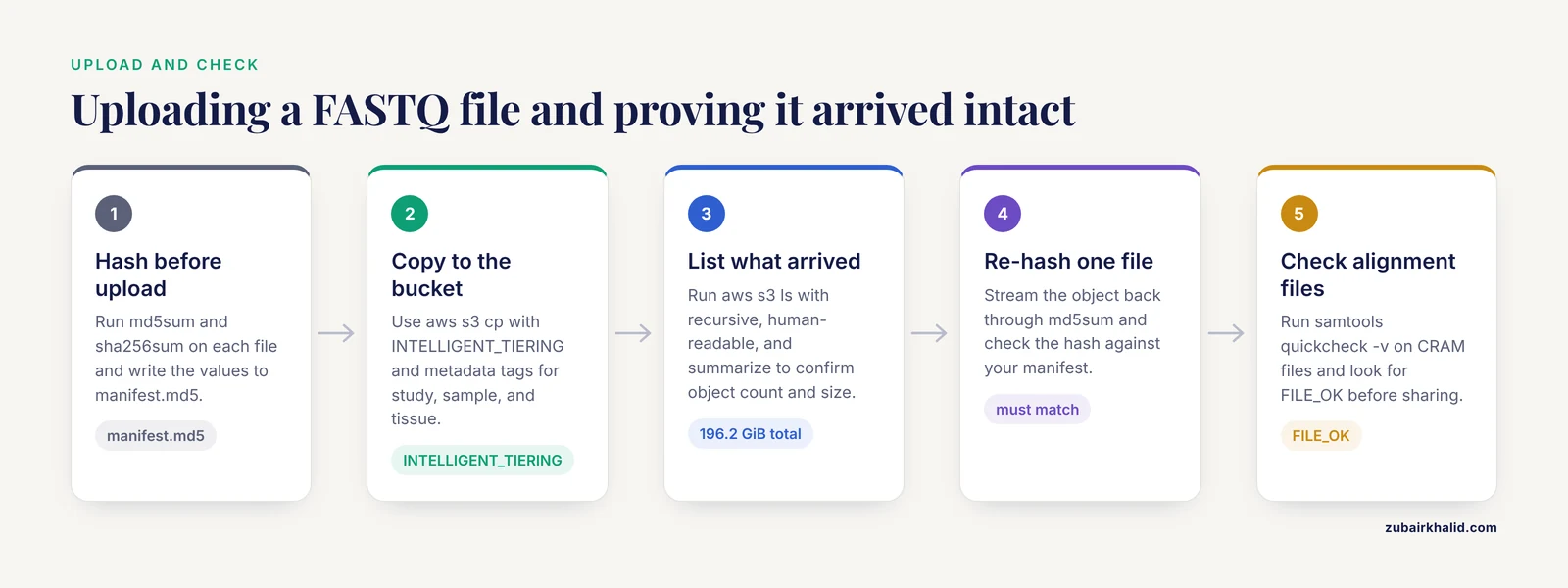
Object storage (the term for cloud systems that store files as addressable objects in buckets rather than blocks on a disk) is the standard target. The upload pattern is identical across providers. On AWS:
$ aws s3 cp sample_A1_R1.fastq.gz \
    s3://mylab-genomics/project-xyz/raw/ \
    --storage-class INTELLIGENT_TIERING \
    --metadata study=project-xyz,sample=A1,tissue=blood
upload: ./sample_A1_R1.fastq.gz -> s3://mylab-genomics/project-xyz/raw/sample_A1_R1.fastq.gz
Key parameters:
-storage-class INTELLIGENT_TIERINGmoves objects between frequent-access and archive tiers automatically, which suits genomics data storage where access patterns are unpredictable. UseDEEP_ARCHIVEonly for copies you can afford to wait hours to retrieve.-metadataattaches study-level tags to the object itself. Replicate your metadata table here in miniature so the object is never orphaned from its context.
On Google Cloud the equivalent command is:
$ gcloud storage cp sample_A1_R1.fastq.gz gs://mylab-genomics/project-xyz/raw/Verify the transfer by listing what arrived and re-hashing one file:
$ aws s3 ls s3://mylab-genomics/project-xyz/raw/ --recursive --human-readable --summarize
2026-11-11 09:14:02 98.3 GiB raw/sample_A1_R1.fastq.gz
2026-11-11 09:41:55 97.9 GiB raw/sample_A1_R2.fastq.gz
Total Objects: 2
Total Size: 196.2 GiB

$ aws s3 cp s3://mylab-genomics/project-xyz/raw/sample_A1_R1.fastq.gz - | md5sum
9f2a1c...b4  -
The hash must match your manifest. For alignment files, validate structure as well as transfer integrity:
$ samtools quickcheck -v sample_A1.cram && echo FILE_OK
FILE_OK
samtools quickcheck reads only the header and end-of-file marker, so it runs in milliseconds even on files tens of gigabytes in size, and -v prints the reason for any failure.
For large historical uploads from instruments or collaborators without the CLI, SFTP-style transfer into object storage remains common. GenoVault supports SFTP for upload and download alongside its web interface and a desktop client designed for the very large single-file uploads typical of NGS datasets [10].
Step 5: Configure access controls and the Five Safes
Never share a bucket by making it public and circulating a link. Configure identity-based access in tiers, mirroring what the NIH platforms do. Their governance review identified multiple tiers of data access with varying user authentication and authorization requirements as a shared design pattern across platforms [9].
A minimal tier structure for a research bucket looks like this:
- Tier 0, metadata and summaries: read access for anyone on the study team.
- Tier 1, processed data (CRAM, VCF): read access for named analysts after institutional agreement.
- Tier 2, raw reads and clinical links: read access only for the principal investigator and data manager, granted through a group, never an individual user.
- Tier 3, writes: restricted to the ingestion service account. Humans get no write access to raw directories.
For external collaborators, prefer time-limited URLs over permanent credentials:
$ aws s3 presign s3://mylab-genomics/project-xyz/raw/sample_A1_R1.fastq.gz --expires-in 604800
https://mylab-genomics.s3.amazonaws.com/raw/sample_A1_R1.fastq.gz?X-Amz-Expires=604800&X-Amz-Signature=...
-expires-in 604800 sets a 7-day expiry, the maximum for this command. The URL embeds a signature tied to your credentials and the exact object, so it cannot be widened to other files.
For governed human data, adopt a formal framework rather than inventing your own. The Genome Institute of Singapore built its RAPTOR repository on a five-safes framework: safe people (authorized users), safe projects (approved use), safe data (de-identification levels), safe settings (trusted environment), and safe outputs (review of what leaves) [12]. The five safes give you a vocabulary for access requests that reviewers, ethicists, and security officers all understand. Underneath, encryption at rest and in transit is table stakes. Research into protecting genomic computation in public clouds has also shown that cryptographic techniques can allow analyses on encrypted genomes, an option worth knowing about for the most sensitive cross-institution collaborations [13].
Step 6: Let collaborators analyze next to the data
The single biggest cost and security win in cloud storage for genomics data sharing is to stop moving data to compute. In AnVIL, an authorized collaborator opens a workspace and gets Terra for workflow execution, Jupyter and RStudio notebooks for interactive analysis, Galaxy for point-and-click pipelines, and Dockstore for published, portable workflows, all operating on data that never moves [4].
Concrete workflow options, in increasing order of engineering effort:
- Notebooks in the platform. Point a Jupyter notebook in Terra or a Galaxy history at the bucket and hand the collaborator a link. Zero infrastructure work.
- Published workflows. Attach a WDL or CWL workflow from Dockstore to the workspace so the collaborator reproduces your exact pipeline [4].
- Graphical pipeline builders. If your collaborators are not comfortable writing workflow code, platforms such as DolphinNext provide a graphical interface for creating and executing complex, parallel, reproducible pipelines [14].
- Population-scale architectures. If you are building rather than borrowing, the Celeste design shows the pattern: serverless functions and container orchestration coordinating millions of jobs, which allowed over 21,000 VMs to run in a comparable NCI platform analysis [1]. That analysis segmented more than 126,000 CT volumes from over 26,000 patients in under 9 hours, versus an estimated 522 days on a single workstation, at a total cloud cost of $1,011.05 [15]. The price-to-performance tradeoff is real, but only when the data already lives in the cloud.
The contrast case proves the point. For nanopore reanalysis, the slow5curl package was demonstrated on all public nanopore data from the Human Pangenome Reference Consortium, more than 22 TB. Instead of downloading entire files, it uses an index to fetch only the raw signal reads for target genes from each individual in a cohort of 91, minimizing time, egress costs, and local storage [11]. Fetch a targeted region instead of a terabyte whenever your platform allows it.
Step 7: Version, document, and publish
Assign an immutable version label to every release of the dataset, for example v1.0_2026-11-11, and write a README.md in the bucket root that states file formats, checksums, the workflow versions used, and the contact. If the dataset will be cited, mint a Digital Object Identifier through a repository and point it at the cloud copy. When the paper is published, deposit the underlying sequence data in an international archive. The INSDC partners, including the DDBJ Center alongside NCBI and EMBL-EBI, accept data from raw reads through assembled and annotated sequences, and standard pipelines for microbial genomics end with exactly this submission step [7], [16]. For domain-specific human data, a designated repository such as NIAGADS provides the compliant storage and distribution layer [6].
Step 8: Audit, monitor, and decommission
Access does not end at grant time. Across the NIH cloud platforms, auditing for inappropriate data use and applying sanctions when it occurs are standard governance elements [9]. At minimum, enable server access logging on your buckets, review logs quarterly for reads outside expected patterns, and set a calendar reminder to revoke access for collaborators whose projects have ended. AnVIL goes further, incorporating active threat detection and monitoring into the platform itself [4]. Finally, decide now what happens at study closeout: which copies persist in long-term archive, which are deleted, and who signs off.
Common Mistakes and Limitations
These are the errors that show up again and again in real bioinformatics data management.
- Sharing via a public bucket link. An unsigned URL to a bucket containing human genomic data is a reportable incident at most institutions. Use presigned URLs with short expiries or identity-based access,.
- Uploading without checksums. Multi-terabyte transfers corrupt silently. Without a manifest you cannot prove the file the collaborator received matches the file you sequenced. Generate MD5 and SHA-256 hashes before upload and verify one file per batch after.
- Deleting raw reads after analysis. Aligners and variant callers improve. The nanopore community maintains raw signal data specifically because updated basecallers change results, which is why tools exist to keep terabyte-scale raw signal accessible for reanalysis [11]. Compress raw data, but keep it.
- Renaming or reorganizing files mid-project. Every workflow, manifest, and published DOI points at object keys. Freeze the layout at Step 3.
- Treating metadata as optional. Datasets without biospecimen, clinical, and experimental annotations cannot be integrated with other omics or reused at all [3]. Metadata captured at upload also powers retrieval in object-store-based repositories [10].
- Downloading data that could be analyzed in place. Egress charges and version drift are the two costs nobody budgets for. Platforms like AnVIL were designed explicitly to eliminate data movement [4], and targeted fetching tools exist for the cases where you only need a slice [11].
- Assuming the cloud platform handles consent scope for you. Platforms implement the mechanics of tiered access, but the specifics of how tiers are organized differ from platform to platform, and the data submitter remains responsible for accurate consent classification [9]. The proposed international Code of Conduct exists precisely because these responsibilities cross institutional and national borders [8], and responsible stewardship, meaning the ethical and secure management, use, and protection of data across its lifecycle, is now treated as a core outcome that repositories must demonstrate [17].
- Ignoring lifecycle costs. Storage that costs little per month accumulates across hundreds of samples and years of retained raw data. Choose archive tiers deliberately and delete duplicates.
One honest limitation: governance specifics such as which tier your dataset belongs in and what your institution requires for a material transfer or data use agreement are determined by your funder and local review board, not by any general guide. Confirm with your institutional data office before the first upload of human data.
Practical Tips for Day-to-Day Genomics Data Storage
- Do a dry run with a 1 GB subset. Time the upload, verify the checksum, have a collaborator open the file, and only then batch the full dataset.
- Use one service account per pipeline. Never run automated workflows under a personal login, or audit logs become uninterpretable.
- Tag objects at write time. Adding study and sample metadata to each object during upload means the bucket stays queryable even if the spreadsheet is lost [10].
- Prefer platforms with published governance. The NIH platforms publish their ingestion, authentication, security, and auditing procedures, which makes your own compliance documentation easier [9].
- Match the interface to the audience. Galaxy and graphical pipeline builders serve wet-lab collaborators [4], [14], while notebooks in Jupyter or RStudio serve computational ones [4]. Teaching contexts have shown that even undergraduates with limited computing experience can analyze large open datasets through cloud notebooks, which tells you how low the barrier can be when the setup is done well [18].
- Write the README before the first collaborator asks. Every hour spent on documentation at upload time saves a week of email later.
Frequently Asked Questions
What is cloud storage for genomics data sharing?
It is the practice of storing sequencing files and their metadata in cloud object storage or a managed scientific platform so that authorized collaborators can access and analyze them over the network. Modern implementations range from simple buckets to federated platforms where analysis comes to the data [4], [2].
Do I have to move my data to share it?
No. Federated platforms such as AnVIL invert the traditional model so analysts bring their computation to the data, eliminating data movement while adding threat monitoring and shared computing [4]. This approach also keeps data inside its organizational or jurisdictional boundary [5].
Is genomic data safe in the cloud?
It can be, if you use platforms or configurations with formal ingestion, tiered authentication, encryption, auditing, and sanctions. These elements are consistent across the major NIH-supported cloud platforms [9], and additional frameworks such as the five safes and cryptographic computation on encrypted genomes extend protection for sensitive collaborations [12], [13].
Can I share pre-publication data with co-authors through cloud storage?
Yes, and dedicated services exist for it. The DDBJ Group Cloud was built specifically for sharing and analyzing pre-publication data among research groups on the same infrastructure that underpins DDBJ's public archives [7]. A private bucket with tiered access works the same way at smaller scale.
What file formats should I upload?
Upload raw reads in FASTQ, alignments in BAM or CRAM, and retain raw signal data for nanopore sequencing where reanalysis is expected [11]. Include a checksum manifest and a metadata table with every release, since multi-omics reuse depends on rich experimental and clinical annotations [3].
Which is better, a data commons or my own bucket?
A data commons or federated platform is better for governed human data and multi-omics integration because curation, harmonization, and analysis services are built in [2]. A self-managed bucket is reasonable for non-human data, intermediates, and small collaborations where you can implement access controls yourself.
How do controlled-access tiers work?
Platforms organize data into multiple tiers with escalating user authentication and authorization requirements, from open summary statistics to individually identifiable sequences [9]. As a submitter, you declare the correct tier, and the platform enforces it through its access management system.
What happens to my cloud responsibilities after the paper is published?
They continue through the data lifecycle. Long-term deposition moves to a public or domain archive such as the INSDC partners or a designated repository, private sharing ends and access is revoked, and auditing records are retained to demonstrate appropriate use [7], [9], [6].
Sources
- Celeste: A cloud-based genomics infrastructure with variant-calling pipeline suited for population-scale sequencing projects.
- Data Lakes, Clouds, and Commons: A Review of Platforms for Analyzing and Sharing Genomic Data.
- NCI's Proteomic Data Commons: A Cloud-Based Proteomics Repository Empowering Comprehensive Cancer Analysis through Cross-Referencing with Genomic and Imaging Data.
- Inverting the model of genomics data sharing with the NHGRI Genomic Data Science Analysis, Visualization, and Informatics Lab-space.
- Democratizing clinical-genomic data: How federated platforms can promote benefits sharing in genomics.
- NIAGADS: A data repository for Alzheimer's disease and related dementia genomics.
- DDBJ update in 2024: the DDBJ Group Cloud service for sharing pre-publication data.
- A proposal for an international Code of Conduct for data sharing in genomics.
- Cloud-based biomedical data storage and analysis for genomic research: Landscape analysis of data governance in emerging NIH-supported platforms.
- GenoVault: a cloud based genomics repository.
- Streamlining remote nanopore data access with slow5curl.
- A five-safes approach to a secure and scalable genomics data repository.
- Protecting genomic data analytics in the cloud: state of the art and opportunities.
- DolphinNext: a distributed data processing platform for high throughput genomics.
- Cloud-based large-scale curation of medical imaging data using AI segmentation.
- Advancements and challenges in bioinformatics tools for microbial genomics in the last decade: Toward the smart integration of bioinformatics tools, digital resources, and emerging technologies for the analysis of complex biological data.
- Characterizing core outcomes of responsible stewardship for human genomic data in the cloud.
- Teaching genomics to life science undergraduates using cloud computing platforms with open datasets.