Choosing the Right Cloud Storage Class for Your Genomic Workflow
By Dr. Zubair Khalid, DVM, MS, PhD ·

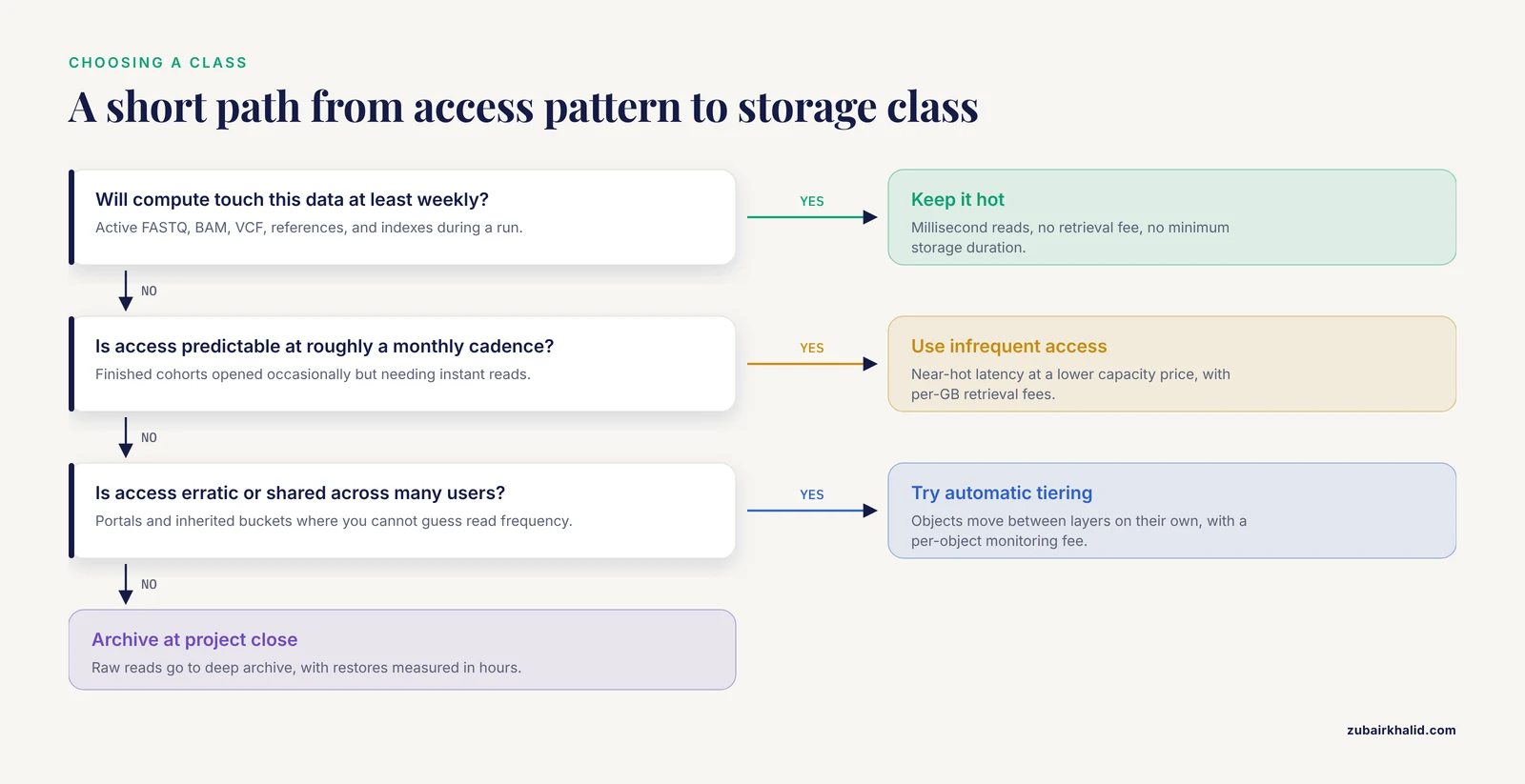
Cloud storage classes differ far less in durability than in two working properties, how quickly a read returns and what you pay to keep a gigabyte versus what you pay to get it back. Durability promises across the major tiers are effectively identical, so class selection is a question of access patterns, not safety. The workable rule of thumb for cloud storage class selection in genomics is simple, keep data in a hot class while your compute touches it at least weekly, drop it to an infrequent-access class when access slows to monthly, and move raw reads and instrument signal to a deep archive class once a project closes and you can tolerate restores measured in hours.
This guide covers the full decision, the storage class options and their pros and cons, the cost levers that actually move a genomics bill, side-by-side criteria, worked scenarios drawn from published cloud bioinformatics systems, and the mix-ups that cost labs real money. Most AWS genomics work runs on Amazon S3, so class names below use AWS terminology with generic equivalents noted, and the same logic transfers to Google Cloud and Azure.
Why Storage Class Choice Matters More in Genomics
Sequencing generates files that are large, written once, and reread on unpredictable schedules. A quick vocabulary refresher for the file types that drive every decision below:
- FASTQ, the text format holding raw base calls with per-base quality scores.
- BAM, the compressed binary format holding sequencing reads aligned to a reference genome.
- CRAM, a more compact alignment format that saves space by referencing the reference sequence.
- VCF, the variant call format listing genetic variants, and gVCF, its per-sample form that also records stretches of reference sequence.
A single 30-fold coverage whole human genome yields raw reads in the tens of gigabytes, alignment files of similar or larger size, and variant lists thousands of times smaller. Multiply by a cohort and the arithmetic gets unforgiving. The Celeste infrastructure, built for the All of Us Research Program, has analyzed petabytes of participant genomic information and routinely processes fluctuating workloads of up to 9,000 whole-genome sequencing samples per month [1].
The economic asymmetry is the part labs miss. Compute is a one-time cost per analysis. Storage recurs every month for as long as you keep the file. In a published cloud variant-calling study, joint calling across 2,535 genomes produced 68.3 million variants in five days at a compute cost of $7.33 per sample, with near-linear scaling [2]. That compute bill is paid once. The storage bill for those same samples arrives twelve times a year until someone deletes the data, and the class you choose sets the multiplier.
Storage class decisions also shape science, not just spending. Data that survives in accessible, well-described form can be reanalyzed as methods improve, and the FAIR principles (findable, accessible, interoperable, reusable) set the expectation that valuable datasets remain retrievable [3]. A cohort archived too aggressively, with no indexes or manifests, becomes practically lost even if it is technically preserved. A cohort deleted at project close is lost outright. Storing and processing sequence data on cloud services was proposed early in the genomics cloud transition as a way to minimize storage costs [4], and cloud platforms have since become the default home for NGS storage, management, and processing [5]. The catch is that pay-as-you-go cuts both ways, and an unexamined bucket of hot storage quietly becomes one of the largest line items in a project budget.
The Anatomy of a Cloud Storage Bill
Nearly all cloud genomics storage is object storage, which keeps each file as an object carrying an identifier and metadata inside a flat namespace called a bucket, rather than inside folders on a disk volume. Object storage suits NGS data well, which is why purpose-built repositories adopt it. GenoVault, an OpenStack-based genomics repository for NGS data, stores FASTQ, BAM, and derived files as objects and drives retrieval from the metadata supplied at upload [6].
Every storage class prices the same four levers, plus a few structural rules.
| Cost lever | What triggers it | Genomic example |
|---|---|---|
| Capacity | Gigabytes stored each month | Years of retained CRAM files for a cohort |
| Retrieval | Reading bytes out of cool or archive tiers | Restoring a cohort of FASTQ files for reanalysis |
| Requests | PUT, GET, and LIST operation counts | Millions of small QC reports and VCF shards |
| Transfer | Cross-region reads and internet egress | Downloading a cohort to a local cluster |
| Structural rules | Early deletion, minimum object size, monitoring fees | Lifecycle expiration inside a 30-day minimum window |
The Fine Print That Surprises People
Three structural rules hide in provider documentation. First, cooler classes impose a minimum storage duration, commonly about 30 days on infrequent tiers and 90 to 180 days on archive tiers, and deleting earlier triggers an early deletion fee covering the remaining days. Second, cool classes often bill small objects at a minimum size, so a million 5-kilobyte QC reports can bill as if they were far larger. Third, automatic tiering classes charge a small per-object monitoring fee, which becomes material when a bucket holds tens of millions of objects.
Prices vary by provider, region, and time, and providers revise them regularly, so treat any dollar figure you read, including historical study costs, as a starting point and verify against the provider's current pricing page before budgeting.
Cloud Storage Class Selection for Genomics: Side-by-Side Comparison
Read the table left to right as a lifecycle, because most cohorts start at the top and migrate downward as access thins.
| Storage class (AWS name) | Generic role | Read latency | Retrieval fee | Minimum storage time | Best genomic fit | Biggest trade-off |
|---|---|---|---|---|---|---|
| S3 Standard | Hot | Milliseconds | None | None | Active FASTQ, BAM, VCF, references, indexes | Highest per-GB capacity price |
| S3 Standard-IA | Cool, instant | Milliseconds | Per GB read | About 30 days | Finished cohorts touched monthly | Retrieval fees and minimum billable object size |
| S3 Intelligent-Tiering | Self-adjusting | Milliseconds | None | None for monitored objects | Erratic or shared access | Per-object monitoring fee, tiny objects not monitored |
| S3 Glacier Instant Retrieval | Cold, instant | Milliseconds | High per GB | About 90 days | Archives that must open immediately on demand | Steepest retrieval price among instant tiers |
| S3 Glacier Flexible Retrieval | Cold, deferred | Minutes to hours after restore | Per GB, speed dependent | About 90 days | Planned batch reanalysis | Restore delays break interactive pipelines |
| S3 Glacier Deep Archive | Deep cold | Hours after restore | Per GB restored | About 180 days | Raw reads and instrument signal at project close | No instant access at any price |
Two notes on cross-provider translation. Google Cloud's Nearline, Coldline, and Archive tiers and Azure's Hot, Cool, and Archive tiers follow the same shape, but the details that decide real bills differ, because some providers keep millisecond reads even on their coldest labeled tiers while others require an explicit rehydration job before any byte can be read. Always confirm retrieval latency, retrieval pricing, and minimum duration rather than trusting the tier name.
The Storage Class Options, Explained on Their Own Terms
Hot Object Storage (S3 Standard and Equivalents)
Hot object storage returns reads in milliseconds, charges nothing to retrieve, and imposes no minimum storage duration. It carries the highest capacity price of any class, which is exactly what makes it right for data in motion and wrong for data at rest.
Where it fits in a genomics workflow, the landing zone where sequencer output arrives, intermediate alignment files during an active run, variant outputs under active interpretation, and shared reference assets such as a GRCh38 reference sequence and its index files that every job reads. Pipelines that coordinate huge numbers of short-lived compute jobs depend on hot storage because jobs cannot wait on retrievals, which is why the Celeste architecture pairs its serverless coordination layer with hot storage in one region [1].
Pros, predictable low latency, no retrieval fees, no early deletion exposure, full support for versioning and access logging. Cons, the highest per-gigabyte price, and a strong tendency to accumulate files nobody deleted. The fix for the second problem is a lifecycle policy, a rule set attached to a bucket that transitions or expires objects by age or prefix, and it is the main tool you will use to move data down the class ladder automatically.
Infrequent Access Tiers (S3 Standard-IA and Equivalents)
Infrequent access (IA) tiers keep millisecond read latency while cutting the capacity price substantially. In exchange they charge a per-gigabyte retrieval fee, bill small objects at a minimum size, and impose a minimum storage duration of about 30 days.
Where it fits, finished outputs waiting for review, a completed cohort of CRAM and gVCF files that collaborators open occasionally, prior quarters of surveillance data that analysts query a few times per season. If your access pattern is monthly or rarer but must remain instant when it happens, this is usually the right class.
Pros, near-hot performance at a meaningfully lower capacity price, with no restore step. Cons, retrieval fees punish wrong guesses about access frequency, the minimum billable object size makes this a poor home for millions of tiny files, and early deletion fees bite when lifecycle rules are miscalibrated. A practical habit is to route anything you might delete within weeks through a lifecycle rule on hot storage instead of transitioning it to IA first.
Automatic Tiering (S3 Intelligent-Tiering and Similar)
Automatic tiering classes watch how often each object is read and move it between a hot layer and cooler layers without retrieval fees. Objects untouched for a defined period drop to a colder layer and return automatically when accessed. A small per-object monitoring fee pays for the bookkeeping, and objects below a small size threshold are not monitored and simply stay where they are put.
Where it fits, shared analysis portals where many users touch data on unpredictable schedules, which describes platforms like VDJServer, a cloud portal and data commons where immunologists, clinicians, and bioinformaticians pull immune repertoire data irregularly [7]. It also fits mixed cohorts whose access you cannot predict, and buckets inherited from a departed colleague.
Pros, removes the guessing game, no retrieval fees, no early deletion exposure between its own layers. Cons, monitoring fees add up across tens of millions of objects, tiny unmonitored files gain nothing, and it is not an archive strategy, because deep archive tiers sit below what auto-tiering reaches, so end-of-life raw reads still need a deliberate lifecycle rule.
Archive Classes With Instant Retrieval (S3 Glacier Instant Retrieval)
These classes price storage close to archive levels while still returning reads in milliseconds. The trade is the steepest retrieval fee of any instantly readable class plus a minimum storage duration of about 90 days.
Where it fits, archives you expect to read rarely but must read immediately, compliance copies subject to audit, a secondary copy of published data that must serve downloads without a warm-up step, and negative-control datasets pulled only when an anomaly investigation starts.
Pros, instant reads at a low capacity price, no restore machinery to operate. Cons, retrieval pricing that can erase months of storage savings with one careless bulk read, a 90-day commitment that conflicts with short-lived data, and little benefit for data you actually touch quarterly or more, where IA or automatic tiering usually wins.
Archive Classes With Deferred Retrieval (S3 Glacier Flexible Retrieval)
Deferred-retrieval archives drop the capacity price further and give up instant access. Reading a file requires a restore job that materializes a temporary copy, with speed options ranging from minutes to hours and pricing that rises with speed. A minimum storage duration of about 90 days applies.
Where it fits, planned reanalysis, restoring a cohort of alignments the week before a pipeline rerun, feeding a scheduled migration, and holding intermediates you regenerate rarely.
Pros, among the cheapest ways to keep data that is still reasonably restorable, and restore options let you buy speed only when you need it. Cons, restore jobs are batch operations that complicate automation, a pipeline cannot open one file interactively, and forgotten restore jobs leave temporary copies billing at hot prices. Treat restoration as an explicit, logged pipeline stage with its own cleanup step.
Deep Archive Classes (S3 Glacier Deep Archive)
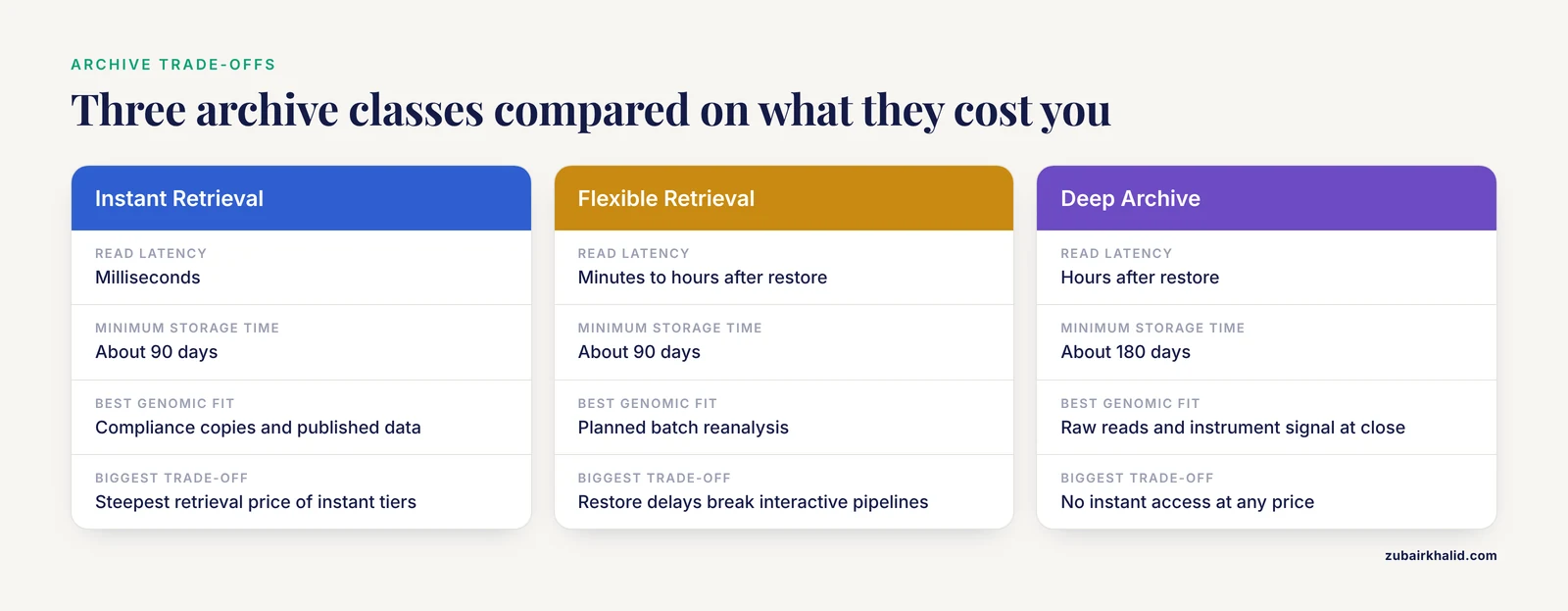
Deep archive is the floor of the price ladder, built for data you intend to keep for years and expect to read almost never. Restores take hours, minimum storage duration runs about 180 days, and retrieval options are fewer.
Where it fits, raw FASTQ and instrument signal at project close, the archival master copy behind a published dataset, and long-horizon retention demanded by funders, regulators, or forensic and clinical record schedules. Raw reads are the artifact that reviewers, regulators, and future reanalysis methods return to years later, which is why clinical NGS reviews emphasize retaining the underlying data alongside interpretations [5].
Pros, makes decade-scale retention affordable, which changes what a lab can afford to keep. Cons, no instant access at any price, restores measured in hours complicate any promise of quick turnaround, early deletion fees punish cleanup mistakes, and the class is unsuitable for anything a collaborator might plausibly request tomorrow. Keep indexes, manifests, and metadata in a hotter class so you always know what sits in the cold vault without restoring it.
How Lifecycle Policies Tie the Classes Together
Lifecycle policies are the mechanism that makes multi-class strategies practical, since nobody wants to hand-migrate petabytes. A lifecycle policy is a rule set attached to a bucket or prefix that transitions objects to another class at a chosen age and expires them at another age. A representative configuration for a sequencing project bucket looks like this:
- Days 0 to 30, hot storage, active processing.
- Day 30, transition final outputs (CRAM, gVCF, QC summaries) to infrequent access.
- Day 365, transition raw reads to deep archive.
- Day 30, expire intermediates entirely.
Rules apply by prefix, so a layout like raw/, aligned/, variants/, and qc/ lets each data type follow its own schedule. Routine movement of data into the bucket uses ordinary commands, for example aws s3 cp run1_lane1.fastq.gz s3://lab-raw/2026/run1/ for a single file or aws s3 sync ./qc-output s3://lab-prod/qc/ for a directory of results.
Transitions within a region are handled by the provider as metadata operations, with no download or re-upload on your side, which is what makes tiered architectures cheap to operate. Two cautions apply. Transitions into deferred archive classes are one-way in practice, since reading requires restores, so only automate transitions you are certain about. And expiration rules interact with minimum durations, because an object transitioned into a 90-day-minimum class and expired at day 45 bills the missing 45 days.
Review lifecycle rules quarterly against access logs and inventory reports. The most common finding is that a bucket assumed dead is still being read, or a bucket assumed active has not been touched in months, and either finding should trigger a class correction.
Decision Criteria That Separate the Classes
Access Pattern and Retrieval Economics
Estimate annual reads before you pick a class. Retrieval fees are charged per gigabyte, so a cool tier stops saving you money once you read more than a modest fraction of the bucket each year. Run the arithmetic as a planning exercise, take the bucket size, guess the gigabytes you will genuinely read per year, and compare the retrieval bill at each candidate class against the annual capacity savings. For example, if you expect to read about 5 percent of a 50 TB archive in a year, multiply the 2.5 TB you will retrieve by the per-GB retrieval rate and set that against a year of capacity savings. If the numbers are close, choose the warmer class or automatic tiering, because the downside of a wrong guess is asymmetric, overestimating access costs a little, underestimating it can cost a lot during an unplanned reanalysis. Erratic, multi-user access patterns favor automatic tiering for exactly this reason.
Coupling Storage to Compute and Region
Keep buckets in the same region as the compute that reads them. Cross-region reads pay transfer charges twice and add latency to every job. Large production systems design for this explicitly, Celeste ran within a single AWS Region, where around 200 million serverless function invocations and over 20 million messages coordinated 1.8 million analysis, quality control, and clinical reporting jobs in twelve months [1]. Moving data into the cloud is its own engineering problem, and published platforms invest in it, from Globus Transfer for reliable bulk movement in a Galaxy-based workflow platform [8] to purpose-built accelerators, one workflow system reported moving large datasets up to ten times faster than standard transfer with its KoDS component [9]. The same logic applies in reverse, egress charges apply when data leaves the cloud, which matters when you migrate providers or publish bulk downloads. Cross-region replication for disaster recovery is a deliberate, priced choice, not a default, and it doubles capacity billing on the replicated bytes.
Small Files, Many Requests, and Format Choices
Object storage charges per request, and genomics pipelines generate enormous request counts, per-chromosome VCF shards, per-sample QC reports, per-interval task outputs. At millions of objects, request charges and listing overhead can rival storage charges. Three fixes are standard. Consolidate, merge shards and bundle small companion files before they land in cool classes. Choose compact formats, CRAM over BAM for alignments, and columnar layouts for tabular genomics data, the approach the Sherlock platform takes by converting heterogeneous sources into Optimized Row Columnar format so distributed queries run efficiently [10]. Query at a higher level, systems like PyGMQL exist because analyzing thousands of individual experiment files one by one does not scale, and they operate on consolidated region stores together with their metadata [11]. Keep metadata in a database rather than encoding it in object names, the pattern GWASHub uses by pairing S3 storage with an AWS-hosted MySQL database for curation and validation of summary statistics [12], and the pattern GenoVault uses by driving retrieval from structured upload metadata [6].
Durability, Versioning, and Immutable Retention
Durability is effectively uniform across classes, so the real questions are versioning and immutability. Bucket versioning keeps every noncurrent version of an overwritten or deleted object, which protects against accidents but silently multiplies your bill when a job overwrites large alignment files, old versions keep billing until a lifecycle rule for noncurrent versions removes them. For regulated retention, immutable storage (write once, read many, often called object lock) prevents deletion or modification for a declared period, which pairs naturally with archive classes for clinical and forensic records. Enable versioning and its cleanup rules at the same time, not as a later cleanup project.
Compliance, Privacy, and Retention Schedules
Class choice barely affects compliance posture, because encryption at rest and fine-grained access controls are available on every class. What shapes class selection is your retention schedule. Clinical genomics carries persistent obligations around privacy and informed consent, and reviews of NGS in clinical practice flag genomic data privacy as a central ongoing concern [5]. Forensic databases hold allele frequencies and population statistics indefinitely, which is why a forensic NGS database like diversID emphasizes stringent filtering and durable cloud-hosted access for global collaboration [13]. Public health systems retain linked sequence and metadata records for years, California's SARS-CoV-2 Integrated Genomic Epidemiology Database links 801,418 sequences with patient-level metadata [14], supported by conventional databases plus newer cloud data solutions within the statewide surveillance program [15]. Long and uncertain retention horizons argue for archive classes with versioning and immutability, and they argue against aggressive lifecycle expiration of anything that could fall under a consent dispute or legal hold.
When Local or Hybrid Beats Pure Cloud
Cloud storage is not automatically the right answer. Teams choose local or hybrid setups for concrete reasons, upload latency for large files, storage quotas, shared computing resources, and recurring licensing costs, considerations documented by the developers of a local genome-taxonomy workstation who weighed cloud platforms against a desktop deployment [16]. A common hybrid pattern keeps active analysis on local or institutionally hosted hardware and uses cloud archive classes as the long-term vault, which captures most of the storage savings without moving daily compute off premises.
Worked Scenarios
Scenario 1, A Production Whole-Genome Sequencing Pipeline
A core facility sequences cohorts continuously. A sensible class progression looks like this:
- Sequencer output lands directly in a hot bucket in the same region as compute, using multipart uploads for large FASTQ files.
- Alignment, variant calling, and QC run against hot storage only, mirroring the single-region design of large production systems [1].
- A lifecycle rule expires intermediates (unsorted BAMs, temporary shards) at 30 days and transitions final CRAM and gVCF files to infrequent access.
- At project close, raw FASTQ moves to deep archive, while indexes, manifests, and reports stay hot or cool.
The published benchmark for this shape of workload, joint variant calling on 2,535 genomes at $7.33 per sample of compute [2], is the one-time half of the budget. The class decisions above set the recurring half, which compounds monthly for as long as the cohort exists.
Scenario 2, A GWAS Meta-Analysis Hub
A consortium aggregates summary statistics from many cohorts for meta-analysis. Files are individually modest but numerous, metadata is rich, and access is collaborative at first and sporadic afterward. GWASHub, a cloud platform for curation, processing, and meta-analysis of GWAS summary statistics, pairs S3 storage with an AWS MySQL database and distributes analysis jobs to AWS compute [12]. The storage pattern follows directly, hot class while harmonization and QC cycles run, automatic tiering once analyses freeze and access becomes unpredictable, and packed or columnar file layouts to keep request counts sane [10]. Because summary statistics files are small, the per-object monitoring fee of automatic tiering is usually affordable, and the database carries the metadata burden so object naming stays simple.
Scenario 3, A Public Health Surveillance Repository
A state genomics surveillance program ingests sequences and patient-level metadata continuously from many laboratories, standardizes and deduplicates them, and retains everything for years. California's IGED linked 801,418 sequences with epidemiologic metadata, supported by a cloud data warehouse and cloud deployment tooling [14], within a program that combined conventional database applications with newer cloud-based data solutions [15]. The storage pattern, hot class for the current rolling window that analysts query daily, infrequent access for prior seasons, deep archive for the full historical record, with versioning or immutability turned on so audit trails cannot be silently edited. Retrieval-heavy annual comparisons argue for keeping prior seasons in infrequent access rather than archive, since the whole point of surveillance is looking across time.
Scenario 4, A Public Data Commons
A lab publishes processed immune repertoires, variant datasets, or forensic population statistics for community reuse. VDJServer operates a data commons with both public sharing and controlled private sharing between users [7], and CloudASM publishes a sample dataset and its results directly from a cloud storage bucket on Google Cloud Platform [17]. The storage pattern, hot class for the interactive subset that browsers and APIs serve, infrequent access for the long tail of completed submissions, deep archive for original submissions sitting behind the published derivatives, and requester-pays billing if you want to shift bulk download costs to heavy users. Forensic and population-frequency resources add a curation layer on top, and diversID couples convenient cloud upload and download with stringent filtering before data enters the public record [13].
Common Mix-Ups
- Treating archive classes as backups. They are storage tiers, restores cost per gigabyte and take minutes to hours, so an emergency read from deep archive is neither fast nor cheap.
- Ignoring minimum storage duration. Transitioning data to an infrequent-access class and deleting it two weeks later triggers early deletion fees.
- Small-object blindness. Millions of tiny QC and shard files generate request charges that can exceed storage charges, so consolidate before cooling.
- Versioning amnesia. Overwriting large files with versioning enabled keeps every old version billing until a noncurrent-version lifecycle rule cleans up.
- Region mismatch. A bucket in one region feeding compute in another pays transfer charges both ways and slows every job.
- Trusting tier names across providers. Some cold tiers still offer millisecond reads while others require rehydration, so verify latency and minimums rather than labels.
- Lifecycle thrash. Rules that bounce data between classes on noisy access signals rack up transition and early deletion costs, and automatic tiering exists to prevent exactly this.
- Forgetting egress at the end. Publishing or migrating data out of a provider incurs transfer charges, so plan for them when comparing providers, not after committing.
Common Mistakes and Limitations
The following mistakes, in rough order of how often they cost money, deserve a standing place in your storage review.
- Choosing classes per bucket instead of per lifecycle stage. A single bucket holding the landing zone, intermediates, and finals forces a bad compromise, so split prefixes and assign rules per prefix.
- Archiving data you could recompute cheaply. Intermediates with a modest regeneration cost often cost more to keep than to rebuild, so compare a few years of storage against one pipeline rerun.
- Promising instant access from a deep archive. Reviewer requests and audits arrive without warning, so keep manifests and key summaries in a warm class and treat cold restores as planned events.
- Letting retention stay undefined while lifecycle rules run. Consent disputes, litigation holds, and funder requirements can forbid deletion, and retention schedules should be settled before automation.
- Assuming one provider's archive behaves like another's. Retrieval latency, minimum durations, and retrieval pricing differ in ways that change the right answer.
- Treating cloud storage as universally superior. Upload latency, quotas, and shared-resource concerns are real, and some workloads belong on local hardware [16].
Individual institutional setups vary widely in contracts, existing agreements, and data governance rules, so have your cloud administrator or data governance office review retention and class plans before they are automated.
Frequently Asked Questions
Which storage class is best for raw sequencing reads?
Hot storage while the pipeline runs, infrequent access once analysis pauses, and deep archive after publication. Raw reads are written once, rarely reread, and are the artifact that reviewers and future reanalysis methods eventually want, which makes them the ideal tenant for archive classes.
Should I use infrequent access or automatic tiering?
Infrequent access if you can predict access at roughly a monthly cadence, automatic tiering if access is erratic or shared across many users. Automatic tiering trades a small per-object monitoring fee for eliminating retrieval fees and guesswork.
Can pipelines read directly from archive classes?
Not from deferred-retrieval or deep archive classes. Reads require a restore job taking minutes to hours, so schedule restoration as an explicit pipeline stage with its own cleanup step, and keep only instant-access classes on interactive code paths.
Does the storage class affect privacy compliance?
Not materially. Every class supports encryption at rest and fine-grained access controls, so your compliance posture depends on retention schedules, versioning, audit logging, and consent tracking rather than the tier name.
What does long-term cohort storage cost?
It depends on class, region, provider, and how often you retrieve. Capacity price falls sharply from hot to deep archive while retrieval prices rise, and because storage recurs monthly while compute is paid once, class choice dominates multi-year budgets. Verify current pricing directly with your provider before committing.
Should I archive raw reads or only processed results?
Archive raw reads. Processed files can be regenerated from raw data, but the reverse is impossible, and FAIR-style reuse, reviewer requests, and future reanalysis methods all assume the original reads survive [3].
Sources
- Celeste: A cloud-based genomics infrastructure with variant-calling pipeline suited for population-scale sequencing projects.
- Inexpensive and Highly Reproducible Cloud-Based Variant Calling of 2,535 Human Genomes.
- Biofilm marker discovery with cloud-based dockerized metagenomics analysis of microbial communities.
- Cloud-based adaptive exon prediction for DNA analysis.
- Next generation DNA sequencing data analysis and its application in clinical genomics.
- GenoVault: a cloud based genomics repository.
- VDJServer: A Cloud-Based Analysis Portal and Data Commons for Immune Repertoire Sequences and Rearrangements.
- Cloud-based bioinformatics workflow platform for large-scale next-generation sequencing analyses.
- Closha: bioinformatics workflow system for the analysis of massive sequencing data.
- Sherlock: an open-source data platform to store, analyze and integrate Big Data for computational biologists.
- PyGMQL: scalable data extraction and analysis for heterogeneous genomic datasets.
- GWASHub: An Automated Cloud-Based Platform for Genome-Wide Association Study Meta-Analysis.
- A cloud-based solution for managing next-generation sequencing data to comprehend forensic population statistics.
- The SARS-CoV-2 Integrated Genomic Epidemiology Database (IGED): Linking viral genomes with patient-level metadata to advance statewide genomic surveillance in California.
- Implementation of California COVIDNet - a multi-sector collaboration for statewide SARS-CoV-2 genomic surveillance.
- TaxaScope: a container-native, visualization-centric workstation for genome-based bacterial taxonomy.
- CloudASM: an ultra-efficient cloud-based pipeline for mapping allele-specific DNA methylation.