How to Choose a Cloud Collaboration Model for Your Genomics Team
By Dr. Zubair Khalid, DVM, MS, PhD ·

Every cloud collaboration model in genomics answers one question differently: when two people need to analyze the same data, does the data move to them, do they move to the data, or do they share one copy in the middle? A managed science platform puts the data, the tools, and the collaborators in one shared environment. A self-managed cloud account gives your team its own infrastructure that data must enter. A federated or hybrid model leaves each dataset where it was produced and sends compute to it. The right rule of thumb is this: choose the model that minimizes how often your largest and most sensitive datasets move, because in cloud bioinformatics, data movement is where cost, delay, and compliance risk concentrate.
This guide walks through the realistic options, their pros and cons, the criteria that decide real choices, and three worked scenarios. It assumes a team of bioinformaticians, analysts, and experimental collaborators who need to share data, workflows, and results, whether that team sits in one building or spans three continents.
What a Cloud Collaboration Model Actually Means
A cloud collaboration model is not a product. It is the combination of three decisions your team makes about infrastructure and policy.
The first decision is where data lives. Genomics datasets are large. A single 30x whole-genome sequence in CRAM format runs roughly 100 gigabytes, and a population-scale project accumulates petabytes. Once a dataset reaches that size, every additional copy is a storage bill, a synchronization problem, and an access-control liability.
The second decision is who runs the infrastructure. The three standard service models frame this choice. Infrastructure as a Service (IaaS) provides raw virtual machines, block storage, and networking that you configure yourself. Platform as a Service (PaaS) provides managed compute and data services on top of that infrastructure, so you deploy code without managing servers. Software as a Service (SaaS) provides finished applications you use through a browser. Reviews of cloud-enabled collaboration emphasize that this IaaS, PaaS, and SaaS layering lets institutions deploy flexible systems without substantial upfront infrastructure costs, which is the core economic argument behind all four models described below [1].
The third decision is how access is governed. In genomics this is not optional paperwork. Controlled-access human genomic data carries consent terms, data use agreements, and institutional oversight. Whatever model you choose must let you answer, at any moment, exactly who can read which dataset and under what authority.
The evidence that cloud collaboration works at all is solid. A mixed-methods study of cloud systems in collaborative software development measured average system uptime of 99.5 percent, median response times under 200 milliseconds, and found that 85 percent of surveyed participants reported higher productivity with cloud-based tools than with traditional methods [2]. Those numbers describe software teams, not sequencing centers, but the underlying pattern transfers: shared environments beat email-and-USB-drive workflows for distributed teams, provided the environment is run competently.
The Four Cloud Collaboration Model Options at a Glance
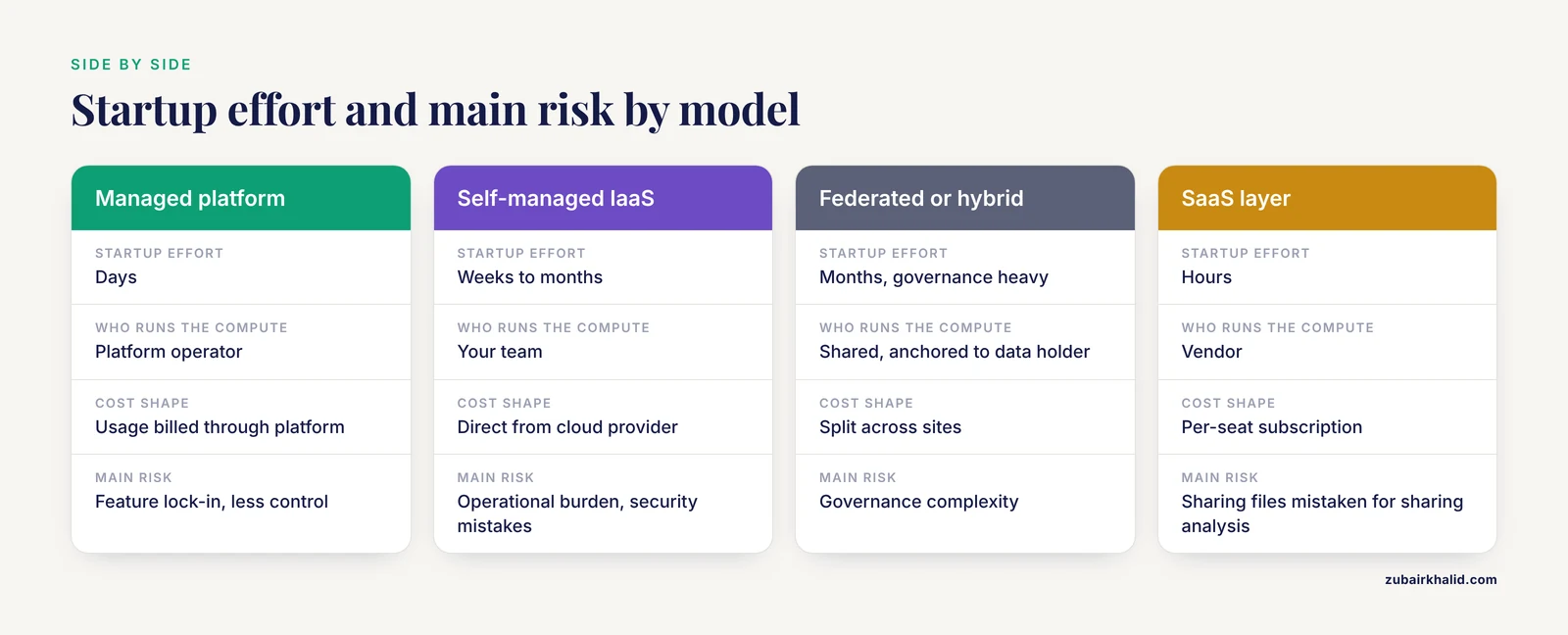
Most genomics teams converge on one of four models. The table below is the core of this article. Each model is then explained on its own terms, followed by the criteria that separate them in practice.
| Dimension | Managed science platform | Self-managed IaaS account | Federated or hybrid | SaaS productivity layer |
|---|---|---|---|---|
| Who runs the compute | Platform operator | Your team | Shared, anchored to data holder | Vendor |
| Where data lives | One shared workspace | Your cloud account | Each institution's own storage | Vendor's application store |
| Access control | Built in, managed by operator | You build it (IAM policies, VPCs) | Per-site policies plus federation | Vendor defaults |
| Startup effort | Days | Weeks to months | Months (governance heavy) | Hours |
| Reproducibility mechanism | Shared workflows, common runtimes | Your own pipelines and containers | Shared workflow definitions, separate execution | Limited to what the tool exports |
| Cost shape | Usage billed through platform | Direct from cloud provider | Split across sites | Per-seat subscription |
| Best fit | Small to mid-size teams, controlled-access consortia | Teams with deep cloud expertise and stable pipelines | Multi-institution groups with sensitive or immovable data | Communication and coordination around the analysis |
| Main risk | Feature lock-in, less control | Operational burden, security mistakes | Governance complexity | False sense that sharing files equals sharing analysis |
A note on naming
The literature uses different words for similar arrangements. A federated platform is one where data stays at its source institution and analysis is dispatched to it, a design the NHGRI AnVIL project describes as inverting the traditional model of data sharing so that data movement becomes unnecessary [3]. A hybrid model, in engineering fields, usually means some workloads run centrally while others run locally, and a study of distributed aircraft design found that such cloud-based environments reduced iteration time between design teams substantially while protecting the intellectual property of collaborating partners [4]. Both ideas matter for genomics, and the sections below treat them as one model with two emphases.
Model 1: Managed Science Platforms
A managed science platform is a cloud environment built specifically for genomics or biomedical analysis. Someone else operates the compute, storage, access control, and often the analysis tools. Your team gets accounts, uploads or links data, and starts working. Examples in the current ecosystem include AnVIL and the Cancer Genomics Cloud.
AnVIL, funded by the National Human Genome Research Institute, unifies data storage, management, and analysis in a federated cloud platform. Its components include Terra for analysis, Gen3 for data commons, Galaxy for interactive analysis, RStudio and Bioconductor for statistics, Jupyter for notebooks, and Dockstore for sharing workflow definitions [3]. The Cancer Genomics Cloud (CGC), funded by the National Cancer Institute, collocates computation, bioinformatics workflows, and more than three petabytes of data so researchers analyze large public datasets without downloading them [5].
Pros
- The fastest path from zero to analysis. A new collaborator needs an account and permissions, not a virtual private cloud.
- Access control is a first-class feature. Platforms designed for controlled-access human data handle permissions, audits, and data use agreement tracking as core functionality rather than as something you bolt on.
- Data and compute are already collocated. When the dataset you need is already sitting on the platform, the classic argument for cloud bioinformatics, avoiding data movement, is realized on day one.
- Interactive and batch analysis coexist. Notebook environments and workflow engines live in the same workspace, so an analyst exploring data in RStudio can hand a finding to a bioinformatician who formalizes it as a workflow.
Cons
- You give up control. You analyze within the tools and runtimes the platform provides. If your method requires a custom driver or a specialized appliance, you may not be able to run it.
- Data must often enter the platform. If your primary datasets live in your own institution's storage, ingesting them duplicates them and creates a second copy to govern.
- Cost is mediated. You pay through the platform's billing model, which may or may not be cheaper than buying raw compute directly, and you generally cannot shop around.
- Portability is imperfect. Workflows exported from one platform usually need adjustment before they run on another, even when both accept standard workflow languages.
Managed platforms suit teams whose primary constraint is people rather than infrastructure. A five-person lab with a grant deadline and no dedicated DevOps engineer gets more value from a platform that handles security and scaling than from the flexibility of raw infrastructure. The platform approach also fits teaching contexts, where a cloud-based open research platform with virtual desktops and integrated tools has been shown to support collaborative research work across distributed academic teams [6].
Model 2: Self-Managed Cloud Accounts (IaaS)
In this model your team holds a cloud account, for example an AWS account, and builds its own environment. You define virtual private clouds, identity and access management (IAM) policies, storage buckets, compute fleets, and monitoring. Nothing about this is exotic. Amazon's object storage service S3, virtual machines under EC2, and managed workflow orchestration are the standard substrate for AWS genomics work, and every major cloud provider offers equivalents.
The argument for this model is control. You decide what software runs, how compute scales, where data physically resides, and what the security posture looks like. Teams running production clinical pipelines, proprietary algorithms, or unusual hardware requirements often have no realistic alternative.
Pros
- Full control over the stack, from operating system to workflow engine.
- No platform intermediary for billing, so large batch workloads can be tuned aggressively for cost.
- Data governance stays inside your institution. For teams that cannot place data under another party's operational control, this is decisive.
- Unlimited extensibility. Any tool, any container, any scheduler.
Cons
- You own everything, including everything that goes wrong. A self-managed account has no default security posture. Open S3 buckets, over-permissive IAM roles, and unpatched access paths are the standard failure modes of cloud bioinformatics, and each one is a decision your team must actively get right.
- The operational burden is ongoing, not just initial. Site reliability engineering practices developed for cloud environments, including infrastructure as code, automated monitoring, incident management, and chaos engineering to test resilience, exist precisely because running reliable cloud systems requires a discipline most research teams have never staffed [7].
- Reproducibility is your responsibility. Nobody hands you a shared runtime. You must maintain containers, pin software versions, and document pipelines yourself.
- Onboarding collaborators is slower. Every external partner needs credentials, VPN or access configuration, and training on your specific environment.
This model rewards teams with at least one person who genuinely enjoys infrastructure work and has time for it. The agile-development literature makes the complementary point that cloud computing reduces costs, improves scalability, and strengthens communication, but that these benefits depend on the team actually adopting the associated working practices rather than simply renting machines [8].
Model 3: Federated and Hybrid Architectures
A federated architecture inverts the usual direction of data flow. Instead of copying every dataset into one central location, each dataset stays at the institution that holds it, and analysis jobs travel to the data. AnVIL is the clearest genomics example, described by its developers as a platform that eliminates the need for data movement while adding security measures for active threat detection and providing scalable shared computing resources [3].
The hybrid variant applies the same logic partly. A consortium might run its most sensitive controlled-access data inside each contributing institution's boundary while performing joint analysis of de-identified aggregates on shared infrastructure.
Pros
- Sensitive data never leaves its home governance boundary, which simplifies consent compliance and data use agreements enormously.
- No massive one-time data migration, which for petabyte-scale cohorts can take months and cost significant egress fees.
- Intellectual property stays under each partner's control. Distributed engineering collaborations have demonstrated that cloud-based environments can substantially speed iteration between teams while protecting each partner's IP, a finding directly relevant to academic-industrial genomics consortia [4].
- It scales socially as well as technically. Adding a new institution means connecting its storage, not negotiating where its data will live.
Cons
- It is the most governance-heavy model. Every participating institution needs agreed standards for authentication, authorization, audit, and data transfer. Building that consensus takes months.
- Debugging is harder. When a workflow fails because of a network partition between two sites rather than a code bug, diagnosis requires expertise at both ends.
- Not every analysis pattern fits. Methods that need to compare raw-level data across sites can require careful design so that the computation, not the data, is what moves.
- Tooling is younger. Federated genomics infrastructure is maturing but still less turnkey than either of the other two models.
Federated designs fit multi-institution consortia, international collaborations where cross-border data transfer is restricted, and hospital networks where patient data cannot legally or contractually be copied to a shared location.
Model 4: The SaaS Productivity Layer
This model is not a substitute for the first three. It is the layer of shared documents, chat, video calls, version-controlled code repositories, and issue trackers that surrounds whatever analysis infrastructure you choose. Dedicated cloud workspaces integrating chat, video conferencing, voice messaging, and secure file sharing have been built specifically to replace scattered point tools with one interface for distributed teams [9].
Treat this layer as necessary but insufficient. A genomics team that coordinates over chat and shares figures in a cloud document is more efficient than one coordinating over email, but neither chat nor documents reproduce a pipeline. The recurring failure pattern is a team whose productivity layer is excellent and whose analysis reproducibility is nonexistent, because results were generated on someone's laptop and discussed in a thread that nobody can reconstruct six months later.
The strongest version of this model pairs lightweight coordination with a real reproducibility backbone. Collaborative hackathons show what that pairing looks like in practice. A recent structural variation hackathon brought together 49 scientists from 14 countries, who developed six prototype bioinformatic workflows using Docker containers and Snakemake for workflow automation, then tested them against public data and released them as scalable, modular, reproducible artifacts [10]. The chat and video calls made the sprint possible. The containers and workflow definitions made its outputs last.
Comparing the Models on the Criteria That Decide Real Choices
Data movement and cost mechanics
Data movement is the hidden tax on every other decision. Copying a 100-genome cohort into a new environment means paying storage for the duplicate, paying transfer charges in at least one direction, and waiting on transfers that may take days at realistic bandwidths. Managed platforms avoid movement when your data is already there, which is why platforms built around large public datasets, such as the CGC with its collocated multi-petabyte data holdings, deliver their biggest advantage to teams analyzing shared public resources [5]. Federated designs avoid movement by refusing to centralize at all [3]. Self-managed accounts give you the most flexibility about where data sits but also the most ways to create accidental duplicates.
A practical audit before choosing: count how many distinct locations your team's data currently lives in, and how many times the average dataset would be copied under each model. The model with the fewest copies usually wins on both cost and risk.
Access control and compliance
For teams handling controlled-access human genomic data, access control is the criterion that can veto an otherwise attractive option. Managed platforms built for biomedical use generally have the strongest defaults because permissions and auditing are their reason for existing [3][5]. Self-managed accounts can reach the same standard, but only if someone builds and maintains it, and security engineering is not a part-time task. Reviews of reliability practice in cloud environments stress that automation through infrastructure as code and continuous monitoring is what keeps a cloud system's security and availability posture consistent over time rather than drifting [7].
The governing question is simple. Can you produce, on request, a complete list of who accessed which dataset and when, and can you revoke any individual's access within minutes? Whichever model makes answering yes easiest is the model that fits a compliance-sensitive team.
Reproducibility
Reproducibility in cloud bioinformatics rests on three artifacts: versioned workflow definitions, containerized software, and recorded execution environments. Workflow languages such as CWL, the Common Workflow Language, exist so that the same pipeline description runs on different infrastructure, and converting analytical tools into CWL has been used explicitly to support reproducible, scalable execution of machine-learning models for drug discovery [5]. Containerized frameworks for medical image and genomics analysis are likewise distributed with unit tests and validated outputs so that identical execution is possible on cloud platforms and on local hardware alike [11].
Whichever model you choose, insist that these three artifacts be non-negotiable. Managed platforms supply the runtime consistency for you. Self-managed accounts require you to build it. The tradeoff is real but narrower than teams expect, because the habits matter more than the platform.
Communication patterns
How your team works determines how much a given model's collaboration features matter. Research comparing concurrent with sequential collaboration in shared cloud design environments found that working concurrently surfaces issues earlier and speeds resolution, at the cost of more conflicts to manage, because people discover problems when their work actually overlaps [12]. In genomics terms, two analysts working simultaneously in one shared workspace with live notebooks and shared data catch inconsistencies in sample metadata or parameter choices in hours rather than weeks. Batch-only, hand-off-based workflows hide those conflicts until the integration stage, when they are expensive.
If your collaboration style is genuinely concurrent, prioritize models with strong shared-state features. If your style is sequential hand-offs between clearly separated roles, the collaboration features matter less and infrastructure control matters more.
Team skills and staffing
The best cloud collaboration model for genomics is partly a function of who you can hire. The self-managed IaaS model implicitly requires infrastructure competence, either a dedicated engineer or a bioinformatician who is willing and able to own networking, security, and cost monitoring. Managed platforms and the SaaS layer require much less of that. Honest self-assessment here prevents the most common bad outcome, which is a team choosing raw infrastructure for its flexibility and then running it insecurely and expensively.
A short note on interactive vs. batch workloads
Interactive exploration (notebooks, R sessions, browsing a cohort) and batch production (running 5,000 samples through an alignment pipeline) have opposite infrastructure needs. Interactive work wants fast startup and persistent sessions. Batch work wants elastic scale and low per-unit cost. Managed platforms increasingly serve both, while a raw IaaS account gives you the most room to optimize each separately. Whichever model you pick, verify that it handles both patterns, because teams that can only run batch jobs end up doing exploratory work on laptops, which is where reproducibility goes to die.
Worked Scenarios
Scenario 1: A three-hospital pediatric genomics consortium
Three hospitals each hold sequencing data from their own patients under consent agreements that restrict where data may be stored. A joint analysis program wants to identify variant patterns across the combined cohort of roughly 12,000 genomes.
Here the federated model is the only honest fit. Copying patient genomes to a central cloud account would require new agreements, new risk assessments, and possibly new consent documentation, a process measured in months per institution. Instead, each hospital keeps its data within its own governed storage, and the consortium adopts shared workflow definitions that can be dispatched to each site, in the pattern AnVIL formalized as sharing data, code, and analysis results without requiring data movement [3]. Access is federated through each institution's identity system so that a researcher's permissions follow them across sites without a separate account everywhere.
The tradeoffs the consortium accepts are governance meetings and slower tooling. The tradeoff it avoids is a data-sharing deadlock that would have stalled the science entirely.
Scenario 2: A startup building a clinical variant-interpretation pipeline
A four-person team, two bioinformaticians and two software engineers, is building a variant interpretation product it intends to sell. The pipeline must process customer samples on a predictable schedule, the algorithm is proprietary, and customers will demand security audits.
The self-managed IaaS model fits. The team needs full control of the stack to run proprietary code, must pass customer security audits that examine their own infrastructure rather than a vendor's, and has the engineering staff to build IAM policies, private networks, and monitoring. Reliability discipline matters as much as the initial build, so the team adopts infrastructure as code and automated monitoring from the start, following the standard SRE practices for cloud environments, because a pipeline that fails silently on a Tuesday night is a bigger business risk than any architecture choice [7]. The team still uses a SaaS layer for code review, issue tracking, and communication, and still packages the pipeline in containers so that any future migration to or from a managed platform remains feasible.
Scenario 3: A university lab joining a public data analysis community
A small academic lab wants to analyze large public cancer datasets and collaborate with groups it has never met, with no dedicated systems administrator.
The managed science platform fits, and the reasoning follows the platform's own design logic. The CGC exists precisely to collocate computation, workflows, and petabytes of cancer data so that researchers analyze in place rather than downloading, and it manages collaborators and compute drawn from providers such as AWS and Google Cloud on the researcher's behalf [5][11]. The lab links its internal project data into the platform where needed, works in shared workspaces with external collaborators, and converts its methods into standard workflow definitions so that results regenerate identically. A SaaS productivity layer handles meetings and manuscripts. When the lab later hosts or joins a collaborative sprint, it follows the hackathon pattern that has proven effective in this field: shared containers, a standard workflow engine, and public example data, so that everything produced during the collaboration runs anywhere [10].
Common Mistakes and Limitations
Moving data when compute could move instead. The default instinct is to centralize everything. Before copying a large dataset, ask whether the analysis could run where the data already lives. This single question resolves most cost and compliance arguments in favor of federated or platform-based designs.
Treating the productivity layer as the infrastructure. A shared cloud drive full of VCF files is not a collaboration model. Files without recorded workflow definitions, container versions, and execution logs cannot be reproduced or audited. Invest in the reproducibility backbone regardless of which model you choose.
Choosing IaaS without an infrastructure owner. Every self-managed account needs a named person responsible for security posture, cost monitoring, and patching. Reviews of cloud reliability practice make clear that this is a sustained discipline of automation and monitoring, not a one-time setup [7]. If nobody on the team owns it, choose a managed platform instead.
Granting access at the wrong granularity. Bucket-wide or project-wide permissions that make onboarding easy are the same permissions that make offboarding unsafe. In genomics, where datasets are sensitive and collaborator lists change, access policy should be defined at the dataset and role level and reviewed on a schedule.
Assuming the choice is permanent. Teams frequently migrate between models as they grow. A lab that starts on a managed platform may move to a self-managed account as pipelines harden, and a startup may move the reverse direction to cut operational load. The migration cost depends almost entirely on how much of the work was expressed in portable forms, standard workflow languages and containers, so invest in portability from day one even if you never exercise it [5][11].
Confusing access to data with access to context. Giving a collaborator the raw files without the sample metadata, parameter choices, and prior intermediate results produces reanalysis from scratch. Shared workspaces that keep data, code, and results together exist because the context is as valuable as the bytes, a lesson explicit in the design of platforms like AnVIL [3].
A limitation worth stating plainly. Model comparisons in this article rest on architectural principles, documented platform designs, and published studies of cloud collaboration in genomics and adjacent fields. No study in the literature directly ranks these four models by genomic team outcomes, so the scenarios above are reasoned applications of known tradeoffs, not measured head-to-head trials. Verify current platform capabilities and pricing directly with vendors and cloud providers before committing, because both change faster than any article can track.
Frequently Asked Questions
What is the best cloud collaboration model for a small genomics team?
For most small teams, a managed science platform with a SaaS productivity layer around it. Small teams rarely have a dedicated infrastructure engineer, and a platform hands you access control, shared data, and consistent runtimes on day one. Revisit the choice if proprietary algorithms, customer security audits, or unusual hardware requirements push you toward a self-managed account.
Do we need to move all our data to the cloud to collaborate?
No. The three realistic patterns are moving data to shared infrastructure, moving compute to data that stays put, and working in one shared environment where data and compute already coexist. For sensitive or very large datasets, the compute-moves-to-data pattern is usually the better choice, and platforms designed around this idea make data movement the exception rather than the rule.
How do AWS genomics services fit into a collaboration model?
AWS genomics services are the raw material for the self-managed IaaS model, providing object storage for large sequencing files, virtual machines and managed compute orchestration for pipelines, and identity management for access control. They also underlie several managed platforms, so understanding the AWS layer helps you evaluate a platform's data location and control guarantees, not only build your own environment.
What is the difference between IaaS, PaaS, and SaaS for bioinformatics?
IaaS gives you virtual machines and storage you configure yourself, which means maximum control and maximum responsibility. PaaS gives you managed compute and data services where you deploy pipelines without managing servers. SaaS gives you finished applications you use in a browser. Genomics teams typically combine all three, with one layer serving as the primary collaboration model and the others filling gaps.
How do we keep analyses reproducible when collaborators use different tools?
Standardize on three portable artifacts regardless of the tools involved: workflow definitions written in a standard language, containerized software with pinned versions, and recorded execution environments. These artifacts let the same analysis regenerate on any platform, which is exactly why major genomics initiatives convert their tools to standard workflow languages and distribute containerized, tested implementations.
Can we switch collaboration models later without redoing everything?
Yes, if you have kept analyses in portable forms. Moving between models mostly means re-running or re-linking data rather than rewriting science, provided your workflows are standard, your software is containerized, and your data has a documented access structure. Teams that build on platform-specific shortcuts pay for those shortcuts at migration time.
Sources
- Collaborative E-Learning Environments Using Cloud Infrastructure: A Comprehensive Review
- Performance Analysis of Cloud Computing Systems in Collaborative Software Development Environments
- Inverting the model of genomics data sharing with the NHGRI Genomic Data Science Analysis, Visualization, and Informatics Lab-space.
- Evaluation of a Collaborative and Distributed Aircraft Design Environment, Enabled by Microservices and Cloud Computing
- Abstract 5356: Collaborating to ensure data-driven drug discovery on the Cancer Genomics Cloud: Realizing the possibilities for MoDaC and ATOM
- THE USE OF THE CLOUD-BASED OPEN LEARNING AND RESEARCH PLATFORM FOR COLLABORATION IN VIRTUAL TEAMS
- SITE RELIABILITY ENGINEERING IN CLOUD ENVIRONMENTS: STRATEGIES FOR ENSURING HIGH AVAILABILITY AND LOW LATENCY
- A STUDY OF AGILE SOFTWARE DEVELOPMENT IN CLOUD ENVIRONMENTS USING SCRUM AND KANBAN PRACTICES
- Cloud Based Collaborative Workspace: Communication Channel, Video Conferencing, Voice Messaging, File Sharing
- The fifth international hackathon for developing computational cloud-based tools and resources for pan-structural variation and genomics
- Artificial intelligence apps for medical image analysis using pyCERR and cancer genomics cloud.
- Comparing concurrent and sequential practices in cloud-BIM interdisciplinary collaborative design: an experimental study