Troubleshooting Collaboration Conflicts in Cloud Bioinformatics
By Dr. Zubair Khalid, DVM, MS, PhD ·

Most cloud bioinformatics collaboration problems start the same way. Two people modify the same dataset, pipeline, or shared folder without a single agreed source of truth, and each ends up with a different version that looks correct to them. The first thing to check is always version history. Look at timestamps, checksums, and commit logs before you look at anything else, because the majority of conflicts are versioning conflicts wearing a technical costume.
This guide covers the practical troubleshooting of collaboration conflicts in cloud bioinformatics, from the ordinary (two analysts overwriting a shared file) to the structural (a central metadata server that cannot keep up with a growing team). The same principles apply whether your group runs analysis on a university cluster, a shared virtual machine, or aws genomics services such as S3 buckets and batch compute environments.
Start Here: The First Diagnostic Pass
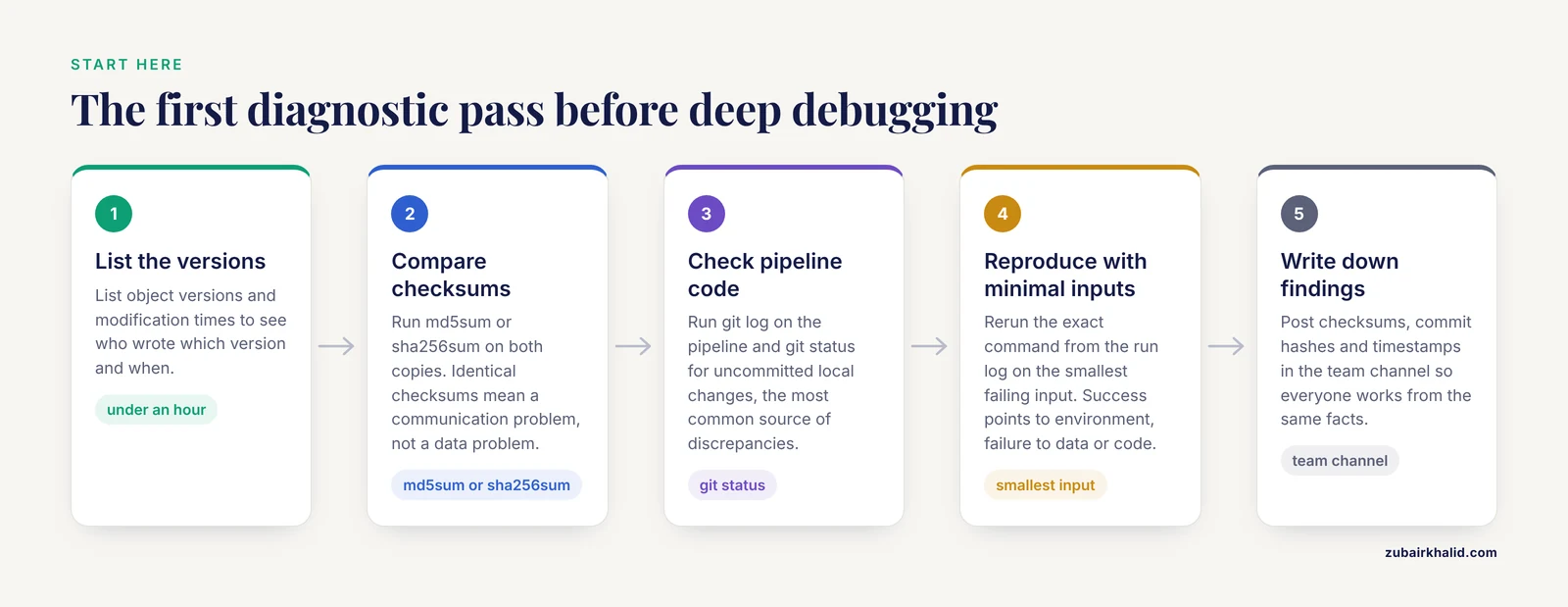
Run this sequence before any deep debugging. It resolves or clearly characterizes most collaboration conflicts in under an hour.
- Establish which versions exist. For files in object storage, list object versions and modification times. In a shared S3 bucket, run
aws s3api list-object-versions, bucket my-lab-bucket, prefix results/to see who wrote which version and when. - Compare content, not names. Run
md5sumorsha256sumon the two copies of the disputed file. Identical checksums mean you have a communication problem, not a data problem. Different checksums mean a genuine write conflict or two independent derivations. - Check the pipeline code, not just the data. Run
git log, oneline, path/to/pipelinein your workflow repository. Uncommitted local changes (git status) are the single most common source of "we ran the same pipeline" discrepancies. - Reproduce the failure with minimal inputs. Take the smallest input file that fails and rerun the exact command from the run log. If it succeeds, the problem is environmental. If it fails, the problem is data or code.
- Write down what you found. Post the checksums, commit hashes, and timestamps in the team channel. Half of all collaboration conflicts dissolve once everyone is looking at the same facts.
If this pass does not resolve the issue, work through the sections below from most common cause to rarest.
What Causes Cloud Bioinformatics Collaboration Problems
Collaboration conflicts in cloud bioinformatics have a small number of root causes, and nearly every incident traces back to one of them.
Shared mutable state. A file, bucket, virtual machine, or database that several people can change at the same time without a locking or versioning mechanism. The cloud makes this worse than local work because writes can come from different institutions, time zones, and tooling stacks simultaneously.
Heterogeneous environments. Collaborators run the same tool under different operating systems, container versions, reference genome builds, or parameter defaults. The cloud promises identical environments but only delivers them when teams actually pin them down.
Skill and training gaps. Not every collaborator arrives with the same computational background. A survey of 309 scientists in Saudi Arabia found that more than half reported a lack of bioinformatics knowledge, and the barriers to adopting bioinformatics tools included lack of training (67.9 percent), insufficient support (58.2 percent), and complexity of software (44.6 percent) [1]. A team where half the members avoid the command line will route work through a few power users, and those users become both the bottleneck and the single point of failure.
Unclear ownership and governance. No named owner for the bucket, the reference data, the pipeline repository, or the cost account. Goodman observed in biopharmaceutical computing that problems once confined to single disciplines have become complex and multidisciplinary, and that how the work is done has become as important as what is done [2]. A team that has not agreed on how work is done will fight about it during every crisis.
Data discovery and delivery failures. Data exists but nobody can find it, or the catalog itself is a bottleneck. This is an old problem in cloud bioinformatics. As biological data moved from in-house infrastructure to the cloud, retrieving data over the internet became harder because of explosive growth and frequent change, and early cloud designs required a central MapReduce master server to track all available data [3]. Any team that relies on one person's memory or one fragile index as its data catalog is running the same risk.
The Troubleshooting Table
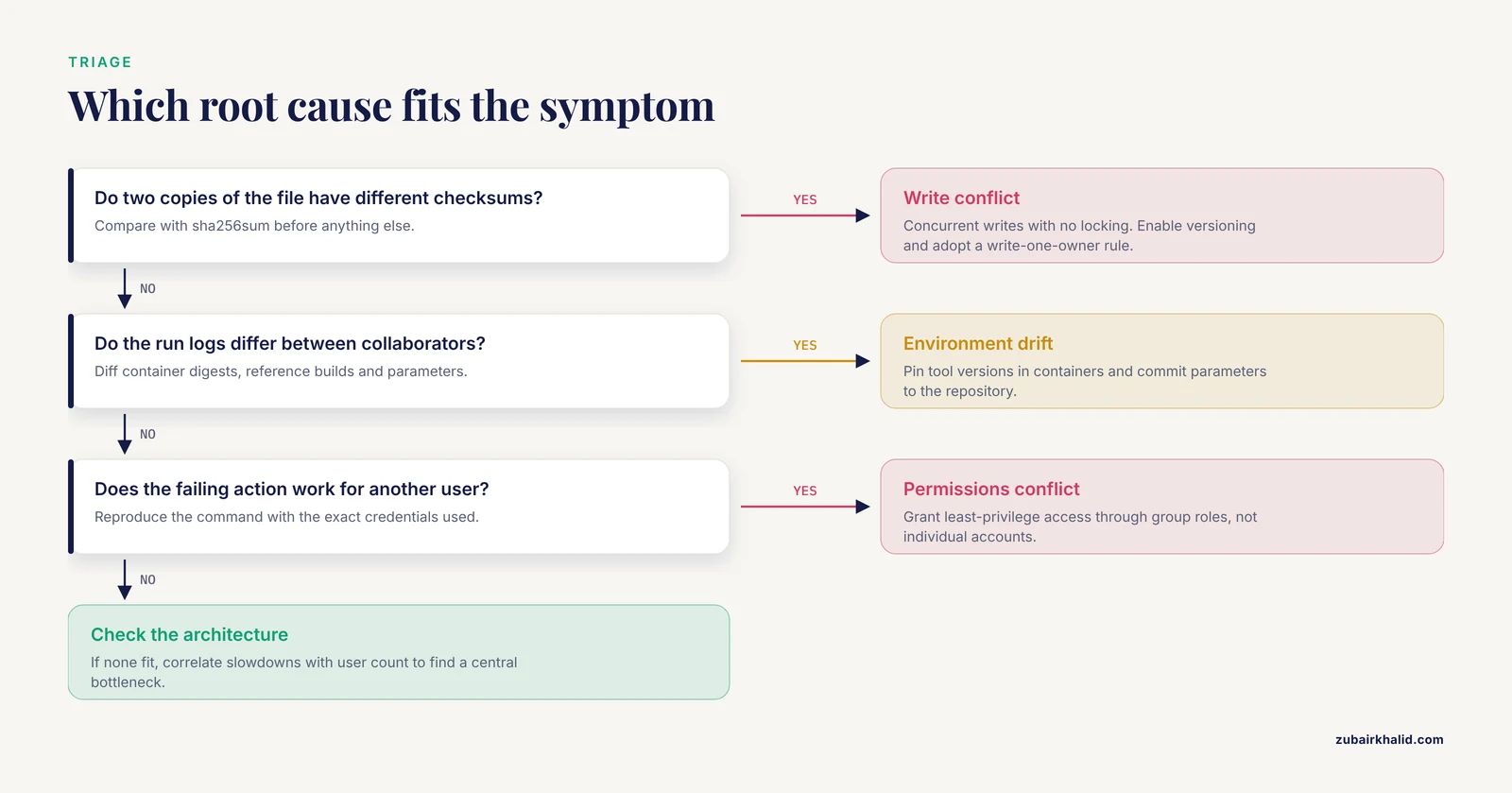
Use this table to map a symptom to its likely cause, confirm it, and apply the fix. The causes are ordered roughly from most common to rarest.
| Symptom | Likely cause | How to confirm | Fix |
|---|---|---|---|
| A shared file has two versions and both collaborators believe theirs is current | Concurrent writes with no locking or versioning | Compare sha256sum of both copies, list object versions or file sync history | Enable bucket versioning, adopt a write-one-owner model, restore the correct version and rederive downstream results |
| "We ran the same pipeline" but results differ | Environment or parameter drift between collaborators | Diff the run logs, check container tags and reference genome builds, run git status on the pipeline repo | Pin tool versions in containers, commit parameters to the repo, rerun both jobs against a pinned environment |
| One collaborator gets permission denied while others succeed | Inconsistent access policies on the bucket, instance, or database | Compare the exact credentials and IAM-style policies in use, reproduce the command as the failing user | Grant least-privilege access through group roles instead of individual accounts, document who has what |
| New collaborators cannot find the data they need | No shared catalog, data scattered across buckets and folders with inconsistent naming | Ask the collaborator to locate a specific dataset unaided and time the attempt | Build a single indexed catalog with enforced naming conventions, assign a data steward |
| A shared annotation or matrix has conflicting edits from two people | Direct concurrent editing of a shared record without a review workflow | Check edit history and modification timestamps in the platform | Move annotation into a platform with per-record history and assign a curator who resolves conflicts |
| A central server or metadata service slows or fails as the team grows | Architectural bottleneck in a master-based design | Correlate slowdowns with user count or job count, check server logs for queueing | Move to a distributed or peer-based discovery approach, or shard the catalog |
| Workflow exports produce different results in different workflow engines | Engine-specific interpretation of tool parameters and data flow | Run the same workflow in two engines on identical inputs and diff the outputs | Describe tools in an engine-neutral format and validate round-trip conversion before relying on it |
| Files marked "conflicted copy" or duplicated in a sync folder | A sync client reconciled offline edits on both sides | Look for conflicted-copy markers and compare modification times and checksums | Assign one writable canonical location, sync downstream copies read-only, resolve by checksum before deleting |
| Cloud costs spike after a new collaborator joins | Idle instances left running, duplicate storage, missing lifecycle rules | Review instance uptime and storage growth by account or tag | Tag resources by owner, shut down idle instances on a schedule, apply lifecycle rules to stale data |
Root Causes Worked From Common to Rare
Shared Storage Write Conflicts
This is the most frequent of all cloud bioinformatics collaboration problems. Two collaborators write to the same object or file, and one version silently replaces the other or the sync service creates a duplicate.
The mechanism is straightforward. Cloud object stores such as those underlying aws genomics workflows treat a write as a complete replacement of the object. There is no merge. If two people upload sample_results.vcf within the same window, the last write wins and the first is either gone or preserved only if versioning was enabled. Desktop sync services behave similarly when two machines edit while offline and later reconcile, which is how "conflicted copy" files appear.
Confirmation takes minutes. List object versions with aws s3api list-object-versions, or inspect the version history in your sync platform. Then checksum both candidate files. The one that does not match the downstream results you trust is the loser.
The durable fix has three parts. First, enable versioning on every shared bucket so no write is ever destructive. Second, adopt a write-one-owner rule: each output directory has exactly one person or automated job that writes to it, and everyone else reads. Third, treat sync services as transport, not as storage of record. NeuronDepot, a system built to keep collaborating scientists in sync across cloud storage and the local file system, was motivated by exactly this problem. Its designers described a one-time data assignment from the originator followed by cloud-based syncing, so that experimental and modeling data became available across a collaboration spanning three universities and eight time zones with minimum overhead [4]. The lesson generalizes: the originator assigns the data once, downstream copies stay read-only, and conflicts never start.
Environment and Pipeline Drift
The second most common cause is two collaborators running "the same" analysis that is not actually the same. Different container tags, different reference builds, an uncommitted local edit to a script, or a parameter that one person set interactively and never recorded.
The mechanism is that most pipelines resolve configuration from several layers at run time. Defaults inside the code, values in a config file, values on the command line, and values in the environment all stack. Two collaborators whose layers differ will produce different outputs from identical inputs, and the discrepancy looks like a data problem until you diff the logs.
Confirm it by diffing the full run logs from both jobs, then checking the container digests (docker images, digests or the equivalent in your engine) and the commit hash of the pipeline repository used in each run. The point of divergence is almost always visible in the log diff before it is visible in the results.
The fix is to make the environment part of the artifact. Pin tool versions in containers, commit all parameters to the repository alongside the workflow, and record the commit hash and container digest in every result directory. Reproducibility is one of the tenets of the scientific method, and breaking a complex experiment into small, repeatable, well defined tasks with defined inputs, parameters, and outputs is what makes discrepancies traceable to a single step [5]. Teams that skip this discipline are not debugging pipelines, they are debugging their own memory.
Data Discovery Failures
A quieter conflict: the data exists, but collaborators cannot find it, so they regenerate it, duplicate it, or analyze the wrong version. This is expensive and erodes trust faster than most technical faults.
The mechanism is historical. As bioinformatics advanced from in-house infrastructure to the cloud, collaborative research groups began sharing work around the world, and retrieving biological data over the internet grew difficult because of explosive growth and frequent change [3]. Early cloud designs concentrated data tracking in a single master server, which became a hindrance as usage scaled. A lab folder structure with a single curator playing the role of that master server fails the same way.
Confirm the problem empirically. Ask a collaborator who did not create a dataset to find it, and record what they had to try. If they cannot find it in a few minutes, your catalog has failed regardless of how well organized it feels to the person who built it.
Solutions range from simple to structural. At minimum, enforce a naming convention and a single top-level prefix per project, with a README that maps the layout. For teams that grow beyond what one index can serve, distributed approaches exist. PRKad, a peer-to-peer framework for bioinformatics applications in dynamic cloud environments, replaced the central master with a Kademlia-based distributed hash table using round-trip time as the associated key, locating data by the XOR metric and showing low link latency for data retrieval with good scalability for larger user populations [3]. Few labs need to implement a DHT, but the design principle scales down cleanly: distribute the catalog so no single failure point blocks everyone.
Conflicting Edits in Shared Analysis Platforms
When a team shares a virtual machine image, a web-based annotation platform, or a community database, conflicts shift from files to records. Two curators edit the same gene model, the same phenotype entry, or the same configuration, and one edit overwrites or contradicts the other.
The mechanism is concurrent editing of a shared record without a review step. Platforms differ in how they handle this. Some serialize edits through a single interface, others allow free editing by all members, and the conflict surfaces later as an inconsistency in the published output.
Genome annotation is a concrete example. The xGDBvm system was built precisely because collaborative genome annotation, arguably best accomplished through collaboration between bioinformaticians and domain experts with broad community involvement, is not scalable at the pace of modern sequence generation [6]. xGDBvm packages the workflow in a self-contained virtual machine deployed through a cloud service, gives users a unified web interface for inputs, parameters, and outputs, flags problematic gene predictions, and lets annotators reannotate them with an integrated tool in a public or private genome browser [6]. The anti-conflict lesson is the flagging step: suspect records are marked and worked on deliberately, rather than silently overwritten.
Community matrix platforms take the same approach at the database level. MorphoBank, a web application and database using software as a service methodology compatible with cloud computing, was created because phylophenomic teams were managing data in single-user, file-based desktop software wholly unsuitable for real-time, team-based collaborative work [7]. It lets teams record homology hypotheses with media, share them, and archive the resulting matrices [7]. When you choose a shared platform, choose one with per-record history, so conflicting edits can be compared and resolved rather than merely discovered.
Confirm the problem by pulling the edit history on the disputed record. If your platform has no edit history, the conflict is invisible by design, and the fix starts with adopting a platform that records one.
Workflow Interoperability Failures
A subtler conflict appears when collaborators use different workflow engines. A pipeline that behaves correctly in one engine produces different results, or fails entirely, after conversion to another.
The mechanism is that each workflow engine was created to address the problems of a specific community, so each has its own advantages, shortcomings, and sometimes licensing restrictions that can discourage parts of the scientific community [5]. Tool descriptions, parameter handling, and data flow semantics are not identical across engines, and silent differences in interpretation show up as numeric discrepancies between collaborators.
Confirm it with a controlled comparison. Run the identical workflow, with identical inputs and pinned tool versions, in both engines, and diff the outputs step by step to localize where the interpretations diverge.
The fix is an engine-neutral tool description. The Common Tool Descriptor approach provides a platform-free structured representation of the parameters, inputs, and outputs of command-line tools, and combining the features of multiple royalty-free workflow engines gives the community interoperability rather than lock-in [5]. Practically, this means your team should describe each tool once, validate that the description converts correctly into each engine you use, and treat any engine-specific behavior as a defect to document, not a quirk to memorize.
Permissions and Identity Conflicts
Permission failures look like technical problems but are usually policy problems. One collaborator can read a bucket and another cannot. A job succeeds interactively but fails in the scheduler. A departing student's account takes access rights with them.
The mechanism is that access is granted through credentials and policies attached to identities. When permissions are granted per person, ad hoc, at the moment of need, the resulting policy landscape is untraceable. Shared credentials make it worse, because audit logs then cannot tell you who performed a write.
Confirm by reproducing the failing action with the exact credentials the collaborator used, and by comparing their effective permissions against a collaborator who succeeds. In an aws genomics setting, this means comparing the attached policies and the bucket policy on the specific prefix, not just the account.
The fix is role-based least privilege. Create group roles such as read-only analyst, pipeline executor, and data steward. Grant bucket access at the project prefix level. Never share long-lived credentials between people. Give every human and every automated job its own identity so the audit trail answers "who wrote this file" instantly, which is exactly the question every version conflict investigation begins with.
Skills and Support Gaps as a Conflict Multiplier
Skills gaps rarely cause an incident directly, but they amplify every other cause. A collaborator who is unsure of the command line will copy files by hand, skip version control, and avoid the platform features that prevent conflicts, which multiplies write conflicts and drift.
The evidence for how widespread this is comes from the survey of 309 scientists, where limited experience showed up as only 31.7 percent having one or more bioinformatics tools and 41 percent reporting a need for help developing a program to solve a biological problem [1]. The barriers they named, lack of training, insufficient support, and software complexity [1], map directly onto collaboration conflicts: untrained users create duplicate copies, unsupported users keep private local workflows that later diverge, and complex software pushes people toward manual workarounds.
Confirm the problem in your own team with a two-question check. Can every collaborator run the pipeline from the repository without help? Can every collaborator retrieve a named dataset unaided? Any "no" predicts future conflicts.
The fix is onboarding as an infrastructure deliverable, not a favor. Maintain a written runbook with the exact commands, provide a containerized environment so new collaborators do not fight installation, and pair each newcomer with an owner for their first project cycle. When a platform can absorb the complexity, use it. The xGDBvm designers chose an intuitive graphical interface over a command-line-first design for exactly this reason, letting users manage inputs, parameters, and outputs through a unified web interface with contextual help [6].
Architectural Bottlenecks in Growing Teams
The rarest cause is structural. A design that worked for three collaborators fails at ten, not because anyone made a mistake but because a component was never built for the load.
The mechanism is centralization. A single metadata server, a single shared instance, or a single curator-managed index becomes a serialization point. Every read and write queues behind it, latency climbs, and eventually the service fails under concurrent demand. The early cloud bioinformatics literature documented this pattern in data delivery, where systems tracking all available data through a MapReduce master server became a hindrance at scale [3].
Confirm it by correlating slowdowns and failures with usage. If latency grows with the number of concurrent users and the failing component is the one every request passes through, you have found the bottleneck.
The fixes are distribution and platform-as-a-service. Distributed discovery designs such as the peer-to-peer approach described above scale to more users without a central master [3]. Alternatively, hand the collaborative layer to a service built for it. MorphoBank has operated as a community-available collaboration platform for phylophenomic matrices for a decade, letting teams work interactively in ways that desktop file-based tools could not support [7]. The xGDBvm model of a preconfigured, self-contained virtual machine image that a team deploys per project removes shared-instance contention entirely [6]. When your team outgrows its architecture, choosing a battle-tested shared platform is a solution, not an admission of defeat.
A Worked Diagnostic Sequence
Here is a complete investigation, compressed, for the most common incident: two collaborators disagree about the current version of a results file.
- Freeze the scene. Tell everyone to stop writing to the disputed prefix.
- List versions:
aws s3api list-object-versions, bucket lab-bucket, prefix projectA/results/. Note the timestamps and the identity of each writer. - Checksum both candidates:
sha256sum fileA.vcf fileB.vcflocally, oraws s3api head-object, bucket lab-bucket, key projectA/results/file.vcfto read the stored checksum metadata if you recorded it at write time. - Trace lineage. Search the team channel and run logs for the job IDs that produced each version. The commit hash and container digest recorded with each run, if you followed the drift-prevention practices above, tell you immediately which run is authoritative.
- Decide the winner based on lineage, not on modification time. A newer file produced by an older, drifted pipeline is the wrong file.
- Restore. Copy the winning version to the canonical key, rederive any downstream outputs that consumed the losing version, and delete or clearly mark the losing one if versioning is not available.
- Close the loop. Post the resolution, the checksums, and the rule that was applied. The written record prevents the same conflict from recurring next month.
Data safety note. Genomic data is frequently controlled-access human data, and shared cloud storage is the most common leak point in academic collaborations. Before any troubleshooting step that copies data, verify that the destination bucket or instance is authorized to hold that data under your data access agreement. Never copy controlled data to a personal sync account as a troubleshooting shortcut, and never email a data file to "get around" a permission error. The permission error is doing its job.
Prevention Practices
Solving a conflict once is cheap. Preventing the class of conflict is cheaper. These practices cover nearly every cause in the table above.
Version everything writable. Enable versioning on shared buckets, keep pipelines in git, and record the commit hash and container digest with every run. This single habit converts every silent overwrite into a recoverable event.
Assign an owner to every artifact. Every bucket prefix, reference dataset, pipeline repository, and shared database gets one named owner. Ownership is not about doing the work, it is about being the person whose decision is final when collaborators disagree.
Use read-only downstream copies. The NeuronDepot pattern generalizes well. The originator assigns the data once, and everyone else consumes synced copies they cannot edit [4]. Write conflicts require two writers, so remove one of them.
Describe tools in an engine-neutral form. If your collaboration spans workflow engines, maintain a platform-neutral description of each tool's parameters, inputs, and outputs, in the spirit of the Common Tool Descriptor approach, and validate conversions before relying on them [5].
Decompose work into small, well defined tasks. Workflows that split complex experiments into small repeatable tasks with defined inputs and outputs make bottlenecks and errors visible early, which is precisely what makes collaborative debugging possible [5].
Build the catalog before you need it. A naming convention, a project-level README, and a single top-level location per project prevent the discovery failures that cause duplicate work. Larger teams should consider distributed or indexed discovery rather than a single curator's memory [3].
Onboard for capability, not courtesy. Give every new collaborator a working containerized environment, a runbook, and a named contact. Training gaps, insufficient support, and software complexity are documented barriers to bioinformatics adoption [1], and every one of them becomes a collaboration conflict six months later.
Separate workspaces by default. Give each collaborator, and each automated job, its own working area, with a single curated promotion path into shared space. This applies to buckets, database schemas, and shared virtual machines alike. A preconfigured per-project instance, in the style of xGDBvm's self-contained image [6], avoids shared-state contention entirely.
Record how you work, not just what you produce. Goodman's observation that how the work is done has become as important as what is done is the entire argument for runbooks, data dictionaries, and decision logs. A team that documents its process resolves conflicts by consulting the record instead of by argument.
Common Mistakes and Limitations
- Treating symptoms as causes. "Permission denied" is a symptom. The cause is usually an ad hoc permission grant made months ago. Fixing the symptom by granting another one-off permission makes the next conflict harder to diagnose.
- Diagnosing by modification time. A newer file is not a more correct file. Decide conflicts by lineage, meaning the recorded commit hash and pipeline version, never by timestamp alone.
- Using personal sync folders as lab storage. Sync conflicts, conflicted copies, and accidental deletions follow. Cloud-based syncing between an originator and read-only consumers is a sound pattern [4]. Free-for-all folders on a personal account are not.
- Sharing credentials. Shared logins destroy your audit trail. When a conflict happens, you will need to know who wrote what, and shared credentials make that question unanswerable.
- Assuming the cloud removes environment drift. The cloud provides identical environments only when you pin them. Unpinned tool versions and reference builds drift exactly as fast as on local machines.
- Blaming the least technical person. Conflicts usually come from system design, not individual error. A workflow where a single accidental drag-and-drop can destroy shared data is a design defect, whoever performed the drag.
- Expecting one tool to fix governance. Platforms help, and platforms with per-record history such as shared annotation and matrix databases make conflicts resolvable [6], but no platform substitutes for named ownership and a promotion path.
- Over-engineering early. A five-person lab does not need a distributed hash table. It needs versioning, checksums, and an owner. Reach for distributed architectures when central ones demonstrably fail.
- A note on scope. This guide covers infrastructure and process conflicts in research computing. Data involving identifiable human subjects carries legal and ethical obligations that go beyond team process, and controlled-access data must always be handled under the terms of your specific data access agreement.
Frequently Asked Questions
What are the most common cloud bioinformatics collaboration problems?
Versioning conflicts in shared storage, pipeline drift between collaborators, discovery failures where data cannot be found, permission inconsistencies, and conflicting edits in shared analysis platforms. All of them trace back to shared mutable state, heterogeneous environments, or unclear ownership.
How do I find out who overwrote a file in a shared bucket?
List the object versions with the cloud provider's versioning API, which shows the identity and timestamp of each write. This requires that bucket versioning was enabled before the incident, which is why enabling it everywhere is the first preventive measure to adopt.
Two collaborators ran the same pipeline and got different results. Where do I start?
Diff the full run logs first. The divergence almost always appears there as a different container digest, an uncommitted code change, or a parameter difference, before it appears in the results.
Should each collaborator get their own workspace or share one?
Both, in layers. Give each person and each automated job a private working area, then define a single curated promotion path into shared space. Pure shared workspaces create write conflicts, and pure private workspaces create drift.
How do we stop sync conflicts between file sharing tools and our analysis servers?
Treat sync as one-way transport. The data originator assigns files once, downstream copies stay read-only, and the canonical copy lives in versioned object storage rather than in a desktop sync folder.
What permissions model should a small lab use?
Role-based least privilege with group roles such as read-only analyst, pipeline executor, and data steward, granted at the project prefix level. Never share credentials between people, because shared logins destroy the audit trail you will need during the next conflict.
How do we onboard a collaborator with limited bioinformatics experience?
Provide a containerized working environment, a written runbook with exact commands, and a named contact for their first project cycle. Training gaps and insufficient support are documented barriers to bioinformatics adoption, and onboarding is where you prevent the conflicts they cause.
When should a team move from ad hoc file sharing to a managed collaboration platform?
When a collaborator who did not create a dataset cannot find it quickly, when edit histories are unavailable on shared records, or when a shared instance slows under concurrent use. Single-user file-based tools are not suited to real-time team work, and purpose-built platforms with per-record history resolve this class of conflict.
Sources
- Awareness and Predictors of the Use of Bioinformatics in Genome Research in Saudi Arabia.
- Analysis, biomedicine, collaboration, and determinism challenges and guidance: wish list for biopharmaceuticals on the interface of computing and statistics.
- A P2P Framework for Developing Bioinformatics Applications in Dynamic Cloud Environments.
- NeuronDepot: keeping your colleagues in sync by combining modern cloud storage services, the local file system, and simple web applications.
- From the desktop to the grid: scalable bioinformatics via workflow conversion.
- xGDBvm: A Web GUI-Driven Workflow for Annotating Eukaryotic Genomes in the Cloud.
- MorphoBank: phylophenomics in the "cloud".