How to Check File Integrity and Disk Usage for Sequencing Data
By Dr. Zubair Khalid, DVM, MS, PhD ·

Most integrity failures in sequencing data are truncated transfers. A copy that stopped early looks normal in a file browser, has a plausible size, and then fails hours into an alignment with a cryptic decoder error. The first thing to check is the byte size against the size recorded at the source. The second is a checksum, a short fingerprint computed from the file's bytes. Those two checks resolve most cases where a FASTQ, BAM, or VCF file suddenly misbehaves.
This guide covers both halves of trustworthy data handling on Linux. The first half proves files are intact through checksums, transfer verification, and format-aware validation. The second half explains disk usage, meaning what df and du actually measure, why they disagree, and how to find your missing space before the cluster does. Sequencing informatics runs almost entirely on Linux, so fluency with these standard Linux commands is what makes bioinformatics work reproducible on a laptop, a server, or a cluster login node.
Work through the causes from most common to rarest, match your symptom against the troubleshooting table, and adopt the prevention habits at the end so the problem never reaches your pipeline again.
Why Sequencing Files Fail: The Common Causes
A quick vocabulary pass, since the failure modes depend on the formats. FASTQ is the four-line text format that stores sequencing reads and their per-base quality scores. BAM and CRAM store aligned reads in binary form, with CRAM compressing against a reference genome. VCF stores variant calls. BAM and tabix-indexed files use BGZF, a blocked variant of gzip, and every BGZF stream ends with a defined trailer. That is exactly why truncation is detectable rather than silent.
The causes, ordered from most common to rarest:
- Truncation. A copy that was interrupted. This covers an scp session that died, a browser download that dropped, a cp across filesystems killed by a logout, and an interrupted mv between devices, which internally copies and then unlinks. Compressed formats end with a fixed trailer, so a cut stream fails decode. This cause dwarfs all others in day-to-day bioinformatics.
- Checksum convention mismatch. The sender hashed the decompressed content while you hashed the delivered .gz file. Both computations are correct, they just describe different byte streams. Public archives sometimes publish uncompressed-stream sums, so this surprises people constantly.
- Silent storage corruption, often called bit rot. Failing RAM, aging disks, bad cables, and unclean shutdowns flip bytes on disk. Servers with error-correcting memory and checksumming filesystems such as ZFS or btrfs see less of this. Old external drives and desktops without ECC RAM see more.
- In-flight network corruption. TCP checksums plus the integrity checks inside SSH and TLS catch nearly all line-level damage. If a checksum changes after a clean network transfer, suspect storage or the source, not the wire.
- Identity swaps. A perfect checksum on the wrong file. R1 paired with the wrong R2, lane directories switched, a renamed sample. Checksums prove byte identity, never biological identity.
- Resource problems mistaken for corruption. A filled quota, exhausted inodes, or a purged scratch directory produce read and write errors that look like broken files but are storage policy, not data damage.
Start every investigation with these three commands:
ls -l sample_R1.fastq.gz
gzip -t sample_R1.fastq.gz && echo intact
md5sum -c sample_R1.fastq.gz.md5
The first compares size against the sender's record. The second walks the entire gzip stream and verifies its internal checksums without writing anything to disk. The third recomputes the fingerprint and compares it to the published value.
How to Check File Integrity on Linux for Bioinformatics Data
Choose a Hash: MD5, SHA-1, or SHA-256
A hash function reads a file and emits a fixed-length digest. MD5 produces 128 bits, SHA-1 produces 160 bits, and SHA-256 produces 256 bits. Cryptographers demonstrated practical collisions against MD5 in the mid-2000s and against SHA-1 in 2017, so neither protects against deliberate tampering. Both remain excellent at detecting accidental damage, which is the problem you actually have with sequencing files. The practical rule is simple. Default to SHA-256 for new manifests, and accept MD5 when that is what an archive or collaborator publishes, because the exact algorithm matters far less than having a recorded expectation to compare against.
On modern CPUs, hardware acceleration makes SHA-256 roughly as fast as MD5, and either one is usually limited by disk speed rather than by hashing.
Generate and Verify Checksums
Create a checksum by redirecting the output into a small sidecar file that lives next to the data:
md5sum sample_R1.fastq.gz > sample_R1.fastq.gz.md5
sha256sum sample_R1.fastq.gz > sample_R1.fastq.gz.sha256
Verify later with the -c flag, which reads each listed file, recomputes the digest, and prints OK or FAILED per file:
md5sum -c sample_R1.fastq.gz.md5Both commands return a nonzero exit status when any file fails, so pipeline scripts can gate on the result instead of parsing text.
For a whole directory, build a manifest, a single file listing every data file with its digest:
find run1 -type f -print0 | xargs -0 sha256sum > run1.sha256
sha256sum -c run1.sha256
Generate the manifest from the parent directory, so the stored paths include the folder name and keep working after the folder moves. The -print0 and -0 pair handles spaces in filenames safely.
To compute checksums on a remote machine and verify locally, capture the remote output and compare it against your local copy from the matching directory:
ssh user@cluster "cd /data/runs/run1 && sha256sum *.fastq.gz" > run1.remote.sha256
sha256sum -c run1.remote.sha256
The paths inside the manifest are relative, so run the verification from the directory that corresponds to the remote one.
Checksums From Archives and Collaborators
Most public data sources publish a small checksum file beside each download, and many vendor basecalling and demultiplexing pipelines write per-file checksums as well. Keep those files with the data forever. When a published sum does not match the delivered file, test the uncompressed-stream convention before assuming damage:
gzip -dc sample_R1.fastq.gz | md5sumIf this matches the published value while the plain file hash does not, the file is fine and the convention is simply different. Record whichever convention your project uses in a README inside the data folder so the next person does not rediscover the problem.
A second classic trap is a checksum list edited or saved on Windows, which gains carriage-return characters that break md5sum parsing. Confirm and repair like this:
file sums.md5
tr -d '\r' < sums.md5 > sums.fixed.md5
md5sum -c sums.fixed.md5
Verify Many Files in Parallel
Hashing is embarrassingly parallel, so spread it across cores:
find . -type f -name "*.fastq.gz" -print0 | xargs -0 -n 1 -P "$(nproc)" sha256sum > all.sha256The -P flag runs that many md5sum or sha256sum processes at once, and line order in the output varies, which does not matter because -c ignores order. Total time scales with the number of bytes read once, so local disks saturate quickly and network filesystems dominate the runtime. For a fast triage of a huge delivery, hash the first and last files plus compare all sizes, then run the full manifest overnight.
Verify the Transfer Itself
rsync solves two problems at once, resumable transfer and built-in verification:
rsync -aP source:/data/run1/ /local/run1/
rsync -rcn source:/data/run1/ /local/run1/
The first command transfers with archive semantics, preserving permissions and timestamps, and shows progress while keeping partial data on interruption. The second is a pure comparison, recursive, checksum-based, dry run, which lists any file whose bytes differ without copying anything. A clean comparison with no output means the directories are byte-identical.
scp protects data on the wire but offers no way to confirm the copy completed, which is why truncation hides so well behind it. wget -c resumes interrupted HTTP downloads, but only trust resume when the remote file cannot change, otherwise a fresh download plus checksum is safer. Managed transfer portals commonly verify checksums for you, and a periodic spot check is still cheap insurance.
Make verification a boundary policy. Verify on receipt, while the sender still holds the original, then record the sums in the project manifest. A mismatch discovered six months later, after the sender deleted their copy, is a much worse conversation.
Caution: an interrupted rsync or cp leaves a partial file that looks complete at a glance. After any interruption, rerun the transfer and then the checksum comparison before anyone touches the data.
Format-Aware Validation Beyond Checksums
A checksum proves byte identity, not that a file decodes into sane records. Add a second layer of format-aware checks.
Test every gzip-family file, including the small ones:
gzip -t sample_R1.fastq.gz && echo intact
pigz -t sample_R1.fastq.gz
gzip -t reads the whole stream and validates internal checksums while writing nothing. BGZF is gzip-compatible, so the same test works on BAM, VCF.gz, and on index files such as .bai, .tbi, and .csi. Indexes are easy to forget and painful to debug, because a truncated index fails only when you request a genomic region. pigz, the parallel gzip implementation, runs the same test faster on multicore machines.
For alignment files, screen first and decode deeply only when needed:
samtools quickcheck -v *.bam
samtools view -c sample.bam
samtools quickcheck reads the header and the fixed end-of-file block at the tail of a BAM or CRAM, a 28-byte marker that truncation destroys, and it does all of this in milliseconds. A full record count with samtools view -c decodes every byte and is the thorough version. Picard's ValidateSamFile goes further into structural checks when a BAM behaves strangely.
For FASTQ, exploit the rigid four-line structure, identifier, sequence, separator, qualities:
zcat R1.fastq.gz | awk 'END{print NR, NR%4}'
zcat R2.fastq.gz | awk 'END{print NR, NR%4}'
The remainder must be zero in both files and the two read counts must match. Eyeball the first records with zcat piped into head -n 8, and let seqkit stats or FastQC summarize counts and quality profiles. For variant calls, a full decode catches truncation and index trouble:
bcftools view variants.vcf.gz > /dev/null && echo OK
tabix -p vcf variants.vcf.gz
For runs pulled from public read archives, the vdb-validate utility from the SRA Toolkit checks each downloaded object piece by piece and names what failed.
Caution: full decodes read every byte of every file. On terabyte-scale collections, schedule them deliberately rather than running them interactively against a shared filesystem.
Disk Usage: Find Out Where the Space Went
df and du Measure Different Things
df asks the filesystem how much space remains on an entire mounted volume. du walks a directory tree and adds up what the files inside occupy. Both are correct, they answer different questions, and comparing them is the fastest way to diagnose storage confusion:
df -h /scratch
du -sh /scratch/$USER
du -h -d 1 /scratch/$USER | sort -rh | head -15
The -h flag renders sizes in human units, -s summarizes, and -d 1 breaks the tree one level down, sorted largest first.
Why df and du Disagree
- Deleted but still open. A running process holds a deleted temp file or log, so the blocks stay allocated. df stays high while du cannot see the file. Confirm with lsof +L1, which lists open files with a link count of zero, note the process ID, then stop that process and the space returns.
- Reserved blocks. ext-family filesystems hold about five percent of capacity for root by default. df reports nearly full while the sum of user files is lower. Inspect with tune2fs -l on the underlying device and look for the reserved block count. Changing the reserve is an administrator decision.
- Snapshots. Weekly snapshots on network storage keep deleted data alive invisibly to du. Check for a .snapshot directory at the mount root or ask your admins.
- Hard links. A single du run counts a hard-linked file once, but separate du runs on two paths each report the full size. df reflects the true total.
- Sparse files. Some tools preallocate large mostly-empty files. ls -l shows apparent size while du shows allocated blocks, so a file can claim 500 GB and occupy almost none. Compare ls -l against du -sh on the same file to see the gap.
- Shared volumes. On NFS mounts and parallel filesystems, df describes capacity shared with every user, not your personal share.
Per-Project and Per-Sample Accounting
Make accounting routine rather than forensic:
du -sh /projects/*/
du -ah /project | sort -rh | head -25
find /project -type f -size +50G -print
ncdu /project
Log the first command's output weekly, because a growing per-project trend is easier to manage than a sudden full disk. The du-plus-sort recipe lists the twenty-five largest entries anywhere in the tree, the find line names individual giants above 50 GB, and ncdu gives an interactive, navigable view when you would rather explore than script.
Quotas, Inodes, and Shared Cluster Storage
Bytes are not the only limit. Inodes are the filesystem structures that track each file, they are finite, and pipelines that emit millions of small chunked outputs exhaust them while gigabytes remain. Check with df -i on the affected mount.
Quotas cap usage per user, group, or directory regardless of volume-wide free space, and on parallel filesystems plain df is nearly meaningless for personal capacity because it describes the whole shared system. Use your site's quota command, commonly lfs quota on Lustre systems and mmlsquota on GPFS systems, and ask administrators where your real ceiling is. Many centers also purge scratch on a fixed schedule, deleting old files silently, which is one more reason manifests matter.
Temp discipline prevents self-inflicted full disks. Aligners and sorters write large temporary trees, so point them at roomy scratch explicitly:
samtools sort -T /scratch/$USER/tmp sorted.bam
sort -T /scratch/$USER/tmp -o out.txt in.txt
watch -n 60 df -h /scratch
Caution: never clean shared scratch with rm combined with wildcards. Move candidates into a dated trash directory, review, then delete.
Estimate Storage Before the Sequencer Runs
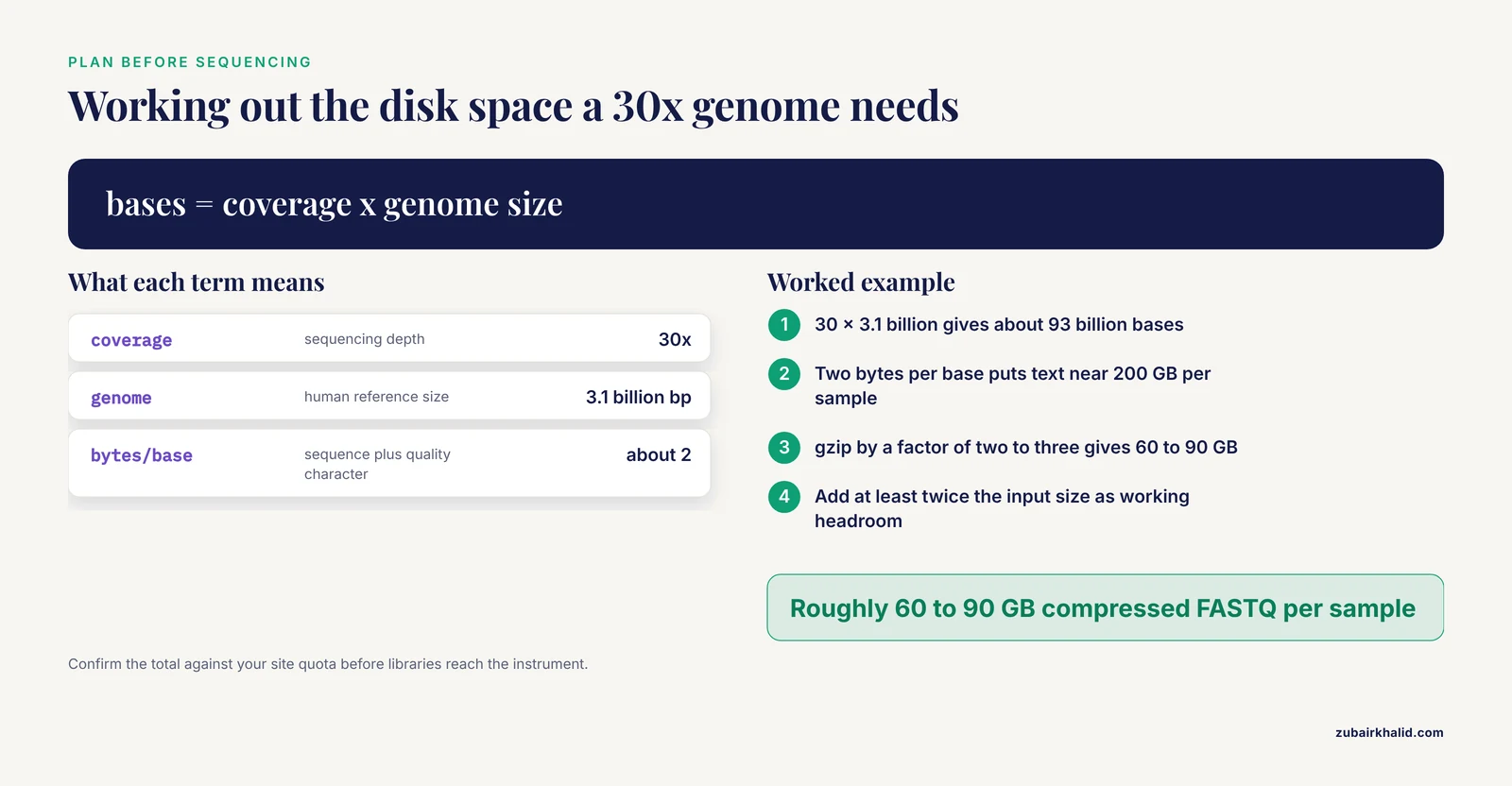
Work the arithmetic with stated assumptions. For a paired-end 2 x 150 bp run at 30x coverage of the 3.1 billion base human reference genome, you generate about 93 billion bases of sequence. FASTQ spends roughly two bytes per base on the sequence character and the quality character, plus a header line per read, so uncompressed text lands near 200 GB per sample. gzip typically compresses FASTQ by a factor of two to three, which puts compressed FASTQ at roughly 60 to 90 GB per sample. BAM output tends to land near the FASTQ footprint, while CRAM with a suitable reference usually cuts that substantially.
Add working headroom of at least twice the input size for alignment temporaries, indexes, and intermediates, because sorting and marking duplicates duplicate your footprint transiently. Multiply by the sample count, then confirm the total against your site quota before libraries reach the instrument. These are planning heuristics, and actual sizes vary with platform, chemistry, and how repetitive the genome or transcriptome is, so recalibrate after your first run.
Troubleshooting Table: Symptom, Cause, Confirmation, Fix
| Symptom | Likely cause | How to confirm | Fix | |
|---|---|---|---|---|
| sha256sum -c reports FAILED for one large file | Truncated or altered copy | Compare ls -l size with the source record, run gzip -t | Re-transfer with rsync -aP, then confirm with rsync -rcn | |
| gzip -t reports unexpected end of file | Interrupted download or copy | Size smaller than the recorded size | Fresh download, avoid resume when the remote may have changed | |
| samtools quickcheck reports a missing end-of-file marker | BAM or CRAM copy stopped early | quickcheck -v names the offender | Recopy, verify a checksum before any downstream use | |
| Checksums match but the aligner crashes | Wrong format, swapped mates, or damage at the source | quickcheck, FASTQ line counts, FastQC on the head of the file | Validate format, compare R1 and R2 counts, query the submitter | |
| Published MD5 fails but gzip -t passes | Sum describes the uncompressed stream | gzip -dc file \ | md5sum versus the published value | Nothing is broken, record the convention in the project README |
| md5sum -c rejects the checksum file as badly formatted | Windows line endings or word-processor editing | file shows CRLF line terminators | tr -d '\r' into a fixed copy, then verify | |
| Writes fail with No space left on device while df shows free space | Inode exhaustion or a quota | df -i on the mount, site quota command | Consolidate or remove small files, request a quota increase | |
| du total far below df used | Deleted files still held open by a process | lsof +L1 | Stop the holding process, space returns immediately | |
| du exceeds plausible capacity on a shared mount | Snapshots, other users, or quota accounting | Check .snapshot, run the site quota command | Consult admins, prune inside snapshot-exposed directories | |
| Disk fills mid-run and the sorter dies | Temporary files exhausted scratch | Inspect the tool's temp directory, watch df -h | Point the tool's temp option at larger scratch, rerun cleanly | |
| Sizes match but every checksum differs | Text-mode transfer or mixed hashing conventions | Test gzip -t, recompute both compressed and uncompressed sums | Re-transfer in binary mode, agree on one convention in writing |
A Diagnostic Sequence You Can Follow
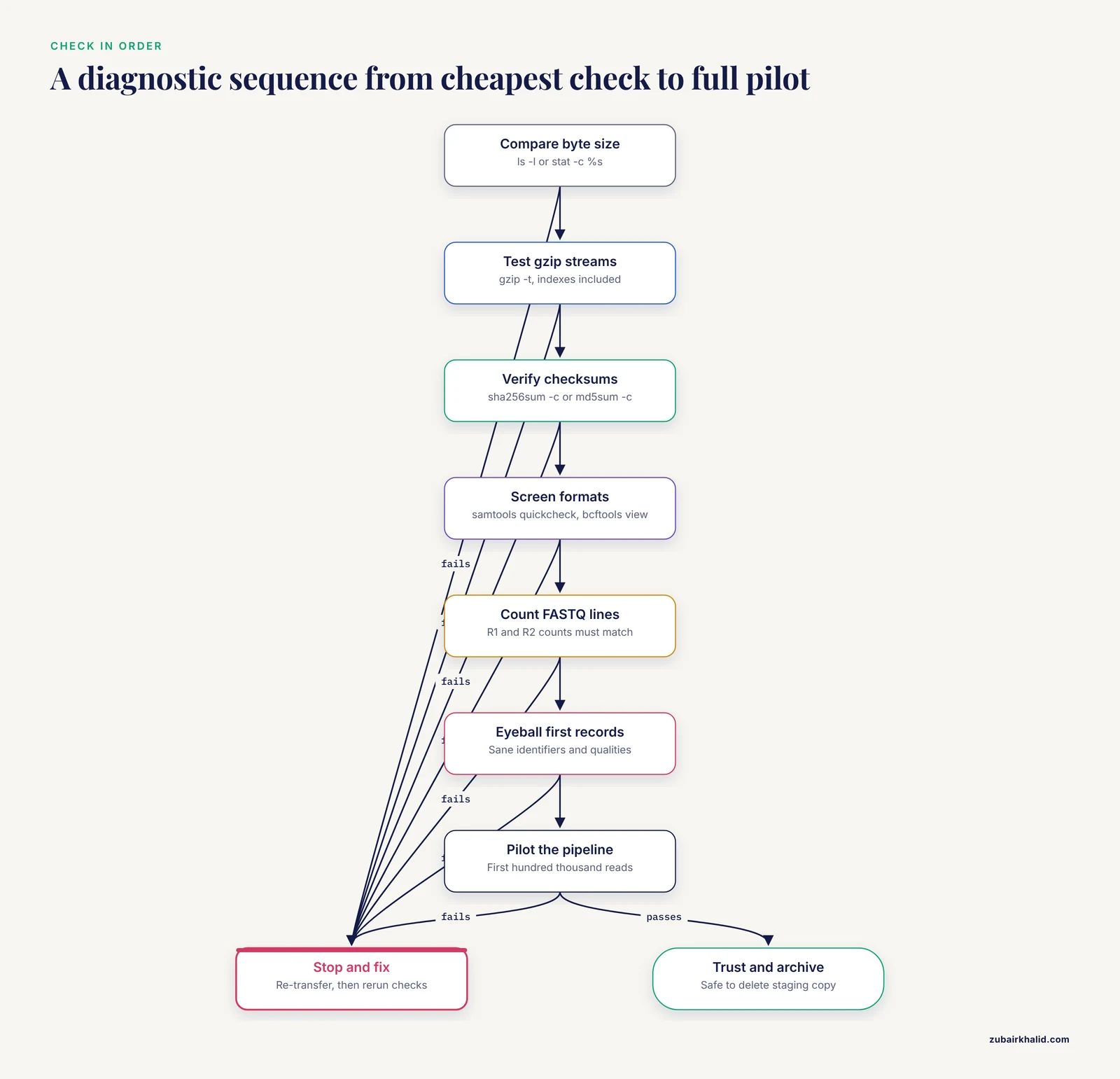
Run these in order and stop at the first failure, because each step is cheaper than the next.
- Compare byte size with the source record using ls -l or stat -c %s.
- Run gzip -t on every compressed file, indexes included.
- Verify checksums against the sender's sums with sha256sum -c or md5sum -c.
- Screen formats with samtools quickcheck and bcftools view redirected to /dev/null.
- Count FASTQ lines and confirm R1 and R2 read counts are equal.
- Eyeball the first records for sane identifiers and quality strings.
- Pilot the full pipeline on the first hundred thousand reads, for example zcat piped through head -n 400000, then trust the files and archive them.
Only after step seven passes should anyone delete a transfer staging copy or consider the original disposable.
How to Fix the Damage
Truncation has no in-place repair. A decoder stops at the break because the bytes after it do not exist, and no flag reconstructs them. The fix is always replacement, and the salvage options below only recover what survived.
If you need partial data while a re-transfer queues, recover the intact prefix of a compressed FASTQ:
zcat broken.fastq.gz > salvaged.fastq 2> salvage.errzcat writes every decompressible record, then errors at the break. Trim the salvage to the last complete four-line record, recompute its checksum, and document exactly how many reads were lost. Caution: keep the original .gz untouched, and never gunzip in place on the only copy, because a failed decompression that removes the input turns a truncated file into nothing.
For everything else, replace rather than repair:
- Re-transfer with rsync -aP, then prove the result with rsync -rcn before use.
- Redownload from the source archive, and use a mirror when one exists. For archive-format runs, run vdb-validate first, then refetch only the failing objects.
- A BAM missing its end-of-file marker gets recopied, or regenerated from the FASTQ if no source copy survives.
- When every file mismatches, suspect convention or transfer mode before corruption. Test the uncompressed-stream hash, confirm the transfer was binary, then ask the sender to regenerate sums from their copy.
- After any fix, update the manifest with the new sums, note the incident in the project log, and rerun the format checks before the pipeline starts.
Never patch a file to make its size match a record. A size that agrees with a broken payload is worse than an honest mismatch, because it hides the failure one stage deeper.
Prevention: Make Corruption Impossible to Miss
Checksum at every boundary. Generate a manifest on receipt, verify after any archival copy, verify before deleting a source, and verify after every restore from backup. A restore you have not verified is a hope, not a backup.
find run1 -type f -print0 | xargs -0 sha256sum > run1.sha256Write the convention down. A README inside each data folder stating whether sums describe compressed or decompressed bytes prevents the most recurring false alarm in this domain.
Make raw data read-only. Removing or renaming a file depends on the write bit of its directory, so chmod a-w on the raw data directory prevents deletion and renaming, and chmod a-w on the files prevents in-place edits. The owner can undo this, and root bypasses it, which is the right trade-off for daily work. chattr +i locks harder but requires root and confuses some backup tooling, so reserve it for genuinely frozen archives.
Verify before you delete. Gate every cleanup on a passing sha256sum -c against the manifest, never on a visual glance or a file count.
Schedule verification. A weekly cron entry finds silent bit rot before your pipeline does:
0 2 * * 0 cd /archive/reads && sha256sum -c manifest.sha256 >> /var/log/verify.log 2>&1Compare mirrors periodically. rsync -rcn between primary and mirror storage lists any drift without copying a byte.
Separate storage classes. Keep raw/ immutable, processed/ expendable and rebuildable, and results/ backed up. Follow the 3-2-1 rule, three copies, two kinds of media, one offsite, and test the restore path at least once.
Keep vendor checksums and run manifests from the sequencer alongside the data, and regenerate index files together with the data files they describe, so a stale .fai, .bai, or .tbi never masquerades as corruption.
Common Mistakes and Limitations
- Trusting size alone. Two files can share a size and differ in bytes after a swap or partial overwrite. Size is a screening test, checksums are proof.
- Hashing a file that is still being written. The digest changes under you and the mismatch means nothing. Wait for the transfer to close cleanly.
- Mixing conventions across a project. Half the manifests describe compressed bytes and half describe decompressed bytes, and every future verification becomes noise. Decide once, write it down.
- Treating a passing checksum as data quality. A perfectly transferred file can still be a failed run, a swapped sample, or a contaminated library. Sample identity and quality control live elsewhere.
- Overreacting to MD5 collision research. Collisions are engineered attacks, not accidents, and they do not change how MD5 behaves as an accidental-corruption detector on files you already possess.
- Ignoring exit codes. md5sum -c and sha256sum -c return nonzero on any failure, so scripts can enforce integrity with a single conditional.
- Deleting sources after a glance. The cheapest insurance in bioinformatics is one checksum pass before rm.
- Forgetting indexes. A truncated .bai or .tbi passes casual inspection and fails only on a region query, so test indexes with the same rigor as the data.
On limitations. Checksums detect accidental damage, not deliberate tampering, and they say nothing about biological quality or correct labeling. Capacity arithmetic varies with platform, chemistry, and project design, so treat every estimate here as a starting point. Individual retention, validation, and capacity decisions depend on institutional policy, so confirm specifics with your research computing group or core facility.
Frequently Asked Questions
Is MD5 still good enough for sequencing files?
Yes, for detecting accidental corruption MD5 remains dependable, and most public archives publish MD5 sums. Prefer SHA-256 for new manifests and accept MD5 whenever that is what the sender provides.
Why does my checksum pass but my pipeline still fail?
Because a checksum proves byte identity, not decodability or correctness. Run gzip -t, samtools quickcheck, and read-count checks next, then examine pairing and the sample sheet.
How can I verify many large FASTQ files quickly?
Pipe find into xargs with -P to hash in parallel across cores. The cost is reading every byte once, so verify at transfer time with rsync -c and avoid a second full read later.
Why do df and du disagree about free space?
df reports whole-volume usage while du sums visible files, and deleted-but-open files, snapshots, reserved blocks, hard links, and quotas sit between them. lsof +L1 and df -i settle most cases.
Can a truncated FASTQ file be repaired?
No, the bytes past the break do not exist. Salvage the intact prefix, trim to a complete four-line record, and re-transfer the original.
Should I checksum the .gz file or the decompressed FASTQ?
Checksum the file exactly as delivered unless the provider published sums for the decompressed stream. Test the alternative with gzip -dc piped into md5sum before assuming corruption.
How much disk space does a 30x human genome need?
Plan roughly 60 to 90 GB of compressed FASTQ per sample under 2 x 150 bp assumptions, a similar footprint for BAM or less for CRAM, and at least double the input size as working space. Confirm against site quotas.
What is the safest way to free space on a shared cluster?
Verify checksums on anything you intend to keep, move candidates to a dated trash directory, review, then delete, and never rm with wildcards on shared mounts. Ask administrators about purge schedules and quotas first.