CD-Search vs InterProScan: Key Differences
By Dr. Zubair Khalid, DVM, MS, PhD ·

CD-Search checks a protein sequence against one curated library of conserved domains, NCBI's Conserved Domain Database, and returns a fast, graphical map of the domains it finds. InterProScan checks the same sequence against many member databases of the InterPro consortium at once, then merges their hits into integrated, pipeline-ready annotations that can include Gene Ontology terms.
The difference between CD-Search and InterProScan comes down to scope, interface, and output. The rule of thumb for choosing is just as short. Use CD-Search when you have a handful of proteins and want a quick, readable answer inside the NCBI ecosystem. Use InterProScan when you have many proteins, need the widest coverage across annotation libraries, or need structured output for an automated pipeline. The two tools are complements rather than rivals, and careful studies usually run both.
This article explains each tool on its own terms, compares it on the criteria that decide real projects, works through concrete scenarios, and lists the mix-ups that waste the most time.
CD-Search and InterProScan at a Glance
| Feature | CD-Search | InterProScan |
|---|---|---|
| Steward | NCBI | EMBL-EBI (InterPro consortium) |
| Underlying resource | Conserved Domain Database (CDD), one library of PSSM models | InterPro, an integration of many member databases |
| Search engines | RPS-BLAST against prebuilt PSSM models | A panel of methods, mostly HMMER3 profile HMMs, plus regular expressions, RPS-BLAST for CDD, and feature predictors |
| Primary interface | Web page first, batch web tool, optional BLAST+ command line | Command line first, plus a web sequence search at EMBL-EBI |
| Typical input | One protein to a few thousand, FASTA or accession | One protein to whole proteomes, FASTA files |
| Statistical framework | Single E-value framework, default cutoff 0.01 | Per-database thresholds, no single global cutoff |
| Output | Graphical domain architecture, alignments, E-values, NCBI links | TSV, GFF3, XML, JSON, with InterPro accessions, GO terms, pathways |
| GO terms | Not built in | Available with a flag |
| Precalculated results | Yes, for proteins held in NCBI databases (SPARCLE) | Yes, via a match lookup service, can be disabled |
| Speed | Seconds per protein on NCBI servers | Minutes to hours, scales with input size and analyses enabled |
| Best suited for | Quick checks, single-protein triage, teaching | Genome annotation pipelines, publication-grade broad annotation |
| Cost | Free | Free, requires local compute for large jobs |
Every row in that table is unpacked in the sections below.
A 60-Second Primer on Conserved Domains
Proteins are chains of amino acids, and most large proteins are built from modules called domains. A domain is a segment of the chain that folds and often functions semi-independently, for example by gripping ATP, cutting a chemical bond, or binding DNA. A protein can contain a single domain or a string of several, and that arrangement is called its domain architecture.
Three related terms appear constantly in annotation work. A motif is a short sequence pattern, sometimes just a handful of residues, that marks a functional spot. A family is the broader group of proteins descended from a common ancestor. A conserved site is a small set of positions inside a domain where function depends on specific amino acids.
Domain content is usually the first real evidence about what an uncharacterized protein does. When a genome annotation pipeline outputs a hypothetical protein, defined as a predicted protein with no experimentally characterized function, its domain architecture is the fastest route to a testable hypothesis. Both tools in this article answer the same question, which known domains does this sequence contain, but they draw on different libraries, run in different places, and produce different kinds of output.
What Is NCBI CD-Search?
CD-Search, short for Conserved Domain Search, is NCBI's web service for finding conserved domains in a protein sequence. It runs on the NCBI Structure website, next to the molecular structure databases and Cn3D, NCBI's 3D structure viewer. You can reach it directly at https://www.ncbi.nlm.nih.gov/Structure/cdd/wrpsb.cgi, or from any protein record in Entrez, NCBI's unified search system across its databases.
The service is built for speed and readability. You paste one sequence, submit, and get a labeled graphic of your domain architecture within seconds, along with alignments, statistics, and links into the rest of NCBI.
The Conserved Domain Database Behind It
CD-Search queries the Conserved Domain Database (CDD), a curated collection of multiple sequence alignments that define conserved domain models. CDD combines models curated by NCBI with imported models from Pfam, SMART, COG, and TIGRFAMs, which makes it a hybrid library rather than a purely in-house one.
Each model is stored as a position-specific scoring matrix (PSSM). A PSSM is a table that records, for every column of the domain's alignment, which amino acids are conserved and which tolerate substitution. That position-specific memory lets the search recognize remote relatives that a plain word-based BLAST search would miss.
The engine underneath is RPS-BLAST, reverse position-specific BLAST. Standard BLAST compares a query sequence against a database of sequences. RPS-BLAST reverses the logic and compares a query sequence against a database of PSSMs. Hits return with bit scores, a normalized measure where higher is better, and E-values, which estimate how many matches of that quality you would expect to see by chance in a database of this size, so smaller means more significant. The live CD-Search service applies a default E-value cutoff of 0.01.
What a CD-Search Report Shows
CD-Search organizes hits in a hierarchy, and reading that hierarchy correctly is most of the skill involved. Specific hits match a curated model closely enough to support a functional annotation. Superfamily hits establish only a distant, often structural relationship, and they should never be reported as functional assignments. Multi-domain models cover two or more domains within a single unit.
The report draws your domain architecture as colored bars along the query sequence. Clicking a bar opens the alignment between your sequence and the model consensus, with conserved functional sites annotated. From there you can move to 3D structures, to the CDD classification tree that arranges related domains from ancient superfamilies down to specific families, and to the Entrez records of related proteins.
Live Search vs Precomputed Results
CD-Search runs in two modes. A live search computes fresh RPS-BLAST results for any sequence you paste. Precomputed results already exist for proteins held in NCBI databases such as RefSeq, NCBI's curated reference sequences, so an accession often returns stored annotation instantly. NCBI's SPARCLE resource builds on those precomputed annotations and lets you browse and compare domain architectures across many proteins, which is useful when you want to see which partner domains a given domain tends to occur with.
How to Use NCBI CD-Search, Step by Step
Treat this section as a compact NCBI databases guide for the conserved-domain corner of NCBI. Five resources matter: the CD-Search web tool, Batch CD-Search, the CDD FTP site, SPARCLE, and the BLAST+ toolkit.
Single Protein Search
- Open the CD-Search page on the NCBI Structure website.
- Enter a protein sequence in FASTA format (a header line starting with ">" followed by the amino acid sequence), an accession number, or a raw sequence.
- Leave the default E-value threshold of 0.01 unless you have a specific reason to change it.
- Submit and read the graphic. Start with specific hits, then check whether any superfamily hit suggests something the specific hits missed.
- Click each domain bar to inspect the alignment and the annotated conserved sites.
- Follow the links to structures and the classification tree when you need depth.
Batch CD-Search for Many Proteins
The Batch CD-Search page accepts a FASTA file containing many proteins and returns a tab-delimited summary together with a graphical hit list. Larger jobs can go through the Batch Web CD-Search service, which runs asynchronously and returns results as downloadable files. For a few hundred to a few thousand proteins, this is the middle path between the single-sequence form and a local installation.
Command-Line Search With rpsbblast
For fully scripted work, install NCBI BLAST+, download the preformatted CDD databases (for example Cdd_NCBI or Cdd_PFAM) from the CDD FTP site, and run RPS-BLAST locally:
rpsbblast -query proteins.faa -db Cdd_NCBI -evalue 0.01 -outfmt "6 qseqid sseqid evalue bitscore" -out cdd_hits.tsvThe tabular output has no graphics, so the usual pattern is the web tool for exploration and rpsbblast for automation. Because the FTP data are versioned, a local rpsbblast run is also the most reproducible way to use CDD.
Reading and Saving Results
Three habits make CD-Search results more trustworthy. First, check the hit type before you write anything down, because specific and superfamily hits support very different claims. Second, open the alignment and confirm that your sequence actually covers the conserved core of the model, not just a fragment at the edge. Third, record the CDD version and the date of the search, because live results change as the database is updated. For machine-readable output at scale, use Batch CD-Search or rpsbblast rather than copying from the web page.
What Is InterProScan?
InterProScan is EMBL-EBI's command-line tool for scanning protein sequences against the member databases of InterPro, an integrated resource that unifies protein family, domain, and site annotations from many databases into single, cross-referenced entries. You can also run a single sequence through the sequence search on the InterPro website at https://www.ebi.ac.uk/interpro/, which performs the same kind of analysis on EMBL-EBI servers, but the software is designed for local, large-scale runs.
The InterPro Consortium and Member Databases
InterPro integrates signatures from member databases. The roster has historically included Pfam, PANTHER, SMART, PROSITE, CATH-Gene3D, TIGRFAMs, HAMAP, PIRSF, and CDD, among others, and it changes between releases, so check the release notes for the version you install. Alongside the member databases, InterProScan runs utility analyses such as MobiDB-lite for intrinsically disordered regions, segments of protein that lack a fixed 3D structure, and Coils for coiled-coil prediction. Signal peptide and membrane topology predictors such as SignalP, Phobius, and TMHMM must be downloaded and installed separately for licensing reasons before InterProScan can call them.
The integration is the point. Instead of five rows from five libraries that you must reconcile by hand, an InterPro entry states that these signatures describe the same family, domain, or site.
InterPro Entry Types
InterPro entries come in several types, and each supports a different claim. A Family entry groups whole proteins that share ancestry. A Domain entry describes a conserved, foldable unit. A Repeat entry describes short recurring segments. A Site entry pins down small functional regions such as active sites. A Homologous superfamily entry, drawn largely from structural classifications, groups domains that share a common fold. Knowing the type tells you how far you can push the interpretation.
How InterProScan Works Under the Hood
InterProScan is not one algorithm. It orchestrates a panel of them. Most member database searches use HMMER3, which compares your sequence against profile hidden Markov models (HMMs), probabilistic models of a multiple sequence alignment that capture conserved positions together with the pattern of insertions and deletions. PROSITE patterns are regular expressions. The CDD analysis inside InterProScan uses RPS-BLAST, the same engine CD-Search uses. Each analysis applies its own calibrated statistical thresholds, so InterProScan has no single global E-value cutoff.
After the scans, InterProScan maps hits to InterPro entries and, with the right options, to Gene Ontology (GO) terms, a controlled vocabulary that describes gene products across molecular function, biological process, and cellular component.
How to Run InterProScan
Installation
Download the release from EMBL-EBI, unpack it, and keep the bundled data directory next to the interproscan.sh script. You need a supported Java runtime, generous RAM and disk space for the databases, and, for proteome-scale work, a multicore server. The tool is free, and the release notes list the exact prerequisites for each version.
A Basic Command
./interproscan.sh -i proteins.faa -f TSV,GFF3 -goterms -pa -iprlookup -b proteome_annotation -cpu 16The flags that matter most:
- -i sets the input FASTA file.
- -f sets the output formats, TSV, GFF3, XML, or JSON.
- -goterms adds GO term predictions.
- -pa adds pathway annotations where available.
- -iprlookup maps signatures to their InterPro entries.
- -b sets the basename for the output files.
- -cpu sets the number of threads.
- -appl restricts the run to named analyses, for example -appl Pfam, which is the fastest route to a Pfam-only scan.
- -T points to a scratch directory for intermediate files.
By default, InterProScan first checks a precalculated match lookup service, which returns stored results for known sequences and skips recomputation. Disable that with -dp when you need a fully local, self-contained run.
Reading the TSV Output
| Column | Content |
|---|---|
| 1 | Protein accession |
| 2 | Sequence MD5 checksum, a fingerprint that identifies the exact sequence |
| 3 | Sequence length in amino acids |
| 4 | Analysis, meaning the member database, for example Pfam |
| 5 | Signature accession, for example a Pfam family identifier |
| 6 | Signature description |
| 7 | Match start position |
| 8 | Match stop position |
| 9 | Match score, usually an E-value |
| 10 | Match status flag |
| 11 | Run date |
| 12 | InterPro accession |
| 13 | InterPro description |
With -goterms and -pa, further columns carry GO terms and pathway cross-references. One protein typically produces many rows, one per signature match, and the InterPro columns group those rows into unified entries.
Practical Tips for Large Runs
Trim before you scale. Restricting analyses with -appl to the libraries you actually need can cut runtime dramatically. Give the job enough threads with -cpu and a scratch directory with real free space through -T. Expect a bacterial proteome to take hours, not minutes, when everything is enabled. Save the GFF3 for genome browsers and the TSV for scripts, and archive the exact InterProScan release number with your results, because the output is only reproducible relative to that release.
CD-Search vs InterProScan: Head-to-Head
Coverage and Sensitivity
InterProScan covers more annotation space by design, because it runs many libraries, and CDD itself is among them. CD-Search covers one library deeply. For a well-characterized domain, both tools usually find it. For divergent or unusual proteins, the width of the net matters, and InterProScan casts the wider one. The tradeoff runs the other way for depth of curation. CDD models come with curated alignments, an ancestor-descendant classification, and annotated conserved sites that are easy to explore on the NCBI site.
Methods and Thresholds
CD-Search applies one engine, RPS-BLAST, and one default E-value framework, 0.01. InterProScan applies many engines, mostly HMMER3 profile HMMs, each with its own thresholds. That makes CD-Search results simpler to reason about and InterProScan results richer but heterogeneous. One consequence matters in daily work. E-values from different tools and libraries are not on a common scale, so never rank a Pfam HMM hit against a CDD PSSM hit by E-value alone. Compare their overlap on the sequence instead.
Speed and Scale
A single CD-Search query returns in seconds on NCBI servers, and the batch tool handles hundreds to a few thousand proteins per submission. InterProScan runs locally, and runtime scales with sequence count, the number of enabled analyses, and available threads. A bacterial proteome of a few thousand proteins can take hours on a multicore server. The precalculated lookup service shortens runs for known sequences, but a fully local run with everything enabled is the slow case.
Output and Downstream Use
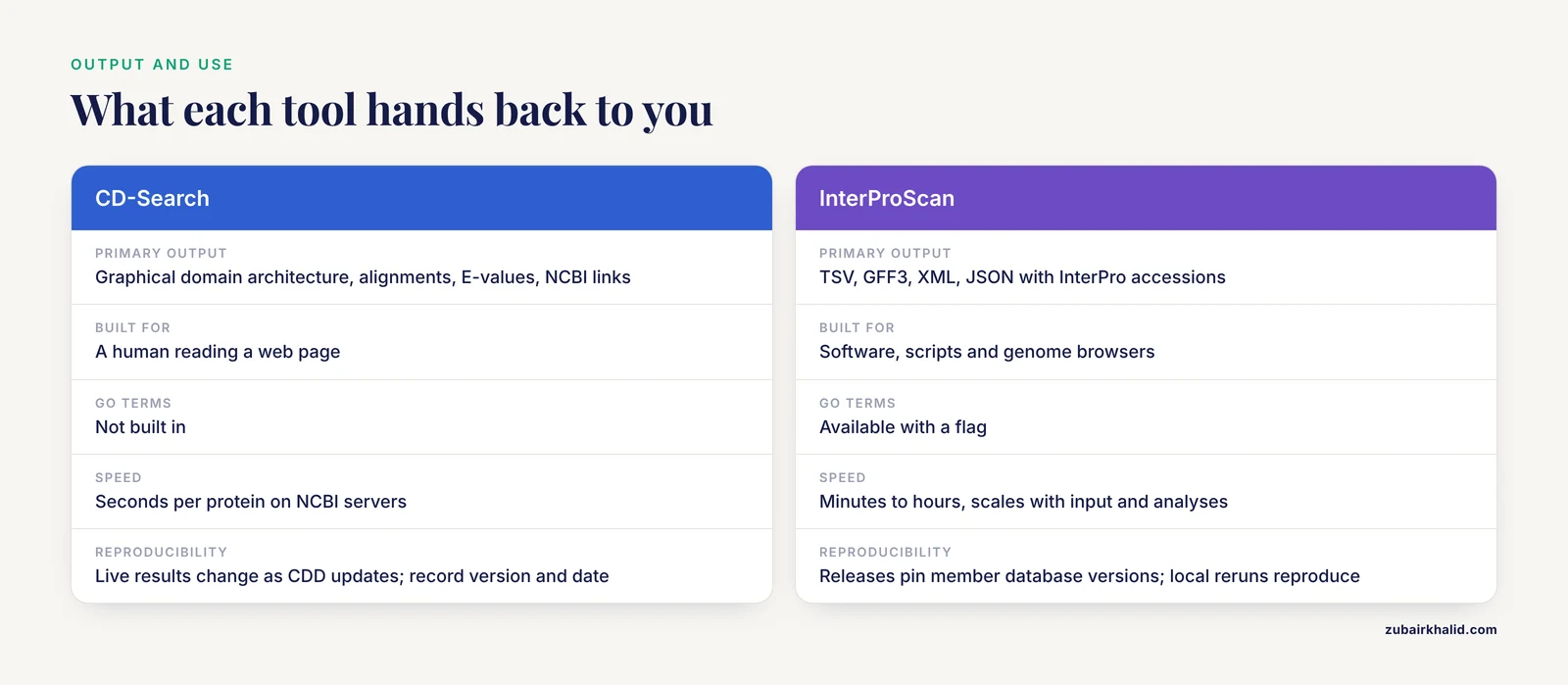
CD-Search output is built for a human reading a web page, with graphics, alignments, and links. The batch tool adds tabular output, but pipelines built on CD-Search remain the exception. InterProScan output is built for software. TSV feeds spreadsheets and scripts, GFF3 feeds genome browsers, XML and JSON feed programs, and the GO terms and pathway links feed enrichment analyses and annotation pipelines directly.
Reproducibility and Versioning
InterProScan releases pin the versions of every member database, and the tool runs locally, so rerunning the same release on the same input reproduces the output. CD-Search live results depend on the current CDD release on NCBI servers, so record the CDD version and the access date whenever you report results. Versioned CDD data on the FTP site make local rpsbblast runs reproducible in the same way.
Ecosystem and Integration
CD-Search sits inside NCBI, one click from Entrez protein records, RefSeq, BLAST, taxonomy, and structures. InterProScan sits inside the EMBL-EBI ecosystem, connected to InterPro entries, Pfam, GO, and pathway resources. If your annotation will live in NCBI-facing workflows, CD-Search is the natural neighbor. If it feeds GO-based analyses or EBI resources, InterProScan is.
Learning Curve and Support
CD-Search needs almost no setup knowledge. If you can paste a sequence into a web form, you can use it. InterProScan demands command-line comfort, Java, and file management, and its documentation, release notes, and issue trackers assume that background. Neither tool is hard by bioinformatics standards, but the entry cost differs by an order of magnitude, and that difference alone decides many tool choices for small projects.
Agreement, Disagreement, and How to Adjudicate
When both tools call the same domain family over overlapping coordinates, annotate it and move on. When they disagree on boundaries, report the overlapping range and say which libraries contributed. When one tool reports a domain the other misses, check three things before you believe or dismiss it, the hit type (specific versus superfamily), the score, and whether the second library even contains a model for that domain. Absence of a model in a library is not evidence that a domain is absent from the protein.
Where Domain Annotation Fits in a Genome Workflow
A typical bacterial genome project moves through five stages. The genome is sequenced and assembled. Genes are predicted, and the gene caller outputs protein sequences in FASTA format. Domain annotation runs next, and this is where CD-Search and InterProScan live. GO terms and pathways get attached, usually through InterProScan, to support enrichment analyses. Finally, interesting proteins move on to BLAST comparisons, structure prediction, and laboratory follow-up.
Domain annotation carries so much weight in that workflow because it converts raw predicted proteins into hypotheses about function. Everything downstream, from enzyme naming to docking studies, inherits its quality from this step.
When to Use CD-Search
CD-Search is the right first move in these situations:
- You have one to a few proteins and want an answer in the next five minutes.
- The protein came from GenBank or RefSeq, and you want its domains without leaving NCBI.
- You need a curated alignment, annotated conserved sites, and the classification tree for a specific domain family.
- You are teaching, triaging, or sanity-checking results from a larger pipeline.
- You want to browse precomputed domain architectures across RefSeq proteins through SPARCLE.
CD-Search is also the gentlest on-ramp to domain annotation. No installation, no Java, no database downloads, and a graphic that makes the concept of a domain architecture obvious in one glance.
When to Use InterProScan
InterProScan earns its setup cost in these situations:
- You are annotating hundreds to thousands of proteins, up to a whole proteome.
- You need GO terms and pathway links for downstream enrichment or genome annotation.
- You need structured outputs, TSV, GFF3, XML, or JSON, that pipelines and genome browsers consume directly.
- You need reproducible, versioned, offline runs for a paper or a production pipeline.
- You want maximum coverage across member libraries in a single pass, with signatures reconciled into InterPro entries.
If your deliverable is a spreadsheet of annotations for a genome, InterProScan is the tool that produces it.
CD-Search or InterProScan: The Decision in One Paragraph
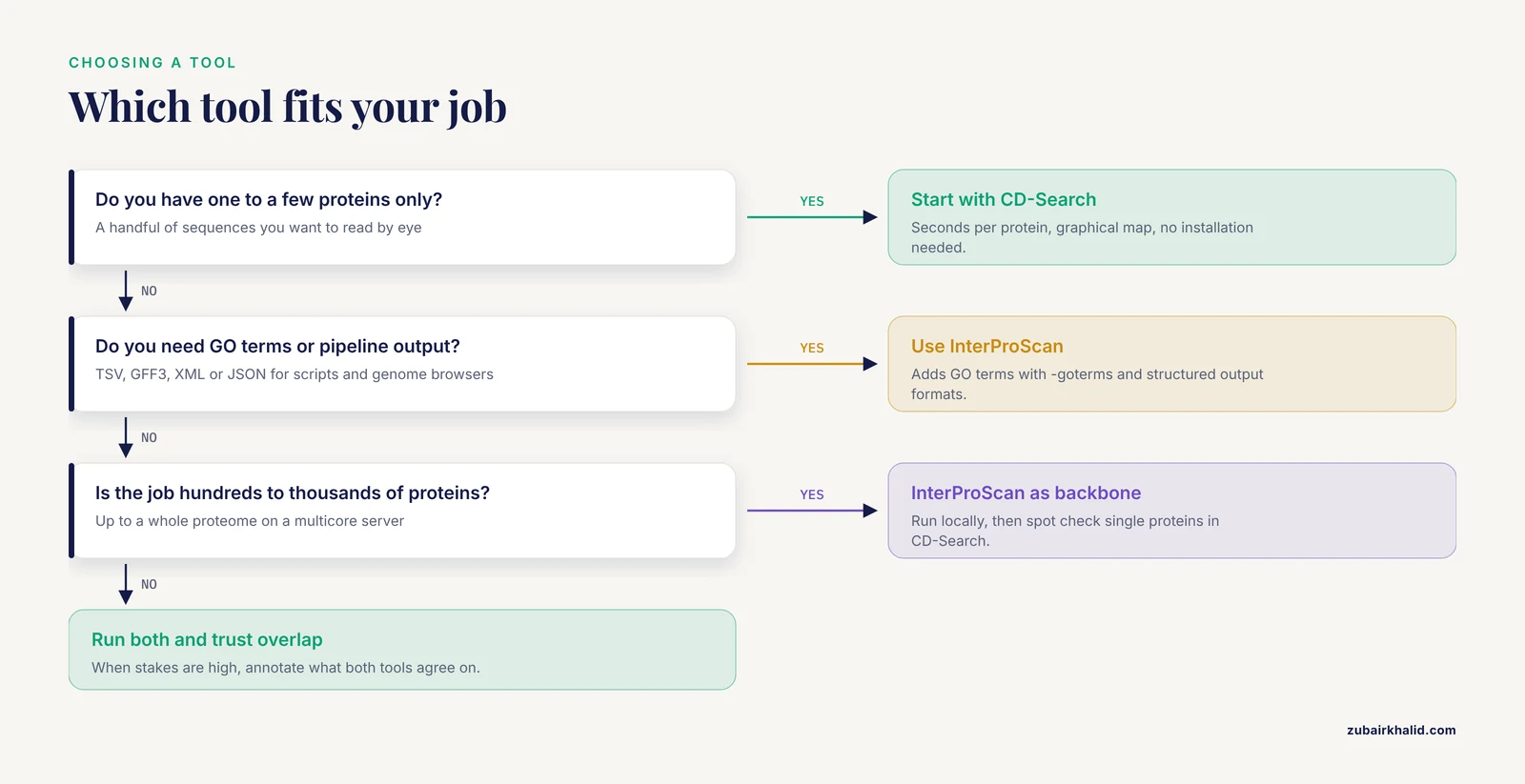
If you are weighing CD-Search or InterProScan for a project, decide on two axes, scale and downstream use. Small scale, human reading, NCBI context, choose CD-Search. Large scale, machine reading, GO terms, reproducibility, choose InterProScan. When the stakes are high, as with assigning a function to a hypothetical protein, use both and trust the overlap.
Using CD-Search and InterProScan Together
The strongest workflow treats the two tools as independent witnesses. Run CD-Search for the NCBI-native read on the domain architecture, then run InterProScan, or at minimum Pfam, for a second opinion from differently built models. Domains both agree on are safe to annotate. Disagreements mark the regions to investigate with alignments and structural modeling.
Published characterizations of hypothetical proteins follow exactly this pattern. A monkeypox virus study and a Shigella dysenteriae study both used NCBI-CD Search, Pfam, and InterProScan in parallel as the functional annotation step, then built structural models on top of the consensus [1] [2].
Worked Scenarios
Scenario 1: One Unknown Protein From a Bacterial Genome
You have a 161-residue hypothetical protein from Shigella dysenteriae, accession WP_128879999.1. Paste it into CD-Search and you have a domain picture in under a minute. Then run InterProScan with -goterms to attach GO terms. In the published analysis of this exact protein, NCBI-CD Search, Pfam, and InterProScan all predicted an amidase effector protein 4 (Tae4) of the type-VI secretion system (T6SS), a bacterial injection machine used in competition between bacteria, and a multiple sequence alignment of homologous proteins supported the call [2]. Three independent libraries agreeing, not any single hit, is what made the annotation defensible.
Scenario 2: Annotating a Whole Proteome
You have a few thousand proteins from a newly assembled bacterial genome. Run InterProScan locally with TSV and GFF3 output, GO terms, and pathway annotations enabled. Load the GFF3 into a genome browser to see domains in genomic context. For spot checks and figures, paste individual proteins into CD-Search, which returns publication-ready graphics in seconds. Batch CD-Search can cross-check the full set, but InterProScan is the backbone at this scale.
Scenario 3: Publication-Grade Characterization of an Outbreak Protein
You are characterizing a hypothetical protein from a monkeypox virus genome, a 49,147.14 Da protein with a theoretical pI of 5.62, and you plan structural work downstream. The published workflow used NCBI-CD Search, Pfam, and InterProScan to establish that the protein contains a Chordopox_A20R domain, then used that functional anchor for homology modeling, meaning building a 3D model from a template structure of a homolog, on PDB entry 6zyc.1, followed by model quality checks and protein-ligand docking [1]. The domain call came first because every later step, template selection, binding-site interpretation, and docking, depended on it.
Common Mistakes and Limitations
- Reading superfamily hits as functional assignments. A superfamily hit says the domain is distantly related, not what it does. Anchor annotations on specific hits.
- Ranking E-values across tools and libraries. A Pfam HMM E-value and a CDD PSSM E-value are not comparable numbers. Judge agreement by overlap on the sequence.
- Running InterProScan without -goterms and then concluding it provides no GO terms. GO terms are opt-in.
- Counting domain bars without reading the hierarchy. A multi-domain model and its child models can both appear, and overlapping hits are normal. Read the report structure before counting anything.
- Submitting nucleotide sequence. Both tools expect protein. Translate coding sequences first, for example with NCBI ORFfinder.
- Under-resourcing InterProScan. It needs a supported Java runtime, substantial RAM and disk, and a scratch directory. Proteome-scale runs belong on a server, not a laptop.
- Ignoring version drift. Live CD-Search results change as CDD updates, so record the version and date. Pin the InterProScan release in pipelines and report it in your methods section.
- Confusing CDD with CD-Search. CDD is the database of domain models. CD-Search is the tool that searches your sequence against it. rpsbblast and the batch tool are other interfaces to the same resource.
- Reading disorder and coiled-coil predictions as domains. MobiDB-lite and Coils rows in InterProScan output describe sequence features, not conserved domains.
- Treating any hit as proof of function. Both tools annotate by homology, so every hit is a hypothesis. That is why published hypothetical protein studies pair their domain calls with homology models and quality checks before drawing conclusions [1] [2]. Computational calls need experimental or structural follow-up before they become claims about biology.
Frequently Asked Questions
What is the main difference between CD-Search and InterProScan?
CD-Search searches one curated library, NCBI's Conserved Domain Database, through a web-first interface, while InterProScan searches many member databases at once through a command-line tool and integrates the hits into unified annotations.
Is CD-Search free, and do I need to install anything?
It is free and runs in the browser with no installation. For scripted work you can optionally install NCBI BLAST+ and run rpsbblast against CDD databases downloaded from the CDD FTP site.
Can I run InterProScan on my laptop?
For a few sequences, yes, though the databases are large and runs are slow. For proteomes, use a multicore server, or submit a single sequence through the sequence search on the EMBL-EBI InterPro website.
Why do CD-Search and InterProScan sometimes disagree?
They rely on different models and thresholds. Member libraries slice the same protein families differently, so boundaries, names, and borderline hits can differ. Agreement across tools raises confidence, and disagreement flags regions worth inspecting with alignments.
Does InterProScan include CDD?
Yes. CDD is one of the member databases InterProScan can run, alongside Pfam, PANTHER, SMART, PROSITE, and others.
Which tool should I use for a whole bacterial genome?
Use InterProScan locally, with TSV and GFF3 output and GO terms enabled, then use CD-Search for quick spot checks and graphics on individual proteins.
Sources
- In-silico approach to characterize the structure and function of a hypothetical protein of Monkeypox virus exploring Chordopox-A20R domain-containing protein activity.
- In Silico Characterization of a Hypothetical Protein from Shigella dysenteriae ATCC 12039 Reveals a Pathogenesis-Related Protein of the Type-VI Secretion System.