Why Does My NCBI CD-Search Return No Domains?
By Dr. Zubair Khalid, DVM, MS, PhD ·

The single most common cause of CD-Search no results is pasting a nucleotide sequence into a tool that only accepts protein sequences. The Conserved Domain Search service (CD-Search) compares your query against profile models of protein domains using the RPS-BLAST algorithm, so a DNA or RNA string will produce either an empty annotation track or a page that refuses the input outright [1]. Check this first before you suspect anything more exotic: confirm that your query contains only the 20 standard amino acid letters (with X for unknown residues) and that you did not paste the coding DNA sequence by mistake.
Once you have ruled that out, empty results usually come down to a small set of recurring causes. This article walks through each one, explains the mechanism behind the failure, gives you a diagnostic sequence to follow, and shows you what to do when the answer is genuinely that your protein has no recognizable conserved domain.
How CD-Search Works, and Why That Explains Empty Output
Understanding the engine behind the tool makes most failures self-explanatory. CD-Search is a web-based service that detects structural and functional domains in protein sequences. It uses BLAST heuristics for speed and searches a comprehensive collection of domain models, then displays results as domain architecture cartoons with pairwise alignments between your query and the consensus sequence of each domain model [2].
The domain models come from the Conserved Domain Database (CDD), the protein classification component of NCBI's Entrez retrieval system. CDD started as a mirror of public domain alignment collections such as SMART, Pfam and COG, and NCBI curators have progressively added and refined their own curated domain hierarchies on top of that foundation [3]. Each model is stored as a multiple sequence alignment from which a Position-Specific Score Matrix (PSSM, a table that captures which residues are tolerated at each position of the domain) is derived. Your query is scored against these PSSMs with RPS-BLAST, a profile-to-sequence version of BLAST [1].
Two consequences of this design drive most "no domains" outcomes:
- Because the search relies on BLAST heuristics rather than an exhaustive comparison, extremely divergent or fragmented queries can fail to be recognized even when a real relationship exists [2].
- Because annotation must be trustworthy at scale, the system applies conservative significance thresholds, and it may suppress borderline hits that lack support from a plausible domain architecture (the sequential order of conserved domains in a protein) [4].
So an empty result is a statement about what cleared a conservative, heuristic-driven comparison against a specific collection of models. It is not a statement that no domain exists in nature.
A Quick Diagnostic Sequence for CD-Search No Results
Run these checks in order. Each one takes under a minute and eliminates a whole class of causes.
- Verify the sequence type. Count the characters. If you see only A, C, G, T and N, you have submitted DNA. Convert the coding sequence to protein (for example with the ExPASy Translate tool or your translation step in the assembly pipeline) and resubmit the amino acid sequence.
- Check the formatting. Remove stray numbers, whitespace inside the sequence, stop symbols other than a trailing asterisk, and non-standard characters. A single corrupted block of text can invalidate the whole query.
- Confirm the sequence is a reasonable length. Most domain models cover 60 to 200 or more residues. A 15-residue peptide cannot reliably match a profile of that size. If your protein is short, treat a null result as expected behavior rather than a bug.
- Run the live search, not the precomputed view. If you looked up a protein accession and saw no graphical domain summary, the protein may simply lack pre-computed annotation. Submit the raw sequence for a live search instead [3].
- Loosen the threshold and turn on the rescue option. The live CD-Search pages let you choose a less conservative significance threshold and enable an automated algorithm that rescues borderline-scoring hits supported by the domain architecture, and suppresses weak hits that are not [4].
- Compare with a plain BLASTp. If BLASTp against the non-redundant protein database returns strong hits to characterized proteins but CD-Search returns nothing, your problem is probably threshold or model coverage, not sequence quality.
- Try the same query against other domain resources. Pfam and InterProScan use profile hidden Markov model methods that can pick up signals RPS-BLAST misses. In one published workflow, a hypothetical monkeypox virus protein was annotated with the Chordopox_A20R domain using NCBI CD-Search, Pfam and InterProScan together, which is exactly the cross-checking pattern to imitate [5].
- Check the service itself. If multiple well-annotated control proteins (for example human serum albumin or GFP) also return nothing, the problem is your session, browser or the service, not your sequence.
Troubleshooting Table
| Symptom | Likely cause | How to confirm | Fix |
|---|---|---|---|
| Page returns immediately with no annotation track | Nucleotide sequence submitted | Sequence contains only A, C, G, T, N | Translate the coding sequence, resubmit the protein |
| Error message or garbled output on submission | Invalid characters, embedded whitespace, line-number artifacts from a PDF or spreadsheet | Inspect the raw text in a plain text editor | Clean the FASTA, keep the header on one line, resubmit |
| Empty result for a peptide under about 50 residues | Sequence too short to match any full-length domain model | Compare query length to the span of domains in CDD | Annotate by motif search instead, or acknowledge that profile-based annotation is not appropriate |
| Empty result for a long, clean protein sequence | Genuinely no strong match to any CDD model, common for hypothetical proteins | Run BLASTp, check whether top hits are themselves hypothetical | Cross-check with Pfam and InterProScan, pursue structural prediction and function inference as in published workflows [5] |
| Result page appears but annotation looks sparse | Conservative thresholds or suppression of borderline hits | Enable the rescue option and a looser threshold on the live search page [4] | Resubmit with relaxed settings, then manually inspect borderline alignments |
| BLASTp finds clear homologs but CD-Search finds nothing | Extreme divergence or BLAST heuristic failure | Look at the top BLASTp hits and their own domain annotations | Use the domain architecture of homologs as indirect evidence, or search remote homologs with HMM-based tools |
| Accession page shows no domain graphics | No pre-computed annotation exists for that record | Run a live search with the sequence instead of browsing the record [3] | Submit the FASTA sequence directly to CD-Search |
| One or two sequences fail in a large batch | Rate limiting or transient API behavior in scripted pipelines | Re-run the failing accessions individually, as the synthaser package does for megasynth(et)ase analysis [6] | Add retry logic with backoff, split the job, run failures one at a time |
| Even control proteins return nothing | Service or session problem | Submit a well-annotated protein such as GFP | Refresh, try another browser, return later, or use the command-line rpsbblast application |
Causes From Most Common to Rarest
1. You submitted a nucleotide sequence
This is the classic first-day mistake and accounts for a large share of CD-Search no results reports. CD-Search and the RPS-BLAST algorithm behind it operate on protein sequences only [1]. NCBI's broader ecosystem can blur this line because BLAST accepts nucleotide queries and because protein-protein BLAST queries are automatically scanned for conserved domains by default [3], so users reasonably expect the same flexibility from the dedicated domain tool. It does not work that way. If your gene came out of a genome assembly or an amplification experiment, translate the open reading frame first. Every published example of successful CD-Search use, including the monkeypox hypothetical protein study and the Lactobacillus peptidase domain screen, submits derived amino acid sequences [5][7].
2. Sequence formatting and invalid characters
The second most common cause of cd-search no results is a broken submission. Common culprits include copying a sequence out of a PDF (which inserts soft hyphens and spaces), leaving column numbers from a spreadsheet interleaved with residues, pasting an entire FASTA file including comment lines in the middle of the sequence, or including translation artifacts such as internal stop characters. Check the character composition of your query before submission. A clean protein query contains uppercase amino acid one-letter codes, the letter X for ambiguous positions, and no punctuation. Hyphens from a multiple alignment should also be removed, since you are submitting a raw sequence, not an alignment row.
3. The sequence is too short
Domain models in CDD describe conserved regions that typically span dozens to hundreds of positions. A peptide of 10 or 20 residues will rarely clear the statistical threshold for matching such a profile, because short alignments occur by chance. If your query is a mature peptide, a signal peptide fragment, or an artificially truncated construct, expect an empty track. This is correct behavior, not a failure. For short sequences, look for smaller linear motifs with dedicated motif resources instead, or extend the query to include flanking regions that provide profile context. Note that some biologically meaningful small proteins do annotate. The Antheraea pernyi ecdysteroid-regulated 16 kDa protein study submitted a 146-residue polypeptide and CD-search correctly revealed an Npc2_like domain belonging to the MD-2-related lipid-recognition superfamily, including putative cholesterol and lipid binding sites [8]. A 146-residue query is small but large enough for a full domain, which is the relevant distinction.
4. The protein genuinely has no match in the database
This is the cause that surprises people most and it is the honest answer in many cases. CDD, for all its coverage, does not contain a model for every protein family in biology. Hypothetical proteins from emerging pathogens, lineage-specific innovations, and rapidly evolving families can fall outside every curated model. The monkeypox study is instructive: the protein of interest was explicitly labeled hypothetical, and its functional inference rested on CD-Search, Pfam and InterProScan jointly recovering a Chordopox_A20R domain, followed by structural modeling and validation [5]. In other words, even a positive call required convergent evidence from multiple methods. If all of those tools return nothing for your sequence, the most likely truth is that the protein is uncharacterized at the domain level, and you should say so in your notes or manuscript rather than forcing an annotation.
5. Conservative thresholds and suppressed borderline hits
NCBI deliberately tunes domain annotation for precision. When annotating proteins with domain footprints, conservative score or E-value thresholds are applied to RPS-BLAST hits to avoid large numbers of false positives, and hits close to the threshold can be suppressed when they lack support from a coherent domain architecture [4]. This means a real, biologically interesting, borderline match can be hidden by default. The fix is built into the tool. The automated rescue algorithm that recovers borderline hits well-supported by domain architecture, including tandem repeats reported at a stricter threshold, is available as a selectable option on the public CD-Search pages [4]. When a reviewer or colleague asks why your live search shows domains that a stricter run did not, this option is the explanation. The same tuning philosophy applies to subfamily assignment: NCBI-curated domains are organized into hierarchies, and heuristics based on sorted scores and domain-specific thresholds decide when to report a specific subfamily model versus a more generic parent model [9]. A result set that looks empty at the subfamily level may still contain a generic parent domain hit one level up the hierarchy, so always check whether the hit list includes broader models.
6. Low-complexity and compositionally biased regions
Profile methods can be misled by compositionally biased segments, such as poly-glutamine tracts, serine-rich windows, or transmembrane stretches with periodic hydrophobicity. Standard practice filters or masks low-complexity sequence before profile comparisons, in the same spirit as the SEG algorithm used in classic BLAST. Masking usually improves specificity, but it can contribute to missed detections when a real domain overlaps a low-complexity region or when the only conserved signal in a divergent domain sits in a biased segment. If you suspect this, run the search with the composition-sensitive settings adjusted where the interface allows, and compare the alignment extents of any hits you do recover against the low-complexity map of your query.
7. Extreme divergence and the limits of BLAST heuristics
CD-Search gains its interactive speed by using BLAST heuristics, and the alignment display embeds your query into the multiple alignment of the domain family so you can inspect the match in detail [2]. Heuristic speed has a cost. Very distant homologs, sequences with frameshifts relative to the model, or proteins whose alignment to the domain consensus is punctuated by long insertions can fail the seeding step and never generate a hit, even though the domain is present. When BLASTp against the non-redundant protein database still finds credible homologs, use those homologs as proxies: open their pre-computed domain annotations in Entrez, since results for protein sequences in Entrez are pre-calculated to provide links between proteins and domain models [3]. If three independent homologs all carry the same domain, your query almost certainly carries it too, and the failure is a detection sensitivity issue rather than biology.
8. Pre-computed results versus live search confusion
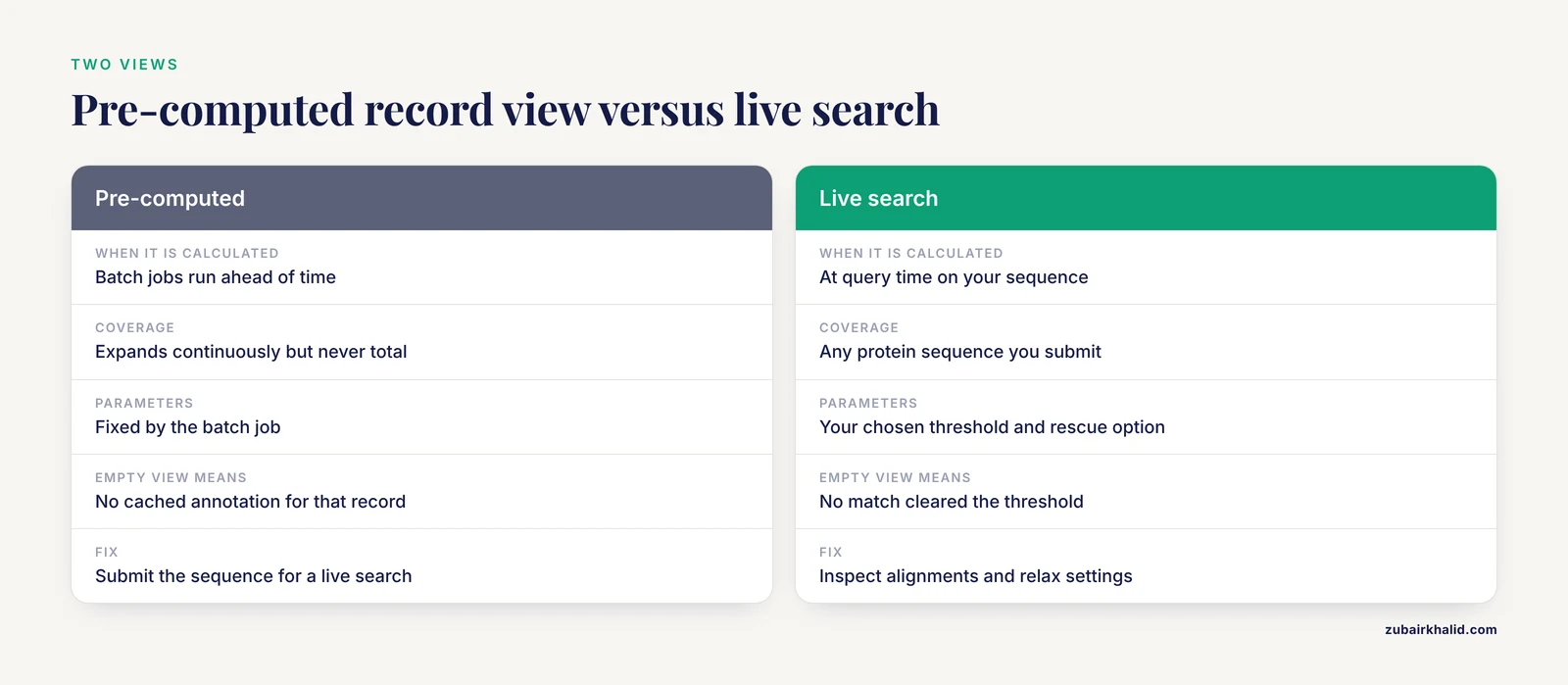
NCBI maintains two different views of domain annotation. Protein records in Entrez carry pre-computed domain links calculated by RPS-BLAST against CDD PSSMs [1], and the coverage of that pre-calculation expands continuously but is never total. A recently deposited protein, a protein from an unannotated genome, or a record outside the pre-computation set can display no domain graphics on its Entrez page while the identical sequence returns a rich result set in a live CD-Search run [3]. This mismatch produces a distinctive symptom: the database record looks empty, but a sequence submission looks fine. The resolution is always the same. For any protein you care about, submit the sequence itself for a live search rather than trusting the cached view of its record.
9. Batch and scripted use failures
Many pipelines call CD-Search programmatically. The synthaser package, for example, leverages NCBI's conserved domain search for remote prediction and classification of fungal polyketide synthases and nonribosomal peptide synthetases, supporting batch sequence analysis with rich textual and interactive visual output [6]. Remote batch use introduces failure modes that never appear in interactive sessions: rate limiting, timeouts on very long queries, HTML or XML parsing errors when the service updates its page structure, and network interruptions that leave individual sequences empty while the rest of the batch succeeds. The synthaser authors show that CD-Search-based classification can outperform tools based on profile hidden Markov models for these megasynthetase architectures [6], which justifies building a pipeline around it, but the pipeline should log per-sequence status, retry failed accessions with backoff, and never treat an empty result and a failed request as the same outcome. If you need full local control, the rpsbblast command-line application from NCBI runs the same RPS-BLAST comparison against CDD data you download yourself, eliminating remote rate limits entirely.
10. Service-side and interface issues
The least common cause is the simplest: the tool itself is temporarily unavailable, or a browser session caches a stale page. CD-Search has been served from the NCBI Structure web space since its introduction, accessed at http://www.ncbi.nlm.nih.gov/Structure/cdd/wrpsb.cgi in the original and subsequent descriptions of the service [3][2][1], and the live interface has been updated repeatedly over the years. If even universally annotated controls fail, submit the same control in a private browsing window, check whether the NCBI status feeds mention an outage, and fall back to the command-line rpsbblast route while you wait.
What To Do When CD-Search Still Returns Nothing
Suppose you have cleaned the sequence, confirmed it is a protein of reasonable length, run a live search with relaxed thresholds and the rescue option enabled, and still see no domains. You now have a defensible negative result, and there are several productive next moves.
Cross-check with HMM-based resources. Profile hidden Markov models capture position-specific conservation differently from PSSMs and can detect relationships RPS-BLAST misses. Pfam and InterProScan are the standard companions here, and published workflows routinely run them alongside CD-Search precisely so that a negative result from any single method is not the final word [5]. The Lactobacillus rhamnosus gluten-digestion study used NCBI CD-Search to screen peptidases for domains shared with known gluten-degrading enzymes [7], and CD Search has also been used at scale to annotate domains in host and pathogen interaction datasets [10], demonstrating that the tool performs well when its assumptions are met. The point of cross-checking is not redundancy for its own sake, it is that each method has a different sensitivity profile at the detection frontier.
Lean on homologs. A BLASTp search that returns characterized relatives lets you infer domain content by descent. Open the top hits in Entrez, inspect their pre-computed domain architectures [3], and note whether a conserved architecture persists across the family. This indirect evidence is weaker than a direct hit on your query and should be labeled as such in any write-up.
Move to structure. If sequence-level methods all fail, structure-level evidence may still exist. The monkeypox study built a three-dimensional model from a template, energy-minimized it, and validated it with standard quality assessment tools before drawing functional conclusions [5]. Structural similarity can reveal domain membership that sequence comparison misses, especially after hundreds of millions of years of divergence.
Report the negative result honestly. In a methods section, state the tool, the version or date, the database release, the threshold setting, and the fact that no significant matches were found. Reviewers respect a clean negative far more than an over-interpreted weak hit.
Interpreting the Level of Your Result, Not Just Its Presence
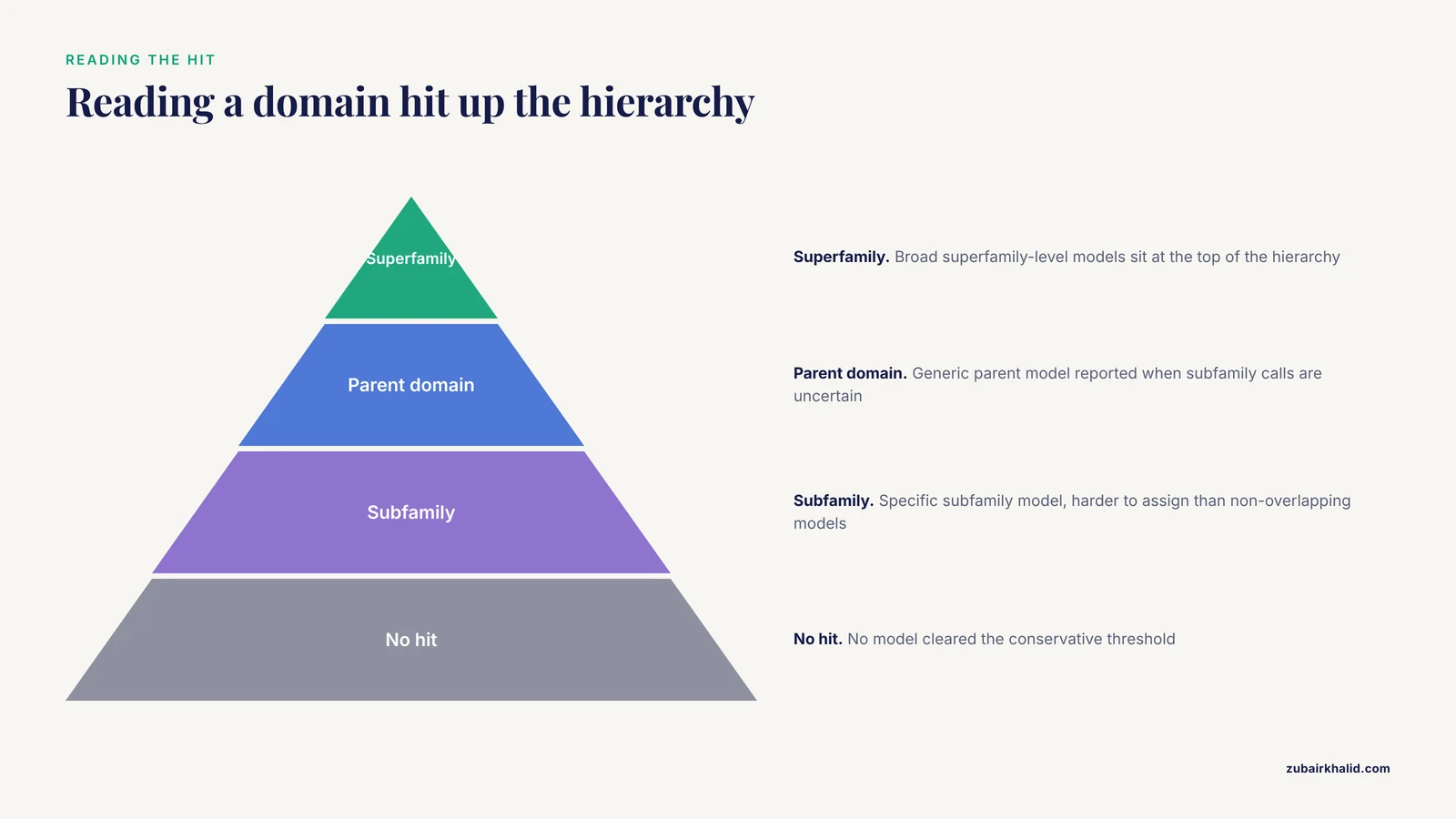
One more subtlety causes confusion that readers often misdiagnose as a null result. CDD organizes related models into hierarchies, from broad superfamily-level models down to specific subfamily models [3]. The assignment of NCBI-curated subfamilies is harder than choosing between non-overlapping domain models, and simple heuristics based on sorting scores and domain-specific thresholds reduce classification error, with most residual errors resolved toward more generic parent assignments [9]. Those heuristics are incorporated directly into the CD-Search software [9].
Practically, this means a search can return a generic domain annotation when the data do not support a confident subfamily call. If you filtered your expectations to a specific subfamily name and saw nothing, scroll up the hierarchy. A hit to the generic parent model is a valid and useful annotation, and demanding subfamily resolution the data cannot support is a common self-inflicted cause of "missing" results.
Prevention Practices
A few habits prevent nearly every cd-search no results incident before it happens.
- Standardize your input. Keep a clean FASTA file for every analysis, with a single-line header, uppercase residues, and no embedded whitespace. Run the same cleaned file through CD-Search, BLASTp and any HMM-based tools so your negative results are comparable across methods.
- Always record the search parameters. Save the database selection, threshold setting, and whether the rescue option was enabled, along with the date. NCBI updates CDD continuously [3], so a null result today may become a hit after the next model release, and your notebook is the only way to know which version you tested against.
- Include a positive control. Before interpreting an empty result on your protein of interest, submit one universally annotated protein. If the control annotates, your query result is informative. If it does not, the problem is upstream of biology.
- Pair CD-Search with at least one HMM-based annotation. The combined workflow of CD-Search, Pfam and InterProScan is the de facto standard in recent functional annotation papers for good reason [5].
- For pipelines, prefer the local route. Download CDD data and run rpsbblast locally for large batch jobs, reserving the remote service for interactive exploration, and handle remote batch tools like synthaser with retry logic [6].
Common Mistakes and Limitations
- Treating a null result as evidence of novelty. An empty CD-Search track means the sequence did not clear a conservative threshold against current models. It does not prove the protein is novel or domain-free. Say "no conserved domain was detected under the tested conditions."
- Demanding subfamily resolution that the data cannot support. The hierarchy-aware assignment logic deliberately falls back to generic models when specific calls are uncertain [9]. A generic hit is a result, not a failure.
- Over-interpreting borderline hits once you relax thresholds. The rescue and suppression options exist because threshold tuning changes the result set [4]. Any annotation recovered only at a loose threshold should be reported with its threshold stated and its alignment inspected manually.
- Ignoring sequence provenance. A frameshifted translation, a contaminated assembly, or a mixed-up sample produces clean-looking garbage that legitimately fails to annotate. Verify your sequence against the source data before debugging the search.
- Forgetting that pre-computed and live results differ. The Entrez record view and the live search are not the same computation [3]. Confusion between them is a leading source of contradictory reports between collaborators.
- Over-relying on a single tool. Even the best-curated collection has blind spots. The convergence of independent methods, as demonstrated in the monkeypox hypothetical protein workflow [5], is what turns a computational annotation into a defensible claim.
- Expecting the tool to resolve function. Domain detection assigns membership in a conserved family. Functional mechanism, ligand specificity and biological role still require the downstream experiments and validation steps that characterize a rigorous annotation study [5].
Frequently Asked Questions
Does CD-Search accept nucleotide sequences?
No. CD-Search compares protein queries against protein domain profiles using RPS-BLAST [1], so a DNA or RNA input yields nothing useful. Translate your coding sequence into an amino acid sequence and resubmit that.
BLASTp finds hits but CD-Search returns nothing, why?
The two tools use different algorithms and thresholds. CD-Search scores your query against curated PSSMs under conservative cutoffs and may suppress borderline hits lacking architectural support [4], while BLASTp searches sequence databases directly. Use the BLASTp hits' own pre-computed domain annotations as indirect evidence, and rerun CD-Search with a looser threshold and the rescue option enabled.
Can I change the significance threshold on the CD-Search page?
Yes. The live conserved domain search pages expose threshold selection and the automated rescue algorithm, which recovers borderline hits supported by domain architecture and suppresses weak hits that are not [4]. Relaxing the threshold trades specificity for sensitivity, so inspect rescued alignments manually.
Why does my short peptide never return domains?
Profile-based domain models span many positions, so very short queries cannot accumulate enough aligned positions to score significantly. A 146-residue protein can annotate cleanly, as the insect Npc2_like domain study showed [8], but fragments of 20 residues generally will not. Use motif-level tools for short sequences instead.
Is a null CD-Search result the same as no function?
No. It means no match to current CDD models cleared the threshold. Cross-check with Pfam and InterProScan, inspect homologs, and consider structural modeling, as done in the monkeypox hypothetical protein analysis where convergent methods established a Chordopox_A20R domain assignment [5].
Can I run CD-Search on many sequences at once?
Yes. The synthaser Python package performs batch remote CD-Search queries and classifies fungal megasynth(et)ase domain architectures with customizable rule-based classification [6]. For very large jobs, the local rpsbblast application avoids remote rate limits.
Why do pre-computed domain graphics differ from my live search?
Pre-computed annotations on Entrez protein records are generated in batch jobs, while a live search runs your specific sequence with your chosen parameters at query time [3]. Newer records may lack pre-computed results entirely, so submit the sequence directly for a live search when a record looks empty.
Which domains database should I select within CD-Search?
The default CDD collection combines NCBI-curated models with mirrored SMART, Pfam and COG alignments [3][1]. Searching the combined collection maximizes sensitivity, while restricting to a single source helps when you need annotations consistent with a particular resource's naming or curation standards.
Sources
- CDD: a curated Entrez database of conserved domain alignments.
- CD-Search: protein domain annotations on the fly.
- CDD: a Conserved Domain Database for protein classification.
- Improving the consistency of domain annotation within the Conserved Domain Database.
- In-silico approach to characterize the structure and function of a hypothetical protein of Monkeypox virus exploring Chordopox-A20R domain-containing protein activity.
- Synthaser: a CD-Search enabled Python toolkit for analysing domain architecture of fungal secondary metabolite megasynth(et)ases.
- Exploring the potential of Lactobacillus rhamnosus as gluten-digesting bacteria.
- Characterization of an Ecdysteroid-Regulated 16 kDa Protein Gene in Chinese Oak Silkworm, Antheraea pernyi (Lepidoptera: Saturniidae).
- Protein subfamily assignment using the Conserved Domain Database.
- ImitateDB: A database for domain and motif mimicry incorporating host and pathogen protein interactions.