BLAST vs. DIAMOND: Which Alignment Tool Should You Use
By Dr. Zubair Khalid, DVM, MS, PhD ·

BLAST finds sequence similarities with a highly sensitive heuristic search, while DIAMOND finds the same kind of similarities with a faster seeding strategy that trades a small amount of sensitivity for large gains in speed on protein and translated-DNA searches. The rule of thumb is simple: use DIAMOND when you are aligning many protein or translated queries against large protein databases, use BLAST when you need nucleotide-to-nucleotide searches, maximum sensitivity, or results that reviewers and databases expect to see generated with the NCBI tool.
This article covers the difference between BLAST and DIAMOND in practical terms, shows how to run and parse both from Python as part of a Python for bioinformatics workflow, and walks through worked scenarios so you can decide which tool fits your next project. It assumes you can open a terminal and have Python installed.
The One-Paragraph Answer
Both tools answer the same question. Given a query sequence, find regions in a database of sequences that are statistically similar to it, and score those regions. BLAST, maintained by NCBI as the BLAST+ command line suite, is the reference implementation that most journals, databases, and annotation pipelines expect. DIAMOND is a modern reimplementation of the same idea built specifically for protein alignment, and it runs far faster than BLAST on large protein datasets while remaining close to BLAST in sensitivity at its more sensitive settings.
If you are annotating a bacterial genome with thousands of predicted proteins against UniRef or a custom database, start with DIAMOND. If you are searching a handful of nucleotide sequences against a nucleotide database, verifying a single suspicious hit, or producing results for a paper where BLAST parameters need to be reported and reproduced exactly, use BLAST. Many mature pipelines run both: DIAMOND for the heavy first pass, BLAST for confirmation and fine tuning. The rest of this article explains when that split makes sense and how to implement it.
What BLAST Actually Does
BLAST, short for Basic Local Alignment Search Tool, was introduced by Altschul and colleagues at NCBI in 1990 and has been the standard for sequence similarity search ever since. The BLAST+ suite distributes the search as separate programs, one per query-database combination, which matters for scripting:
| Program | Query type | Database type | Typical use |
|---|---|---|---|
| blastn | nucleotide | nucleotide | Finding homologous DNA or RNA sequences |
| blastp | protein | protein | Finding homologous proteins |
| blastx | nucleotide | protein | Finding proteins encoded by a DNA query |
| tblastn | protein | nucleotide | Finding a protein encoded in a DNA database |
| tblastx | nucleotide | nucleotide | Comparing translated sequences in all six frames |
| makeblastdb | any | any | Building a local searchable database |
The speed of BLAST comes from a heuristic, which means the program does not compare every residue of every query to every residue of every database entry. Instead it finds short exact or near-exact seed matches between the query and database sequences, extends those seeds into local alignments, and only invests full alignment effort in the small fraction of pairs that show promising seeds. This is why BLAST is fast enough to search millions of letters yet sensitive enough to detect distant homologs.
BLAST reports each hit with a bit score and an E-value, which is the expected number of alignments with a score at least that good that you would find by chance in a database of the size you searched. Lower E-values mean more significant matches. You will tune E-value thresholds in every workflow below.
Because BLAST is the reference tool, its output formats are the lingua franca of alignment. The tabular outfmt 6 format is parsed by hundreds of downstream tools, and many non-BLAST tools, including DIAMOND, can emit output in that same shape.
What DIAMOND Actually Does
DIAMOND, published by Buchfink, Xie, and Huson in 2015, was designed for one job that classical BLAST handles poorly at modern scale: aligning very large sets of protein sequences, or nucleotide sequences translated into proteins, against large protein reference databases. Its name reflects its method, a double-indexed spaced-seed approach that finds candidate matches more efficiently than the BLAST seed strategy.
The practical consequence is speed. DIAMOND is commonly reported to run hundreds to thousands of times faster than BLAST on protein workloads, which is the difference between a run that finishes overnight and one that finishes before lunch. That speed made DIAMOND the standard first-pass aligner in metagenomic classifiers and large-scale proteome annotation workflows, where millions of predicted genes must be assigned function.
Sensitivity is the trade you make for that speed. DIAMOND offers several sensitivity modes, from fast to very-sensitive, and the more sensitive modes take longer. Over its development history DIAMOND has narrowed the sensitivity gap with BLAST substantially, and recent versions run in a default mode whose sensitivity is close to BLAST for protein searches. Still, for the most distant homologs, the hardest searches, BLAST remains the tool you trust when a single marginal hit will change your conclusion.
A second practical constraint matters when choosing between the two. DIAMOND aligns proteins and translated nucleotides. It does not perform a direct nucleotide-to-nucleotide search in the way blastn does. If your core task is comparing DNA sequences to DNA sequences, DIAMOND is not the tool for that step.
Side-by-Side Comparison
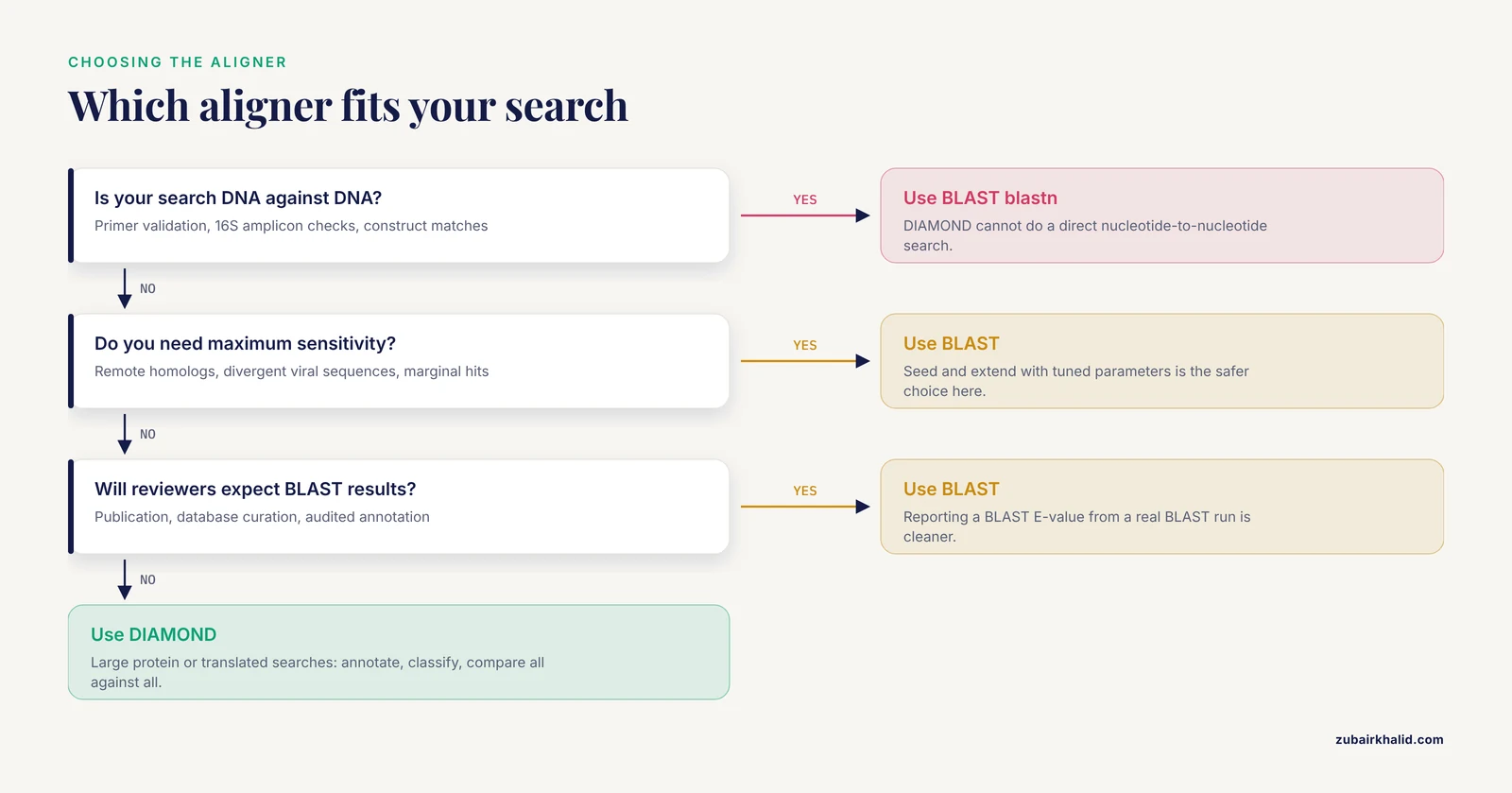
The table below is the core of the blast vs. diamond decision. Read each row as a criterion that decides real projects.
| Criterion | BLAST+ | DIAMOND |
|---|---|---|
| Steward and license | NCBI, open source | Open source, academic maintained |
| Query types | Nucleotide and protein | Protein, and nucleotide translated to protein |
| Direct nucleotide vs nucleotide search | Yes, blastn | No |
| Speed on large protein sets | Baseline | Orders of magnitude faster, commonly hundreds to thousands of fold |
| Sensitivity at default settings | Reference standard | Close to BLAST in recent versions, tunable with sensitivity modes |
| Output formats | Pairwise, tabular, XML, JSON, SAM, and more | Tabular (BLAST-compatible), pairwise, XML, DAA binary, and more |
| Local database format | Custom BLAST database via makeblastdb | Compact .dmnd binary via diamond makedb |
| Web service at NCBI | Yes, plus public API endpoints | No |
| Python integration | First class through Biopython wrappers and parsers | Straightforward through subprocess and tabular parsing |
| Typical role | Reference searches, confirmation, nucleotide work, publication-grade results | High-throughput first-pass annotation, metagenomics, large proteome comparison |
| Community expectation | Universally recognized | Widely recognized in genomics and metagenomics, less so elsewhere |
Two rows deserve emphasis. The nucleotide row is the hard constraint: the moment your task is DNA versus DNA, BLAST is the only option of the two. The sensitivity row is the softer constraint: the gap matters most when you are hunting distant homologs with marginal scores, and matters least when you are assigning function to proteins with clear, high-scoring matches.
When to Use BLAST
The question of when to use BLAST has four good answers.
First, whenever your query is nucleotide sequence and your target is nucleotide sequence. Primer validation, checking a construct for off-target matches, comparing a 16S amplicon to a reference database, and confirming that a synthetic gene matches its design all belong to blastn. DIAMOND cannot do these searches directly.
Second, when sensitivity outranks speed. If you are searching for the faintest trace of homology, a single protein family member in an unusual organism, or a divergent viral sequence, the seed-and-extend strategy of BLAST with tuned parameters is the safer choice. A miss at this stage costs more than the compute time saved.
Third, when reproducibility and reviewer expectations matter. Many journals and databases treat BLAST as the reference method. If a collaborator, reviewer, or curator will ask which BLAST version and which parameters you used, running BLAST removes that friction. Reporting a BLAST E-value from an actual BLAST run is also cleaner than reporting a DIAMOND score and defending its comparability.
Fourth, when you need the NCBI web services. BLAST runs hosted at NCBI let you search huge public databases such as nr and nt from a script without maintaining copies locally. The Biopython interface to that service is one of the classic entry points into Python for bioinformatics, and it is covered in the worked code below.
The cost of BLAST is time. On a large query set against a large database, a BLAST run can take many times longer than the equivalent DIAMOND run, and it will consume more memory during database scanning. That cost is acceptable for hundreds of queries and painful for millions.
When to Use DIAMOND
Choose DIAMOND when the defining property of your job is volume of protein-level alignment.
Annotation of a newly assembled genome is the classic case. A typical bacterial assembly yields several thousand predicted protein-coding genes, and a eukaryotic assembly can yield tens of thousands or more. Aligning those proteins against a comprehensive reference database is the first step of functional annotation, and DIAMOND makes that step take minutes to hours rather than days. Downstream tools in common annotation stacks accept DIAMOND output directly.
Metagenomic classification is the second classic case. Tools that assign sequencing reads to taxa or functions at scale run protein-level translated searches against marker or reference databases, and DIAMOND is built for exactly that inner loop. If your workflow touches the modern metagenomics literature, you will encounter DIAMOND in the methods sections repeatedly.
Large all-against-all comparisons are the third case. Clustering protein sequences into families, building ortholog tables across dozens of species, and constructing similarity networks all reduce to running an aligner on every pair of sequences. The quadratic growth of that workload is exactly where the DIAMOND speed advantage compounds, and it is also where filtering logic such as reciprocal best hits becomes the bottleneck after the search itself, a problem addressed later in this article.
Choose BLAST over DIAMOND, even at high volume, when any of the following is true. Your database is nucleotide and the comparison must be DNA to DNA. Your hits are expected to be remote homologs where every bit of sensitivity counts. Or your results will be audited against a BLAST-based expectation.
Running BLAST from Python with Biopython
Biopython is the standard Python library for bioinformatics, and its BLAST integration is mature enough that this section works as a short biopython tutorial on its own. There are three patterns you should know: searching the NCBI web service, driving a local BLAST+ installation, and parsing results.
Querying NCBI BLAST over the web
The Bio.Blast.NCBIWWW module wraps the NCBI BLAST URL API. Pass a sequence as a string, a Biopython SeqRecord, or a FASTA file handle.
from Bio.Blast import NCBIWWW
from Bio import SeqIO

record = SeqIO.read("query.fasta", "fasta")
result_handle = NCBIWWW.qblast(
    program="blastn",
    database="nt",
    sequence=record.seq,
    expect=1e-5,
    hitlist_size=50,
)
The call blocks until NCBI returns results, which can take minutes for a long query against a large database. The NCBI servers are a shared resource, so batch your queries thoughtfully and avoid hammering the endpoint in tight loops. Save the raw response to disk before parsing so you never need to re-run a search.
with open("blast_results.xml", "wb") as out_handle:
    out_handle.write(result_handle.read())
result_handle.close()
Driving a local BLAST+ installation
For repeatable pipelines you will usually install BLAST+ locally and drive it from Python. Biopython ships command-line wrappers that build and run the command for you and check for errors.
from Bio.Blast.Applications import NcbitblastnCommandline

tblastn_cline = NcbitblastnCommandline(
    query="proteins.fasta",
    subject="genome_assembly.fasta",
    evalue=1e-5,
    outfmt="6 qseqid sseqid pident length evalue bitscore",
    out="hits.tsv",
)
stdout, stderr = tblastn_cline()
Building the database once with makeblastdb and reusing it across runs is the efficient pattern. Database construction is a one-time cost per reference release.
from Bio.Blast.Applications import NcbimakeblastdbCommandline

make_db = NcbimakeblastdbCommandline(
    input_file="reference_proteins.fasta",
    dbtype="prot",
    out="reference_db",
)
make_db()
Parsing BLAST output in Python
Biopython offers two parser families. The older NCBIXML parser reads BLAST XML output into objects with descriptions, alignments, and HSPs, where an HSP is a high-scoring segment pair, a single local alignment region. The newer Bio.SearchIO module presents a uniform interface across formats, including tabular output.
from Bio.Blast import NCBIXML

with open("blast_results.xml") as result_handle:
    blast_records = NCBIXML.parse(result_handle)
    for record in blast_records:
        for alignment in record.alignments:
            for hsp in alignment.hsps:
                if hsp.expect < 1e-5:
                    print(record.query, alignment.hit_id,
                          hsp.identities, hsp.expect)
from Bio import SearchIO
for result in SearchIO.parse("hits.tsv", "blast-tab"):
for hit in result:
for hsp in hit:
print(result.id, hit.id, hsp.evalue)Parsing is where many pipelines slow down. The BLAST-QC project documented that analyzing large BLAST outputs is a known pain point, and that purpose-built parsing tools can outperform parsers written with common BioPerl and Biopython modules as well as C and Java implementations, a point worth remembering before you assume a hand-written parser is fast enough [1]. The same project highlights a subtle trap in BLAST parameterization: options such as -max_target_seqs interact with the heuristic search in ways that can surprise users, so treat that parameter as something that shapes the search itself, not merely a cap on printed results [1].
Running DIAMOND from Python
DIAMOND does not have a Biopython wrapper, but it does not need one. The clean pattern is subprocess.run plus tabular output, which slots directly into any Python for bioinformatics workflow.
Build the database once:
diamond makedb --in reference_proteins.fasta --db reference_proteinsRun a search from Python:
import subprocess

cmd = [
    "diamond", "blastp",
    "-q", "predicted_proteins.fasta",
    "-d", "reference_proteins.dmnd",
    "-o", "diamond_hits.tsv",
    "-e", "1e-5",
    "--max-target-seqs", "1",
    "--ultra-sensitive",
    "--threads", "8",
]
subprocess.run(cmd, check=True)
The blastp subcommand mirrors the BLAST name. Use diamond blastx when your query is nucleotide sequence that you want translated and compared to a protein database, which covers the gene-calling stage of metagenomic pipelines. The -ultra-sensitive flag raises sensitivity at some cost in speed, and the more sensitive modes are the right default when your queries may be evolutionarily distant from the database.
Parse the tabular output with pandas:
import pandas as pd

columns = [
    "qseqid", "sseqid", "pident", "length",
    "mismatch", "gapopen", "qstart", "qend",
    "sstart", "send", "evalue", "bitscore",
]
hits = pd.read_csv("diamond_hits.tsv", sep="\t", names=columns)
significant = hits[hits.evalue < 1e-5]
best_per_query = significant.sort_values("bitscore", ascending=False).drop_duplicates("qseqid")
Because DIAMOND can emit BLAST-compatible tabular format, any parser, database loader, or visualization script you wrote for BLAST output works unchanged on DIAMOND output. That compatibility is the single biggest reason the blast vs. diamond question is easy to hedge in a pipeline: you can swap the aligner behind a stable parsing interface.
Scaling Up: Galaxy Servers and the blast2galaxy Package
Local installation is not the only deployment model. Galaxy is an open-source workflow platform for data-intensive life sciences research, offering a web interface for complex analyses and a REST API for remote execution of individual tools, and it wraps both NCBI BLAST+ and DIAMOND as available tools [2]. If your organization runs a Galaxy server, or you use a public one, you can run both aligners there through the same interface.
The blast2galaxy Python package is built for exactly that path. It uses the Galaxy API, through the bioblend library, to run BLAST+ and DIAMOND searches as Galaxy-wrapped tools on compatible servers, and it provides both a command-line interface that mirrors the native CLI of each aligner and a high-level Python API for launching alignments directly from Python applications [2]. Installation follows the usual Python channels with pip install blast2galaxy or conda install -c bioconda blast2galaxy, and the project is MIT licensed with Docker and Apptainer images available through its documentation [2].
This option is most attractive in three situations. First, your institution already runs Galaxy, so compute, data management, and history tracking come for free. Second, you want BLAST and DIAMOND behind one identical interface, which blast2galaxy provides by mirroring both CLIs. Third, you want workflow-level provenance, since Galaxy records every tool invocation with its parameters. The trade is added moving parts: you depend on a server, an API, and network access rather than a local binary.
Filtering and Analyzing Results at Scale
Running the aligner is half the workflow. The other half is turning raw hit lists into biological conclusions, and two patterns recur so often that they deserve their own treatment.
Reciprocal best hits and all-against-all comparisons
A reciprocal best hit is a pair of sequences where each is the other's best-scoring match, a conservative operational definition of orthology used across comparative genomics. Computing RBHs requires an all-against-all comparison between two sequence sets, then logic over the result tables. Doing this by hand across many query batches is tedious, which is the problem PARIGA addressed: a server that performs all-against-all BLAST between two user-selected sequence sets, stores the results in a database of Python-serialized objects, and lets users filter interactively in real time, including retrieving reciprocal best hits or queries that match the same targets across sets, without re-running the search or writing new code [3]. The design lesson transfers directly to local pipelines. Separate the search from the filtering, store results in a queryable form, and iterate on filters cheaply.
In Python, the same principle looks like this: run the search once, load the tabular output into pandas or a SQLite database, and express every downstream question as a query rather than a re-run.
import sqlite3
import pandas as pd

con = sqlite3("hits.db") if False else sqlite3.connect("hits.db")
hits.to_sql("hits", con, if_exists="replace", index=False)

rbh = pd.read_sql_query(
    """
    SELECT a.qseqid AS id_a, b.qseqid AS id_b
    FROM best_a a
    JOIN best_b b ON a.sseqid = b.qseqid AND b.sseqid = a.qseqid
    """,
    con,
)
That small shift, from repeated searches to stored hits with logical filtering, is the spirit of the PARIGA design carried into your own code [3].
Quality control of large hit sets
As result tables grow into millions of rows, parsing speed and sanity checking become first-class concerns. The BLAST-QC project was motivated by exactly this: large BLAST result sets are tedious to analyze, parser options are scarce, and researchers often end up writing specialized scripts repeatedly, so the project provides a fast standalone parser for quality control of BLAST results designed to drop into a variety of workflows [1]. Whatever parser you use, the QC questions are consistent: Are there queries with no hits, and is that expected given the database? Are E-values suspiciously uniform? Did the heuristic truncation parameters, such as limits on targets per query, silently shape what you are allowed to see [1]? Build those checks once and reuse them across both BLAST and DIAMOND runs.
Worked Scenarios
Three scenarios show how the choice resolves in practice.
Scenario 1: Annotating a bacterial genome
You assembled a bacterial genome, predicted 4,200 protein-coding genes, and want functional assignments against a curated protein database. There is no nucleotide-to-nucleotide step here. DIAMOND blastp in a sensitive mode against the reference database will finish the search in minutes on a workstation, and you can parse the tabular output with pandas to assign one best function per gene. BLAST blastp on the same workload would take dramatically longer for marginal gains on genes with clear homologs. Verdict: DIAMOND. If a specific gene family matters for your paper and its top hits are weak, re-run that single gene through BLAST blastp as confirmation.
Scenario 2: Checking a PCR amplicon against reference sequences
You have 30 Sanger-derived 16S rRNA sequences and want to know which organisms they match. The query is nucleotide, the reference is nucleotide, and the expected matches are close relatives where sensitivity is not the issue, but the DNA-to-DNA requirement is absolute. DIAMOND is excluded by its design. Verdict: BLAST blastn. At 30 queries the speed difference is irrelevant anyway, and Biopython's web wrapper or a local blastn call both work; the local call is more reproducible.
Scenario 3: Building an ortholog table across 20 species
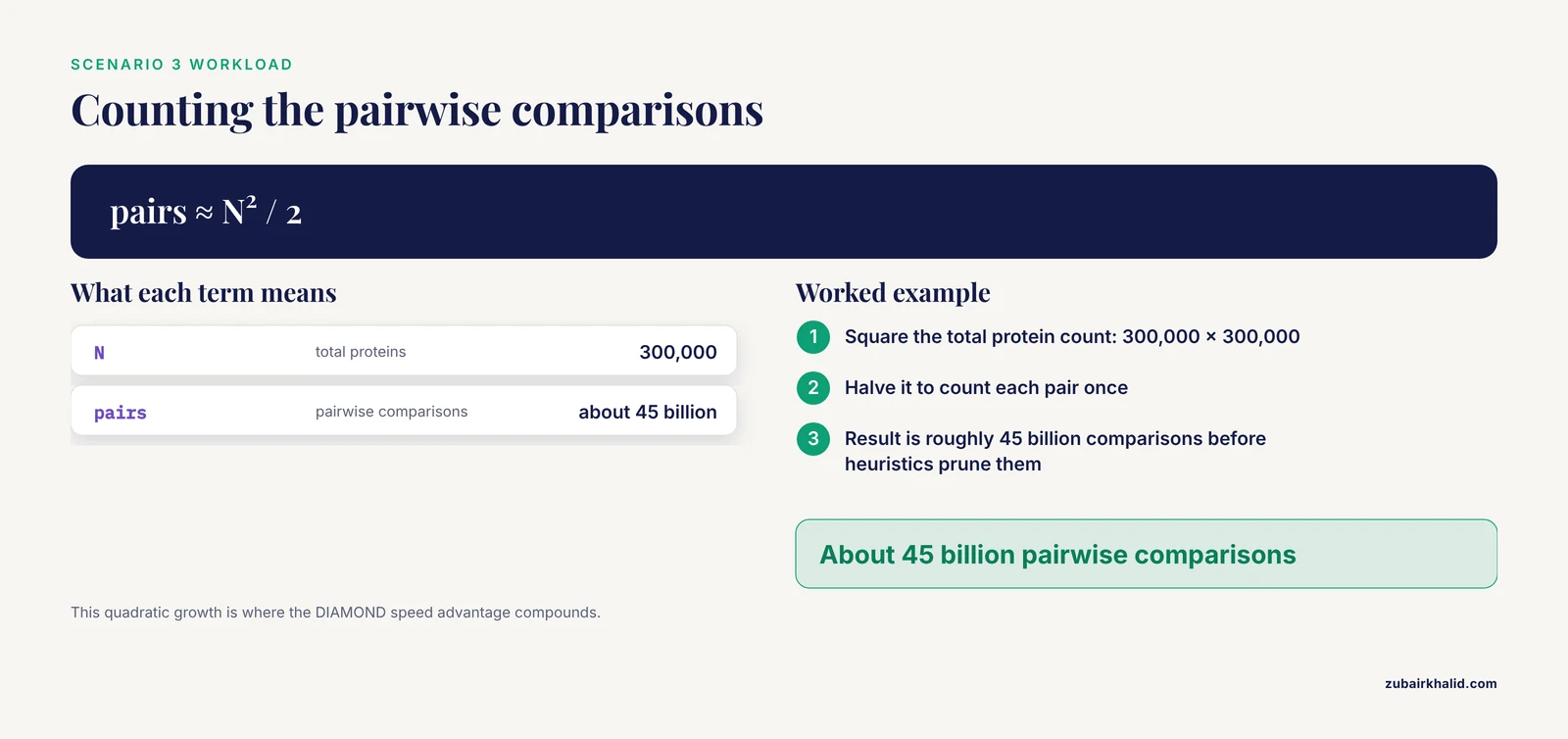
You have 20 proteomes, roughly 300,000 proteins total, and you need all-against-all protein similarity to derive reciprocal best hits for an orthology analysis. The quadratic workload, roughly 45 billion pairwise comparisons before heuristics prune them, makes BLAST impractical on ordinary hardware. Run DIAMOND blastp on every species pair, store the tabular hits in a database, then compute RBHs with SQL or pandas as described above. The search-versus-filter separation lets you refine your RBH thresholds, such as requiring a minimum coverage fraction in both directions, without ever re-running the alignments. Verdict: DIAMOND for the search, Python for the logic, with BLAST reserved for spot-checking contentious pairs.
Scenario 4: Reconciling a hybrid pipeline
Real projects often combine all of the above. A practical architecture looks like this: DIAMOND performs the high-volume first pass, BLAST confirms a filtered subset of hits, and a parsing and QC layer validates both result streams before downstream annotation. If your compute is shared or institutional, wrapping both aligners behind a Galaxy server through blast2galaxy gives you one API surface for both tools, which keeps the pipeline code independent of which aligner each stage uses [2].
Common Mistakes and Limitations
Treating DIAMOND scores and BLAST scores as interchangeable. Bit scores and E-values are computed against the scoring scheme and database of the run that produced them. A DIAMOND E-value and a BLAST E-value for the same pair will be similar in spirit but not identical in number. When you compare across runs, compare within each tool's own output, and when you report a threshold, name the tool that produced it.
Assuming the most sensitive mode is always on. DIAMOND's fast modes exist for a reason, but running them by default on divergent queries sacrifices real sensitivity. Conversely, running the most sensitive mode when your queries have abundant close homologs wastes the tool's main advantage. Match the sensitivity mode to the expected evolutionary distance, and document the mode in your methods section just as you would document BLAST parameters.
Using -max_target_seqs without understanding it. As discussed in the context of BLAST result analysis, this parameter affects the heuristic search process itself, not just the number of reported hits, which has generated debate over its effects on results [1]. Set it deliberately, keep it consistent across comparable runs, and be suspicious of comparisons between runs that used different values.
Parsing XML for millions of hits. XML is verbose and slow to parse at scale. For large searches, tabular output loaded into pandas or a database is faster and easier to QC, which is why dedicated fast parsers emerged to replace general Biopython-based parsing in high-volume workflows [1]. Keep XML for records you need to archive in full detail, tabular for bulk computation.
Re-running searches to change filters. A recurring anti-pattern is to adjust an E-value threshold or hit criterion and re-run the entire alignment. Store raw hits once and filter programmatically. This is the workflow design that tools like PARIGA embody, keeping results in a queryable store so filtering happens in seconds rather than hours [3].
Forgetting that E-value depends on database size. The same query hit against a database ten times larger will show a different E-value. When you compare results across different databases, or across a growing database over time, E-values are not directly comparable, while bit scores are more stable.
Relying on web searches inside production pipelines. The NCBI web BLAST service is a shared public resource with queuing and rate considerations. It is excellent for exploration and small batches, and a poor foundation for a pipeline that runs nightly over thousands of queries. Local databases, local executables, or a Galaxy deployment are the scalable options.
Ignoring validation. Whatever the aligner, a pipeline is only as good as its worst assumption. Spot-check high-stakes hits by eye, verify that a sample of low-E-value alignments actually covers the region you think it covers, and compare a small BLAST run against your DIAMOND results periodically as a cross-check. Alignment statistics tell you what is similar, not what it means biologically.
A note on limitations. Tool choice, sensitivity modes, and thresholds are decisions that belong to the analyst with full knowledge of the biological question and the data. This article gives you the decision framework and the working code, but the final parameters for any published analysis should be justified against your own data.
Frequently Asked Questions
Is DIAMOND a drop-in replacement for BLAST?
No. DIAMOND replaces BLAST for protein and translated-DNA searches, and it can emit BLAST-compatible output, but it does not perform direct nucleotide-to-nucleotide searches and its scores are its own. Treat it as a fast, protein-focused sibling of BLAST rather than a clone.
Which tool is faster, and by how much?
DIAMOND is dramatically faster on protein workloads, commonly by hundreds to thousands of times compared to BLAST. The exact factor depends on the query set, database size, sensitivity mode, and hardware, so benchmark on your own data before promising a runtime to anyone.
Can I run both tools from the same Python pipeline?
Yes, and it is a common design. Drive BLAST+ through Biopython's command-line wrappers, drive DIAMOND through subprocess, parse both into the same tabular schema, and run downstream logic once for both. On a Galaxy server, blast2galaxy provides a single Python API and CLI covering both tools.
Do BLAST and DIAMOND give the same E-values?
No. Both report E-values with the same statistical meaning, but the numbers differ because each tool uses its own scoring and search machinery. Use each tool's own values for thresholding, and never mix thresholds across tools in a comparison.
When should I use BLAST instead of DIAMOND even for proteins?
When sensitivity is the priority, when hits are expected to be remote homologs, when results must match a BLAST-based expectation for publication or review, or when you need BLAST-specific features. A frequent pattern is DIAMOND for volume and BLAST for confirmation on the subset that matters.
Where does Python fit into a BLAST or DIAMOND workflow?
Python glues the workflow together: Biopython builds commands and parses results, subprocess launches the aligners, pandas and SQLite filter and join hit tables, and packages like blast2galaxy extend the same patterns to remote servers. The aligners do the alignment, Python does everything around it.