BLAST Output Formats Explained: Which One Should You Choose
By Dr. Zubair Khalid, DVM, MS, PhD ·

The difference between BLAST output formats comes down to who reads the results. The pairwise format is written for a human reading a report, tabular and CSV are written for spreadsheets and short scripts, and XML or JSON are written for programs that need every detail of every alignment. The rule of thumb is simple: use tabular output (outfmt 6) when you need a quick ranked list of hits, use XML (outfmt 5) or JSON when a parser needs the full alignment structure, and use the BLAST archive format (outfmt 11) when you want to save results once and reformat them later without rerunning the search.
This article walks through each BLAST output format on its own terms, compares them on the criteria that decide real choices in python for bioinformatics work, and gives worked examples you can run on your own machine.
What the -outfmt Flag Actually Controls
BLAST (Basic Local Alignment Search Tool) compares a query sequence against a database of subject sequences and reports the local alignments it finds, called HSPs (high-scoring segment pairs). Every BLAST+ command-line program, including blastn, blastp, blastx, tblastn, and tblastx, accepts the same -outfmt flag. You give it a number, and BLAST reshapes its results to match.
Three things change when you switch formats:
- Which fields appear. The pairwise format shows full alignments with scores and statistics woven into the text. Tabular output shows one line per HSP with a fixed set of columns. XML and JSON carry both the hit list and the full alignment strings, plus search parameters.
- How easy it is to parse. Text reports need fragile pattern matching. Tabular rows split cleanly on delimiters. XML and JSON load into standard libraries with a few lines of code.
- How much information survives. Tabular output throws away the actual alignment strings unless you ask for them. XML and JSON keep alignment positions, gaps, strand, frame, and per-HSP statistics.
The format choice happens at search time. If you save only the pairwise report and later realize you needed machine-readable data, you must rerun the search. That single fact drives most format decisions in practice, and it is the reason the archive format exists at all.
Researchers who process large BLAST results routinely describe the analysis step as tedious and time consuming, which is why a whole ecosystem of parsers and converters has grown around the tool. A 2020 paper introducing the BLAST-QC parser makes exactly this point, noting that condensing large BLAST datasets often leaves researchers writing their own specialized software [1]. Choosing the right output format on the first pass reduces how much of that parsing work you ever have to do.
BLAST Output Formats at a Glance
The table below is the core of this article. Codes refer to the argument you pass to -outfmt. Availability of the newest codes depends on your BLAST+ version, so run blastn -help (or the equivalent for your program) to confirm what your build supports.
| Format | outfmt code | Machine readable? | Carries alignment strings? | Best for | Main drawback |
|---|---|---|---|---|---|
| Pairwise | 0 | No | Yes, inline | Reading a small number of results by eye | Hard to parse, verbose |
| Tabular | 6 | Yes | Only if you add qseq/sseq columns | Hit lists, filtering, quick Python scripts | No full alignment detail by default |
| Tabular with comments | 7 | Yes | Same as 6 | Sharing tables that document themselves | Comment lines break naive row splitters |
| CSV | 10 | Yes | Same as tabular | Spreadsheets, R, pandas | Same limited field set as 6 |
| XML | 5 | Yes | Yes | Biopython, Galaxy, most pipelines | Verbose files, slower to parse at scale |
| JSON | 12/13 in current builds, varies by version | Yes | Yes | Modern Python and JavaScript tooling | Newest option, tool support still uneven |
| SAM | 17 in current builds | Yes | Yes | Feeding alignments to samtools and genome viewers | Alignment-centric, loses BLAST-specific statistics |
| Archive (ASN.1) | 11 | No (binary) | Yes | Saving results for later reformatting | Needs blast_formatter to read |
The Pairwise Alignment Format (outfmt 0)
Run blastn with no -outfmt argument and you get the classic report: a header describing the database, a graphical line of hits, then one block per alignment showing the query line, the match line with vertical bars for identities, the subject line, and the score, expect value, identities, gaps, and strand underneath. This is the default because it is the format biologists have read for thirty years.
The pairwise format is the right choice when you are inspecting a handful of hits before deciding something, for example whether a primer binding site has a mismatch in exactly the wrong place. It is the wrong choice for anything automated. The layout encodes meaning in column positions and repeated labels, so a script that reads it reliably needs careful pattern matching, and every BLAST version that nudges the layout can break that parser.
Within outfmt 0 there are variants controlled by the codes 1 through 4 (query-anchored and flat query-anchored views, with and without identity markers). These compact many alignments into a shared query-centered layout. They are legacy views from the days of NCBI's web BLAST pages and almost nobody needs them for scripted work. If you see them in an old script, treat them as a signal that the script predates modern tabular practice.
One more point in favor of pairwise output: it is the only format where the alignment rendering is immediately checkable by a person. When a student brings you a suspicious result, asking for the pairwise view is often the fastest way to see whether the alignment itself is what they assumed.
Tabular Output (outfmt 6 and 7): The Workhorse
Tabular output is the format most bioinformaticians reach for first. -outfmt 6 prints one line per HSP with fields separated by tabs. -outfmt 7 is identical but adds comment lines beginning with # that record the fields, query, and database.
The default columns for outfmt 6 are these twelve fields:
- qseqid, the query sequence identifier
- sseqid, the subject sequence identifier
- pident, percentage of identical positions across the aligned length
- length, the alignment length
- mismatch, the number of mismatches
- gapopen, the number of gap openings
- qstart, the start of the alignment in the query
- qend, the end of the alignment in the query
- sstart, the start of the alignment in the subject
- send, the end of the alignment in the subject
- evalue, the expect value, meaning the number of alignments with a score at least this good that you would expect to see by chance in a database of this size
- bitscore, the score normalized so that it can be compared across searches
Choosing and Reordering Columns
The real power of tabular output is that you can request any of several dozen fields in any order. A typical annotation pipeline might use:
blastn -query contigs.fa -db nt \
  -outfmt "6 qseqid sseqid pident length qcovhsp evalue bitscore stitle" \
  -max_target_seqs 5 -out hits.tsv
Useful fields beyond the default twelve include qcovhsp (query coverage per HSP, which guards against a high-identity but tiny alignment), sscinames and sskingdoms (scientific names and taxonomy, available when your database carries taxonomic information), sskingdoms for filtering out viral or plasmid hits, and slen for subject length. The full field list appears in blastn -help and changes occasionally between BLAST+ releases, so treat the help text as the authority for your installed version.
Tabular output is deliberately lossy. It reports positions and scores but not the alignment strings, so you cannot recover which base was substituted where unless you add the qseq and sseq fields, which do carry the aligned sequences including gap characters. If your downstream logic depends on mutation-level detail, either add those two columns or step up to XML.
PARIGA, a server built for all-against-all BLAST comparisons, illustrates why structured, re-queryable output matters at scale. Its designers note that manual inspection of BLAST results becomes tedious as data volume grows and that filtering or parsing tools are then required, so the server stores BLAST output in a database of Python-serialized objects that users can filter in real time, for example to pull out reciprocal best hits, without rerunning searches [2]. You get the same benefit in miniature by choosing tabular output with the right columns on the first run.
CSV Output (outfmt 10)
Outfmt 10 is tabular output with commas instead of tabs and no comment lines. It exists so that results open cleanly in spreadsheet software and load into R or pandas without a delimiter argument. Everything said about column selection for outfmt 6 applies here unchanged.
Two cautions keep CSV from being a universal default. First, sequence titles in stitle can contain commas, and BLAST handles this by quoting, but scripts written for tab-delimited data sometimes split naively and mangle those rows. Second, tabs are simply less ambiguous for sequence data, which is why most Unix-oriented pipelines stay with outfmt 6 and treat CSV as an export step at the end of a workflow rather than the native format.
XML Output (outfmt 5): The Structured Standard
XML output carries everything: the search parameters, the database description, every hit, every HSP within every hit, the alignment strings, per-HSP scores, identities, positives, gaps, frame, and strand. Where tabular output is a flattened summary, XML is a complete serialization of the search.
That completeness has a price. XML files are bulky, often five to ten times larger than the equivalent tabular file for the same search, and parsers do real work walking the tree. For a small search this is irrelevant. For an all-against-all comparison of tens of thousands of sequences, parser runtime becomes a genuine bottleneck, which is a recurring theme in the parser literature. The BLAST-QC authors benchmarked their tool against parsers built on the commonly used BioPerl and Biopython modules and reported faster runtimes for their implementation, precisely because full XML traversal at scale is expensive [1].
XML remains the safest choice for interoperability. Galaxy workflows, web services, and older Biopython code all speak it fluently, and it has been stable for many years. If you are writing a script that must survive across BLAST versions and across institutions with different builds installed, XML is the conservative bet.
JSON Output: The Modern Alternative
Recent BLAST+ releases add JSON output options near the end of the -outfmt list. JSON has two practical advantages over XML for Python work: the standard library json module loads it directly, and the data lands in native dictionaries and lists rather than in an object tree you have to traverse. Several JSON variants exist across versions, differing in whether the output lands in one file or one file per query, so check blastn -help on your installed build and pin your BLAST version in your environment if JSON is central to your pipeline.
The tradeoff is tool maturity. XML parsers in Biopython, Galaxy, and countless published pipelines have years of hardening. JSON support in third-party tools is newer and less uniform. A pragmatic pattern used in many pipelines is to keep XML as the archival, interoperable format and convert to JSON locally when a specific script benefits from it.
SAM Output (outfmt 17)
Current BLAST+ releases can emit SAM (Sequence Alignment/Map) format, the tab-delimited standard used by samtools, IGV, and most read-mapping toolchains. This matters when your BLAST search is conceptually a mapping problem, for example aligning transcript sequences to a genome so the alignments can be viewed in a genome browser alongside coverage tracks.
SAM output restructures BLAST results into alignment coordinates with a CIGAR string describing matches, mismatches, insertions, and deletions. BLAST-specific statistics such as e-values do not fit the SAM field structure, so treat SAM as the format for visualization and coordinate-based downstream steps, not as a substitute for tabular or XML when hit ranking is the goal.
The BLAST Archive Format (outfmt 11): Your Reformatting Insurance
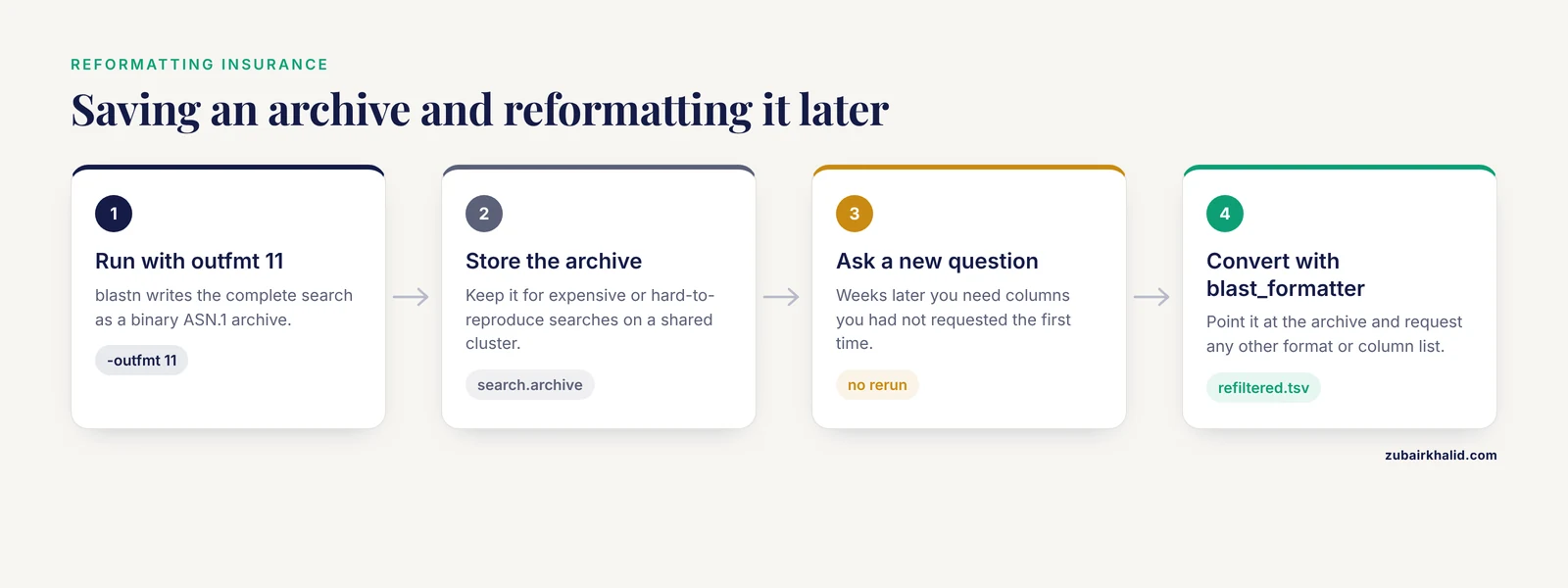
Outfmt 11 writes a binary ASN.1 (Abstract Syntax Notation One, the data description language NCBI uses internally) archive of the complete search. This is the format that changes how you think about the other formats.
An archive file can be fed back into the blast_formatter program at any later time and converted into any other format, including tabular with a different column selection you had not thought of yet:
blastn -query query.fa -db nt -outfmt 11 -out search.archive
# weeks later, a new question arises:
blast_formatter -archive search.archive -outfmt "6 qseqid sseqid qcovs staxids" -out refiltered.tsv
The archive keeps everything the XML output keeps, so nothing is lost. The costs are that the file is binary (poor for version control and text tools) and that the archive format is specific to BLAST itself, so anything that reads it needs NCBI tooling. A sensible habit for expensive or hard-to-reproduce searches, such as long jobs against a large database, is to save outfmt 11 plus a ready-made outfmt 6 summary. You get everyday convenience and full reformatting freedom in about the disk space the pairwise report would have wasted.
Parsing BLAST Output in Python with Biopython
The rest of this article assumes you want to process results in Python, since that is the dominant language for this step in python for bioinformatics pipelines. Biopython, the standard open-source Python library for sequence work, ships a subpackage called SearchIO that reads BLAST output much the way Biopython's SeqIO reads sequence files. This section works as a short Biopython tutorial for the two formats you will parse most often.
Parsing XML with SearchIO
Given a search run with -outfmt 5:
blastp -query proteins.fa -db swissprot -outfmt 5 -out blastp_results.xmlParse it like this:
from Bio import SearchIO

for query in SearchIO.parse("blastp_results.xml", "blast-xml"):
    print(f"Query: {query.id}, hits: {len(query)}")
    for hit in query:
        for hsp in hit.hsps:
            print(
                hit.id,
                f"identity: {hsp.ident_num}/{hsp.aln_span}",
                f"evalue: {hsp.evalue:.2e}",
                f"bitscore: {hsp.bitscore}",
            )
SearchIO models the hierarchy as QueryResult containing Hit objects containing HSP objects, which mirrors how BLAST itself thinks about results. Each HSP exposes alignment coordinates, strands or frames, score statistics, and the aligned sequences themselves. The classic Bio.Blast.NCBIXML module does the same job with a flatter object model and appears in many older Biopython tutorials, so expect to meet it when reading published scripts. For new code, SearchIO is the maintained interface.
One practical warning: XML schemas evolve. If a script that parsed BLAST XML happily for years suddenly fails on a new cluster, the first suspect is a BLAST+ version change, and the fix is usually pinning the version or switching the parser to the newer schema.
Parsing Tabular Output
SearchIO also reads tabular files:
from Bio import SearchIO
for query in SearchIO.parse("hits.tsv", "blast-tab", fields="qseqid sseqid pident length evalue bitscore"):
    for hit in query:
        for hsp in hit.hsps:
            print(query.id, hit.id, hsp.evalue)
If you requested a custom column list in the BLAST command, pass the same list to the fields argument so the parser maps columns correctly. For very large files, or when you only need a couple of columns, plain Python often beats any library:
with open("hits.tsv") as fh:
    for line in fh:
        qseqid, sseqid, pident, length, evalue, bitscore = line.split("\t")
        if float(pident) >= 95.0 and int(length) >= 300:
            print(qseqid, sseqid, pident, bitscore)
This is the context in which dedicated high-performance parsers emerged. The BLAST-QC project grew out of exactly this need, offering a streamlined standalone tool for condensing large BLAST datasets so that researchers do not have to write a new specialized parser for every analysis [1]. The lesson for your own workflow is not that you must adopt one particular tool, but that parser performance is a real engineering constraint at scale, and the fix starts with producing the leanest output format your analysis actually requires.
For heavily nested downstream logic, such as the reciprocal best hit pattern used to infer orthologs, consider persisting parsed results into a real database rather than re-parsing raw BLAST files repeatedly. PARIGA demonstrates the pattern at server scale, using serialized BLAST output as a queryable store so that filtering questions can be answered in real time without new searches [2]. Even a simple SQLite table loaded once from your tabular file gives you the same architectural benefit locally.
Pros and Cons Compared on the Criteria That Decide Real Choices
The table above summarizes features. These are the criteria that actually settle arguments in pipeline design, framed as the blast output formats xml tabular python pros and cons question people ask in reviews.
Information content. XML, JSON, SAM, and the archive carry full alignment structure. Tabular and CSV carry summaries, extendable with qseq and sseq columns but still flat. Pairwise carries everything but only in prose.
Parse reliability. Tabular rows are the most predictable. XML is reliable if your parser tracks the schema. JSON is reliable if your toolchain is current. Pairwise is the least reliable to parse and should never feed a script.
File size and parse speed. Tabular is the smallest and fastest. XML and JSON trade size for completeness. At the scale of all-against-all searches across large datasets, this difference is measurable and motivates the standalone parsers described in the parser literature [1].
Interoperability. XML has the broadest third-party support today. Tabular is universally consumable by everything that reads delimited text. JSON is the direction the ecosystem is moving. SAM plugs directly into the genomic toolchain.
Rerun risk. Every lossy format (0 through 10) forces a rerun when a new field is needed. The archive (outfmt 11) eliminates reruns for that search. For a 20-minute search this is a convenience. For a week-long search on a shared cluster it is a project-saving habit.
Future-proofing. Formats 0 through 11 have been stable for a very long time. The newest JSON variants and SAM are still settling, which is a mild argument for pairing them with an archive or XML copy during this period.
Worked Scenarios
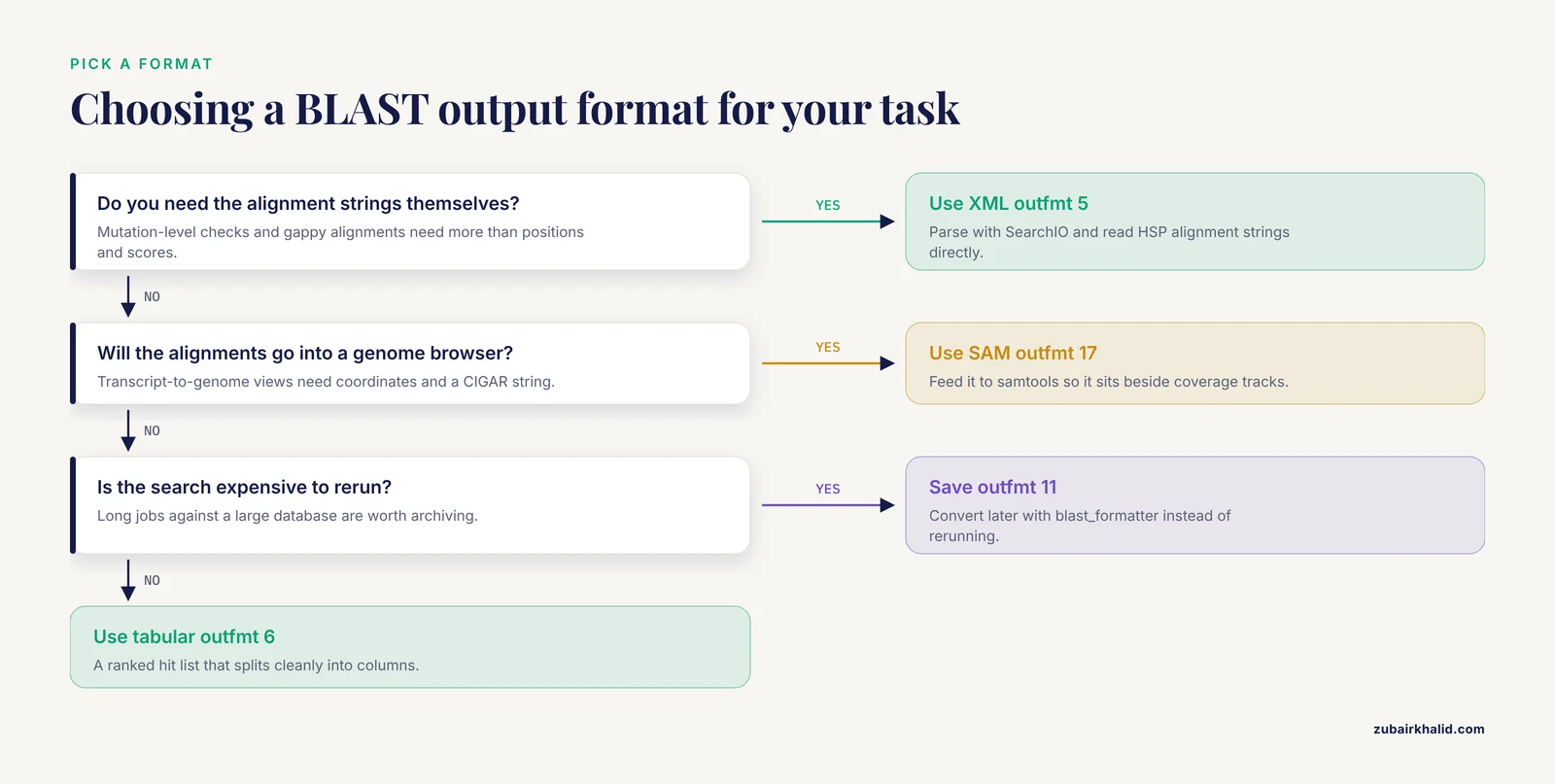
Scenario 1, quick taxonomic check of 20 sequences. Run blastn against nt with -outfmt "6 qseqid sseqid stitle pident qcovs evalue" and read the output directly. The pairwise default would work for eyeballing, but the tabular file also drops straight into a figure for your slide deck. No parser needed.
Scenario 2, annotation of a bacterial genome. You will run blastp against Swiss-Prot for thousands of proteins, then join the results with other evidence in Python. Choose -outfmt "6 qseqid sseqid pident length qlen slen qcovhsp evalue bitscore", parse with plain line splitting or SearchIO's blast-tab reader, and load the result into pandas. Tabular wins because you never need alignment strings for annotation-level decisions and the file size stays manageable. If reviewers later demand alignment evidence for a specific hit, run the archive you saved alongside the tabular summary, or rerun just that query.
Scenario 3, mutation-level validation. A collaborator needs to know whether each aligned read carries a specific resistance-conferring point mutation. Tabular output cannot answer this even with qseq and sseq columns in complex gappy cases, because strand, frame, and multiple HSPs per subject complicate reconstruction. Choose outfmt 5, parse with SearchIO, and read the HSP alignment strings directly. XML wins because the requirement is alignment detail, not hit ranking.
Scenario 4, visualizing transcript-to-genome alignments. You want colleagues to view BLAST alignments of assembled transcripts against the reference genome in a genome browser. Run blastn with SAM output and process with samtools so the alignments land in the same viewing session as RNA-seq coverage tracks. Tabular output would leave you hand-writing a conversion step.
Scenario 5, a long all-against-all search. An all-against-all comparison across two large sequence sets will run for days. Save outfmt 11 as the canonical result. Then produce whatever tabular views collaborators ask for with blast_formatter, minutes each, no reruns. This mirrors the design principle behind PARIGA, where storing complete structured results lets filtering and comparison questions be answered repeatedly without recomputing the search [2].
Common Mistakes and Limitations
Parsing the pairwise format with regular expressions. This is the single most common source of broken BLAST scripts. Any format from 6 onward is easier and safer. If you inherited a script that regex-parses outfmt 0, budget an afternoon to migrate it.
Assuming -max_target_seqs only limits display. Researchers know that analyzing large BLAST results is tedious, and discussions over parameters such as -max_target_seqs have raised questions about how these search options behave and what they affect in the heuristic search process itself [1]. The practical consequence is that a low -max_target_seqs value can shape which hits exist in the report, not merely how many are shown. If hit completeness matters for your claim, either raise the limit or state the setting explicitly in your methods.
Confusing e-value with p-value or with identity. A hit can have 100 percent pident (perfect identity over the aligned region) and still be unremarkable if the alignment is short. Judge hits jointly on identity, coverage, alignment length, and e-value. The default tabular columns hand you exactly these fields, which is part of why they were chosen.
Forgetting that tabular output reports one line per HSP. A query can align to one subject in two separated regions and produce two rows with the same qseqid and sseqid. Scripts that assume one row per query-subject pair silently double count. Aggregate deliberately, or use fields like qcovs (query coverage per subject), which summarize across HSPs.
Losing information by saving only the summary. The pairwise report, the tabular file, and the XML file are three different projections of one search. If you only saved the projection, the rest is gone unless you saved outfmt 11. Save the archive for anything expensive.
Not checking which outfmt codes your BLAST+ version supports. The newer JSON and SAM options depend on version. A pipeline that runs on your laptop with a current build can fail on the institute cluster running an older one. Pin your BLAST version in your conda environment or container, and note the version in your methods section.
Reading outfmt 7 files with a naive line splitter. The # comment lines are useful for humans and fatal for line.split() loops that do not skip them. Either filter lines beginning with # or use outfmt 6 and generate your own header.
Taxonomy fields returning empty. sscinames, sskingdoms, and staxids require a database built with taxonomic information. A locally built FASTA-only database has no taxonomy to report, and the columns come back blank. This is a database construction issue, not a format bug.
A final limitation worth stating plainly: output format choice does not compensate for search design. The format determines what you can see afterward, while parameters such as the scoring matrix, word size, and hit limits determine what BLAST looked for in the first place. Results should be interpreted in the context of the biological question, and individual analysis decisions deserve domain expertise on the specific sequences involved.
Frequently Asked Questions
Which BLAST output format is best for Python analysis?
Tabular output (outfmt 6) is best for hit-list analyses and XML (outfmt 5) is best when you need full alignment details. For most scripts, tabular wins on speed and simplicity, and Biopython's SearchIO parses both formats with the same interface.
What is the difference between outfmt 6 and outfmt 7?
Outfmt 7 is identical to outfmt 6 except it adds comment lines beginning with # that document the fields, query, and database. Use 7 when a human will read the file directly, use 6 when a script will split every line.
How do I add more columns to tabular BLAST output?
Pass a field list after the 6 in the -outfmt argument, for example -outfmt "6 qseqid sseqid pident qcovhsp staxids". Run your BLAST program with -help to see the full field list supported by your installed version.
Is XML or JSON better for parsing BLAST results?
XML has broader tool support and long-term stability, while JSON loads natively into Python dictionaries and is lighter to work with in modern code. Choose XML for maximum interoperability today and JSON when your entire toolchain is current and you prefer native data structures.
What does outfmt 11 do and why would I use it?
Outfmt 11 saves the complete search as a binary BLAST archive in ASN.1 format. You can later convert it to any other format with the blast_formatter program, which means you never have to rerun an expensive search just because you need a column you did not request.
Why are some expected hits missing from my BLAST results?
The most common cause is a restrictive -max_target_seqs value, which interacts with the search process itself rather than merely trimming the display. Raise the value, confirm your database and filtering settings such as e-value thresholds, and report the exact parameters in your methods.