How to Set Up Bash Aliases for Common Bioinformatics File Formats
By Dr. Zubair Khalid, DVM, MS, PhD ·
Every bioinformatics workflow spends a large share of its keystrokes on the same handful of chores. You count reads in a FASTQ file. You peek at the header of a BAM file. You pull the first few sequence names out of a FASTA. You convert a SAM file to a sorted, indexed BAM. None of these steps is hard, but each one involves a long command with flags you have to remember, and typing them fifty times a day is where typos are born.
Bash aliases solve this. An alias is a short name the shell expands into a longer command before running it. A well-designed set of bioinformatics file format aliases turns samtools view -h sample.sorted.bam | head into bamview sample.sorted.bam | head, and turns a fragile multi-part pipeline for counting reads into a single word. By the end of this guide you will have a permanent alias file that covers FASTA, FASTQ, SAM, BAM, CRAM, VCF, BCF, BED, GFF3, GTF, and compressed variants of all of them, plus a few shell functions where plain aliases run out of ability.
Here is what you need before you start:
- A Linux machine or a macOS machine using Bash. On Linux this is the default. On macOS, Bash is available in the Terminal even though zsh is the default shell. This guide covers both, and the alias syntax is identical.
- A Unix text editor you are comfortable with.
nanois fine. - Core command-line tools for genomics installed and on your
PATH:samtoolsandbcftoolsfrom the htslib project,tabixandbgzip(these ship with htslib), and optionallyseqkitfor sequence manipulation. If you install tools with conda or miniconda, activate the environment that contains them before you test the aliases. - One or two small real data files to test against, such as a small BAM file and a small VCF file from a previous run or from a tutorial dataset.
Nothing in this guide requires root access. Everything lives in your home directory.
How Aliases Work and Where Linux Keeps Them
When you open a terminal, Bash starts as an interactive shell and reads a series of startup files in order. For most Linux distributions the relevant file is ~/.bashrc, where the tilde means your home directory, usually /home/yourusername. Anything you put in ~/.bashrc takes effect in every new terminal you open.
Many distributions, including Debian and Ubuntu, include a small block inside ~/.bashrc that looks like this:
if [ -f ~/.bash_aliases ]
then
    . ~/.bash_aliases
fi
That block says: if a file named ~/.bash_aliases exists, load it. This is the cleanest place for your bioinformatics file format aliases, because it keeps your personal shortcuts separate from the system-managed parts of .bashrc. If your .bashrc does not contain that block, you can either add it or simply put aliases directly at the bottom of .bashrc.
Three behaviors of aliases shape everything else in this guide:
- Aliases expand only at the start of a command. If you type
bamview sample.bam, Bash sees the first wordbamview, replaces it with its definition, then runs the result. Arguments likesample.bamare appended to the end of the expanded command. - Aliases expand only in interactive shells. A shell script run with
bash myscript.shdoes not read~/.bashrc, so aliases are invisible inside scripts, cron jobs, and scheduler jobs. Section "Common Mistakes and Limitations" covers what to do about this. - Aliases cannot take positional arguments in the middle of the command.
alias fq2fa='seqkit fq2fa -i {}'will not substitute anything for the braces. When you need arguments in the middle, you use a shell function instead, which is covered below.
The alias format itself is strict. The definition alias name='command' requires the equals sign with no spaces on either side of it. The command on the right is best wrapped in single quotes, which tell Bash to store the text exactly as written and defer all interpretation until you actually call the alias. Double quotes work in simple cases but cause trouble when the command contains dollar signs, because double quotes let Bash expand variables at definition time rather than at call time.
Step by Step: Building Your First Bioinformatics File Format Aliases
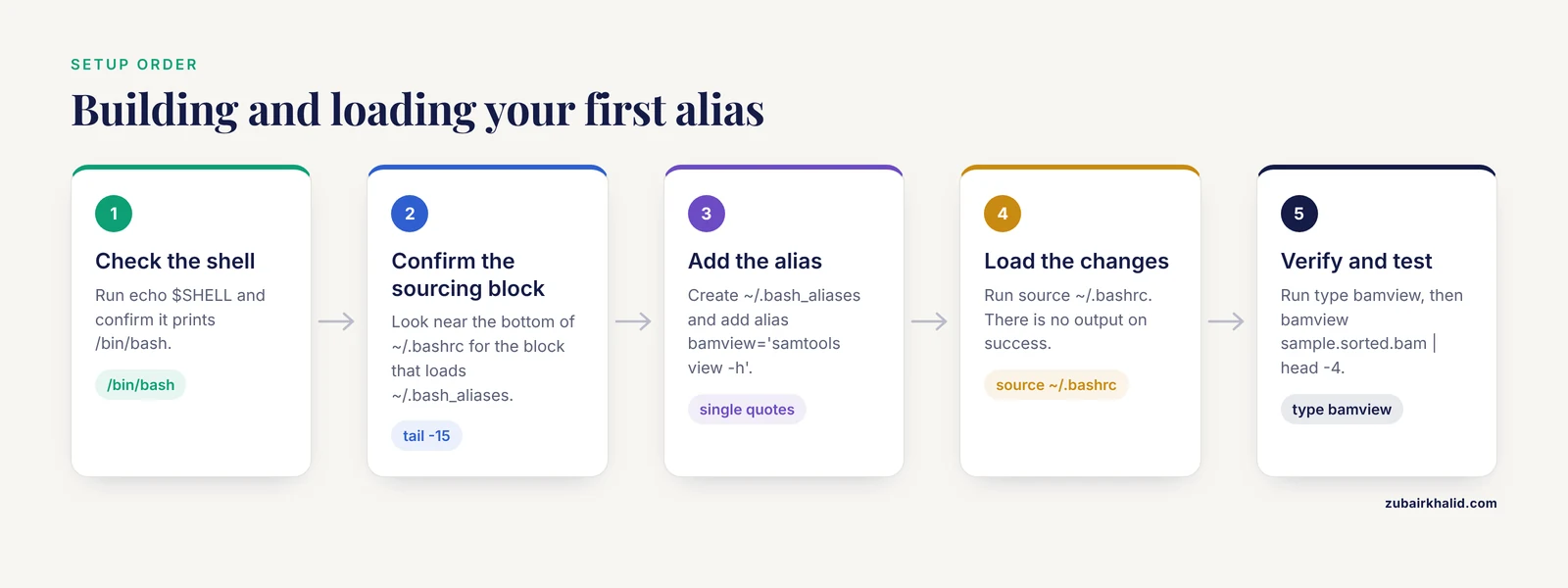
Follow these steps in order. Each command is shown with the output you should expect on a typical Ubuntu machine.
Step 1. Confirm which shell you are using
echo $SHELLExpected output:
/bin/bashIf you see /bin/zsh, you are on zsh, common on macOS. The alias syntax in this guide works in zsh as well, but your startup file is ~/.zshrc instead of ~/.bashrc, and the ~/.bash_aliases convention does not apply.
Step 2. Check whether ~/.bash_aliases is already sourced
tail -15 ~/.bashrcLook near the bottom of the output for a block mentioning .bash_aliases. On stock Ubuntu you will see:
if [ -f ~/.bash_aliases ]; then
    . ~/.bash_aliases
fi
If that block is absent, add these three lines to the end of ~/.bashrc using nano ~/.bashrc:
if [ -f ~/.bash_aliases ]
then
    . ~/.bash_aliases
fi
Note that this version puts then and fi on their own lines, which avoids needing a semicolon between the test and then.
Step 3. Create the alias file and add one alias
touch ~/.bash_aliases
nano ~/.bash_aliases
Add this first entry, then save the file. In nano you save with Ctrl+O and Enter, then exit with Ctrl+X.
# View a BAM or CRAM file with its header
alias bamview='samtools view -h'
Step 4. Load the changes into your current shell
Editing the file does nothing for terminals that are already open. Load it now:
source ~/.bashrcThere is no output on success. If you see an error message here, fix the typo in the file before moving on.
Step 5. Verify the alias exists
type bamviewExpected output:
bamview is aliased to `samtools view -h'The type command is the single most useful checking tool for alias work. It tells you whether a name is an alias, a function, or a real program on your PATH, and it prints the definition. If it instead prints bamview: command not found, the file was not sourced or the definition has a syntax error.
Step 6. Test the alias on a real file
bamview sample.sorted.bam | head -4Expected output, for a coordinate-sorted BAM produced against GRCh38:
@HD VN:1.6 SO:coordinate
@SQ SN:chr1 LN:248956422
@SQ SN:chr2 LN:242193529
@PG ID:samtools PN:samtools VN:1.19
Lines beginning with @ are the SAM header. The @SQ lines list each reference sequence and its length in bases. If you see alignment records instead, with fields like chromosome, position, and CIGAR strings, your shell expanded a different samtools view definition, so run type samtools view and check for a name collision.
Step 7. Make it permanent and keep it organized
The alias is already permanent because it lives in ~/.bash_aliases and every new terminal sources that file. From here on, the workflow for every new alias is the same: edit the file, run source ~/.bashrc, run type newname to confirm, and test on a small file. A useful habit is to group aliases by file format with comment lines, which is the structure the full template below follows.
The Bioinformatics File Format Aliases Format, Explained
A minimal alias definition has four parts, and each part has rules that matter.
alias bamview='samtools view -h'aliasis the shell builtin that registers the name.bamviewis the name you will type. Names may contain letters, digits, underscores, and hyphens, must not contain spaces, and are case sensitive.BamViewandbamvieware different names.=joins them, with no spaces on either side.'samtools view -h'is the expansion, in single quotes.
The single quotes are the part beginners get wrong most often. Compare two definitions:
alias safe='echo $HOME'
alias unsafe="echo $HOME"
Run type unsafe immediately after defining it and you will see the problem already happened:
unsafe is aliased to `echo /home/zkhalid'The double-quoted version baked your home directory path into the alias at definition time. Move the account to another machine, or share the file with a colleague, and it points at the wrong place. The single-quoted version stores $HOME literally and lets the shell expand it correctly at the moment you run the alias.
Comments start with # and are ignored by Bash. Use them generously. Six months from now, alias mapped='samtools view -F 4' is much easier to trust if the line above it says # alignments that are not flagged as unmapped.
When to Upgrade an Alias to a Shell Function
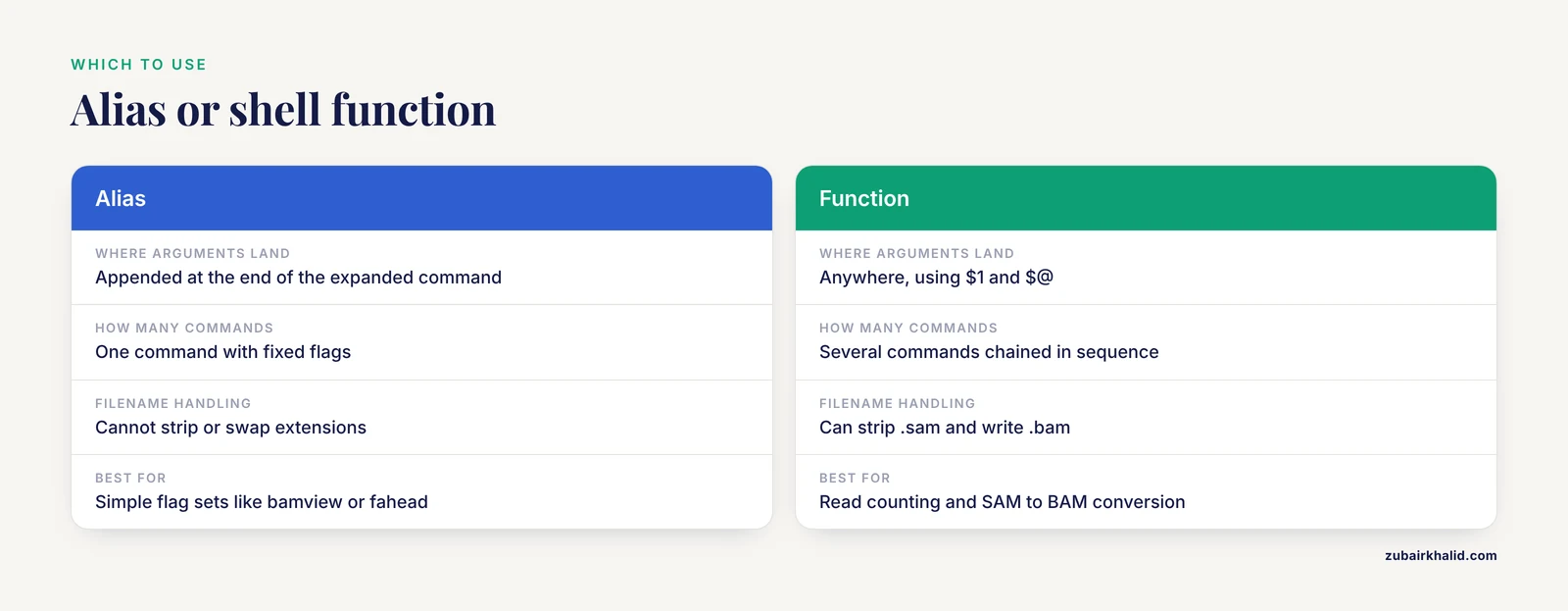
Aliases paste text at the front of a command and append your arguments at the end. That covers a lot, but not everything. When you need an argument in the middle of a command, or multiple commands chained together, or a calculation, write a shell function in the same file. Functions use $@ to mean all arguments and $1, $2 for the first and second arguments.
The canonical bioinformatics file format aliases example that needs a function is counting reads in a FASTQ file. A FASTQ record is exactly four lines: a header starting with @, the sequence, a line starting with +, and the base quality string. So the read count is the line count divided by four, which means printing every fourth line and counting those.
fqreads() {
  awk 'NR%4==2' "$@" | wc -l
}
Save that in ~/.bash_aliases, run source ~/.bashrc, then:
fqreads sample.fq.gzExpected output:
25000000The awk program NR%4==2 is true on every second line of every group of four, which is the sequence line, and "$@" passes along any files you name, including .gz files if your awk build reads them, otherwise pipe through zq first. Because the value sits in the middle of the pipeline, this could never be a plain alias.
A second function worth having converts a SAM file to a sorted, indexed BAM in one step:
sam2bam() {
  samtools view -b -o "${1%.sam}.bam" "$1"
  samtools sort -o "${1%.sam}.sorted.bam" "${1%.sam}.bam"
  mv "${1%.sam}.sorted.bam" "${1%.sam}.bam"
  samtools index "${1%.sam}.bam"
}
The parameter expansion ${1%.sam} strips the trailing .sam from the first argument, so sam2bio alignment.sam writes alignment.bam next to it and indexes it. This is the kind of multi-step chore that rewards the one-word interface most, because every manual retyping of it is a chance to forget the index step, and downstream tools such as samtools view on a region or tabix will fail without one.
Aliases for Sequence Formats: FASTA and FASTQ
FASTA aliases
A FASTA file stores one or more sequences as a header line beginning with > followed by the sequence itself, wrapped across one or more lines. The most common chores are listing headers, counting sequences, and converting to a table of names and lengths.
# Print every FASTA header
alias fahead='grep "^>"'

# Count sequences
alias facount='grep -c "^>"'

# Name, length, and GC fraction for every sequence
alias fa2tab='seqkit fx2tab -n -l -g'

# Reverse complement
alias revcomp='seqkit seq -r -p'
Running fahead genome.fna produces lines like:
>NC_000001.11 Homo sapiens chromosome 1, GRCh38 reference primary assembly
>NC_000002.12 Homo sapiens chromosome 2, GRCh38 reference primary assembly
facount genome.fna prints a single integer. fa2tab prints one row per sequence with the name, the length in bases, and the GC content as a fraction, for example:
NC_000001.11 248956422 0.4016The reverse complement alias chains two seqkit flags on one command: -r reverses the sequence and -p complements it. Run together, as in revcomp primers.fasta, they give the reverse complement, which is what you need for checking primer binding sites on the opposite strand.
FASTQ aliases and the multiline record problem
FASTQ looks similar but pairs each sequence with a quality string. The format supports wrapping the sequence and quality across multiple lines, and older exporters still do this. Any alias that assumes four lines per record will miscount such files, which is why the fqreads function above and the seqkit tools, which handle both layouts, are safer than hand-rolled arithmetic. If a file has already passed through seqkit, samtools, or any modern modernizer, four-line layout is what you have.
Useful FASTQ entries:
# Normalize to four lines per record and strip whitespace in headers
alias fqclean='seqkit seq -w 0 -n'

# Peek at the first few records
alias fqhead='seqkit head -n 4'

# Adapter and quality trimming, writing gzipped output
alias fqtrim='fastp -q 20 -l 50'

# Extract reads from a BAM back to FASTQ, gzipped
bam2fq() {
  samtools fastq "$1" | gzip -c > "${1%.bam}.fastq.gz"
}
In fqclean, -w 0 means do not wrap sequence lines, which produces the four-line layout, and -n does not apply here, so a simpler and equally useful alias is alias fqunwrap='seqkit seq -w 0'. Use whichever name you like, but keep the note in your file that its job is to guarantee the four-line layout that other aliases assume. In fqtrim, -q 20 drops bases with a Phred quality below 20 at the read ends, and -l 50 discards reads shorter than 50 bases after trimming. Both are example values you should tune to your platform and library, and fastp writes an HTML report you can open in a browser.
To check that your counting alias is correct, build a tiny file you can verify by eye:
printf '@r1\nACGT\n+\nIIII\n@r2\nTTTT\n+\nIIII\n' > test.fq
fqreads test.fq
Expected output:
2The quality string IIII is valid ASCII-encoded Phred input, so tools that read the file will not complain. Two records in, two out, alias verified.
Aliases for Alignment Formats: SAM, BAM, and CRAM
The SAM format is tab-delimited text with a header section of lines beginning with @ followed by an alignment section. Each alignment record has 11 mandatory fields, including the read name, the flag field describing pairing and mapping state, the reference name and position, the mapping quality, the CIGAR string describing insertions and deletions, and the sequence and quality. BAM is the same data in compressed binary form, and CRAM is a further-compressed form that stores sequences by reference to a FASTA file, which is why CRAM files cannot be read without their reference sequence available.
The aliases that earn their keep daily:
# Header only
alias bamhdr='samtools view -H'

# Alignment records only, no header
alias bamrecs='samtools view'

# Everything, header plus records
alias bamview='samtools view -h'

# Summary of flag values
alias bamstat='samtools flagstat'

# Full alignment statistics report
alias bamstats='samtools stats'

# Reads not flagged as unmapped
alias mapped='samtools view -F 4'

# Reads that are paired and properly paired, flag bits 1 and 2 set
alias properpair='samtools view -f 3'

# Create a BAM index
alias bamidx='samtools index'
The two filter aliases deserve an explanation because the flag field confuses everyone at first. Each alignment carries a numeric flag whose bits describe properties: bit value 1 means the read is paired, 2 means it is part of a proper pair, 4 means it is unmapped, and so on. -F 4 filters out reads with bit 4 set, keeping mapped reads. -f 3 keeps only reads with both bit 1 and bit 2 set. Note the direction: -f requires a flag and -F excludes one, which is a classic source of silently wrong filtering.
bamstat sample.sorted.bam prints a short report, which begins with a line in this shape:
100000 + 0 in total (QC-passed reads | QC-failed reads)followed by counts for each mapping and pairing category. If that number does not match the number of records in the file, or if downstream per-chromosome counts look wrong, run samtools quickcheck sample.sorted.bam. It prints nothing when a file passes the structural checks and prints a message naming the file when the file is truncated or malformed. The most common cause of a failing check is a copy or transfer that was interrupted, so re-download or re-create the file rather than trying to patch it.
For CRAM, view commands work the same way, but a reference must be reachable. Point at one explicitly with the single-dash reference option when the default lookup fails:
samtools view -T GCA_000001405.15_GRCh38_genomic.fna sample.cram | head -4That is a good candidate for a function if you always use the same reference:
cramview() {
  samtools view -h -T "$HOME/references/GRCh38_genomic.fna" "$@"
}
Adjust the path to wherever your reference FASTA and its .fai index live, and keep the .fai file next to the FASTA, since the reader needs it to jump to the right contig.
Aliases for Variant Formats: VCF, BCF, and Index Files
A VCF file lists genetic variants. Its header lines begin with ##, its column header line begins with #CHROM, and each variant record has 8 fixed columns: chromosome, position, identifier, reference allele, alternate allele, quality, filter status, and info, followed by sample genotype columns when samples are present. BCF is the binary, indexed-compressed counterpart produced and read by bcftools.
Because VCF files meant for random access must be compressed with bgzip and indexed with tabix, compression aliases belong in this group:
# Decompress gzip or bgzip to standard output
alias zq='gzip -dc'
alias bz='bgzip -dc'

# Header only
alias vcfhdr='bcftools view -h'

# Records only, header suppressed
alias vcfrecs='bcftools view -H'

# Create a tabix index for a bgzipped VCF
alias vcfidx='tabix -p vcf'
The workhorse is a function that prints the columns you actually care about:
vcfcols() {
  bcftools query -f '%CHROM\t%POS\t%REF\t%ALT\n' "$@"
}
Run vcfcols sample.vcf.gz | head -3 and you get output in this shape:
chr1	7676115	G	A
chr1	7676155	C	T
chr1	7681001	TA	T
The format string uses \t for tabs and \n for newlines, and the percent-prefixed words pull named fields from each record. Extend it with %QUAL or %FILTER as needed. Because the format string is fixed inside the function, you never mistype a percent code again, which matters since a wrong code makes bcftools exit with a message about an unknown tag and aborts the whole stream.
Random access by region is where the index pays for itself:
tabix sample.vcf.gz chr1:1000000-2000000This prints only the records overlapping that interval, in seconds even on files with millions of variants, provided three conditions hold: the file was compressed with bgzip rather than plain gzip, the .tbi or .csi index exists next to it, and the index is newer than the data file. Plain gzip archives will not work with tabix, and the failure is silent until you query, so the safest habit is to always run bgzip and then an index command immediately after producing any VCF.
Converting and sorting get one-word names too:
# Sort a bgzipped VCF and write gzipped output
alias sortvcf='bcftools sort -O z'

# Compress to BCF, the indexed binary form
alias tobcf='bcftools view -O b'
sortvcf still needs -o out.vcf.gz and an input file when you call it, so the alias fixes the output format and leaves the rest to you. In -O z, the lowercase z means compressed VCF, capital Z would mean uncompressed BCF-compatible plain text, and b means binary BCF.
Aliases for Interval and Annotation Formats: BED, GFF3, and GTF
BED is the simplest of the group. Each line has a chromosome name, a zero-based start coordinate, and an end coordinate, with the end position excluded, so a feature from position 1000 to 2500 spans 1500 bases. Optional columns add names, scores, and display attributes. GFF3 and GTF are nine-column tab-delimited annotation formats. Both share the same first eight column meanings, including source, feature type, start, end, score, strand, and phase, and differ mainly in the attribute column, where GFF3 uses = separators and GTF traditionally uses spaces with quoted values. Many downstream tools accept only one of the two, and gffread converts between them with its -T flag.
Handy entries:
# Keep only the first three BED columns
alias bedcut='cut -f1-3'

# Append the interval length as a fourth column
bedlen() {
  awk '{print $1 "\t" $2 "\t" $3 "\t" ($3-$2)}' "$@"
}

# Count feature types in a GFF3 or GTF file
alias gffcounts='cut -f3 | sort | uniq -c'

# Sort a GFF3 or GTF by chromosome and start position
alias gffsort='sort -k1,1 -k4,4n'
bedlen exons.bed | head -3 prints:
chr1	1000	2500	1500
chr1	5000	5200	200
chr2	12000	13700	1700
gffcounts annotation.gff3 prints a tally of every value in the third column, which is the feature type:
  61234 exon
  41276 gene
  20261 mRNA
This is a surprisingly good sanity check on a new annotation file. If a file that should describe a well-annotated genome lists almost no gene features, the file is probably a different release, a different feature hierarchy, or truncated.
A Copy-Paste Bioinformatics File Format Aliases Template
The blocks above assemble into one complete file. This is the bioinformatics file format aliases template you can paste into ~/.bash_aliases and edit down to what you use. Every entry follows the format rules from earlier: names without spaces, values in single quotes, functions where arguments must land mid-command.
# ~/.bash_aliases
# Bioinformatics file format shortcuts
# Reload after editing with: source ~/.bashrc

# ---------- Compression ----------
# Decompress gzip or bgzip archives to standard output
alias zq='gzip -dc'
alias bz='bgzip -dc'

# ---------- FASTA ----------
# Headers only, and a sequence count
alias fahead='grep "^>"'
alias facount='grep -c "^>"'

# Name, length, and GC fraction per sequence
alias fa2tab='seqkit fx2tab -n -l -g'

# Reverse complement
alias revcomp='seqkit seq -r -p'

# ---------- FASTQ ----------
# Guarantee four lines per record
alias fqunwrap='seqkit seq -w 0'

# First few records
alias fqhead='seqkit head -n 4'

# Adapter and quality trimming, tuned to taste
alias fqtrim='fastp -q 20 -l 50'

# Count reads in any FASTQ, handling wrapped records
fqreads() {
  awk 'NR%4==2' "$@" | wc -l
}

# ---------- SAM, BAM, CRAM ----------
alias bamhdr='samtools view -H'
alias bamrecs='samtools view'
alias bamview='samtools view -h'
alias bamstat='samtools flagstat'
alias bamstats='samtools stats'
alias bamidx='samtools index'
alias mapped='samtools view -F 4'
alias properpair='samtools view -f 3'
alias quickcheck='samtools quickcheck'

# SAM to sorted, indexed BAM, output named after the input
sam2bam() {
  samtools view -b -o "${1%.sam}.bam" "$1"
  samtools sort -o "${1%.sam}.sorted.bam" "${1%.sam}.bam"
  mv "${1%.sam}.sorted.bam" "${1%.sam}.bam"
  samtools index "${1%.sam}.bam"
}

# BAM to gzipped FASTQ
bam2fq() {
  samtools fastq "$1" | gzip -c > "${1%.bam}.fastq.gz"
}

# ---------- VCF, BCF ----------
alias vcfhdr='bcftools view -h'
alias vcfrecs='bcftools view -H'
alias vcfidx='tabix -p vcf'
alias sortvcf='bcftools sort -O z'
alias tobcf='bcftools view -O b'

vcfcols() {
  bcftools query -f '%CHROM\t%POS\t%REF\t%ALT\n' "$@"
}

# ---------- BED, GFF3, GTF ----------
alias bedcut='cut -f1-3'
alias gffcounts='cut -f3 | sort | uniq -c'
alias gffsort='sort -k1,1 -k4,4n'

bedlen() {
  awk '{print $1 "\t" $2 "\t" $3 "\t" ($3-$2)}' "$@"
}
Trim or extend this template to match the tools your lab actually uses. An alias file full of commands for software you never run is noise, and noise is how you end up ignoring the file. The version above deliberately avoids defining an alias with the same name as any standard Linux command such as sort, cut, or head, because shadowing a system command with different behavior is one of the most confusing mistakes you can hand to a collaborator.
Quick Reference Table
| Format | Typical extensions | Alias or function | Command behind it | What it does | ||
|---|---|---|---|---|---|---|
| , - | , - | , - | , - | , - | ||
| FASTA | .fa, .fna, .fasta | fahead | grep "^>" | List all sequence headers | ||
| FASTA | .fa, .fna, .fasta | fa2tab | seqkit fx2tab -n -l -g | Names, lengths, GC fraction | ||
| FASTQ | .fq, .fastq, .fq.gz | fqreads | `awk 'NR%4==2' \ | wc -l` | Count reads, multiline safe | |
| FASTQ | .fq, .fastq | fqunwrap | seqkit seq -w 0 | Force four-line records | ||
| SAM | .sam | sam2bam | samtools view -b, samtools sort, samtools index | Convert, sort, index | ||
| BAM | .bam | bamview | samtools view -h | Records with header | ||
| BAM | .bam | bamstat | samtools flagstat | Flag category summary | ||
| BAM | .bam | mapped | samtools view -F 4 | Drop unmapped reads | ||
| CRAM | .cram | cramview | samtools view -h -T ref.fna | View with explicit reference | ||
| VCF | .vcf, .vcf.gz | vcfcols | bcftools query -f ... | Chromosome, position, alleles | ||
| VCF | .vcf.gz | vcfidx | tabix -p vcf | Build a tabix index | ||
| BCF | .bcf | tobcf | bcftools view -O b | Binary compressed output | ||
| BED | .bed | bedlen | awk length calculation | Append interval length | ||
| GFF3, GTF | .gff3, .gtf | gffcounts | `cut -f3 \ | sort \ | uniq -c` | Tally feature types |
Testing That Every Alias Actually Works
Aliases fail quietly in the worst way, which is when the alias exists but does something subtly different from what you assume. Three checks catch essentially every problem.
First, confirm registration with type:
type fqreads bamview vcfcolsExpected output:
fqreads is a function
fqreads ()
{
    awk 'NR%4==2' "$@" | wc -l
}
bamview is aliased to `samtools view -h'
vcfcols is a function
vcfcols ()
{
    bcftools query -f '%CHROM\t%POS\t%REF\t%ALT\n' "$@"
}
Second, confirm equivalence with the long command using process substitution and diff. This proves the alias produces byte-identical output to the command it replaces:
diff <(bamhdr sample.sorted.bam) <(samtools view -H sample.sorted.bam)No output means the two streams matched. Any lines printed by diff show exactly where the alias and the long form diverge.
Third, exercise each alias family against the tiny test files you can generate in seconds, like the two-record FASTQ shown earlier. For BAM files, samtools quickcheck file.bam is the fast structural gate: silence means pass, a named warning means the file is truncated or malformed. For indexed files, run one region query and confirm the coordinates returned fall inside the interval you requested.
A final check matters if you share the file: start a fresh, clean shell that loads only your startup files, with no aliases inherited from the current session:
bash -i -c "type fqreads"Expected output:
fqreads is a functionIf that fails, your definitions live somewhere that only your current session can see, such as typed directly at the prompt, rather than in ~/.bash_aliases.
Error Messages You Will Actually See, and the Fixes
| Message | What caused it | Fix |
|---|---|---|
| , - | , - | , - |
bash: bamview: command not found | You added the alias but did not reload the shell, or you are in a script where aliases do not expand | Run source ~/.bashrc, or use the full command inside scripts |
bash: syntax error near unexpected token '(' | You wrote alias fqreads() {, mixing alias and function syntax | Drop the word alias and write the function as fqreads() { ... } |
bash: alias: sam stat: not found | Spaces inside an unquoted alias name, splitting one name into two | Wrap the whole value in single quotes, with no spaces around = |
[E::idx_find_and_load] Could not retrieve index file for 'sample.vcf.gz' | No .tbi or .csi index next to the file | Run tabix -p vcf sample.vcf.gz or bcftools index sample.vcf.gz |
[E::hts_idx_load3] The index file is older than the data file | You regenerated the data file after building the index | Rebuild the index with the same command |
[E::bgzf_read] Read block operation failed | The bgzipped file is truncated, usually a failed transfer | Delete and re-download or regenerate the file, then reindex |
bgzip: command not found | htslib tools are not on your PATH in the current environment | Install htslib or activate the conda environment that contains it |
samtools: command not found inside a job scheduler script | The conda environment was never activated in the non-interactive job shell | Add the activation line, or the full tool path, at the top of the job script |
Two of these deserve extra emphasis because they cost people real analysis time. The index-age error is the one you cause yourself: if you re-run a variant caller and overwrite sample.vcf.gz but forget the index, every region query after that fails or, worse, returns stale results, until you reindex. And the non-interactive shell problem is the single most common way alias-driven pipelines break on a cluster. Aliases exist only in shells that read ~/.bashrc, so anything submitted to a scheduler, run from cron, or executed as bash script.sh never sees them. The robust pattern is to keep the real commands in scripts, and treat aliases as an interactive convenience layered on top.
Common Mistakes and Limitations
Redefining an existing command. An alias named sort, head, or grep will fire in every terminal, including ones where you typed the real command on purpose. Pick names that do not collide. type name before you commit tells you instantly whether a name is already taken.
Quoting wrong. Double quotes in a definition expand variables immediately, which hard-codes your paths into the alias. Spaces around the equals sign split the definition into pieces. If an alias definition behaves strangely, run type aliasname and read back exactly what Bash stored.
Trusting aliases in scripts. This bears repeating because it is the biggest practical limitation. Aliases are an interactive-layer tool. Pipelines, scheduler jobs, and CI steps should contain the full commands. If you want reusable names in scripts, define functions in a separate file and source that file explicitly at the top of the script with . /path/to/functions.sh, which works in any shell that supports sourcing.
Assuming gzip and bgzip are interchangeable. They produce superficially similar files, but only bgzip creates the blocked layout that tabix requires for random access. A VCF compressed with plain gzip cannot be region-queried, and converting after the fact is as simple as zq in.vcf.gz | bgzip -c > out.vcf.gz followed by vcfidx out.vcf.gz. Note that the pipe uses only single-dash flags, so the whole thing types quickly.
Counting lines in wrapped FASTQ. Any alias or one-liner that divides line counts by four silently miscounts a multiline FASTQ. Normalize first with fqunwrap, or use the fqreads function built on the sequence-line selector, which handles both layouts.
Expecting CRAM to be self-contained. CRAM stores differences against a reference, so a CRAM file without its reference FASTA is unreadable. Keep the reference and its .fai index alongside your data, and record the path in your alias function if you use one reference everywhere.
Confusing GTF and GFF3. The files look almost identical and the attribute column syntax differs, and tools that accept one often reject the other with a parse error deep in a run. Check the header lines at the top of the file, where the version is usually declared, and convert with gffread -T when you need the other dialect.
Alias hygiene is not data validation. Shortcuts reduce typing errors, not analytical errors. Keep running structural checks such as samtools quickcheck, keep verifying record counts against expectations, and keep your aliases in version control so a change that breaks a pipeline can be traced. Individual project setups vary enough that an alias file should be reviewed by whoever owns the cluster before it becomes the lab default.
Frequently Asked Questions
Do bash aliases work inside shell scripts?
No. Aliases expand only in interactive shells, so scripts, cron jobs, and scheduler submissions do not see them. Use full commands in scripts, or define functions in a separate file and source it explicitly at the top of the script.
How do I make a new alias take effect immediately?
Save it in ~/.bash_aliases and run source ~/.bashrc, or simply open a new terminal. Every newly started interactive shell reads the startup files automatically.
What is the difference between an alias and a shell function for bioinformatics commands?
An alias pastes text at the front of a command and appends your arguments at the end. A function can place arguments anywhere, run multiple commands in sequence, and transform filenames, so use aliases for simple flag sets and functions for anything involving $1 or $@.
Why does my alias ignore the arguments I pass to it?
Plain aliases cannot inject arguments into the middle of a command, and some tools ignore trailing arguments or require options in a fixed order. Rewrite the alias as a function that uses "$@" or "$1" in the correct position.
Can I use the same aliases on an HPC cluster and over SSH?
Yes, as long as the shell is Bash and the file is ~/.bash_aliases in your home directory on that machine. Tools referenced by the aliases must also be installed or available through an activated environment on that system. Copy the file with scp and test each family with type and a small file.
How do I read gzipped FASTQ files without typing gzip -dc every time?
Define alias zq='gzip -dc' and write zq sample.fq.gz wherever you would have written the full command. For bgzipped files, define the parallel alias bz with bgzip -dc, since tabix-indexed files require the bgzip format.
How do I share a bioinformatics file format aliases template with my lab without breaking other people's setups?
Keep the template in a git repository, instruct people to clone it to a known path and source it from their own .bashrc, and avoid alias names that shadow standard commands such as sort or head. Have each person run type name for the aliases they plan to use to catch collisions on their machine.
Which file formats benefit most from aliases?
The formats you touch dozens of times a day benefit most, which in practice means FASTQ read counting and trimming, SAM to BAM conversion and indexing, BAM filtering and statistics, VCF header inspection and column extraction, and tabix-indexed region queries. Formats you touch weekly are better served by a short cheat sheet than by an alias you will forget.