Best Operating System for Bioinformatics: Options Compared
By Dr. Zubair Khalid, DVM, MS, PhD ·
The practical difference between operating systems for bioinformatics is friction, meaning the amount of effort standing between you and working software. Linux has the least, macOS runs a close second with occasional architecture surprises, and Windows closes most of the gap once you enable the Windows Subsystem for Linux (WSL2), a lightweight layer that runs a genuine Linux environment inside Windows.
The rule of thumb is short. If you control the machine, install an Ubuntu long-term support (LTS) release and manage analysis software with conda, a package and environment manager built for reproducible scientific software. If your analysis runs on a university or industry cluster, you are already using Linux, so put your energy into learning the core commands. If you need Windows applications for grants, teaching, or office work, keep Windows and put WSL2 underneath it.
This guide compares the main options on the criteria that decide real choices, including software availability, package managers, containers, CPU architecture, GPU support, and high-performance computing (HPC) compatibility. It walks through the Linux commands that carry most of the daily workload in genomics, works through five concrete setup scenarios, and lists the mistakes that cost beginners the most time.
What Bioinformatics Workloads Demand From an Operating System
Most bioinformatics is not one program. It is a pipeline, a chained sequence of tools where each step consumes the output of the previous one. A published tumor subtyping study shows the typical shape. The authors downloaded transcriptomic data from the Gene Expression Omnibus (GEO), a public gene expression repository, and The Cancer Genome Atlas (TCGA), a public cancer genomics resource. They screened 18 prognosis-related differentially expressed genes tied to epithelial-mesenchymal transition and mitophagy, stratified patients into two molecular subtypes with consensus clustering, mapped a protein-protein interaction (PPI) network to identify hub genes, and finished with Cox regression, functional enrichment, immune infiltration, and drug sensitivity analyses [1]. Every step ran in R or at the Unix command line. None of it needed Windows.
Clinical genomics leans on the command line even harder. A benchmark of software implementing the American College of Medical Genetics and the Association for Molecular Pathology (ACMG/AMP) guidelines for classifying genetic variants compared four tools selected from 22 candidates, Franklin, InterVar, TAPES, and Genebe, against the phenotype-driven tool LIRICAL on 151 expert-curated Mendelian (single-gene) disorder datasets. LIRICAL reached 68.21 percent top-10 variant prioritization accuracy (the correct variant appearing among a tool's top ten ranked candidates) and Franklin 61.59 percent, and tools with deeper phenotype integration outperformed the rest [2]. InterVar and TAPES are command-line programs, the kind that assume a Unix environment and slot straight into automated pipelines.
That pattern explains why the search for the best operating system for bioinformatics is really a search for the smoothest path to Unix. The software is written for Unix first. Everything else is a question of how gracefully your machine imitates it.
Comparing the Main Options Side by Side
The table below lays out the options with their practical pros and cons in one view.
| Option | Package management | Genomics tool support | Hardware notes | HPC fit | Best for | Main drawback |
|---|---|---|---|---|---|---|
| Ubuntu LTS | apt plus conda or mamba | Native for nearly all command-line tools | x86_64 and ARM64, NVIDIA CUDA setup is straightforward | Excellent, mirrors cluster behavior | Beginners, laptops, lab servers | Consumer hardware support varies by vendor |
| Rocky or AlmaLinux | dnf plus conda | Native | x86_64 server hardware | Excellent, matches institutional RHEL systems | Lab and core-facility servers | Older package versions in the base repositories |
| macOS, Apple Silicon | Homebrew plus conda | Most tools build or ship ARM64 versions, x86_64-only tools run under Rosetta 2 | ARM64 CPU, no NVIDIA CUDA | Client to clusters only | Laptop development, R and Python analysis | Occasional missing ARM64 builds |
| Windows 11 with WSL2 | apt inside WSL2, winget outside | Full Linux toolchain inside the WSL2 layer | CUDA passthrough on supported NVIDIA GPUs | Strong as a cluster client, not a cluster OS | People who need Windows apps alongside analysis | Slow file access across the Windows and Linux boundary |
| Windows native | winget and installers | R and Python run natively, most pipeline software does not | Broad hardware support | Poor | Not recommended as a primary analysis platform | Genomics software assumes Unix |
| Android or iOS | App stores only | None for standard pipelines | Phone-class hardware | None | Field data capture and diagnostic readout | Not an analysis platform |
Three patterns fall out of the table. Linux in some form wins every column that involves running genomics software. macOS and Windows with WSL2 are both viable daily systems, and the choice between them depends on the rest of your work rather than on the bioinformatics. Native Windows and mobile devices are niche, one because of software gaps and the other by design.
Linux for Bioinformatics
Why Linux Dominates the Field
Linux is a free, open-source operating system built around the kernel, the core program that manages hardware, together with the GNU userland tools. The shell is the command interpreter you type into, and on servers and clusters that shell is almost always bash. Four facts explain the platform's grip on bioinformatics.
First, the tools themselves are Linux-first. Alignment utilities such as BWA and Bowtie2, the SAMtools and BCFtools families for handling sequence alignments, variant callers such as GATK, and assemblers such as SPAdes all target Unix, and many projects publish Linux binaries before anything else. Second, the containers that carry reproducible pipelines are Linux containers, so a Linux host runs them with no translation layer. Third, HPC clusters, the shared machines that run the heavy jobs, are Linux end to end. A laptop that matches the cluster behaves like the cluster, which means scripts that work at your desk work on the queue. Fourth, and easy to underestimate, is documentation culture. Nearly every error message you will ever paste into a search box has already been answered by someone on the same stack, because the installed base is enormous and homogeneous. Heterogeneity is where time disappears, and Linux minimizes it.
Choosing a Distribution
A distribution is a complete Linux system assembled from the kernel, an installer, default tools, and package repositories. The main options differ in release cadence and support length.
- Ubuntu LTS ships every two years with five years of standard security updates. It has the largest community documentation of any distribution, which matters more than any technical feature when you are troubleshooting at midnight. This is the default recommendation for laptops, lab servers, and first installs.
- Debian, the project Ubuntu builds on, favors stability over freshness and runs quietly on servers for years.
- Rocky Linux and AlmaLinux are free community rebuilds compatible with Red Hat Enterprise Linux (RHEL), the commercial distribution many institutions standardize on. Choose one when your core facility or IT department runs RHEL and wants matching behavior.
- Fedora tracks newer software with a short support window per release, which suits enthusiasts more than production servers.
- Arch Linux updates continuously and expects fluency from its users. It is a poor first target.
If you are unsure, install Ubuntu LTS. Nothing in bioinformatics requires a rarer choice.
Essential Linux Commands for Bioinformatics
Two concepts make the command set below coherent. The PATH is the list of directories the shell searches when you type a command, which is why conda's activate step prepends its environment's bin directory. And permissions decide who can read, write, or execute a file, which is why chmod appears in the table. The working pattern is small commands chained with the pipe symbol (|), which sends the output of one command into the input of the next. Around twenty commands cover most daily genomics work.
| Command | What it does | Bioinformatics example | |
|---|---|---|---|
| ssh user@server | Opens an encrypted shell on a remote machine | Log into the campus cluster | |
| tmux new -s rnaseq | Starts a named session that survives disconnects | Keep an overnight alignment running through a laptop sleep | |
| zcat file.fastq.gz | Prints a gzipped file without decompressing it | Peek at raw sequencing reads | |
| awk 'NR%4==2' | Keeps every second line of each four-line block | Pull sequence lines from a FASTQ | |
| grep -c ">" file.fa | Counts matching lines | Count records in a FASTA file | |
| cut -f1,4,5 peaks.bed | Selects tab-separated columns | Pull chromosome and coordinates from a BED file (a tab-delimited format listing genomic intervals) | |
| sort -k1,1 -k2,2n in.bed | Sorts by column one, then numerically by column two | Prepare intervals for merging | |
| sort x.txt \ | uniq -c | Collapses duplicate lines and counts them | Tally values across samples |
| sed 's/^chr//' in.bed | Substitutes text patterns | Strip chr prefixes before joining files | |
| find . -name "*.fastq.gz" -size +1G | Locates files by name, age, or size | Find large files filling a quota | |
| du -sh */ | Reports folder sizes | Find which project filled the disk | |
| df -h | Reports free space per filesystem | Check scratch space before a run | |
| md5sum file.gz | Prints a content checksum | Verify a download against the source | |
| rsync -avP src/ user@server:/dst/ | Copies and syncs with resume support | Archive results to long-term storage | |
| nohup cmd > log 2>&1 & | Runs a job that survives logout | Launch a multi-hour script on a shared server | |
| chmod +x script.sh | Makes a file executable | Run your own pipeline script | |
| tar -xzf bundle.tar.gz | Extracts a compressed archive | Unpack a downloaded tool bundle | |
| wget / curl | Downloads from a URL | Fetch a reference genome | |
| htop | Watches CPU and memory use live | Confirm a job is actually running | |
| man command | Opens the manual page | Check what an unfamiliar flag does |
A worked example ties three of them together. Say you have just received sample_R1.fastq.gz and want three facts: whether the file transferred intact, how many reads it holds, and how many reads carry adapter sequence.
md5sum sample_R1.fastq.gz
zcat sample_R1.fastq.gz | awk 'NR%4==2' | wc -l
zcat sample_R1.fastq.gz | awk 'NR%4==2' | grep -c "AGATCGA"
The first command prints a checksum, a fingerprint of the file contents, which you compare against the checksum published by the data source. The second line exploits the FASTQ format, which stores each read on four lines (identifier, sequence, separator, quality scores), so the awk filter NR%4==2 keeps every sequence line and wc -l counts them. The third line reuses the same filter and counts reads whose sequence contains AGATCGA, the opening of a common Illumina adapter, which serves as a quick contamination check. Three commands, no code written, and you know whether the file is worth aligning.
Long jobs need two more habits. nohup followed by & runs a command in the background so it survives a logout, with output redirected into a log file:
nohup bash run_pipeline.sh > pipeline.log 2>&1 &tmux creates a session that stays alive on the server even if your laptop sleeps, and you reattach later with tmux attach -t rnaseq. For moving data, rsync -avP copies directories with resume support and transfers only what changed, which beats plain copies on anything larger than a gigabyte. On macOS the checksum command is md5 rather than md5sum, one of the small differences between the two Unix environments.
Linux Pros and Cons
Pros:
- Native support for nearly every genomics tool and container
- The same environment as most clusters, so scripts move without edits
- Free, and it runs well on modest or aging hardware
- Every operation is scriptable, which is what automation requires
Cons:
- Wi-Fi, printers, and sleep behavior vary by laptop vendor
- Some commercial desktop software has no Linux version
- Root access (the superuser account, used through sudo) lets you break a working system, so it deserves respect
macOS for Bioinformatics
macOS is a certified UNIX operating system wearing a polished desktop, and Apple has maintained that certification across its Intel and Apple Silicon generations. Under the hood you get a BSD-flavored Unix userland, the zsh shell as the default, and the Terminal app. Homebrew, the macOS package manager, fills the gaps with command-line tools, and conda manages analysis environments exactly as it does on Linux. For R, Python, and most interpreted-language work, a Mac is a fully capable bioinformatics machine.
Apple Silicon needs one caveat. M-series chips use the ARM64 architecture (also written AArch64), while decades of bioinformatics binaries targeted x86_64, the Intel and AMD architecture. Rosetta 2, Apple's translation layer, runs x86_64 programs on ARM64 at some cost in speed, and the conda ecosystem now publishes osx-arm64 builds for a large share of bioinformatics packages. A minority of tools still ship x86_64 only. Before you commit a critical pipeline to a Mac, check whether your key tools have ARM64 builds or tolerate Rosetta.
Two smaller quirks are worth knowing. The default macOS filesystem is case-insensitive, which occasionally surprises tools that expect FileA and filea to differ. And modern Macs carry no NVIDIA GPUs, so CUDA, NVIDIA's GPU computing platform, is unavailable locally. Macs remain excellent clients for Linux clusters, with Terminal, ssh, and Homebrew-installed utilities covering the remote workflow.
macOS Pros and Cons
Pros:
- Certified Unix environment with a refined desktop and strong battery life
- Homebrew and conda cover most command-line needs
- Excellent laptop hardware for development and interactive analysis
Cons:
- ARM64 compatibility gaps for x86_64-only tools
- No local NVIDIA CUDA
- Case-insensitive default filesystem can trip edge cases
- Rare as a cluster operating system, so it is a client rather than a target
Windows for Bioinformatics
Native Windows runs R, RStudio, and Python well, and a handful of tools ship Windows builds. Most pipeline software does not. Aligners, variant callers, assemblers, and workflow managers overwhelmingly assume Unix, which historically made Windows a poor primary platform for genomics.
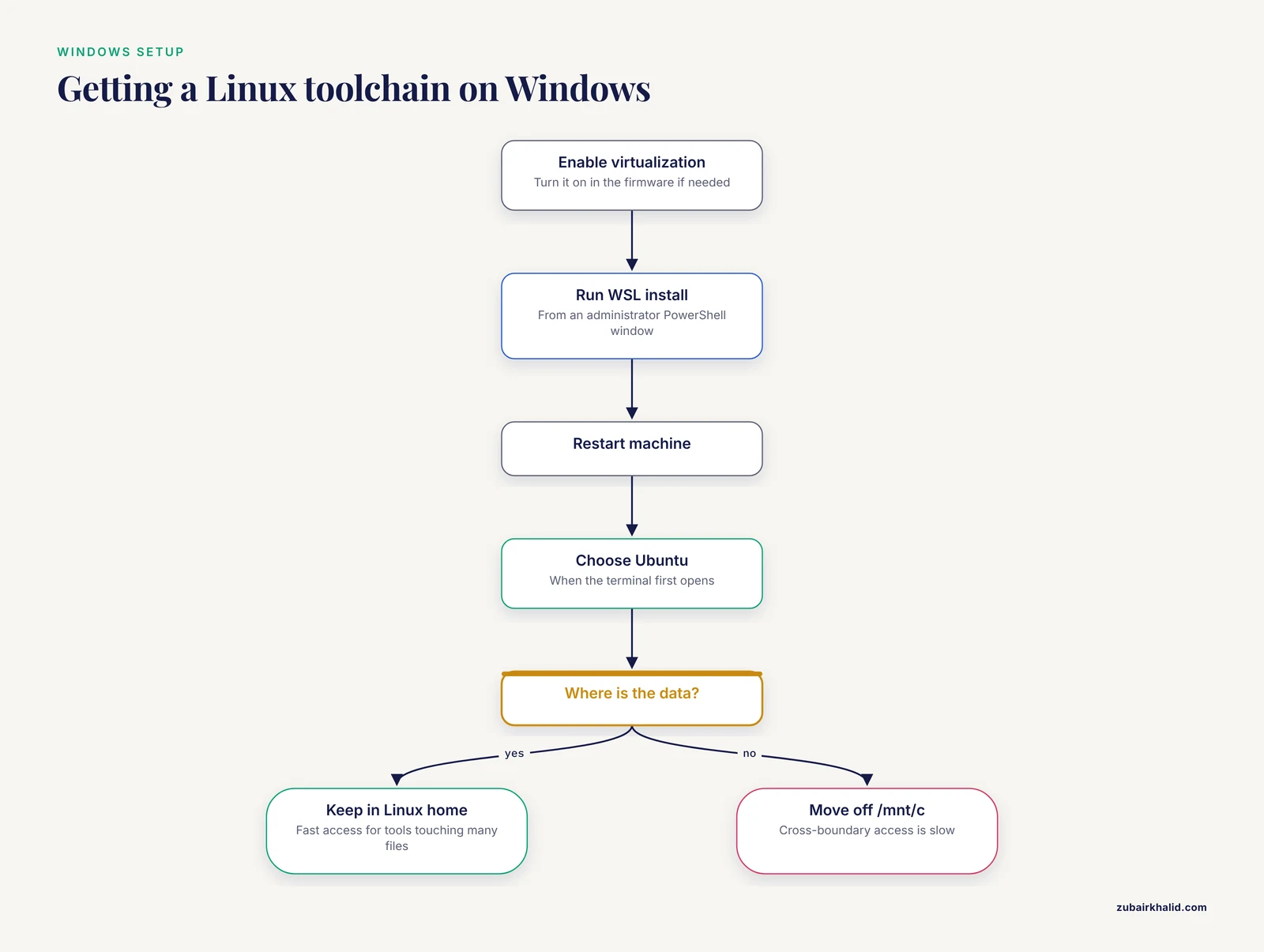
WSL2 changed the calculation. The Windows Subsystem for Linux 2 runs a real Linux kernel inside a lightweight virtual machine alongside Windows. Inside that environment you get apt, conda, compilers, and the full command-line ecosystem, and the filesystem behaves like Linux. Setup takes minutes: enable virtualization in the firmware if needed, run the WSL install command from an administrator PowerShell window, restart, and choose Ubuntu when the terminal first opens.
Docker Desktop integrates with WSL2, so Linux containers run inside the same layer, and NVIDIA supports CUDA inside WSL2 on supported GPUs, which makes deep learning workable without leaving Windows. A practical pattern follows from this: develop and debug on small files locally in WSL2, then submit the same scripts to a cluster unchanged, because both environments are Ubuntu.
One performance rule matters more than any other. Keep project data inside the Linux filesystem, meaning your Ubuntu home folder, rather than under /mnt/c, the mount point where WSL2 exposes Windows files. File access across that boundary is slow, and tools that touch many small files, such as indexing a BAM (the standard binary alignment format), crawl when data sits on the Windows side.
Windows also works well as a front end to remote Linux. The OpenSSH client is built in, Windows Terminal manages tabs of cluster sessions, and rsync or scp moves results back. Many working bioinformaticians run Windows on the desk and Linux everywhere that matters.
Windows Pros and Cons
Pros:
- One machine covers Office, reference managers, and analysis
- WSL2 delivers a genuine Linux toolchain without dual booting or repartitioning
- CUDA passthrough on supported NVIDIA GPUs
- Built-in OpenSSH and Windows Terminal for cluster work
Cons:
- Slow input and output when data lives on the Windows side of WSL2
- The virtualization layer occasionally complicates networking and localhost services
- Native Windows bioinformatics tooling remains thin
Mobile and Edge Devices
Phones are entering the workflow at the readout end rather than the analysis end. A recent Nature Communications study described SID-WAVES, a smartphone-integrated microfluidic diagnostics platform that pairs RPA-CRISPR/Cas12a nucleic acid detection (an isothermal amplification method coupled to a CRISPR-based detector) with protein immunoassays and an AI-assisted smartphone readout, reaching attomolar sensitivity (10^-18 M) and more than 95 percent diagnostic accuracy across 225 clinical and self-collected assays [3]. The phone reads the result, and the desktop Linux machine developed the assay. Treat Android and iOS as capture and display devices for field and clinical work, not as pipeline platforms.
Choosing the Best Operating System for Bioinformatics
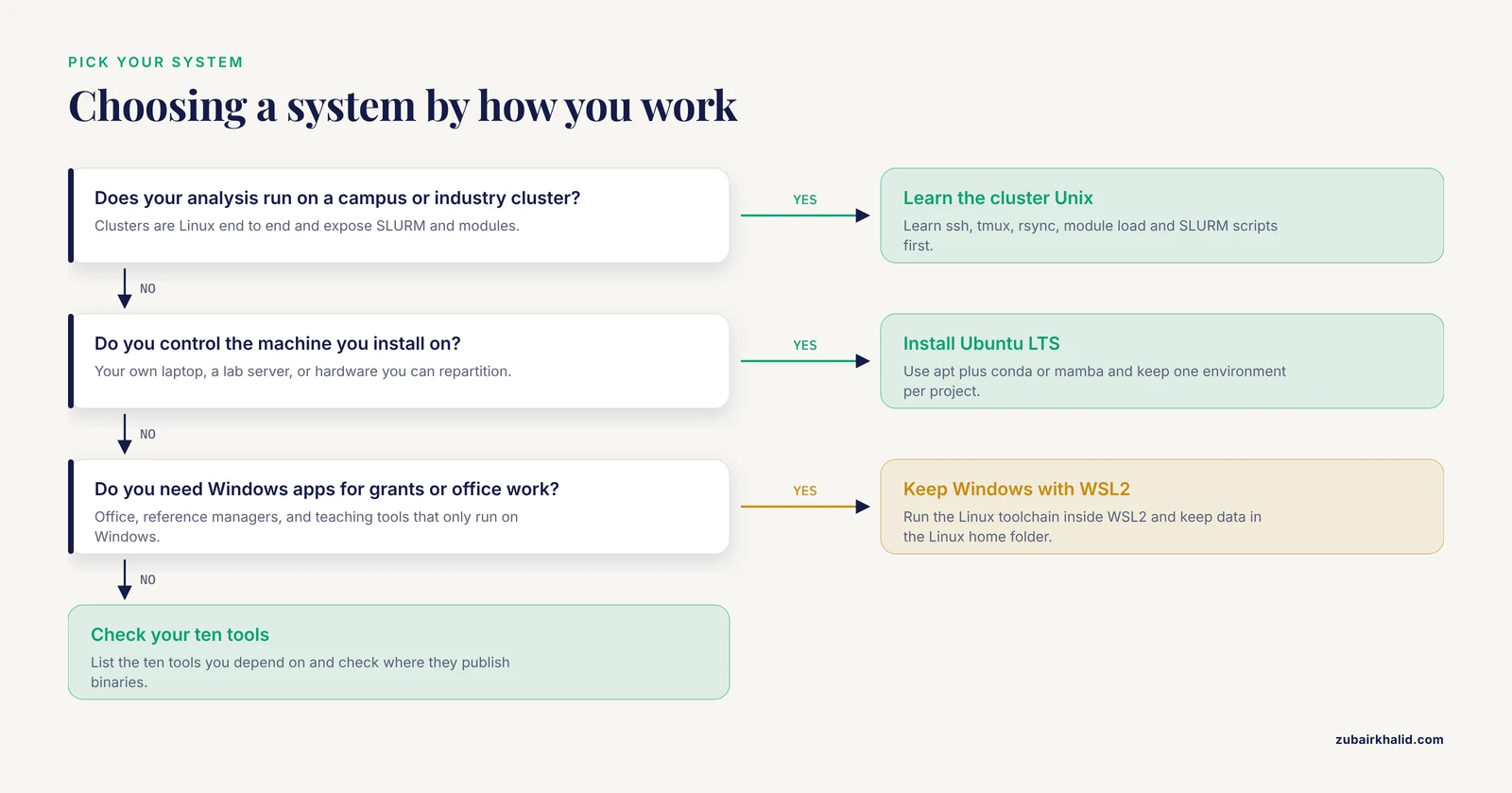
Marketing labels matter less than six practical questions.
Software availability
List the ten tools your work actually depends on and check where they publish binaries. If your list is GATK, SAMtools, BWA, and FastQC, Linux is the target. If your work is mostly R and Python with packaged libraries, any of the three desktop systems works, and the decision shifts to the rest of your life.
Package managers and environments
System package managers (apt on Debian-family systems, dnf on RHEL-family systems, Homebrew on macOS) handle operating system software. Conda, and its faster reimplementation mamba, handle analysis software in isolated environments, one per project, each with its own pinned versions. Bioconda, a conda channel dedicated to bioinformatics, hosts thousands of packages from aligners to workflow tools. Export each environment to a YAML file with conda env export and a collaborator can rebuild your exact stack on any Linux or macOS machine. This habit, more than the choice of distribution, is what makes analyses reproducible.
Containers
A container bundles software with its dependencies into a portable image that runs identically everywhere. Docker dominates on workstations. Apptainer (formerly Singularity) was built for HPC, runs without root privileges, and is standard on clusters. Containers shrink the operating system question, since the image carries its own Linux userland, but every container still needs a Linux kernel underneath, which is precisely what Linux, WSL2, and macOS (through its virtualization layer) provide.
CPU architecture and GPU support
x86_64 remains the default architecture for prebuilt bioinformatics binaries, with ARM64 coverage growing. For GPU work the answer is blunter. NVIDIA's CUDA stack is Linux-first, and training deep learning models happens on Linux GPU servers. A video-based model such as DeepRV, which learned to assess right ventricular systolic function (how well the heart's right pumping chamber works) from 8053 coronary angiography studies and later ran prospectively in the clinic with a median 5.1 second inference time, is representative of the workloads that assume a Linux host with NVIDIA drivers [4].
HPC schedulers and modules
Clusters expose Linux through a scheduler such as SLURM. You write a submission script describing the cores, memory, and time you need, the scheduler queues it, and environment modules (the module load command) switch tool versions per job. None of this exists on a desktop operating system, which is why cluster work is Linux work regardless of your laptop.
Reproducibility
The strongest argument for a Unix-centric setup is that the reproducibility tooling lives there. Workflow managers such as Nextflow and Snakemake express a pipeline as code, resolve software through conda or containers, and resume from the last completed step after a failure. They run on macOS too, but cluster execution profiles, container images, and most published workflow repositories assume Linux. If a reviewer or collaborator asks you to rerun an analysis two years from now, pinned environments plus containers plus a workflow manager is what makes that possible.
One more factor sits outside the technical list entirely. Your core facility runs what it runs, and your collaborators' pipelines pin the versions they pin. Matching the dominant environment around you reduces friction more than any personal preference. When in doubt, ask the sysadmin before buying hardware.
Worked Scenarios
Scenario 1: A student with a Windows laptop
Enable WSL2, install Miniconda (the minimal conda installer) inside Ubuntu, and create one conda environment per course project. Keep data in the Linux home folder. Edit with VS Code using its WSL integration, which opens the Linux filesystem transparently. Run RStudio Desktop on the Windows side for R-heavy coursework. Any modern machine with 16 GB of RAM handles coursework, and 32 GB is more comfortable once alignments and large tables enter the picture.
Scenario 2: A graduate student running RNA-seq on a campus cluster
The laptop is a terminal, not the computer. Learn ssh, tmux, rsync, the module system, and SLURM submission scripts first, because they matter more than anything installed locally. A typical analysis uses FastQC for quality checks, STAR or HISAT2 for alignment, featureCounts or Salmon for quantification, and DESeq2 for differential expression, all of which run identically on the cluster and in a local WSL2 or macOS Unix environment. Draft and test on small data subsets, then scale on the cluster. Keep heavy jobs off the login node, the shared machine everyone lands on, and submit them to the queue instead.
Scenario 3: A lab buying or repurposing a server
Install Ubuntu LTS or Rocky Linux on the hardware. Create individual accounts rather than shared logins, install Apptainer for containers, and set up rsync-based backups to a second disk or a remote host. Put large data on a dedicated scratch volume, watch it with df and du, and monitor load with htop. A used x86_64 machine with error-correcting memory and a stack of drives serves a small lab well, and the operating system costs nothing.
Scenario 4: A clinical genomics group standardizing variant interpretation
Reproducibility and auditability outrank convenience. Pin tool versions in containers, record versions in every report, and treat the analysis environment as part of the record. Command-line classifiers such as InterVar and TAPES slot into automated pipelines, and the ACMG/AMP benchmark's selection criteria, free availability, VCF compatibility, and operational reliability, read as a practical checklist before standardizing on any tool [2].
Scenario 5: A deep learning project on medical images
Budget for a Linux workstation or server with an NVIDIA GPU, install the driver and CUDA toolkit, and run PyTorch inside a conda environment or container. Prototype on a small subset before renting cluster GPU time. Keep datasets on fast local SSD storage, because GPU jobs that starve on disk throughput waste the expensive component.
Common Mistakes and Limitations
- Running heavy jobs on a cluster login node. The login node is shared infrastructure for editing and light checks. Aligning a genome there gets you noticed by the sysadmin for the wrong reason.
- Keeping WSL2 data under /mnt/c. Cross-boundary file access is slow. Move project data into the Linux home folder and treat /mnt/c as a bridge for occasional exports.
- Assuming every tool has an Apple Silicon build. Check the conda channel or the project's download page before committing a Mac to a pipeline, and treat Rosetta 2 as the fallback rather than the default.
- Installing everything into the base conda environment. One environment per project, exported to YAML, is what keeps a machine rebuildable and an analysis reproducible.
- Mixing system packages and conda for the same libraries. Let conda own analysis software and let apt or dnf own the operating system, and conflicts stay rare.
- Skipping checksums on downloaded data. A corrupted reference genome wastes days before it announces itself. md5sum takes seconds.
- Fixing permission problems with chmod 777. Learn ownership and group permissions instead, because world-writable files are a standing security hole on shared systems.
- Working without version control or backups. Git for scripts and rsync for data, both set up on day one, prevent the classic lost-analysis-folder incident.
- Blaming the operating system when hardware is the limit. Most "the pipeline is too slow" cases trace to RAM, disk throughput, or a single-threaded step, not the OS.
One limitation deserves plain language. The right setup depends on your institution's cluster, your software requirements, and your budget, and there is no universal answer. When a decision involves shared infrastructure or clinical data, ask your local sysadmin or core facility before committing hardware or months of pipeline work.
Frequently Asked Questions
Do I need Linux for bioinformatics?
Not strictly, but Linux is the default environment for genomics software and virtually every high-performance cluster, so fluency pays off regardless of which laptop you own. WSL2 brings the same toolchain to Windows, and macOS covers most needs through Homebrew and conda.
Which Linux distribution is best for bioinformatics beginners?
Ubuntu LTS is the best first distribution. It pairs five years of security updates with the largest pool of tutorials and troubleshooting threads, and conda installs cleanly on it. Debian and Rocky Linux are solid server alternatives.
Can a MacBook with Apple Silicon handle bioinformatics work?
Yes for R, Python, and most conda-packaged tools. A minority of x86_64-only programs run through Rosetta 2 translation, and NVIDIA CUDA is unavailable, so verify your critical tools before committing a pipeline to a Mac.
Is WSL2 enough, or should I dual boot into Linux?
WSL2 is enough for coursework and single-machine analysis. Consider dual booting only when you need bare-metal performance, unusual hardware support, or a dedicated analysis machine.
How many Linux commands do I actually need to memorize?
About twenty. The commands in the table above cover inspection, file handling, transfer, checksums, and job control, which covers most daily work.
Does the operating system matter more than hardware?
No. RAM, CPU cores, and fast SSD storage decide what you can run for most analyses. The operating system decides how easily the software installs and how well your scripts match the cluster.
Further Reading
Sources
- Molecular subtyping, prognostic evaluation, and tumor immune microenvironment heterogeneity in intrahepatic cholangiocarcinoma based on epithelial-mesenchymal transition and mitophagy-related genes.
- Comprehensive evaluation of ACMG/AMP-based variant classification tools.
- Reframing decentralized diagnostics with a programmable multi-dimensional microfluidic system.
- Automated assessment of right ventricular systolic function from coronary angiograms with video-based artificial intelligence algorithms: development, validation, comparison against humans, and prospective deployment.