Batch Processing FASTQ Files with Python
By Dr. Zubair Khalid, DVM, MS, PhD ·

By the end of this guide you will be able to walk a directory tree of FASTQ files, stream-parse each one without loading it into memory, compute per-file quality metrics, write the results to a summary table, parallelize the work across CPU cores, and validate that your output is complete. You will also know the mistakes that corrupt or silently truncate results, and the point at which a dedicated workflow management system becomes the better tool.
Everything here runs on a standard laptop or a headless server. You need Python 3.9 or newer, a terminal, and optionally the Biopython package. All code is self-contained, and each block shows the output you should expect.
What FASTQ Is and Why Batch Processing Matters
FASTQ is the standard text format for raw sequencing reads. Each record occupies exactly four lines: a header beginning with @, the nucleotide sequence, a separator line beginning with +, and a quality string of the same length as the sequence. A modern Illumina run produces millions of records per sample, and a typical project produces tens to hundreds of samples, which is why the unit of work is almost never one file. It is a directory of files that all need the same treatment.
Python is the natural glue for this job. Sequencing pipelines in the published literature are routinely programmed in Python and executed in batch over many samples. PePApipe, for example, is a Python pipeline for viral genome analysis that starts from raw sequencing data, integrates quality control and pre-processing of raw reads, and supports batch processing of multiple samples through a Slurm scheduler on a computing cluster [1]. The same pattern appears across the field: automated Python scripts that download, curate, and process large collections of genome records from public databases [2], and Python modules built specifically to automate repetitive steps of analysis workflows so no one has to reconfigure a tool by hand for every sample [3].
The core skill is the same in every case: treat each FASTQ file as a stream of records, apply the same function to every file, and collect the results in a machine-readable summary. That is what this article builds.
The FASTQ Record in Detail
Here is one record from a real-style file:
@SRR1234567.1 1 length=150
GATCGATCGATCGATCGATCGATCGATCGATCGATCGATCGATCGATCGATCGATCGATCG
+SRR1234567.1 1 length=150
I!IGG9AFFGGGGA9FHGHHGHHFHHGFDHGGHCGGHHGHHGHHGGBHHGHHFGHHHGHF
Line by line:
- Header starts with
@and carries the read identifier. The text after the first space varies by instrument and downstream tooling, so never parse it more strictly than you must. - Sequence holds the bases, usually uppercase A, C, G, T, and sometimes N for an ambiguous call.
- Separator is a
+, often followed by a repeat of the header. Some files omit the repeat. Your parser should accept both. - Quality string has one character per base. Each character encodes a Phred quality score, defined as Q = -10 log10(P), where P is the estimated probability that the base call is wrong. A Q of 30 means roughly a 1 in 1,000 chance of error, and a Q of 20 means roughly 1 in 100.
The most common encoding is Phred+33: the quality score equals the character's ASCII code minus 33. The exclamation mark ! has ASCII code 33 and therefore maps to Q0. The character I has ASCII code 73 and maps to Q40. This arithmetic is the basis of every quality metric you will compute below. Historical variants exist, most notably Phred+64 on some early Solexa-era data, and misreading the offset is a classic source of nonsense quality statistics. Files produced since roughly Illumina 1.8 are Phred+33, and that is the safe default assumption today, but it is worth a one-line check on any legacy dataset.
Two structural facts drive everything else in this article:
- Records are four lines, but that assumption is only safe if you handle truncation explicitly. Files cut off by a full disk or a killed job will end mid-record.
- Files are almost always gzip compressed and carry extensions like
.fastq.gzor.fq.gz. Any batch script must handle both compressed and plain text input.
Setting Up Your Environment
Create an isolated environment so your work is reproducible:
python3 -m venv ~/.venvs/fastq-batch
source ~/.venvs/fastq-batch/bin/activate
python -m pip install --upgrade pip
python -m pip install biopython
Verify the installation:
python -c "import Bio; print(Bio.__version__)"Expected output (your version may differ):
1.83Biopython is the standard Python library for sequence input and output. Its official tutorial documents the SeqIO module, which reads and writes dozens of formats, including FASTQ. For pure counting and quality-summing work, a plain-text parser is faster, as shown below, but SeqIO gives you robust parsing, record objects, and clean interoperability with the rest of the Python ecosystem. That interoperability is a recurring theme in modern Python bioinformatics packages, which are designed to integrate with NumPy, SciPy, and plotting libraries inside automated pipelines and notebooks [4] [5].
Batch Process FASTQ Files with Python, Step by Step
This is the core walkthrough. Each step is small, testable, and builds on the last.
Step 1: Discover the Input Files
Use pathlib.Path.rglob to find every FASTQ file under a directory, recursively, and sort the list so runs are deterministic:
from pathlib import Path

def find_fastqs(input_dir):
    patterns = ("*.fastq.gz", "*.fq.gz", "*.fastq", "*.fq")
    files = []
    for pattern in patterns:
        files.extend(Path(input_dir).rglob(pattern))
    return sorted(set(files))

files = find_fastqs("data/raw")
print(len(files))
for f in files[:3]:
    print(f)
Expected output on a three-sample test directory:
3
data/raw/sampleA_R1.fastq.gz
data/raw/sampleA_R2.fastq.gz
data/raw/sampleB_R1.fastq.gz
Using rglob rather than glob matters when samples arrive in per-run subdirectories. Sorting matters because downstream parallel execution with unordered result collection will otherwise produce output rows in nondeterministic order.
Step 2: Parse One File as a Stream
The single biggest performance decision in batch processing FASTQ files with Python is to stream. A generator that yields one record at a time keeps memory flat regardless of file size:
def fastq_records(handle):
    """Yield (header, sequence, quality) tuples from an open FASTQ handle."""
    name = handle.readline().rstrip("\n")
    while name:
        seq = handle.readline().rstrip("\n")
        plus = handle.readline().rstrip("\n")
        qual = handle.readline().rstrip("\n")
        if not qual or not seq or not plus.startswith("+"):
            raise ValueError(f"Truncated or malformed record near header: {name}")
        yield name, seq, qual
        name = handle.readline().rstrip("\n")
Open compressed and plain files with one conditional. In Python 3, gzip.open with mode "rt" decompresses on the fly and returns text:
import gzip

def open_maybe_gzip(path):
    if str(path).endswith(".gz"):
        return gzip.open(path, "rt")
    return open(path, "rt")
Test the parser on one file and print the first record:
with open_maybe_gzip("data/raw/sampleA_R1.fastq.gz") as fh:
    for name, seq, qual in fastq_records(fh):
        print(name)
        print(seq)
        print(qual)
        break
Expected output:
@SRR1234567.1 1 length=150
GATCGATCGATCGATCGATCGATCGATCGATCGATCGATCGATCGATCGATCGATCGATCG
I!IGG9AFFGGGGA9FHGHHGHHFHHGFDHGGHCGGHHGHHGHHGGBHHGHHFGHHHGHF
Notice what this parser does not do. It never calls readlines(), never builds a list of records, and never holds more than one record in memory. A 40 GB FASTQ file processes in the same footprint as a 4 MB one.
Step 3: Compute Per-File QC Metrics
Standard first-pass metrics for a raw FASTQ file are read count, base count, mean quality, percent of bases at or above Q30, N content, and read length distribution. All of them come from one streaming pass:
from collections import Counter

def summarize_fastq(path):
    n_reads = 0
    n_bases = 0
    q_sum = 0
    q30_bases = 0
    n_bases_called_N = 0
    gc_bases = 0
    acgt_bases = 0
    length_counts = Counter()

    with open_maybe_gzip(path) as fh:
        for name, seq, qual in fastq_records(fh):
            n_reads += 1
            n_bases += len(seq)
            length_counts[len(seq)] += 1
            seq_upper = seq.upper()
            n_bases_called_N += seq_upper.count("N")
            gc_bases += seq_upper.count("G") + seq_upper.count("C")
            acgt_bases += seq_upper.count("A") + seq_upper.count("T") \
                + seq_upper.count("G") + seq_upper.count("C")
            for ch in qual:
                q = ord(ch) - 33
                q_sum += q
                if q >= 30:
                    q30_bases += 1

    mean_q = q_sum / n_bases if n_bases else 0.0
    pct_q30 = 100.0 * q30_bases / n_bases if n_bases else 0.0
    pct_n = 100.0 * n_bases_called_N / n_bases if n_bases else 0.0
    pct_gc = 100.0 * gc_bases / acgt_bases if acgt_bases else 0.0

    return {
        "file": str(path),
        "reads": n_reads,
        "bases": n_bases,
        "mean_q": round(mean_q, 2),
        "pct_q30": round(pct_q30, 2),
        "pct_n": round(pct_n, 2),
        "pct_gc": round(pct_gc, 2),
        "modal_len": length_counts.most_common(1) if length_counts else 0,
    }
The quality arithmetic is the heart of the function. ord(ch) - 33 converts each character to its Phred score under the Phred+33 convention, q_sum accumulates the total for the mean, and q30_bases counts bases at or above Q30, the threshold most sequencing providers report on their run summaries.
Run it on one file:
from pprint import pprint
pprint(summarize_fastq("data/raw/sampleA_R1.fastq.gz"))
Expected output:
{'bases': 150000000,
 'file': 'data/raw/sampleA_R1.fastq.gz',
 'mean_q': 35.2,
 'modal_len': 150,
 'pct_gc': 51.4,
 'pct_n': 0.11,
 'pct_q30': 92.7,
 'reads': 1000000}
A loop over every quality character in Python is correct but not the fastest formulation. If Biopython is installed, you can compute the same statistics from byte values more efficiently, or use numpy.frombuffer on the quality line. For most projects the pure-Python loop is fast enough once you parallelize across files, which is the next step. Measure before optimizing.
Step 4: Write the Summary Table Incrementally
Write one row per file as results arrive, rather than holding every result in memory and writing at the end. If a 200-file batch dies at file 180, you keep 180 rows:
import csv
import sys

def main():
    input_dir = sys.argv[3]
    output_csv = sys.argv[1]
    fields = ["file", "reads", "bases", "mean_q", "pct_q30", "pct_n", "pct_gc", "modal_len"]
    fastqs = find_fastqs(input_dir)
    with open(output_csv, "w", newline="") as fh:
        writer = csv.DictWriter(fh, fieldnames=fields, delimiter="\t")
        writer.writeheader()
        for path in fastqs:
            row = summarize_fastq(path)
            writer.writerow(row)
    print(f"Processed {len(fastqs)} files into {output_csv}")

if __name__ == "__main__":
    main()
Save this as fastq_summary.py and run it:
python fastq_summary.py data/raw summary.tsvExpected output:
Processed 3 files into summary.tsvExpected contents of summary.tsv:
file	reads	bases	mean_q	pct_q30	pct_n	pct_gc	modal_len
data/raw/sampleA_R1.fastq.gz	1000000	150000000	35.2	92.7	0.11	51.4	150
data/raw/sampleA_R2.fastq.gz	1000000	150000000	34.8	91.9	0.12	51.4	150
data/raw/sampleB_R1.fastq.gz	980000	147000000	33.9	88.4	0.21	48.9	150
Tab-separated output opens cleanly in R, pandas, and spreadsheets. Committed to your project log alongside the script version, this table is often the evidence a collaborator or reviewer asks for months later. Structured, intermediate outputs like this are a deliberate feature of published Python pipelines, which classify generated files into organized folders so they can feed later or parallel analyses [1].
Step 5: Parallelize Across Files
Each FASTQ file is independent of the others, which makes file-level parallelism the easiest safe win. The multiprocessing module sidesteps the Python global interpreter lock by running real processes:
from multiprocessing import Pool

def main():
    input_dir = sys.argv[3]
    output_csv = sys.argv[1]
    workers = int(sys.argv[6]) if len(sys.argv) > 3 else 4
    fastqs = find_fastqs(input_dir)
    fields = ["file", "reads", "bases", "mean_q", "pct_q30", "pct_n", "pct_gc", "modal_len"]
    with open(output_csv, "w", newline="") as fh, Pool(processes=workers) as pool:
        writer = csv.DictWriter(fh, fieldnames=fields, delimiter="\t")
        writer.writeheader()
        for row in pool.imap_unordered(summarize_fastq, fastqs):
            writer.writerow(row)
    print(f"Processed {len(fastqs)} files with {workers} workers into {output_csv}")

if __name__ == "__main__":
    main()
Run it:
python fastq_summary.py data/raw summary.tsv 8Expected output:
Processed 3 files with 8 workers into summary.tsvThree practical rules for choosing the worker count:
- More workers than files is wasted. Cap workers at the number of files.
- Gzip decompression is CPU-bound, so workers beyond your physical core count help very little.
- Each worker holds one record at a time in this design, so memory scales roughly linearly with worker count. If you later switch to parsers that buffer whole files, memory becomes the binding constraint.
The speed-versus-memory trade-off is real and measured. In a benchmark of a Python-native genomics framework against R-based comparators, the Python tool ran faster but used more memory because it retained full data arrays and metadata in memory rather than streaming [6]. Your batch script faces the same trade: streaming keeps memory flat, in-memory structures buy speed.
Step 6: Validate and Resume
Two checks make the batch trustworthy.
First, confirm every output file is structurally intact. Line count must be divisible by four, and for paired-end data, R1 and R2 must have equal record counts:
for f in data/raw/*.fastq.gz; do
    lines=$(zcat "$f" | wc -l)
    echo "$f $lines $((lines % 4))"
done
Expected output (the final number must be 0):
data/raw/sampleA_R1.fastq.gz 4000000 0
data/raw/sampleA_R2.fastq.gz 4000000 0
data/raw/sampleB_R1.fastq.gz 3920000 0
Second, make reruns cheap. On resume, read the existing summary, collect filenames already processed, and skip them:
def already_done(output_csv):
    done = set()
    try:
        with open(output_csv) as fh:
            for row in csv.DictReader(fh, delimiter="\t"):
                done.add(row["file"])
    except FileNotFoundError:
        pass
    return done

# inside main(), replace the for loop body:
if str(path) in done:
    continue
This converts a fragile one-shot script into a restartable batch job, which is the behavior that workflow management systems formalize. Researchers who reimplemented a Python analysis workflow inside a workflow manager gained exactly these properties: incremental build, the ability to selectively re-execute parts of a workflow when inputs or configuration change, and resumption from where a previous run stopped [7]. The loop above is a minimal hand-rolled version of the same idea.
The Complete Script
Assembled in one file, fastq_batch.py:
#!/usr/bin/env python3
"""Batch QC summary for FASTQ files.

Usage: python fastq_batch.py INPUT_DIR OUTPUT_TSV [WORKERS]
"""
import csv
import gzip
import sys
from collections import Counter
from multiprocessing import Pool
from pathlib import Path

FIELDS = ["file", "reads", "bases", "mean_q", "pct_q30",
          "pct_n", "pct_gc", "modal_len"]

def find_fastqs(input_dir):
    patterns = ("*.fastq.gz", "*.fq.gz", "*.fastq", "*.fq")
    files = []
    for pattern in patterns:
        files.extend(Path(input_dir).rglob(pattern))
    return sorted(set(files))

def open_maybe_gzip(path):
    if str(path).endswith(".gz"):
        return gzip.open(path, "rt")
    return open(path, "rt")

def fastq_records(handle):
    name = handle.readline().rstrip("\n")
    while name:
        seq = handle.readline().rstrip("\n")
        plus = handle.readline().rstrip("\n")
        qual = handle.readline().rstrip("\n")
        if not qual or not seq or not plus.startswith("+"):
            raise ValueError(f"Truncated or malformed record near header: {name}")
        yield name, seq, qual
        name = handle.readline().rstrip("\n")

def summarize_fastq(path):
    n_reads = n_bases = q_sum = q30 = n_N = gc = acgt = 0
    length_counts = Counter()
    with open_maybe_gzip(path) as fh:
        for name, seq, qual in fastq_records(fh):
            n_reads += 1
            n_bases += len(seq)
            length_counts[len(seq)] += 1
            s = seq.upper()
            n_N += s.count("N")
            gc += s.count("G") + s.count("C")
            acgt += s.count("A") + s.count("T") + s.count("G") + s.count("C")
            for ch in qual:
                q = ord(ch) - 33
                q_sum += q
                if q >= 30:
                    q30 += 1
    return {
        "file": str(path),
        "reads": n_reads,
        "bases": n_bases,
        "mean_q": round(q_sum / n_bases, 2) if n_bases else 0.0,
        "pct_q30": round(100.0 * q30 / n_bases, 2) if n_bases else 0.0,
        "pct_n": round(100.0 * n_N / n_bases, 2) if n_bases else 0.0,
        "pct_gc": round(100.0 * gc / acgt, 2) if acgt else 0.0,
        "modal_len": length_counts.most_common(1) if length_counts else 0,
    }

def already_done(output_csv):
    done = set()
    try:
        with open(output_csv) as fh:
            for row in csv.DictReader(fh, delimiter="\t"):
                done.add(row["file"])
    except FileNotFoundError:
        pass
    return done

def main():
    input_dir, output_csv = sys.argv[3], sys.argv[1]
    workers = int(sys.argv[6]) if len(sys.argv) > 3 else 4
    fastqs = find_fastqs(input_dir)
    done = already_done(output_csv) if Path(output_csv).exists() else set()
    todo = [p for p in fastqs if str(p) not in done]
    with open(output_csv, "a", newline="") as fh, Pool(processes=workers) as pool:
        writer = csv.DictWriter(fh, fieldnames=FIELDS, delimiter="\t")
        if not done:
            writer.writeheader()
        for row in pool.imap_unordered(summarize_fastq, todo):
            writer.writerow(row)
    print(f"Processed {len(todo)} of {len(fastqs)} files into {output_csv}")

if __name__ == "__main__":
    main()
Run and verify:
python fastq_batch.py data/raw summary.tsv 8
zcat data/raw/sampleB_R1.fastq.gz | wc -l
Expected outputs:
Processed 3 of 3 files into summary.tsv
3920000
The wc -l count of 3,920,000 divided by 4 equals 980,000 reads, which matches the reads column written for sampleB_R1 in the summary. That cross-check, script output against an independent count, is the fastest way to trust a new batch script.
Key Metrics and Formulas
| Metric | Formula or method | What it tells you |
|---|---|---|
| , - | , - | , - |
| Read count | Number of 4-line groups | Sequencing depth per file, first check for dropped samples |
| Base count (yield) | Sum of sequence lengths | Total data volume, comparable to provider run reports |
| Mean quality | Sum of (ASCII code minus 33) over all quality characters, divided by base count | Overall run quality under Phred+33 encoding |
| Percent Q30 | 100 times bases with Q at least 30, divided by total bases | The standard industry quality threshold, roughly 1 error per 1,000 bases |
| Percent N | 100 times N characters divided by total bases | Ambiguous base calls, elevated values signal chemistry or library problems |
| Percent GC | 100 times (G plus C) divided by (A plus T plus G plus C), excluding N | Library composition, should match expected organism or panel |
| Modal read length | Most frequent length in a Counter of lengths | Detects unexpected trimming, mixed libraries, or fragment size drift |
Working with Paired-End FASTQ Files
Most modern sequencing is paired end, meaning each fragment produces two files, conventionally named with _R1 and _R2 (or _1 and _2). Batch processing must keep mates synchronized. The dangerous failure is silent truncation: if R1 has 1,000,000 records and R2 has 999,999, code that pairs records with zip() will quietly drop the last record of the longer file and every downstream read pair will be misaligned from that point, without any error message.
Add an explicit pairing check before processing a pair:
def check_pair(r1_path, r2_path):
    def read_names(path):
        with open_maybe_gzip(path) as fh:
            for name, seq, qual in fastq_records(fh):
                yield name.split().replace("/1", "").replace("/2", "")

    names1 = list(read_names(r1_path))
    names2 = list(read_names(r2_path))
    if len(names1) != len(names2):
        raise ValueError(
            f"Pair length mismatch: {r1_path} has {len(names1)} reads, "
            f"{r2_path} has {len(names2)} reads"
        )
    if names1 != names2:
        raise ValueError(f"Read names out of order between {r1_path} and {r2_path}")
    return len(names1)
For the QC-summary use case you can process R1 and R2 as independent files, since read count and quality statistics do not require pairing. Any step that pairs records, such as merging overlaps, filtering by mate, or building insert-size distributions, requires the check above. Store both counts in the summary table so a mismatch surfaces in the report rather than three steps downstream.
Tips for Faster, Safer Batch Runs
- Stream, never slurp. The pattern
data = fh.read()on a multi-gigabyte FASTQ file is the fastest route to an out-of-memory kill. Every example above streams. - Prefer
Counterover dicts for histograms.Counterreturns zero for missing keys, which removes a whole class ofKeyErrorbugs in length-distribution code. - Write output incrementally. Flush each row as it completes so a crashed batch leaves usable partial results you can resume from.
- Sort inputs before processing. Deterministic ordering makes logs, diffs, and reruns comparable.
- Use external decompression for maximum throughput. Piping through
zcator the parallelpigzinto a Python process can beat pure-Pythongzip.openon very large files, at the cost of extra process plumbing. Measure on your own hardware. - Log per-file timing. A timestamp column in the summary costs nothing and identifies slow or corrupted inputs later.
- Keep the transformation pure. A function that takes a path and returns a dict, like
summarize_fastq, parallelizes trivially and unit-tests trivially. Side-effect-laden scripts do neither. - Notebook-driven development is mainstream. Published Python analysis libraries are built explicitly for scripted workflows inside Jupyter notebooks, which suits exploratory QC on a handful of files before you freeze the logic into a batch script [5].
Common Mistakes and Limitations
These are the failures that produce wrong numbers or silent data loss in batch FASTQ work, with the exact symptoms.
Assuming strict four-line blocks without truncation handling. A job killed mid-write leaves a file whose last record has one, two, or three lines. A parser that reads in blocks of four will either crash with an unpacking error or, worse, silently misalign everything after the break. The fastq_records generator above raises ValueError: Truncated or malformed record near header: ... and names the offending record. Do not remove that check to save time.
Wrong quality encoding. Subtracting the wrong offset, for example treating legacy Phred+64 data as Phred+33, produces quality values shifted by 31. The symptom is mean quality near 66 or negative scores, both impossible. Phred+33 is standard for all recent data, but check the offset on old archives before reporting numbers.
Opening gzip files in the wrong mode. gzip.open(path, "rb") returns bytes. Iterating it and calling string methods produces the classic TypeError: a bytes-like object is required, not 'str'. The fix is mode "rt" for text, or decoding each line explicitly. The reverse mistake, opening a plain file with gzip.open, raises gzip.BadGzipFile: Not a gzipped file.
Truncated gzip archives. An incomplete transfer decompresses partway and then fails with EOFError: Compressed file ended before the end-of-stream marker was reached. Treat this as a data-integrity alarm, not a parser bug. Re-transfer the file and, where possible, compare checksums against the provider.
Letting zip() truncate paired files. Covered above. zip(r1_records, r2_records) drops surplus records silently. Use explicit length and name checks.
Parsing sample names out of filenames with fragile string cuts. Splitting on underscores breaks the moment a sample ID contains one. Anchor on the full known suffix, for example _R1.fastq.gz, and take everything before it.
Believing your own script. Always validate with an independent method, as in the zcat | wc -l cross-check above, and spot-read one output file end to end for a short sample. A script that runs without errors is not a script that produces correct numbers.
Memory creeping up with parallel workers. Streaming keeps per-worker memory small, but any accumulation, such as collecting all quality strings to compute a histogram, multiplies by the worker count. Keep worker functions stateless.
Outgrowing plain Python. A single loop over files is the right tool for dozens of samples and a few steps. When a project grows to many samples, many steps, and frequent reruns after parameter changes, a workflow management system becomes the better foundation. These systems provide a common language for describing multistep analyses, support incremental builds and resumption, integrate containers and cluster execution, and free the analyst from re-implementing scheduling and recovery logic in every script [7]. Published pipelines reflect this split: simple per-sample batch execution can be driven from a Python entry point with a scheduler such as Slurm [1], while consolidating many heterogeneous steps into one reproducible Python-native framework is an architectural choice made to reduce friction between raw files, quality control, and downstream statistics [6].
When to Move Beyond Plain Python
The script in this article solves one well-defined job: per-file QC summaries over a batch of FASTQ inputs. As your workflow accretes steps, trimming, filtering, alignment, variant calling, the following signals indicate a structural change is due.
First, when rerunning after a change means re-executing everything downstream, rather than only the affected steps. Workflow management systems track dependencies and support selective re-execution, which plain scripts cannot do without significant custom bookkeeping [7]. Second, when you need the same workflow to run on a laptop and on a cluster. Batch submission of many samples through Slurm, as implemented in published Python pipelines for pathogen genomics, is standard infrastructure at that scale [1]. Third, when several domains of analysis must share one reproducible environment. Python-native frameworks now exist that consolidate parsing, filtering, and summary statistics within a single software architecture for population genomic data [6], and domain packages exist for automated workflows in virus genomics [2], proteomics [5], structural cavity analysis [4], and automated tool configuration inside screening pipelines [3]. Adopting one of these is usually cheaper than rebuilding its functionality by hand.
The practical sequence that works: prototype the logic in plain Python with a streaming parser, prove correctness on a small batch with the validation checks above, then promote the frozen logic into a workflow manager when sample counts or rerun complexity justify it.
Frequently Asked Questions
Can Python handle very large FASTQ files without running out of memory?
Yes, if you stream. Reading one record at a time through a generator keeps memory constant regardless of file size, so the same script handles a 4 MB file and a 40 GB file. Problems only appear when code calls read() or readlines() on the whole file, or accumulates results per record instead of per file.
Do I need Biopython to batch process FASTQ files?
No, a plain-text parser over four-line records handles counting and QC work and is faster. Biopython earns its place when you need robust format handling, record objects, format conversion, or integration with other sequence tools, and its official tutorial documents the SeqIO interface in depth.
How do I know whether my FASTQ uses Phred+33 or Phred+64?
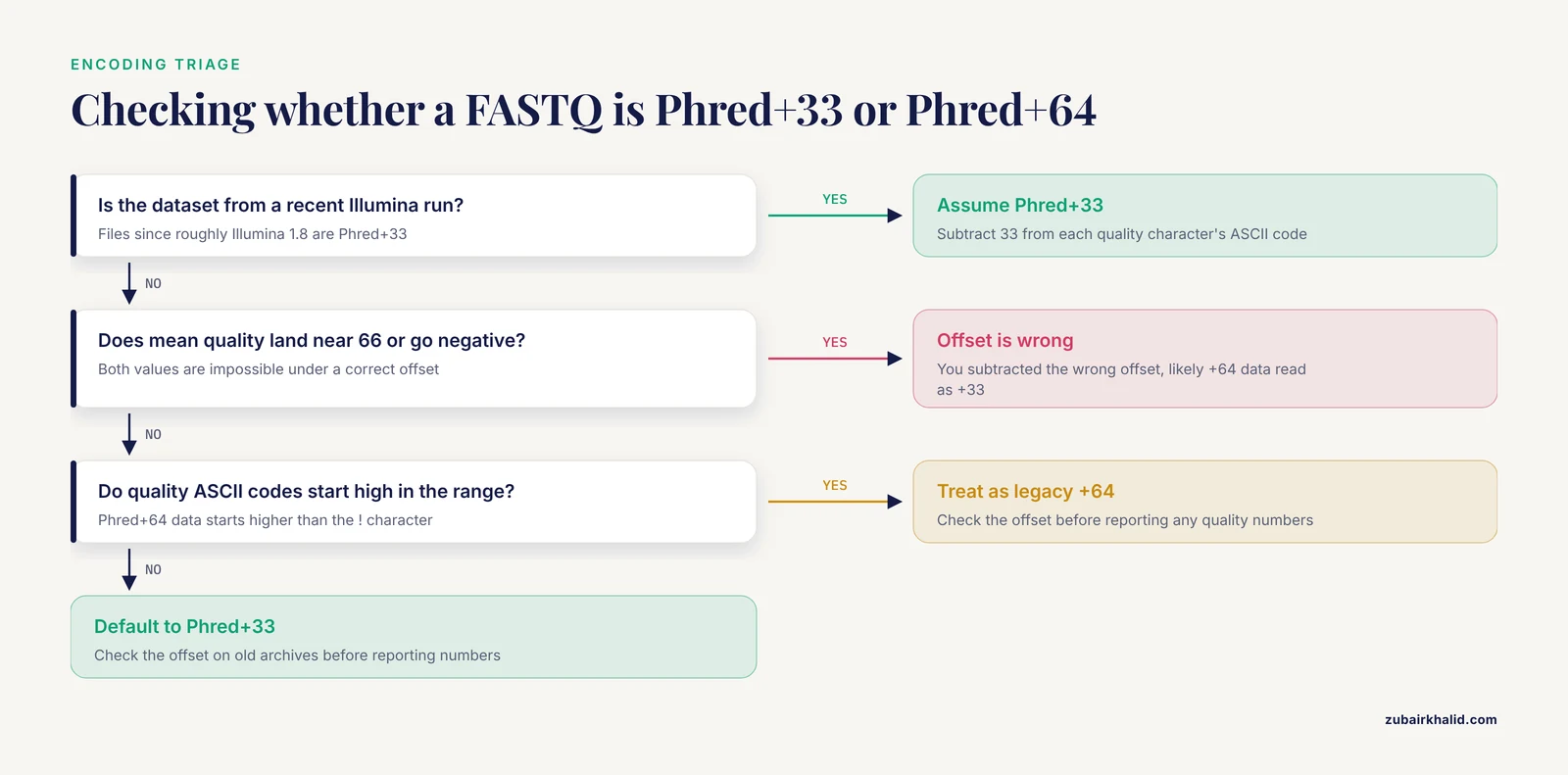
Inspect the minimum and maximum ASCII codes in the quality string. Phred+33 data spans characters from ! (Q0) upward, typically reaching into the 70s, while Phred+64 data starts higher in the ASCII range. All recent Illumina output is Phred+33, so treat +64 as a legacy-archive question only.
How do I process gzipped FASTQ files in Python?
Use gzip.open(path, "rt"), which decompresses transparently and returns text lines identical to an uncompressed file. The same generator then parses both compressed and plain inputs if you switch the opener based on the .gz suffix.
How many parallel workers should I use for a batch of FASTQ files?
Use at most the number of files, and in practice no more than your physical CPU core count, since gzip decompression is CPU-bound. Remember that memory use scales with worker count, so a memory-limited machine may cap workers below the core count.
Should I use Bio.SeqIO or plain-text parsing for speed?
Plain-text line parsing is faster for pure counting because it skips object construction per record. Bio.SeqIO is the better choice when you need validated parsing, sequence objects, or format conversion, and the difference rarely matters once work is parallelized across files. Measure on your data before deciding.
How do I verify that my batch output is correct?
Check two independent facts: line counts of output FASTQ files must be divisible by four, and record counts must match the counts in your summary table, ideally via a separate tool such as zcat file | wc -l. Spot-read one output file in full and confirm headers, sequence lengths, and quality lengths agree.
When should I switch from a Python script to a workflow manager?
When reruns after small changes require re-executing everything, when samples span a cluster scheduler such as Slurm, or when multiple tools and steps must stay synchronized across many samples. Workflow managers provide incremental builds, resumption, and container support that hand-written scripts would otherwise need to re-implement.
Sources
- 'PePApipe': A complete bioinformatics analysis pipeline for African Swine Fever Virus genome.
- A python based automated computational framework to classify and comparative genomics analysis of the global diversity of chili leaf curl virus (ChiLCV) strains to understand virus host interactions.
- PyGOLD: a python based API for docking based virtual screening workflow generation.
- pyKVFinder: an efficient and integrable Python package for biomolecular cavity detection and characterization in data science.
- PaDuA: A Python Library for High-Throughput (Phospho)proteomics Data Analysis.
- SNPio: a Python interface for population genomic data processing.
- Using prototyping to choose a bioinformatics workflow management system.