How to Automate BLAST Searches for Multiple Sequences in Python
By Dr. Zubair Khalid, DVM, MS, PhD ·

By the end of this guide you will be able to take a FASTA file with hundreds of query sequences, run a batch BLAST search against a local database, capture the hits in tabular format, parse them in Python, and produce a filtered summary table you can trust. You will need a computer with Python 3.8 or newer, the NCBI BLAST+ command-line tools, the Biopython library, and about 1 GB of disk space for a small nucleotide database.
This article is a hands-on biopython tutorial for one of the most common tasks in python for bioinformatics. The workflow below works for blastn, blastp, blastx, and tblastn with only minor changes to the command names.
Why Automate BLAST Runs in Python
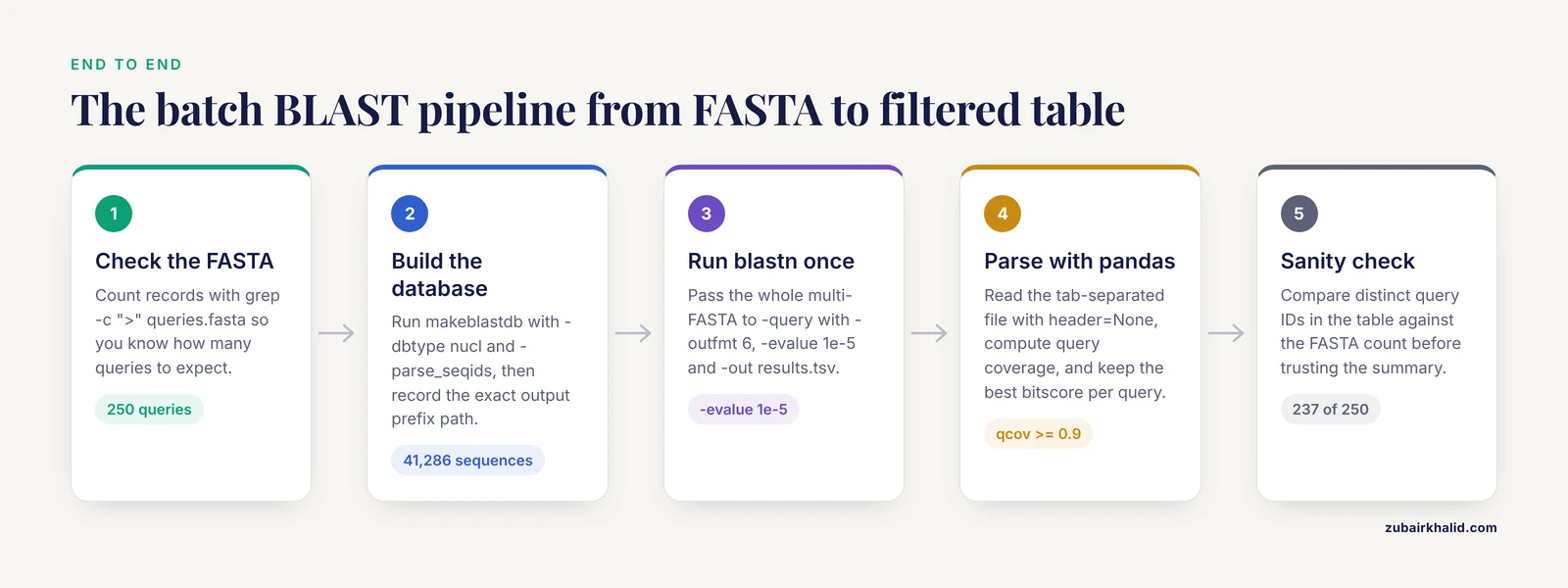
BLAST, the Basic Local Alignment Search Tool from NCBI, is the standard utility for sequence similarity search and identification in genomics research. Anyone who has run a large search and opened the raw output in a text editor knows the problem. Analyzing the results of a large BLAST search is tedious and time-consuming, and researchers frequently write custom parsing scripts for every new project [1]. Automation solves three problems at once.
First, it makes the work reproducible. A script that ran yesterday will run the same way tomorrow with the same inputs, which matters when you need to regenerate results after a database update.
Second, it scales. When the amount of analyzed data increases, manual inspection of BLAST results becomes impractical, and programmatic filtering becomes a requirement rather than a convenience [2].
Third, it lets you build quality control into the pipeline itself. Dedicated tools such as BLAST-QC exist because parsing large result files efficiently is a real engineering problem, and building those checks directly into a Python workflow gives you fast, reusable analysis code [1].
What You Need Installed
Before writing any code, gather these components.
| Component | Purpose | Typical install command |
|---|---|---|
| Python 3.8+ | Runs the pipeline | Preinstalled on macOS and most Linux systems |
| NCBI BLAST+ | Runs blastn and makeblastdb | conda install -c bioconda blast or apt install ncbi-blast+ |
| Biopython | Runs BLAST from Python and parses results | pip install biopython |
| pandas | Filters and summarizes tabular hits | pip install pandas |
| A query FASTA file | The sequences you want to search | Your own data or a public genome |
| A reference FASTA | The database you search against | Downloaded genome or transcriptome |
If you use conda, one command sets up an isolated environment with everything you need.
conda create -n blastenv -c bioconda -c conda-forge python=3.10 blast biopython pandas
conda activate blastenv
Step 1: Install and Verify Your Toolkit
Verify that BLAST+ is on your PATH and that Biopython imports cleanly.
blastn -version
makeblastdb -version
Expected output looks like this.
blastn: 2.15.0+
 Package: blast 2.15.0, build Aug 10 2023 15:57:29
Then check Python.
python -c "import Bio; print(Bio.__version__)"
python -c "import pandas; print(pandas.__version__)"
If either import fails, run pip install biopython pandas inside the same environment you will use for the analysis. Version mismatches between environments are a common source of confusing errors, so confirm you are in the environment you think you are in with conda env list or which python.
Step 2: Prepare Your Query FASTA File
BLAST queries go in a FASTA file, a plain-text format where each sequence starts with a line beginning with the greater-than character followed by an identifier, and the sequence itself follows on subsequent lines.
>seq_001
ATGAAAGACTTTGCCTAC
>seq_002
GGTTACCTGCAGAAGAATGG
>seq_003
TTGACCGATGACCAGTTCA
Two practical rules will save you hours later.
Give every header a short, unique, simple identifier. In tabular output the query identifier is the first column, so identifiers with spaces or special characters cause parsing headaches. >seq_001 is easier to work with than >Contig_1 [organism=Escherichia coli]. If you need to keep descriptions, use a # separator after the identifier and enable the right database flags when indexing.
Check the file before running anything. A quick count tells you how many queries to expect in the results.
grep -c ">" queries.fastaIf this prints 250, your final hit table should contain hits for at most 250 distinct values in the query column. That number becomes a sanity check later.
Step 3: Build a Local BLAST Database
Searching a local database is faster, private, and free of web rate limits. Build the database with makeblastdb. For a nucleotide reference such as a genome or transcriptome, use nucl as the database type. For proteins, use prot.
mkdir -p blastdb
makeblastdb -in ref_transcripts.fasta -dbtype nucl -out blastdb/ref_transcripts -title "Reference transcripts"
Expected output ends with lines like these.
Building a new DB, taxid omitted, current time: ...
Adding sequences from FASTA, added 41,286 sequences in 3.2 seconds.
Two flags matter here for downstream work.
-parse_seqids tells makeblastdb to store the full sequence identifiers rather than replacing them with local numeric IDs. If you plan to retrieve sequences from the database or join results on original identifiers, include it at build time. You cannot add it after the fact without rebuilding.
-taxid_map attaches taxonomy IDs when you build a database from multiple organisms, which lets you add staxids to your output columns later.
Keep the database in a stable directory and record its full path. BLAST looks for database index files in the directory you pass with -db, and a moved or renamed directory is the most common cause of database errors.
Step 4: Understand the BLAST Output Format
The question of which batch blast multiple sequences python format to use has a clear answer for most pipelines. Tabular output, requested with -outfmt 6, gives you one hit per line with columns separated by tabs, which pandas reads in one line of code. XML and JSON carry more detail but are heavier to parse.
The default tabular format contains 12 columns in a fixed order.
| Column | Field | Meaning |
|---|---|---|
| 1 | qseqid | Query sequence identifier |
| 2 | sseqid | Subject (database) sequence identifier |
| 3 | pident | Percentage of identical positions |
| 4 | length | Alignment length |
| 5 | mismatch | Number of mismatches |
| 6 | gapopen | Number of gap openings |
| 7 | qstart | Query alignment start |
| 8 | qend | Query alignment end |
| 9 | sstart | Subject alignment start |
| 10 | send | Subject alignment end |
| 11 | evalue | Expect value, the expected number of chance hits with this score |
| 12 | bitscore | Bit score, higher means a better alignment |
You can extend the format with additional fields. Two of the most useful are qlen and slen, the full query and subject lengths, which let you compute alignment coverage. A common extended format string looks like this.
-outfmt "6 qseqid sseqid pident length qlen slen qstart qend sstart send evalue bitscore"With coverage columns available you can filter for full-length matches, for example alignments covering at least 90 percent of the query, rather than relying on identity alone.
For very large analyses, tabular output compresses well and streams fast. Where you need per-alignment detail such as the actual aligned strings, use -outfmt 5 for XML or -outfmt 15 for JSON, and parse those with Biopython or a JSON loader.
Step 5: Run a Batch BLAST Search From the Command Line
Here is the core insight that simplifies everything. BLAST is a batch tool natively. You do not need to loop over individual sequences at the shell level. Pass a multi-FASTA file with -query and BLAST processes every sequence in the file, writing hits for all queries into one output file.
blastn -query queries.fasta \
  -db blastdb/ref_transcripts \
  -outfmt "6 qseqid sseqid pident length qlen slen qstart qend sstart send evalue bitscore" \
  -evalue 1e-5 \
  -max_target_seqs 5 \
  -num_threads 8 \
  -out results.tsv
The key parameters, explained.
| Parameter | What it does | Practical guidance |
|---|---|---|
-query | Input FASTA with one or many sequences | Point it at your whole multi-FASTA for a batch run |
-db | Path to the makeblastdb database prefix | Use the exact -out path from makeblastdb |
-outfmt | Output format, 6 plus a field list for tabular | Match your parser to this list exactly |
-evalue | Expect value cutoff | 1e-5 is a conventional starting threshold for screening, tighten for specificity |
-max_target_seqs | Limits reported hits per query | See the caveat below, treat the number as approximate |
-num_threads | CPU cores to use | Set to the number of physical cores available, minus one or two if the machine is shared |
-out | Output file | Use .tsv for tabular output |
A word of caution on -max_target_seqs. There has been substantial discussion in the BLAST user community about how this parameter interacts with the heuristic search process, and the reported hits may not correspond to the true best-scoring set when you apply this cutoff [1]. The safe habit is to run with a generous value, sort results in Python by bitscore within each query, and take the top N yourself. That way the ranking is under your control rather than the heuristics of the search step.
Expected output, results.tsv, looks like this.
seq_001	tr_A1E3A3	98.824	170	2	0	1	170	52	221	2.43e-118	412
seq_001	tr_B7Z4K1	76.471	170	38	2	3	171	14	182	4.11e-44	171
seq_002	tr_C9KQ22	99.415	171	1	0	1	171	88	258	1.02e-121	428
Each line is one query-subject hit. No line for a query means that query found no hit passing your evalue cutoff.
Step 6: Parse and Filter Results With Python
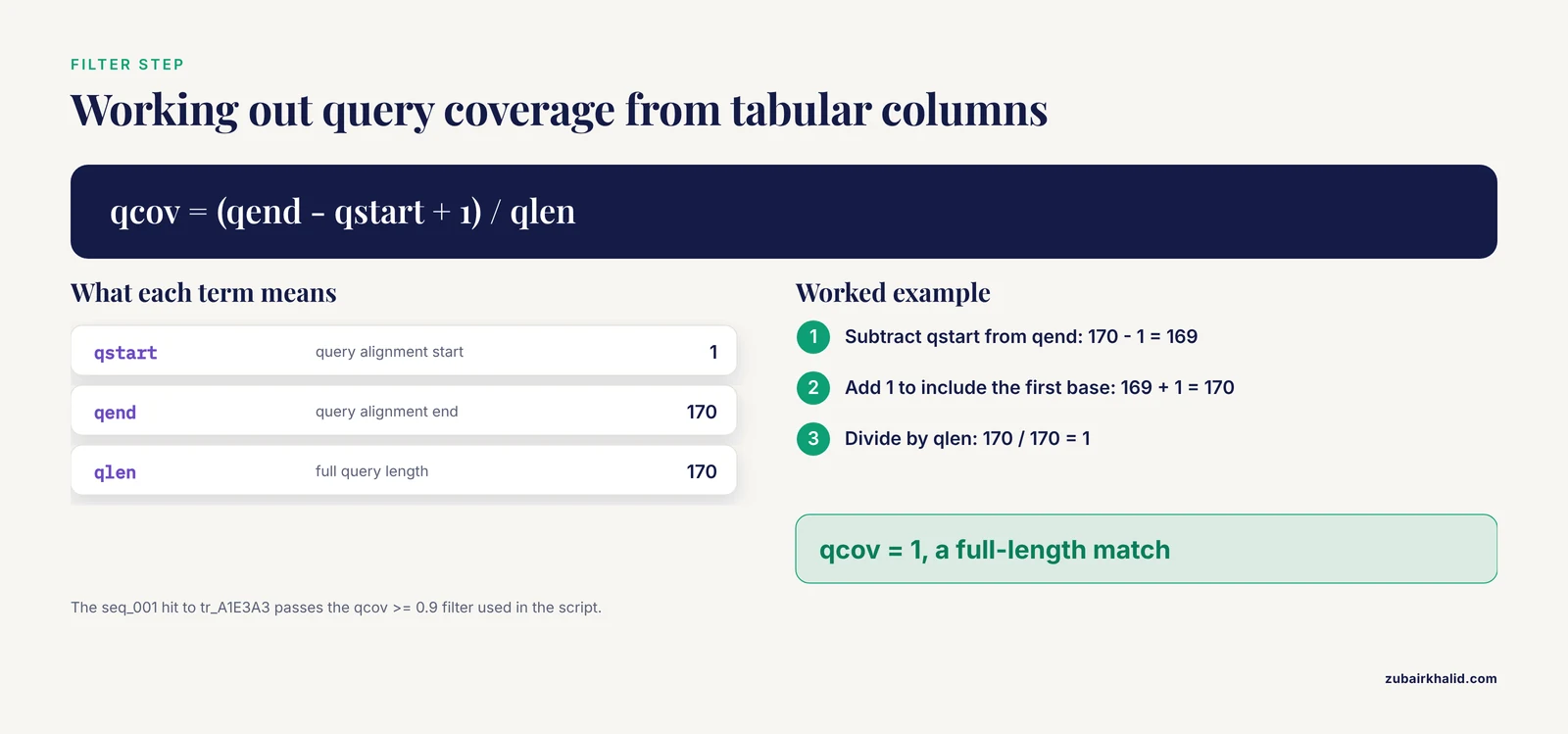
With tabular results in hand, pandas does the heavy lifting. This short script loads the hits, names the columns, computes query coverage, and filters to confident full-length hits.
import pandas as pd

COLS = ["qseqid", "sseqid", "pident", "length", "qlen", "slen",
        "qstart", "qend", "sstart", "send", "evalue", "bitscore"]

hits = pd.read_csv("results.tsv", sep="\t", header=None, names=COLS)

# Query coverage: fraction of the query length included in the alignment
hits["qcov"] = (hits["qend"] - hits["qstart"] + 1) / hits["qlen"]

confident = hits[
    (hits["evalue"] <= 1e-5) &
    (hits["pident"] >= 90) &
    (hits["qcov"] >= 0.9)
].copy()

# Keep the best hit per query by sorting on bitscore, then take the first
best = confident.sort_values("bitscore", ascending=False).drop_duplicates("qseqid")

best.to_csv("best_hits.tsv", sep="\t", index=False)

# Sanity summary
n_queries = 250  # from grep -c ">" queries.fasta
print(f"{best['qseqid'].nunique()} of {n_queries} queries have a confident hit")
print(f"Median identity: {best['pident'].median():.1f}%")
Expected output.
237 of 250 queries have a confident hit
Median identity: 96.4%
The 13 queries without hits are not failures. They may be too short, low complexity, or genuinely absent from the database. Printing their identifiers gives you a starting list for follow-up.
missing = set(f"seq_{i:03d}" for i in range(1, n_queries + 1)) - set(best["qseqid"])
print(sorted(missing))
A Complete Reusable Batch BLAST Template in Python
The following template is the batch blast multiple sequences python template that covers the whole loop end to end. It validates inputs, runs blastn as a subprocess, parses the tabular output, applies filters, and writes both a full hit table and a per-query best-hit summary. Save it as batch_blast.py.
#!/usr/bin/env python
"""Run a batch BLAST search for a multi-FASTA query file and summarize hits."""
import argparse
import subprocess
import sys
from pathlib import Path

import pandas as pd

COLS = ["qseqid", "sseqid", "pident", "length", "qlen", "slen",
        "qstart", "qend", "sstart", "send", "evalue", "bitscore"]

OUTFMT = "6 " + " ".join(COLS)

def main():
    ap = argparse.ArgumentParser(description="Batch BLAST for multiple sequences")
    ap.add_argument("--query", required=True, help="Multi-FASTA query file")
    ap.add_argument("--db", required=True, help="BLAST database prefix from makeblastdb")
    ap.add_argument("--out", default="blast_results.tsv", help="Raw hits output")
    ap.add_argument("--evalue", type=float, default=1e-5)
    ap.add_argument("--threads", type=int, default=4)
    ap.add_argument("--program", default="blastn",
                    choices=["blastn", "blastp", "blastx", "tblastn"])
    args = ap.parse_args()

    # 1. Validate inputs before spending compute time
    query = Path(args.query)
    if not query.is_file():
        sys.exit(f"Query file not found: {query}")

    n_queries = sum(1 for line in query.open() if line.startswith(">"))
    if n_queries == 0:
        sys.exit("Query file contains no FASTA records")

    # 2. Run BLAST in batch mode
    cmd = [
        args.program,
        "-query", str(query),
        "-db", args.db,
        "-outfmt", OUTFMT,
        "-evalue", str(args.evalue),
        "-num_threads", str(args.threads),
        "-out", args.out,
    ]
    print("Running:", " ".join(cmd))
    subprocess.run(cmd, check=True)

    # 3. Parse the tabular results
    hits = pd.read_csv(args.out, sep="\t", header=None, names=COLS)

    # 4. Per-query best hit by bitscore
    best = (hits.sort_values("bitscore", ascending=False)
                .drop_duplicates("qseqid"))

    # 5. Sanity report
    n_with_hits = hits["qseqid"].nunique()
    print(f"Queries in input:     {n_queries}")
    print(f"Queries with hits:    {n_with_hits}")
    print(f"Queries with no hits: {n_queries - n_with_hits}")
    print(f"Total hit rows:       {len(hits)}")

    best.to_csv("best_hits.tsv", sep="\t", index=False)
    print("Best-hit summary written to best_hits.tsv")

if __name__ == "__main__":
    main()
Run it like this.
python batch_blast.py --query queries.fasta --db blastdb/ref_transcripts --threads 8Expected output.
Running: blastn -query queries.fasta -db blastdb/ref_transcripts -outfmt 6 qseqid sseqid pident length qlen slen qstart qend sstart send evalue bitscore -evalue 1e-05 -num_threads 8 -out blast_results.tsv
Queries in input:     250
Queries with hits:    241
Queries with no hits: 9
Total hit rows:       1148
Best-hit summary written to best_hits.tsv
This template is the concrete batch blast multiple sequences python example you can adapt. Swap -program blastp and a protein database for protein queries. Change the filter thresholds in step 3 to match your project.
Running BLAST From Inside Python With Biopython
The template above calls the BLAST executable through subprocess, which is the most robust pattern because you use the exact flags documented by BLAST+. Biopython offers two alternatives.
Wrapping the command line with NcbiblastnCommandline
Biopython's application wrappers build and run BLAST+ commands with keyword arguments, and they raise an error if you pass an invalid flag combination.
from Bio.Blast.Applications import NcbiblastnCommandline

cline = NcbiblastnCommandline(
    query="queries.fasta",
    db="blastdb/ref_transcripts",
    outfmt="6 qseqid sseqid pident length qlen slen evalue bitscore",
    evalue=1e-5,
    num_threads=8,
    out="results.tsv",
)
stdout, stderr = cline()
This is a thin wrapper around the same executable, so runtime is identical to the shell command. Its value is that Python code documents the exact parameters in one readable block, and Biopython catches misspelled arguments before anything runs.
Parsing structured output with NCBIXML
If you need per-alignment detail such as the aligned residues, request XML with -outfmt 5 and parse it with Biopython.
from Bio.Blast import NCBIXML

with open("results.xml") as handle:
    for record in NCBIXML.parse(handle):
        for alignment in record.alignments:
            for hsp in alignment.hsps:
                print(record.query, alignment.hit_id,
                      f"e={hsp.expect:.2e}", f"id={hsp.identities}/{hsp.align_length}")
Calling the NCBI web service with NCBIWWW
Biopython's Bio.Blast.NCBIWWW.qblast submits queries to the public NCBI web BLAST service. This works without installing BLAST+ but has two constraints. Each query is a separate network round trip, so batches of hundreds of sequences take hours, and the public service expects considerate usage. For serious batch work, a local database is the better tool. Reserve the web route for occasional small searches or for cases where you specifically need NCBI's live nr database.
Scaling Up: Parallel BLAST Searches
A single blastn call with -num_threads 8 parallelizes work within each query, which helps most when queries are long. When you have thousands of short queries and several independent database versions to search, the cleanest parallelism is at the process level.
Split a very large FASTA into chunks and run one BLAST process per chunk, either on one machine with GNU parallel or across nodes of a cluster with a job array.
# Split queries.fasta into chunks of 500 sequences
awk '/^>/{n++} !(n % 500){f="chunk_" int(n/500) ".fasta"} {print >> f}' queries.fasta

# Run one blastn per chunk, 4 at a time
ls chunk_*.fasta | parallel -j 4 \
  "blastn -query {} -db blastdb/ref_transcripts -outfmt 6 -evalue 1e-5 -out {}.tsv"

# Combine results
cat chunk_*.fasta.tsv > results.tsv
Because BLAST results are independent per query, concatenating the per-chunk outputs produces exactly the same data as one large run. Keep the chunking simple and deterministic so reruns are reproducible.
How to Check That Your Results Are Correct
Automated output still needs verification. Build these checks into every run.
Count queries against hits. If grep -c ">" queries.fasta reports 250 and your parsed table reports hits for 251 distinct query IDs, something is wrong with identifier parsing. This check catches most format mistakes immediately.
Look at the evalue distribution. A handful of hits at e-150 and a long tail approaching your cutoff is normal. A wall of hits all sitting exactly at the cutoff suggests the database contains low-complexity or repetitive sequences dominating weak matches.
Check for self-hits. When your query set is a subset of the database, each sequence should match itself perfectly at 100 percent identity over its full length. Missing or imperfect self-hits point to index problems or an outfmt string that does not match your parser.
Verify reciprocal relationships when it matters. Tools built for this purpose, such as the PARIGA server, store all-against-all BLAST results so that users can apply logical filters without rerunning searches, including retrieving reciprocal best hits between two datasets [2]. The same logic applies to any local pipeline. To confirm that gene A in species one and gene B in species two are reciprocal best hits, run BLAST in both directions and check that each is the other's top hit. Implementing this check in Python is a small extension of the best-hit code above, filtering for rows where the best hit relationship holds in both directions.
Spot-check one alignment by eye. Take the top hit for one familiar query and confirm that the reported coordinates and identity match what you see in an alignment viewer. Ten seconds of manual checking per run catches column-order mistakes that would otherwise silently corrupt a whole analysis.
Common Mistakes and Limitations
Every one of these errors appears repeatedly in real pipelines.
Mismatched outfmt strings. If your -outfmt lists 14 fields and your parser names 12 columns, pandas raises ValueError: 14 columns passed, passed data had 12 columns or silently mislabels columns if you did not set header=None. Always derive the column list from a single shared constant, as the template does with COLS, so the command and the parser cannot drift apart.
The max_target_seqs heuristic. Treat reported hit counts as approximate. Because of documented discussion over how this parameter affects the heuristic search, a run asking for the top 5 hits can miss a true best hit in some cases [1]. The reliable approach is to request more hits than you need, then rank and trim in Python.
Rebuilding the database after adding sequences. BLAST searches only what makeblastdb indexed. Appending sequences to your reference FASTA does nothing until you rerun makeblastdb. If results look stale after updating the reference, check the database directory timestamps first.
Identifier collisions without -parse_seqids. Databases built without -parse_seqids replace original identifiers with local numeric IDs in some contexts. If your sseqid column contains values like gnl|BL_ORD_ID|12345 instead of your original names, rebuild the database with the flag.
Web BLAST rate limits. Submitting hundreds of sequences to qblast one after another violates the spirit of the public service and can take a very long time. Large batch jobs belong on a local database.
A best hit is not an ortholog. The top-scoring hit is the most similar sequence in the database, which can be a paralog, a low-complexity region match, or a conserved domain rather than the true ortholog. Similarity search answers a similarity question. Functional annotation based on BLAST alone needs corroboration from other evidence, and tools designed for structured comparison of full result sets exist precisely because simple top-hit reporting is insufficient for careful annotation work [1], [2].
Thread oversubscription. Setting -num_threads 64 on a 16-core machine slows everything down through context switching. Match thread counts to available cores, and when running several BLAST processes in parallel, divide the cores among them.
Zero-hit queries are data, not errors. Some sequences genuinely have no match above your threshold. If an unexpectedly large fraction returns no hits, verify strand orientation (blastn searches both strands by default), confirm you chose the right program for the molecule type, and check that the database actually contains the organism or gene family you expect.
Frequently Asked Questions
Can I run BLAST on multiple sequences without splitting the FASTA file?
Yes. Pass the entire multi-FASTA file to -query and BLAST processes every record in one run. Splitting only helps when you want to parallelize at the process level across machines or job slots.
How do I choose between tabular, XML, and JSON output?
Use tabular output with -outfmt 6 for filtering and summarizing hits in pandas. Use XML or JSON when you need alignment details such as the aligned residue strings or multiple high-scoring segment pairs per hit.
What does -max_target_seqs actually control?
It limits how many hits are reported per query, but due to its interaction with the BLAST heuristic search, the reported set may not be the true best set [1]. Request a generous number, then sort by bitscore and trim in Python.
How many threads should I give blastn?
Set -num_threads to the number of physical cores on the machine running the search, minus one or two if other processes share it. When running several parallel BLAST jobs, divide cores among the jobs instead of giving each job all cores.
Can I use the NCBI web BLAST service from Python for hundreds of sequences?
You can with Bio.Blast.NCBIWWW.qblast, but each query is a separate network submission, so large batches take a long time. Install BLAST+ and build a local database for batch work.
How do I find reciprocal best hits between two sequence sets?
Run BLAST in both directions, A against B and B against A, then keep pairs where each sequence is the other's top hit. Servers built for this purpose store both result sets so logical filters such as reciprocal best hits can be applied without rerunning searches [2].
Do I need Biopython for batch BLAST, or is pandas enough?
You can run blastn with subprocess and parse tabular output with pandas alone. Biopython adds value for command-line wrappers that validate arguments, XML parsing with detailed alignment information, and sequence input output through SeqIO.
How do I fix a database not found error?
The -db argument must match the exact prefix path you gave to makeblastdb, including the directory. Check that the .pin, .pog or nucleotide index files exist at that path, and confirm you did not move or rename the directory after building.