How to Write Your First Bash Script for Bioinformatics
By Dr. Zubair Khalid, DVM, MS, PhD ·

By the end of this article you will be able to write, run, and debug a Bash script that automates a small but genuinely useful bioinformatics task. You will count sequencing reads in a FASTQ file, loop over a folder of samples, run a quality control tool on every file, and verify that the outputs actually exist. You will also learn the error handling habits that separate a script you can trust from one that silently produces garbage.
You need three things before you start:
- A Unix-like environment. macOS ships with Bash already. On Windows, install WSL2 (Windows Subsystem for Linux) with Ubuntu, or work on your institution's high performance computing (HPC) cluster.
- A plain text editor. Nano is installed almost everywhere and is the friendliest starting point. VS Code and Vim both work well once you are comfortable.
- A small practice dataset. Any FASTQ file works. If you do not have one yet, you can follow along with the commands using any text file and substitute your sequencing data later.
No prior programming experience is assumed. Everything in this tutorial runs in a terminal, and every command is explained before it is used.
Why Bash Still Matters in Bioinformatics
Bash is the default shell on Linux systems, and Linux for bioinformatics is the norm rather than the exception. Most sequencing centers deliver data on Linux filesystems, most command line bioinformatics tools are built for Linux first, and most HPC clusters expect you to drive them through a shell.
The reason is practical, not nostalgic. Real analyses are chains of many small steps. A modern RNA-seq pipeline can involve dozens of discrete operations covering quality control, alignment, quantification, and contamination assessment [1]. Population geneticists working with ADMIXTOOLS historically had to generate configuration files for each analysis using a combination of shell scripting and manual text editing before more automated tools existed [2]. Statistical packages aimed at cluster deployment, such as the MSqRob proteomics workflow, explicitly provide scripts designed to run in Bash mode so they can be embedded in automated pipelines on cluster environments [3].
A Bash script is simply a text file containing the same commands you would type by hand, saved so the computer can run them in order. That single idea scales from counting reads in one file to orchestrating hundreds of samples across a cluster.
Linux Commands for Bioinformatics That You Need First
Before scripting, make sure these commands feel familiar. They form the vocabulary of every script you will ever write.
| Command | What it does | Example |
|---|---|---|
pwd | Prints your current directory | pwd |
ls -lh | Lists files with human readable sizes | ls -lh data/ |
cd | Changes directory | cd results/ |
mkdir -p | Creates directories, including parents, without error if they exist | mkdir -p results/qc |
head and tail | Show the first or last lines of a file | head -n 8 reads.fastq |
wc -l | Counts lines | wc -l reads.fastq |
grep | Searches text for a pattern | grep -c ">" genome.fa |
mv and cp | Move and copy files | cp data/sampleA.fastq backup/ |
chmod +x | Makes a file executable | chmod +x script.sh |
echo | Prints text to the screen | echo "done" |
man | Opens the manual page for any command | man wc |
Two conventions matter immediately:
- File paths. An absolute path starts from the root of the filesystem, for example
/home/you/data/sampleA.fastq.gz. A relative path starts from where you are now, for exampledata/sampleA.fastq.gz. - File redirection. The
>symbol sends output to a file, and<feeds a file into a command. The pipe symbol|sends the output of one command directly into another, which is how Unix lets small tools compose into large analyses.
Step by Step: Your First Script
This walkthrough builds a script from scratch. Follow it in order and run every command yourself.
Step 1. Create a project directory
Keep every analysis in its own directory. This single habit prevents most file chaos later.
mkdir -p ~/projects/first-script
cd ~/projects/first-script
mkdir -p data results
The -p flag tells mkdir to create any missing parent directories and to stay quiet if the directory already exists. Without it, running the same command twice produces the error mkdir: cannot create directory 'first-script': File exists.
Step 2. Create an empty script file
touch hello.sh
nano hello.sh
The .sh extension is a convention that tells humans this is a shell script. Bash itself does not care about the extension, but you should care, because future you will read these files.
Step 3. Write the script
Type the following three lines into nano, then save with Ctrl+O, Enter, and exit with Ctrl+X.
#!/usr/bin/env bash
# My first bioinformatics script
echo "Hello from the command line"
Line by line:
#!/usr/bin/env bashis called the shebang line. It tells the operating system which interpreter should run this file. Theenvform is preferred over#!/bin/bashbecause it finds Bash wherever it is installed, which matters on systems where Bash lives in a nonstandard location.- Lines beginning with
#are comments. Bash ignores them. The shebang is the one exception, because the operating system reads it before Bash does. echo "Hello from the command line"prints text to the terminal.
Step 4. Make it executable and run it
chmod +x hello.sh
./hello.sh
Expected output:
Hello from the command lineIf you see bash: ./hello.sh: Permission denied, you skipped the chmod +x step. That command changes the file's mode to executable, which is a security feature of Linux, not an obstacle. If you see command not found, you probably typed hello.sh without the ./ prefix. The ./ tells Bash to look in the current directory, because for safety reasons the current directory is not on the command search PATH.
Step 5. Do something actually useful
Counting reads is the most common sanity check in sequencing work. A FASTQ file stores each read across exactly four lines: a header beginning with @, the sequence, a separator line beginning with +, and the quality scores. That fixed structure means the number of reads equals the number of lines divided by four.
First, confirm the structure by eye on the practice file:
head -n 8 data/sampleA.fastqExpected output shape:
@SRR1234567.1 length=75
GATCGATCGATC...
+
IIIIIIIIIIII...
@SRR1234567.2 length=75
GATCGATCCATC...
+
IIII9IIIIIII...
Now create the counting script:
nano count_reads.sh#!/usr/bin/env bash
# count_reads.sh: count FASTQ records in a single file
fastq_file=$1
line_count=$(wc -l < "$fastq_file")
records=$((line_count / 4))
echo "$fastq_file contains $records reads"Make it executable and run it:
chmod +x count_reads.sh
./count_reads.sh data/sampleA.fastq
Expected output:
data/sampleA.fastq contains 250000 readsWhat each line does:
fastq_file=$1stores the first argument you passed on the command line. Positional parameters$1,$2, and so on are how scripts receive input. When you ran the script,data/sampleA.fastqbecame$1.$(...)runs a command and captures its output. This is called command substitution. The script runswc -lon the file and stores the line count in the variableline_count.$((...))performs arithmetic. The double parentheses are Bash's integer math syntax.- The
$fastq_filein the finalechois variable expansion. Bash replaces the variable name with its value before running the command.
One critical detail: the quotes around "$fastq_file". Quoting prevents disaster when a filename contains spaces. Unquoted variables are one of the most common sources of subtle script bugs, and the fix costs zero effort.
Step 6. Check the result is right
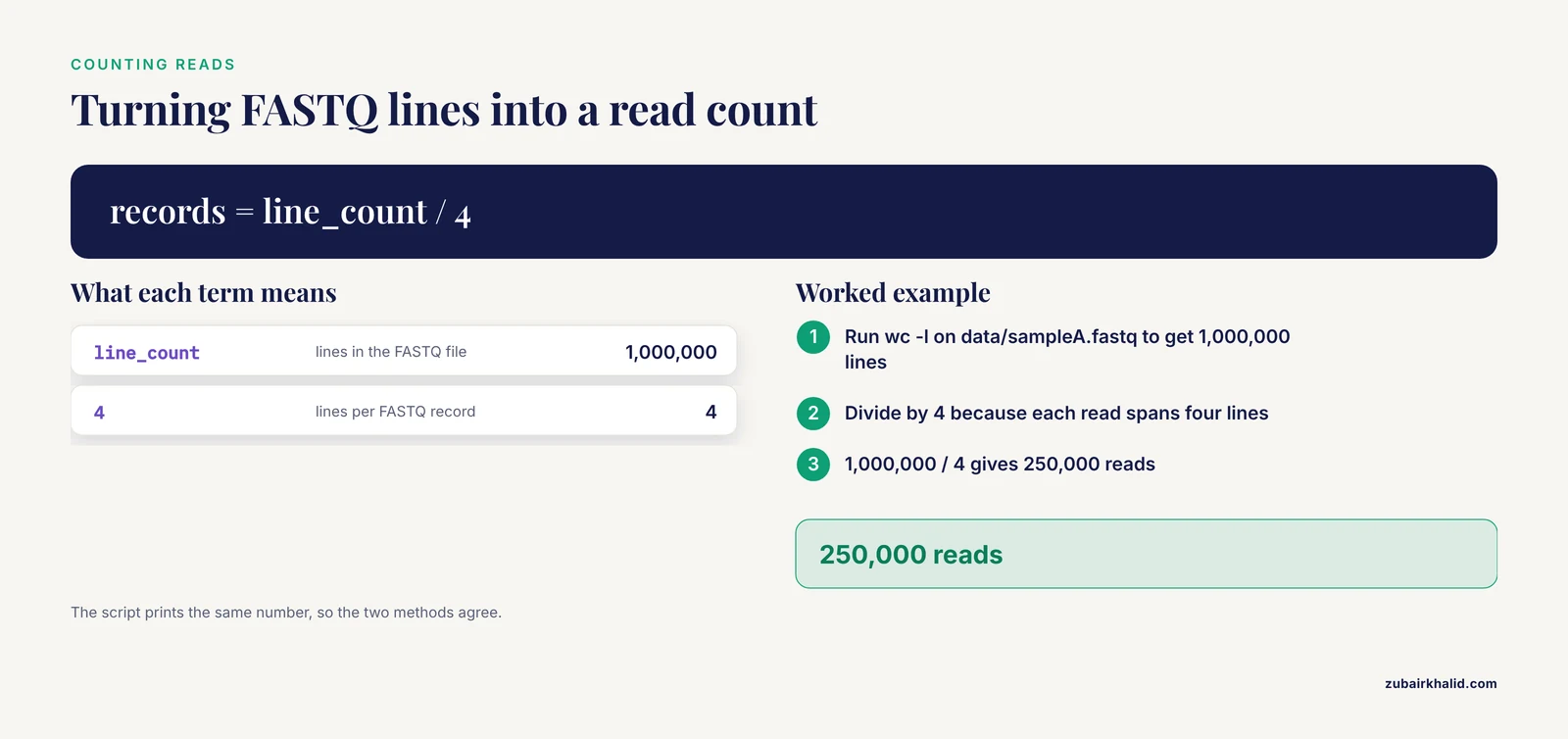
Verify the count independently with a one-liner before trusting the script:
wc -l data/sampleA.fastqIf the file has 1,000,000 lines, then 1,000,000 divided by 4 is 250,000 reads, which matches the script output. This cross-check habit, running the same calculation a second independent way, is the cheapest quality control in bioinformatics.
Loops, Conditionals, and Real Pipelines
One file is easy. Thirty samples is a job for a script.
The for loop
nano batch_rename.sh#!/usr/bin/env bash
# Print the name of every FASTQ file in the data directory
for fastq in data/*.fastq
do
echo "Found $fastq"
doneExpected output:
Found data/sampleA.fastq
Found data/sampleB.fastq
Found data/sampleC.fastq
The pattern data/.fastq uses a wildcard, called globbing, where matches any sequence of characters. Bash expands the wildcard into a list of matching filenames before the loop even starts. The words do and done mark the beginning and end of the loop body. Indentation inside the loop is optional but makes scripts far easier to read.
Conditionals
#!/usr/bin/env bash
# Check that an input file exists before doing anything with it

input_file=$1

if [ -f "$input_file" ]
then
  echo "$input_file exists, proceeding"
else
  echo "Error: $input_file not found" >&2
  exit 1
fi
Key elements:
[ -f "$input_file" ]is a test.-fis true if the path exists and is a regular file. Other useful tests are-dfor directories,-sfor files that exist and have a size greater than zero, and-zfor empty strings.>&2redirects the error message to standard error, the channel reserved for diagnostics. Errors belong on standard error so they stay separate from data output, which matters when someone pipes your script's output into another tool.exit 1stops the script with exit code 1. By convention, exit code 0 means success and any nonzero code means failure. Downstream tools and job schedulers read this code to decide whether your script succeeded.
The fail fast settings
Add this line near the top of every script you write from now on:
set -euo pipefailEach flag does something specific:
| Flag | Effect |
|---|---|
-e | Exit immediately if any command returns a nonzero exit code |
-u | Treat an unset variable as an error instead of silently expanding to nothing |
-o pipefail | Make a pipeline fail if any command inside it fails, not just the last one |
Without -e, a script that fails at step 2 of 10 keeps running through steps 3 through 10 anyway, often producing confidently wrong output. Without -u, a typo like $samplename instead of $sample_name expands to an empty string and quietly deletes the wrong files or analyzes nothing. Without pipefail, the pipeline grep "pattern" file | wc -l reports success even when grep found nothing, because only the last command's exit code is checked by default.
One honest caveat about -e: some commands use nonzero exit codes for normal outcomes. grep returns 1 when it finds no matches, which can kill a script that considers no matches acceptable. When that happens, handle the case explicitly rather than fighting the flag.
A complete quality control pipeline script
Now assemble everything into a script that mirrors how working bioinformaticians actually operate. It accepts a directory of compressed FASTQ files, checks its inputs, runs the FastQC quality control tool on each file, and reports where the results landed.
nano run_qc.sh#!/usr/bin/env bash
# run_qc.sh: run FastQC on every compressed FASTQ file in a directory
# Usage: ./run_qc.sh READS_DIR OUTPUT_DIR
set -euo pipefail
if [ "$#" -ne 2 ]
then
echo "Usage: ./run_qc.sh READS_DIR OUTPUT_DIR" >&2
exit 1
fi
reads_dir=$1
out_dir=$2
if [ ! -d "$reads_dir" ]
then
echo "Error: input directory $reads_dir does not exist" >&2
exit 1
fi
mkdir -p "$out_dir"
for fastq in "$reads_dir"/*.fastq.gz
do
sample=$(basename "$fastq" .fastq.gz)
echo "Running quality control on $sample"
fastqc "$fastq" -o "$out_dir"
done
echo "All done. Reports are in $out_dir"Run it:
chmod +x run_qc.sh
./run_qc.sh data results/qc
Expected output:
Running quality control on sampleA
Running quality control on sampleB
Running quality control on sampleC
All done. Reports are in results/qc
New elements explained:
"$#" -ne 2checks that exactly two arguments were supplied.$#holds the number of arguments, and-nemeans not equal. Scripts that fail immediately with a clear usage message are far easier to use than scripts that fail mysteriously ten minutes in.basename "$fastq" .fastq.gzstrips the directory path and the.fastq.gzsuffix from a filename, turningdata/sampleA.fastq.gzintosampleA. Deriving sample names from filenames instead of retyping them removes an entire class of transcription errors.fastqc "$fastq" -o "$out_dir"runs the actual tool. FastQC is a standard sequencing quality control program that reports per-base quality scores, adapter contamination, duplication levels, and overrepresented sequences. The-oflag directs its output directory. Always check a tool's own manual withman fastqcorfastqc, helpfor the flags your installed version supports, because flags vary between versions.
Verify the outputs
A script that exits cleanly has not necessarily done the right work. Check three things every time:
- Expected files exist and are nonzero in size:
ls -lh results/qc/Look for .html and .zip files for every sample. A zero byte file is a red flag even when the exit code was 0.
- The FastQC reports themselves open and show sane per-base quality. The summary screen flags modules as PASS, WARN, or FAIL, and reading those modules is a manual judgment call that no script should make for you at this stage.
- Log the software versions so the run is reproducible:
fastqc --version > results/software_versions.txt 2>&1Recording versions is not optional bookkeeping. Reproducibility depends on knowing exactly which tools and versions produced a result, which is the same motivation that drove the development of workflow wrappers for older command line suites [2] and integrated, multi-step pipelines like EVscope, which formalizes 27 major analysis steps into a single standardized workflow [1].
Scripting Habits That Pay Off Immediately
These tips come from watching scripts succeed and fail across many projects.
- Echo your progress. A line like
echo "Processing $sample"at the top of each loop iteration tells you exactly where a long run stopped when it fails at 2 a.m. - Log to a file, not just the screen. Wrap invocations with redirection, for example
./run_qc.sh data results/qc 2>&1 | tee run_qc.log. Theteecommand writes to both the screen and a file. - Use one variable for the output directory and build every path from it. Scripts that hardcode
/home/you/resultsin six places break in six places when you move to the cluster. - Write for the reader who is future you. Comments should explain why, not what.
# Count reads to sanity check the demultiplexingis useful.# Set variableis not. - Keep scripts small and composable. A script that does one thing well can be chained into larger workflows later. That modularity is exactly how Bash scripts get embedded in larger automated analysis frameworks [3].
- Run shellcheck. It is a free static analysis tool for shell scripts, usually installable with your system package manager. Run
shellcheck run_qc.shand it will flag quoting problems, unused variables, and portability traps before they bite.
Running Scripts on an HPC Cluster
Most genomics work happens on shared Linux clusters. The Bash you learned transfers directly, with two additions.
First, clusters use workload managers such as SLURM. You submit your script, or a wrapper around it, using a submission command like sbatch, and the scheduler decides which compute node runs it. The scheduler needs to know your resource requests, which you typically provide in a header block at the top of the script. Check your own institution's cluster documentation for the exact header syntax, because it varies between sites.
Second, never run heavy compute on the login node. The login node is shared by everyone and exists for editing files, submitting jobs, and light work. Running a whole genome alignment there will get you a polite email from your sysadmin. Interactive compute belongs on a compute node, usually requested with a command such as salloc or srun, and production runs belong in submitted batch jobs.
Environment modules are the third cluster-specific habit. Software on clusters is typically loaded on demand with commands like module load fastqc, and the available modules differ between institutions. Load the modules your script needs at the top of the script itself so it is self-contained and reproducible.
Common Mistakes and Limitations
These are the failures that account for most lost hours in real projects.
- Unquoted variables. Writing
mv $file backup/instead ofmv "$file" backup/breaks the moment a filename contains a space, turning one file into two broken operations. Quote every variable expansion that holds a filename or path. - Missing
set -euo pipefail. A script without fail-fast settings happily continues after a failure and reports success. The output looks plausible and is quietly wrong, which is far worse than a crash. - Assuming exit code 0 means the science is right. A tool can exit cleanly while producing an empty alignment or a truncated file because an input was subtly wrong. Check output file sizes, line counts divisible by 4 for FASTQ, and spot check contents with
head. A script proves mechanical success, not biological validity. - Windows line endings. If you edit a script on Windows and transfer it, invisible carriage return characters can produce the confusing error
/usr/bin/env: 'bash\r': No such file or directory. The\rin the message is the telltale. Fix it withdos2unix script.shor by setting your editor to Unix line endings. - Spaces and special characters in filenames. Spaces in sample names break naive scripts and some bioinformatics tools. Use underscores, never spaces, and avoid characters such as parentheses and ampersands in sample names entirely.
- Hardcoding absolute paths tied to one machine.
/Users/you/Desktop/projectworks on your laptop and nowhere else. Use relative paths from the project root or define paths as variables at the top of the script so they can be changed in one place. - Overwriting results silently. Rerunning a script that writes to the same output paths destroys the previous run with no warning. Either timestamp your output directories, for example
results_2026-11-11/, or check with[ -d "$out_dir" ]and exit if it already exists. - Treating a script as a pipeline. Bash is excellent for gluing tools together for tens of samples. For workflows with hundreds of samples, complex dependencies, or restart-from-failure requirements, dedicated workflow managers such as Snakemake or Nextflow handle parallelism and provenance better than hand-written Bash ever will. Writing your first scripts in Bash is still the right way to understand what those managers automate.
- Not recording versions and parameters. An analysis whose tool versions, reference genome build, and parameter flags are unrecorded cannot be reproduced, and unreproducible results are functionally unpublished. Echo versions and full command lines into a log file as part of the script itself.
- Testing on real data first. Always run a new script on one small sample, or a truncated test file created with
head -n 400 sample.fastq > test.fastq, before pointing it at a directory of 200 large files.
Frequently Asked Questions
Do I need to know Linux well before learning Bash scripting?
You need a working subset, not mastery. If you can navigate directories, move files, and read a manual page, you know enough to start scripting, and scripting itself will teach you the rest of Linux faster than any standalone drill.
What is the difference between Bash, a shell, and a terminal?
A terminal is the window, a shell is the program inside it that interprets your commands, and Bash is the most common shell on Linux systems. When you write a Bash script, you are writing down a sequence of commands the shell could have run interactively.
Which Linux commands should a bioinformatician learn first?
Start with cd, ls, pwd, mkdir, cp, mv, head, tail, wc, grep, chmod, and man. Those eleven commands cover nearly everything in this tutorial and appear in almost every bioinformatics script ever written.
How do I run my script on an HPC cluster?
Submit it through the cluster's workload manager, commonly SLURM, using a submission command such as sbatch along with the resource requirements in a header block. Load any required software modules inside the script so the job is self-contained. Check your institution's cluster documentation for the exact header syntax.
Why does my script work when I type the commands but fail when scripted?
The most common causes are an unquoted variable meeting a filename with spaces, a missing fail-fast line letting an early failure cascade, or an environment difference such as software loaded interactively with module load but not loaded inside the script. Compare the interactive environment with the script environment line by line.
What does set -euo pipefail actually do?
It makes Bash exit on the first failing command, error out on any unset variable, and fail a pipeline if any stage inside it fails. Together these three flags convert silent data corruption into loud, immediate crashes, which is what you want in scientific computing.
When should I move from Bash scripts to Snakemake or Nextflow?
Move when your workflow has enough steps or samples that manual bookkeeping hurts, when you need to rerun only the failed parts of an analysis, or when multiple people must reproduce your runs. For a handful of samples and a linear chain of commands, Bash remains the fastest tool.
How do I test a new script without risking my real data?
Run it on a single small test file first, ideally a truncated copy made with head, into a scratch output directory. Confirm the exit code is 0, the expected output files exist with nonzero sizes, and the contents look sane before scaling up to the full dataset.
Sources
- EVscope: A Comprehensive Bioinformatics Pipeline for Accurate and Robust Analysis of Total RNA Sequencing from Extracellular Vesicles.
- admixr-R package for reproducible analyses using ADMIXTOOLS.
- Experimental design and data-analysis in label-free quantitative LC/MS proteomics: A tutorial with MSqRob.