How to Loop Over Files in Bash
By Dr. Zubair Khalid, DVM, MS, PhD ·

By the end of this article you will be able to write bash loops that process batches of sequencing files, handle paired-end FASTQ pairs correctly, descend into subdirectories, run iterations in parallel, log outputs, and stop on the first failure instead of silently producing garbage. You need a Linux or macOS machine (or Windows with WSL), bash version 4 or newer, and a handful of files to practice on. Every example in this article works on toy files you create yourself, so you can follow along on a laptop before touching real data.
Looping over files is the single most reused skill in day-to-day command-line analysis. A sequencing run with 48 samples means 48 trimming jobs, 48 alignment jobs, and 48 quality reports. Typing each command by hand does not scale, and hand-edited commands are where transcription errors enter a project. The authors of the admixr package describe exactly this pain in population genetics, where a traditional ADMIXTOOLS workflow required the user to generate text configuration files for each analysis, often through shell scripting combined with manual text editing, and then parse non-tabular outputs by hand [1]. Loops are the first step toward removing that manual layer from any pipeline.
Why Loops Matter in Bioinformatics Workflows
Most bioinformatics tools operate on one file per invocation. fastqc reads one FASTQ. bwa mem maps one read pair against one reference. samtools flagstat summarizes one BAM. The tools themselves are batch-unaware. Your shell is the layer that turns "run this on one sample" into "run this on every sample in the project."
This matters beyond convenience. Manual repetition invites inconsistent file names, skipped samples, and outputs that cannot be traced to the command that produced them. When Petr, Vernot, and Kelso introduced admixr, one of their explicit motivations was that automating configuration and parsing steps enables the automation of analytic pipelines and significantly improves the reproducibility of population genetic studies [1]. The same logic applies at the shell level. A loop you can read a year later, that names every output deterministically from its input, is the cheapest reproducibility investment available.
Linux for bioinformatics is built on this pattern: small, single-purpose programs composed by the shell. Loops, together with pipes and redirects, are the glue. Learning them well pays off in every subsequent tool you adopt.
The Basic for Loop in Bash
The core syntax has three parts: the keyword for, a list of items, and a body between do and done.
for item in item1 item2 item3
do
    echo "$item"
done
In practice the list is almost always generated by a glob, which is a pattern the shell expands into matching file names before the loop runs.
for file in raw_fastq/*.fastq.gz
do
    echo "$file"
done
Three behaviors in that one line deserve attention before you write anything longer.
The glob is expanded by the shell, not by the tool. fastqc never sees the asterisk. Bash finds every file matching raw_fastq/*.fastq.gz, substitutes the full list of names, and the loop body runs once per name. This is why loops compose with any tool.
Quoting the variable is not optional. "$file" treats the whole file name as one word even if it contains spaces. Unquoted $file splits on whitespace and triggers word splitting and glob expansion again, which corrupts names and occasionally runs unintended commands. Always write "$file".
An unmatched glob does not error by default. If raw_fastq/ contains no .fastq.gz files, bash passes the literal string raw_fastq/*.fastq.gz to the loop and runs the body once with that nonsense name. You will learn the fix (nullglob) later in this article.
A first sanity check that costs nothing: replace your real tool with echo and run the loop. What echoes is exactly what would have been executed.
for file in raw_fastq/*.fastq.gz
do
    echo "fastqc \"$file\" -o qc_reports/"
done
Expected output:
fastqc "raw_fastq/sampleA_R1.fastq.gz" -o qc_reports/
fastqc "raw_fastq/sampleA_R2.fastq.gz" -o qc_reports/
fastqc "raw_fastq/sampleB_R1.fastq.gz" -o qc_reports/
fastqc "raw_fastq/sampleB_R2.fastq.gz" -o qc_reports/
Read that dry run line by line. If every line is a command you would be happy to run by hand, the loop is correct. If any line is wrong, no amount of rerunning will fix it, because the loop is faithfully doing the wrong thing.
Step-by-Step: Building a Loop-Driven Mini Pipeline
This walkthrough uses the most common pattern in the field: raw paired-end FASTQ files, quality trimming, alignment, and per-sample summary statistics. The commands are real, and each step shows expected output so you can confirm you are on track.
Step 1. Create a practice project
mkdir -p demo/raw_fastq demo/qc_reports demo/bam demo/logs
cd demo

# Create four empty files shaped like a real Illumina run
touch raw_fastq/sampleA_R1.fastq.gz raw_fastq/sampleA_R2.fastq.gz
touch raw_fastq/sampleB_R1.fastq.gz raw_fastq/sampleB_R2.fastq.gz
The -p flag to mkdir creates nested directories as needed and does nothing if they already exist, which makes the command safe to rerun. Using sampleA, sampleB as names is deliberate. Underscores separate fields cleanly, and no spaces appear anywhere, which keeps every example in this article simple while you learn the space-safe variants later.
Step 2. Count what the loop will see
Before looping, confirm the glob matches what you think it matches.
ls raw_fastq/*.fastq.gz | wc -lExpected output for the demo directory:
4Two samples, two files each, four total. If this number surprises you, stop and inspect with plain ls raw_fastq/. Surprises at this stage are cheap. Surprises after an hour of compute are not.
Step 3. Loop with echo as a dry run
for file in raw_fastq/*.fastq.gz
do
    echo "Would process: $file"
done
Expected output:
Would process: raw_fastq/sampleA_R1.fastq.gz
Would process: raw_fastq/sampleA_R2.fastq.gz
Would process: raw_fastq/sampleB_R1.fastq.gz
Would process: raw_fastq/sampleB_R2.fastq.gz
Step 4. Extract the sample name with parameter expansion
Every per-sample loop needs to derive a clean sample name from a longer file name. Bash parameter expansion does this without calling external programs.
for file in raw_fastq/*_R1.fastq.gz
do
    sample="$(basename "$file" _R1.fastq.gz)"
    echo "sample name: $sample"
done
Expected output:
sample name: sampleA
sample name: sampleB
Three expansions cover nearly every case you will meet:
| Expansion | Example input | Result | Use |
|---|---|---|---|
${file%.fastq.gz} | sampleA_R1.fastq.gz | sampleA_R1 | Strip a suffix from the end |
${file#raw_fastq/} | raw_fastq/sampleA_R1.fastq.gz | sampleA_R1.fastq.gz | Strip a prefix from the start |
${file/_R1/_R2} | sampleA_R1.fastq.gz | sampleA_R2.fastq.gz | Replace first occurrence of text |
$(basename "$file" _R1.fastq.gz) | raw_fastq/sampleA_R1.fastq.gz | sampleA | Strip directory and suffix together |
The percent sign strips from the right, the hash strips from the left. Memorizing those two directions removes the need for sed in most file-name manipulation.
Step 5. Run a real tool inside the loop
Assuming FastQC is installed and on your PATH, the loop is two lines longer than the dry run.
for file in raw_fastq/*.fastq.gz
do
    echo "Running fastqc on $file"
    fastqc "$file" -o qc_reports/
done
Each iteration writes an HTML report and a zip archive into qc_reports/, named after the input file. Check the result before trusting it:
ls qc_reports/ | headExpected output:
sampleA_R1_fastqc.html
sampleA_R1_fastqc.zip
sampleA_R2_fastqc.html
sampleA_R2_fastqc.zip
With real data, open one HTML report and confirm the per-base quality looks like the run you expect. A loop that runs is not a loop that ran correctly. Verify one sample deeply rather than counting files.
Step 6. Loop over paired-end files as pairs
Trimming tools such as Trimmomatic need both mates of a pair in one command. Loop over the R1 files only, then derive the R2 name and the sample name from each R1.
for r1 in raw_fastq/*_R1.fastq.gz
do
    sample="$(basename "$r1" _R1.fastq.gz)"
    r2="raw_fastq/${sample}_R2.fastq.gz"

    if [[ ! -f "$r2" ]]
    then
        echo "Missing mate for $sample: expected $r2" >&2
        exit 1
    fi

    echo "Trimming $sample"
    java -jar trimmomatic-0.39.jar PE "$r1" "$r2" \
        "trimmed/${sample}_R1.trimmed.fastq.gz" \
        "trimmed/${sample}_R1.unpaired.fastq.gz" \
        "trimmed/${sample}_R2.trimmed.fastq.gz" \
        "trimmed/${sample}_R2.unpaired.fastq.gz" \
        ILLUMINACLIP:adapters.fa:2:30:10 LEADING:3 TRAILING:3 MINLEN:36
done
Read the pieces. The if block checks that the mate exists and aborts the entire run if one sample is unpaired, writing the problem to standard error. On a real project this check converts a silent half-pipeline into a loud, early failure. The trailing backslashes continue the command across lines so the Trimmomatic call stays readable. Create the output directory first with mkdir -p trimmed, because the loop will not create it for you.
Step 7. Align each trimmed sample and summarize
The same pair-derivation pattern drives the alignment stage.
mkdir -p bam logs

for r1 in trimmed/*_R1.trimmed.fastq.gz
do
    sample="$(basename "$r1" _R1.trimmed.fastq.gz)"
    r2="trimmed/${sample}_R2.trimmed.fastq.gz"

    bwa mem reference.fa "$r1" "$r2" 2> "logs/${sample}.bwa.log" \
        | samtools sort -o "bam/${sample}.sorted.bam" -

    samtools index "bam/${sample}.sorted.bam"
    samtools flagstat "bam/${sample}.sorted.bam" > "bam/${sample}.flagstat.txt"
done
Every output name is a pure function of the sample name. Six months from now, bam/sampleB.flagstat.txt tells you exactly which inputs produced it. After the loop, check each summary:
grep -H "properly paired" bam/*.flagstat.txtExpected output shape (your numbers will differ):
bam/sampleA.flagstat.txt:1234567 + 0 properly paired (95.43% : N/A)
bam/sampleB.flagstat.txt:1123456 + 0 properly paired (91.20% : N/A)
A per-sample loop plus a per-sample grep gives you a one-line quality table for the whole run, which is the level of oversight that catches a failed library before it contaminates a downstream analysis.
Looping Safely Over Many Files
The glob-based loop covers most situations. Three situations need more machinery: filenames with spaces, thousands of files that exceed argument limits in other contexts, and recursive directory trees.
Spaces and special characters: find with null-delimited reading
Filenames arriving from collaborators or sequencing facilities sometimes contain spaces. Word splitting breaks naive loops for those files. The robust pattern uses find with null characters as separators and a while read loop configured for them.
find raw_fastq -name "*_R1.fastq.gz" -print0 | while IFS= read -r -d '' r1
do
    echo "Found: $r1"
done
Each flag has a job. -print0 makes find terminate every name with a null byte instead of a newline, which is the only character a filename cannot contain. IFS= prevents read from trimming leading and trailing whitespace. -r stops read from interpreting backslashes. -d '' tells read to expect null-terminated records. Together they handle every legal filename, including ones with spaces, tabs, quotes, and newlines.
For ordinary globs, one setting removes the unmatched-glob hazard from the start of every script:
shopt -s nullglob
for file in raw_fastq/*.fastq.gz
do
    echo "$file"
done
With nullglob active, a glob that matches nothing expands to nothing and the body never runs, instead of running once on a literal asterisk string.
Loading file lists into arrays
Arrays let you count, slice, and loop over a file set without re-globbing.
fastqs=(raw_fastq/*.fastq.gz)
echo "Number of files: ${#fastqs[@]}"

for file in "${fastqs[@]}"
do
    echo "$file"
done
Expected output for the demo project:
Number of files: 4
raw_fastq/sampleA_R1.fastq.gz
raw_fastq/sampleA_R2.fastq.gz
raw_fastq/sampleB_R1.fastq.gz
raw_fastq/sampleB_R2.fastq.gz
Note the quoting in "${fastqs[@]}". Quoted, it expands to one properly separated word per element even when elements contain spaces. Unquoted, it behaves like the classic whitespace-splitting bug.
Looping over lines of a sample sheet
Many projects ship a samples file rather than relying on directory contents. Read it with the same hardened read pattern, minus the null handling.
# samples.txt contains one sample name per line
while IFS= read -r sample
do
    echo "Running QC for $sample"
done < samples.txt
This pattern generalizes to sample sheets with columns, where read -r sample rest captures the first field and leaves the remainder in rest.
Running Loop Iterations in Parallel
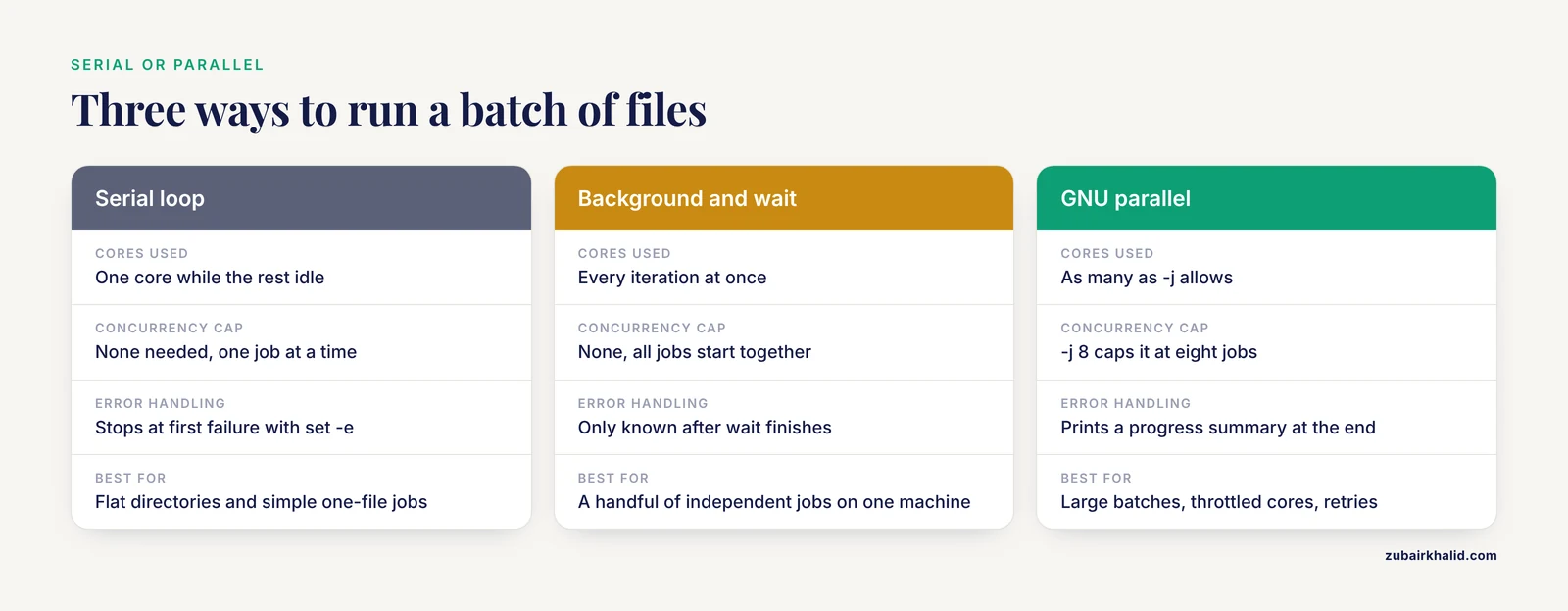
A serial loop uses one core while the rest idle. Two mechanisms fix that, one built into bash and one external tool.
Background jobs and wait
Appending & runs each iteration in the background. wait blocks until every background job finishes.
for file in raw_fastq/*.fastq.gz
do
    fastqc "$file" -o qc_reports/ &
done
wait
echo "All QC reports finished"
This works well for a handful of jobs. For hundreds, running everything at once can exhaust memory or hammer a shared server. Throttle by chunking or use the next option.
GNU parallel
GNU parallel runs a command once per input, across as many cores as you allow, keeps an ordering of outputs, and retries cleanly.
parallel -j 8 fastqc {} -o qc_reports/ ::: raw_fastq/*.fastq.gzThe -j 8 caps concurrency at eight jobs. {} is the placeholder for each input. The ::: marks the start of the input list. The output is identical to the serial loop, produced roughly eight times faster on an eight-core machine, and parallel prints a progress summary at the end.
For a per-sample pipeline rather than a single command, export a function and call it.
run_one_sample() {
    sample="$1"
    bwa mem reference.fa "trimmed/${sample}_R1.trimmed.fastq.gz" \
        "trimmed/${sample}_R2.trimmed.fastq.gz" \
        | samtools sort -o "bam/${sample}.sorted.bam" -
}
export -f run_one_sample

parallel -j 4 run_one_sample ::: sampleA sampleB
Parallel execution changes when errors surface, so pair it with the logging and exit-code checks described next.
Making Loops Fail Loudly and Log Everything
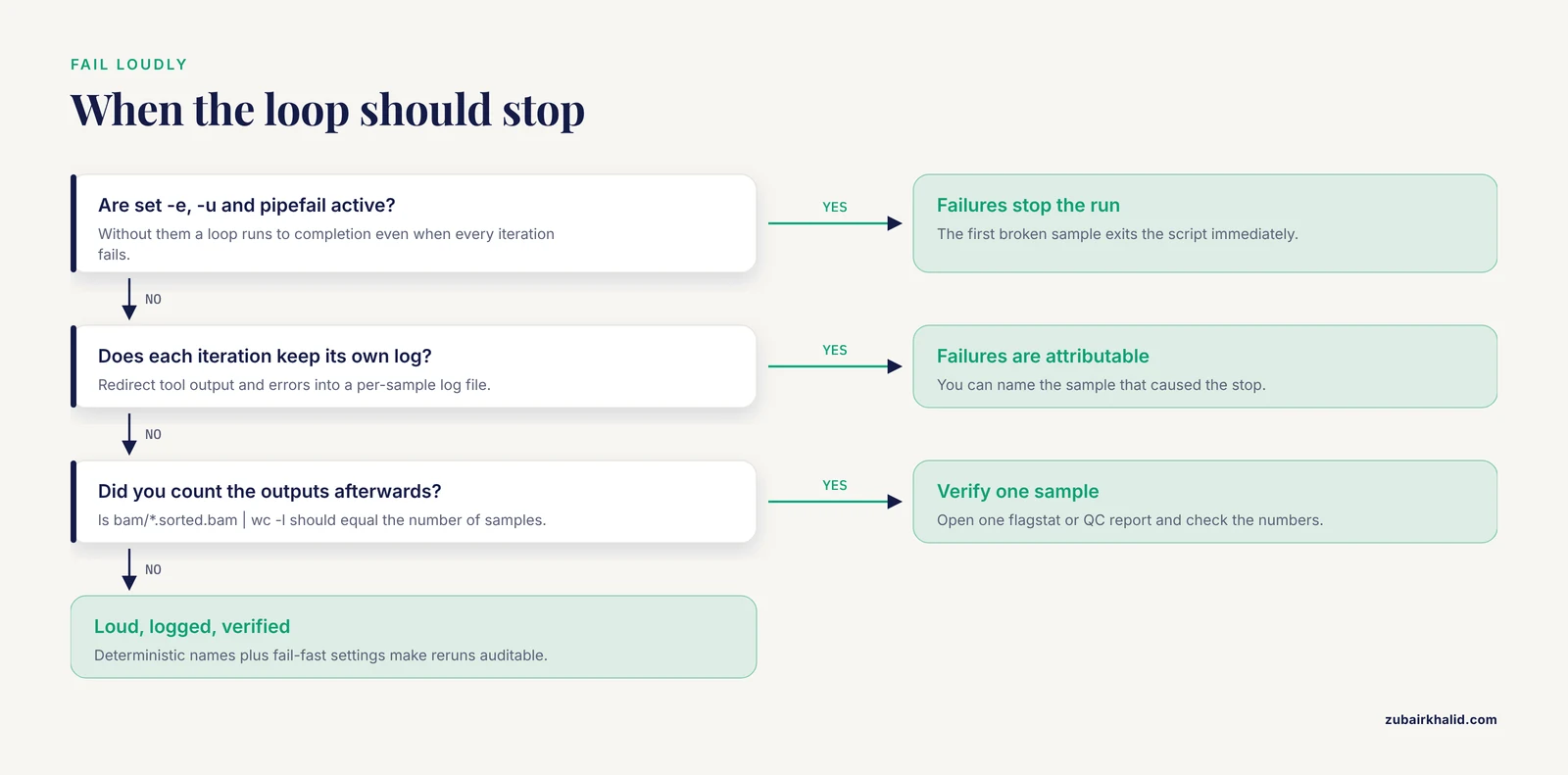
A loop that runs overnight should tell you when something breaks. Three bash settings turn quiet corruption into immediate, located failure.
set -e          # exit immediately if any command fails
set -u          # error on use of an unset variable
set -o pipefail # a pipeline fails if any stage fails, not just the last
Writers commonly combine them on one line at the top of a script. With these active, the Trimmomatic loop from Step 6 stops at the first broken sample instead of continuing and producing partial output sets that look complete.
Logging per iteration keeps failures attributable. Redirect each tool's output and error stream into a per-sample log file, as the alignment loop does with 2> "logs/${sample}.bwa.log", and print progress to the terminal:
echo "[$(date +%H:%M:%S)] starting $sample"Verification closes the loop. Three checks cover most pipelines:
- Count the outputs.
ls bam/*.sorted.bam | wc -lshould equal the number of samples you started with. - Check exit codes. After
set -eandpipefail, any surviving run had zero failures. Without them, scan logs withgrep -il error logs/*.log. - Inspect one sample deeply. Open one flagstat, one QC report, or one alignment summary and confirm the numbers make biological sense for your data.
Reproducibility is the payoff of this discipline. The admixr paper frames automation of low-level steps as the path to reproducible analyses, because a machine-executed sequence of steps can be rerun and audited in a way hand-edited files cannot [1]. A loop with deterministic output names, logged commands, and fail-fast settings is the shell-level version of that principle.
Quick Reference: Loop Patterns for Bioinformatics
| Pattern | Skeleton | Best for | |
|---|---|---|---|
| Glob loop | for f in dir/*.fastq.gz then do/done | Flat directories, simple one-file jobs | |
| Paired loop | Loop over *_R1, derive R2 and sample name | FASTQ pairs, any R1/R2 pairs | |
| find loop | `find dir -name "pattern" -print0 \ | while IFS= read -r -d '' f` | Spaces in names, recursive trees |
| Array loop | files=(*.fastq.gz) then for f in "${files[@]}" | Counting, slicing, reuse of the list | |
| Sample sheet | while IFS= read -r s from a text file | Sample-driven pipelines, metadata coupling | |
| Background batch | Body followed by &, then wait | Small independent jobs on one machine | |
| GNU parallel | parallel -j N tool {} ::: list | Large batches, throttled cores, retries |
Bash Loop Tips for Everyday Bioinformatics
These habits separate loops that survive contact with real projects from loops that work only on the toy example.
Dry run first, every time. Keep the echo version of every loop in your history or notes. Changing a glob from * to _R1 is a five-second edit to the echo version and a potential hour of recompute in the real version.
Name outputs from inputs. The pattern output="result/${sample}.sorted.bam" ties every artifact to its origin. Avoid counters or dates in output names unless you also record the mapping.
Create directories before the loop. A loop that writes into a missing directory fails on iteration one with No such file or directory. One mkdir -p line above the loop prevents it.
Keep the variable name meaningful. for r1 in reads better than for i in when the loop handles pairs, and it documents the content without a comment.
Test on two samples before the full run. Copy two files into a scratch directory, run the loop there, inspect the outputs, then point the loop at the real directory. The cost is minutes. The errors it catches include wrong globs, wrong suffix stripping, and missing output directories.
Prefer reruns over resumes when in doubt. If a loop failed halfway and you are not certain which iterations completed, make the tool idempotent (overwrite outputs) and rerun the whole thing. Partial-state debugging consumes more time than the rerun.
Common Mistakes and Limitations
Unquoted variables. The most frequent bash loop bug in bioinformatics scripts is for f in *.fastq.gz followed by a bare $f. Filenames with spaces split into fragments, tools receive extra arguments, and error messages appear unrelated to the cause. Always write "$f" or "${f}".
Assuming the glob matched. Without nullglob, an empty glob hands the loop the literal pattern as a filename. The loop then runs once, the tool fails with No such file or directory, and the confusion begins. Set shopt -s nullglob at the top of scripts, or count matches with an array before looping.
Losing variables after a pipe. In find ... | while read -r f do ... done, the while loop runs in a subshell because it sits in a pipeline. Variables set inside, such as a failure counter, vanish when the pipeline ends. Two fixes exist: feed the loop from process redirection (while ... done < <(find ...)) or accumulate results into a file inside the loop.
Not checking the exit status of tools inside the loop. A loop runs to completion even when every iteration fails, unless set -e is active. Check for the outputs you expected rather than the absence of error text, since some tools return zero while writing warnings.
Overwriting inputs or prior outputs. A loop writing trimmed/${sample}_R1.fastq.gz while globbing trimmed/*_R1.fastq.gz in the same directory consumes its own output on the second run. Separate raw, intermediate, and result directories from the start.
Recursion you did not intend. *.fastq.gz does not descend into subdirectories, but some recursive patterns combined with symlinks can revisit directories. Use find with explicit -maxdepth when depth matters.
Loops as workflow replacement. Bash loops excel at batches of independent jobs on one machine. They do not track dependencies, resume partial pipelines, or manage environments across machines. The admixr authors note that their package unifies workflow steps under a single framework to improve automation and reproducibility, moving work out of ad hoc shell glue [1]. The same reasoning explains why many groups graduate from loops to workflow managers such as Snakemake or Nextflow once a pipeline stabilizes. Learn loops thoroughly first, because every workflow manager still requires you to understand what the shell is doing underneath.
Silent partial pairing. If a glob matches R1 files for ten samples but R2 files for nine, a pair loop without the existence check either errors cryptically or processes a mismatched pair. The Step 6 check for the mate file costs two lines and removes the entire failure class.
Frequently Asked Questions
How do I loop over paired-end FASTQ files in bash?
Loop over only the R1 files with a glob such as for r1 in raw_fastq/*_R1.fastq.gz, then derive the sample name with basename "$r1" _R1.fastq.gz and construct the R2 path from it. Add a file-existence check for the R2 path so an unpaired sample aborts the run loudly rather than feeding a tool a nonexistent file.
Why does my bash loop skip files with spaces in their names?
An unquoted loop variable splits each filename at whitespace, so my sample.fastq.gz becomes two fragments. Quote the variable as "$f" everywhere it appears, and for robustness across all legal filenames, use find -print0 piped into while IFS= read -r -d '' f.
What is the difference between using a glob directly and piping ls into a loop?
Use the glob. Parsing the output of ls breaks on spaces and newlines in filenames, because ls output is designed for humans, not for machines. The glob for f in *.fastq.gz hands the loop one correctly separated word per file, and find handles anything the glob cannot.
How do I run each loop iteration in parallel?
Append an ampersand to the command inside the loop and follow the loop with wait, or use GNU parallel with parallel -j 8 command {} ::: filelist to cap concurrency at eight jobs. GNU parallel is preferable for large batches because it throttles resource use and reports a clean summary.
Why does my counter variable lose its value after the loop finishes?
The loop ran in a subshell because it sat on the right side of a pipe, and subshell variables disappear when the subshell exits. Feed the loop with redirection such as done < <(find ...) so it runs in the current shell, or write the counter to a file inside the loop.
How do I loop over files in subdirectories recursively?
Use find directory -type f -name ".fastq.gz" -print0 piped into a null-delimited while-read loop. Add -maxdepth 1 if you want only the top level, and remember that a plain glob like .fastq.gz never descends into subdirectories on its own.
How do I make the whole loop stop when one sample fails?
Put set -euo pipefail at the top of the script. With those settings, the first failing command or pipeline exits the script immediately, which prevents half-completed output sets. Per-sample log files then tell you exactly which sample caused the stop.
Should I use a bash loop or a workflow manager like Snakemake?
Use a bash loop for quick batches of independent jobs on one machine and a workflow manager when you need dependency tracking, automatic reruns of changed steps, or execution across machines. Snakemake and Nextflow formalize what a loop does informally, and they are the usual next step once a loop-based pipeline becomes something you rerun regularly.