If Statements in Bash for Bioinformatics
By Dr. Zubair Khalid, DVM, MS, PhD ·

By the end of this article you will be able to write bash if statements that gate a genomics pipeline on real conditions. You will check that input files exist and are complete, react to the exit status of tools such as fastqc, bwa, and samtools, compare read counts between paired-end FASTQ files, skip samples that already have results, and log the decisions your pipeline makes. You will also learn the specific ways these statements fail, including the exact error messages bash prints, and how to verify your logic with bash -n and shellcheck.
You need a Linux or macOS machine (or the Windows Subsystem for Linux), bash version 4 or later, and a plain text editor. The examples use standard Linux commands available on any distribution, plus common bioinformatics tools such as fastqc, bwa, samtools, and bcftools. You do not need root access. Every example is small enough to test on a directory with a handful of files.
Why If Statements Matter in Bioinformatics Workflows
A typical sequencing analysis is a chain of commands. You demultiplex, trim, align, sort, mark duplicates, call variants, and summarize. Each stage reads files written by the previous stage. If a stage fails silently, every later stage either crashes with a confusing error or, worse, produces plausible-looking output from incomplete input.
The classic description of this problem comes from population genetics. In a traditional ADMIXTOOLS workflow, a researcher must generate a set of text configuration files for each analysis, often using a combination of shell scripting and manual text editing, and then parse non-tabular output files to extract values of interest [1]. That combination of hand-built files and scripted glue is exactly where unguarded bash code breaks. A missing input file, a truncated download, or an unnoticed nonzero exit status propagates downstream and can invalidate an entire analysis.
If statements are the smallest unit of defense. They let a script make a decision before doing expensive work: run this step only if the input is present, skip this sample only if the output is complete, stop the pipeline if the alignment returned an error. A single well-placed conditional is often the difference between a pipeline that fails loudly at the right moment and one that fails quietly two days later.
This matters for reproducibility as much as for convenience. Packages such as admixr were built specifically to automate the low-level configuration and parsing steps of ADMIXTOOLS and to unify workflows under a single programmatic framework, which the authors note significantly improves the reproducibility of population genetic studies [1]. The if statements you write in bash serve the same goal at the shell level: they replace human judgment ("did that file look right?") with explicit, repeatable checks.
The Core Syntax of Bash If Statements
Bash does not test conditions directly. Every command in Linux returns an exit status, which is a number from 0 to 255. An exit status of 0 means success. Any nonzero value means failure, and the meaning of each nonzero code depends on the program. The if statement simply runs a command and checks whether that command returned 0.
The structure looks like this:
if [ -f sample_1.fastq.gz ]
then
    echo "Input file found"
else
    echo "Input file missing"
    exit 1
fi
Read the keywords as plain English. if starts the test. then begins the block that runs when the test succeeds. else begins the block that runs when it fails. elif (short for else if) lets you chain additional tests. fi (if spelled backward) closes the whole statement.
The square brackets are not decoration. [ is actually a command, an alias for the test command, and the expression inside the brackets is a set of arguments passed to it. This explains the single most common bash error: the brackets must be separated from their contents by spaces, because [ is a program name, not punctuation.
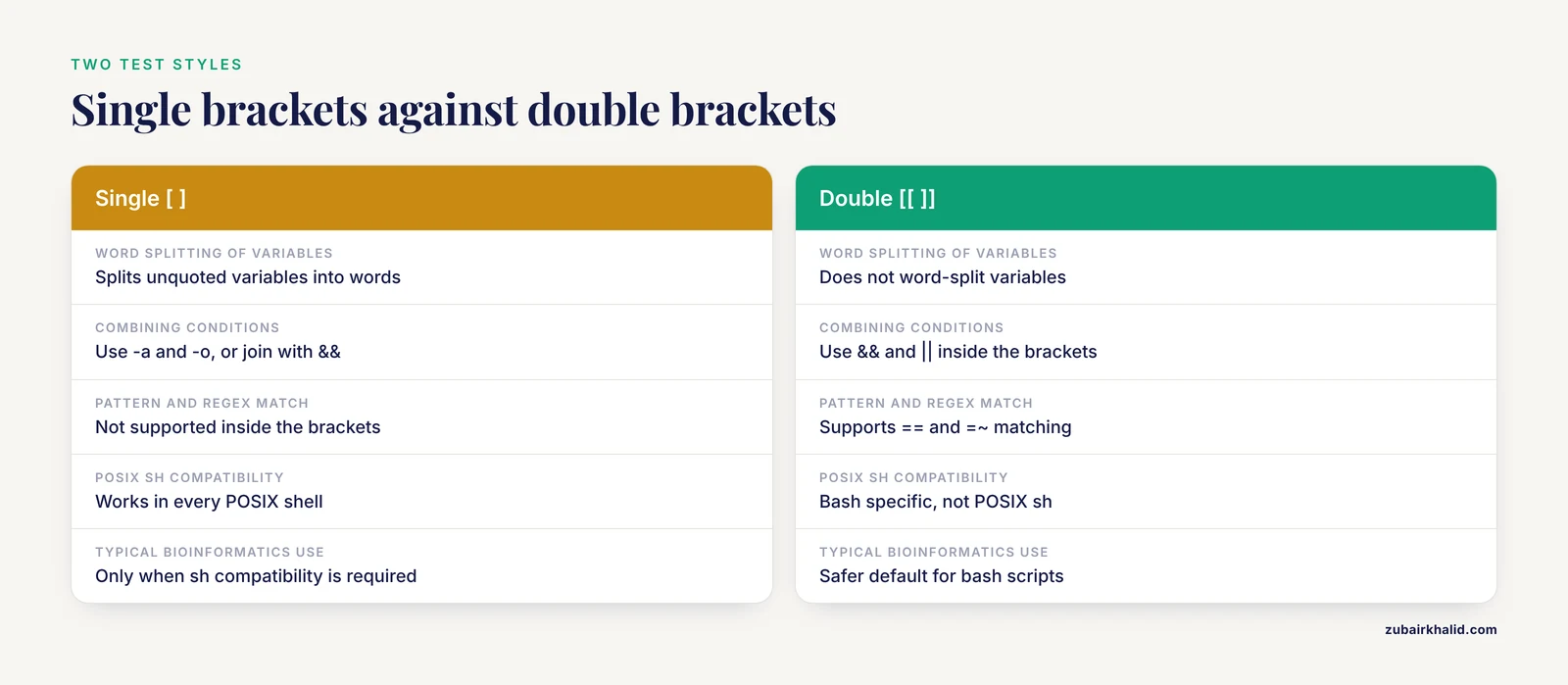
Bash also provides [[, a bash-specific keyword with friendlier behavior. The difference matters and is covered in the table below. For most bioinformatics scripts, [[ is the safer default, while [ keeps your script compatible with the POSIX sh shell.
Three facts about exit status will carry you through most situations:
- The variable
$?holds the exit status of the most recently completed command.0means success. trueis a command that always returns 0.falsealways returns 1. They are useful for testing your own conditionals.- An
ifcondition can be any command list, not just a bracket test.if grep -q "sample_A" samples.txtis a complete, valid conditional.
Step-by-Step: Writing Bash If Statements for Bioinformatics
This walkthrough builds six conditionals in increasing complexity. Run them in a scratch directory so mistakes cost nothing.
Step 1: Check that an input file exists and is not empty
Create a test file and an empty file first.
mkdir -p scratch && cd scratch
printf "read_one\nread_two\n" > sampleA_1.fastq.gz
touch sampleB_1.fastq.gz
Note that sampleB_1.fastq.gz here is an empty regular file, not real gzip data. It exists, which makes it a good prop for learning the difference between "exists" and "exists and has content."
Now write the check:
if [ -s sampleA_1.fastq.gz ]
then
    echo "sampleA input is present and nonempty"
else
    echo "sampleA input is missing or empty"
fi

if [ -s sampleB_1.fastq.gz ]
then
    echo "sampleB input is present and nonempty"
else
    echo "sampleB input is missing or empty"
fi
Expected output:
sampleA input is present and nonempty
sampleB input is missing or empty
The -s test returns true only if the file exists and has a size greater than zero bytes. This is almost always what you want for pipeline inputs. The -f test returns true for any existing regular file, including a zero-byte one left behind by a crashed download or an earlier failed run. Bioinformatics directories are full of such husks, which is why -s beats -f for gating real work.
Step 2: Act on the exit status of a command
Every stage of a pipeline should be gated on the previous stage's exit status.
fastqc sampleA_1.fastq.gz

if [ $? -eq 0 ]
then
    echo "fastqc finished successfully"
else
    echo "fastqc failed with status $?"
    exit 1
fi
Expected output on success:
Started analysis of sampleA_1.fastq.gz
Approx 5% finished for sampleA_1.fastq.gz
Analysis complete for sampleA_1.fastq.gz
fastqc finished successfully
The $? in the echo inside the else block deserves a warning covered fully in the mistakes section. By the time bash evaluates that echo, $? holds the status of the if condition itself, which is what you want here. But if you insert any other command between the test and the use of $?, the value is overwritten. Capture it immediately when you need it later:
fastqc sampleA_1.fastq.gz
status=$?
if [ $status -ne 0 ]
then
    echo "fastqc failed with status $status"
    exit 1
fi
Step 3: Compare numbers
Numeric comparison uses the -eq (equal), -ne (not equal), -lt (less than), -le (less than or equal), -gt (greater than), and -ge (greater than or equal) operators. A common bioinformatics use is enforcing a minimum read count before running expensive downstream steps. The threshold is your choice and belongs in a variable at the top of the script so collaborators can see and change it.
MIN_READS=1000000
read_count=$(grep -c "^@" sampleA_1.fastq)

if [ $read_count -ge $MIN_READS ]
then
    echo "sampleA passed the depth check with $read_count reads"
else
    echo "sampleA has only $read_count reads, below the minimum of $MIN_READS"
    exit 1
fi
Expected output when the file holds two reads:
sampleA has only 2 reads, below the minimum of 1000000The $( ) construct is command substitution. Bash runs the inner command and replaces the whole expression with its standard output. Here, grep -c "^@" counts lines starting with the @ character, which in a four-line-per-record FASTQ file approximates the number of sequence records. For a production script you would count records more carefully, but the conditional logic is identical.
Step 4: Compare strings
String comparison uses = for equality, != for inequality, -z for an empty string (zero length), and -n for a nonempty string. String checks are how you validate that required variables were actually set before a script does anything destructive.
SAMPLE_NAME="sampleA"

if [ -z "$SAMPLE_NAME" ]
then
    echo "Error: SAMPLE_NAME is not set"
    exit 1
fi

if [ "$SAMPLE_NAME" = "sampleA" ]
then
    echo "Processing $SAMPLE_NAME"
else
    echo "Unexpected sample name: $SAMPLE_NAME"
    exit 1
fi
Expected output:
Processing sampleAThe quotation marks around "$SAMPLE_NAME" are not optional style. Without them, a variable containing spaces is split into multiple words and the bracket command receives more arguments than it can handle. Always quote variable expansions inside [.
Step 5: Combine conditions
Bash gives you two ways to combine tests. Inside [[ ]]', you can use && for AND and || for OR. Inside [ ], use the -a and -o operators or, better, separate bracket commands joined by && and ||` at the shell level.
R1="scratch/sampleA_1.fastq.gz"
R2="scratch/sampleA_2.fastq.gz"

if [ -s "$R1" ] && [ -s "$R2" ]
then
    echo "Paired-end inputs are both present and nonempty"
else
    echo "One or both paired-end inputs are missing or empty"
    exit 1
fi

if [ ! -s "results/sampleA.bam" ] || [ "$FORCE" = "yes" ]
then
    echo "Alignment needed for sampleA"
else
    echo "Alignment already complete for sampleA"
fi
Expected output for the first block, given the files created earlier:
Paired-end inputs are both present and nonemptyThe ! negates a test. The second block implements the checkpoint pattern described later: run the alignment only when the output is missing, empty, or the user explicitly set FORCE=yes.
Step 6: Assemble the pieces into a pipeline gate
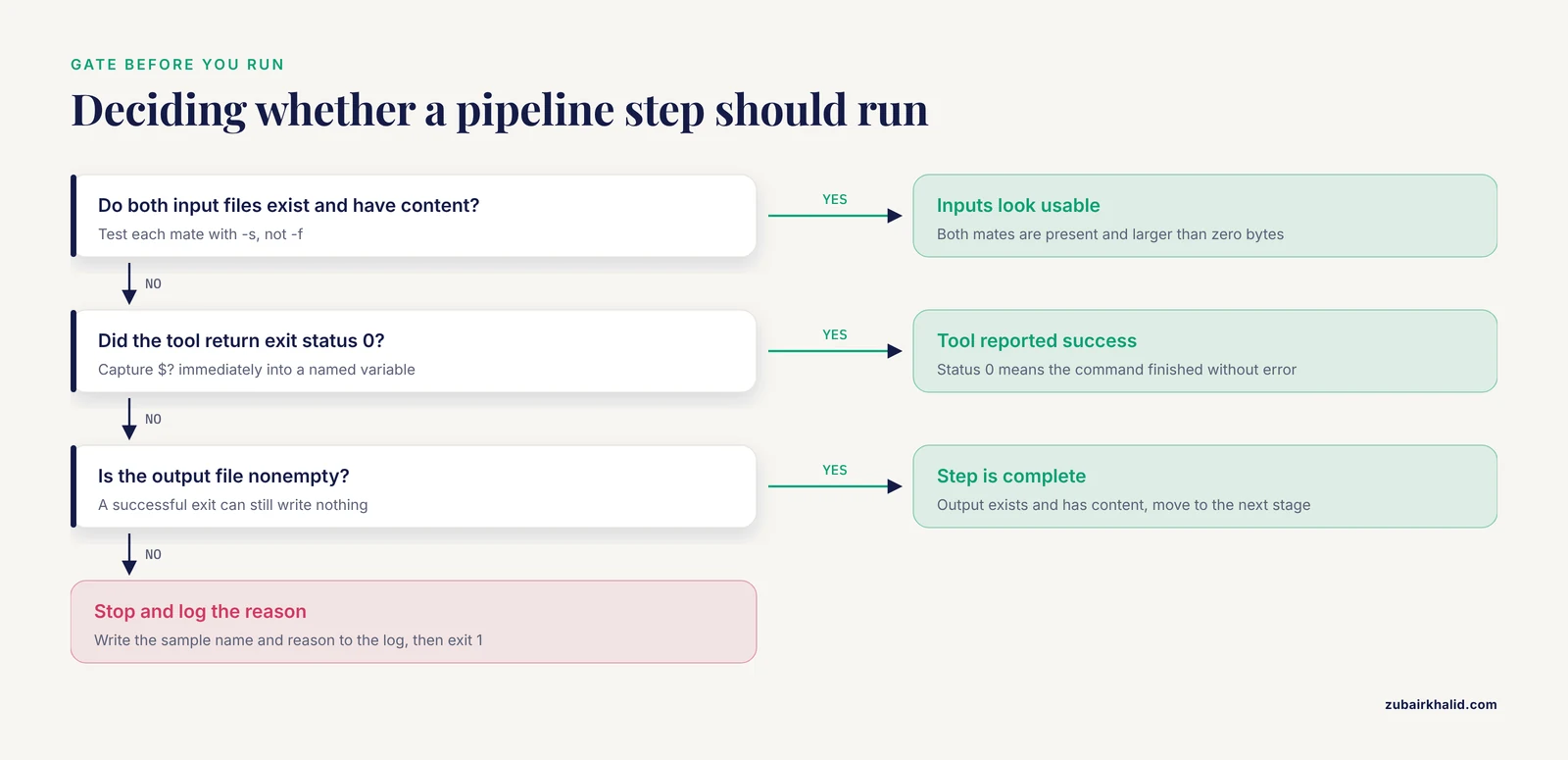
Here is a complete, minimal gate for one sample. It checks inputs, runs a step, checks the exit status, and verifies the output.
#!/bin/bash

R1="sampleA_1.fastq.gz"
R2="sampleA_2.fastq.gz"
OUT="sampleA.bam"

if [ ! -s "$R1" ] || [ ! -s "$R2" ]
then
    echo "ERROR: missing or empty FASTQ input for sampleA" >&2
    exit 1
fi

bwa mem reference.fa "$R1" "$R2" 2> sampleA.bwa.log | samtools view -b -o "$OUT"

if [ $? -ne 0 ]
then
    echo "ERROR: alignment failed for sampleA" >&2
    exit 1
fi

if [ -s "$OUT" ]
then
    echo "OK: $OUT written"
else
    echo "ERROR: $OUT was not created" >&2
    exit 1
fi
Expected output on success:
OK: sampleA.bam writtenTwo details in this block are load-bearing. First, 2> sampleA.bwa.log redirects standard error to a file, because bwa writes its progress messages to standard error and leaving them interleaved with results makes parsing painful. Second, the final -s check catches the case where the aligner "succeeded" but wrote nothing, which happens with corrupt inputs. Checking both the exit status and the output is the minimum standard for any step in a pipeline.
Operators That Matter in Bioinformatics
The following table summarizes the operators you will use most often when writing if statements in bash for bioinformatics work.
| Category | Operator | Meaning | Typical bioinformatics use | ||
|---|---|---|---|---|---|
| File test | -f file | File exists and is a regular file | Confirm a reference or index exists | ||
| File test | -s file | File exists and is larger than zero bytes | Confirm a FASTQ, BAM, or VCF is really there | ||
| File test | -d dir | Directory exists | Confirm an output directory before writing | ||
| File test | -r file | File is readable | Catch permission problems on shared drives | ||
| File test | ! | Negates the following test | Run a step only when output is absent | ||
| Numeric | -eq, -ne | Equal, not equal | Compare an exit status to 0 | ||
| Numeric | -lt, -le, -gt, -ge | Less than, less or equal, greater, greater or equal | Enforce minimum read counts or sample numbers | ||
| String | = , != | Equal, not equal | Match sample names or file extensions | ||
| String | -z, -n | Empty, nonempty | Validate that a variable was set | ||
| Combined | &&, ` | ` | AND, OR | Require both mates of a pair, allow a forced rerun |
Two syntax notes that save hours of debugging. First, [[ treats its contents more leniently than [: it does not word-split variables, it supports pattern matching with ==, and it supports regular expression matching with the =~ operator, as in [[ "$file" =~ \.fastq\.gz$ ]]. Second, when you need arithmetic on numbers that might be floating point, such as coverage values, bash alone cannot do it. Pipe the numbers through awk or bc and test their textual output instead.
Real Patterns for If Statements in Bash for Bioinformatics Pipelines
The step-by-step examples show mechanics. The patterns below show how working pipelines use them. Each one is a self-contained snippet you can adapt.
Pattern 1: Verify paired-end FASTQ files have matching record counts
Uneven mate files are a classic silent killer. The alignment step may run to completion and produce garbage. Count the records in each file and compare before aligning.
n1=$(zcat sampleA_1.fastq.gz | wc -l)
n2=$(zcat sampleA_2.fastq.gz | wc -l)

if [ $n1 -ne $n2 ]
then
    echo "ERROR: mate counts differ ($n1 vs $n2 lines) for sampleA" >&2
    exit 1
fi
Expected output on failure, printed to standard error:
ERROR: mate counts differ (8000000 vs 7999996 lines) for sampleALine counts rather than record counts are fine here because both mates must have the same number of four-line records, so equal line counts imply equal record counts. Dividing by four adds nothing.
Pattern 2: Handle the exit status of a pipeline, not just its last command
In bash, the exit status of a pipeline is the exit status of its final command by default. This hides failures in earlier commands. Suppose you filter a VCF and count the results:
bcftools view -f PASS variants.vcf.gz | gzip > variants_pass.vcf.gz
if [ $? -eq 0 ]
then
    echo "Filtering succeeded"
fi
This test examines only gzip, not bcftools. If bcftools fails midway, gzip may still exit 0 with a truncated file, and your if statement reports success. Bash exposes the individual statuses in the PIPESTATUS array, which is populated after each pipeline and immediately overwritten by the next command.
bcftools view -f PASS variants.vcf.gz | gzip > variants_pass.vcf.gz
if [ ${PIPESTATUS} -ne 0 ]
then
    echo "ERROR: bcftools view failed" >&2
    exit 1
fi
Alternatively, start scripts that depend on piped commands with set -o pipefail, which makes the pipeline return the rightmost nonzero status of any component.
Pattern 3: Use checkpoints to make reruns cheap
Long pipelines get interrupted. Rather than rerunning everything, test for a completed, nonempty output and skip finished work.
OUT="results/sampleA_sorted.bam"

if [ -s "$OUT" ]
then
    echo "Skipping sampleA, output already exists"
else
    samtools sort -o "$OUT" sampleA.bam
    if [ $? -ne 0 ] || [ ! -s "$OUT" ]
    then
        echo "ERROR: sorting failed for sampleA" >&2
        rm -f "$OUT"
        exit 1
    fi
fi
The rm -f on failure is deliberate. A partially written BAM is worse than no BAM, because the next rerun would see a nonzero-size file, pass the -s checkpoint, and skip the repair. Deleting failed outputs keeps the checkpoint honest.
Existence alone is not proof of integrity, so strong checkpoints pair the size test with a format-aware check. gzip -t tests the internal integrity of a gzip file. samtools quickcheck verifies that a BAM has a valid header and is not truncated. A combined gate looks like this:
if [ -s "$OUT" ] && samtools quickcheck "$OUT" 2>/dev/null
then
    echo "Skipping sampleA, output exists and passes quickcheck"
else
    echo "Output missing or corrupt, running alignment for sampleA"
fi
Note that a command used directly as an if condition contributes its own exit status, which is why samtools quickcheck needs no brackets around it.
Pattern 4: Flag samples against a threshold while parsing a summary table
Suppose depth_summary.txt holds two columns, sample name and mean depth, produced by another tool. You can drive decisions from it with a bash loop over awk output.
MIN_DEPTH=10

awk '{print $1, $2}' depth_summary.txt | while read -r sample depth
do
    if [ -z "$sample" ]
    then
        continue
    fi
    if awk -v d="$depth" -v m="$MIN_DEPTH" 'BEGIN { exit (d >= m) ? 0 : 1 }'
    then
        echo "$sample depth $depth OK"
    else
        echo "$sample depth $depth BELOW threshold $MIN_DEPTH" >> low_depth_samples.txt
    fi
done
Expected content of low_depth_samples.txt when two samples fall short:
sampleC depth 7.8 BELOW threshold 10
sampleF depth 9.2 BELOW threshold 10
The comparison itself happens inside awk because awk handles decimal numbers natively, and awk's exit with 0 or 1 turns the comparison into an exit status the bash if can test. The -v flags pass the bash variables into the awk program. The continue statement skips blank lines that often appear at the end of tool output.
Pattern 5: Validate sample counts in a VCF
Variant call sets are frequently filtered by sample number, for example when you expect a specific cohort. bcftools query -l lists sample names, one per line.
expected=54
observed=$(bcftools query -l cohort.vcf.gz | wc -l)

if [ $observed -ne $expected ]
then
    echo "ERROR: cohort.vcf.gz has $observed samples, expected $expected" >&2
    exit 1
fi
This two-line check has caught countless renaming and subsetting errors. It belongs near the top of any script that consumes the VCF, before any expensive work.
If Statements Inside Loops for Batch Processing
Real projects rarely process one sample. The loop-plus-conditional combination is where if statements in bash for bioinformatics pay off most. This snippet walks a directory of paired FASTQ files, validates each pair, and records its decision.
MIN_READS=100000
LOG="pipeline_run.log"

for r1 in raw/*_1.fastq.gz
do
    sample=$(basename "$r1" _1.fastq.gz)
    r2="raw/${sample}_2.fastq.gz"

    if [ ! -s "$r2" ]
    then
        echo "$sample: missing mate file, skipping" | tee -a "$LOG"
        continue
    fi

    n1=$(zcat "$r1" | grep -c "^@")
    if [ $n1 -lt $MIN_READS ]
    then
        echo "$sample: $n1 reads, below minimum, flagging" | tee -a "$LOG"
        echo "$sample" >> low_input_samples.txt
        continue
    fi

    if [ -s "trimmed/${sample}_1_trimmed.fastq.gz" ]
    then
        echo "$sample: already trimmed, skipping" | tee -a "$LOG"
        continue
    fi

    echo "$sample: $n1 reads, processing" | tee -a "$LOG"
    fastp -i "$r1" -I "$r2" \
          -o "trimmed/${sample}_1_trimmed.fastq.gz" \
          -O "trimmed/${sample}_2_trimmed.fastq.gz"
done
Expected log output for a mixed directory:
sampleA: 2450000 reads, processing
sampleB: missing mate file, skipping
sampleC: 88000 reads, below minimum, flagging
sampleD: 3100000 reads, already trimmed, skipping
Three techniques in this loop are worth internalizing. The basename command with a suffix argument strips the directory and the trailing pattern to recover the clean sample name. The tee -a construct writes each message both to the terminal and to a log file, so the record of what the script decided survives after the terminal scrolls. The continue statement moves to the next sample on any failed check, which keeps one bad sample from halting a batch of two hundred.
Common Mistakes and Limitations
These are the errors that account for most broken conditionals in real analysis scripts, with the messages bash actually prints.
- Missing spaces around the brackets.
if [$n -eq 0]produces[: missing ]or, for the no-space variant against a word,[$n: command not found. The brackets are a command and need whitespace on both sides. Writeif [ "$n" -eq 0 ].
- Unquoted variables.
if [ $file = "ref.fa" ]breaks when$filecontains spaces, with the messageunary operator expectedortoo many arguments. Quote every expansion:[ "$file" = "ref.fa" ], or use[[which tolerates unquoted variables safely.
- Numeric operators on non-numeric strings.
if [ "$sample" -eq 5 ]where$sampleissampleAprintsinteger expression expectedand the branch behaves unpredictably. Use string operators for strings, numeric operators for numbers, and validate input with a regex if the type is uncertain:[[ "$n" =~ ^+$ ]].
- Trusting existence when you need completeness.
-freturns true for a zero-byte file left by a killed process. For pipeline inputs and checkpoints, use-s, and add a format-aware integrity test such asgzip -torsamtools quickcheckwhere truncation is plausible.
- Reading
$?after another command.$?reflects only the most recent command. This sequence is a classic bug:
bwa mem reference.fa r1.fq r2.fq > aln.sam
echo "Alignment started"
if [ $? -ne 0 ]
The echo reset $? to 0, so the if statement never detects the failure. Capture the status into a named variable immediately, as shown in Step 2, or put the command directly in the if condition.
- Pipelines that mask failures. As shown in Pattern 2, the default exit status of a pipeline belongs to the last command only. Without
set -o pipefailor an explicitPIPESTATUScheck, a failing upstream tool hides behind a successful downstream one.
- Forgetting
fi. Bash reportssyntax error: unexpected end of filewhen a script ends with an open if block. The fix is to close everyifwithfi, and everycasewithesac. Deep nesting makes this common, so flatten logic with early exits where you can.
- Confusing
[and[[features.[does not support&&,||, or=~inside the brackets. Writingif [ "$a" = "x" && "$b" = "y" ]producesmissing ]. Either split into two bracket commands joined by shell-level&&, or move to[[.
- Windows line endings. Scripts edited on Windows carry carriage return characters that bash cannot parse, producing errors like
$'\r': command not found. Convert withdos2unix script.shor configure your editor for Unix line endings.
- Testing a directory with
-f.-fis false for directories, so a check intended to confirm the reference directory exists fails confusingly. Use-dfor directories.
- Scripting past the point where a workflow manager is the right tool. Conditional logic grows: branching by sample metadata, rerunning failed nodes, parallel execution. Bash handles the small end of this well, but beyond a certain size the better answer is to move orchestration to a dedicated system. The admixr authors make this argument for population genetics specifically, replacing hand-managed shell scripts and manual text editing with a single programmatic framework that automates configuration and parsing [1]. The same reasoning applies to any pipeline held together by long chains of conditionals.
- Silent decisions. An if statement that quietly skips a sample leaves no trace in the results. Always
echoorteewhat each branch did, with the sample name and the reason, so a collaborator reading the log months later can reconstruct the run.
Checking Your Work
Before trusting a conditional, verify it three ways.
First, check syntax without executing anything:
bash -n pipeline.shExpected output on success is nothing at all. Any syntax error, including a missing fi, prints a line number.
Second, trace execution. Insert set -x at the top of a script or run it as bash -x pipeline.sh. Bash prints each expanded command prefixed with +, which shows exactly how variables were substituted inside your test.
++ '[' -s sampleA_1.fastq.gz ']'
++ echo 'sampleA input is present and nonempty'
Third, run a static analyzer. The shellcheck tool reads a script and reports specific, actionable warnings, including unquoted variables and useless tests.
shellcheck pipeline.shA typical finding looks like this:
In pipeline.sh line 12:
if [ $sample = "sampleA" ]
      ^------^ SC2086: Double quote to prevent globbing and word splitting.
Finally, test both branches deliberately. A conditional you have only ever seen succeed is untested. Create the failure condition on purpose, with a zero-byte file or a deliberately wrong variable, and confirm the else branch does what you expect. Pipeline authors who do this catch the majority of logic errors before a real dataset ever touches the script.
Next Steps
Once conditionals feel natural, three upgrades deliver most of the remaining value in Linux for bioinformatics scripting.
Add a strictness header to new scripts: set -euo pipefail makes bash exit on any failed command, treat unset variables as errors, and propagate failures through pipelines. Your explicit if statements then handle the cases you want to decide about, while set -e catches everything else.
Wrap repeated blocks in functions, with the sample name and file paths as arguments, so the validation logic is written once and tested once.
Recognize when the job has outgrown bash. The trajectory of most groups is the same: ad hoc shell commands, then a scripted pipeline with conditionals, then a workflow system such as Snakemake or Nextflow that manages dependencies and retries natively. For population genetics in particular, moving analysis steps into a programmatic framework has been shown to automate configuration and parsing and to improve reproducibility, which is the explicit motivation behind the admixr package for ADMIXTOOLS analyses [1]. Bash if statements remain the right tool inside that trajectory for quick validation, file gating, and batch bookkeeping, and they stay useful even inside workflow systems, which often shell out to small bash snippets for exactly those tasks.
Frequently Asked Questions
What does an if statement actually do in a bioinformatics script?
It runs a test command and executes one block of code when that command returns exit status 0, or a different block when it returns nonzero. In practice this means a script can check that a FASTQ file is present, that an aligner succeeded, or that a sample has enough reads, and only then proceed to the next stage.
Should I use single brackets [ ] or double brackets [[ ]]?
Use [[ ]] in bash scripts unless you need strict POSIX sh compatibility. Double brackets do not word-split variables, handle pattern and regex matching, and produce fewer surprising errors, while single brackets work in every POSIX shell but require careful quoting.
Why does bash say "integer expression expected"?
You used a numeric operator such as -eq or -lt on a value that is not a plain integer, often a string like sampleA or a decimal like 7.8. Check the variable's contents, or perform decimal comparisons in awk and test the result.
How do I confirm a downloaded FASTQ file is complete?
Combine three checks: the file is nonzero size with -s, its gzip integrity passes with gzip -t, and, where available, a format-aware tool such as samtools quickcheck validates the header and structure. A file that merely exists is not evidence that a transfer finished.
How do I skip samples that already have results?
Wrap each stage in a checkpoint: if [ -s "$output" ] then skip else run. Delete partial outputs when a step fails, so a truncated file cannot masquerade as a completed checkpoint on the next run.
Why does my script keep going after a command fails?
By default bash continues after failures, and in a pipeline only the last command's exit status is visible. Start the script with set -euo pipefail, gate important steps with explicit exit status checks, and use PIPESTATUS when you need the status of a specific command inside a pipe.
Can bash compare decimal numbers like mean coverage?
Not with its built-in numeric operators, which are integer only. Compute and compare decimals with awk or bc, then convert the result to an exit status that a bash if statement can test, as shown in the depth-threshold example above.
How do I debug an if statement that always takes the wrong branch?
Run the script with bash -x to see the expanded test, run shellcheck for quoted-variable and syntax warnings, and echo the variables immediately before the conditional. In almost every case the trace reveals an unquoted expansion, a stale $?, or a value with unexpected whitespace.