Handling Large GFF Files with awk
By Dr. Zubair Khalid, DVM, MS, PhD ·
When an awk parse large gff file job fails, the most likely cause is memory: the script stores every feature in an associative array and never removes anything, so a multi-gigabyte annotation exhausts RAM. The first thing to check is the simplest thing: run the command on the first 1,000 lines with head -n 1000 annotation.gff3 | awk 'your script here' and watch whether the logic works at all before you debug scale. Most failures are one of two kinds, logic failures that a small test reveals immediately and scale failures that only appear on the full file. This article covers both, in order from most common to rarest, with a troubleshooting table, working one-liners, and a diagnostic sequence you can follow line by line.
The awk pattern-matching and text-processing language remains a core part of linux for bioinformatics because it streams input. awk reads one record at a time, applies your rules, and discards the record unless you deliberately store it. A well-written awk script processes a two-gigabyte annotation from Ensembl or NCBI in minutes on a laptop with constant memory. A badly written one climbs into swap and either thrashes for hours or dies with an out-of-memory kill. The difference is almost always a handful of design decisions covered below.
GFF Format Essentials Every awk Script Must Handle
Before fixing anything, you need a precise mental model of the input. GFF, the General Feature Format, is a tab-delimited text format for genomic annotations. The current version, GFF3, is maintained by the Sequence Ontology project, and its close cousin GTF is used by GENCODE and Ensembl for gene annotations. awk treats every line identically, so the format details are your responsibility.
A GFF3 record has exactly nine tab-separated fields:
| Field | Name | Content |
|---|---|---|
| 1 | seqid | Chromosome or scaffold name |
| 2 | source | Annotation source, for example Ensembl or RefSeq |
| 3 | type | Feature type, for example gene, mRNA, exon, CDS |
| 4 | start | 1-based inclusive start coordinate |
| 5 | end | 1-based inclusive end coordinate |
| 6 | score | Float or a dot placeholder |
| 7 | strand | Plus, minus, or a dot placeholder |
| 8 | phase | 0, 1, 2, or a dot placeholder |
| 9 | attributes | Semicolon-separated tag=value pairs |
A real line from an Ensembl-style file looks like this:
1 ensembl gene 11869 14412 . + . ID=gene:ENSG00000223972;Name=DDX11L1;biotype=transcribed_unprocessed_pseudogeneFive structural details break awk scripts repeatedly.
First, comment lines and directives start with a hash character. Every GFF3 file begins with the ##gff-version 3 directive, and files can contain ##sequence-region lines and single-column # comments. Any awk rule that does not explicitly skip these lines will process them as data.
Second, many annotation files, including some NCBI RefSeq GFF releases, append the genome sequence itself after a ##FASTA directive. Those FASTA lines have a different structure entirely, and awk rules written for the tabular section will silently chew through millions of FASTA characters and produce garbage or absurd counts.
Third, field 9 is a mini-language of its own. Attributes are separated by semicolons, keys and values are joined by an equals sign, and values can contain percent-encoded characters such as %2C for a comma and %3B for a semicolon. GTF, by contrast, uses the gene_id "ENSG00000223972" style with quoted values and different attribute names such as transcript_id instead of GFF3's Parent. Scripts that assume one dialect fail on the other.
Fourth, GFF3 is hierarchical. A gene has mRNA children, which have exon and CDS children, linked through the ID and Parent attributes. The file is not required to list all children immediately after the parent, which is why awk scripts that try to reconstruct full gene models in one pass often need two passes over the file.
Fifth, coordinates are 1-based and inclusive on both ends, unlike the 0-based half-open intervals used in BED. Converting GFF to BED requires subtracting one from the start. Getting this wrong is the single most common correctness bug in awk-based GFF conversion.
First Checks When a Large GFF File Breaks Your awk Command
Run this short sequence before changing anything. Each command takes seconds and eliminates whole categories of failure.
Check the size and line count:
ls -lh annotation.gff3
wc -l annotation.gff3
A typical vertebrate annotation runs from a few hundred megabytes to about two gigabytes uncompressed and 1.5 to 3 million feature lines. If your expectations are far off from these orders of magnitude, the file itself may be truncated or corrupted.
Confirm the field count. The fastest check for structural problems uses awk itself:
awk -F'\t' '!/^#/ && NF != 9 { print NR ": " NF " fields" }' annotation.gff3 | headOutput here means you have wrapped lines, an old GFF2 file, space-separated pseudo-GFF, or FASTA bleeding into the tabular section.
Profile the feature types. Almost every awk parse large gff file mistake involves filtering on the wrong value of column 3:
awk -F'\t' '!/^#/ { count[$3]++ } END { for (t in count) print t "\t" count[t] }' annotation.gff3This gives the exact vocabulary of feature types in your file. Ensembl uses gene, transcript, exon, and CDS. RefSeq uses gene, mRNA, exon, and CDS. Scripts written against one vocabulary return empty output on the other.
Check for a FASTA tail:
grep -n "^##FASTA" annotation.gff3 | headIf this prints a line number, everything after it is sequence, not annotation, and your script needs an exit rule as shown later.
Check whether the file is actually compressed:
file annotation.gff3Running awk directly on a gzipped file produces confusing errors because awk sees binary bytes, not tab-separated text.
Finally, test the full command on a slice:
head -n 20000 annotation.gff3 > test_slice.gff3Run your script on test_slice.gff3 first. If it fails there, you have a logic bug. If it succeeds there but fails on the full file, you have a scale problem, and the table below points you to the right cause.
Troubleshooting Table: Symptoms, Causes, Confirmation, and Fixes
This table is the core of the article. It lists the failure modes of handling large gff files with awk, ordered roughly from most to least common.
| Symptom | Likely cause | How to confirm | Fix |
|---|---|---|---|
| Script slows down and system memory climbs until the process is killed | Unbounded associative arrays keep every record in RAM | Watch top or free -h while the job runs. Growth that never plateaus confirms it | Restructure to stream, or delete array entries once used. See the memory section |
| Output is empty | Wrong feature type string in column 3, wrong field separator, or the file is gzipped | Run the feature-type profiling command above. Check file output | Match the exact type string, use -F'\t', and decompress or pipe through zcat |
| awk prints a syntax error | Space-separated fields parsed with default splitting, or an unescaped quote in the script | Run the same script on 20 lines. Isolate the failing rule | Use -F'\t' and test the script on a small slice |
| Counts are absurdly high or garbage appears at the end | The ##FASTA section is being parsed as features | grep -n "^##FASTA" | Add an exit rule on the ##FASTA directive |
| Extracted coordinates are off by one relative to BED tools | 1-based inclusive GFF coordinates used directly as 0-based half-open BED coordinates | Compare one known gene against a BED-format source | Subtract 1 from column 4 when writing BED |
| Join or lookup logic silently misses matches | The file is not sorted, and the script assumes adjacent related records | Run the sortedness check below | Sort with sort -k1,1 -k4,4n and LC_ALL=C, then rerun |
| Attribute extraction returns the wrong substring or truncates | Field 9 contains percent-encoded characters, or the script splits on the wrong delimiter | grep one problematic feature and inspect field 9 directly | Decode percent escapes with gsub, or match keys explicitly with match and substr |
| awk reports "broken pipe" or exits early | A downstream command such as head closed the pipe, or the pipeline was killed | Look at the exit status of each pipeline stage with echo $? | Treat it as expected with head, otherwise check disk space and process limits |
| Output contains stray carriage returns that break downstream tools | Windows line endings, CRLF, in the source file | file annotation.gff3 reports "with CRLF line terminators" | Strip them once with tr -d '\r' < in.gff3 > out.gff3 |
| awk is slow even though memory is fine | Locale-aware string operations, unnecessary regex, or decompression as the bottleneck | time the command. Compare against a plain cut on the same file | Set LC_ALL=C, replace regex with string equality, use mawk, stream compressed input with pigz |
Cause 1: Filtering on the Wrong Column, Type String, or Separator
This is the most frequent logic failure, and it produces empty or nonsensical output rather than crashes. awk's default field splitting collapses any run of spaces and tabs into one separator. GFF files are strictly tab-separated, and column 9 often contains spaces inside quoted GTF values, so default splitting merges or splits fields incorrectly.
The fix is to always declare the separator explicitly:
awk -F'\t' '$3 == "gene" { print $1 "\t" $4 "\t" $5 }' annotation.gff3Notice the string comparison uses == with double quotes. Two related mistakes follow from this. Writing $3 = "gene" assigns the value instead of comparing, and writing $3 == gene compares against the variable gene, which is unset and therefore empty, so nothing matches. Both errors run without warnings.
The second variant of this failure is vocabulary mismatch. A script written for a RefSeq file that filters $3 == "mRNA" returns nothing on an Ensembl file where the same biological entities are typed as transcript. The profiling one-liner in the previous section tells you the exact strings present in your file, and running it once per new annotation source should be a standing habit.
The third variant is treating GTF and GFF3 field 9 identically. In GTF the gene identifier lives in gene_id "VALUE" and the transcript identifier in transcript_id "VALUE". In GFF3 the identifier lives in ID= on the parent feature and Parent= on the child. An awk expression that works on one dialect silently extracts nothing on the other. Decide which dialect you have with the first line of the file, ##gff-version 3 indicates GFF3, and check attribute names with a direct look:
awk -F'\t' '$3 == "gene" { print $9 }' annotation.gff3 | head -n 3Cause 2: Compressed Input and Pipeline Plumbing
Most publicly distributed annotations are gzipped, and awk does not read gzip streams natively in a portable way. Pointing awk at a .gz file yields binary garbage, a mysterious syntax error on line 1, or an empty result.
The standard fix in linux commands bioinformatics practice is to stream the decompression:
zcat annotation.gff.gz | awk -F'\t' '!/^#/ { count[$3]++ } END { for (t in count) print t "\t" count[t] }'For files compressed with bgzip, the blocked compressor used by the tabix indexing system, use bgzip -dc in place of zcat. Both work in pipelines exactly like plain text.
Decompression is often the real bottleneck. gzip decompression is fast, but it is single-threaded in the standard implementation, and a slow disk or an old gzip build can cap the whole pipeline. The pigz parallel implementation reads the same format and uses multiple cores for decompression where the format allows:
pigz -dc annotation.gff.gz | awk -F'\t' '$3 == "exon" { n++ } END { print n }'If the pipeline dies partway with a "broken pipe" message, check what is downstream. Piping awk into head intentionally terminates awk early through a signal, which is normal and expected. The same message on a full run usually means a disk filled up, an upstream process was killed by the scheduler, or a job manager imposed a wall-clock limit. Check df -h on the output filesystem and the exit status of each stage when you need to isolate the failure.
One plumbing mistake deserves its own warning.
Safety note on file overwrites. A command like zcat in.gff.gz > in.gff3 followed later by awk ... in.gff3 > in.gff3 destroys the input file before awk reads it, because the shell truncates the output file first. Never redirect output onto an input filename. Write to a new name, and keep annotation files read-only with chmod a-w so an errant redirect fails instead of erasing a two-gigabyte download you waited hours for.
Cause 3: Comment Lines and the FASTA Section
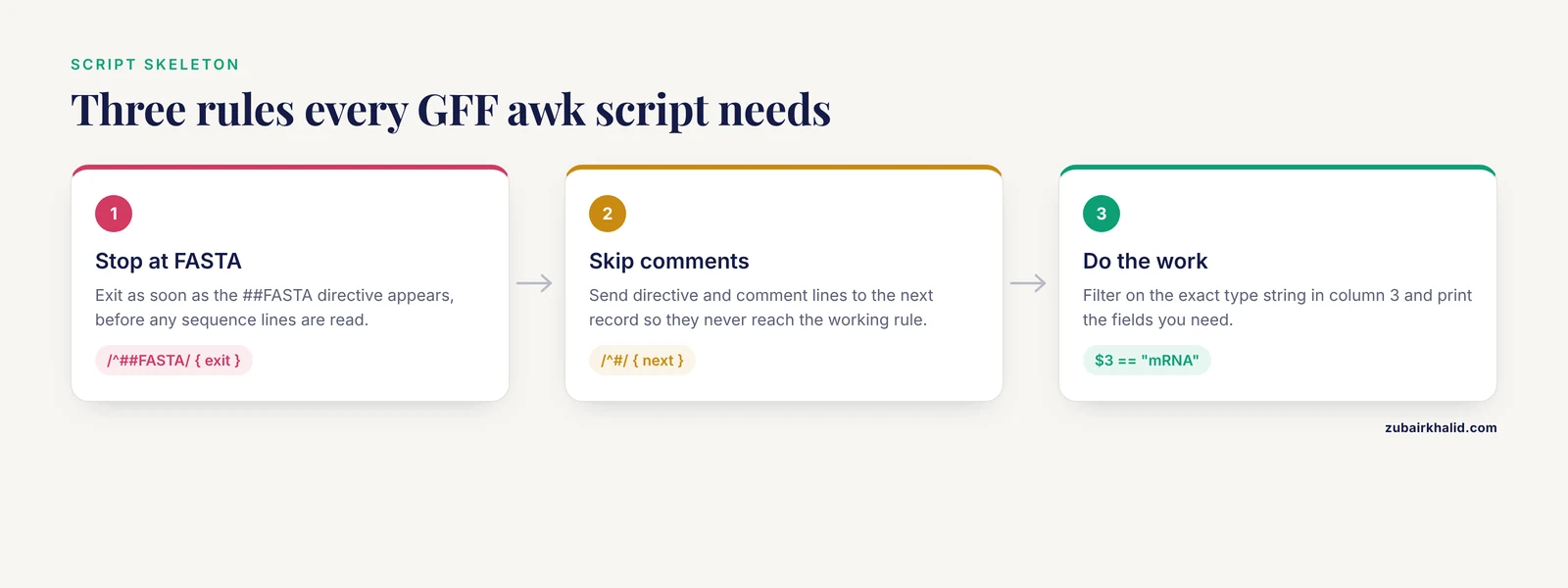
Rules that ignore the hash character produce wrong counts, parse errors on directive lines, and corrupted output when the file ends with sequence data. The robust pattern is a three-rule prefix that appears at the start of nearly every production awk script for GFF:
awk -F'\t' '
/^##FASTA/ { exit }
/^#/ { next }
$3 == "mRNA" { print $1 "\t" $4 "\t" $5 "\t" $9 }
' annotation.gff3
Reading this in order, the first rule stops processing entirely when the FASTA block starts, which matters because the sequence section can be hundreds of megabytes. The second rule skips directives and comments. The third rule does the actual work. The order is deliberate, because the ##FASTA line itself begins with a hash and would be skipped by the second rule if it came first, letting all subsequent FASTA lines through as data.
An equivalent and slightly faster form uses a state flag rather than exit when you want to keep processing for some reason, but for pure annotation extraction, exit is correct and cheap.
A subtler trap is that some files embed comments in the middle of the data rather than only at the top. The /^#/ { next } rule handles those as well, which is another reason it belongs in every script rather than only in careful ones.
Cause 4: Unbounded Arrays and Memory Exhaustion
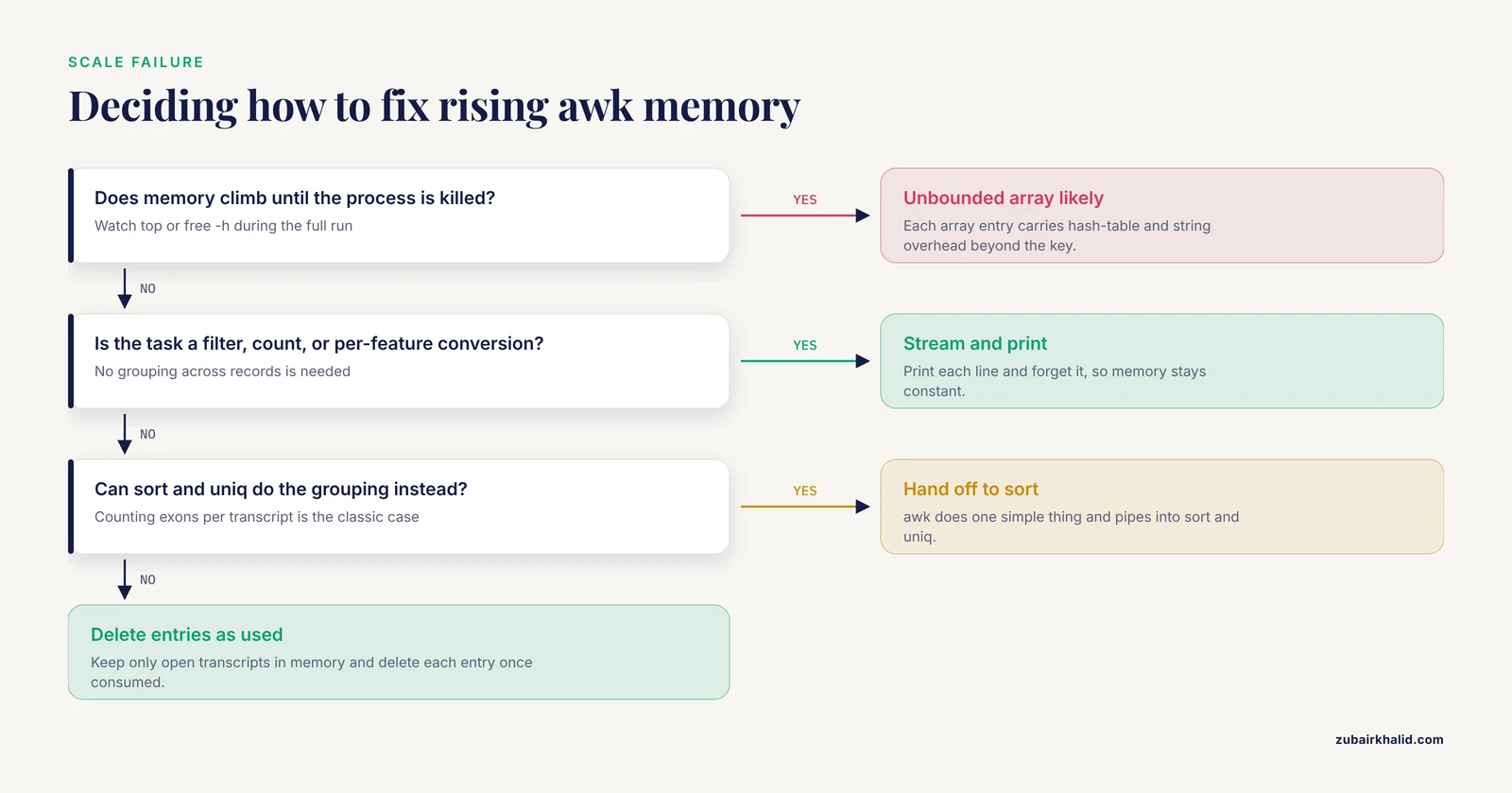
This is the dominant scale failure, the one most likely behind a request for how to fix awk parse large gff file problems on a real cluster. awk associative arrays grow without limit. A script that records every gene ID, every parent-child pair, or every coordinate in an array holds the entire annotation in memory at once. For a mammalian genome with tens of thousands of genes and hundreds of thousands of transcripts, that can be several gigabytes of awk overhead per array, since each array entry carries hash-table and string overhead far beyond the bytes of the key itself.
The mechanism of the failure is quiet. The script runs fine on a test chromosome, fine on a small genome, then memory climbs steadily on the full file until the kernel or the job scheduler kills the process. dmesg on Linux shows the out-of-memory kill, and top run during the job shows growth that never levels off.
Three structural fixes cover nearly every case.
Fix one, stream when you can. If the task is a filter, a count, a per-feature conversion, or a per-chromosome summary, you never need an array at all:
zcat annotation.gff.gz | awk -F'\t' '
/^##FASTA/ { exit }
/^#/ { next }
$3 == "exon" { print $1 "\t" $4 - 1 "\t" $5 "\t" $3 }
' > exons.bed
This runs in constant memory regardless of file size because every line is printed and forgotten.
Fix two, stream and sort instead of hashing. Many scripts use an array to group records that a sort can group more cheaply. Counting exons per transcript is a classic case. The array-based version holds every transcript ID in memory. The streaming version pipes through the standard sort and uniq tools, which handle the grouping externally:
zcat annotation.gff.gz | awk -F'\t' '
/^##FASTA/ { exit }
/^#/ { next }
$3 == "exon" {
  match($9, /Parent=[^;]+/)
  print substr($9, RSTART + 7, RLENGTH - 7)
}
' | sort | uniq -c | sort -rn | head
The + 7 offset skips the seven characters of Parent=, and [^;]+ stops at the attribute delimiter. This pattern, awk does one simple thing and hands grouping to sort, is the workhorse of handling large gff files with awk.
Fix three, delete entries you no longer need. When an array is genuinely necessary, for example mapping every transcript ID to its parent gene, remove entries as they are consumed:
awk -F'\t' '
/^##FASTA/ { exit }
/^#/ { next }
$3 == "transcript" {
  match($9, /Parent=[^;]+/)
  tx2gene[substr($9, RSTART + 4, RLENGTH - 4)] = substr($9, 4)
}
$3 == "exon" {
  match($9, /Parent=[^;]+/)
  tx = substr($9, RSTART + 7, RLENGTH - 7)
  print tx "\t" tx2gene[tx]
  delete tx2gene[tx]
}
END {
  for (t in tx2gene) print "orphan transcript: " t > "/dev/stderr"
}
' annotation.gff3
Wait, that example has a deliberate simplification worth explaining. The transcript-to-gene map is written when transcripts appear and read when exons appear, and because annotations are usually sorted with exons following their transcript, the delete keeps memory proportional to open transcripts rather than all transcripts. If the file is not sorted that way, the delete breaks the lookup, which is exactly why the sortedness cause below matters. Also note the per-entry delete tx2gene[tx] form. Deleting an entire array with delete tx2gene in one statement is a gawk extension and does not work in every awk implementation, while the per-element form is portable.
A final memory note: the END block runs after all input is read, and anything you print only in END, such as totals or contents of remaining arrays, is held for the whole run. Streaming output as you go keeps the peak footprint flat.
Cause 5: Coordinates, Numbers, and Off-by-One Errors
awk does arithmetic in floating point and coerces strings to numbers contextually. Two consequences matter for GFF work.
The first is the coordinate convention itself, covered in the format section. The conversion to BED is worth fixing in muscle memory:
awk -F'\t' '/^##FASTA/ { exit } /^#/ { next } $3 == "gene" {
  match($9, /ID=[^;]+/)
  print $1 "\t" $4 - 1 "\t" $5 "\t" substr($9, RSTART + 3, RLENGTH - 3)
}' annotation.gff3
GFF start column 4 is 1-based inclusive, BED chromStart is 0-based inclusive, and both end coordinates are exclusive-style in the sense that GFF end column 5 equals BED chromEnd. The single subtraction $4 - 1 is the entire conversion. A gene at GFF positions 11869 to 14412 becomes BED 11868 to 14412.
The second is numeric coercion. If column 4 contains an unexpected value, a dot placeholder, scientific notation from a corrupted file, or a chromosome name that ended up in the wrong column, expressions such as $5 - $4 compute 0 without complaint. Force explicit numeric context when validating:
awk -F'\t' '/^#/ { next } $4 !~ /^[0-9]+$/ || $5 !~ /^[0-9]+$/ { print "bad coordinates at line " NR }' annotation.gff3 | headHistorically, some very old awk builds used 32-bit integers internally, which could silently corrupt coordinates on large scaffolds. Any awk released in the last decade on a 64-bit Linux system uses double-precision floats and handles genomic coordinates exactly, but if you are running on antique infrastructure, verify with a known long coordinate.
Cause 6: Sort Order Assumptions and Streaming Joins
Many awk workflows assume that the children of a feature follow their parent, that exons of one transcript are contiguous, or that records for one chromosome appear together. The GFF3 specification does not require any of this. Files from different providers differ, files regenerated by different pipelines differ, and a script that worked on one release can fail on the next.
Confirm sortedness with a dedicated check rather than assuming it. This awk script verifies that records group by chromosome and that start coordinates never go backwards within a chromosome:
awk -F'\t' '
/^##FASTA/ { exit }
/^#/ { next }
{
  if ($1 != chr) {
    chr = $1
    prev = 0
  }
  if ($4 + 0 < prev) {
    print "unsorted at line " NR > "/dev/stderr"
    exit 1
  }
  prev = $4 + 0
}
' annotation.gff3
Note $4 + 0, which forces numeric comparison so that string comparison of coordinates does not order 1000 before 999.
When you need sorted input, produce it deliberately. GNU sort is the standard tool, and on large files its memory and parallelism settings matter:
LC_ALL=C sort -k1,1 -k4,4n -S 2G -T /scratch annotation.gff3 > annotation.sorted.gff3Setting LC_ALL=C makes byte-wise comparisons, which is both faster and more predictable than locale-aware collation for chromosome names. -S 2G gives sort two gigabytes of buffer, and -T points temporary files at a fast scratch filesystem, which matters because sort spills to disk on annotations of this size. Chromosome names will order lexicographically under LC_ALL=C, so chromosome 1, then 10, then 11, and so on. That is fine for awk joins, which only need grouped chromosomes, and it is also acceptable to tools such as tabix, which require records of one chromosome to be contiguous but do not mandate a particular chromosome order.
A common downstream step after sorting is compression with bgzip and indexing with tabix, which gives constant-time random access by chromosome and position and turns repeated full scans into targeted queries. Converting a large annotation once into a sorted, bgzipped, tabix-indexed file is among the highest-value habits in this entire article.
Cause 7: Attribute Parsing in Field 9
Field 9 failures look like garbled identifiers, truncated names, or values that seem to belong to the wrong feature. Three mechanisms produce them.
Mechanism one, delimiter ambiguity. Splitting field 9 on spaces fails because GFF3 attribute values may contain encoded spaces and GTF values contain quoted text with spaces. Splitting on commas fails because some attributes, notably Dbxref, hold comma-separated lists inside one value. The reliable approach is to match the specific key you want with a regex anchored at a semicolon boundary or the start of the field, as the one-liners above do with match($9, /Parent=[^;]+/).
A caution on that regex: an attribute named something like Parent_name would also contain the substring Parent=, so a fully rigorous matcher anchors the key. In practice the standard GFF3 attribute keys, ID, Name, Alias, Parent, Target, Gap, Derives_from, Note, Dbxref, Ontology_term, and is_circular, are distinct enough that substring matching with the trailing = is safe for the common keys, but be aware of the assumption you are making.
Mechanism two, percent encoding. The GFF3 specification requires certain characters to be percent-encoded inside attribute values, including semicolons, equals signs, commas, and percent signs themselves. A gene name containing a comma arrives as Name=Some%2CName. If your downstream tool expects the decoded form, decode it explicitly:
awk -F'\t' '$3 == "gene" {
  match($9, /Name=[^;]+/)
  name = substr($9, RSTART + 5, RLENGTH - 5)
  gsub(/%2C/, ",", name)
  gsub(/%3B/, ";", name)
  gsub(/%3D/, "=", name)
  print $1 "\t" $4 "\t" $5 "\t" name
}' annotation.gff3
Mechanism three, dialect confusion between GFF3 and GTF, covered under Cause 1. When a script extracts ID= from a GTF file or gene_id from a GFF3 file, it returns nothing, and the symptom looks like a broken file rather than a broken script.
Cause 8, the Rare Ones: Line Endings, Locale, and awk Implementation Differences
Three uncommon failures complete the list.
CRLF line endings come from files edited or exported on Windows systems. The carriage return becomes part of the last field, so $9 ends with an invisible \r, and filters comparing $9 or values extracted from it fail. Confirm with file, fix once with tr -d '\r', and document that the file was normalized.
Locale settings change how both awk and sort compare strings. Under some locales, case folding and collation rules differ from byte order, which reorders chromosome names and can break the sortedness assumptions above. Setting LC_ALL=C at the top of any pipeline involving sort or string comparison removes the variable entirely. This single environment setting is also one of the cheapest performance wins in linux for bioinformatics, because byte-wise comparison avoids multibyte character handling in gawk.
awk implementations differ in speed and in edge-case behavior. On Debian and Ubuntu systems, the default awk is often mawk, which is typically substantially faster than gawk on large streaming jobs, while gawk offers more extensions and stricter standards conformance. For a multi-gigabyte GFF, timing the same script under both with the time builtin often saves more wall-clock time than any code change. If a script relies on gawk-specific features, invoke it explicitly as gawk rather than through the generic awk name, so behavior does not change when the script moves to another machine.
A Worked Library of awk One-Liners for Large GFF Files
These are the scripts referenced throughout the article, gathered in one place with brief statements of purpose. All of them stream in constant memory except where noted.
Count features by type:
zcat annotation.gff.gz | awk -F'\t' '
/^##FASTA/ { exit }
/^#/ { next }
{ count[$3]++ }
END { for (t in count) print t "\t" count[t] }
'
This one does hold one array entry per distinct feature type, which is bounded by the annotation vocabulary, typically under a few dozen entries, so it is safe.
Convert genes to BED:
zcat annotation.gff.gz | awk -F'\t' '
/^##FASTA/ { exit }
/^#/ { next }
$3 == "gene" {
  match($9, /ID=[^;]+/)
  print $1 "\t" $4 - 1 "\t" $5 "\t" substr($9, RSTART + 3, RLENGTH - 3)
}' > genes.bed
Extract all exons with their parent transcript:
zcat annotation.gff.gz | awk -F'\t' '
/^##FASTA/ { exit }
/^#/ { next }
$3 == "exon" {
  match($9, /Parent=[^;]+/)
  print $1 "\t" $4 - 1 "\t" $5 "\t" substr($9, RSTART + 7, RLENGTH - 7)
}' > exons.bed
Count features per chromosome:
zcat annotation.gff.gz | awk -F'\t' '
/^##FASTA/ { exit }
/^#/ { next }
{ count[$1]++ }
END { for (c in count) print c "\t" count[c] }
'
Bounded by the number of chromosomes, so safe.
Split a file by feature type:
zcat annotation.gff.gz | awk -F'\t' '
/^##FASTA/ { exit }
/^#/ { next }
{ print >> $3 ".tsv" }
'
This writes gene.tsv, exon.tsv, and so on. It holds one open file handle per feature type, so on files with hundreds of distinct types you may hit the open-file limit, which the shell reports as "too many open files." Raise it with ulimit -n or process types in separate passes.
Find the longest feature of a given type:
zcat annotation.gff.gz | awk -F'\t' '
/^##FASTA/ { exit }
/^#/ { next }
$3 == "transcript" {
  len = $5 - $4 + 1
  if (len > max) {
    max = len
    line = $0
  }
}
END { print max "\t" line }
'
Constant memory, one stored line.
Validate that every line has nine fields and numeric coordinates:
zcat annotation.gff.gz | awk -F'\t' '
/^##FASTA/ { exit }
/^#/ { next }
NF != 9 || $4 !~ /^[0-9]+$/ || $5 !~ /^[0-9]+$/ {
  print "problem at line " NR
}
' | head
Performance Tuning for Large GFF Files
Once a script is correct, four levers make it fast.
Lever one, use the cheapest tool that does the job. Extracting whole columns needs no awk at all, and cut -f1,4,5 is measurably faster because it does far less work per line. Use grep for line selection, cut for column extraction, and awk only when you need logic, arithmetic, or field 9 parsing.
Lever two, avoid regex where string equality suffices. $3 == "exon" is much cheaper per line than $3 ~ /exon/, and on three million lines the difference is real. Save regular expressions for field 9, where they are genuinely needed.
Lever three, choose the implementation. As noted above, time the job under mawk and gawk. On typical annotation files, mawk often finishes in roughly half the wall time of gawk for simple streaming scripts. If you need gawk features for correctness, keep gawk, but do not pay for them accidentally.
Lever four, overlap decompression with processing. Pipelines already do this, since gzip output flows into awk while awk works on earlier lines. The remaining serial cost is decompression itself, and pigz reduces it on multi-core machines. Keep the pipeline single-stage rather than decompressing to disk first when disk space or write bandwidth is tight, and decompress to disk first when you will run many passes over the same file, since repeated decompression costs more than one-time storage.
A Diagnostic Sequence You Can Follow Every Time
For any failing or suspicious awk job on a large GFF file, work through this order:
- Run
fileon the input. Identify compression and line endings. - Run
head -n 5and confirm the dialect, GFF3 versus GTF, and the attribute style. - Run
grep -n "^##FASTA"to learn whether a sequence block exists. - Run the field-count check to find structural corruption.
- Run the feature-type profile to learn the exact type strings.
- Run your script on a 20,000-line slice and confirm the logic.
- Run the full job under
timewhile watchingfree -hin a second terminal. Flat memory means the script scales. Rising memory points to Cause 4. - If results are wrong rather than crashing, check coordinate conventions, sort order, and percent encoding, in that order.
Prevention Practices
Prevention costs minutes now and saves hours later.
Validate every new annotation file on arrival with the diagnostic sequence above, and record the line count, feature-type profile, and checksum so you can detect corruption or surprise format changes between releases.
Keep original downloads read-only. chmod a-w on raw annotation files prevents the most destructive class of accident in shell-based work, the overwrite redirect.
Store the canonical working copy sorted, bgzipped, and tabix-indexed. Derive everything else from that copy, and repeated queries stop requiring full scans.
Log the exact commands. Prefixing interactive commands with script or saving them in a version-controlled file means the next person, including future you, reproduces the result instead of reverse-engineering it.
Prefer bounded arrays. When you write a new awk script for a GFF task, decide before running it whether each array is bounded by vocabulary size, chromosome count, or open features, or unbounded by record count. If it is unbounded and the task does not need it, restructure to stream or sort.
Common Mistakes and Limitations
Several specific mistakes account for most of the pain in this workflow.
Assuming default field splitting is safe. It is not, for GFF. Column 9 defeats it. Always pass -F'\t'.
Assuming the file is sorted. Provider conventions differ and change between releases. Check, then sort explicitly when order matters.
Treating GTF and GFF3 as interchangeable. Their attribute syntaxes and key names differ, and scripts must declare which dialect they target.
Forgetting the ##FASTA tail on files that carry one. This silently corrupts counts and output files.
Comparing coordinates as strings. The $4 + 0 idiom and numeric-aware sort keys prevent lexicographic surprises.
The limitations of awk itself are equally worth stating plainly. awk is line-oriented, so a record that spans lines, such as a FASTA sequence split across many lines, is not one record to awk, and any logic that needs to see a whole gene model across scattered lines requires either two passes, a sorted file with careful state tracking, or a different tool. For complex hierarchical reconstruction, merging isoform structure, or coordinate algebra with overlaps, dedicated tools such as bedtools, gffread, and the GenomeTools suite are the better fit, and the GFF3 specification itself anticipates that general-purpose parsers will need format-aware libraries for full fidelity. awk earns its place for filtering, counting, conversion, and validation, which together cover a large share of day-to-day annotation work.
One further limitation applies to any automated pipeline. Coordinate and identifier conventions differ among annotation providers and change between releases, so outputs built with these one-liners should be spot-checked against a known gene in a genome browser before they feed downstream analyses.
Frequently Asked Questions
Why is my awk command so slow on a GFF file?
The usual culprits are locale-aware string handling, unnecessary regular expressions, and slow decompression. Set LC_ALL=C, replace $3 ~ /exon/ with $3 == "exon", use mawk if it is available, and decompress with pigz when the input is gzipped.
Why does awk run out of memory when I parse my GFF file?
An associative array is storing one entry per feature, which for a large annotation means millions of entries held in RAM. Restructure the script to print as it goes and hand grouping to sort, or delete array entries once they are consumed.
How do I skip the FASTA section at the end of a GFF file?
Add /^##FASTA/ { exit } as the first rule in your awk script so processing stops when the sequence block begins. Place it before the rule that skips comment lines, since the directive itself starts with a hash.
How do I convert GFF3 to BED with awk?
Filter on the feature type, print the chromosome, subtract one from the start coordinate, print the end coordinate, and extract an identifier from field 9. The GFF start is 1-based inclusive while BED start is 0-based, and the single subtraction is the entire coordinate conversion.
What is the difference between GFF3 and GTF for awk parsing?
The first eight columns are equivalent, but field 9 differs. GFF3 uses ID= and Parent= pairs with percent-encoded values, while GTF uses gene_id "VALUE" and transcript_id "VALUE" with quoted strings. A script must declare which dialect it expects.
Should I decompress my GFF file before running awk?
Not necessarily. Streaming through zcat or bgzip -dc in a pipeline saves disk space and works well for a single pass. Decompress to disk first only when you will run many passes over the same file, and consider keeping a sorted, bgzipped, tabix-indexed copy as the canonical working version.
How do I check whether a GFF file is sorted?
Run an awk script that tracks the current chromosome and the previous start coordinate, and reports any line where the start decreases within a chromosome. Remember that chromosome names sort lexicographically under LC_ALL=C, so chromosome 10 follows chromosome 1, which is expected and acceptable for grouped processing.
Which awk should I use, gawk or mawk?
mawk is usually faster for simple streaming scripts on large files, and gawk offers more language extensions and stricter standards conformance. Time the same script under both with the time builtin, and invoke gawk explicitly by name whenever your script depends on gawk-specific behavior.