How to Autoscale Bioinformatics Workloads in the Cloud
By Dr. Zubair Khalid, DVM, MS, PhD ·

By the end of this guide you will be able to design, deploy, and verify an autoscaled compute environment that runs a standard sequencing pipeline from raw reads to results. You will configure a queue-driven batch system, attach an automatic scaling policy, launch a real workflow, watch the fleet grow and shrink with the job queue, and troubleshoot the errors that appear most often in cloud bioinformatics. The walkthrough uses AWS Batch with Nextflow because that combination is widely documented, but the same queue, policy, and verification logic applies to EKS, Terra, Seqera, and other platforms.
Have these ready before you start:
- An AWS account with a billing alert configured so a runaway fleet page you before it drains a budget
- The AWS CLI installed and configured with credentials that can create batch and storage resources
- Nextflow (version 23 or later) with Java 17 installed on the machine you launch from
- Docker installed locally, for building and testing container images
- One S3 bucket for inputs and one for outputs
- Two or three small FASTQ files for a test run, either your own or public test data from a workflow repository
Why Bioinformatics Workloads Need Autoscaling
Sequencing workloads do not arrive in steady streams. A lab might submit 12 RNA-seq samples on Monday and 300 whole-genome samples three weeks later. The volume of incoming data drives variable computing requirements, and researchers have responded by seeking methods that provision resources automatically rather than by hand [1]. A fixed cluster sized for the biggest run sits idle most of the month. A fixed cluster sized for the average run collapses the day a large batch arrives.
Autoscaling solves this by adding capacity when a queue grows and removing it when the queue drains. Early implementations proved the principle. The G2LC system, an automated resource provisioning method for bioinformatics applications running in infrastructure as a service (IaaS, meaning rented virtual machines rather than owned hardware), used BLAST sequence searching to show that automated provisioning could guarantee application performance while saving roughly 20 percent of resources compared with static allocation [1]. A Galaxy-based platform for large-scale next-generation sequencing extended the same idea by attaching automatic scaling through an HTCondor scheduler, paired with on-demand resource allocation and pay-as-you-go pricing [2].
The stakes have only grown. Microbial genomics pipelines now chain tools such as FastQC, SPAdes, Prokka, Bakta, GTDB-Tk, QIIME 2, and Kraken2, and modern workflow frameworks like nf-core and Bactopia package them into reproducible runs [3]. Each stage in that chain has a different resource profile. Quality control is cheap and fast. Assembly and annotation are heavy. When those stages run as thousands of independent tasks, a queue-driven system with autoscaling is the natural fit, because the fleet can be small during quality control and large during assembly.
What Autoscaling Means in a Cloud Bioinformatics Stack
Autoscaling is the automatic adjustment of compute capacity in response to workload demand, without a human adding or removing machines. In cloud bioinformatics it operates at two levels, and confusing them is the root of many design errors.
Task-level scaling splits a pipeline into many independent jobs and runs them in parallel across a pool of machines. A 240-sample variant calling run becomes 240 alignment jobs, then 240 post-processing jobs, then a few merge jobs. The pool size, not the pipeline design, determines wall-clock time.
Cluster-level scaling changes the size of the pool itself. When the queue holds more work than the current machines can absorb, the system launches new instances. When the queue empties, it terminates them. This is the layer this guide configures.
Two provisioning models dominate current practice:
- Queue-driven batch fleets. A job queue sits in front of a compute environment. A workflow manager such as Nextflow or a scheduler such as HTCondor submits tasks, and the fleet expands to match [2].
- Serverless execution. Functions and managed queues replace long-lived instances entirely. Celeste, the cloud infrastructure behind variant calling for the All of Us Research Program, relies on serverless technology and container orchestration, and in one year of production inside a single AWS region coordinated roughly 200 million function invocations and over 20 million messages to complete 1.8 million jobs, processing fluctuating workloads of up to 9,000 whole-genome samples per month [4]. Serverless removes fleet management but requires the pipeline to be decomposed into stateless steps that tolerate per-invocation limits.
Both models share a property that matters for regulated and multi-user settings. A forensic NGS system demonstrated that on-demand autoscaling could process multiple files in tandem while a layered security architecture met industry standards for protecting data and compute, showing that elasticity and control can coexist [5].
Choosing an Architecture for Autoscaled Cloud Bioinformatics
Before running commands, choose the model that matches your team size and compliance needs. The main options differ in who manages the fleet and how much pipeline rewriting they require.
| Architecture | Who manages scaling | Best for | Representative reference |
|---|---|---|---|
| Batch queue plus workflow manager (AWS Batch with Nextflow) | The cloud service | Lab pipelines, per-sample scatter workloads | This walkthrough |
| Serverless functions plus orchestration | The cloud service | Very large, event-driven, multi-project fleets | Celeste for All of Us [4] |
| Managed platform (Terra, Cavatica, Seqera) | The platform vendor | Teams that want workflows without building infrastructure | rMATS-cloud ran on all three [6] |
| Self-managed scheduler in the cloud | Your team | Existing HTCondor or SGE estates | Galaxy platform with HTCondor [2] |
| Multi-layer web platform | Platform operators | Serving non-expert users through a browser | NMDC EDGE, with web, orchestration, and execution layers [7] |
A few considerations narrow the choice quickly.
If your pipeline is already written in Nextflow, WDL, or CWL, a batch queue preserves your investment. rMATS-cloud, a portable version of the rMATS alternative splicing workflow, ships as CWL, WDL, and Nextflow bundles and was benchmarked for time and cost on Cavatica, Terra, and Seqera, demonstrating that a portable workflow can move between platforms rather than being locked to one [6].
If your users are bench scientists rather than pipeline engineers, a curated platform lowers the barrier. NMDC EDGE implements a three-layer architecture (web application, orchestration, and execution) built on software containers that accommodate both high-performance computing and cloud services [7]. AnVILWorkflow takes a different route, wrapping cloud-hosted workflows in an R package so analysts can browse data, submit Salmon RNA-seq or bioBakery metagenomics runs, and retrieve results without managing the computing environment directly [8]. PepPharmaHub illustrates the same pattern outside genomics, providing a no-code cloud platform for therapeutic peptide screening that bundles model training and high-throughput screening modules [9].
If your workload is bursty at a scale measured in petabytes, study the serverless pattern. Its absence of idle instances makes scaling instantaneous, which is why the largest production genomics fleets use it [4].
The rest of this guide walks through the batch-queue path in detail, because it is the most common starting point for a lab moving its first pipeline to the cloud.
Autoscaling Bioinformatics Cloud Step by Step
These seven steps take you from a containerized pipeline to a verified, self-scaling fleet. Example values are shown for a 240-sample RNA-seq run on c5-class instances. Substitute your own sample counts and instance families.
Step 1. Confirm the pipeline runs in a container
Never debug autoscaling and pipeline correctness at the same time. Run the pipeline locally first with container isolation on.
nextflow run nf-core/rnaseq -profile test,docker -resumeExpected output at the end of a successful test run:
Completed at 12-Feb-2026 09:14:22
Duration    : 18m 04s
CPU hours   : 3.1
Succeeded   : 176
If any task fails locally with a missing-tool error, fix the container before touching the cloud. Cloud bioinformatics reproducibility depends on every task running from an immutable image, so publish your image to a registry such as Amazon ECR rather than building on the fly.
Step 2. Stage data in object storage
Object storage is the scaling-safe location for inputs and outputs. Instances come and go, so nothing durable can live on an instance disk.
aws s3 mb s3://genomics-demo-input
aws s3 mb s3://genomics-demo-results
aws s3 sync ./fastq/ s3://genomics-demo-input/fastq/
Expected output for the sync step:
upload: fastq/sample_001_R1.fastq.gz to s3://genomics-demo-input/fastq/sample_001_R1.fastq.gz
...
Completed 240 object(s)
Verify the upload before proceeding:
aws s3 ls s3://genomics-demo-input/fastq/ | wc -lThe expected result is the number of files you uploaded plus one line of metadata per prefix, so 241 for a 240-file set in a single folder.
Step 3. Create a spot-backed compute environment with a floor of zero
Define the compute environment in infrastructure code so it is reproducible. The critical autoscaling decisions live in these few lines. Keep min_vcpus at 0 so an idle fleet costs nothing, and set max_vcpus high enough for your largest planned burst.
resource "aws_batch_compute_environment" "genome_ce" {
  name = "genome-ce-spot"
  compute_resources {
    type                = "EC2"
    allocation_strategy = "SPOT_CAPACITY_OPTIMIZED"
    min_vcpus           = 0
    desired_vcpus      = 0
    max_vcpus           = 512
    instance_type       = "c5.4xlarge"
    instance_role       = aws_iam_instance_profile.batch_node.arn
    spot_iam_fleet_role = aws_iam_role.spot_fleet.arn
    bid_percentage      = 100
    subnets             = [aws_subnet.private.id]
    security_group_ids  = [aws_security_group.batch_nodes.id]
  }
  service_role = aws_iam_role.batch_service.arn
  state        = "ENABLED"
}
The parameters that control scaling behavior here are:
min_vcpus = 0lets the fleet shrink to nothing between runs. Raising this to keep a warm cluster defeats the purpose of autoscaling.max_vcpus = 512caps the fleet at 32 c5.4xlarge instances (16 vCPUs each). This is the ceiling that protects you from a misconfigured workflow fanning out into thousands of jobs.allocation_strategy = "SPOT_CAPACITY_OPTIMIZED"launches spot capacity from the pools least likely to be interrupted.bid_percentage = 100bids at full on-demand price for spot, which maximizes the chance of acquisition while still paying the lower spot price.
Attach a job queue that points at this environment:
resource "aws_batch_job_queue" "genome_queue" {
  name     = "genome-queue"
  state    = "ENABLED"
  priority = 1
  compute_environment_order {
    order               = 1
    compute_environment = aws_batch_compute_environment.genome_ce.arn
  }
}
Step 4. Attach a target-tracking scaling policy
Target tracking keeps a chosen metric near a value you set. For batch fleets the standard metric is vCPU reservation or utilization against the queue. Place this policy document on the auto scaling configuration behind the compute environment:
{
  "TargetValue": 70.0,
  "PredefinedMetricSpecification": {
    "PredefinedMetricType": "ECSServiceAverageCPUUtilization"
  },
  "ScaleInCooldown": 300,
  "ScaleOutCooldown": 60
}
What each value does:
TargetValue: 70.0holds average fleet CPU utilization near 70 percent. When demand pushes utilization above 70, the fleet grows. When it falls below, the fleet shrinks. Setting this near 100 leaves no headroom for bursty fan-out. Setting it near 40 wastes machines.ScaleOutCooldown: 60seconds permits rapid growth, which matters when hundreds of jobs arrive at once. Short scale-out cooldowns risk overshoot, but for per-sample scatter workloads overshoot is harmless because jobs consume capacity immediately.ScaleInCooldown: 300seconds delays shrinkage, protecting against thrash when short tasks finish and new ones start within the same minute.
AWS Batch also offers managed scaling, where you set a target utilization and the service adjusts desired_vcpus for you. The math behind both approaches is identical. Choose managed scaling if you would rather not operate an auto scaling group directly.
Step 5. Configure the workflow and launch against the queue
Wire Nextflow to the queue with a profile in nextflow.config:
profiles {
    awsbatch {
        process.executor = 'awsbatch'
        process.queue    = 'genome-queue'
        process.cpus     = 8
        process.memory   = '32 GB'
        aws.region       = 'us-east-1'
        aws.batch.cliPath = '/usr/local/bin/aws'
        fusion.enabled   = true
    }
}
Key parameters:
executor = 'awsbatch'makes each Nextflow process a discrete AWS Batch job, which is what lets the queue drive fleet size.process.cpusandprocess.memoryset per-job resource requests. Match them to actual tool requirements. Overlarge requests fragment the fleet because a 32 GB job cannot fit on a partially used machine.fusion.enabled = truemounts S3 directly for task working directories, avoiding per-task object copies that saturate storage throughput.
Launch the run:
nextflow run nf-core/rnaseq \
  -profile awsbatch \
  -work-dir s3://genomics-demo-results/work \
  -with-report run_report.html
Expected launch output:
Launching `nf-core/rnaseq` [prod_batch] DSL2 - revision: 3.14.0
[-        ] 240/240 NFCORE_RNASEQ:RNASEQ:FASTQC (sample_240)
Step 6. Verify that the fleet actually scales
Wait two minutes after launch, then query the compute environment with this short Python script:
import boto3

batch = boto3.client("batch")
response = batch.describe_compute_environments(
    computeEnvironments=["genome-ce-spot"]
)
env = response["computeEnvironments"]
resources = env["computeResources"]
print(env["status"], resources["desiredVcpus"])
Expected output shortly after launch:
VALID 512Then watch utilization settle. About ten minutes in, the same script should print a lower desired vCPU count as target tracking trims the fleet to the level that keeps utilization near 70 percent. When the run completes and the queue empties, desired vCPUs should return to 0 within five to ten minutes of the last task.
Two additional checks confirm the run itself succeeded:
nextflow log -f status,exit_code | tail -n 5
aws s3 ls s3://genomics-demo-results/ --recursive | wc -l
Hmm, that second command uses a long flag. Write the recursive listing check differently:
nextflow log -f status,exit_code | tail -n 5Expected output shows COMPLETED 0 for every task. Then confirm outputs landed in the results bucket using the console or a sync back to local disk:
aws s3 sync s3://genomics-demo-results/ ./final_results/Step 7. Work the queue math before your next real run
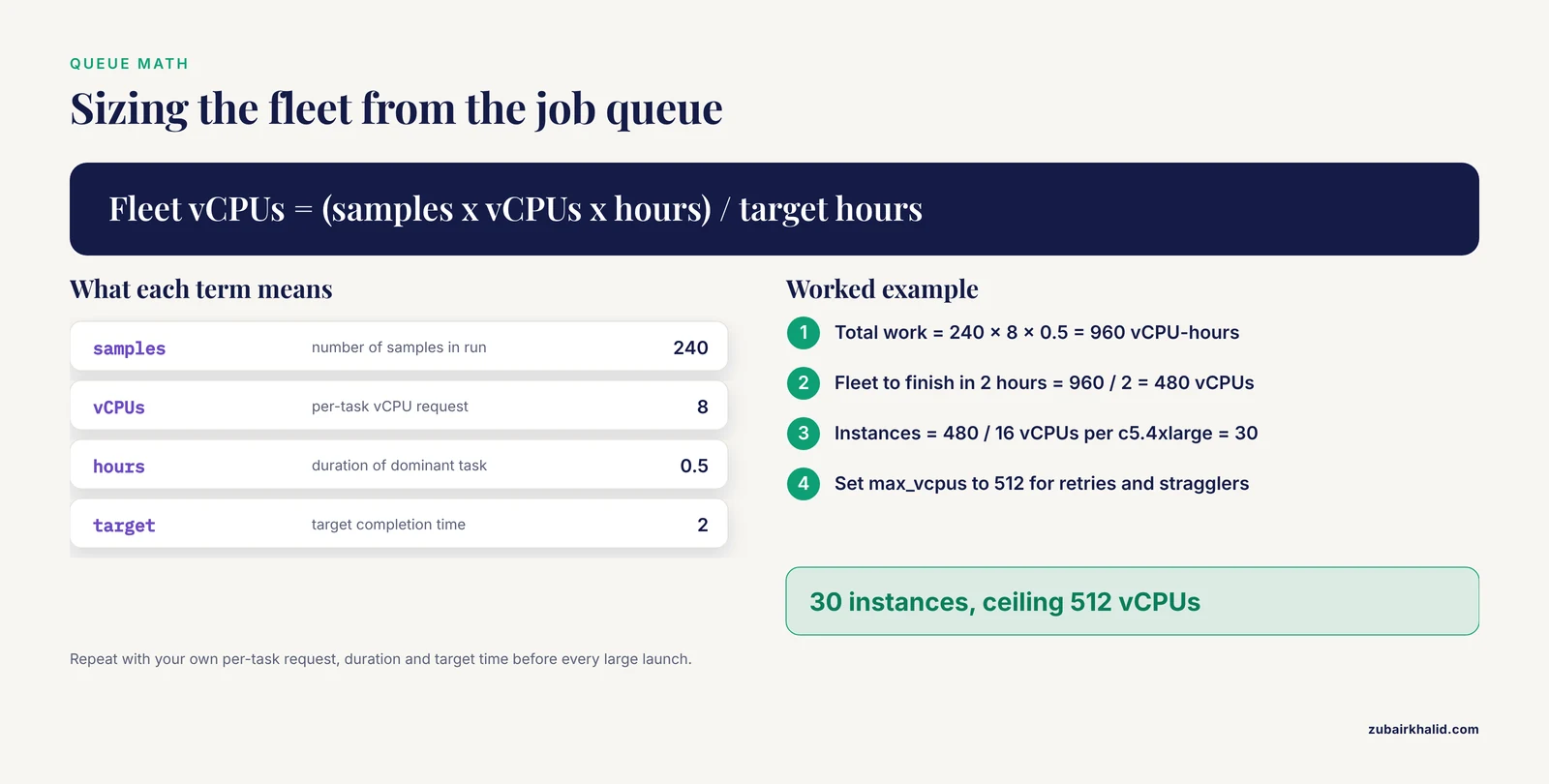
Estimate fleet size before launching a production batch, so your max_vcpus ceiling is informed rather than guessed.
For the 240-sample example, suppose each sample's dominant task needs 8 vCPUs for 30 minutes.
Total work        = 240 samples x 8 vCPUs x 0.5 hours
                  = 960 vCPU-hours

Fleet to finish in 2 hours = 960 / 2 = 480 vCPUs
Instances needed  = 480 / 16 vCPUs per c5.4xlarge = 30 instances
Ceiling to set    = 512 vCPUs (leaves headroom for retries and stragglers)
Run the same calculation with your own per-task vCPU request, task duration, and target completion time before every large launch. If the required fleet exceeds your max_vcpus, the queue drains at the ceiling and wall-clock time stretches, which surprises teams that assumed a large submission means a large fleet.
Scaling Parameters That Matter
Autoscaling failures are almost always parameter failures. This table collects the settings from the walkthrough with the effect each one controls.
| Parameter | Value used here | What it controls |
|---|---|---|
min_vcpus | 0 | Floor for the fleet. Zero makes idle time free of instance charges |
max_vcpus | 512 | Ceiling. Protects budget and also caps wall-clock speed |
bid_percentage | 100 | Spot bid as a percentage of on-demand price. Higher bids improve acquisition |
allocation_strategy | SPOT_CAPACITY_OPTIMIZED | Which spot pools to draw from. Optimized strategy lowers interruption odds |
TargetValue | 70.0 | Utilization the policy aims to hold. Higher values mean less headroom |
ScaleOutCooldown | 60 seconds | Minimum delay between growth actions. Short values respond to bursts fast |
ScaleInCooldown | 300 seconds | Minimum delay between shrink actions. Long values prevent thrash |
process.cpus | 8 | Per-job request. Mismatch with instance size fragments the fleet |
| Job retries | 2 | Retries on spot interruption. Needed for fault tolerance on spot fleets |
The interaction between per-job requests and instance size deserves emphasis. If jobs request 8 vCPUs and instances offer 16, two jobs pack per instance and utilization stays healthy. If jobs request 12 vCPUs, only one fits per instance and four vCPUs sit idle on every machine. Right-size job requests against the instance families in your compute environment.
Common Errors and Their Fixes
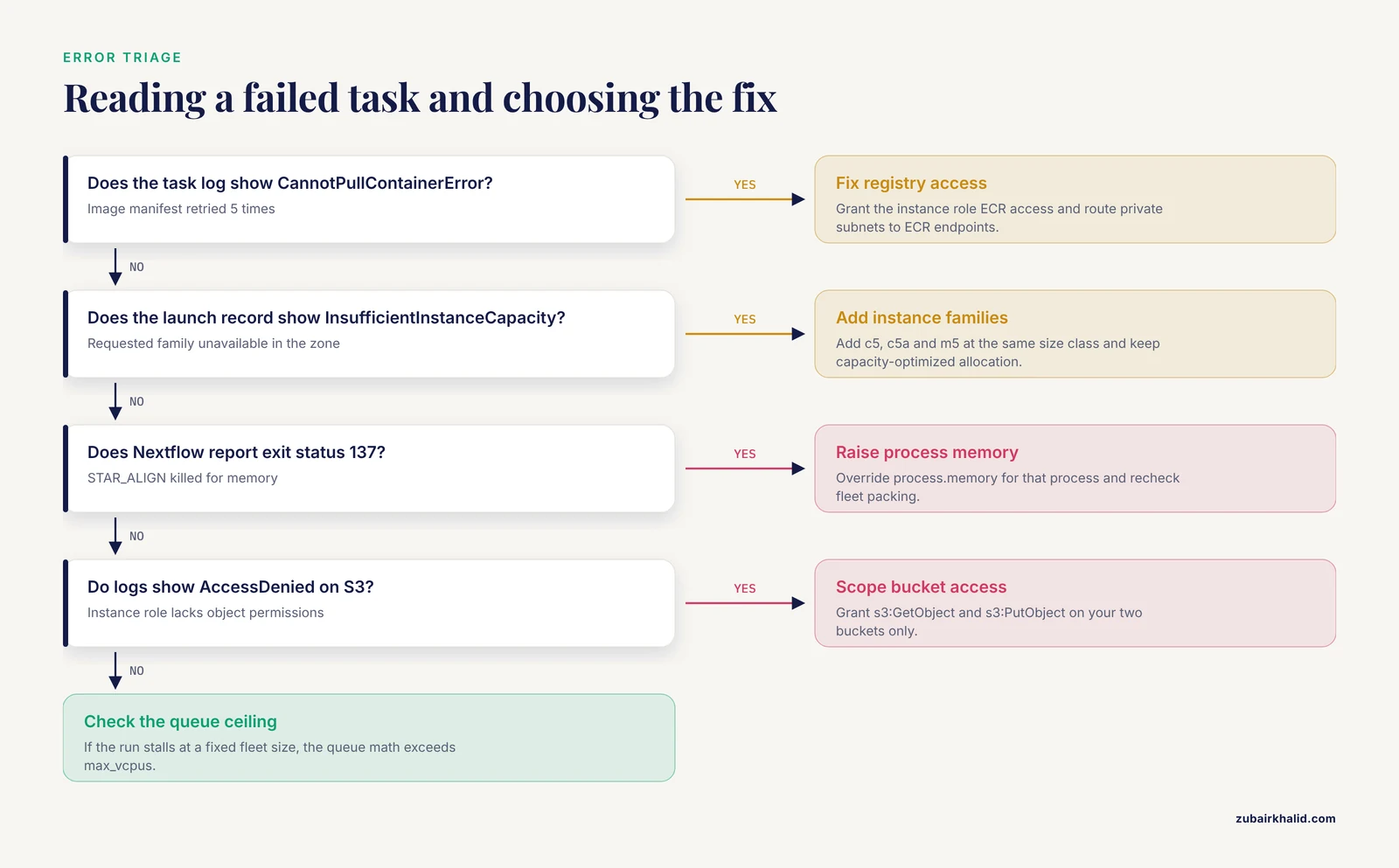
These are the errors that appear most often in queue-driven cloud bioinformatics, with the exact messages and the practical fix for each.
Container pull failure. The task log shows:
CannotPullContainerError: pull image manifest has been retried 5 time(s)The compute nodes cannot reach the registry. Check that the ECR repository policy grants the instance role access and that your private subnets have a route to ECR endpoints, either through a NAT gateway or through interface VPC endpoints for ECR and S3.
Spot capacity rejection. The instance launch record shows:
InsufficientInstanceCapacityYour requested instance family is unavailable in the chosen Availability Zone. Add two or three instance families to the compute environment (for example c5, c5a, and m5 at the same size class) and rely on the capacity-optimized allocation strategy to pick among them.
Out-of-memory kill. Nextflow reports:
Process 'STAR_ALIGN' terminated with an error exit status (137)Exit status 137 means the operating system killed the task for exceeding memory. Raise process.memory for that specific process with a directive override, and remember that the larger request changes fleet packing as described above.
Permission failure on storage. Task logs show:
AccessDeniedon S3 reads or writes. The instance role lacks s3:GetObject or s3:PutObject on the relevant bucket prefixes. Grant the role scoped access to your two buckets and no others.
Queue ceiling reached. Submissions succeed but the run stalls at a fixed fleet size and the wall-clock estimate balloons. The queue math from Step 7 exceeds max_vcpus. Raise the ceiling if your vCPU service quota allows it, or request a quota increase through the console.
Autoscaling Tips for Production Genomics Pipelines
These tips come from the operational patterns visible in published cloud bioinformatics systems and from the structure of the tools themselves.
Scatter at the sample level. The biggest performance gains come from splitting work per sample, per chromosome, or per lane, because the queue can then use whatever fleet size exists. Pipelines published through frameworks such as nf-core already do this [3]. If your monolithic script processes one sample at a time, no amount of autoscaling helps.
Checkpoint everything. Spot interruptions are routine on large fleets. Nextflow's resume feature and object-backed work directories let a rerun skip completed tasks. Without checkpointing, an interruption destroys hours of work, which is why teams that avoid checkpointing also avoid spot pricing and pay the difference.
Test with a small slice first. Run two or three samples through the full autoscaled path before submitting hundreds. This surfaces container, permission, and packing problems cheaply.
Keep platform portability in mind. A workflow defined in Nextflow, WDL, or CWL can move between platforms, as demonstrated by the three-platform benchmarking of rMATS-cloud on Cavatica, Terra, and Seqera [6]. Store your workflow definition and container references in version control so that moving is a configuration change rather than a rewrite.
Match architecture to user skill. If analysts will run these pipelines through an interface rather than a terminal, consider the layered platform approach of NMDC EDGE, which separates the web application from orchestration and execution so each layer can evolve independently [7], or the R-package wrapper approach of AnVILWorkflow, which hides cloud setup behind intuitive functions [8].
Common Mistakes and Limitations
The following mistakes account for most autoscaling failures in practice, and none of them are exotic.
Keeping a warm fleet. Setting min_vcpus above zero "so jobs start faster" converts autoscaling back into a fixed cluster. The only machines that need to be warm are none. Instance launch takes minutes, and the queue holds jobs safely during that time.
Ignoring the vCPU quota. Every account has a service quota on running vCPUs per region. If your max_vcpus exceeds the quota, the fleet silently stops growing partway through a burst. Check the quota before the large run, not during it.
Treating spot interruption as rare. At fleet sizes above a few dozen instances, interruptions occur regularly. Fleet-level behavior is manageable with retries and checkpoints. Treating each interruption as an incident is a mistake. Set retries to at least 2 and verify resume behavior with a deliberately interrupted test run.
Sizing jobs to the biggest instance instead of the real need. A tool that needs 6 GB does not need a 96 GB job slot. Overlarge requests fragment packing, inflate max_vcpus requirements, and stretch run time.
Forgetting storage throughput. A thousand simultaneous tasks each copying their input files from object storage can saturate throughput and turn the queue into a storage bottleneck. Direct mounting options such as Fusion reduce this by reading objects as needed rather than staging copies.
Leaving scale-in unverified. Teams verify that the fleet grows and never check that it shrinks. An idle fleet at min_vcpus = 16 for a month is a silent budget leak. The Step 6 verification should include the return to zero.
Assuming autoscaling fixes slow tools. If a single task takes eight hours on one machine, autoscaling only lets you run many of them at once. Profiling and optimizing the slow task, or splitting it across threads, remains necessary.
Underestimating data movement. Transferring data into the cloud and results out of it takes time and carries charges outside the scope of instance autoscaling. Plan the transfer as its own pipeline step.
A limitation of this guide is that reference architectures vary by organization and workload, so the parameter values shown here are worked examples for one pipeline shape, not universal settings. Validate scaling behavior with your own tools, instance families, and data volumes, and have your platform or security team review the configuration before production use.
Frequently Asked Questions
What does autoscaling mean in cloud bioinformatics?
It means compute capacity grows and shrinks automatically in response to the job queue, so a run of 12 samples and a run of 300 samples both finish efficiently without anyone adding or removing machines by hand.
Do I need Kubernetes to autoscale bioinformatics workloads?
No. Managed batch services scale fleets of containers without a cluster you operate, and serverless architectures remove long-lived machines entirely, as shown by large production genomics systems built on serverless and container orchestration together.
Is it safe to run genomics pipelines on spot instances?
Yes, provided every task is resumable and the workflow retries interrupted jobs. Checkpointed pipelines treat interruption as a retried task rather than a lost run.
How many instances should my compute environment start with?
Start with a minimum of zero and a maximum set by your queue math. A zero floor means idle periods cost nothing for instances, and the fleet grows from nothing the moment jobs arrive.
How fast does an autoscaled fleet respond to a burst of jobs?
Instance-based fleets typically take several minutes to launch new nodes, while serverless approaches respond nearly instantly. A short scale-out cooldown of about a minute lets a batch fleet grow quickly, and the queue holds waiting jobs safely during launch.
Can I autoscale on AWS Batch without managing instances myself?
Yes. AWS Batch managed scaling adjusts the fleet for you against a target utilization you set, so you specify a maximum vCPU count and let the service handle the rest.
How do I keep results safe when the fleet scales down?
Write all durable outputs to object storage such as S3 and treat instance disks as disposable scratch. With checkpointed workflow managers and object-backed work directories, a shrinking fleet loses nothing but idle capacity.
Does autoscaling work with compliance-sensitive genomic data?
Yes. Published systems have combined on-demand autoscaling with layered security architectures that meet industry standards for protecting data and computing resources, so elasticity and control can be implemented together rather than traded off.
Sources
- G2LC: Resources Autoscaling for Real Time Bioinformatics Applications in IaaS.
- Cloud-based bioinformatics workflow platform for large-scale next-generation sequencing analyses.
- Advancements and challenges in bioinformatics tools for microbial genomics in the last decade: Toward the smart integration of bioinformatics tools, digital resources, and emerging technologies for the analysis of complex biological data.
- Celeste: A cloud-based genomics infrastructure with variant-calling pipeline suited for population-scale sequencing projects.
- Secure and robust cloud computing for high-throughput forensic microsatellite sequence analysis and databasing.
- rMATS-cloud: Large-scale Alternative Splicing Analysis in the Cloud.
- Standardized and accessible multi-omics bioinformatics workflows through the NMDC EDGE resource.
- AnVILWorkflow: A runnable workflow package for Cloud-implemented bioinformatics analysis pipelines.
- PepPharmaHub: a cloud-based platform integrating multimodel language architectures with curated data resources for therapeutic peptide discovery.