How to Automate NCBI Genome Download Bash
By Dr. Zubair Khalid, DVM, MS, PhD ·

By the end of this guide you will have a working Bash pipeline that automates NCBI genome downloads end to end. The pipeline resolves an organism name or taxid to a specific RefSeq assembly, pulls the genome FASTA and annotation files over HTTPS, verifies every file against NCBI's MD5 checksums, writes a manifest you can diff tomorrow, and reruns itself on a schedule without human input. You will also learn three alternative routes into NCBI, the official datasets command line tool, the community package ncbi-genome-download, and Entrez Direct, and you will know when each one beats plain Bash.
Here is what you need on hand: a Linux or macOS machine with Bash 4 or newer, curl, GNU coreutils (which supplies md5sum), and Python 3 with pip if you want the batch tools. Everything runs against NCBI's public mirrors, no account is required for downloads, and an NCBI API key only matters if you script E-utilities queries heavily.
Two genomes serve as running examples. The first is Escherichia coli K-12 MG1655, the canonical bacterial reference that every tool vendor tests against. The second is the long-tailed chinchilla (Chinchilla lanigera), an established animal model for diseases of the middle and inner ear, including otitis media and polymicrobial infections of the upper respiratory tract. The chinchilla genome was sequenced in 2012 and now anchors the Chinchilla Research Resource Database, a curated companion to the corresponding NCBI records [1]. Both examples are small enough to download in seconds, which makes them ideal for testing a script before you point it at thousands of assemblies.
What You Will Build and What You Need
The deliverables, in the order you will build them:
- A cached copy of NCBI's assembly summary index, refreshed on demand.
- A one-command downloader that takes an organism name, finds the latest complete RefSeq assembly, downloads the FASTA, GFF3, protein FASTA and assembly report, and verifies MD5 checksums.
- A batch wrapper that runs the downloader over a list of organisms and logs failures.
- A cron entry that refreshes the index nightly and only downloads when something changed.
Before starting, confirm your toolchain:
$ command -v bash curl md5sum awk python3 pip3
/usr/bin/bash
/usr/bin/curl
/usr/bin/md5sum
/usr/bin/awk
/usr/bin/python3
/home/you/.local/bin/pip3
On macOS, md5sum is not installed by default. Run brew install coreutils and use gmd5sum, or alias md5sum to gmd5sum. Everything else ships with the operating system or installs with one command.
A Short NCBI Databases Guide for Genome Downloads
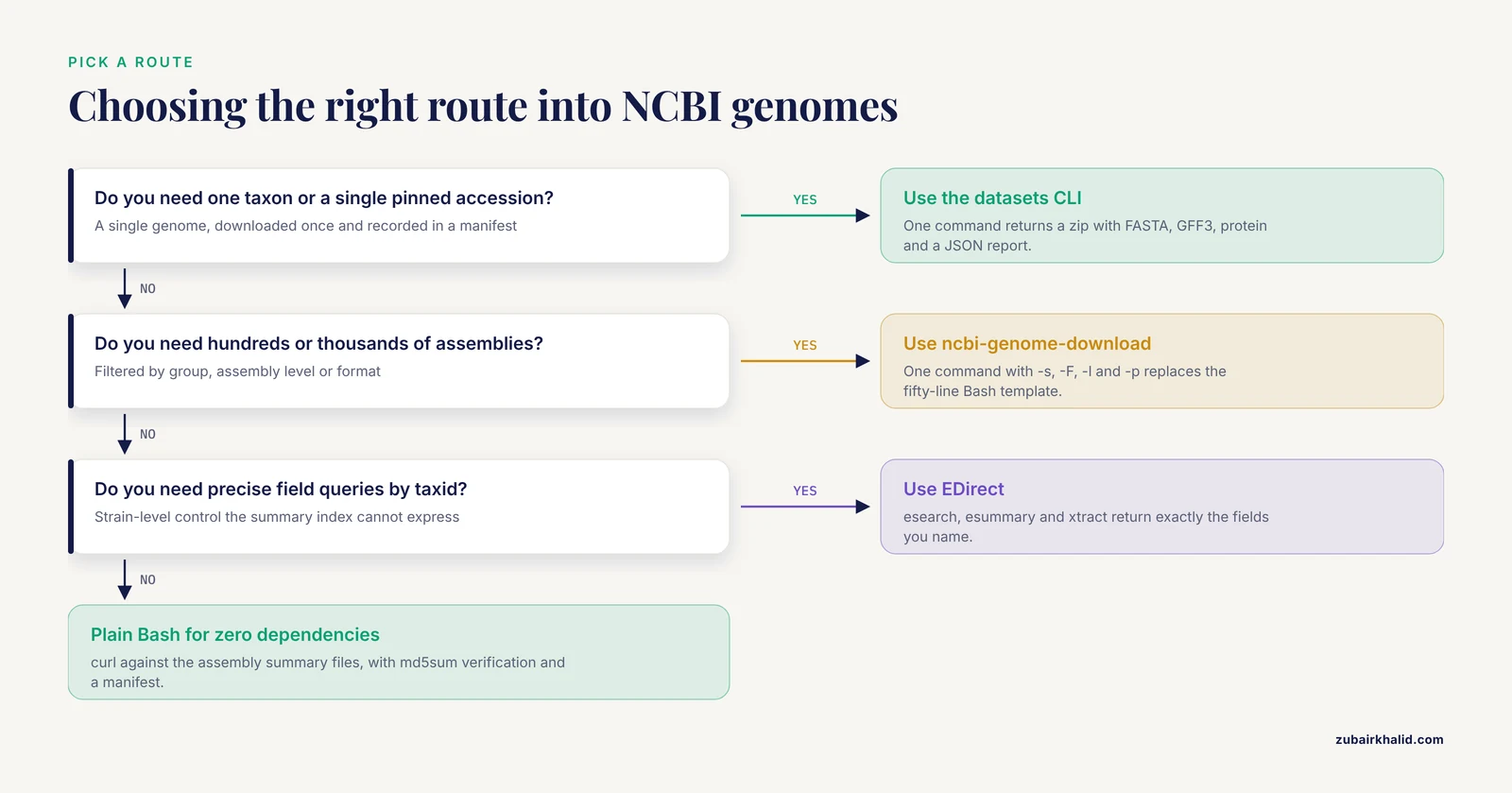
If you are new to how to use NCBI for bulk data, the confusion usually comes from the fact that NCBI exposes the same genomes through several doors. This compact NCBI databases guide maps them.
GenBank and RefSeq. GenBank is the archival repository where submitters deposit sequences. RefSeq is NCBI's curated derivative, where staff select, validate and sometimes correct representative versions. Assembly accessions encode the difference: GCA_ prefixes are GenBank assemblies, GCF_ prefixes are RefSeq assemblies. For automated pipelines, GCF is usually what you want, because it is the curated, stable version.
Assembly, accession, taxid. An assembly is a set of contigs (or chromosomes) plus its annotation, released as one versioned unit, for example GCF_000005845.2, where the .2 is the version. A taxid is the numeric identifier in NCBI's taxonomy database. Escherichia coli K-12 MG1655 has taxid 511145 at the strain level, under species taxid 562. Chinchilla lanigera has taxid 101510.
The four doors to genome files.
- The genomes HTTPS tree, a plain directory of files at https://ftp.ncbi.nlm.nih.gov/genomes/, indexed by tabular assembly_summary files. NCBI has been phasing out the older ftp:// protocol, so point scripts at https:// URLs.
- E-utilities, the REST-style API behind the web interface, scripted with curl or with Entrez Direct (EDirect), NCBI's Perl toolkit for chained esearch and efetch calls.
- The datasets API and its official command line client,
datasets, which packages a taxon's genomes into a single zip with a JSON metadata report. - Community wrappers such as ncbi-genome-download that sit on top of the HTTPS tree and add filtering, parallelism and metadata tables.
Specialized model organism databases build on these NCBI records rather than replacing them. The Chinchilla Research Resource Database, for example, maintains a complete catalog of chinchilla genes and, for comparison, human genes, and displays chinchilla genes in their scaffold positions through the JBrowse genome browser [1].
| Route | Tools you install | Best for | What you get | Main gotcha |
|---|---|---|---|---|
| , - | , - | , - | , - | , - |
| Genomes HTTPS tree plus assembly summary | curl, awk, md5sum | Zero dependencies, full control, cron jobs | Raw NCBI files, MD5 verified | Tab-separated parsing, checksums cover uncompressed files |
| datasets CLI | datasets, dataformat | One taxon at a time, clean metadata | Zip with FASTA, GFF3, protein, JSON report | Flags and JSON keys shift between versions |
| ncbi-genome-download | Python 3 package | Hundreds to thousands of assemblies | Nested directories plus an optional metadata table | Deep directory layout, Python dependency |
| E-utilities or EDirect | curl or entrez-direct | Precise queries, custom field extraction | UIDs, XML, FTP paths | Rate limits, pacing required |
One rule governs E-utilities etiquette: NCBI asks scripted users to stay at or below three requests per second, and an API key registered to your NCBI account raises the ceiling to ten per second. Bulk file transfers from the HTTPS tree are not metered the same way, which is exactly why heavy pipelines should prefer the tree over the API.
Install and Verify the Toolkit
Core tools first:
$ sudo apt-get install curl coreutils      # Debian or Ubuntu
$ brew install coreutils                   # macOS, provides gmd5sum
The official datasets CLI ships as a static binary. The Linux install currently looks like this:
$ curl -o datasets "https://ftp.ncbi.nlm.nih.gov/pub/datasets/command-line/LINUX/universal/datasets"
$ curl -o dataformat "https://ftp.ncbi.nlm.nih.gov/pub/datasets/command-line/LINUX/universal/dataformat"
$ chmod +x datasets dataformat
$ sudo mv datasets dataformat /usr/local/bin/
$ datasets --version
NCBI rebuilds these binaries regularly, so if a URL returns a 404, check the datasets documentation for the current link. Verify with datasets, version, which prints the release number.
The Python batch tool installs from PyPI:
$ pip3 install ncbi-genome-download
$ ncbi-genome-download --help
EDirect installs cleanly through conda:
$ conda install -c bioconda entrez-direct
$ esearch -version
If you plan to script E-utilities directly, create a free NCBI account, generate an API key under Account Settings, and export it in your shell profile:
export NCBI_API_KEY="your-key-here"How to Automate NCBI Genome Downloads with Bash: The Core Walkthrough
This is the section you came for: plain Bash, no dependencies beyond curl and coreutils, and a template you can adapt to any organism list.
Step 1: Cache the assembly summary index
NCBI publishes a tab-separated index of every RefSeq assembly:
$ mkdir -p ~/ncbi_cache
$ curl -sfL https://ftp.ncbi.nlm.nih.gov/genomes/ASSEMBLY_REPORTS/assembly_summary_refseq.txt \
    -o ~/ncbi_cache/assembly_summary_refseq.txt
$ head -n 3 ~/ncbi_cache/assembly_summary_refseq.txt | cut -c1-140
# See ftp://ftp.ncbi.nlm.nih.gov/genomes/README.txt for a description of the files in this directory.
#
# assembly_accession	Bioproject	Biosample	WGS_master	refseq_category	taxid	species_taxid	organism_name	...
The file has two header lines followed by one line per assembly. A parallel file, assembly_summary_genbank.txt, covers GCA assemblies. Cache it locally rather than fetching it per query, because the file is large and the bacterial section alone covers enormous numbers of assemblies.
Step 2: Find the assembly you want
Each column has a fixed position. The ones that matter for filtering: column 5 is refseq_category (reference genome, representative genome, or na), column 6 is taxid, column 8 is organism_name, column 11 is version_status, column 12 is assembly_level, column 15 is the release date, column 16 is the assembly name, and column 20 is the FTP path. Because organism names contain spaces, you must split on tabs, not whitespace:
$ awk -F'\t' '$1 !~ /^#/ && $8 == "Escherichia coli K-12 MG1655" && $12 == "Complete Genome" {print $1, $16, $20}' \
    ~/ncbi_cache/assembly_summary_refseq.txt
GCF_000005845.2 ASM584v2 https://ftp.ncbi.nlm.nih.gov/genomes/all/GCF/000/005/845/GCF_000005845.2_ASM584v2
-F'\t' sets tab as the field separator, $1 !~ /^#/ skips both header lines, and $12 == "Complete Genome" restricts the search to finished assemblies. Assembly levels are Complete Genome, Chromosome, Scaffold and Contig. For partial matching, swap the equality for a regex, for example $8 ~ /Chinchilla/.
Step 3: Understand the file naming format
Every assembly directory follows the same format. The basename is the accession joined to the assembly name with an underscore, and the directory path splits the nine accession digits into three groups of three:
GCF_000005845  ->  GCF/000/005/845
basename       ->  GCF_000005845.2_ASM584v2
Inside that directory, the standard suffixes are:
| File suffix | Contents | Typical downstream use |
|---|---|---|
| , - | , - | , - |
| _genomic.fna.gz | DNA sequence of every contig | Alignment, gene prediction, QC |
| _genomic.gff.gz | Annotation in GFF3 format | Gene coordinates, BED conversions |
| _genomic.gbff.gz | GenBank flatfile with full feature tables | Reading annotations as plain text |
| _protein.faa.gz | Translated coding sequences | BLAST protein databases |
| _rna.fna.gz | tRNA, rRNA and other noncoding RNA | RNA feature filtering |
| _assembly_report.txt | Assembly metadata and sequence-to-chromosome mapping | Contig renaming, cross-references |
| md5checksums.txt | MD5 digest of each uncompressed file | Integrity verification |
FASTA is the plain-text sequence format, GFF3 is the standard tab-separated annotation format, and MD5 is a 128-bit checksum that changes if even one byte of a file changes. Note that annotation files are optional: an assembly deposited without annotation ships no GFF or protein files at all.
Step 4: Download the files
$ ftp_path="https://ftp.ncbi.nlm.nih.gov/genomes/all/GCF/000/005/845/GCF_000005845.2_ASM584v2"
$ base=$(basename "$ftp_path")
$ echo "$base"
GCF_000005845.2_ASM584v2
$ curl -sfL -O "$ftp_path/${base}_genomic.fna.gz"
$ gunzip -t GCF_000005845.2_ASM584v2_genomic.fna.gz && echo "gzip OK"
gzip OK
The curl flags matter: -s silences the progress meter, -f makes curl fail on HTTP errors instead of saving the error page as a .gz file, -L follows redirects, and -O saves using the remote filename. gunzip -t tests archive integrity without writing anything.
Step 5: Verify the MD5 checksums
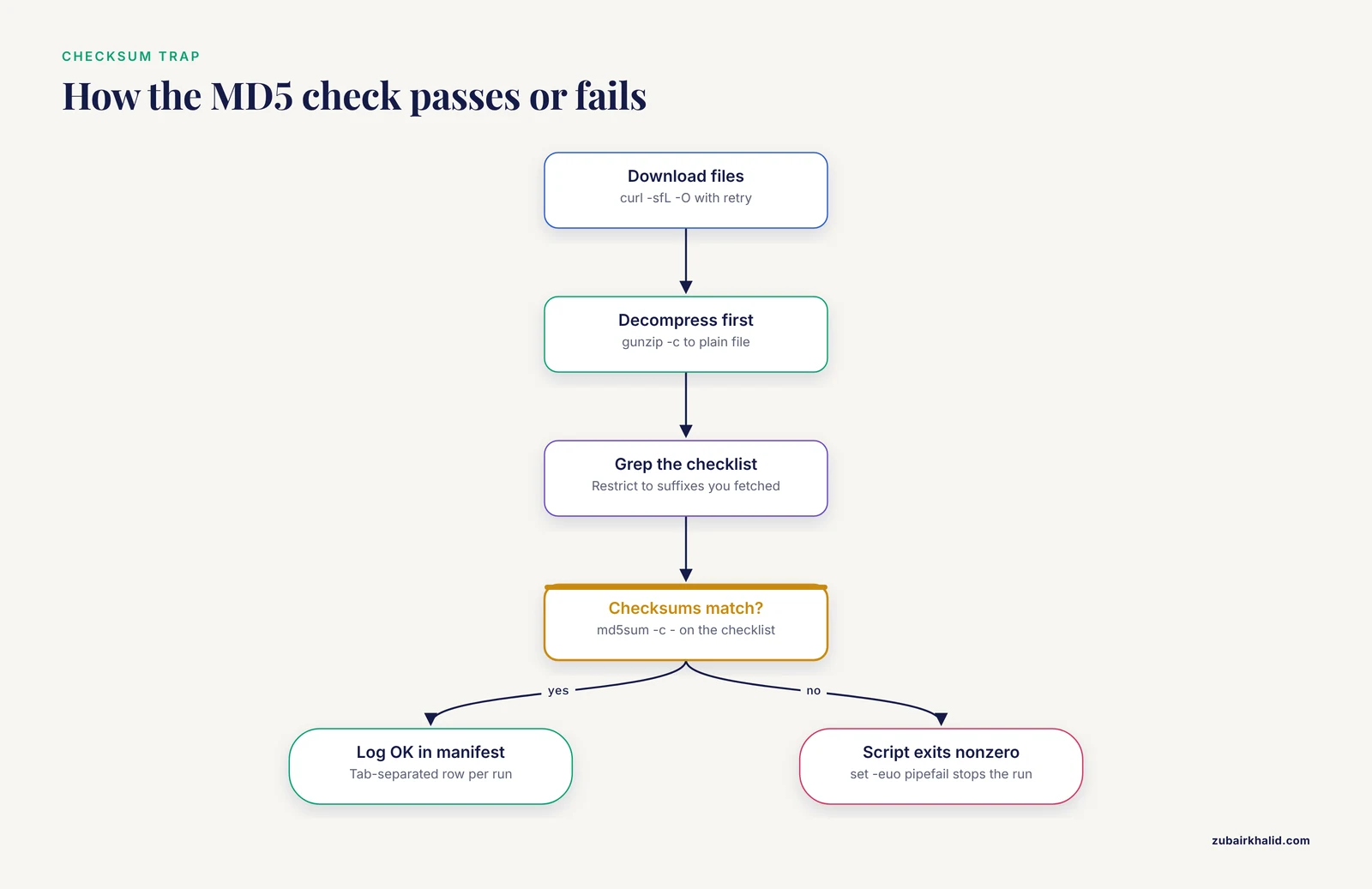
Here is the trap that catches almost everyone: NCBI's md5checksums.txt lists digests for the uncompressed files, not the .gz archives. Decompress first, then verify:
$ curl -sfL -O "$ftp_path/md5checksums.txt"
$ gunzip -c GCF_000005845.2_ASM584v2_genomic.fna.gz > GCF_000005845.2_ASM584v2_genomic.fna
$ grep -E "GCF_000005845.2_ASM584v2_genomic\.fna$" md5checksums.txt | md5sum -c -
./GCF_000005845.2_ASM584v2_genomic.fna: OK
md5sum -c - reads the checklist from standard input and exits nonzero on any mismatch, which is what makes the script fail loudly on corruption.
Step 6: Turn it into a reusable template
This is the complete download template. Save it as download_assembly.sh, run chmod +x download_assembly.sh, and adapt the suffix list to your needs:
#!/usr/bin/env bash
# download_assembly.sh
# Fetch one RefSeq assembly by organism name, verify it, log it.
# Usage: ./download_assembly.sh "Organism name" [outdir] [assembly level]
set -euo pipefail

SUMMARY="${SUMMARY:-$HOME/ncbi_cache/assembly_summary_refseq.txt}"
ORGANISM="$1"
OUTDIR="${2:-downloads}"
LEVEL="${3:-Complete Genome}"

mkdir -p "$OUTDIR"
cd "$OUTDIR"

ftp_path=$(awk -F'\t' -v org="$ORGANISM" -v lvl="$LEVEL" \
  '$1 !~ /^#/ && $8 == org && $12 == lvl && $11 == "latest" {print $20}' \
  "$SUMMARY" | head -n 1)

if [ -z "$ftp_path" ]
then
  echo "No $LEVEL assembly found for: $ORGANISM" >&2
  exit 1
fi

base=$(basename "$ftp_path")
echo "Downloading $base from $ftp_path"

for suffix in _genomic.fna.gz _genomic.gff.gz _protein.faa.gz _assembly_report.txt md5checksums.txt
do
  curl -sfL -O --retry 3 "$ftp_path/$base$suffix"
done

gunzip -c "$base"_genomic.fna.gz  > "$base"_genomic.fna
gunzip -c "$base"_genomic.gff.gz  > "$base"_genomic.gff
gunzip -c "$base"_protein.faa.gz > "$base"_protein.faa

grep -E "$base(_genomic\.fna|_genomic\.gff|_protein\.faa)$" md5checksums.txt | md5sum -c -

printf '%s\t%s\t%s\t%s\n' "$(date +%F)" "$base" "$ORGANISM" "OK" >> manifest.tsv
echo "Done. Files are in $(pwd)"
set -euo pipefail stops the script on the first failed command, on undefined variables, and on any failure inside a pipe. The $11 == "latest" filter excludes superseded versions. The manifest line is tab-separated, one row per run:
2026-11-11 GCF_000005845.2_ASM584v2 Escherichia coli K-12 MG1655 OKA clean run looks like this:
$ ./download_assembly.sh "Escherichia coli K-12 MG1655" downloads
Downloading GCF_000005845.2_ASM584v2 from https://ftp.ncbi.nlm.nih.gov/genomes/all/GCF/000/005/845/GCF_000005845.2_ASM584v2
./GCF_000005845.2_ASM584v2_genomic.fna: OK
./GCF_000005845.2_ASM584v2_genomic.gff: OK
./GCF_000005845.2_ASM584v2_protein.faa: OK
Done. Files are in /home/you/downloads
Step 7: Run it as a batch
Wrap the template in a loop that reads organism names, one per line, from organisms.txt:
#!/usr/bin/env bash
# download_batch.sh
set -uo pipefail

while IFS= read -r org
do
  if ./download_assembly.sh "$org" genomes
  then
    echo "ok: $org"
  else
    echo "FAILED: $org" >> failures.log
  fi
done < organisms.txt
Note that set -e is dropped here because failures are handled explicitly. For parallel downloads on a multicore machine:
$ xargs -P 4 -I {} ./download_assembly.sh {} genomes < organisms.txtFour parallel streams is a reasonable ceiling. You are sharing a public service, so resist the urge to raise it much further.
Step 8: Point it at the chinchilla genome
The same template works for a mammal, and the chinchilla is a good test case because it has a single RefSeq assembly, the genome sequenced in 2012 that underpins the Chinchilla Research Resource Database [1]:
$ ./download_assembly.sh "Chinchilla lanigera" chinchillaMammalian genomes are orders of magnitude larger than bacterial ones, so expect the download and checksum steps to take longer. If you want the strain-level control that the summary index cannot express, the EDirect route below queries by taxid directly.
The Official datasets CLI: Fewer Moving Parts
The datasets CLI replaces all of the awk parsing with one command and returns clean metadata. Start with a summary, which costs almost nothing:
$ datasets summary genome taxon 511145The output is JSON (abridged here, and exact key names vary slightly between CLI versions):
{
  "total_count": 1,
  "reports": [
    {
      "accession": "GCF_000005845.2",
      "organism": {
        "organism_name": "Escherichia coli K-12 MG1655",
        "tax_id": 511145
      },
      "assembly_info": {
        "assembly_level": "Complete Genome"
      }
    }
  ]
}
To download, use taxon with a name or taxid, or accession to pin an exact version:
$ datasets download genome accession GCF_000005845.2 --include genome,gff3,protein --filename k12.zip
$ unzip -q k12.zip -d k12
$ find k12 -type f | sort
k12/README.md
k12/ncbi_dataset/data/GCF_000005845.2/genomic.fna
k12/ncbi_dataset/data/GCF_000005845.2/genomic.gff
k12/ncbi_dataset/data/GCF_000005845.2/protein.faa
k12/ncbi_dataset/data/assembly_data_report.jsonl
k12/ncbi_dataset/data/dataset_catalog.json
The -include flag takes a comma-separated list: genome (FASTA), gff3, gbff, protein, rna, cds, or sequence. Files arrive already decompressed, and the assembly_data_report.jsonl carries the metadata. Convert that report to a spreadsheet-friendly table with the companion tool dataformat:
$ dataformat tsv genome --inputfile k12/ncbi_dataset/data/assembly_data_report.jsonl \
    --fields accession,organism-name
accession	organism-name
GCF_000005845.2	Escherichia coli K-12 MG1655
Run dataformat tsv genome, help to list every available field. For the chinchilla, the same pattern applies:
$ datasets download genome taxon "Chinchilla lanigera" --include genome,gff3,protein --filename chinchilla.zip
$ unzip -q chinchilla.zip -d chinchilla
The zip contains one assembly directory named for the chinchilla RefSeq accession, plus the data report. That single assembly is the resource genome for the curated database built to give chinchilla investigators easy access to relevant datasets and software tools [1]. When you want reproducibility above convenience, prefer the accession form, because a taxon query follows whatever NCBI designates current, while an accession pins the version in your manifest.
ncbi-genome-download for Large Batches
When the job is hundreds or thousands of assemblies, ncbi-genome-download does in one command what the Bash template does in fifty:
$ ncbi-genome-download bacteria -s refseq -F fasta,gff -l complete -o genomes -p 4The parameters: bacteria is the NCBI group (others include vertebrate_mammalian, viral, plant, fungi), -s picks the refseq or genbank section, -F takes a comma-separated format list (fasta, gff, genbank, protein-fasta, rna-fna and others), -l filters by assembly level, -o sets the output folder, and -p sets parallel workers. The tool writes files in a deep, predictable tree:
$ find genomes -name "*_genomic.fna.gz" | head -n 1
genomes/refseq/bacteria/GCF/000/005/845/GCF_000005845.2_ASM584v2/GCF_000005845.2_ASM584v2_genomic.fna.gz
A full bacterial run fetches thousands of assemblies and the order is not guaranteed, so filter before you commit. To target a single taxid, which is how you would pull just the chinchilla assembly from the mammalian group:
$ ncbi-genome-download vertebrate_mammalian -s refseq -F fasta,protein-fasta -T 101510 -o genomesTwo more flags earn their keep in production. -m metadata.tsv writes a tab-separated metadata table alongside the files, which doubles as your manifest. -dry-run prints what would be downloaded without transferring anything, which is the right first move for any new filter combination. To pin exact versions, pass -A with a comma-separated accession list or a file of accessions. The tool also verifies checksums internally, so you get the Step 5 protection without writing it yourself.
EDirect for Precise Queries
The Bash template matches on organism name strings, which breaks when a species has many strains. EDirect queries the assembly database with the same syntax as the NCBI web interface and returns exactly the fields you name:
$ esearch -db assembly -term 'Escherichia coli K-12 MG1655[organism]' \
  | esummary \
  | xtract -pattern DocumentSummary -element AssemblyAccession AssemblyName FtpPath_RefSeq
GCF_000005845.2	ASM584v2	https://ftp.ncbi.nlm.nih.gov/genomes/all/GCF/000/005/845/GCF_000005845.2_ASM584v2
esearch returns database UIDs, esummary converts them to XML document summaries, and xtract pulls named elements into tab-separated lines. Pipe the FTP path column straight into the Step 4 download loop and you have a query-driven front end for the plain Bash pipeline. If you script E-utilities heavily, attach your API key as described in NCBI's E-utilities documentation and keep an eye on the pacing rules covered earlier. Older records may report ftp:// paths in the summary output, so normalize the scheme to https:// before downloading.
Schedule It with cron and Keep It Idempotent
Automation that requires you to remember it is not automation. The nightly updater re-fetches the index, compares it with the previous copy, and only triggers downloads when NCBI published something new:
#!/usr/bin/env bash
# update_refseq.sh
set -euo pipefail

cache="$HOME/ncbi_cache"
log="$HOME/logs/refseq_updates.log"
mkdir -p "$cache" "$HOME/logs"

curl -sfL --retry 3 \
  https://ftp.ncbi.nlm.nih.gov/genomes/ASSEMBLY_REPORTS/assembly_summary_refseq.txt \
  -o "$cache/assembly_summary_refseq.txt.new"

if [ -f "$cache/assembly_summary_refseq.txt" ] && cmp -s "$cache/assembly_summary_refseq.txt" "$cache/assembly_summary_refseq.txt.new"
then
  printf '%s no changes\n' "$(date +%F)" >> "$log"
  rm "$cache/assembly_summary_refseq.txt.new"
else
  mv "$cache/assembly_summary_refseq.txt.new" "$cache/assembly_summary_refseq.txt"
  printf '%s index updated, running batch\n' "$(date +%F)" >> "$log"
  "$HOME/bin/download_batch.sh"
fi
cmp -s returns success when the two files are identical, which makes the whole script idempotent: running it twice in a row does nothing the second time. Install it in cron with crontab -e:
0 2 * * * flock -n /tmp/refseq.lock /home/you/bin/update_refseq.sh >> /home/you/logs/refseq_cron.log 2>&1This runs the updater at 02:00 daily, flock -n prevents overlapping runs if one night's job is still going, and everything lands in one log file. Two cron-specific notes: cron runs with a minimal environment, so use absolute paths for every script, and the percent sign is special in crontab, so any date +%F inside a crontab line must be written as date +\%F.
Check the Result Is Right
Verification is not optional in a pipeline you never watch. Four checks, in increasing depth:
- Checksums passed. The
md5sum -cstep already proved every byte matches NCBI's copy. A run that ends without: OKlines did not finish. - Sequence counts match the assembly report. The assembly report lists one row per sequence after its header lines, so the counts should agree:
$ grep -c '^>' downloads/GCF_000005845.2_ASM584v2_genomic.fna
1
$ grep -vc '^#' downloads/GCF_000005845.2_ASM584v2_assembly_report.txt
1- Total length is sane. Sum the bases and compare against the value in the _assembly_stats.txt file. For the E. coli example, the single chromosome is 4,641,652 bp:
$ grep -v '^>' downloads/GCF_000005845.2_ASM584v2_genomic.fna | tr -d '\n' | wc -c
4641652
The seqkit stats command from bioconda produces the same numbers with nicer formatting if you prefer a dedicated tool.
- The annotation opens. Open the GBFF flatfile in a text editor and confirm the DEFINITION line names the organism and strain you expected. Wrong-strain surprises usually trace back to a loose organism match in Step 2.
Common Mistakes and Limitations
Splitting on whitespace instead of tabs. awk '{print $8}' on the assembly summary returns fragments of organism names, because default awk splits on any whitespace and names like Escherichia coli K-12 MG1655 contain spaces. Always pass -F'\t'.
Verifying the .gz archives. The checksum file describes uncompressed files, so grepping it for .gz names matches nothing. Decompress first, then verify, as in Step 5.
curl without -f. A wrong path or a missing file type saves the 404 page as a .gz, and the failure surfaces later as gzip: stdin: unexpected end of file. With -f, curl fails fast with the exact message curl: (22) The requested URL returned error: 404, which tells you the URL was wrong rather than the transfer truncated.
Verifying files you did not download. If you check the full md5checksums.txt after downloading only three files, md5sum reports lines like md5sum: GCF_000005845.2_ASM584v2_genomic.gbff: FAILED open or read. Restrict the grep to the suffixes you actually fetched.
Assuming one assembly per organism. Most species have dozens of assemblies from different strains and projects. Filter by assembly level, by refseq_category equal to reference genome, or pin the accession. The chinchilla happens to have a single assembly, which is why it makes a clean example.
Confusing GCF with GCA. Scripts that mix the two silently compare curated and uncurated annotation. Decide per project and record the choice in the manifest.
Unquoted variables. ./download_assembly.sh $org breaks on spaces. Quote every expansion, and use IFS= read -r in loops, as the batch template does.
Old ftp:// URLs. NCBI has been retiring the ftp:// protocol. Scripts copied from pre-2020 tutorials may stall or fail. Normalize to https://.
Rate limits on E-utilities. A loop that hammers esearch without pacing will be throttled, and NCBI returns 429 Too Many Requests. Stay under the documented limits from the databases guide, or move the workflow to the HTTPS tree.
Deep nesting from ncbi-genome-download. Files land under refseq/bacteria/GCF/000/005/845/..., not in the current directory. Scripts that assume flat output will find nothing.
Cron percent signs. An unescaped % in a crontab line becomes a newline. Escape it as \%.
macOS checksum tools. Plain md5sum is absent on macOS. Install coreutils and call gmd5sum, or your verification step silently does nothing.
Two structural limitations deserve honest mention. First, the assembly summary format is stable but not guaranteed forever, so for long-lived pipelines map columns by header name or prefer the datasets CLI, whose JSON report is self-describing. Second, NCBI records carry sequence and standard annotation, not curated functional layers. The chinchilla gene reports at the Chinchilla Research Resource Database, for instance, include Disease, Gene Ontology and Pathway annotations assigned through human orthologs, in contrast to the corresponding records at NCBI [1]. Plan for a companion resource when your analysis needs curated function, and verify accessions on the NCBI website before any production run, because individual projects differ in which assembly generation they can tolerate.
Next Steps
With the pipeline working, three upgrades pay off quickly. Build searchable databases from what you downloaded: makeblastdb -in GCF_000005845.2_ASM584v2_protein.faa -dbtype prot turns the protein file into a BLAST target in seconds. Move the whole workflow into Snakemake or Nextflow once more than a handful of genomes per run, so dependencies and reruns are managed for you. And if you work in the cloud, NCBI mirrors the genomes tree on AWS as an open dataset, which removes WAN transfer time entirely.
For the chinchilla specifically, the natural next step after downloading the assembly is comparative work against human, and the Chinchilla Research Resource Database is built for exactly that, with a complete gene catalog for both species, keyword and gene-specific searches, and gene lists assembled by shared functional attributes [1]. Download the NCBI files for sequence-level work, use the curated resource for function, and record both accessions in your methods section.
Frequently Asked Questions
What is the simplest way to automate NCBI genome downloads with Bash?
Use the official datasets CLI for a single taxon, ncbi-genome-download for filtered batches, and plain Bash with curl against the assembly_summary files when you want zero dependencies beyond coreutils. The template in the core walkthrough covers the plain Bash route end to end.
Do I need an NCBI API key for scripted downloads?
Not for the bulk routes. The HTTPS genomes tree, the datasets CLI and ncbi-genome-download work without any account, while E-utilities scripts benefit from a key once query volume grows.
What is the difference between GCF and GCA accessions?
GCF accessions are RefSeq assemblies curated by NCBI staff, and GCA accessions are GenBank assemblies as submitted by depositors. RefSeq adds validation and consistency checks on top of the GenBank version, which is why automated pipelines usually prefer GCF.
How do I download only complete or reference genomes?
Filter by assembly level and category. In plain Bash, compare column 12 of the assembly summary to Complete Genome and column 5 to reference genome, in ncbi-genome-download pass -l complete and -R reference, and in the datasets CLI use -assembly-level complete.
Why does my MD5 check fail on NCBI genome files?
Because the checksum file lists MD5 values for the uncompressed files, not the .gz archives. Decompress with gunzip first, then run md5sum -c against the extracted files, exactly as Step 5 shows.
How do I keep a local genome collection current without re-downloading everything?
Re-fetch the assembly summary on a cron schedule, compare it with the previous copy using cmp, and trigger the batch only when the index changed. The update_refseq.sh script in the scheduling section implements this pattern.
Can I download only protein or annotation files instead of whole genomes?
Yes. Add gff3, gbff or protein to the datasets -include list, or pass gff, protein-fasta or genbank to the ncbi-genome-download -F flag. Keep in mind that assemblies deposited without annotation ship no GFF or protein files at all.
Where should I look for functional annotation after the download?
Start with the annotation files you downloaded, then check model organism databases that layer curated annotations on top of NCBI records. The Chinchilla Research Resource Database is one example, adding Disease, Gene Ontology and Pathway annotations to chinchilla genes through human orthologs [1].