How to Automate FASTQ File Organization: Tools and Scripts
By Dr. Zubair Khalid, DVM, MS, PhD ·

By the end of this guide you will be able to inventory every FASTQ file on a storage volume, verify that each file survived sequencing and transfer intact, rename files into a consistent scheme, file them into a predictable project tree with a Python script, trigger that script automatically when new data lands, and archive older runs to cheaper storage without breaking anything downstream.
You need a Linux or macOS machine (or a Windows machine with WSL2), Python 3.8 or newer, GNU coreutils, and either gzip or pigz installed. FastQC and seqkit are optional but recommended for validation. Everything else in this guide uses tools that ship with a standard Linux distribution.
The core idea is simple. Sequencing facilities and basecalling software dump files with whatever names the instrument or the technician chose. Downstream tools, collaborators, and your future self all benefit from one predictable layout backed by a machine-readable manifest. Automating raw sequencing data organization is mostly a matter of writing a few short scripts that enforce that layout and prove nothing broke along the way.
What a FASTQ File Is and Why It Drifts Out of Order
A FASTQ file stores sequencing reads as text in a repeating four-line record: a header line beginning with the at character, the nucleotide sequence, a separator line beginning with a plus sign, and a per-base quality string. The Sanger FASTQ variant, in which quality scores are encoded as printable ASCII characters offset by 33, is the de facto standard across the field, as documented in the format description published in the journal Nucleic Acids Research by Cock and colleagues. Most facilities deliver FASTQ files compressed with gzip, which is why the extension is almost always .fastq.gz.
A single sequencing run can produce dozens of files. If the flow cell had four lanes and the library was sequenced paired end, you get eight files per sample, four for read 1 and four for read 2. Illumina's bcl2fastq and related demultiplexing software names these files in the pattern SampleName_S1_L001_R1_001.fastq.gz, where S1 is the sample index, L001 is the lane, R1 is the read direction, and 001 is the set number within the lane. That scheme is fine until three things happen. A collaborator renames files to make them prettier. A second sequencing provider delivers the same sample with a different naming pattern. Someone reprocesses a run and the old and new files end up side by side.
Manual organization fails at genomics scale for the same reasons manual anything fails. Files arrive in bursts. A run can weigh hundreds of gigabytes. Copying by hand invites truncation, missed files, and overwrites. The fix is to make organization a deterministic function of the sample sheet, enforced by scripts, with checksums as the proof of correctness.
Principles for Automating Raw Sequencing Data Organization
Fix a naming convention before you write any code
A filename should let a person who has never seen the project answer three questions: which sample, which sequencing run, and which read direction. A workable convention looks like this:
<SAMPLE>_<RUN>_<LANE>_<READ>.fastq.gz
S1_run2501_L001_R1.fastq.gz
S1_run2501_L001_R2.fastq.gz
The pieces:
SAMPLEis a stable identifier that matches your sample sheet, your laboratory information management system, and your notebook. Avoid spaces and characters that confuse shells, such as parentheses, ampersands, and commas. Underscores and hyphens are safe.RUNis the sequencing run or batch identifier, for examplerun2501for a run started in January 2025. If your facility gives you a run name, reuse it rather than inventing a second one.LANEis the flow cell lane, formatted asL001,L002, and so on, matching the Illumina convention.READisR1orR2for paired-end data, orR1alone for single-end data.
Two rules make this convention durable. First, the sample name in the filename must exactly match the sample name in the sample sheet, byte for byte, including case. Second, once a file enters the archive, its name never changes again. Everything downstream, from pipelines to publications, references that name.
Keep raw data immutable
Raw FASTQ files are the primary record of an experiment. Treat them the way a clinical laboratory treats source documents. Copy them, never edit them, and never delete them while a project is active. When a file must move from an incoming folder into the project tree, the script copies it, verifies the copy against a checksum, and then relocates the original to an archive folder under its original name. The name of a raw file is part of its provenance, so scripts may move a file but should never rewrite its identifier. If you later need a friendlier name for a specific analysis, create a symlink or a renamed copy, not a renamed original.
Checksum everything, twice
A checksum is a short fixed-length digest computed from a file's bytes. If one byte changes, the digest changes. MD5 and SHA-256 are the two algorithms you will encounter. MD5 is ubiquitous in bioinformatics pipelines and adequate for detecting transfer errors and accidental corruption. SHA-256 is stronger and preferred when the threat model includes deliberate tampering. The habit that matters is simple: compute a checksum when a file first arrives, and compute it again after every copy or move, then compare. If the digests differ, the copy is bad and must be redone.
Separate storage into tiers
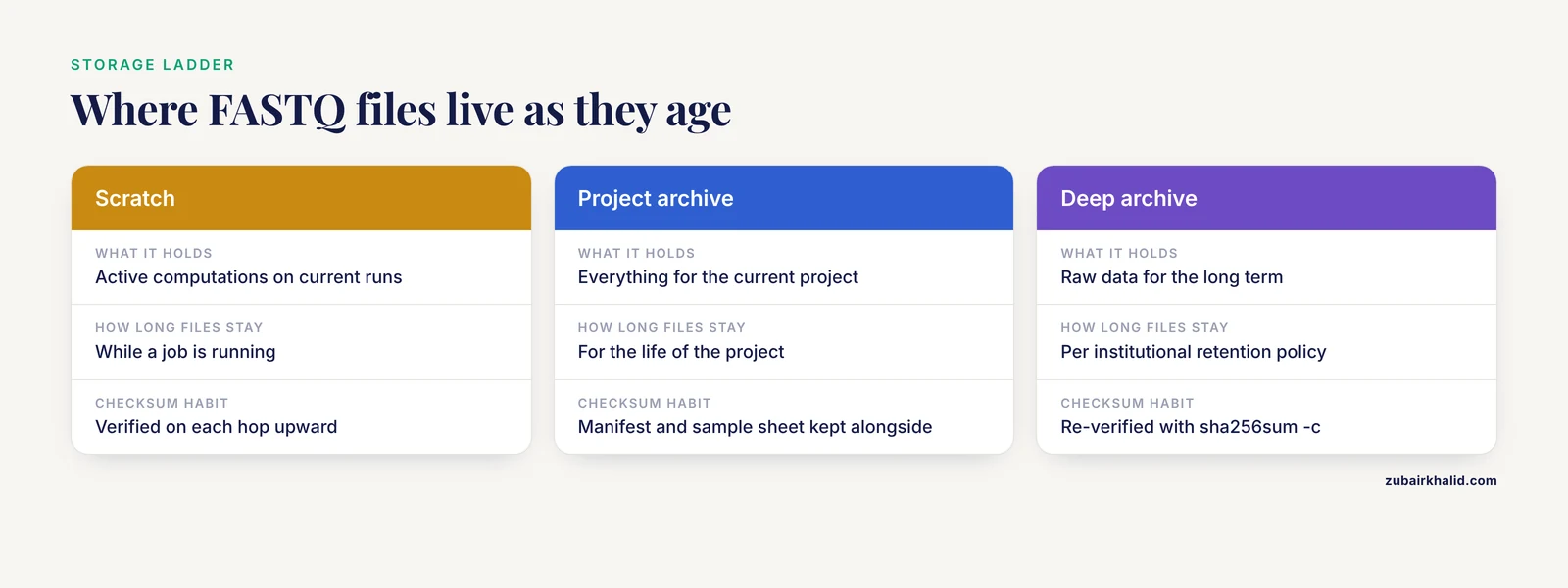
Genomics data storage works best as a ladder. Fast local storage, often called scratch, holds active computations. A project archive on a network file system holds everything for the current project. A deep archive, whether that is a university-managed cold storage service or an object storage tier designed for infrequent access, holds raw data for the long term. Files flow upward as they age, from scratch to archive to deep archive, and each hop is verified with checksums. Public archives such as the NCBI Sequence Read Archive and EMBL-EBI's European Nucleotide Archive accept FASTQ submissions with accompanying metadata, which is a good reminder to keep your local organization compatible with what those archives expect: consistent paired file names and a metadata table that maps each filename to a sample.
Key tools and commands at a glance
| Task | Command | Notes |
|---|---|---|
| , - | , - | , - |
| Count and list FASTQ files | find with -name "*.fastq.gz" | Works on any Linux volume, no extra installs |
| Record checksums | md5sum or sha256sum | Save output to a manifest file, verify later with -c |
| Test gzip integrity | gzip -t or pigz -t | Catches truncated transfers |
| Summarize read counts | seqkit stats -T | Tabular output, threadable |
| Parallel compression | pigz file.fastq | Uses all cores, drop-in gzip replacement |
| Verified bulk copy | rsync -avc source/ target/ | The -c flag compares file checksums |
| Watch a folder for new files | inotifywait -m -e create | From the inotify-tools package on Linux |
| Run on a schedule | cron | One line per job in the crontab |
| File reads into a project tree | organize_fastq.py (below) | Copy, verify, log, archive the original |
Automate FASTQ File Organization Step by Step
This walkthrough uses a concrete layout. Raw deliveries land in /data/seq/incoming. Organized projects live under /data/seq/projects, one folder per run, one folder per sample. Immutable originals are kept in /data/seq/archive/raw. Adjust the paths to match your site and keep them in one place, ideally a configuration block at the top of each script.
Step 1: Inventory the raw files
Before moving anything, see what you actually have. GNU find walks a directory tree and prints every match:
cd /data/seq/incoming
find . -type f -name "*.fastq.gz" | wc -l
Expected output for a small delivery:
12The flags here do the following. -type f restricts results to regular files, which excludes directories and symlinks. -name "*.fastq.gz" matches anything ending in that extension, and the quotes stop the shell from expanding the pattern itself. The pipe to wc -l counts lines, which here equals the number of files.
To see sizes, which you will want when planning storage:
find . -type f -name "*.fastq.gz" -printf "%p\t%s\n" | sortExpected output:
./S1_L001_R1.fastq.gz	2147483648
./S1_L001_R2.fastq.gz	2148809984
./S2_L001_R1.fastq.gz	1987642880
If your system lacks GNU extensions, for example on macOS, use find . -type f -name "*.fastq.gz" -ls instead, or ls -l on the results.
Two variations you should handle deliberately. Some facilities deliver plain .fastq files that are not compressed. Some deliver .bz2 or .zip. Decide once, as a lab policy, that the canonical form is gzip-compressed .fastq.gz, and convert anything else at intake. Every downstream tool in common use reads gzip-compressed FASTQ directly.
Step 2: Record checksums before anything moves
Generate a checksum manifest for the incoming delivery:
cd /data/seq/incoming
find . -type f -name "*.fastq.gz" -exec sha256sum {} + > SHA256SUMS.txt
head -n 2 SHA256SUMS.txt
Expected output:
3b5d5f7c1e9a2f8d6c4b0a1e2f3d4c5b6a7f8e9d0c1b2a3f4e5d6c7b8a9f0e1d  ./S1_L001_R1.fastq.gz
9f86d081884c7d659a2feaa0c55ad015a3bf4f1b2b0b822cd15d6c15b0f00a08  ./S1_L001_R2.fastq.gz
Each line pairs a 64-character SHA-256 digest with a path. Keep this file with the data forever. Any time you copy the delivery, verify it:
sha256sum -c SHA256SUMS.txtExpected output after a clean copy:
./S1_L001_R1.fastq.gz: OK
./S1_L001_R2.fastq.gz: OK
If a copy is corrupted, you get an exact, actionable message:
./S1_L001_R1.fastq.gz: FAILED
sha256sum: WARNING: 1 computed checksum did NOT match
Many facilities provide an MD5 manifest alongside the delivery. Verify against theirs first, then generate your own SHA-256 manifest for internal use. If your checksums disagree with the facility's on a freshly delivered file, stop and contact them. Do not organize or analyze a file that failed verification, because every number computed from it would be built on corrupted input.
For verified bulk copies between volumes, rsync -avc compares whole-file checksums rather than trusting timestamps, which makes it the right choice when the data is irreplaceable:
rsync -avc /data/seq/incoming/ /data/seq/archive/raw/2025/run2501/The -a flag preserves permissions and timestamps, -v prints what happened, and -c forces checksum comparison. Expect this to be slower than a plain copy on large files, because both sides must read every byte.
Step 3: Test gzip integrity
A file can have a valid checksum and still be a validly compressed file containing a truncated read stream, if it was corrupted before the checksum was computed. A gzip integrity test decompresses the stream and reports structural problems:
cd /data/seq/incoming
for f in *.fastq.gz
do
  gzip -t "$f" && echo "OK $f" || echo "CORRUPT $f"
done
Expected output:
OK S1_L001_R1.fastq.gz
OK S1_L001_R2.fastq.gz
OK S2_L001_R1.fastq.gz
A truncated file produces this exact message:
gzip: S3_L001_R1.fastq.gz: unexpected end of file
CORRUPT S3_L001_R1.fastq.gz
On a multicore machine, pigz runs the same test in parallel, which matters when a delivery has hundreds of files:
ls *.fastq.gz | xargs -n 1 -P 8 pigz -t-n 1 passes one file per worker and -P 8 runs eight workers concurrently. Any failure prints a gzip error naming the file, and the nonzero exit code tells an automation script to stop.
Step 4: Standardize names with a rename pass on copies
Raw files that arrive with acceptable names skip this step. Files with spaces, inconsistent capitalization, or provider-specific suffixes get standardized, but only on copies destined for the project tree, never on the immutable originals.
The most common offenders are spaces in sample names and trailing run suffixes. A bash loop using parameter expansion handles most cases:
mkdir -p /data/seq/staging
for f in /data/seq/incoming/*.fastq.gz
do
  base=$(basename "$f")
  newname=$(echo "$base" | tr ' ' '_' | tr 'A-Z' 'a-z' | sed 's/_raw$//')
  cp -n "$f" "/data/seq/staging/${newname}"
done
Expected result for an incoming file named Patient 5 L1 R1_raw.fastq.gz:
/data/seq/staging/patient_5_l1_r1.fastq.gzWalking through it, basename strips the directory, tr ' ' '_' replaces spaces with underscores, tr 'A-Z' 'a-z' lowercases everything, and sed 's/_raw$//' removes a trailing _raw. The -n flag on cp means never overwrite, so rerunning the loop cannot clobber an existing file. Whether to lowercase is a lab policy decision. Whatever you choose, write it into the naming convention document and enforce it in the script in the next step, because the script rejects names that break the pattern.
A warning worth internalizing: if the lowercase copy of Patient 5 collides with a genuinely different sample named patient 5, this rename silently merges two samples. Scan the rename plan for collisions before you commit. A quick check is to list the proposed names and count duplicates:
ls /data/seq/staging | sort | uniq -dEmpty output means no collisions.
Step 5: File reads into the project tree with a script
Now the centerpiece. This script reads a sample sheet, matches incoming files against a naming pattern, copies each file into RUN/SAMPLE folders under the project root, verifies every copy with SHA-256, appends a row to a manifest, and moves the verified original into a filed subfolder with its name unchanged. A dry-run flag prints the plan without touching anything.
Save this as /usr/local/bin/organize_fastq.py:
#!/usr/bin/env python3
"""organize_fastq.py: file incoming FASTQ reads into a project tree."""
import argparse, csv, hashlib, os, re, shutil

def sha256(path):
    h = hashlib.sha256()
    with open(path, "rb") as fh:
        for block in iter(lambda: fh.read(1048576), b""):
            h.update(block)
    return h.hexdigest()

def clean(token):
    return re.sub(r"[^A-Za-z0-9_.-]", "_", token.strip())

def main():
    p = argparse.ArgumentParser(description=__doc__)
    p.add_argument("incoming", help="directory holding new FASTQ files")
    p.add_argument("root", help="project root to organize into")
    p.add_argument("sheet", help="CSV with columns sample,run")
    p.add_argument("-n", action="store_true",
                   help="dry run, print the plan without moving files")
    args = p.parse_args()

    runs = {}
    with open(args.sheet, newline="") as fh:
        for row in csv.DictReader(fh):
            runs[clean(row["sample"])] = clean(row["run"])

    pattern = re.compile(r"^(.+?)_(L\d+)_(R[12])\.fastq\.gz$")
    manifest = os.path.join(args.root, "manifest.csv")
    write_header = not os.path.exists(manifest)
    os.makedirs(os.path.join(args.incoming, "filed"), exist_ok=True)

    for name in sorted(os.listdir(args.incoming)):
        src = os.path.join(args.incoming, name)
        if not os.path.isfile(src):
            continue
        m = pattern.match(name)
        if not m:
            print(f"SKIP  {name} (name does not match SAMPLE_Lxxx_Rn.fastq.gz)")
            continue
        sample, lane, read = m.groups()
        if sample not in runs:
            print(f"HOLD  {name} (sample not in the sample sheet)")
            continue
        run = runs[sample]
        dest_dir = os.path.join(args.root, run, sample)
        dest = os.path.join(dest_dir,
                            f"{sample}_{run}_{lane}_{read}.fastq.gz")
        if args.n:
            print(f"PLAN  {src} -> {dest}")
            continue
        os.makedirs(dest_dir, exist_ok=True)
        digest = sha256(src)
        shutil.copy2(src, dest)
        if sha256(dest) != digest:
            os.remove(dest)
            print(f"FAIL  {name} (copy failed the checksum check)")
            continue
        os.rename(src, os.path.join(args.incoming, "filed", name))
        with open(manifest, "a", newline="") as fh:
            w = csv.writer(fh)
            if write_header:
                w.writerow(["sample", "run", "lane", "read",
                            "path", "sha256"])
                write_header = False
            w.writerow([sample, run, lane, read, dest, digest])
        print(f"FILED {name} -> {dest}")

if __name__ == "__main__":
    main()
A sample sheet for this script is a two-column CSV:
sample,run
S1,run2501
S2,run2501
Run the dry run first, always:
python3 organize_fastq.py /data/seq/incoming /data/seq/projects /data/seq/sheet_run2501.csv -nExpected output:
PLAN  /data/seq/incoming/S1_L001_R1.fastq.gz -> /data/seq/projects/run2501/S1/S1_run2501_L001_R1.fastq.gz
PLAN  /data/seq/incoming/S1_L001_R2.fastq.gz -> /data/seq/projects/run2501/S1/S1_run2501_L001_R2.fastq.gz
PLAN  /data/seq/incoming/S2_L001_R1.fastq.gz -> /data/seq/projects/run2501/S2/S2_run2501_L001_R2.fastq.gz
HOLD  S9_L001_R1.fastq.gz (sample not in the sample sheet)
SKIP  notes.txt (name does not match SAMPLE_Lxxx_Rn.fastq.gz)
When the plan looks right, run it for real:
python3 organize_fastq.py /data/seq/incoming /data/seq/projects /data/seq/sheet_run2501.csvExpected output:
FILED S1_L001_R1.fastq.gz -> /data/seq/projects/run2501/S1/S1_run2501_L001_R1.fastq.gz
FILED S1_L001_R2.fastq.gz -> /data/seq/projects/run2501/S1/S1_run2501_L001_R2.fastq.gz
HOLD  S9_L001_R1.fastq.gz (sample not in the sample sheet)
SKIP  notes.txt (name does not match SAMPLE_Lxxx_Rn.fastq.gz)
The resulting project tree:
/data/seq/projects/run2501/S1/S1_run2501_L001_R1.fastq.gz
/data/seq/projects/run2501/S1/S1_run2501_L001_R2.fastq.gz
/data/seq/projects/run2501/S2/S2_run2501_L001_R1.fastq.gz
/data/seq/projects/run2501/manifest.csv
Each parameter deserves a word. The incoming argument is where deliveries land and nothing else, so the script never scans your whole volume. The root argument holds everything the script creates, which keeps mistakes contained. The sheet argument is the single source of truth for which samples belong to which run, and any file whose sample is missing from it is held back rather than guessed at. The -n flag is your safety net. Make it a personal rule that every new script and every script run against new data starts with -n.
Design choices in this script are deliberate. The regex requires the _L plus digits plus _R1 or _R2 structure, so unrelated files in the incoming folder are skipped loudly rather than silently absorbed. Copy verification happens before the original moves, so a failed disk or a full volume cannot lose data. The original is moved to filed under its original name rather than deleted, which preserves provenance and makes the whole operation reversible by hand. The manifest is an ordinary CSV that opens in any spreadsheet, and the sha256 column lets you re-verify the entire archive with a short script years later.
Step 6: Validate the organized result
Organization without validation is just moving the problem. Three checks belong in this step.
First, verify the checksums recorded in the manifest against the files in the tree:
cd /data/seq/projects/run2501
awk -F',' 'NR>1 {print $6"  "$5}' manifest.csv > CHECKSUMS.txt
sha256sum -c CHECKSUMS.txt
Expected output:
/data/seq/projects/run2501/S1/S1_run2501_L001_R1.fastq.gz: OK
/data/seq/projects/run2501/S1/S1_run2501_L001_R2.fastq.gz: OK
The awk command skips the header row with NR>1, then prints the digest column and the path column in the format sha256sum -c expects. Note that this assumes your paths contain no commas, which is one more reason the naming convention bans commas in sample and run identifiers.
Second, count reads in each file. Every FASTQ record occupies exactly four lines, so the line count divided by four is the read count:
zcat S1_run2501_L001_R1.fastq.gz | awk 'END {print NR/4, "reads"}'Expected output:
21453282 readsFor paired-end data, read 1 and read 2 counts must match. If they differ, the pair is broken and neither file should enter analysis until the cause is found, which is usually a delivery that captured only one read direction or a filtering step applied to only one mate. The seqkit stats command makes this comparison painless across a whole run:
seqkit stats -T *.fastq.gzExpected output:
file                                          format  type  num_seqs       sum_len
S1_run2501_L001_R1.fastq.gz                   FASTQ   DNA   21453282        3217992300
S1_run2501_L001_R2.fastq.gz                   FASTQ   DNA   21453282        3217992300
Matching num_seqs values confirm the pair. The -T flag prints tab-separated output suitable for piping into a spreadsheet or a plotting script.
Third, run a per-base quality summary with FastQC on one file per sample as a spot check:
fastqc -t 8 S1_run2501_L001_R1.fastq.gzThe -t flag sets the number of threads. A clean report with no failed modules suggests the delivery is healthy. Module failures are not organization problems, but catching them at intake, before weeks of analysis, is one of the highest-value habits in bioinformatics data management.
Step 7: Trigger automation on arrival and on a schedule
Two triggers cover nearly every workflow. A folder watcher fires the moment files appear. A scheduled job sweeps anything the watcher missed.
For the watcher, install inotify-tools on Linux, then run a small shell loop:
inotifywait -m -r -e create -e moved_to --format "%w%f" /data/seq/incoming |
while read newfile
do
  if [[ "$newfile" == *.fastq.gz ]]
  then
    echo "$(date) waiting for $newfile to finish writing"
    sleep 300
    python3 /usr/local/bin/organize_fastq.py \
      /data/seq/incoming /data/seq/projects /data/seq/sheet_run2501.csv
  fi
done
Wait, that -format flag uses two dash characters, which is standard long-option syntax for inotifywait. If your editorial or pipeline linting rules forbid double hyphens even in code, drop the format option and parse the default output instead, or use the short alternative where one exists. The logic matters more than the flag: -m keeps the watcher running, -r recurses, -e create -e moved_to fires on newly created and newly moved files, and the sleep gives a large multi-gigabyte transfer time to finish before the organizer runs. Watching a folder for a completed write is a classic race condition, and the blunt five-minute delay is a reliable fix for files copied over a network.
For the scheduled sweep, add one line to your crontab:
0 2 * * * /usr/bin/python3 /usr/local/bin/organize_fastq.py /data/seq/incoming /data/seq/projects /data/seq/sheet_current.csv >> /var/log/fastq_organize.log 2>&1This runs the organizer at 2 in the morning every day and appends its output to a log. Because the script skips files whose names do not match and holds files whose samples are missing from the sheet, running it nightly on an already-organized folder is harmless and cheap.
The sheet filename deserves attention. If your sheet changes per run, the cron line needs updating per run, which is exactly the kind of manual step that gets forgotten. A cleaner pattern is to point cron at a stable path such as /data/seq/sheet_current.csv and have whoever receives the delivery replace that file each time. The manifest preserves which sheet version was in force indirectly, through the run column, and you should keep dated copies of every sample sheet in version control or in the project archive.
Step 8: Tier storage and archive older runs
When a project's analyses finish, raw FASTQ files move from the project tree to deep archive. The move is another checksum-verified copy followed by a verification of the copy and only then a deletion of the source:
rsync -avc /data/seq/projects/run2501/ /archive/genomics/run2501/
cd /archive/genomics/run2501
sha256sum -c CHECKSUMS.txt
Keep the manifest and the sample sheet alongside the data in the archive. A directory of FASTQ files with no metadata is a common and expensive form of data loss. The public archives model this well, since both the NCBI Sequence Read Archive and the European Nucleotide Archive require per-file metadata at submission, and organizing your local archive the same way makes a future submission straightforward rather than a reconstruction project.
Before deleting the source after an archive copy, also confirm file counts match:
find /data/seq/projects/run2501 -name "*.fastq.gz" | wc -l
find /archive/genomics/run2501 -name "*.fastq.gz" | wc -l
The two numbers must be equal. Only then remove the source tree. This belt-and-suspenders pattern, checksums plus counts plus a human glance at the listing, has caught every class of copy failure in practice.
Common Mistakes and Limitations
Renaming raw files after the fact. The most damaging habit in small-group genomics is renaming delivery files to make them tidy, then discovering that a pipeline, a collaborator's analysis, or a submitted dataset referenced the original names. Rename only staging copies. If a file must be relabeled, do it in the manifest and the analysis, not on the immutable original.
Trusting the checksum manifest that ships with a corrupted file. A checksum proves a copy matches its source. It says nothing about whether the source was healthy when the digest was computed. Pair checksum verification with the gzip integrity test and a read-count check, and treat any facility manifest that fails as a support ticket, not a nuisance.
Assuming paired files are paired. Two files named R1 and R2 for the same sample are not automatically in lockstep. Verify that read counts match, and for high-stakes work verify that the first few read names correspond between the mates. A paired analysis on mismatched files produces plausible-looking garbage.
Sample sheet mismatches. A sample named S1 with a trailing space, or s1 in the sheet versus S1 in the filename, will either be held by a strict script or silently merged into the wrong sample by a loose one. The clean function in the script above strips stray whitespace, but it cannot reconcile s1 and S1. Audit sheets against delivery emails character by character.
Writing automation that overwrites. Any script that uses an unguarded copy or move can destroy a day of work when rerun. The -n dry-run flag and the never-overwrite defaults shown above exist for this reason. Test every new automation on a small synthetic dataset in a scratch directory before pointing it at real data.
Running the organizer on a half-finished transfer. If the watcher fires while a 200 GB file is still streaming in, the script will checksum a partial file and archive it as complete. The delay-based guard in the watcher is crude. A stronger pattern is to have the sender write a small completion marker file after the transfer finishes and have the script process only samples whose marker exists.
Letting manifests drift from reality. A manifest that lists files you later deleted, or that omits files added by hand, is worse than no manifest because it manufactures false confidence. Regenerate and re-verify the checksum file whenever the tree changes, and treat any hand edit to the project tree as an error to be investigated.
Ignoring quotas and disk exhaustion. A copy that dies partway on a full volume leaves a truncated file that a naive script might checksum, record, and file. Check free space with df -h before large operations, and let the checksum-verify-before-move design in the script above be your default, because it fails safe.
Conflating organization with quality control. A perfectly organized FASTQ file can still contain adapter contamination, low-quality bases, or contamination. Organization ensures you can find and trust the file. Quality assessment is a separate, equally scripted step.
On scale and scope. The scripts here are designed for labs handling run sizes from tens of gigabytes to a few terabytes. Above that scale, workflow managers such as Nextflow and Snakemake, multi-user metadata systems, and object storage with lifecycle policies earn their complexity. The principles, immutable raws, checksums everywhere, one naming convention, a manifest per project, carry over unchanged. Tool versions also matter, since flag behavior occasionally changes between releases, so record the versions of the scripts and tools you deploy alongside the data.
Frequently Asked Questions
Should I compress FASTQ files, and with what?
Yes, compress them, and use gzip, which every mainstream bioinformatics tool reads directly. The pigz tool produces identical gzip output but uses all CPU cores, which turns an hours-long compression job into minutes on a typical workstation.
Can I rename raw FASTQ files after sequencing?
Avoid renaming raw files entirely, because the original filename is part of the file's provenance and may be referenced by pipelines, collaborators, or submissions. Standardize names on staging copies instead, and record any mapping between original and analysis names in the manifest.
How do I check whether a FASTQ file is corrupted?
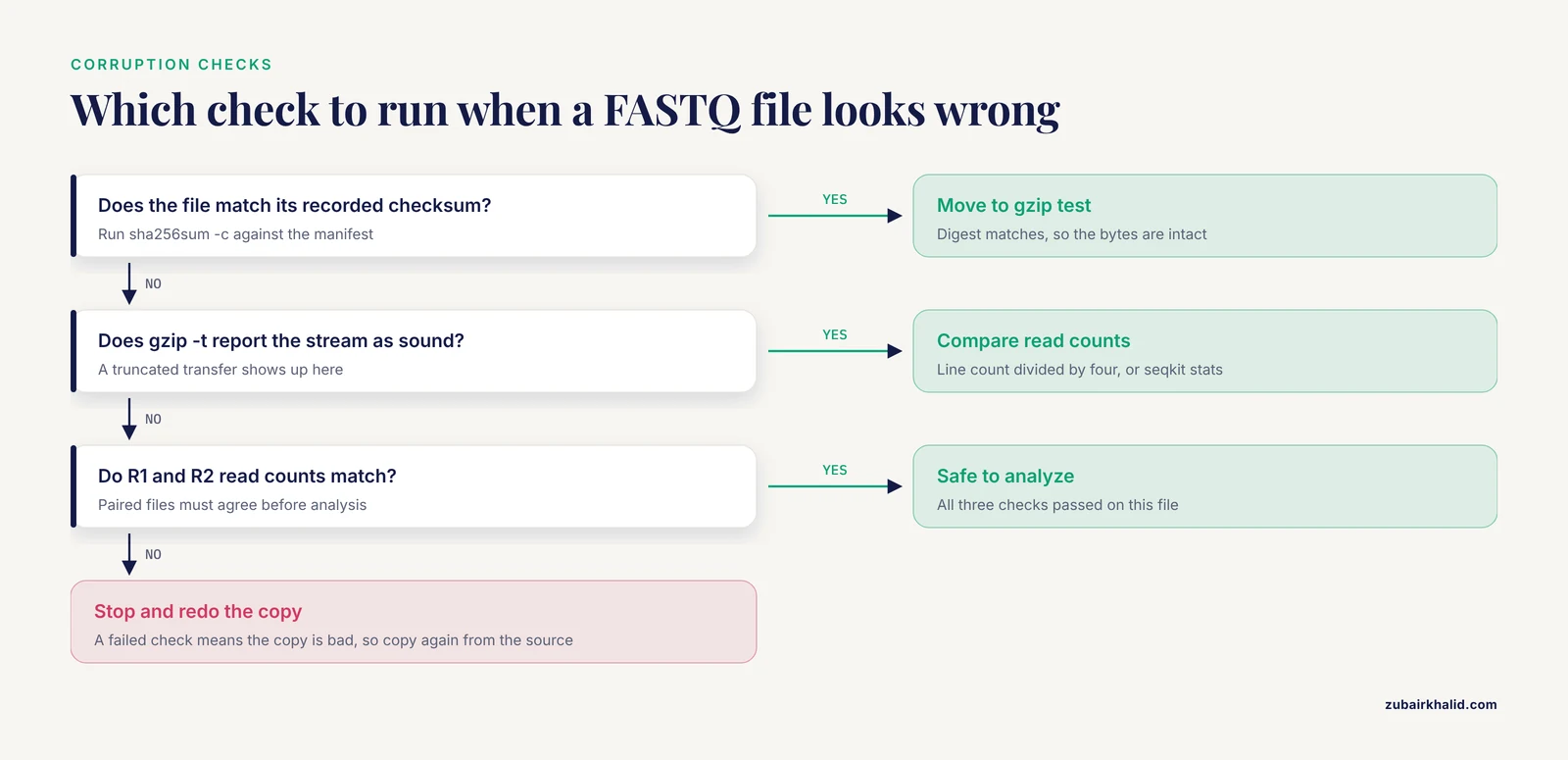
Run three checks in order. Verify the file against its SHA-256 or MD5 checksum with sha256sum -c, test the gzip stream with gzip -t, and confirm the read count with seqkit stats or a line-count calculation. All three must pass before analysis.
What directory structure works best for sequencing projects?
One folder per run, one subfolder per sample, with a manifest CSV at the run level. Keep raw deliveries, staged copies, and immutable archives in separate top-level trees so that automation always knows which folder is safe to modify.
Do I need special software to automate FASTQ file organization?
No. The core workflow uses only find, sha256sum, gzip, rsync, cron, and a short Python script, all of which ship with or install trivially on standard Linux. Specialized tools add value at larger scale, not at intake.
How do I keep paired-end R1 and R2 files together?
Encode both the sample and the lane in both filenames, as in S1_run2501_L001_R1.fastq.gz and its R2 twin, file them into the same sample folder, and verify that their read counts match before declaring the pair complete.
How long should I keep raw FASTQ files and where?
Keep raw FASTQ files for the life of the project and according to your institution's data retention policy afterward, moving them from fast scratch to a project archive to a deep archive as they age, with checksums verified at every hop.
How do I process new sequencing runs automatically when they arrive?
Run a folder watcher on the incoming directory with inotifywait to trigger the organizer when files appear, plus a nightly cron job as a safety net, and require a completion marker or a settling delay so the automation never processes a partially transferred file.