Automating Genomics Data Transfer with Aspera: A Scripting Guide
By Dr. Zubair Khalid, DVM, MS, PhD ·

A single WGS sample can easily produce 50 to 100 GB of raw FASTQ, and a sequencing batch multiplies that by the number of libraries. Moving files that large over ordinary HTTP or scp is slow and fragile, so most sequencing centers, public archives, and core facilities expose an Aspera endpoint instead. This guide walks you through automating genomics data transfer with Aspera using ascp, the command-line client. By the end you will be able to install the client, run a test transfer against a public archive, batch-download dozens of runs from a manifest, resume interrupted transfers without losing progress, verify checksums, and wire the whole thing into a scheduled script or workflow manager.
Here is what you need on hand before starting:
- A Linux or macOS workstation, server, or compute node with Bash. Windows works through WSL or the Aspera Connect GUI, though scripting is easier in WSL.
- IBM Aspera Connect installed, which provides the
ascpbinary and the public key files used for anonymous archive access. - Network access to your data provider over TCP port 22 (authentication) and UDP port 33001 (the FASP data channel).
- A manifest of the files you want, such as a list of SRA run accessions.
- Basic comfort with Bash,
md5sum, andcron.
Why Aspera for Genomics Data Transfer
Aspera's transfer protocol, FASP (Fast, Adaptive, Secure Protocol), was designed for exactly the problem genomics runs into. Conventional file transfer rides on TCP, which treats every dropped packet as congestion and slows down even when the drop was noise on a long-haul link. Over a transcontinental connection with tens of milliseconds of latency, TCP throughput collapses well below what the link physically supports. FASP instead sends data over UDP and manages reliability and congestion response itself, so throughput stays close to the available bandwidth regardless of distance and latency. The protocol concept is well studied, and high-throughput UDP-based peer-to-peer secure transfer has been described as an efficient alternative for moving large scientific datasets [1].
The second reason is security. Genomic sequence is inherently identifiable, privacy researchers have repeatedly shown that raw sequence data can re-identify individuals, and healthcare data breaches have repeatedly targeted large patient databases. FASP encrypts data in transit, and when you transfer human sequence data between institutions you should keep that encryption enabled rather than trading it for raw speed. Scripting matters as much as the protocol because a single transfer is easy, but a sequencing project is hundreds of transfers that must be repeatable, logged, and resumable.
Installing and Verifying the Client
Download IBM Aspera Connect from IBM's Aspera product page and install the package for your operating system. On Linux the command-line client is placed under your home directory, typically at ~/.aspera/connect/bin/ascp. Add it to your path in ~/.bashrc:
export PATH="$HOME/.aspera/connect/bin:$PATH"Reload the shell and confirm the binary works:
source ~/.bashrc
which ascp
ascp --version
which ascp should print the full path to the binary. ascp, version prints a single line naming the client version and build number. If you see a command-not-found error, the install directory is not on your path.
Two bundled files matter for public archive downloads. Aspera Connect ships shared authentication keys, including an OpenSSH-format private key commonly found at ~/.aspera/connect/etc/asperaweb_id_dsa.openssh. Public archives such as NCBI and ENA accept this key in place of a password for anonymous access. Check that the file exists:
ls -l ~/.aspera/connect/etc/asperaweb_id_dsa.opensshAspera Scripting for Genomics Data Transfer Step by Step
This walkthrough builds from one file to a complete, resumable batch script. Every step shows the command, what it does, and what the output should look like.
Step 1. Run a single-file test transfer
Start with one real file so you know the network path works before writing any logic. The following command pulls a public SRA run from NCBI using anonymous FASP access:
ascp -QT -l 300m -k 2 \
  -i ~/.aspera/connect/etc/asperaweb_id_dsa.openssh \
  [email protected]:/sra/sra-instant/reads/ByRun/sra/SRR/SRR000648/SRR000648.sra \
  ./data/raw/
Create ./data/raw/ first or add the -d flag so ascp creates the last directory element for you. A successful run prints progress lines and ends with a success exit message. A trimmed transcript looks like this:
Session Start ...
File: SRR000648.sra
Completed = 100%
Session Stop (Exit code 0: Success)
Confirm the exit code, because scripts should branch on it rather than on the printed text:
echo $?
0
Zero means success. Any nonzero value means the transfer failed or aborted, and your wrapper script should record that number. Note that public endpoints change over time, NCBI in particular has been migrating SRA delivery toward cloud object storage, so confirm the current path format in the provider's official documentation before relying on it in production.
Step 2. Learn the options that actually matter
Most scripts need fewer than ten flags. The table below lists the ones worth memorizing.
| Option | What it does | Typical genomics use |
|---|---|---|
-i <keyfile> | Authenticates with an SSH private key | Aspera's bundled public key for anonymous archive access |
-l <rate> | Sets the target transfer rate, for example -l 300m for 300 Mbit/s | Match your provider's limit and your link |
-m <rate> | Sets a minimum rate the sender tries to maintain | Keeps transfers from crawling on quiet links |
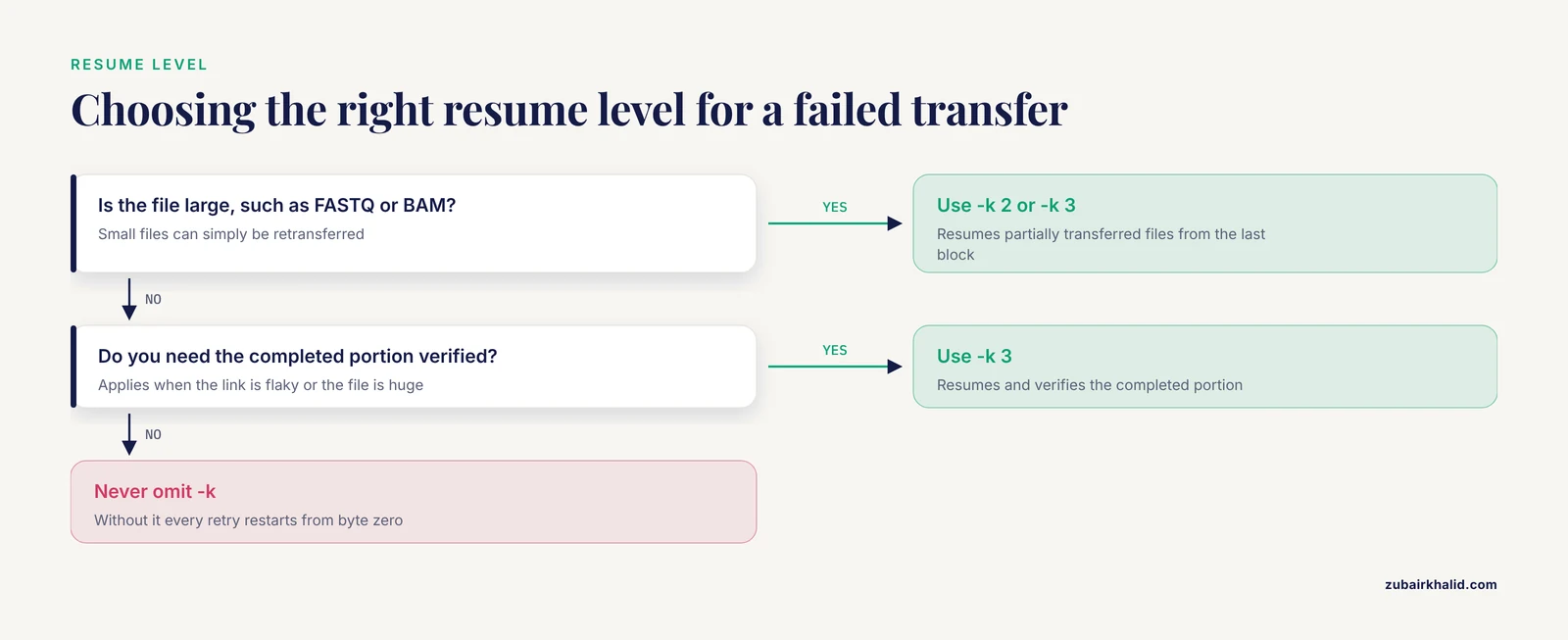
-k <0-3> | Resume level. 0 never resumes, 1 resumes complete files, 2 resumes partially transferred files, 3 resumes and verifies the completed portion | Use -k 2 or -k 3 for large FASTQ and BAM files |
-Q | Uses the fair adaptive transfer policy | Default choice for mixed workloads |
-T | Disables encryption in transit | Anonymous public downloads only, never for patient data |
-O <port> | Sets the UDP (FASP) data port | Default 33001, adjust for firewalls |
-P <port> | Sets the TCP (SSH) authentication port | Default 22 |
-d | Creates the destination directory if it is missing | Handy in batch scripts |
-p | Preserves source timestamps | Useful for provenance in archive mirrors |
-E <pattern> | Excludes files matching a pattern | Skip sidecar files you fetch separately |
-file-list <file> | Reads source paths from a text file, one per line | Batch downloads from a manifest |
-file-pair-list <file> | Reads source and destination pairs, two columns per line | Paired-end FASTQ layout |
Step 3. Batch downloads with a file list
Manually repeating the Step 1 command does not scale. Build a manifest of remote paths, one per line, and hand the whole list to a single ascp session:
cat sra_batch_07.txt
/sra/sra-instant/reads/ByRun/sra/SRR/SRR000648/SRR000648.sra
/sra/sra-instant/reads/ByRun/sra/SRR/SRR000649/SRR000649.sra
/sra/sra-instant/reads/ByRun/sra/SRR/SRR000650/SRR000650.sra
ascp -QT -l 300m -k 2 -d \
-i ~/.aspera/connect/etc/asperaweb_id_dsa.openssh \
--file-list sra_batch_07.txt \
[email protected]:./data/raw/With -file-list, the paths are relative to the remote user's home directory, so the leading /sra/... in the manifest is interpreted under the authenticated user's root on the server. The destination directory receives every file in the list. This is the core of aspera scripting for genomics data transfer, and everything else in this guide hardens this pattern.
Step 4. Handle paired-end files explicitly
Paired-end data means two files per sample, and you usually want them renamed into a consistent layout. Prepare a two-column pair list where column one is the remote source and column two is the local destination:
cat pairs_batch_07.txt
/vol1/ERR188/ERR188047/ERR188047_1.fastq.gz  ./data/raw/SampleA_R1.fastq.gz
/vol1/ERR188/ERR188047/ERR188047_2.fastq.gz  ./data/raw/SampleA_R2.fastq.gz
The paths shown are illustrative of the ENA FASP layout on host [email protected]. Substitute the run accessions and the exact paths from your provider's documentation. Then transfer with:
ascp -QT -l 300m -k 2 \
  -i ~/.aspera/connect/etc/asperaweb_id_dsa.openssh \
  --file-pair-list pairs_batch_07.txt \
  [email protected]:./data/raw/
Pair lists are also the cleanest way to download a FASTQ and its matching MD5 sidecar in one session, which sets up Step 6.
Step 5. Add resume, retries, and logging in a Bash wrapper
A production script has four properties. It skips files that already finished, retries transient failures, logs every attempt, and reports what still failed at the end. Here is a complete, working wrapper:
#!/usr/bin/env bash
set -u

KEY="$HOME/.aspera/connect/etc/asperaweb_id_dsa.openssh"
LIST="$1"
DEST="$2"
LOGDIR="logs/$(date +%Y%m%d)"
mkdir -p "$LOGDIR" "$DEST"

while IFS= read -r rempath
do
  run=$(basename "$rempath" .sra)
  logfile="$LOGDIR/${run}.log"
  localfile="$DEST/${run}.sra"

  if [[ -s "$localfile" ]]
  then
    echo "Skipping $run, file already present"
    continue
  fi

  status=1
  for attempt in 1 2 3
  do
    echo "$(date -Is) attempt $attempt for $run" >> "$logfile"
    ascp -QT -l 300m -k 2 -i "$KEY" \
      "[email protected]:$rempath" "$DEST/" \
      >> "$logfile" 2>&1
    if [[ $? -eq 0 ]]
    then
      status=0
      break
    fi
    echo "$(date -Is) attempt $attempt failed" >> "$logfile"
    sleep 60
  done

  if [[ $status -ne 0 ]]
  then
    echo "$run FAILED after 3 attempts, see $logfile" >> "$LOGDIR/failures.txt"
  fi
done < "$LIST"

echo "Batch complete. Failures listed in $LOGDIR/failures.txt"
Run it like this:
chmod +x fetch_sra.sh
./fetch_sra.sh sra_batch_07.txt ./data/raw
Three design decisions in this script deserve explanation. First, -k 2 is what makes retries cheap, because an interrupted 60 GB file resumes from the last transferred block instead of restarting at zero. Second, each attempt writes to its own log file so you can diagnose a persistent failure without grep-ing through one giant log. Third, the script appends failed run IDs to a failures file, which is what you feed back into the script after fixing whatever went wrong. This pattern, scriptable glue that drives third-party tools with explicit inputs and logged outputs, is the same approach described in published phylogenomic pipelines built from Python scripts integrating third-party tools [2], and it transfers directly to Bash.
The same wrapper runs unattended under cron for off-hours transfers:
30 2 * * * /home/lab/scripts/fetch_sra.sh /home/lab/manifests/batch_08.txt /data/raw >> /home/lab/logs/cron.log 2>&1If you use a workflow manager, express the transfer as a rule with the output file as the target so the manager tracks completion for you. A minimal Snakemake-style rule illustrates the idea:
rule ascp_fetch:
    output:
        "data/raw/{sample}.sra"
    params:
        remote=lambda wc: remote_paths[wc.sample]
    shell:
        "ascp -QT -l 300m -k 2 "
        "-i ~/.aspera/connect/etc/asperaweb_id_dsa.openssh "
        "[email protected]:{params.remote} data/raw/"
remote_paths would be a dictionary loaded from your sample sheet. Because the output file is declared, the manager will not rerun the transfer unless the file is missing.
Step 6. Verify integrity after transfer
FASP validates data as it transfers, so corruption in flight is unlikely. The residual risk is truncation, a file that exists on disk but is incomplete, and that is exactly what the skip-if-exists check in the wrapper can mask if it runs before a transfer ever finished. Close the loop with checksums.
For data that ships with an MD5 sidecar, such as ENA FASTQ files, record and compare the hash:
md5sum ./data/raw/SampleA_R1.fastq.gz
cat ./data/raw/SampleA_R1.md5
md5sum -c ./data/raw/SampleA_R1.md5
Expected output on success:
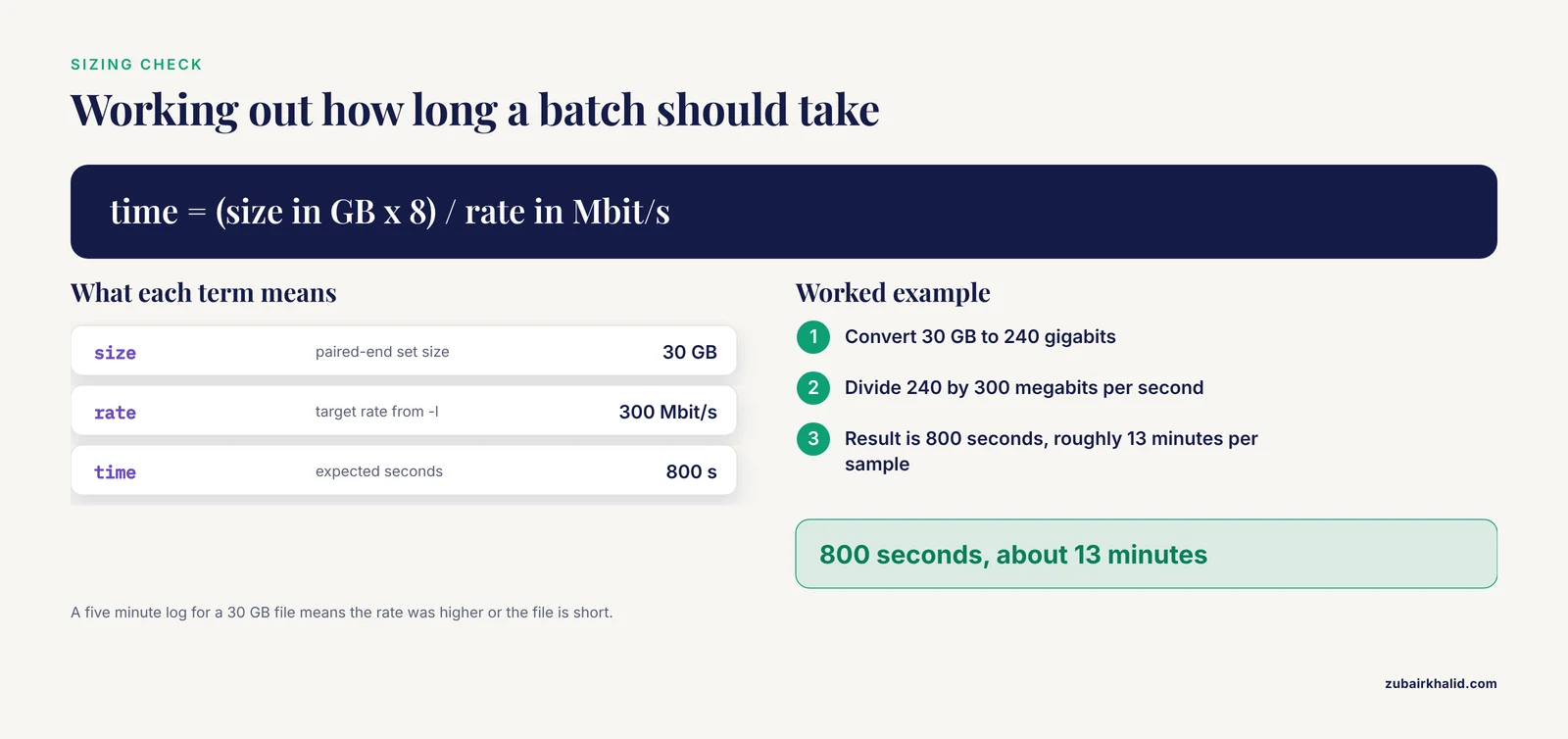
SampleA_R1.fastq.gz: OKFor data without a sidecar, at minimum record file sizes before deleting anything upstream. A worked sizing check helps you sanity-check a batch: a 30 GB paired-end FASTQ set carried at a sustained 300 Mbit/s takes 240 gigabits divided by 300 megabits per second, which is 800 seconds, roughly 13 minutes per sample. If your log shows five minutes for a 30 GB file, the rate was higher than expected or the file is short.
Step 7. Upload the same way
The options work symmetrically for uploads to an institutional Aspera server, which is how most core facilities prefer to receive data:
ascp -Q -l 200m -k 2 \
  ./SampleA_R1.fastq.gz SampleA_R2.fastq.gz \
  [email protected]:/incoming/lab01/
Leave out -T for uploads of patient-derived material. If your server uses a password rather than a key, supply it noninteractively with the -W option or the ASPERA_SCP_PASS environment variable, and never write the password into a committed script. Better practice is to ask your facility for a dedicated SSH key.
Aspera Scripting for Genomics Data Transfer Tips
These tips come from the parts of the workflow that most often waste an afternoon.
- Test with the smallest file the endpoint offers. A 2 MB test file confirms key, host, port, and path format in seconds. Debugging all of that with a 60 GB transfer is painful.
- Keep encryption on unless the data is public. The
-Tflag trades security for a modest speed gain and belongs only in anonymous public-archive commands. - Set
-lto what the provider allows, not what your link can do. Many institutional servers cap per-session rates, and exceeding your fair share can get your IP throttled. For very large single files,ascp4supports streaming modes that can improve sustained throughput. - Prefer one well-resumed session over many parallel ones. Parallel
ascpprocesses can saturate a link, but they also multiply the load you place on shared archive servers. Increase session rate before you increase session count. - Build manifests programmatically. Generate
-file-listand-file-pair-listfiles from your LIMS export or sample sheet rather than typing paths, because hand-built manifests are where silent path errors enter. - Log the exit code and the byte count. Grep-ing logs for the word "error" is unreliable. Recording
$?and the completed byte total gives you something testable. - Pin your client version in shared infrastructure. If several lab servers transfer data, keep the Aspera Connect version consistent so behavior does not drift between machines.
Common Mistakes and Limitations
These are the specific failure modes behind most broken Aspera scripts, with what you will actually see and how to fix each one.
Relying on wildcards in remote paths. ascp does not expand shell wildcards on the remote side, and your local shell expands globs against your local filesystem, which produces errors or empty results. You will see messages about files not found when the path is actually correct. Fix: enumerate remote paths into a -file-list manifest instead.
Assuming the UDP path is open. If a firewall blocks UDP 33001, ascp falls back to TCP-based transport and throughput drops to familiar scp-like speeds, sometimes with a warning about the UDP port in the output. The transfer still succeeds, which is why this mistake goes unnoticed for weeks. Fix: verify UDP 33001 is reachable end to end, confirm the server's configured FASP port, and compare observed rates against your -l setting.
Authentication failures with the shared key. A message such as Permission denied (publickey,password) usually means one of three things. The key path is wrong, the endpoint requires a user-specific key instead of the bundled anonymous key, or the remote account has too many failed attempts behind it. Fix: confirm the key file exists with ls -l, check that the provider still supports the bundled key, and read the provider's authentication page rather than guessing.
Wrong path structure for the archive. Public archives organize data in fixed directory trees by accession prefix, and a wrong tree gives a file-not-found style session stop. This is the most frequent error when copying commands from years-old blog posts. Fix: derive paths from the current provider documentation or from the provider's API, and validate one path before batch mode.
Restarting instead of resuming. Omitting -k means every retry retransmits from byte zero. On a 100 GB file behind a flaky link, that is hours wasted per attempt. Fix: put -k 2 in every scripted command and leave it there.
Skipping checksums because "FASP already checks". FASP protects data in transit, but it cannot tell you that you fetched the wrong file or that a partial file survived as a complete-looking file. Fix: verify MD5s where the provider publishes them and record checksums for everything else before the source data ages out.
Embedding credentials in scripts. Passwords on the command line leak into shell history and process listings. Because genomic sequence data can re-identify individuals and institutional databases are high-value breach targets, treat credential handling as part of the pipeline, not an afterthought. Fix: key-based authentication, environment variables sourced from a protected file, and no secrets in version control.
Ignoring provider endpoint migrations. Public archives change delivery mechanisms as storage and funding change. A script written against last year's endpoint can break between grant cycles. Fix: keep endpoint definitions in one configuration file at the top of your scripts and check provider announcements when a batch suddenly fails wholesale.
The server-side limitation. FASP is a negotiated protocol. Both ends must run Aspera software, and the server side typically requires a licensed Aspera server or a hosted endpoint. You cannot use ascp against an arbitrary SSH host that lacks it, and that is the honest boundary of the tool. If an endpoint offers only HTTP, plain wget or curl with -c for resume is the correct tool instead.
Aspera in a Broader Bioinformatics Data Management Strategy
A transfer script is one component of bioinformatics data management, and it works best when the surrounding system knows what should exist. Collaborative genomics programs increasingly run schema-driven research data management platforms in which the expected data model, validation, and exports are generated from a single versioned schema set, as described for the ICTS-Dashboard platform built around the GREGoR rare-disease data model [3]. In that setting, your manifest is not a loose text file, it is derived from the same authoritative sample registry that downstream pipelines query, which eliminates a whole class of missing-sample errors.
The same principle shows up in institutional pipelines that use custom scripts to move data from instrument-facing systems into a central warehouse, as the Department of Veterans Affairs radiotherapy database effort did when extracting DICOM-RT records and transferring them into the Corporate Data Warehouse for linkage with the cancer registry and tumor sequencing data [4]. Whether the payload is radiotherapy records or FASTQ files, the pattern is identical. A scripted, logged, verifiable transfer feeding a structured central store.
One counterpoint keeps the choice of tool in perspective. There is an active effort to reduce how much data must move at all. Platforms that execute genomic analysis client-side in the browser, such as the WebAssembly-based BioChef workflow builder, avoid bulk transfers for small analyses entirely, though browser execution carries its own performance penalties for compute-heavy steps [5]. For the terabyte-scale outputs that sequencing instruments produce, transfer remains unavoidable, and Aspera remains the default mechanism many providers expose for it.
Frequently Asked Questions
What is Aspera and why do genomics pipelines use it?
Aspera is IBM's high-speed file transfer product built on the FASP protocol, which moves data over UDP with its own congestion control. Genomics pipelines use it because sequencing data files are enormous and FASP sustains high throughput over long, high-latency network paths where TCP-based tools slow down.
Do I need a license or my own server to use ascp?
No, for downloads. The Aspera Connect client is free, and public archives such as NCBI and ENA operate the FASP servers. You only need licensed server software if you want to run your own receiving endpoint, which is a facility-level decision.
Which ports and firewall rules does Aspera need?
Authentication runs over TCP port 22 and the FASP data channel over UDP port 33001 by default. If UDP 33001 is blocked anywhere along the path, transfers still work but silently fall back to TCP with much lower throughput.
How do I download FASTQ or SRA files with Aspera?
Confirm the current path format in the provider's documentation, then run ascp -QT -l 300m -k 2 -i <bundled-key> user@host:<remote-path> <local-dir>. For many runs, put the remote paths in a text file and use -file-list instead of repeating the command.
Why is my Aspera transfer slow or falling back to TCP?
The most common causes are a blocked UDP port, a rate cap set by the provider, or shared-link congestion. Check the log for UDP-related warnings, confirm your -l value against the provider's stated limit, and test from a different network before assuming the client is at fault.
How do I resume a failed transfer without starting over?
Use the -k 2 flag, which resumes partially transferred files from the last completed block. With -k in place, rerunning the same ascp command or wrapper script continues where the interrupted attempt stopped.
Can I run ascp in Docker or a workflow manager?
Yes, in both cases, provided the container or job environment includes the ascp binary, the key file, and outbound UDP access. Express the transfer as a workflow rule with the downloaded file as the declared output so the manager handles retries and skip logic.
How should I verify that transfers completed correctly?
Check the process exit code, confirm file sizes against expectations, and run md5sum -c where the provider publishes MD5 values. Record checksums for every file before the upstream source becomes unavailable.
Sources
- High throughput udp-based peer-to-peer secure data transfer
- Building a Phylogenomic Pipeline for the Eukaryotic Tree of Life - Addressing Deep Phylogenies with Genome-Scale Data
- An extensible laboratory information management system for data harmonization across research centers: The ICTS-Dashboard
- Leveraging Radiotherapy Data for Precision Oncology: Veterans Affairs Granular Radiotherapy Information Database
- Biochef: a client-side WebAssembly-based workflow builder for genomic data analysis