How to Run AlphaFold on the Server: A Step-by-Step Tutorial
By Dr. Zubair Khalid, DVM, MS, PhD ·

By the end of this tutorial you will be able to install AlphaFold2 on a GPU-equipped Linux server, download the genetic databases and neural network parameters, run monomer and multimer predictions from the command line, and interpret the confidence metrics in the output files. You will also know the setup decisions that most often waste hours of compute time, and how to avoid them.
Before you start, make sure you have the following on hand:
- A Linux server (Ubuntu 20.04 or 22.04 is the path of least resistance) with an NVIDIA GPU that has at least 16 GB of memory, as specified in the official AlphaFold documentation
- Root or sudo access, or a container runtime such as Docker or Apptainer if you are on a shared cluster
- Roughly 2.6 TB of free disk space for the full genetic databases, or about 560 GB for the reduced set
- Your protein sequence in FASTA format
- A stable internet connection for the one-time database download
Every command in this tutorial comes from the AlphaFold repository maintained by Google DeepMind on GitHub. Where a choice exists (Docker versus a native install, full versus reduced databases), I explain the tradeoffs so you can decide rather than copy blindly.
What AlphaFold Does and Which Version to Run
AlphaFold2 is the deep learning system published by DeepMind in 2021 that predicts a protein's three-dimensional structure from its amino acid sequence. In the CASP14 assessment it achieved accuracy that the assessors described as competitive with experimental structures for most targets, a result reported in the Nature paper by Jumper and colleagues. AlphaFold's structure predictions now underpin the AlphaFold Protein Structure Database run by DeepMind together with EMBL-EBI, which holds predicted structures for over 200 million proteins.
For practical work on your own server you will encounter four related tools. Choosing among them first will save you from installing the wrong thing.
| Tool | What it predicts | Best for |
|---|---|---|
| AlphaFold2 (open source) | Single protein chains | Full control, reproducibility, custom databases |
| AlphaFold-Multimer | Complexes of two or more chains | Protein-protein interfaces, homo-oligomers |
| ColabFold | Both of the above, faster | Servers without heavy MSA infrastructure, batch jobs |
| AlphaFold3 | Proteins with ligands, nucleic acids, ions | Web server users. Weights require approval from Google and are not freely downloadable |
This tutorial focuses on the open-source AlphaFold2 and AlphaFold-Multimer code, because that is what "running AlphaFold on the server" almost always means in practice. AlphaFold3 is covered separately near the end.
One concept worth defining before the walkthrough: an MSA, or multiple sequence alignment, is the alignment of your query sequence against homologous sequences found in large genetic databases. AlphaFold relies on two MSAs and on structural templates from the Protein Data Bank, and generating these inputs is the slowest part of any prediction. Most of the disk space and most of the setup effort in this tutorial exist to support MSA and template search.
Hardware and Software Requirements
The official AlphaFold documentation specifies the following baseline. Your server should meet or exceed it.
| Requirement | Minimum | Notes |
|---|---|---|
| GPU | NVIDIA with 16 GB memory | V100, A100, A6000, RTX 3090 and 4090 all work. More memory lets you fold longer chains and larger complexes |
| CPU | 8 cores recommended | MSA search and structure relaxation are CPU-heavy |
| RAM | 32 GB practical minimum | Multimer jobs with large MSAs can exceed this |
| Disk | About 2.6 TB (full) or 560 GB (reduced) | Plus space for outputs, which can be several GB per job |
| OS | Linux | The pipeline is developed and tested on Ubuntu |
| CUDA | 11.x | Only if you install natively rather than with Docker |
| Software | Docker plus NVIDIA Container Toolkit, or a conda environment | Docker is the officially supported route |
Two clarifications that are not always obvious from that table:
- The 16 GB GPU figure is a floor, not a target. Chains longer than about 1,000 residues and multimer jobs benefit substantially from 24 GB or 40 GB cards. Memory use grows roughly with the square of sequence length during model inference.
- The databases, not the code, dominate the disk requirement. If your storage budget is tight, start with the reduced set. It omits the largest sequence databases, which shortens MSA search but slightly reduces accuracy for hard targets.
Step 1: Choose Your Environment (Docker, Apptainer, or Native)
The AlphaFold repository supports three installation routes. Pick one before touching the databases.
Docker is the route the documentation recommends and the one I use here. It bundles every pinned dependency (JAX, Haiku, HH-suite, jackhmmer, OpenMM, and the exact library versions the developers tested) inside a container image. You need Docker Engine and the NVIDIA Container Toolkit installed so containers can see the GPU.
Apptainer (formerly Singularity) is the right choice on most university HPC systems where users cannot run Docker directly. You build an image from the same Dockerfile with apptainer build alphafold.sif docker://deepmind/alphafold or by converting a local Docker image, then run jobs through your scheduler.
Native (conda or from source) gives you the most control and the fastest per-job overhead, but you own every version conflict. The repository documents the required packages, and a community-maintained conda recipe exists, yet most reproduction problems I see come from native installs where one library drifted from the tested version. If your team has no strong reason to go native, do not.
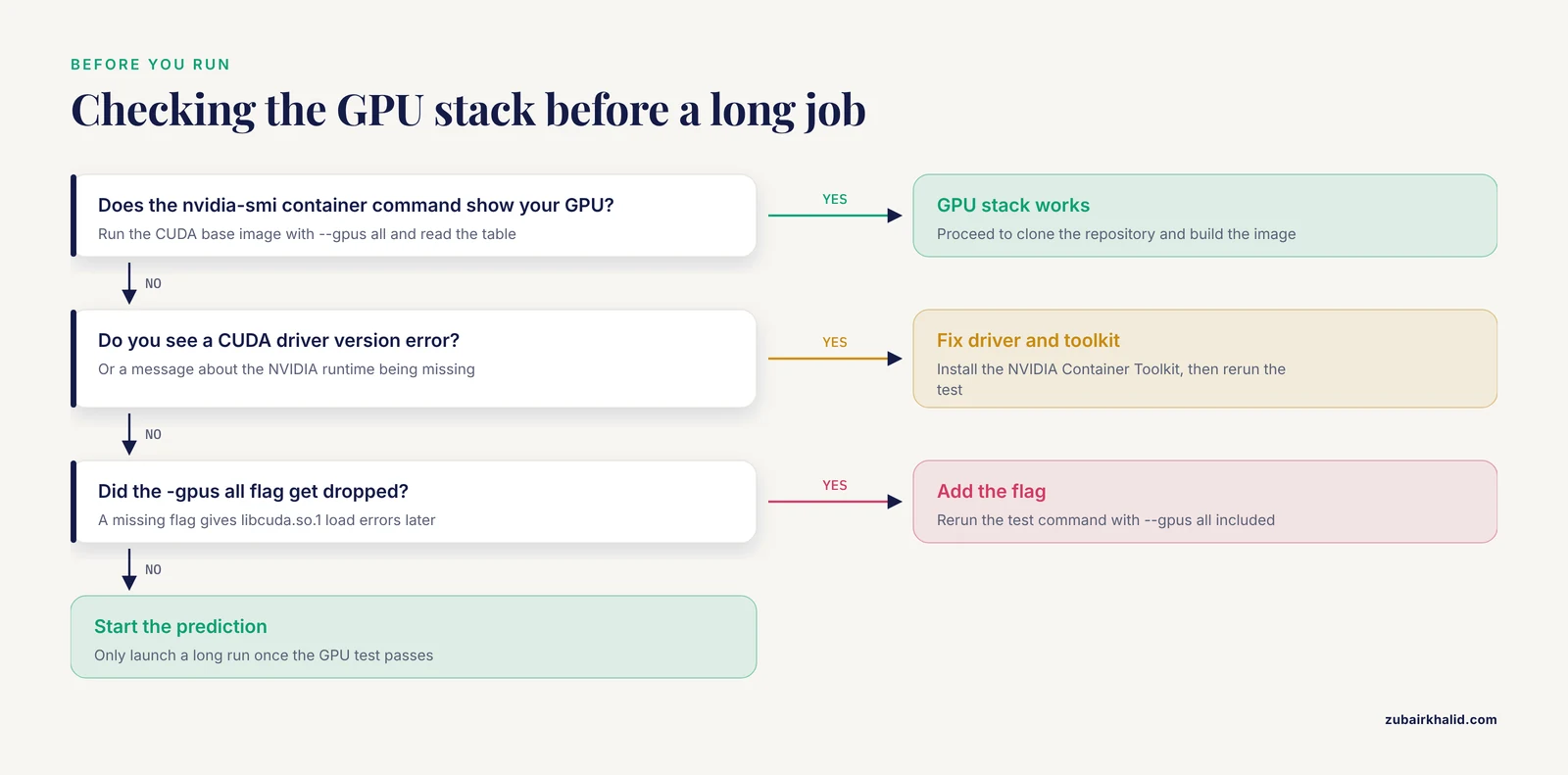
To verify Docker and the GPU stack are working before anything else, run:
docker run --rm --gpus all nvidia/cuda:11.8.0-base-ubuntu22.04 nvidia-smiExpected output is the standard nvidia-smi table showing your GPU name, driver version, and memory. If you instead see CUDA driver version is insufficient or an error about the NVIDIA runtime, fix the driver and NVIDIA Container Toolkit now, because nothing downstream will work until this command succeeds.
Step 2: Clone the Repository and Build the Image
Create a working directory and clone the code:
git clone https://github.com/google-deepmind/alphafold.git
cd alphafold
git checkout v2.3.2
Pinning a tagged release matters. The repository's main branch can move, and reproducing a result months later is far easier when the commit is recorded in your lab notebook.
Build the Docker image. This compiles the container and takes roughly 20 to 40 minutes depending on your machine:
docker build -f docker/Dockerfile -t alphafold_2.3.2 .Expected output ends with lines like:
Successfully tagged alphafold_2.3.2:latestIf the build fails partway through, the most frequent cause on servers is a stale Docker daemon or insufficient build-time memory. Restarting the Docker service (sudo systemctl restart docker) and rerunning resolves most of these. On clusters with a proxy, make sure HTTP_PROXY and HTTPS_PROXY are exported before the build, because the Dockerfile downloads several archives from the internet.
If you are on Apptainer instead, skip the Docker build and pull the prebuilt image:
apptainer pull alphafold_2.3.2.sif docker://ghcr.io/kalininalab/alphafold-non-docker:2.3.2or build from the repository Dockerfile with apptainer build. The community-maintained Apptainer images track the official releases, and their documentation explains the mapping between docker/run_docker.py arguments and apptainer run arguments.
Step 3: Download the Genetic Databases and Model Parameters
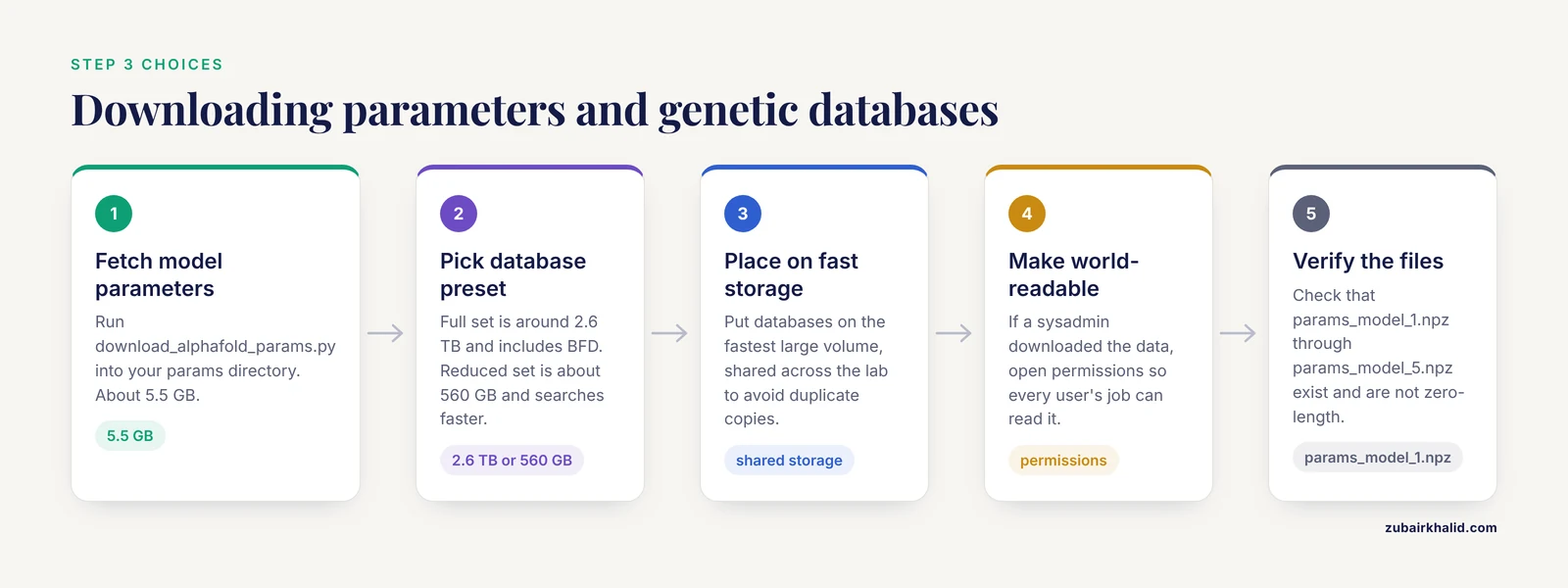
This step is long (hours, on a fast connection) and it is the one people shortcut incorrectly, so read the options first.
The scripts/download_alphafold_params.py script fetches the neural network parameters, and scripts/download_all_data.sh fetches the genetic databases. Both are run from the repository root:
# Model parameters (about 5.5 GB)
python scripts/download_alphafold_params.py --download_dir /data/alphafold/params

# Full genetic databases (around 2.6 TB)
bash scripts/download_all_data.sh /data/alphafold/data full_dbs

# OR reduced genetic databases (about 560 GB)
bash scripts/download_all_data.sh /data/alphafold/data reduced_dbs
Expected output is a long stream of download progress lines followed by extraction messages. When it finishes, your data directory should look like this:
/data/alphafold/data/
├── bfd/
├── mgnify/
├── params/
├── pdb70/
├── pdb_mmcif/
├── pdb_seqres/
├── uniprot/
├── uniref30/
└── uniref90/
Three decisions to make deliberately here:
- Full versus reduced databases. The full set includes BFD, a very large metagenomic sequence database. The reduced set substitutes smaller databases. For routine predictions of well-covered proteins, reduced is fine and the MSA search finishes several times faster. For orphan proteins, novel folds, and difficult complexes, use the full set, because a deeper MSA directly improves prediction quality.
- Where the data lives. Put the databases on the fastest large-volume storage you have. Every job reads them, and on shared servers putting them on network storage shared across the lab avoids duplicating 2.6 TB per user.
- Permissions. If a sysadmin downloads the databases, make the directory world-readable. A surprisingly common failure mode is a job that works for the person who downloaded the data and fails for everyone else.
You can verify the download completed cleanly by checking the parameters directory:
ls /data/alphafold/params/Expected output includes files named params_model_1.npz through params_model_5.npz plus multimer variants such as params_model_1_multimer_v3.npz. If those files are missing or zero-length, the download script was interrupted. Rerun it, since the scripts skip files that are already complete.
Step 4: Prepare Your Input Sequences
AlphaFold takes plain FASTA files. For a monomer, one sequence per file is all you need:
cat > /data/jobs/lysozyme.fasta <<'EOF'
>MLYZ_HUMAN
KVFERCELARTLKRLGMDGYRGISLANWMCLAKWESGYNTRATNYNAGDRSTDYGIFQINSRYWCNDGKTPGAVNACHLSCSALLQDNIADAVACAKRVVRDPQGIRAWVAWRNRCQNRDVRQYVQGCGV
EOF
Two rules from the documentation that are easy to miss:
- Do not include signal peptides, tags, or fusion partners unless you specifically want them modeled. AlphaFold predicts the structure of exactly the residues you give it, and an N-terminal His tag will be predicted as an unstructured tail that can distort domain placement.
- Preprocess with tools that match the standard pipeline. If your protein has unmodeled regions you intend to remove, remove them from the FASTA rather than hoping the model ignores them.
For a multimer (AlphaFold-Multimer), provide each chain either as a comma-separated list of FASTA files or as one FASTA with chains separated by lines beginning with >. The chain names matter for homo-oligomers: identical chains must share the same name so the model treats them as identical copies.
cat > /data/jobs/complex_chainA.fasta <<'EOF'
>hemA
MKVLWAALLVTFLAGCQAKVEQAVETEPEPELRQQTEWQSGQRWELALGRFWDYLRWVQTTLSEQVQEELLSSQVTQELRALMDETMKELKDKATLPHPKESGSVSK
EOF

cat > /data/jobs/complex_chainB.fasta <<'EOF'
>hemB
GSKLVDYGSPVLDIVRQLLSEFGDSEDEGISLLHWFHIAVGTNIQHGFHSLKQGDEDKDNLLNSLLDLQTKKKNMKGLFVQADFNVSSPPGFNQAVGGSLGALHLGQPPQ
EOF
For a homodimer (two identical chains), both files would contain the same sequence and the same chain name. Also pass -num_multimer_predictions_per_model 5 for homo-oligomers, because sampling multiple seeds markedly improves the chance of finding the correct assembly, a recommendation that comes from the AlphaFold-Multimer paper by Evans and colleagues.
Deciding how many chains to include in a complex is a modeling decision, not a formatting one. If you know from biophysical data that your protein dimerizes, model the dimer. If you do not, run the monomer first, then test a dimer and compare interface confidence.
Step 5: Run AlphaFold
This is the core of the step-by-step walkthrough. The repository provides run_alphafold.py for native installs and docker/run_docker.py for Docker installs. The Docker wrapper handles volume mounting and GPU passthrough for you, so that is the version shown here:
python3 docker/run_docker.py \
  --image alphafold_2.3.2 \
  --fasta_paths /data/jobs/lysozyme.fasta \
  --output_dir /data/jobs/output \
  --data_dir /data/alphafold/data \
  --db_preset full_dbs \
  --model_preset monomer \
  --max_template_date 2026-01-01 \
  --use_gpu_relax
Expected output as the job progresses:
I0302 14:02:11.445392 12345 templates.py:xxx] Found 4 templates
I0302 14:05:32.110482 12346 pipeline.py:xxx] MSA finished in 201 seconds
I0302 14:07:58.221891 12347 model.py:xxx] Running model_1
I0302 14:09:14.776501 12347 model.py:xxx] Ran model_1 in 76.3s
...
I0302 14:22:41.001382 12351 relaxation.py:xxx] Relaxation done
For a complex, change two arguments:
python3 docker/run_docker.py \
  --image alphafold_2.3.2 \
  --fasta_paths /data/jobs/complex_chainA.fasta,/data/jobs/complex_chainB.fasta \
  --output_dir /data/jobs/output \
  --data_dir /data/alphafold/data \
  --db_preset full_dbs \
  --model_preset multimer \
  --max_template_date 2026-01-01 \
  --num_multimer_predictions_per_model 5 \
  --use_gpu_relax
The parameters that actually change your results are summarized here.
| Parameter | What it controls | When to change it |
|---|---|---|
-model_preset | monomer, monomer_ptm, or multimer models | Use multimer for anything with more than one chain |
-db_preset | full_dbs or reduced_dbs | Use full_dbs for hard targets, reduced_dbs for screening |
-max_template_date | Cutoff for structural templates used | Set to your project's knowledge cutoff date to avoid data leakage in benchmarks |
-num_multimer_predictions_per_model | Number of samples per multimer model | Set to 5 for homomers and difficult heteromers |
-use_gpu_relax | Runs Amber relaxation on the GPU | Leave on. CPU relaxation can take as long as inference |
-num_recycle (native installs) | Recycling iterations | Defaults are fine for most targets, reduce to speed up screening |
-stop_at_score | Stops recycling early when score converges | Useful for reducing runtime on long screening runs |
The -max_template_date flag deserves one more sentence. Template date control exists to prevent information leakage when you benchmark a method against structures solved after a cutoff. For production predictions there is no reason to use an old date, but fixing one date for your whole project makes runs reproducible and comparable, which is why I set it explicitly rather than trusting defaults.
The AlphaFold documentation reports that a typical shorter-sequence prediction takes on the order of two hours on a single V100 GPU with reduced databases, including MSA search. On a modern A100 with a warm database cache, the same job usually finishes well under an hour. Long chains and five-sample multimer runs scale up from there, which is why the tips section below focuses on reuse and parallelism.
Step 6: Interpret the Output
When the job finishes, your output directory contains a consistent set of files:
/data/jobs/output/lysozyme/
├── ranked_0.pdb
├── ranked_1.pdb
├── ranked_2.pdb
├── ranked_3.pdb
├── ranked_4.pdb
├── result_model_1.pkl ... result_model_5.pkl
├── scores_ranked_0.json ... scores_ranked_4.json
├── timings.json
├── features.pkl
├── msa/
├── predicted_aligned_error_v1.png (per model)
└── relaxation metrics in the result pickles
The files that matter for judging a prediction:
- ranked_0.pdb is AlphaFold's best model, already ranked by confidence. The other ranked files are alternatives, and for flexible proteins they can represent genuinely different conformations worth inspecting.
- The B-factor column of each PDB holds the pLDDT value. pLDDT (predicted local distance difference test) is a per-residue confidence score from 0 to 100. Scores above 90 indicate very high confidence suitable for detailed analysis, 70 to 90 indicates the backbone is probably correct while side-chain details deserve care, 50 to 70 indicates low confidence, and below 50 is typically disordered in reality. This color-coding convention is the same one used in the AlphaFold Protein Structure Database browser.
- The predicted aligned error (PAE) matrix, stored in the result pickles and rendered as
predicted_aligned_error_v1.png, gives the expected positional error in angstroms between every pair of residues. Within a confidently folded domain, off-diagonal values stay low. High PAE between two regions means AlphaFold does not know how those regions are arranged relative to each other, which is often the correct biological answer for a floppy linker or a disordered segment. - scores_ranked_0.json contains aggregate metrics. For monomers, look at
ptm. For multimers, the key metric isiptm(interface pTM), which scores the predicted interface specifically. The AlphaFold-Multimer paper recommends treating interface confidence as the main acceptance criterion for complex models, and docking evaluations have used an ipTM cutoff of 0.6 as a practical filter for reliable interfaces. Do not accept a multimer model with high chain-wise pLDDT but low ipTM, because that combination means the chains folded correctly individually while their relative arrangement is uncertain.
A quick sanity check script to summarize a finished run:
python3 - <<'EOF'
import json, glob
for f in sorted(glob.glob("/data/jobs/output/*/scores_ranked_*.json")):
    s = json.load(open(f))
    keys = [k for k in ("iptm", "ptm") if k in s]
    print(f, {k: round(s[k], 3) for k in keys})
EOF
To visualize the model, load ranked_0.pdb into PyMOL or ChimeraX and color by b-factor (spectrum b in PyMOL). Green to blue regions are trustworthy, yellow to orange regions are not. This single habit, coloring by pLDDT before drawing any conclusion, prevents more misinterpretation than anything else on this list.
Running AlphaFold on an HPC Cluster
If your server is a SLURM-scheduled cluster rather than a single workstation, the workflow changes in two ways: the container runtime is usually Apptainer, and each prediction is a batch job. Here is a working template:
#!/bin/bash
#SBATCH --job-name=alphafold
#SBATCH --partition=gpu
#SBATCH --gres=gpu:a100:1
#SBATCH --cpus-per-task=8
#SBATCH --mem=64G
#SBATCH --time=12:00:00

module load apptainer cuda/11.8

DATA_DIR=/scratch/alphafold/data
OUT_DIR=/scratch/$USER/af_out/$SLURM_JOB_ID

apptainer run --nv \
  --bind $DATA_DIR:/data \
  --bind $OUT_DIR:/out \
  alphafold_2.3.2.sif \
  --fasta_paths=/data/myprotein.fasta \
  --output_dir=/out \
  --data_dir=/data \
  --model_preset=monomer \
  --db_preset=full_dbs \
  --max_template_date=2026-01-01
Submit with sbatch alphafold.sbatch and check progress with squeue -u $USER. Three cluster-specific practices are worth adopting immediately:
- Put the databases on shared parallel storage and get the sysadmin to install them once at the site level. Every lab downloading its own copy of 2.6 TB is a storage emergency waiting to happen.
- Request scratch output space, not your home directory. Output directories with MSAs and pickles can reach several gigabytes per job, and home quotas are usually small.
- Array jobs for batch screening. If you have 200 sequences, submit them as a SLURM array where each task handles one FASTA, rather than serializing them in one long job.
AlphaFold Server Tutorial Tips for Faster and Better Predictions
These are the adjustments that give the largest payoff in day-to-day server work.
Reuse MSAs across runs. The MSA search is often half the wall-clock time of a job, and it does not change unless your databases change. Tools such as ColabFold and several community pipeline scripts can compute MSAs once, store the pickles, and run model inference against them repeatedly. If you are iterating on the same sequence with different presets, this turns hour-long jobs into minute-long ones.
Use the reduced databases for screening and the full set for finals. Screening hundreds of constructs against reduced databases and rerunning only the hits on full databases gives you most of the accuracy where it matters at a fraction of the cost.
Cache the PDB templates. A local copy of the PDB mmCIF files, updated monthly, removes the dependency on the PDB download step and makes template search deterministic across jobs.
Batch intelligently. One GPU per job is the norm. Running multiple small predictions concurrently on one large GPU sometimes works, but JAX preallocates nearly all GPU memory by default, so set XLA_PYTHON_CLIENT_PREALLOCATE=false if you deliberately share a card.
Check timings.json. It records how long each stage took. If MSA search dominates, the reuse tip applies. If relaxation dominates, confirm -use_gpu_relax is set. If model inference itself is unexpectedly slow, check that the job is actually using the GPU and not silently falling back to the CPU.
Consider ColabFold for throughput. ColabFold, described by Mirdita and colleagues in Nature Biotechnology in 2022, wraps the AlphaFold models with MMseqs2-based MSA search against precomputed sequence databases, which is dramatically faster than jackhmmer searches. On a server with a GPU, colabfold_batch handles the whole pipeline in one command:
colabfold_search input.fasta /data/mmseqs_db/uniref30 msa.a3m
colabfold_batch --num-models 5 --amber msa.a3m /data/jobs/out/
For many lab workflows, ColabFold on your own server gives nearly identical model quality with far less setup. The original DeepMind code remains the reference implementation and is the safer choice when exact reproducibility against published runs matters.
AlphaFold3: What Server Operators Need to Know
AlphaFold3, published by Abramson and colleagues in Nature in 2024, extends prediction to complexes containing proteins, nucleic acids, ligands, ions, and chemical modifications. Its accuracy on protein-ligand and protein-nucleic acid interfaces substantially exceeds AlphaFold2 in the published benchmarks.
The practical situation for running it yourself is different from AlphaFold2. Google offers the AlphaFold3 Server as a free web service for non-commercial use with a daily request limit, and the inference source code was released for non-commercial use, but the trained model weights are available only through a request and approval process with Google rather than a public download. That means most labs in 2026 use the AlphaFold 3 Server interactively and run AlphaFold2 or ColabFold on their own hardware for high-throughput and commercial work. Check the current terms on the official AlphaFold 3 Server site before building a workflow around it, since access conditions are set by Google and have already changed once since release.
Common Mistakes and Limitations
These are the errors I see most often when helping labs set up an AlphaFold server, with the exact failure modes and fixes.
Running with the monomer preset on a complex. The job completes without errors, but you get a single chain folded in isolation and then wonder why the interface is missing. The fix is -model_preset multimer with one FASTA per chain. The symptom that gives this away is an output directory with no iptm in the scores.
Confusing high per-chain confidence with a correct complex. A multimer model can have every chain beautifully folded (high pLDDT) while the interface is wrong (low ipTM). Always read ipTM for complexes before believing an assembly.
Not setting -max_template_date and getting irreproducible results. Because the script refuses to run without this flag in the reference implementation, most people set it, but they set it to different values in different runs. Templates deposited into the PDB after an old cutoff will not be used, so a job run today and one run last month can disagree. Fix one cutoff per project and record it.
The most common runtime error, GPU out of memory. JAX reports it as:
RESOURCE_EXHAUSTED: Out of memory while trying to allocate ...The fixes, in order of preference: use a GPU with more memory, shorten the sequence or split domains, reduce the number of chains in a multimer job, or reduce recycling. There is no flag that magically fits a 3,000-residue protein into 16 GB. Memory demand grows steeply with length, and very long chains may exceed even 80 GB cards.
Docker cannot see the GPU. The error is usually:
Could not load dynamic library 'libcuda.so.1'This means the NVIDIA Container Toolkit is missing or the -gpus all flag was dropped. Test with the nvidia-smi container command from Step 1 before starting a long run.
Insufficient or partial database downloads. A failed download script leaves truncated archives that produce cryptic jackhmmer or HHsearch failures hours into a job. Always let download_all_data.sh finish and spot-check that the largest files (BFD, PDB70, the mmCIF templates) are present and nonzero.
Forgetting that AlphaFold2 does not model ligands, glycans, or most cofactors. AlphaFold2 predicts protein atoms only. If your protein is zinc-binding, glycosylated, or bound to a drug, the metal and ligand will be absent from the model, and residues near a ligand-binding site may be modeled in a slightly different conformation than in reality. This is a genuine capability boundary of AlphaFold2, addressed in AlphaFold3.
Treating low-confidence regions as wrong and high-confidence regions as gospel. A pLDDT below 50 usually means the region is disordered in solution, not that the prediction failed. Conversely, a confident model is a hypothesis about the most likely structure given evolution and templates, not a crystal structure. Validate experimentally important claims (active sites, interfaces, mutations) with biochemical or structural data.
Citing predicted structures as if they were experimental. When you deposit or publish a model derived from your server runs, label it as a prediction, report the confidence metrics, and note the software version and database presets. Journals and reviewers increasingly ask for exactly these details.
One limitation applies to all uses of the tool and is worth stating plainly: AlphaFold predictions are computational hypotheses. Any conclusion that matters for a publication, a drug discovery decision, or an experiment design should be checked against evidence beyond the model itself.
Frequently Asked Questions
Can I run AlphaFold on a server without a GPU?
Technically the code can run on CPU, but a prediction that takes minutes on a GPU can take a day or more on CPUs and some configurations simply fail to run in reasonable time. For any serious use, get a GPU with at least 16 GB of memory.
How long does an AlphaFold prediction take on a server?
A short monomer prediction takes roughly minutes to two hours depending on the GPU, the database preset, and MSA search time. Large multimers with five sampled models per network can take many hours, and chain length matters more than anything else in determining runtime.
What is the difference between AlphaFold2 and AlphaFold-Multimer?
AlphaFold-Multimer is the same underlying system with additional training on protein complexes, invoked with -model_preset multimer on two or more input chains. It adds interface-specific confidence metrics such as ipTM that the monomer models do not produce.
Should I use the full databases or the reduced set?
Use the reduced set for routine predictions and high-throughput screening, and the full set, which includes the large BFD sequence database, for orphan proteins, novel folds, and final models of important targets. The full set costs around 2.6 TB of disk versus roughly 560 GB reduced.
What pLDDT score is good enough to trust a model?
Residues above 90 are very high confidence, 70 to 90 are generally reliable for backbone placement, and below 70 deserve skepticism, with anything under 50 likely disordered in reality. Judge each region of the model rather than relying on a single global number.
Can AlphaFold2 predict complexes with DNA, RNA, or small molecules?
No. AlphaFold2 handles protein chains only, including their interfaces with each other. Ligands, nucleic acids, ions, and chemical modifications require AlphaFold3, available through Google's web server for non-commercial use and through an approved-weights process for running locally.
Why is my AlphaFold job slower than expected?
The usual culprits are MSA search against the full databases on slow storage, CPU-based relaxation because -use_gpu_relax was omitted, and cold page caches after a server restart. Check timings.json in the output to see which stage is consuming the time.
Do I have to reinstall databases every time AlphaFold updates?
No. Genetic databases rarely change, and the download scripts let you keep an existing data directory. New model parameters do accompany each AlphaFold release, but those are a few gigabytes and download quickly compared with the sequence databases.