AlphaFold Server Errors: Causes and Fixes
By Dr. Zubair Khalid, DVM, MS, PhD ·

The single most common AlphaFold server error is a rejection at the moment of submission, and the single most common reason for that rejection is the input itself: a sequence that is too long for the server's token budget, or text pasted into the sequence box in the wrong format. Before you assume the server is broken, open your job, look at the sequence field, and check for FASTA header lines (text starting with the greater-than sign), gap dashes, blank lines, or a construct that runs several thousand residues. Most AlphaFold server errors trace back to one of those two problems, and most take less than five minutes to fix.
This article covers the full range of AlphaFold server error causes and solutions, working from the most frequent failures to the rarest. It also covers a category of problems that look like errors but are not: predictions that complete successfully and then mislead you, most notably the well-documented tendency of the interface pTM (ipTM) confidence score to drop when you submit full-length constructs instead of trimmed constructs [1]. By the end you will have a short diagnostic sequence you can follow for any AlphaFold server error, a reference table you can keep open while you work, and a set of prevention practices that stop most errors from happening at all.
How the AlphaFold Server Works, and Where It Fails
The AlphaFold server is Google DeepMind's free web interface for running AlphaFold 3 (AF3) predictions without installing anything. You describe a complex through a set of entity fields, one for each protein chain, nucleic acid chain, ligand, ion, or modification. The server tokenizes your input, runs the multiple sequence alignment (MSA) search and the AF3 network on Google infrastructure, and returns a predicted structure with per-residue confidence (pLDDT), a pairwise aligned error matrix (PAE), and summary confidence scores including pTM and ipTM.
Three properties of this pipeline explain most AlphaFold server error causes:
- The input is validated at submission time. The server enforces a total token budget per job (on the order of five thousand tokens, where a standard amino acid or nucleotide costs roughly one token and ligands or modified residues cost more), a cap on the number of entities, and strict character rules on sequence fields. Anything that violates these rules is rejected before the job ever runs, which is why so many errors appear instantly.
- Compute is shared and rationed. Because the service is free, each user gets a fixed number of jobs per day and can hold only a small number of jobs in the queue at once. Queue-related messages are a normal part of using the server under load, not a sign that your input is wrong.
- A successful job is not the same as a correct answer. AF3 can return a beautifully folded structure with confidence statistics that understate the quality of the interface you care about. The ipTM issue described later in this article is the best documented example of this gap.
Keeping these three failure classes separate (validation, capacity, and interpretation) is the fastest route to a fix, because each class has a completely different remedy.
A Five-Minute Diagnostic Sequence
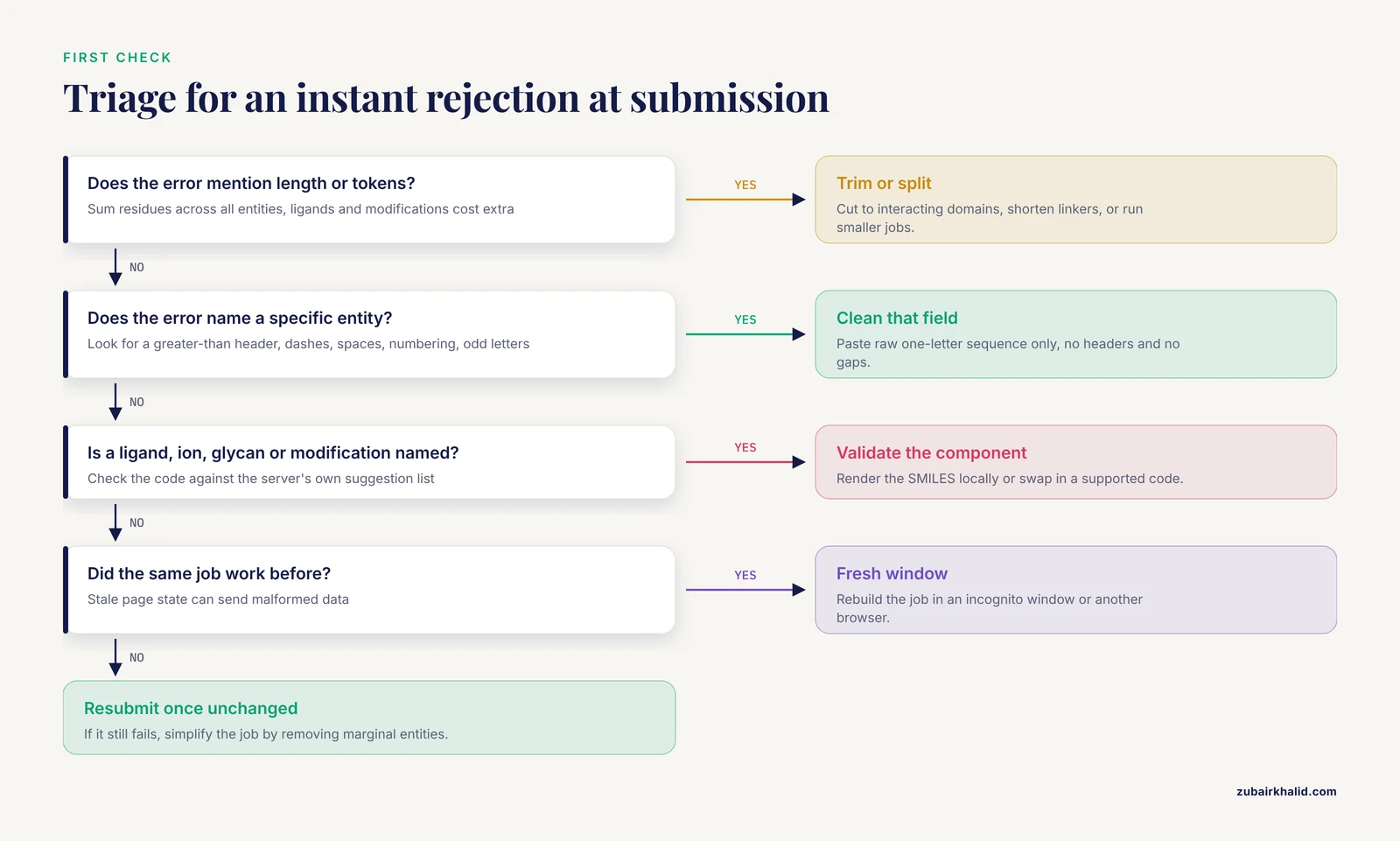
When any AlphaFold server error appears, work through this sequence in order. It resolves the majority of cases and tells you quickly whether you are dealing with your input, the service, or the interpretation of results.
- Read the exact error text. AlphaFold server error messages generally state which field failed. A message naming an entity points at that entity's sequence, SMILES string, or residue choices. A message about tokens or length points at total job size.
- Check the sequence fields for paste artifacts. Look for a leading greater-than sign and a header line, gap dashes, whitespace, numbering, or unusual letters. Strip everything that is not the raw one-letter sequence.
- Add up your construct lengths. Sum the residues across all entities and compare against the token budget. If you are near or over the limit, trim to the regions that matter, shorten linkers, or split the question into smaller jobs.
- Check ligands and modifications. Every non-standard molecule must come from the server's supported sets (known chemical component codes, supported glycans, supported modified residues, or a valid SMILES string). An invalid SMILES string or an unsupported modification code is a frequent cause of instant rejection.
- Check your account status and queue. If the input looks clean, confirm you have not hit the daily job limit and that your queued-jobs slot is not full. Wait for existing jobs to finish or clear.
- Retry once under different conditions. If submission succeeds but the job fails later, resubmit unchanged. Transient server-side failures happen. If the same input fails twice, reduce its size or simplify it.
- Rule out the browser. A stuck, half-loaded submission page can send malformed data. Try an incognito window or a different browser before concluding the server rejected your science.
If all seven steps come up clean and the failure persists, you are most likely looking at a service-side problem or an input that exceeds hard limits, and the sections below cover both in detail.
AlphaFold Server Error Troubleshooting Table
This table is the core reference for how to fix an AlphaFold server error quickly. Find the symptom you are seeing, confirm the cause, and apply the fix.
| Symptom | Likely cause | How to confirm | Fix |
|---|---|---|---|
| Instant rejection on submit, message about length or tokens | Total job exceeds the token budget | Sum residues across all entities, remember that ligands and modified residues cost extra tokens | Trim constructs to the domains of interest, shorten linkers, or split into several smaller jobs |
| Instant rejection naming a specific entity | Bad characters or format in that entity's sequence field | Open the field and look for a greater-than sign header line, dashes, spaces, numbering, or letters outside the standard 20 amino acids or standard nucleotides | Paste raw sequence only, one-letter code, no headers, no gaps, no annotations, uppercase if the server does not normalize case for you |
| Instant rejection for a ligand | Invalid SMILES string or unsupported chemical component code | Render the SMILES in a local molecule editor to check it parses, or search the chemical component dictionary for the code | Correct the SMILES, or replace the custom ligand with the closest supported code, or omit the ligand and note its likely position manually |
| Instant rejection for a modification | Modified residue or glycan not in the supported list | Compare your modification against the choices the server's dropdown actually offers | Use a supported modification, or model it as a separate ligand attached to the chain, or drop it and interpret the apo prediction with care |
| Repeated rejections on a job that worked before | Session or page state corruption | Test in an incognito window or another browser | Clear the site's stored state, log back in, rebuild the job in a fresh window |
| Submission succeeds, job stuck in queue for hours | Server load, or your queued-jobs slots are full | Check how many of your previous jobs are still pending or queued | Wait for queued jobs to clear, delete completed jobs from your history if that frees slots, resubmit at off-peak hours |
| Job fails partway through with a generic failure message | Server-side runtime failure, often correlated with very large or very complex inputs | Resubmit the identical input once. A one-off failure that succeeds on retry is server-side | If it fails repeatedly, reduce entity count, trim sequences, or remove marginal entities such as weakly supported ligands |
| Daily submission attempts refused | You have reached the per-user daily job limit | Count the jobs you submitted in the last 24 hours on your account | Wait for the limit to reset, prioritize which jobs actually matter, consider a local AF3 installation or AF2-based alternatives for bulk work |
| Structure returned, pLDDT high, interface looks plausible, but ipTM is low | ipTM is deflated by disordered regions or accessory domains included in the chains [1] | Inspect the PAE matrix. If the inter-chain block over your interacting domains is dark (low error) while large parts of each chain show high error, the interface itself is well determined | Trim the constructs to the interacting domains and resubmit, or judge the interface directly from the inter-chain PAE block rather than from the single ipTM number [1] |
| Structure returned, pLDDT low across most of every chain | The model finds no stable structure, often because the input really is disordered or lacks covering sequence data | Look at the PAE matrix. Uniform high error across everything means the model has no confident answer | Treat this as a result, not an error. The prediction says the construct does not form a single well-defined structure under AF3's assumptions |
| Interface pLDDT good, but inter-chain PAE block high | The chains are each confidently folded but their relative arrangement is not determined | Compare intra-chain PAE blocks against the inter-chain block in the PAE matrix | Do not interpret the relative pose as a finding. Try adding experimental restraints conceptually, check whether the interaction is real, and consider whether the interface needs a cofactor or partner you did not include |
| Cannot download or open results | Download failure, expired storage, or viewer problem | Check whether the file downloads at all and whether it opens in a local structure viewer | Re-download from the results page, check that your results have not passed the server's retention window, open files in an independent viewer rather than relying only on the web viewer |
Cause One: Submission-Time Input Validation Errors
These are the most common AlphaFold server error causes, and they are almost entirely under your control.
The token limit
AF3 does not read residues one by one. It reads tokens, and every entity you add consumes tokens. A standard amino acid or nucleotide maps to roughly one token, while ligands, glycans, ions, and modified residues consume more because the model must represent their chemistry explicitly. The server enforces a total budget per job (on the order of five thousand tokens at the time of writing, though published limits change as DeepMind updates the service).
The practical consequence is that a full-length membrane receptor plus its full-length binding partner plus a ligand plus a glycan can blow through the budget even though each piece looks modest. The error message usually tells you the job is too long. The fix is one of three moves:
- Trim to the domains that interact. If you are asking whether a kinase domain binds a peptide, submit the kinase domain and the peptide, not both full-length proteins. This is also the correct move scientifically for a second reason described in the ipTM section below [1].
- Shorten linkers and tags. Expression tags, long flexible linkers, and unstructured extensions consume tokens and, as documented below, actively damage your confidence scores.
- Split the question. If you need to compare a protein against five partners, run five focused jobs rather than one oversized job.
Formatting and illegal characters in sequence fields
The sequence boxes expect raw one-letter codes and nothing else. Copying from a database page, a PDF, a spreadsheet, or an alignment file routinely introduces characters that fail validation:
- A FASTA header line, meaning any line beginning with the greater-than sign, is the classic culprit. Many people paste an entire FASTA record including the header. Delete the header, keep only the sequence line.
- Gap dashes from multiple sequence alignments. These are alignment notation, not sequence.
- Blank lines, spaces, or carriage returns in the middle of a sequence.
- Residue numbering or annotation text copied from a database entry.
- Ambiguity and nonstandard letters. Beyond the canonical amino acid letters, codes such as B, J, O, U, X, and Z describe ambiguity or unusual residues and will typically be rejected in a plain protein sequence field. If you have an unknown residue, decide what it is or model it explicitly as a modification if the server supports that choice.
- Terminal stop characters such as an asterisk copied from translated coding sequences.
A reliable habit is to keep a plain-text working copy of every construct, cleaned once, and paste from that file every time. Clean the sequence by hand once, save it, and stop re-deriving it from web pages.
Entity structure mistakes
The server wants each biological unit declared as its own entity, with a specified count. Common mistakes include:
- Typing a homotrimer as one chain and then wondering why the output is a monomer. Set the copy count for the entity instead.
- Pasting two chains into one field. Each chain belongs in its own entity, otherwise AF3 will treat the concatenation as a single covalently linked polymer.
- Mixing up DNA and RNA entity types. Thymine is not a valid RNA base and uracil is not a valid DNA base, and the server will reject the mismatch.
- Forgetting that copies of an entity are treated as symmetric copies of the same sequence. If your two chains are similar but not identical, they need separate entities.
Cause Two: Ligands, Modified Residues, Glycans, and Ions
Non-polymer components are the second most common source of instant rejections, because each has its own validation path.
Ligands by chemical component code. The server recognizes small molecules by their three-letter chemical component dictionary codes. A typo, or a code that exists in a crystal structure but is not among the server's supported entries, produces a rejection naming that component. The fix is to verify the code against the server's own suggestion list, which filters as you type, rather than trusting a code remembered from a PDB file.
Ligands by SMILES string. When a molecule is not in the supported set, you can supply a SMILES string. SMILES validation failures usually mean a syntax problem (unbalanced ring closures or brackets) or a chemistry problem (an atom with impossible valence, an ambiguous stereocenter). Open the SMILES in any local molecular editor and confirm it parses and renders as the molecule you intend before submitting. Note that a SMILES-defined ligand with unfamiliar chemistry may also behave worse in the model than a well-annotated chemical component, so prefer the code when both options exist.
Modified residues. Phosphorylated serines, methylated lysines, and similar modifications are supported only for specific, listed chemical component codes. If your modification is not on the list, the server cannot represent it as a residue. The workarounds are to model the modification as a covalently attached ligand-style component where the interface allows it, or to run the unmodified construct and treat the modification's effect qualitatively. Do not silently substitute a standard residue and then over-interpret the result, because a phosphomimetic substitution is chemically very different from a phosphate.
Glycans. Glycans must be chosen from the server's supported list and attached at a supported residue. Complex or non-mammalian glycans that fall outside the supported set will be rejected. Model the glycan tree you actually need rather than the largest possible tree, both for token economy and because enormous glycan trees add uncertainty to the model without adding information.
Ions. Zinc, magnesium, and other structural ions can matter enormously for interface geometry. Add them as their own entities when the interaction depends on them. A metal-dependent interface predicted without its metal will often show the two chains in a plausible but wrong register, and this shows up as a confident-looking model with a suspicious interface, not as an error message.
Cause Three: Queue and Daily Limit Errors
The AlphaFold server is free, heavily used, and deliberately rationed. Each account gets a fixed number of job submissions per day and can hold only a small number of jobs in the queue simultaneously. Two error patterns follow from this design.
The daily limit. When you have used your daily submissions, further attempts are refused until the allotment resets. This is not an AlphaFold server error in the technical sense, but it produces an error message and it derails a day's work if you discover it at four in the afternoon. Confirm the count on your account page before a long submission session, and order your jobs by priority so the ones you care about go in first.
A stuck queue. Jobs can sit in the queue for extended periods when demand is high. If your job has been queued for a long time, first check whether your own earlier jobs are occupying your queue slots, because a full personal queue blocks new submissions. Deleting finished or abandoned jobs from your history can free slots. Beyond that, patience is the fix. Do not resubmit the same job repeatedly, because each resubmission consumes your daily allotment and adds load.
One planning habit prevents both patterns: batch your submissions deliberately. Decide in the morning which two or three predictions actually answer today's question, submit those, and use the waiting time to prepare the next batch. Users who burn their daily allotment on exploratory one-chain jobs before lunch are the users who meet the limit error most often.
Cause Four: Server-Side Failures and Timeouts
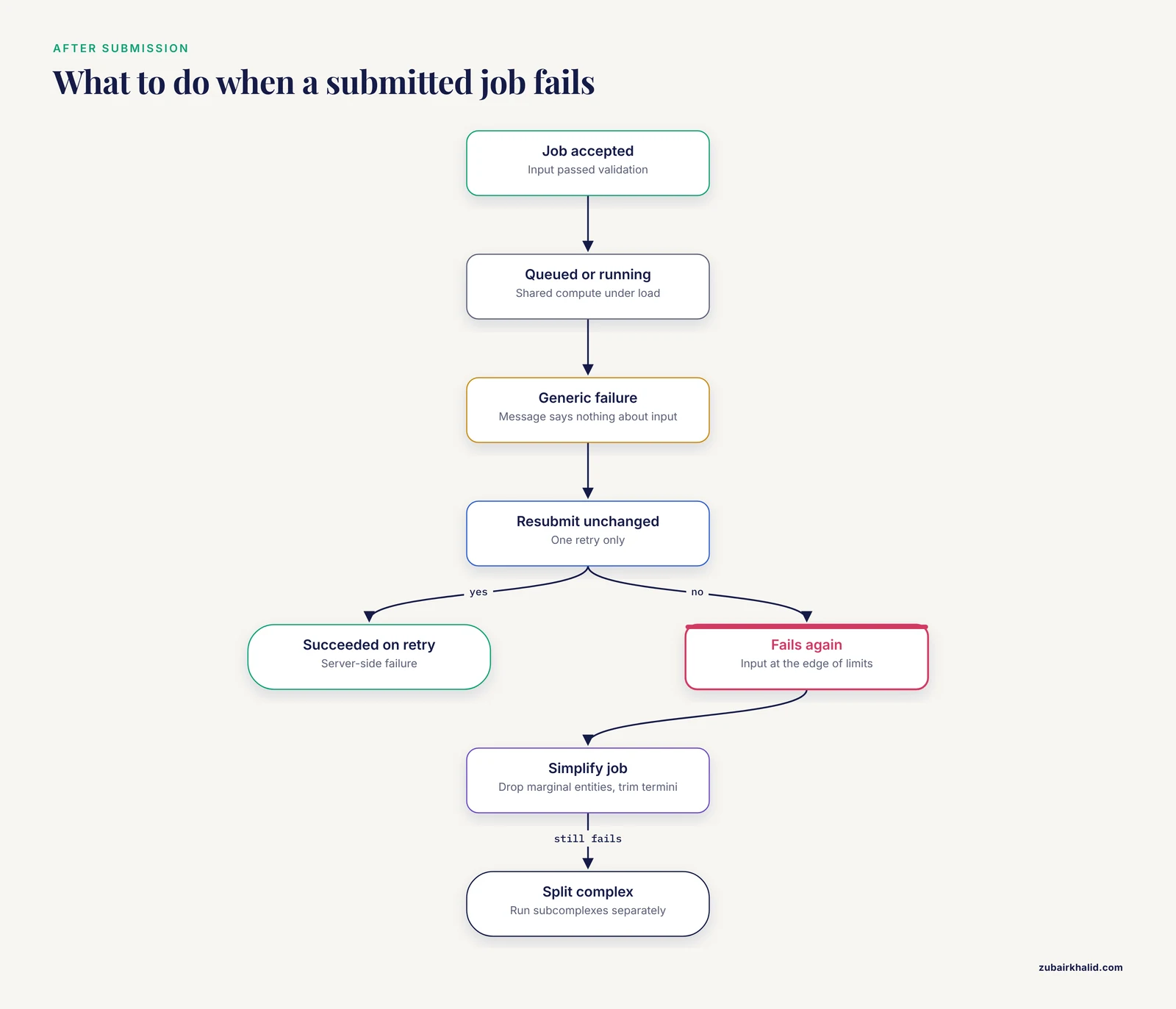
Occasionally a job is accepted, queued, runs, and then fails with a generic error message that says nothing about your input. The defining feature of this class of AlphaFold server error is inconsistency: the identical input succeeds on one attempt and fails on another.
The mechanism is usually a transient failure in a distributed pipeline. Your job passes through queue management, MSA generation against sequence databases, and the network forward pass itself. Any stage can fail under load, and a failure at the MSA stage or mid-inference produces a job-level failure message that cannot tell you which stage broke.
The diagnostic is simple and was listed in the table: resubmit once, unchanged. A job that succeeds on the second attempt was a server-side failure. A job that fails twice with the same input is telling you something about the input, most likely that it is at the very edge of the server's size or complexity limits. In that case, simplify systematically:
- Remove the least essential entity first, usually a marginal ligand or a weakly motivated ion.
- Trim termini and long unstructured insertions from the proteins.
- Reduce glycan size to the minimal tree relevant to your question.
- If the job still fails, split the complex into subcomplexes and run them as separate jobs.
If the entire site is unresponsive, submissions fail for every input including trivial ones, and colleagues report the same, the problem is service-wide. There is nothing to fix on your side. Wait, and check DeepMind's official communication channels for service status rather than burning your daily limit on resubmission attempts.
Cause Five: Browser, Session, and Account Problems
A smaller but genuinely confusing class of errors comes from the client side rather than the server.
Corrupted page state. A submission page that loaded partially, or that has been open across many hours and many jobs, can carry stale state. Symptoms include buttons that do nothing, entity fields that will not accept edits, or rejections that make no sense because the visible form looks correct. The fix is a fresh incognito window, a hard reload, or a different browser. Rebuild the job from scratch in the clean window rather than trusting a draft that was created in the broken one.
Session expiry. If you compose a long, careful job and the session lapses before you submit, the submission may fail in confusing ways or the draft may vanish. For large jobs, prepare your sequences in a local text file first so that a lost session costs you a paste, not an hour of field-by-field construction.
Download and viewer failures. Results that will not download, or structures that will not display in the built-in viewer, are client-side problems more often than server problems. Try the download again, try another browser, and confirm the file opens in an independent structure viewer on your machine. Remember that the server stores results for a limited retention window, so a prediction you noticed a month late may no longer be retrievable, and the only fix is to spend one of your daily submissions running it again.
Account issues. Access requires signing in with a Google account under the current terms of use, which restrict the service to non-commercial use. A sign-in failure or a terms-of-use prompt left unanswered will surface as submission errors. Resolve the account state before troubleshooting anything else.
Cause Six: Results That Look Like Errors but Are Model Behavior
The most intellectually important AlphaFold server errors are not errors at all. The job succeeds, the numbers look alarming, and the interpretation goes wrong. Three patterns cover most cases.
Low pLDDT across the board
pLDDT is the per-residue confidence score, reported from 0 to 100, and it reflects how confidently the model places each atom. When most residues in every chain score low (roughly below 50, the range AF's documentation associates with disorder), the model is telling you it cannot identify a stable structure for your input. This is a result, not a malfunction. Common legitimate reasons include genuinely disordered constructs, proteins whose fold depends on a partner or cofactor you did not include, and domains so novel that the MSA search finds too few homologs. Fixing the submission will not fix this. Reconsidering the biological question might.
High intra-chain confidence with a bad inter-chain PAE block
The PAE matrix reports expected positional error, in angstroms, for every pair of residues. Within-chain blocks that are dark (low error) next to an inter-chain block that is light (high error) mean each protein is confidently folded but their relative orientation is not determined. The model may still draw the chains touching, and the resulting image is seductive, but the relative pose is not a prediction you can rely on. The remedy is not a different submission format. The remedy is to ask whether the interaction is real, whether it depends on a missing component, and whether independent evidence supports the interface.
The ipTM problem
This is the best documented interpretation trap in current practice, and it deserves its own discussion.
The ipTM Problem: Why Trimming Constructs Raises Your Score
ipTM (interface pTM) is the summary score AF2 and AF3 use to describe the predicted accuracy of a protein-protein interface, and many labs also read it as evidence for whether two proteins interact at all, with values above roughly 0.6 widely treated in practice as supporting a plausible interface. The problem is that ipTM is computed over whole chains, and that design has a measurable side effect.
The phenomenon, familiar to many AF2 and AF3 users, is this: take a full-length sequence construct, for example a pair of proteins as they appear in UniProt, submit the complex, and record the ipTM. Then trim both constructs down to just the interacting domains, or to a domain and its binding peptide, and resubmit. The ipTM score goes up, even though the predicted structure of the interaction itself is essentially unchanged [1].
The mechanism is mathematical, and it is worth understanding because it tells you exactly when to distrust the score. ipTM is formulated to score the interactions of whole chains [1]. If each chain contains large stretches of intrinsic disorder, or accessory domains that have nothing to do with the primary domain-domain or domain-peptide interface, those residues contribute to the score even though they are not part of the interaction you are asking about. Disordered or unaligned accessory regions depress the score substantially, so the single ipTM number no longer represents either the accuracy of the interface prediction or the likelihood that the two proteins interact [1]. In other words, the server did not make a mistake and your complex did not change. The metric is averaging in residues that are irrelevant to your question.
Dunbrack's analysis proposes a corrected formulation with three changes [1]:
- Include only residue pairs in the ipTM metric that have good PAE scores, so residues unrelated to the interface stop diluting the statistic.
- Adjust the d0 parameter, the length-dependent scaling constant in the TM-score equation, so that it reflects the number of residues with good inter-chain PAE values rather than the full length of the query sequences.
- Use the PAE values themselves rather than the full probability distributions over aligned error when computing the pairwise residue-residue pTM values that feed ipTM.
You cannot change how the AlphaFold server computes ipTM. You can change how you use it. The practical AlphaFold server error solutions that follow from this analysis are:
- Trim before you submit, when trimming is biologically justified. If your question is about a specific domain-domain or domain-peptide interface, submit the interacting regions. This raises ipTM to a value that actually reflects interface quality [1] and saves tokens at the same time.
- Read the PAE matrix, not just the summary number. The inter-chain PAE block over your residues of interest tells you directly whether the interface is well determined, independent of how much disordered filler is attached to the chains. A confident interface with a deflated whole-chain ipTM is identifiable at a glance this way.
- Compare ipTM between constructs with identical boundaries only. If you compare scores across constructs, trim all constructs the same way. Comparing a full-length score against a trimmed score conflates the metric artifact with a real difference in predicted interaction quality.
- Never use trimming as a way to manufacture a good score. The structure prediction is unchanged by trimming [1]. If the inter-chain PAE block over the interface is poor in both the full-length and trimmed submissions, the interaction is not well determined, and no amount of construct editing changes that. Trimming fixes the metric, not the model.
Common Mistakes and Limitations
These are the errors in practice that the troubleshooting table cannot catch, because they are mistakes of interpretation and workflow rather than of submission.
- Treating a completed job as a validated answer. Every AF3 output is a hypothesis with an attached uncertainty estimate. The confidence scores are the product. A structure with poor confidence is not a failed run, it is an informative one.
- Reading ipTM as a yes-or-no interaction oracle. The score describes predicted structural accuracy of the interface as computed over whole chains, and its behavior under trimming shows it can move without any change in the predicted interaction [1]. Use it alongside the PAE matrix and your own biological knowledge of the system.
- Comparing scores across differently constructed inputs. Construct boundaries, tags, and linkers change tokenization and change ipTM [1]. If you are ranking partners against a bait protein, use the same construct definition for every comparison.
- Pasting sequences from web pages directly. This is the root cause behind a large share of validation errors and it recurs because cleaning a sequence once feels unnecessary until a header character costs you a day.
- Ignoring the daily limit until it blocks you. Plan submissions. The limit is generous for focused questions and punishing for scattershot exploration.
- Assuming the server's MSA is the best possible one. The server generates and uses its own alignments and does not accept user-supplied MSAs. For proteins from sparsely sampled families, or for cases where you know the relevant homologs better than the search does, a locally installed AlphaFold 3 or an AF2-based tool such as ColabFold, which accepts custom alignments, gives you control the server cannot.
- Forgetting run-to-run variability. The server uses stochastic elements of the AF3 pipeline, and repeated submissions of the same input can give structures that differ in loop conformations and, for marginal interfaces, in overall arrangement. Do not rank two hypotheses by single runs. Where a comparison matters, rerun it.
- Over-interpreting docked-looking poses. Two chains drawn in contact is not evidence of binding. Contact without a dark inter-chain PAE block is the model's least-bad guess, not a prediction.
A limitation that applies to everything in this article: individual predictions need expert judgment in the context of your specific system, your experimental data, and your question. Confidence scores guide that judgment, they do not replace it.
Prevention: A Submission Checklist and a Short AlphaFold Tutorial Workflow
Most AlphaFold server errors are preventable at the keyboard, before the submit button. The checklist below takes about two minutes per job.
Prepare sequences in a clean file. One plain-text file per project, containing each construct as a raw one-letter sequence with no headers, no gaps, no numbering, no ambiguity letters you have not decided to model, and no terminal stop characters. Paste from this file only.
Design constructs deliberately. For interface questions, submit the interacting domains, not full-length constructs. This conserves tokens and produces ipTM values that mean what you want them to mean [1]. Record the exact construct boundaries in your notes so every comparison uses the same definitions.
Count your budget before submitting. Estimate residues across all entities, add margin for ligands and modifications, and confirm you are comfortably within the token limit rather than at its edge. Jobs near the limit are the ones that fail intermittently.
Validate every non-polymer component. Check chemical component codes against the server's own suggestion list. Render every SMILES string in a local editor before submission. Confirm glycans and modified residues against the supported dropdowns.
Check entity definitions. One chain per entity, correct copy counts, correct polymer type, matched DNA versus RNA bases.
Check your account budget. Know how many of your daily submissions remain and how many queue slots your pending jobs occupy before you start composing.
A short alphafold tutorial-style workflow for a new protein-protein question:
- Open the server in a fresh browser window and sign in.
- Create the first protein entity and paste the trimmed domain sequence from your clean text file.
- Create the second protein entity with its trimmed sequence. Set copy counts if the biology calls for an oligomer.
- Add any ion or ligand the interface genuinely depends on, using codes or validated SMILES.
- Estimate the total length and confirm the token budget.
- Submit, note the submission time and job name in your notebook, and move on to composing the next job while the queue works.
- When results arrive, read the PAE matrix first, then the inter-chain block over your residues of interest, then the summary scores. Record pLDDT, PAE quality at the interface, and ipTM together, with the construct boundaries noted.
- If ipTM looks inconsistent with the interface PAE, check whether disordered or accessory regions are deflating it [1] and rerun with trimmed constructs if warranted.
A short data safety note. Submissions are processed on Google's infrastructure under the service's current terms, and results are treated as non-confidential, so do not submit sequences tied to unpublished, proprietary, or restricted projects through the public server. For confidential work, use a locally installed, licensed copy of AlphaFold 3 or another local tool.
When to Move Off the Server
The AlphaFold server is the right tool for focused questions on modest complexes. Move to a local or notebook-based workflow when you hit its natural boundaries:
- You need more tokens or more jobs than the server's limits allow. A local AF3 installation, under its own license terms, removes the per-day and per-job ceilings for non-commercial work.
- You need custom MSAs. The server does not accept them. ColabFold and local AF2-based pipelines do, and for under-sampled protein families a curated alignment can change the answer.
- You need custom seeds, many recycles, or pipeline settings the server does not expose. Local installations expose controls the web service deliberately hides.
- You need to compute corrected confidence metrics. If the ipTM reformulation described above matters for your analysis [1], you need the model outputs locally so you can compute interface statistics over the residue pairs you choose.
The web server and the local tools are complements. Use the server for fast, focused, non-confidential interface questions, and move local when the question outgrows the interface.
Frequently Asked Questions
Why does my AlphaFold server job fail immediately after submission?
Almost always because the input failed validation, most often a sequence field containing paste artifacts such as a FASTA header line or gap dashes, or a job exceeding the server's total token budget. Read the error message, clean the named field, and sum your construct lengths before resubmitting.
What does the token limit mean and how do I stay under it?
The server converts every residue, nucleotide, ligand, and modification into tokens and enforces a total budget per job, on the order of five thousand tokens at the time of writing. Stay under it by trimming constructs to interacting domains, shortening linkers and tags, and minimizing ligands and glycans to those your question actually requires.
Why did my job sit in the queue for hours?
Shared compute under heavy load, or your own earlier jobs occupying your queue slots. Check your pending and completed jobs, clear finished ones if that frees capacity, and avoid resubmitting, because each attempt uses your daily allotment.
Why is my ipTM score low even though the interface looks good?
Because ipTM is computed over whole chains, so disordered regions and accessory domains that are not part of the interface depress the score even when the interface prediction itself is unchanged [1]. Check the inter-chain PAE block over your residues of interest, and resubmit trimmed constructs if the block is strong.
Should I trim my sequences before submitting them to the AlphaFold server?
Yes, when your question is about a specific interface and the trimmed boundaries are biologically justified. Trimming raises ipTM to a value that reflects interface quality and saves tokens [1]. Do not trim to manufacture a good score, because the predicted structure of the interaction does not change with trimming [1].
Why is my pLDDT high but the PAE between chains terrible?
Each chain is confidently folded on its own, but the model cannot determine their relative arrangement. Treat the relative pose as undetermined, reconsider whether the interaction is real and whether a missing cofactor, ion, or partner is required, and do not report the docked appearance as a finding.
Can I submit ligands, ions, or modified residues?
Yes. Small molecules are accepted by chemical component code or by SMILES string, ions and glycans from supported lists, and modified residues for specific listed codes. Validate every SMILES in a local editor before submission, and prefer chemical component codes where both options exist.
What should I do when the server itself is down or my job fails with no explanation?
Confirm the failure is service-wide by testing a trivial input or checking with colleagues. If it is, wait and monitor official communication rather than spending your daily submissions. If only your job fails, resubmit once unchanged, and if it fails again, systematically simplify the job by removing marginal entities and trimming sequences.