AlphaFold Runtime Failures: How to Debug
By Dr. Zubair Khalid, DVM, MS, PhD ·

Most alphafold runtime errors are environmental, not algorithmic. The neural network rarely crashes. The job dies because the GPU ran out of memory, the container cannot see the GPU, a database path is wrong, or the input file violates a schema. The most common single cause is GPU memory exhaustion on a long protein or a large complex, and the first thing to check is the tail of the log next to the output of nvidia-smi.
A runtime error here means a job that launches and then fails during multiple sequence alignment (MSA) generation, neural network inference, or structure relaxation. An MSA is the alignment of evolutionarily related sequences that AlphaFold uses to infer which residues constrain one another's positions. A runtime error differs from an installation problem, which stops you before the first job ever starts, and from a poor prediction, where the job finishes and hands you a model you should not trust.
Many readers hit their first alphafold runtime failure immediately after working through an alphafold tutorial. The tutorial's short test protein ran in minutes. The real target, a 1,500-residue membrane protein or a twelve-chain complex, then crashed the job. Nothing in the tutorial was wrong. The input crossed a resource threshold the tutorial never tested. This guide covers alphafold runtime error causes and solutions in order of frequency, gives a symptom-to-fix table, and closes with prevention practices.
How to Fix an AlphaFold Runtime Error: The First Five Checks
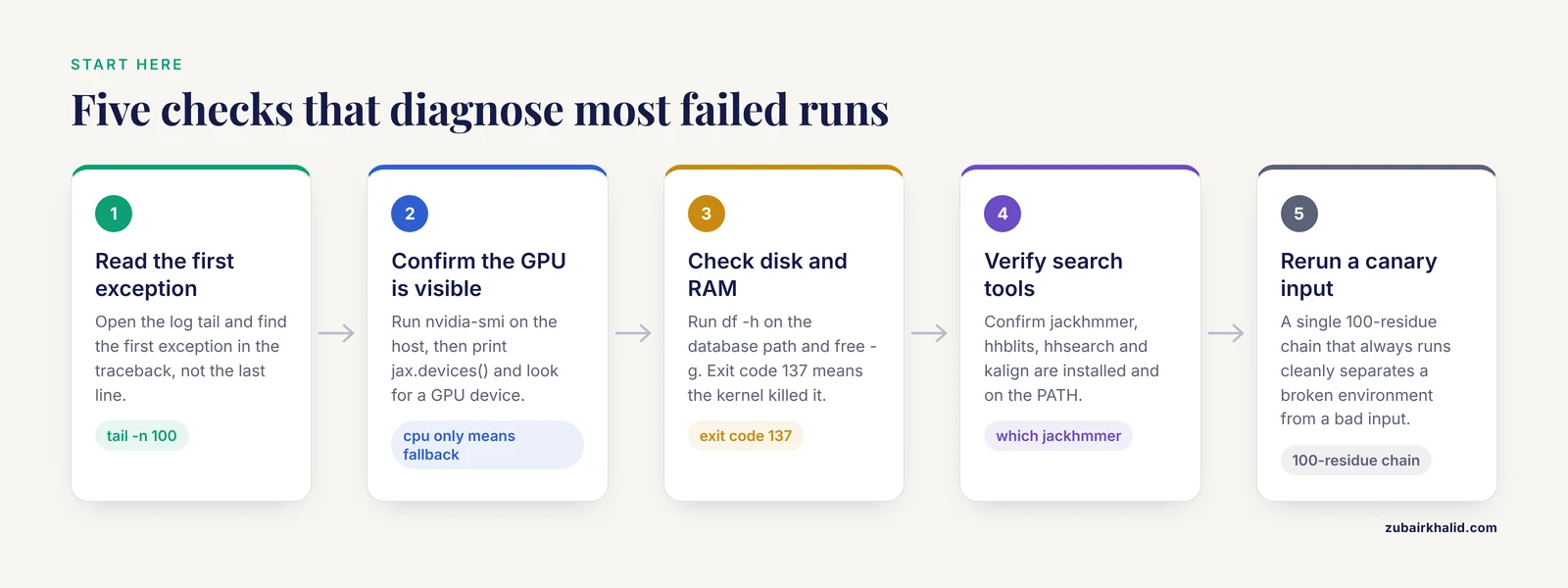
Work through these in order. Most jobs are diagnosed by check two or three, and every check takes under a minute.
1. Read the actual error message. Open the log, look at the end, and then find the first exception in the traceback, not the last line.
tail -n 100 alphafold_run.logThe first exception line names the failing stage. Copy the exact message and search it in the AlphaFold GitHub issue tracker, where common failures are documented in detail by the maintainers and the user community.
2. Confirm the GPU is visible. Run nvidia-smi on the host and confirm that JAX, the numerical library AlphaFold is built on, can see the device:
python - <<'PY'
import jax
print(jax.devices())
PY
A healthy setup prints a GPU device. A list that contains only cpu means JAX silently fell back to the processor, a classic failure mode covered below.
3. Check disk and RAM. The full AlphaFold 2 database set spans multiple terabytes, and MSA outputs add more on top.
df -h /path/to/databases
free -g
If the job died with exit code 137, the Linux kernel killed it for using too much memory. Confirm with dmesg and look for the out-of-memory killer entry.
4. Verify the sequence search tools. AlphaFold shells out to external binaries for database searches:
which jackhmmer hhblits hhsearch kalignjackhmmer and hhblits are hidden Markov model (HMM) search programs from the HMMER suite. All four binaries must be present and on the PATH.
5. Rerun a canary input. A canary is a small input you keep purely for testing, for example a single 100-residue chain that always runs cleanly. If the canary passes, the environment is healthy and the problem is your input or its size. If the canary fails, the environment is broken and no amount of input editing will help.
AlphaFold Runtime Error Solutions at a Glance
The table below maps symptoms to causes, confirmation steps, and fixes. It is the core reference for this article, and the sections after it explain the mechanisms behind each row.
| Symptom | Likely cause | How to confirm | Fix |
|---|---|---|---|
| Crash mid-run with a memory exhaustion message | GPU out of memory (OOM) on a long chain or large complex | Residue count, MSA depth, and nvidia-smi at the time of failure | Reduce MSA depth and ensemble count, run fewer multimer predictions, or use a larger GPU |
| Job dies within seconds and the GPU never spins up | GPU not visible to JAX or the container | nvidia-smi on the host, then the JAX device check | Repair the driver and NVIDIA Container Toolkit, launch the container with the GPU flag |
| Docker reports it cannot select the nvidia device driver | NVIDIA Container Toolkit missing or Docker not restarted | docker info lists the available runtimes | Install nvidia-container-toolkit, restart the Docker daemon, test with a minimal CUDA image |
| Error names jackhmmer, hhblits, hhsearch, or kalign | Search tool missing from PATH or not compiled | which jackhmmer hhblits hhsearch kalign | Install HMMER, add the binaries to PATH, compile the bundled kalign binary |
| Database download stalls or fails a checksum | Interrupted multi-terabyte download or a full disk | df -h, then rerun the checksum step | Free space, resume the download, verify checksums before running jobs |
| Run completes but warns of an empty or tiny MSA | Orphan sequence or a wrong database path | Count the lines in the MSA output file | Verify database paths, expect low confidence, this is a warning rather than a crash |
| Input rejected with a parse or schema error | Malformed FASTA or JSON, invalid ligand code | Validate the input against the published schema | Fix chain names, sequence alphabet, and three-letter CCD ligand codes |
| Failure during relaxation with NaN coordinates | Strained geometry that OpenMM cannot minimize | Log shows the amber or OpenMM stage | Skip or cap relaxation, inspect the unrelaxed model in a structure viewer |
| Job runs but takes hours per step | JAX silently fell back to CPU | JAX device check lists only cpu | Repair driver or toolkit, use the official container image |
| Notebook session dies or reports a usage quota | Colab session limits | Session runtime panel and quota notices | Run ColabFold locally or on a cluster, keep jobs short |
| Hosted job rejected, truncated, or stuck in queue | AlphaFold server caps on input size and daily jobs | Status message on the job page | Split the system, reduce its size, or run the same job locally |
| Output files owned by root and unwritable | Container ran as root | ls -l on the output directory | Run the container with your user ID or correct ownership before the next run |
| Same input gives different results on two machines | Version drift or unseeded randomness | Compare package versions, container digests, and logs | Pin versions, set the random seed, archive logs with results |
| Model finishes but the overall arrangement looks wrong | Prediction failure, not a runtime failure | Confidence metrics plus visual inspection | See the section on finished runs with poor confidence |
AlphaFold Runtime Error Causes, from Most Common to Rarest
Failure profiles shift by version. AlphaFold 2 monomer is the most forgiving target. AlphaFold-multimer multiplies memory demand and adds run-to-run stochasticity. AlphaFold 3 adds a container launcher and a stricter input schema, which moves some failures away from the GPU and into the input file. Work down the following list in order.
1. GPU memory exhaustion
AlphaFold 2 runs its network core, the Evoformer, over two coupled representations: one across the MSA and one across all pairs of residues. Memory for the pair representation grows with the square of the sequence length, and the depth of the MSA multiplies the cost. A single chain of a few hundred residues fits comfortably on a 16 GB card. A 2,000-residue chain, or a complex with many chains, does not fit on any consumer card.
Three details trip people up. First, recycling, the network's repeated passes over its own draft structure, adds time but not peak memory, so cutting recycles makes runs slower without preventing the failure. Second, the multimer preset generates five predictions per model across five models by default, so a complex run is twenty-five passes, and the largest single pass sets the memory ceiling. Third, AlphaFold 3 is heavier than AlphaFold 2, and its documentation points to data-center GPUs such as the A100 80 GB and H100 as reference hardware.
Fixes, in order of preference:
- Reduce MSA depth through the max_msa_clusters and max_extra_msa settings in the model configuration, or the max-MSA option in ColabFold. This is the single most effective lever.
- Set the ensemble count to one if your configuration runs more than one.
- Reduce the number of multimer predictions per model.
- Move to a larger GPU.
- As a last resort for very long single chains, model domains separately and accept the loss of interdomain contact information.
A related failure is CPU memory exhaustion during the MSA stage. Exit code 137 means the kernel's out-of-memory killer ended the process. Confirm in dmesg, then reduce MSA depth or move the search stage to a machine with more RAM.
2. CUDA, driver, and library mismatches
JAX ships as jaxlib binaries compiled against specific versions of CUDA, NVIDIA's GPU computing platform, and cuDNN, NVIDIA's library of deep learning kernels. The official AlphaFold containers bundle a matching stack. Your host NVIDIA driver must be at least as new as the CUDA release inside the container, because drivers are backward compatible with older CUDA runtimes but not the reverse.
The symptoms are distinctive. JAX lists only a cpu device, or the job crashes at the first kernel launch with a CUDA error. The failure often appears the day after a driver downgrade, or when a job moves to a cluster node with an older driver than your workstation.
Confirm by reading the driver and CUDA versions in the nvidia-smi header, then running the JAX device check from the first section. If the versions disagree with what the container requires, you have found the cause.
Fix by upgrading the host driver, using the official container image rather than a hand-built Python environment, and resisting the temptation to install CUDA libraries through pip next to a containerized stack. After any change, rerun the canary job before the real one.
3. Container and NVIDIA Container Toolkit failures
Docker, a system for running software in isolated packages called containers, exposes GPUs only through the NVIDIA Container Toolkit. Without it, docker run fails immediately with a message that it cannot select the nvidia device driver. Test the GPU path with a minimal CUDA image, matching the tag to your installed CUDA version:
docker run --rm --gpus all nvidia/cuda:12.4.1-base-ubuntu22.04 nvidia-smiThree further container problems dominate this category:
- Mount path typos. The launcher cannot find files that were never mounted, and the error surfaces as a missing file rather than a mount problem. Print the mounts from inside the container and compare them with the host paths.
- Root-owned outputs. Containers run as root by default, so output directories fill with root-owned files that your next run cannot overwrite. Run the container with your user ID or fix ownership between runs.
- Excessive access. Mounting an entire home directory or granting elevated privileges works, but it widens the blast radius of any mistake.
Safety note: mount only the directories a job needs and avoid elevated-privilege options unless you control the machine. A container that can read your whole home directory is a real risk on shared systems.
AlphaFold 3 ships as a container workflow wrapped by a launcher script, run_alphafold3.py, so most of its early failures are mount, permission, or toolkit problems rather than model problems.
Traceability helps here. ConCert, a governance tool for container deployments, seals each image with its build-time evidence, including a software bill of materials (SBOM, a machine-readable inventory of the components inside an image), vulnerability analysis, digital signature, and test results, and re-evaluates running containers against the active policy set [1]. The problem it addresses is the one you face when a containerized AlphaFold job fails months later: the evidence that produced the deployment has detached from the running workload, forcing manual, error-prone reconstruction of what you actually ran [1].
4. Database paths, downloads, and search tools
MSA generation shells out to external tools against external data. jackhmmer searches UniRef90, a clustered version of the UniProt reference sequence database, and the sequence archive of the Protein Data Bank (PDB), the public repository of experimental structures. HHblits searches the BFD metagenomic database and MGnify. Template search compares your sequence against known PDB structures, and kalign aligns the templates. Every tool must be on the PATH, every database must sit where the configuration says it is, and every download must be complete.
The full database set is about 2.2 TB uncompressed, and BFD accounts for most of it. Interrupted downloads are the classic failure, because a multi-terabyte transfer over a campus link can break quietly. The download script ships checksums, so rerun the checksum step after any interrupted transfer. If disk space is tight, the reduced_dbs preset swaps in smaller databases at a modest accuracy cost, a reasonable trade for method development runs.
Two habits prevent most of this category:
- Verify checksums after every download and after every database move.
- Reuse precomputed MSAs. The run script can skip the search stage for inputs whose MSAs already exist, which saves hours and removes an entire failure class.
Safety note: install HMMER and other binaries from official package repositories or the upstream project, not from unofficial mirrors. Freeing disk by deleting database directories is destructive and expensive to undo, so print the exact path with du -sh, confirm it in the terminal, and never delete while a job is running.
5. Malformed input files
AlphaFold 2 takes FASTA format. Multimer inputs use one header per chain, and chain names must be unique. AlphaFold 3 takes a JSON file that describes entities: protein chains, nucleic acid chains, ligands identified by three-letter codes from the Chemical Component Dictionary (CCD, the standard vocabulary for small molecules in PDB entries), ions, and modifications such as disulfide bonds.
Common input failures follow a short list:
- Sequence alphabet problems: lowercase letters, stray whitespace, residue numbering, or characters that do not belong to the declared entity type.
- Invalid or misspelled CCD codes for ligands and modified residues.
- Duplicate chain or entity names.
- Missing required fields in the JSON, or a stoichiometry that does not match the intent, such as two copies of a chain where you meant one.
AlphaFold 3 validates inputs against a published schema and returns explicit errors, so read the message before assuming a bug. The fastest fix loop is to start from a minimal input, one protein chain, confirm that it runs, then add entities one at a time until the failure reappears. Check every ligand code against the CCD before submission.
6. Relaxation stage crashes
After inference, AlphaFold 2 can run a relaxation stage: energy minimization of the predicted model under the amber force field, a physical model of molecular interactions, executed through OpenMM, an open-source molecular dynamics library. The stage removes physically implausible atomic clashes. It also fails on strained geometries, with messages about NaN coordinates, where NaN means not a number, or failed minimization.
The key fact is that relaxation is optional. Confidence metrics such as pLDDT come from the network itself, not from the relaxed structure, so a relaxation failure does not invalidate the prediction. Skip the stage or cap its iterations, then inspect the unrelaxed model in a structure viewer such as PyMOL or ChimeraX. ColabFold treats relaxation as an opt-in step for exactly this reason. If the unrelaxed model already shows extreme distortions, the underlying problem is the prediction, not the minimizer.
7. Hosted service limits and timeouts
Google DeepMind's AlphaFold server runs AlphaFold 3 in the cloud. You submit sequences and ligand codes through a web interface, and the service handles MSAs and hardware. The trade is control. The service caps input size per job, measured in tokens, the model's counting unit for residues and small-molecule components, caps the number of jobs per day, does not accept custom MSAs, and queue times vary with demand. DeepMind states that submitted sequences are not used to train the models.
When a hosted job fails, the status message on the job page is the log. Rejections name the violated cap. The fixes are to split large systems into separate jobs, reduce the number of ligands or chains, or move the job to a local installation when you need custom MSAs or exceed the caps.
Colab-based workflows, including ColabFold notebooks, fail differently. Sessions disconnect after idle periods, and free-tier GPU quotas run out without warning. Move long jobs to a local machine or a cluster and treat notebooks as a testing ground rather than a production environment.
8. Rare causes: NaNs, version drift, and hardware faults
Three rarer causes round out the list.
NaN during inference. A small fraction of inputs produce not-a-number values inside the network. If a short canary passes and one specific input fails reproducibly at the same stage, try a different model preset or a different random seed before suspecting hardware.
Version drift. A pip install in the same environment can upgrade JAX or a dependency and break a pinned stack weeks later. Pin exact versions, and treat any unexplained regression after an install as the prime suspect.
Hardware faults. A job that crashes on one node but runs on another points at the node, not the code. Check the GPU health output, move the canary job between nodes, and report the failing node to your system administrators.
Unseeded randomness deserves a mention because it masquerades as flakiness. AlphaFold 2 exposes a random seed option. Set it when you need reproducibility, and expect legitimate run-to-run variation when you do not.
Choosing Where to Run: AlphaFold Server, ColabFold, and Local Clusters
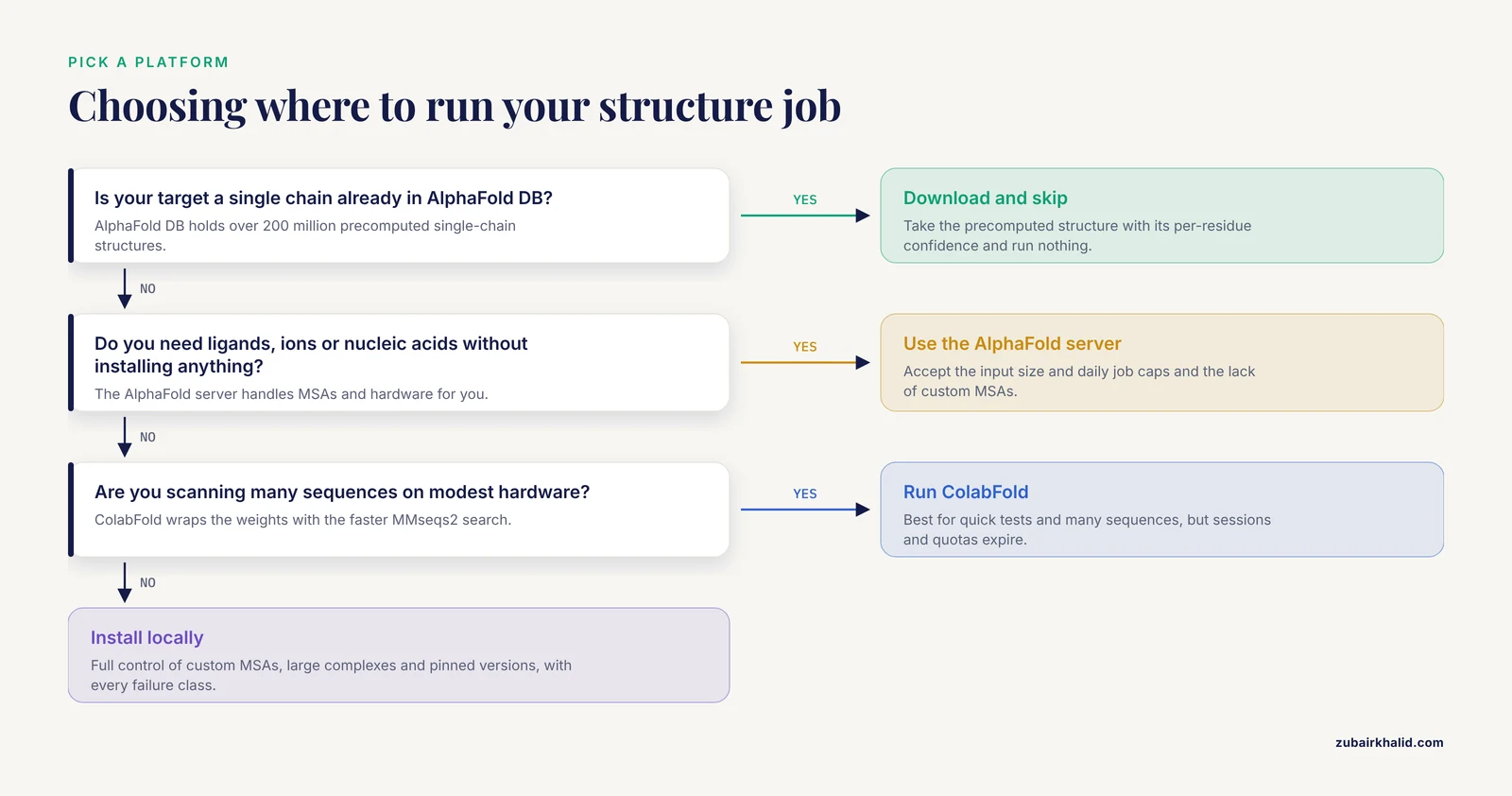
Before you debug anything, check whether someone has already run your protein. AlphaFold DB, hosted by EMBL-EBI, holds over 200 million precomputed single-chain structures covering most UniProt entries, each with per-residue confidence. If your target is a single chain, download the structure and skip the runtime entirely.
The AlphaFold server is the right tool when you need complexes with ligands, ions, or nucleic acids and you do not want to install anything. Its caps and its lack of custom MSA support are the price you pay for zero maintenance.
ColabFold wraps the AlphaFold 2 and AlphaFold-multimer weights with MMseqs2, a fast sequence search tool that replaces the slower HMMER-based pipeline. It is the best choice for scanning many sequences and for quick tests on modest hardware.
A local installation of AlphaFold 2 or AlphaFold 3 gives full control: custom MSAs, large complexes, pinned versions, and reproducibility. It also carries every failure class in this article, which is the cost of control.
For hard complexes, model choice matters as much as hardware. In a 2026 benchmark of 40 experimentally resolved ternary complexes from the Protein Data Bank, including 25 PROTAC systems and 15 molecular glue systems, AlphaFold 3 and Boltz-2 outperformed other current approaches in both accuracy and runtime [2]. A PROTAC is a proteolysis targeting chimera, a small molecule that bridges a target protein and an E3 ubiquitin ligase into a single ternary complex, and molecular glues achieve a similar induced proximity through smaller binders. Newer diffusion-based models, which generate structures through an iterative denoising process rather than the older recycle-heavy pipeline, are the right destination for problems in that class.
When the Run Finishes but the Model Is Wrong
A completed run with a bad model is not an alphafold runtime error, and debugging the cluster will not help. Read the confidence metrics instead.
pLDDT, the predicted local distance difference test, scores each residue from 0 to 100. Regions above 90 are usually modeled with high accuracy, while regions below 50 are often disordered in reality. PAE, the predicted aligned error, estimates the expected position error between pairs of residues or chains, and low PAE between two chains signals a confident relative placement. ipTM extends the same idea to overall interface quality in complexes.
The benchmark literature shows why low confidence on a specific feature can be the correct answer rather than a defect. In the ternary complex benchmark above, error analysis found that prediction failures predominantly arose from misoriented global arrangements and twisting in flexible complexes, while the individual protein and ligand structures were often accurately modeled [2]. Accuracy was generally higher for VHL-based PROTACs than for CRBN-based PROTACs, and the open Boltz-2 model scored higher than AlphaFold 3 on complex RMSD, the root mean square deviation that measures global geometric error, and on DockQ, a score from 0 to 1 for protein-protein interface quality [2].
Practical reading: if per-chain pLDDT is high but inter-chain PAE is high, the model is telling you the interface arrangement is uncertain. Try additional seeds, compare predictions across models, and treat flexible interfaces as hypotheses to test rather than answers to trust.
Prevention Practices
- Pin everything that affects a run: software version, container image digest (the content hash that identifies one exact image), model parameter version, database snapshot date, and NVIDIA driver version.
- Keep an artifact trail. Governance research makes the point directly, and tooling now exists that carries build-time evidence forward and re-evaluates it continuously at runtime [1]. Even without that tooling, the habit generalizes: record the image digest, the SBOM, and the driver version next to every result.
- Run a canary job after every environment change, before the real job.
- Verify database checksums after downloads and after moves.
- Cache MSAs and reuse them across runs.
- Monitor disk with scheduled df checks, because database sets and MSA outputs grow quietly until they fill a volume mid-job.
- Archive logs, inputs, and outputs together. A result you cannot rerun is a rumor.
- Change one variable at a time while debugging, and write down what you changed.
Common Mistakes and Limitations
- Reading the last line of a traceback instead of the first exception. The root cause is usually at the top of the traceback.
- Debugging the cluster because confidence is low. Low pLDDT is a modeling result, not a runtime failure.
- Blaming the model for malformed input. Schema errors and invalid ligand codes look like crashes but originate in the input file.
- Regenerating MSAs on every run instead of caching them, which multiplies both runtime and exposure to search failures.
- Mixing pip-installed CUDA libraries with a containerized stack, then troubleshooting the container for a problem the pip environment caused.
- Upgrading drivers or packages mid-project without rerunning the canary job.
- Assuming a server rejection means a local bug, or the reverse. Hosted and local environments fail for different reasons.
- Deleting database directories to free space without confirming the path first.
A limitation worth stating once: individual systems, especially those with flexible interfaces, novel ligands, or few sequence homologs, need expert review and, where possible, experimental validation before any predicted model is trusted.
Frequently Asked Questions
Why does my AlphaFold job pass the tutorial example but fail on my real protein?
Memory demand grows with sequence length and MSA depth, so a short tutorial protein fits your GPU while your real target does not. Cut MSA depth, reduce multimer predictions, or move to a larger GPU.
How do I fix an alphafold runtime error that mentions out of memory or resource exhaustion?
Reduce MSA depth, set the ensemble count to one, run fewer multimer predictions per model, or use a GPU with more memory. Confirm the failure is on the GPU by checking nvidia-smi at the time of the crash.
Can I run AlphaFold without a GPU?
Yes. AlphaFold 2 runs on CPU, but runtimes are far longer and large proteins or complexes become impractical. If you do have a GPU, confirm that JAX is not silently falling back to CPU.
Why does AlphaFold fail in Docker when the same command works outside it?
The container bundles its own CUDA and Python stack, and the host driver plus NVIDIA Container Toolkit must match it. Test GPU access inside the container with nvidia-smi before blaming the model code.
How much disk space do the AlphaFold databases need?
The full set is about 2.2 TB uncompressed, and the reduced set is several hundred gigabytes. Keep additional working space for MSA outputs on top of the database total.
Is a low-confidence model the same as a runtime failure?
No. A runtime failure stops the job before it produces output. Low confidence means the job finished, and the model deserves suspicion or validation rather than debugging.
What limits does the AlphaFold server have?
The hosted service caps input size per job and the number of jobs per day, does not accept custom MSAs, and queue times vary with demand. Split large systems or run them locally when you hit a cap.
How do I make my AlphaFold runs reproducible?
Pin the software version, container digest, database snapshot, and driver, set the random seed, and archive logs, inputs, and outputs together. Rerun a canary job after any environment change.