AlphaFold Local Installation Tutorial: Step-by-Step Guide
By Dr. Zubair Khalid, DVM, MS, PhD ·

By the end of this AlphaFold local installation tutorial you will have a working AlphaFold 2 environment on your own GPU workstation, you will have predicted the structure of at least one protein monomer and one protein complex, and you will know how to check that the outputs are trustworthy. You will also know when a local installation is the right choice and when the hosted AlphaFold Server or the precomputed AlphaFold Database will save you days of work.
Before you start, make sure you have on hand:
- A machine with Ubuntu 20.04 or 22.04 and an NVIDIA GPU with at least 16 GB of memory. An NVIDIA A100 with 40 GB is the comfortable reference configuration for full-length proteins and complexes.
- Roughly 2.3 TB of free disk space for the full genetic databases, or about 440 GB if you start with the reduced database set.
- Root or sudo access, an NVIDIA driver already installed, and a fast internet connection for the database downloads.
- Basic command line fluency. Every command below is copy-paste ready with the expected output shown.
Which AlphaFold Should You Install?
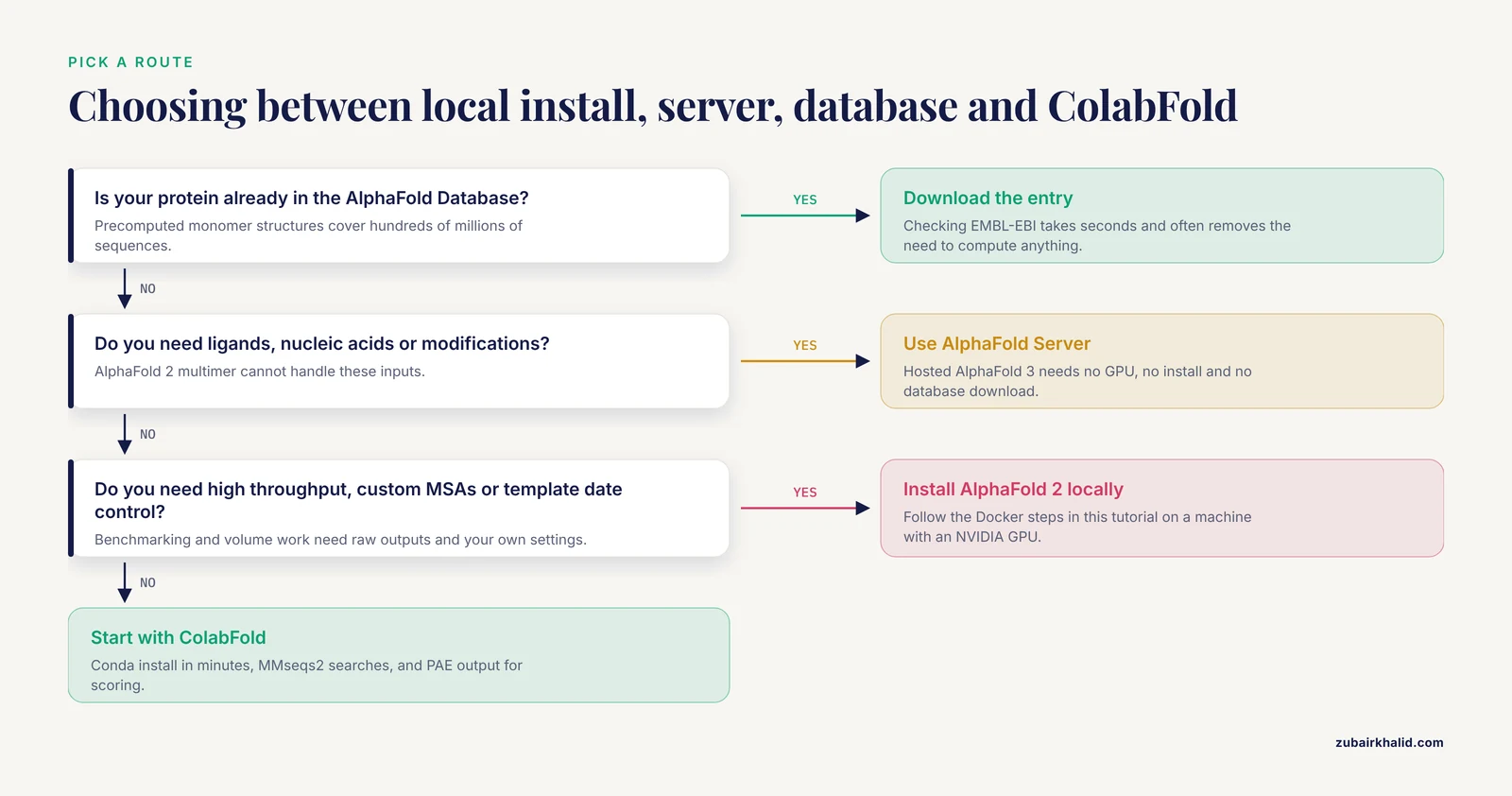
The name AlphaFold now covers several distinct tools, and picking the wrong one is the most common source of wasted setup time.
AlphaFold 2 is DeepMind's open-source protein structure prediction system, distributed as the deepmind/alphafold repository. It predicts monomer structures and, in its multimer mode, protein complexes. This is the version this tutorial installs locally.
AlphaFold 3 is the successor model from Google DeepMind and Isomorphic Labs. Its code is available, but the model parameters are gated. You must request access and agree to a terms-of-use agreement that limits how the outputs can be used, including a restriction on training competing models. It also demands heavier hardware than AlphaFold 2.
ColabFold is a community-maintained implementation that wraps AlphaFold 2 and later adds its own improvements. It installs through conda in minutes rather than hours and is the pragmatic choice for many labs. Published work demonstrates that ColabFold is a practical and accessible route for real discovery projects, including the identification of short linear motifs in disordered protein regions, and that AlphaFold 2 combined with the MiniPAE scoring metric outperformed AlphaFold 3 in that benchmark [1].
AlphaFold Database, hosted at EMBL-EBI, contains precomputed monomer structures for hundreds of millions of protein sequences. If your protein is already in the database, downloading a structure beats computing one.
AlphaFold Server is the free hosted interface to AlphaFold 3 operated by Google and Isomorphic Labs. It requires no installation at all and is covered near the end of this article.
Hardware, Operating System, and Storage Requirements
AlphaFold 2 is GPU-bound during neural network inference and CPU-bound during the multiple sequence alignment (MSA) stage, where it searches your sequence against large genetic databases with jackhmmer and HHblits. A slow CPU or a slow disk will starve an expensive GPU.
| Component | Minimum for monomers | Recommended |
|---|---|---|
| , - | , - | , - |
| GPU | NVIDIA, 16 GB memory | NVIDIA A100 40 GB or better |
| RAM | 32 GB | 64 GB or more |
| CPU cores | 8 | 16 to 32 |
| Disk (full databases) | 2.3 TB download, about 2.6 TB unzipped | NVMe SSD |
| Disk (reduced databases) | About 440 GB | NVMe SSD |
| Operating system | Ubuntu 20.04 or 22.04 | Same |
Two notes on the table. First, the reduced database set substitutes a smaller BFD database and drops some search targets, which shortens both the download and the MSA stage but lowers sensitivity for proteins with distant homologs. Second, template search against the PDB requires the database copies you download, and their dates matter, which is handled by a flag explained later.
AlphaFold Local Installation Tutorial, Step by Step
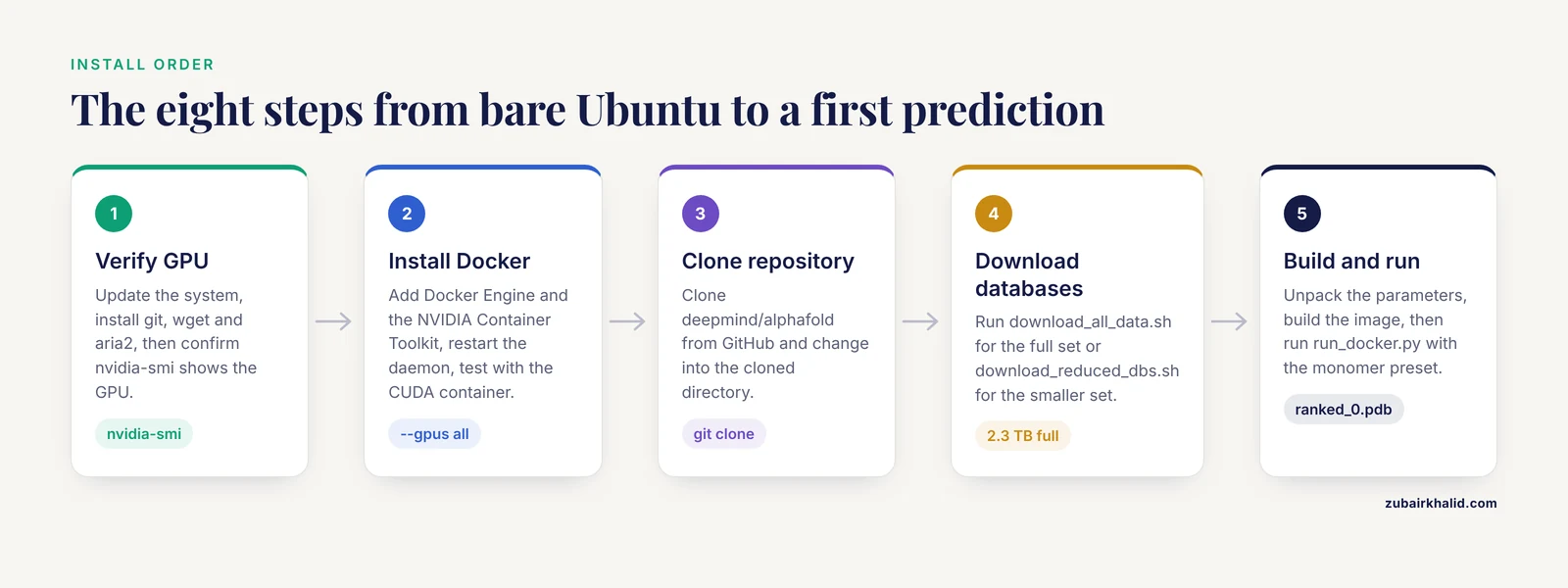
This walkthrough installs AlphaFold 2 from the official repository using Docker, which is the configuration DeepMind supports directly. Each step lists the commands and the output you should expect.
Step 1: Prepare the Operating System and Verify the GPU
Update the system and install basic tools.
sudo apt update && sudo apt install -y git wget aria2
nvidia-smi
Expected nvidia-smi output includes a driver version and your GPU name in a table, for example:
+-----------------------------------------------------------------------------+
| NVIDIA-SMI 535.104.05   Driver Version: 535.104.05   CUDA Version: 12.2     |
| GPU  Name        Persistence-M| Bus-Id        Disp.A | Volatile Uncorr. ECC |
|   0  NVIDIA A100-SXM4-40GB  Off  | 00000000:07:00.0   Off |                    0 |
If nvidia-smi fails with command not found, install the NVIDIA driver before continuing. AlphaFold 2 was built around CUDA 11, and recent drivers remain backward compatible with it.
Step 2: Install Docker and the NVIDIA Container Toolkit
AlphaFold 2 ships as a Docker image so that JAX, CUDA, and all scientific dependencies are pinned correctly. Install Docker Engine from Docker's official repository, then install the NVIDIA Container Toolkit following NVIDIA's current instructions for your distribution.
Verify that Docker can reach the GPU:
sudo docker run --rm --gpus all nvidia/cuda:11.0-base nvidia-smiExpected output is the same GPU table as before, printed from inside the container. If you see this message instead, the toolkit is missing or the daemon was not restarted:
docker: Error response from daemon: could not select device driver "" with capabilities: [[gpu]].Run sudo systemctl restart docker after installing the toolkit and retry.
Step 3: Clone the AlphaFold Repository
git clone https://github.com/deepmind/alphafold.git
cd alphafold
Expected output:
Cloning into 'alphafold'...
remote: Enumerating objects: ...
Receiving objects: 100% (...), done.
Step 4: Download the Genetic Databases
AlphaFold 2 needs several reference databases for the MSA and template stages. For a full installation run:
export DOWNLOAD_DIR=$PWD/data
mkdir -p $DOWNLOAD_DIR
./scripts/download_all_data.sh $DOWNLOAD_DIR > download.log 2>&1
tail -f download.log
For a first test run on limited disk, use the reduced set instead:
./scripts/download_reduced_dbs.sh $DOWNLOAD_DIR > download.log 2>&1Expect the full download to take many hours even on a fast connection. When it finishes, $DOWNLOAD_DIR contains these directories:
bfd/          mgnify/       pdb70/        pdb_seqres/   uniprot/
params/       uniref90/     uniclust30/
The download_all_data.sh script fetches everything used by both monomer and multimer presets, including UniProt sequences needed for the multimer chain pairing logic. If you only ran the reduced script and later switch to multimer mode, confirm that pdb_seqres and uniprot are present.
Step 5: Download the Model Parameters
The trained neural network weights are distributed separately. The official README links to a download of a compressed archive containing the parameters. Download it and unpack it so that the parameters sit inside your data directory:
$DOWNLOAD_DIR/params/params_model_1.npz
$DOWNLOAD_DIR/params/params_model_2_ptm.npz
...
$DOWNLOAD_DIR/params/params_multimer_model_5.npz
The archive holds five monomer models and five multimer models. The archive is a few gigabytes, far smaller than the databases.
Step 6: Build the Docker Image
From inside the cloned repository:
docker build -f docker/Dockerfile -t alphafold .Expected final lines:
Successfully built <hash>
Successfully tagged alphafold:latest
The build compiles the environment described in the repository's requirements files and typically takes 10 to 30 minutes depending on your network and disk speed.
Step 7: Run Your First Prediction
Create a FASTA file with a single sequence and no blank lines beyond the header:
echo ">my_protein
MKTAYIAKQRQISFVKSHFSRQ" > /data/my_protein.fasta
Run the prediction through the provided wrapper, which mounts your data and output directories into the container:
python3 docker/run_docker.py \
  --fasta_paths=/data/my_protein.fasta \
  --output_dir=/data/outputs \
  --data_dir=$DOWNLOAD_DIR \
  --model_preset=monomer \
  --db_preset=full_dbs \
  --max_template_date=2021-11-01
On an A100, a protein of a few hundred residues finishes in tens of minutes, with most time spent in the MSA stage on the first run. The console prints progress per model, and the output directory ends up looking like this:
my_protein/
├── ranked_0.pdb
├── ranked_1.pdb
├── ranked_2.pdb
├── ranked_3.pdb
├── ranked_4.pdb
├── ranked_0_scores.json
├── timings.json
├── relax_metrics.json
├── msas/
└── result_model_1_multimer.pkl (multimer runs)
ranked_0.pdb is the best model by the internal ranking score. The five ranks correspond to five independently sampled predictions from the five model configurations.
For a protein complex, place each chain in the same FASTA file separated by their own headers and switch the preset:
python3 docker/run_docker.py \
  --fasta_paths=/data/complex.fasta \
  --output_dir=/data/outputs \
  --data_dir=$DOWNLOAD_DIR \
  --model_preset=multimer \
  --num_multimer_predictions_per_model=5 \
  --db_preset=full_dbs \
  --max_template_date=2021-11-01
Step 8: Verify That the Prediction Worked
Open ranked_0_scores.json and check three numbers:
python3 -c "
import json
s = json.load(open('/data/outputs/my_protein/ranked_0_scores.json'))
print('mean pLDDT:', s['mean_plddt'])
print('ptm:', s.get('ptm'))
print('iptm:', s.get('iptm'))
"
Then inspect the PDB file itself. The B-factor column of a PDB written by AlphaFold carries the per-residue pLDDT score from 0 to 100, so loading the file in PyMOL or ChimeraX colors the model by confidence automatically. Cross-check your structure against the AlphaFold Database entry for the same UniProt accession when one exists. Agreement between an independent local run and the database is a strong sign your installation is correct.
Installing ColabFold Locally Without Docker
ColabFold replaces the jackhmmer database searches with an MMseqs2-based pipeline, which is dramatically faster and lets the whole stack install through conda. This is the route many labs choose after running the Docker tutorial once.
conda create -n colabfold python=3.9 -y
conda activate colabfold
conda install -c conda-forge -c pytorch -c bioconda colabfold
Download the AlphaFold 2 weights ColabFold uses, then predict:
colabfold_batch --model-type alphafold2_multimer_v3 \
  /data/complex.fasta /data/colabfold_out
On first run, ColabFold fetches the model weights automatically and tells you where it cached them. ColabFold outputs per-residue pLDDT in the PDB B-factor column exactly like the original, and additionally writes PAE matrices as images and JSON. ColabFold also exposes computed PAE values that downstream scoring tools build on. The MiniPAE metric, introduced for detecting short linear motifs, is computed from AlphaFold's PAE output and was shown to make AlphaFold 2 through ColabFold a competitive discovery tool, outperforming AlphaFold 3 in that specific benchmark [1].
A short list of ColabFold flags worth learning beyond the basics:
| Flag | What it does |
|---|---|
| , - | , - |
-model-type | Selects monomer, ptm, or multimer model versions |
-num-recycle | Number of recycle iterations, default is model-defined |
-num-seeds | Runs multiple random seeds per model to sample alternative conformations |
-msa-mode | Chooses MMseqs2, single-sequence, or custom MSA input |
-amino-acid | Handles non-canonical residues in nanobody-style inputs |
Key Parameters Reference
These are the flags that most often change your results. A value listed as the default reflects the official repository documentation at the time of writing, so check -help after updates.
| Parameter | Values | Effect |
|---|---|---|
| , - | , - | , - |
-model_preset | monomer, monomer_casp14, multimer | Chooses model family and outputs |
-db_preset | full_dbs, reduced_dbs | Full databases give better sensitivity on distant homologs |
-max_template_date | Date string | Structures deposited after this date are excluded from templates, preventing leakage when benchmarking |
-num_multimer_predictions_per_model | Integer, default 5 | Number of samples per model in multimer mode, main driver of runtime |
-use_gpu_relax | Boolean, default true | Runs the Amber relaxation on GPU instead of CPU |
-num_recycle (ColabFold) | Integer | Extra recycling can improve difficult folds at the cost of runtime |
-model-type (ColabFold) | alphafold2, alphafold2_ptm, alphafold2_multimer_v3 | Selects the model weights |
Interpreting Confidence Metrics Correctly
Three metrics matter in every AlphaFold 2 output.
pLDDT is a per-residue score from 0 to 100 stored in the B-factor column. Values above 90 indicate a confidently placed backbone, 70 to 90 usually means the backbone is right with uncertain side chains, 50 to 70 marks low confidence, and below 50 is very low confidence. Intrinsically disordered regions routinely score below 50, and that is correct behavior, not a failure, because AlphaFold was trained on structured examples and unstructured proteins do not have a single answer.
PAE, the predicted aligned error, is a matrix of expected positional errors between residue pairs, measured in angstroms. Domains that move as rigid units appear as dark blocks along the diagonal, and confident inter-domain contacts appear as dark blocks off the diagonal. This is the metric to read for domain orientation and for interfaces.
pTM and ipTM summarize pairwise accuracy into a single score, where ipTM applies to interfaces in multimer predictions. A high ipTM with consistent ranking across the five models is the strongest available signal that a predicted complex interface is real.
The lesson from motif-discovery work is that these quality metrics do not tell the whole story. In the benchmark cited above, AlphaFold 2 combined with MiniPAE scoring revealed short linear motifs in disordered regions even when the global model quality metrics were unimpressive, and it outperformed AlphaFold 3 for that task [1]. Confidence metrics describe accuracy of atomic coordinates, while interaction signals can live in the error structure of the model itself.
Common Errors and Exact Fixes
Error: could not select device driver with capabilities gpu. The NVIDIA Container Toolkit is not installed or Docker was not restarted after installation. Install the toolkit, run sudo systemctl restart docker, and retest with the CUDA container command from Step 2.
Error: CUDA driver version is insufficient for CUDA runtime version. Your NVIDIA driver is too old for the CUDA version inside the container. Upgrade the host driver, not the container.
Error: Out of memory while trying to allocate (JAX RESOURCE_EXHAUSTED). The model ran out of GPU memory, most often with long multimers. Reduce -num_multimer_predictions_per_model to 1, shorten the construct by removing low-confidence disordered tails, or move to a larger GPU.
Error: FileNotFoundError pointing to params_model_1.npz. The parameters were unpacked to the wrong location or -data_dir points to the wrong parent directory. AlphaFold expects them at $DOWNLOAD_DIR/params/.
Error: No such file or directory naming a database such as pdb70 or uniclust30. You downloaded the reduced database set but are running with -db_preset=full_dbs, or the download script exited early. Rerun the download script and check download.log for partial transfer failures, which are common with the largest files.
Error: Max template date in the future. -max_template_date must be a past date. It exists to prevent template leakage, so set it to your knowledge cutoff when benchmarking and to a recent date when you want the best possible template coverage.
ColabFold first-run connection errors. Weight downloads occasionally fail on institutional networks. Rerun the command, or download the weights once on an unrestricted connection and copy the cache directory to the compute node.
Common Mistakes and Limitations
These are the mistakes seen repeatedly in labs adopting AlphaFold locally, along with the honest limits of the technology.
- Starting the full database download without checking disk space. The download is 2.3 TB and expands to about 2.6 TB. A failed download at 90 percent wastes an entire day. Check free space first and start with the reduced set.
- Benchmarking on targets solved after your template date. If
-max_template_dateis later than the deposition date of a test structure, AlphaFold may see that structure as a template and your accuracy numbers will be inflated. This single flag is the difference between a valid benchmark and a meaningless one. - Treating a high pLDDT as proof of a correct complex. pLDDT scores per-chain geometry, not interface correctness. For complexes, read ipTM and the PAE off-diagonal blocks, and require agreement across multiple seeds.
- Forgetting that the five ranked models are samples, not five hypotheses of equal value. If
ranked_0andranked_2disagree about a domain orientation, that disagreement is information about conformational uncertainty, not noise to discard. - Running relaxation on the CPU by accident. On older repository versions,
-use_gpu_relaxdefaults to true, but if relaxation dominates your runtime log, verify the flag was passed through the wrapper correctly. - Assuming AlphaFold 3 is a strict upgrade for every task. The motif-discovery benchmark referenced earlier found AlphaFold 2 with MiniPAE superior for that use case [1]. Model version choice should follow the question you are asking.
- Ignoring the licensing terms on AlphaFold 3 parameters. The parameters require a signed agreement with Google, and the terms restrict use of outputs, including training models that compete with AlphaFold 3. Read them before building a pipeline on top of AF3 outputs.
- Expecting AlphaFold to predict conformational switching from a single sequence. AlphaFold predicts a static structure per input. Alternate states, ligand-dependent changes, and post-translational effects are outside what a single MSA-based prediction represents. Sampling with multiple seeds and MSAs gives hints, not proof.
- Not recording versions. Pin the git commit of the repository, the Docker image digest, the database download date, and the parameter version in your lab notebook. Predictions are not reproducible without all four.
One broader limitation deserves plain language. AlphaFold predictions are computational hypotheses with quantified confidence, not experimental structures. For publishable claims about binding sites, active sites, or disease variants, validate against experiments or at minimum against orthogonal computational evidence.
Practical Tips for Faster, Cleaner Runs
- Run the MSA stage once and cache it. In the official implementation the MSAs are written under the output directory, and ColabFold lets you precompute them with
colabfold_search. Reusing MSAs across many models of the same target turns an hour-long job into minutes. - Use the reduced database set for pilot work and reserve full databases for final predictions on targets with weak homology.
- Put the databases on local NVMe storage, not a network file system. The MSA stage reads hundreds of gigabytes in random access patterns, and network latency directly multiplies your wall clock time.
- Batch your sequences. The per-run overhead of Docker startup and database index warming is fixed, so predicting 20 proteins in one session is far more efficient than 20 separate runs.
- Check
timings.jsonafter every run. It breaks down where the minutes went, and it is the fastest way to notice that your GPU is idle because a database search is bottlenecking.
AlphaFold Server and When to Use It Instead
A local installation is the right choice when you need unlimited throughput, custom MSAs, control over template dates for benchmarking, or the ability to postprocess raw outputs. For many other situations, a hosted route is faster to results.
The AlphaFold Server from Google and Isomorphic Labs provides a web interface to AlphaFold 3 with no installation, no GPU, and no database downloads. It accepts complexes of proteins, nucleic acids, and small molecules, enforces a daily job quota, and its terms of use restrict how outputs may be used, including a prohibition on training competing models. For occasional structures and for ligand or nucleic acid complexes that AlphaFold 2 multimer cannot handle, it is the sensible first stop.
The AlphaFold Database at EMBL-EBI already contains predicted structures for most known protein sequences. Checking it takes seconds and often eliminates the need to run anything.
ColabFold notebooks and the streamlined Colab-based workflows published in the literature remove installation entirely, and the published SLiM-discovery workflow was designed specifically to require no local computation [1]. If your goal is exploratory rather than high-throughput, start there and move to a local installation only when the notebooks' queue times and quotas become the bottleneck.
A reasonable progression for a new lab is this. Check the AlphaFold Database first. Use the AlphaFold Server for AF3-specific questions such as ligand complexes. Use ColabFold notebooks for exploratory work. Install AlphaFold 2 locally, using the steps in this article, when volume, custom MSAs, or benchmarking control become necessary.
Frequently Asked Questions
Can I run AlphaFold locally without a GPU?
AlphaFold 2 can run on CPU through the official repository, but a prediction that takes minutes on a GPU can take many hours to days on a CPU, which makes the CPU route practical only for very short proteins or testing the installation. For GPU-free work, use the AlphaFold Database, the AlphaFold Server, or Colab notebooks instead.
How much disk space do I really need?
Plan for about 2.3 TB of downloads and about 2.6 TB unzipped for the full database set, or about 440 GB for the reduced set. Add a few gigabytes for model parameters and comfortable headroom for outputs.
What is the difference between AlphaFold 2, AlphaFold 3, and ColabFold?
AlphaFold 2 is the open-source DeepMind model this tutorial installs, covering monomers and protein complexes. AlphaFold 3 adds ligands, nucleic acids, and modifications, but its parameters are gated behind a terms agreement. ColabFold is a community implementation of AlphaFold 2 that installs through conda and uses faster MMseqs2-based MSAs.
How long does one prediction take?
On an A100-class GPU, a monomer of a few hundred residues typically finishes in tens of minutes, with the first-run MSA stage the slowest part. Long multimers with five samples per model can take several hours. CPU-only runs are orders of magnitude slower.
What pLDDT score is good enough?
Per-residue pLDDT above 90 indicates a confidently placed backbone and 70 to 90 is usually reliable for the backbone. Scores below 50 frequently mark genuinely disordered regions rather than model failure. Judge domains, not whole-protein averages.
Can AlphaFold predict protein-protein interactions?
Yes, through the multimer preset or ColabFold's multimer models. Judge predicted interfaces with ipTM and the PAE matrix rather than pLDDT alone, and require consistency across the five ranked models before trusting an interface.
Should I use the AlphaFold Server instead of a local installation?
Use the AlphaFold Server when you need AlphaFold 3 capabilities such as small molecule or nucleic acid complexes and your volume fits within its daily quota. Install locally when you need high throughput, custom MSAs, template date control for benchmarking, or full access to raw outputs.
How do I update the databases or model parameters?
Genetic databases update on their own release cycles, so rerun the relevant download script into a new directory and point -data_dir at it, keeping the old directory until you have rerun a control prediction. Model parameters update only when DeepMind publishes a new release, and for AlphaFold 3 they require renewed access under the terms agreement.
Further Reading
- The Ultimate Tutorial for AI-driven Scale Development in Generative Psychometrics: Releasing AIGENIE from its Bottle
- AI explainability 360: hands-on tutorial