AlphaFold Installation Errors: Causes and Fixes
By Dr. Zubair Khalid, DVM, MS, PhD ·

Most AlphaFold installation errors trace back to a single moment: the point where Docker hands the NVIDIA GPU to the container. Run this check on the host before you reread any log file:
docker run --rm --gpus all ubuntu nvidia-smiIf a GPU table prints, your foundation is sound and the fault lies elsewhere in the pipeline. If the command fails with a message about device drivers or capabilities, you have found the failure class behind the largest share of broken installs. Fix the NVIDIA Container Toolkit and driver setup first, then work down the rest of this guide.
AlphaFold is DeepMind's deep learning system for predicting protein 3D structures from amino acid sequence. The self-hosted AlphaFold 2 pipeline is not one program. It is a stack of code, a container image, terabytes of genetic databases, trained model weights, and an NVIDIA driver stack, and a weakness in any layer produces its own characteristic failure. This article walks through the layers in order of how often they break, explains the mechanism behind each failure, gives a short diagnostic sequence, and closes with the prevention habits and hosted alternatives (including the AlphaFold Server web service) that save you from repeating the pain.
What a Complete Install Actually Consists Of
Knowing the five layers makes every error message easier to place.
- Code. The Python source from the official DeepMind GitHub repository, cloned with git. The repository contains the feature pipeline, the model, and the run script.
- Container image. You build a Docker image (a portable, sealed application environment) from the repo's
docker/Dockerfile. The image bundles JAX, Google's numerical computing library that executes the neural network, plus OpenMM, the molecular dynamics library used in the final relax stage, and a matched CUDA runtime. CUDA is NVIDIA's GPU computing platform. The image is pinned so the Python packages are mutually compatible. - Host NVIDIA stack. The kernel driver on the physical machine, plus the NVIDIA Container Toolkit, the glue that exposes the GPU inside containers. Containers ship the CUDA runtime but always borrow the host driver.
- Genetic databases. UniRef90, the BFD metagenomic database (or its small subset), MGnify, and PDB sequence and template files. The full set totals roughly 2.6 TB and comes down through
scripts/download_all_data.sh, which requires aria2, a multi-connection download manager. - Model parameters. The trained weights in the
params/directory, fetched by the same download script.
At runtime the pipeline moves through stages: multiple sequence alignment (MSA) generation with tools such as jackhmmer and HH-suite, template search, neural network inference on the GPU, and finally relax, an energy minimization step that cleans up side-chain geometry. Each stage has its own resource profile, so the stage named in an error tells you which layer to inspect.
Safety note: commands prefixed with sudo change system-wide configuration such as Docker's daemon settings. Read them before running, and on shared machines coordinate with your administrator.
A Five-Minute Diagnostic Sequence
Follow these steps in order and most failures identify themselves.
- Capture the full error and name the stage. Setup, image build, database download, MSA, inference, relax, or output. Half of all confusion comes from debugging the wrong stage.
- Check the GPU on the host. Run
nvidia-smi. If it fails or shows no GPU, the problem is the driver, not AlphaFold. - Check the GPU inside a container. Run the
ubuntu nvidia-smitest from the top of this article. Host passes but container fails means the toolkit or Docker runtime configuration is broken. - Check disk and RAM.
df -hon the data directory, the output directory, and Docker's root (docker system dfhelps too), andfree -gfor memory. Databases, Docker images, and per-run outputs each consume hundreds of gigabytes in a serious setup. - Look for silent kills.
sudo dmesg -T | grep -iE "oom|killed process"reveals whether the Linux out-of-memory (OOM) killer terminated a stage. - Audit database paths. From inside the image, run
python3 /app/run_alphafold.py, help, then compare every-*_database_pathflag againstlsoutput on disk. The flags demand exact file paths, not directories. - Confirm the weights exist.
ls params/should show the model parameter files. A missingparamsdirectory means the download script never completed. - Pin the version.
git log -1shows your commit. Error messages and required flags change between releases, so always compare against the README of the exact commit you checked out.
Troubleshooting Table: Symptom, Cause, Confirmation, Fix
| Symptom | Likely cause | How to confirm | Fix | |
|---|---|---|---|---|
could not select device driver "" with capabilities: [[gpu]] | NVIDIA Container Toolkit missing or runtime unconfigured | `docker info \ | grep -i runtime` shows no nvidia runtime | Install the toolkit, run sudo nvidia-ctk runtime configure, runtime=docker, restart Docker |
nvidia-smi works on host but not in any container | Toolkit injection broken, Docker too old | The ubuntu test container fails while the host passes | Update Docker and the toolkit, reconfigure the runtime, restart the daemon | |
| JAX reports no GPU devices or fails to initialize CUDA | Host driver older than the CUDA runtime in the image | Compare the driver version in nvidia-smi with the CUDA base tag in docker/Dockerfile | Upgrade the host NVIDIA driver, keep the image as built | |
| Out-of-memory error from JAX during inference | Chain or complex too large for GPU VRAM | Watch nvidia-smi during the run, note the failing stage | Split the complex, use a larger GPU, or reduce recycles via a config edit with an accuracy tradeoff | |
| Process dies with no traceback during MSA stage | Host RAM exhausted, OOM killer fired | dmesg shows an oom-kill for the python or java process | Add RAM, run the reduced_dbs preset, or supply precomputed MSAs | |
FileNotFoundError naming a database file | Wrong flag value, directory passed instead of file, or mixed versions | Compare each -*_database_path flag with ls output | Point every flag at the exact file produced by the matching download script | |
| Downloads stall or archives fail checks | Interrupted transfers or aria2 not installed | Files smaller than the sizes listed in the README | Install aria2, rerun the script (it resumes), verify sizes | |
No space left on device during build or run | Disk quota exhausted | df -h on data, output, and Docker roots | Free space, relocate data to a large volume, docker system prune | |
docker build fails at apt or pip steps | Proxy, firewall, or Docker Hub rate limiting | Build log shows network errors or toomanyrequests | Configure proxy settings, docker login, retry after pruning cache | |
| Permission denied on mounted volumes | Unix ownership or SELinux labels | ls -l the mount source, getenforce on RHEL-family hosts | Fix ownership, or append :z/:Z to the volume option on SELinux hosts | |
ModuleNotFoundError: No module named 'alphafold' | Running the script on the host instead of in the container | Your invocation has no docker run prefix | Execute inside the container exactly as the README shows | |
| Crash in the relax stage after models are ranked | GPU relax instability with OpenMM | Error appears only after ranked_*.pdb files exist | Set -use_gpu_relax=false so relax runs on CPU |
AlphaFold Installation Errors From Most Common to Rarest
1. Docker cannot see the GPU
This is the single most frequent cause of AlphaFold installation errors. The mechanism has three layers, and any one can fail independently. First, the kernel driver must be installed and loaded, which nvidia-smi on the host proves. Second, the NVIDIA Container Toolkit must be installed, because Docker alone knows nothing about GPUs. Third, Docker must be configured to use the nvidia runtime, which the toolkit's nvidia-ctk runtime configure command writes into /etc/docker/daemon.json. The container carries its own CUDA runtime libraries, but at launch the toolkit mounts the host's driver libraries and the nvidia-smi binary into the container. Break that mount and every GPU feature vanishes, even though the host looks perfectly healthy.
The standard repair sequence on Debian or Ubuntu is:
sudo apt-get install -y nvidia-container-toolkit
sudo nvidia-ctk runtime configure --runtime=docker
sudo systemctl restart docker
docker run --rm --gpus all ubuntu nvidia-smi
On very old setups you may see instructions using -runtime=nvidia instead of -gpus all. The -gpus flag is the modern interface and is what current toolkit versions expect.
Safety note: adding your account to the docker group with sudo usermod -aG docker $USER grants root-equivalent access to that machine. Do it only on hardware you control, and log out and back in for the group change to apply.
Windows users running through WSL2 (the Windows Subsystem for Linux) face a variant. The GPU driver belongs on the Windows side, and a Linux driver must not be installed inside the WSL distribution. If nvidia-smi works in both PowerShell and the WSL shell but the Docker test fails, install the toolkit inside the WSL distribution and configure Docker's runtime there.
2. CUDA and cuDNN initialization failures inside JAX
Once the GPU is visible, the next failure class is version arithmetic. The jaxlib wheel inside the image is compiled against specific CUDA and cuDNN (NVIDIA's deep learning primitive library) versions. At startup, JAX asks the driver whether it can satisfy those requirements. A driver that predates the bundled runtime produces errors about failing to initialize the CUDA backend or finding no GPU devices, even though nvidia-smi inside the container works.
The direction of compatibility matters: a newer host driver can run older CUDA runtimes, but an older driver cannot run newer runtimes. So the fix is almost always to upgrade the host driver, not to rebuild the image with a different jaxlib. Resist the temptation to pip install a different jaxlib inside the container. The Dockerfile pins the scientific stack precisely so these mismatches cannot happen, and editing it reintroduces the problem you are trying to solve.
3. Out-of-memory crashes, and why GPU and host RAM are different problems
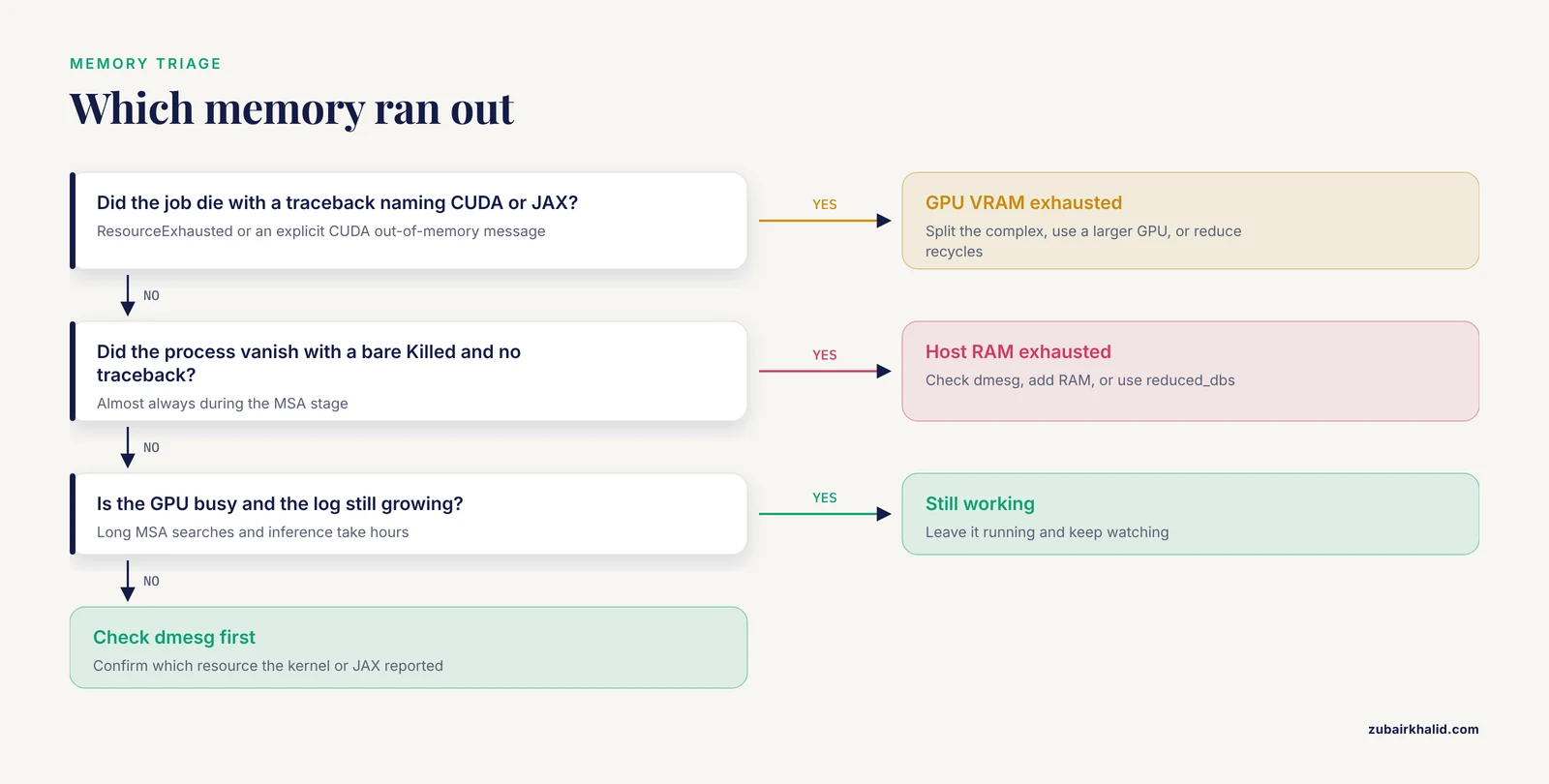
Two distinct resources run out, with two distinct signatures.
GPU memory exhaustion surfaces as a JAX ResourceExhausted error or an explicit CUDA out-of-memory message during inference. Memory demand grows steeply with sequence length and multiplies for complexes, because the model attends across every residue pair. Consumer cards with modest VRAM handle short monomers, while large assemblies need data-center GPUs. Practical fixes in order of preference: split the complex into separate chains and model them individually, move to a larger GPU, or edit the model config to reduce the number of recycles, a community practice that lowers memory use at some cost to accuracy.
Host RAM exhaustion looks completely different: the process vanishes with a bare Killed and no Python traceback, almost always during the MSA stage. jackhmmer, the iterative search tool from the HMMER package, drives profile searches against UniRef90 and MGnify, and peak memory can reach tens of gigabytes for long chains and much more for multimers. Confirm with dmesg, then either add RAM, switch to the reduced_dbs preset, which swaps the full BFD metagenomic database for a far smaller subset, or run the search step on a beefier machine and feed the results back with precomputed MSAs.
4. Database download failures and path mistakes
The database layer fails in three ways. First, the download itself: the script relies on aria2, and without it the fetch aborts immediately. Interrupted multi-hundred-gigabyte transfers produce truncated archives, so let the script resume and finish rather than deleting partial files, and verify sizes against the table in the README.
Second, the path contract. run_alphafold.py passes each -*_database_path value straight into the search tools, which expect a specific file, not a directory. Passing /data/uniref90 instead of the FASTA file inside it guarantees a file-not-found error deep in the search stage. The same applies to the PDB template files and the MSA databases.
Third, version coupling. The download script shipped with your commit produces the file layout that commit expects, and releases have changed their database requirements over time. Manually assembled database folders from an older install, or a data directory shared between different code versions, produce mismatches that look like mysterious tool failures. Keep one data directory per code version, or re-run the current script against a fresh directory.
A quieter failure is speed. Databases on network-attached storage make every jackhmmer iteration crawl, and slow filesystems are a common cause of jobs that appear wedged. Staging the databases on fast local disk is one of the highest-return optimizations available.
Safety note: a 2.6 TB download can fill a shared filesystem and trip quotas that affect other users. Confirm free space with df -h first, and prefer local scratch or dedicated volumes over home directories.
5. Docker build and image pull failures
Building the image pulls a CUDA base image from Docker Hub and then runs apt and pip installs inside it. Three things break this. Anonymous Docker Hub pulls are rate limited, so repeated builds on a shared IP can fail with request-limit errors until you docker login. Corporate proxies and firewalls block the package downloads inside the build unless Docker's proxy settings are configured. And a full disk kills the build midway, since images and build cache consume substantial space.
Diagnose from the build log: network errors point at connectivity, request-limit errors at rate limiting, and disk errors at capacity. docker system prune reclaims cache and dangling layers. If the base image tag in the Dockerfile has drifted from what NVIDIA publishes, check the repository's issue tracker, because maintainers usually patch this quickly after a tag disappears.
6. Volume mount, permission, and SELinux failures
The run command binds host directories into the container for databases, parameters, inputs, and outputs. Two classic mistakes: relative paths, which Docker resolves unpredictably, so always use absolute paths, and output directories the container user cannot write to, which surface as permission denied at the moment the first results should appear. Note that the container runs as root by default, so files it writes may be root-owned on the host, which surprises users who then cannot delete their own outputs.
On RHEL, CentOS, and Fedora hosts with SELinux (Security-Enhanced Linux, a mandatory access control system), the container is denied access to mounted volumes unless the volumes are relabeled. Appending :z for shared volumes or :Z for private ones to the volume option resolves it:
-v /data/databases:/data:z7. HPC installs with Apptainer or Singularity
Many clusters forbid Docker and provide Apptainer (formerly Singularity), a container runtime built for multi-user systems. Converting a locally built image is straightforward:
apptainer build alphafold.sif docker-daemon://alphafold:latest
apptainer exec --nv --bind /data:/data,/scratch/outputs:/outputs \
  alphafold.sif python3 /app/run_alphafold.py --help
The -nv flag requests GPU support. The characteristic Apptainer failure is a missing libcuda.so.1 inside the container, meaning the driver libraries were not injected, usually because -nv was omitted or the scheduler node lacks a driver. Bind paths must also be requested explicitly, since Apptainer mounts only /home, /tmp, and a few others by default. On scheduled systems, confirm the job actually landed on a GPU node before blaming the software. Many institutions maintain a prebuilt module or container for AlphaFold, and using it avoids every one of these steps, so ask your system administrator before building your own.
8. Relax stage crashes
The relax stage runs OpenMM under an amber forcefield to relieve geometric strain in the predicted structures. It is the most fragile GPU stage in the pipeline, and a crash here, after the ranked prediction files already exist, wastes nothing but time. Setting -use_gpu_relax=false moves relax to the CPU, which is slower per structure but far more forgiving of driver quirks. If relax fails on the CPU too, suspect host RAM rather than the GPU stack.
9. A run that looks hung but is not
Long silences are not errors. MSA generation for a novel protein can run iterative searches against terabyte-scale databases for a long time, and inference on long chains takes hours even on fast GPUs. Before declaring a hang, check that nvidia-smi shows active GPU processes, that log output is still growing, and that the output directory keeps receiving files. A job with a busy GPU and growing logs is working. A job with an idle GPU, flat logs, and no CPU activity for many hours is genuinely stuck, and the earlier sections cover its likely causes.
A Minimal Alphafold Tutorial Walkthrough
Use this as a reference for the correct order of operations. Always cross-check against the README of the commit you cloned, because flags and paths evolve between releases.
- Verify prerequisites. Working NVIDIA driver (
nvidia-smi), Docker, NVIDIA Container Toolkit (section 1 test passes), aria2, and adequate disk for the database preset you intend to use. - Clone the code.
git clone https://github.com/google-deepmind/alphafold.git
cd alphafold- Download databases and weights. For the full set:
scripts/download_all_data.shFor the reduced set, pass reduced_dbs to the same script. Expect the full download to take a long time even on fast links, and let it resume if interrupted.
- Build the image.
docker build -f docker/Dockerfile -t alphafold .- Run a prediction. Copy the
docker runinvocation from the README of your commit verbatim, then edit only the path variables. The command mounts each database location, the parameters directory, your input directory, and an output directory, sets-gpus all, and invokes the run script with flags. The flags that matter most:
| Flag | What it controls | Frequent mistake |
|---|---|---|
-fasta_paths | Input FASTA files, the plain-text sequence files, one run each | Passing a directory instead of a file |
-model_preset | monomer, monomer_casp14, or multimer | Using the monomer preset for a complex |
-db_preset | full_dbs or reduced_dbs | Expecting reduced_dbs to fix GPU memory problems, since it only shrinks databases |
-max_template_date | Cutoff date so PDB templates newer than it are excluded | Leaving it unset or setting a future date |
-num_multimer_predictions_per_model | Samples per multimer model, five by default | Raising it without checking GPU memory and runtime |
-use_gpu_relax | Whether relax runs on GPU | Leaving it enabled on an unstable driver stack |
-data_dir plus per-database paths | Where the databases live | Pointing at directories rather than exact files |
- Read the outputs. A default monomer run produces five predictions, written as
ranked_0.pdbthroughranked_4.pdbalongside per-model confidence scores, withranked_0.pdbbeing the highest-confidence model. If those files appear with plausible confidence values, your installation is complete.
Keep this walkthrough as your smoke test. After any driver update, Docker upgrade, or database refresh, rerun it on one short sequence before committing to a production batch.
When To Skip Installation Altogether
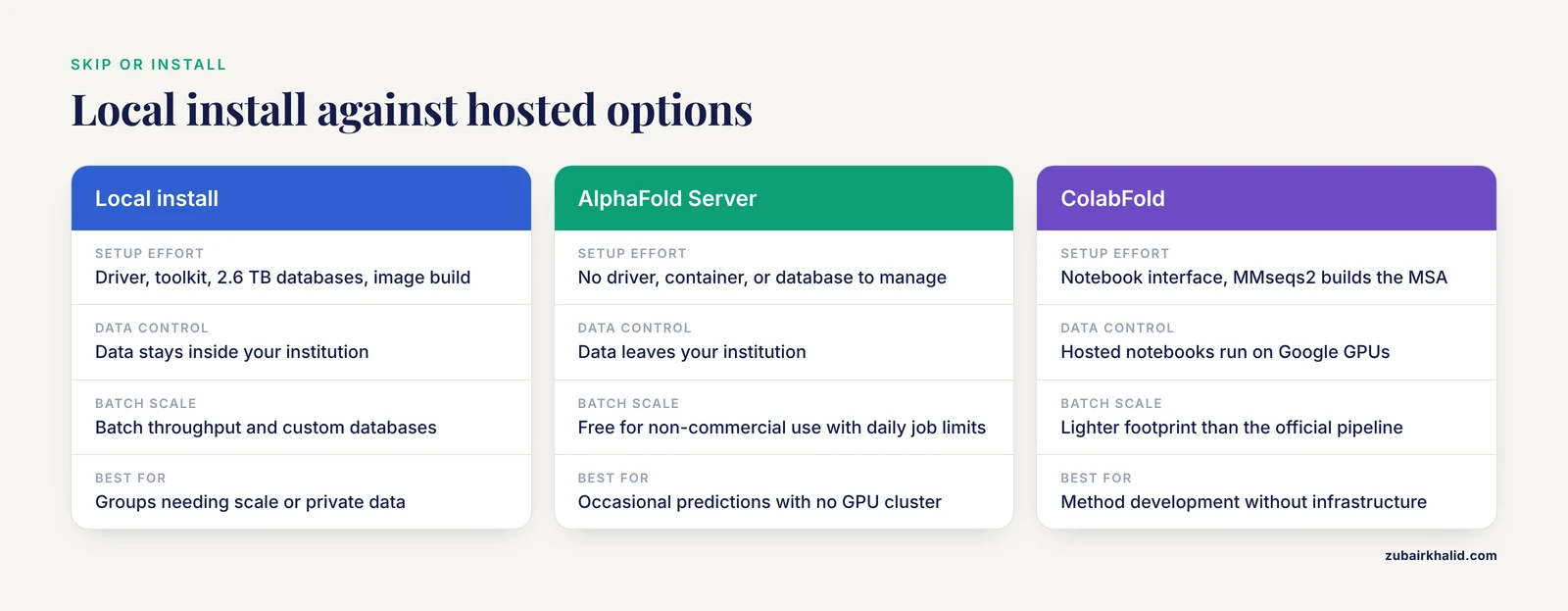
Installation is not always the right answer, and several options remove it entirely.
AlphaFold Server is Google's hosted web service for AlphaFold 3 predictions. You paste sequences, specify entities and modifications through a web interface, and receive predicted structures without touching a driver, a container, or a database. It is free for non-commercial use subject to daily job limits and usage terms published on the site. If you searched for an alphafold server because your lab has no GPU cluster, this is usually the fastest route to a result. The tradeoffs are batch scale, customization, and data control, since you are limited to the service's interface and terms.
AlphaFold DB, hosted by EMBL-EBI, already contains predicted structures for more than 200 million proteins covering nearly the full UniProt catalog. If your protein of interest is in the catalog, the structure may exist already, no computation required.
ColabFold wraps the AlphaFold models in a notebook interface and uses MMseqs2 for MSA generation, which removes the need to host the large sequence databases yourself. The hosted notebooks run free on Google's GPUs, and the same project can be installed locally with a lighter footprint than the official pipeline.
OpenFold is an open reproduction of AlphaFold aimed at training and methods research. It suits groups that need to fine-tune models rather than only run inference.
Choose the hosted server for occasional predictions, AlphaFold DB for known proteins, ColabFold for method development without infrastructure, and a local install when you need batch throughput, custom databases, or data that cannot leave your institution.
Common Mistakes and Limitations
- Trying to install on a CPU-only machine. The official pipeline assumes an NVIDIA GPU. CPU inference of even a single protein is measured in days, not minutes. Decide between cloud GPUs, the hosted server, or notebooks before installing anything.
- Looking for a pip package. No official
pip install alphafoldexists. The distribution is the GitHub repository plus Docker. Packages under that name on public indexes are not the DeepMind software. - Passing directories where files are required. Every database flag wants an exact file path. This one-character-class mistake generates a disproportionate share of search-stage errors.
- Mixing versions. Code from one commit, weights from another download, and databases assembled by hand from a third produce failures that look random. Keep the four artifacts from one coherent point in time.
- Treating a host RAM kill as a bug. A bare
Killedis the kernel protecting the machine. It means capacity, not code. - Editing the image to chase errors. Swapping jaxlib or CUDA versions inside the container trades a known configuration for an unknown one. Change the host driver instead, or rebuild the unmodified image.
- Assuming error messages are stable. Wording changes between releases. When a message matches nothing in this article, search the issue tracker of the repository for your exact commit's version number.
One limitation deserves plain statement: error text, flag names, and database requirements differ across AlphaFold releases and across institutional environments, where proxies, schedulers, and security modules reshape the failure modes. The mechanisms in this article hold across versions, but individual clusters vary enough that root-level or scheduler-bound problems deserve your system administrator's involvement early rather than late.
Prevention Practices
- Pin everything. Record the git commit, the image build date, the driver version, and the database download date in a small README inside your data directory. Reproducibility starts here, and so does debugging six months later.
- Use containers only. Resist host-level pip installs of the scientific stack. The image exists to make version conflicts impossible.
- Stage databases on fast local disk. Network filesystems slow every MSA search and create hangs that masquerade as bugs. Local NVMe or scratch space pays for itself on the first project.
- Keep disk headroom. Databases, Docker layers, and per-run outputs each need hundreds of gigabytes. Alert at 80 percent usage rather than discovering limits mid-run.
- Maintain a smoke test. One short sequence, run end to end after every environment change. Five minutes of validation prevents overnight batch losses.
- Update drivers deliberately. Driver upgrades fix CUDA initialization errors and introduce none of their own when the container stays untouched. Schedule them, run the smoke test, and record the new version.
- Monitor the first run of any new target class. Watch
nvidia-smi, log growth, and output files for the first hour of a longer or multimeric job, so a capacity problem surfaces in minute five rather than hour nine.
Frequently Asked Questions
Why does Docker report that it could not select a device driver with GPU capabilities?
The NVIDIA Container Toolkit is missing or Docker's runtime is not configured to use it. Install the toolkit, run sudo nvidia-ctk runtime configure, runtime=docker, restart Docker, and confirm with docker run, rm, gpus all ubuntu nvidia-smi.
Can I run AlphaFold on a machine with no GPU?
Not in any practical sense. The official pipeline assumes an NVIDIA GPU, and CPU-only inference of a single protein can take days. Use AlphaFold Server, ColabFold notebooks, or a rented cloud GPU instead.
How much disk space do the AlphaFold databases need?
Plan for roughly 2.6 TB for the full database set, plus headroom for downloads and outputs. The reduced set saves space but weakens MSA depth on hard targets.
My AlphaFold job dies silently during the MSA stage. What happened?
The Linux OOM killer almost certainly terminated the search process after the host ran out of RAM. Check dmesg for kill records, then add RAM, run the reduced database preset, or supply precomputed MSAs.
Do I need to rebuild the AlphaFold image after updating my NVIDIA driver?
No. The container ships its own CUDA runtime, so a host driver update requires no rebuild and often resolves CUDA initialization errors.
What is the difference between AlphaFold Server and a local AlphaFold installation?
AlphaFold Server is Google's hosted web service for AlphaFold 3 predictions that needs no installation, while a local install provides batch scale, custom databases, and full control at the cost of ongoing maintenance.
AlphaFold says a database file is missing even though the folder exists. Why?
The run script expects exact file paths for each database, not folder paths, and the files must come from the download script that matches your code version.
Is there a pip package for AlphaFold?
No official one exists. Install from the DeepMind GitHub repository using Docker, or use a maintained community implementation such as ColabFold or OpenFold.