AlphaFold Sequence Input: How to Format Your FASTA
By Dr. Zubair Khalid, DVM, MS, PhD ·

By the end of this guide you will be able to write a FASTA file that AlphaFold-based prediction tools accept on the first try, validate it from the command line before submission, format multi-chain inputs for protein complexes, and troubleshoot the errors that stop a prediction from running. You need a protein sequence in one-letter amino acid code, a plain-text editor (Notepad, TextEdit in plain-text mode, nano, or VS Code), and either a terminal for the validation commands or one of the web-based options such as the AlphaFold Server from Google DeepMind or ColabFold. Every command shown here runs on macOS, Linux, or Windows Subsystem for Linux without installing anything beyond standard Unix tools.
FASTA formatting sounds trivial. In practice it causes a large share of failed AlphaFold submissions, because sequence input is parsed strictly and a single stray character or a missing header line can invalidate an otherwise correct file. A worked example makes this concrete. The xBind webserver, which performs LLM-enabled cross-molecular binding site prediction, accepts a single-chain protein sequence in FASTA format and runs an on-the-fly AlphaFold-based structure prediction for sequence-only inputs, which means the FASTA you supply is parsed by an AlphaFold pipeline before anything else happens [1]. If the FASTA is malformed, nothing downstream can rescue it. This article walks through the format from first principles, then covers the mistakes that trip people up most often.
What AlphaFold Actually Reads When You Submit a Sequence
FASTA is a plain-text format for storing biological sequences. The format takes its name from the FASTA sequence alignment package of the late 1980s, and it has become the lingua franca of sequence input across bioinformatics tools, including AlphaFold and the servers built on top of it.
A FASTA file has exactly two kinds of lines:
- A header line that begins with a greater-than symbol (
>), followed by an identifier and optionally a description. - One or more sequence lines containing the sequence itself in single-letter code.
A minimal, valid example looks like this:
>demo_protein human test peptide
MKTAYIAKQRQISFVKSHFSRQ
When an AlphaFold pipeline parses this file, it splits the content at each > character. Everything on the header line after the > is metadata. In most AlphaFold implementations the identifier is used as the job or chain name, and the description is ignored or stored as a label. The sequence characters are mapped onto the model's residue alphabet. This mapping is where most problems originate, because the model recognizes only a fixed set of characters and treats anything else as either an unknown residue or an error.
Two properties of the parsing behavior matter for your day-to-day work:
- The sequence itself, not the header, drives the prediction. AlphaFold builds its multiple sequence alignment (MSA), the set of evolutionarily related sequences it uses to infer structure, from the residue string. A descriptive header helps you keep results organized but does not affect the model.
- Parsing is character-by-character. There is no fuzzy matching. A lowercase letter is usually converted to uppercase, a space inside a sequence line is not, and a stop symbol like
*is not a residue at all.
This strict parsing is easy to see in practice. Sequence-only web servers that wrap AlphaFold, such as xBind, take a single-chain FASTA as one of their two accepted input types (the other being a monomer structure in PDB or mmCIF format) and immediately convert the sequence into a predicted structure [1]. The FASTA is the sole carrier of sequence information, so every character in it has to be defensible.
AlphaFold FASTA Format Step by Step
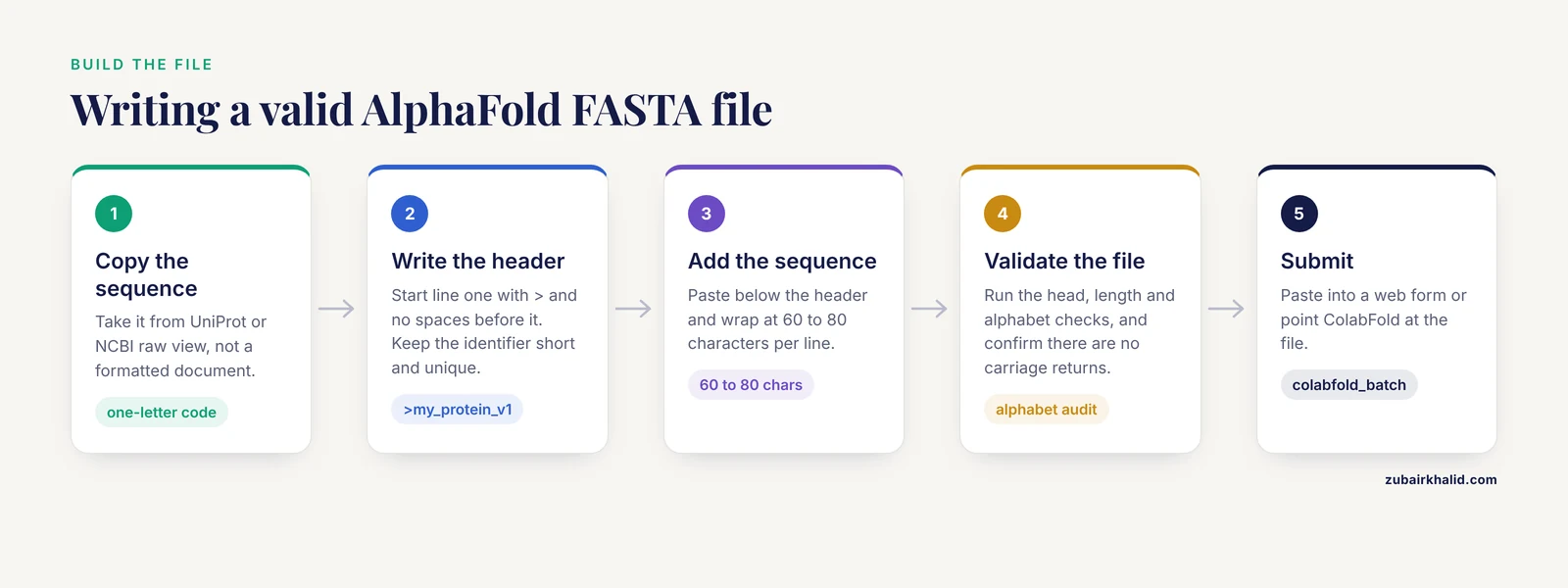
This walkthrough builds a valid file from scratch using a toy sequence. The same steps apply whether you paste the file into a web form or point a command-line tool at it.
Step 1: Get the Sequence in One-Letter Amino Acid Code
Copy your protein sequence from a reliable source such as UniProt or NCBI, or from your own translation output. The sequence must use the standard twenty one-letter amino acid codes. If your source shows a FASTA with a header, copy the whole thing. If it shows a bare sequence, you will write the header yourself in the next step.
A word of caution about copying from word processors or web pages: rich-text sources sometimes introduce invisible characters, replace hyphens with different Unicode dash characters, or convert straight quotes into curly quotes. Copy from the raw sequence view of a database, not from a formatted document.
Step 2: Write the Header Line
Open a plain-text editor and type a header line. The only strict requirement is that the line starts with > and contains no spaces before it. A common convention, borrowed from UniProt entries, separates the identifier from the description with a single space:
>sp|P69905|K1C15_HUMAN_demo|demo|sequence for tutorialFor a personal project, something short and unique is enough:
>my_protein_v1Keep the identifier short, use only letters, digits, underscores, hyphens, and pipes, and make it unique within the file. Several command-line AlphaFold implementations, including ColabFold, use the identifier as an internal job name, and duplicate identifiers in one file cause name collisions during output.
Step 3: Add the Sequence, Wrapped Across Lines
Paste or type the sequence below the header. The traditional FASTA convention wraps sequences at 60 to 80 characters per line, which keeps files readable and matches the output of most sequence databases. Modern parsers handle a single unwrapped line without trouble, but wrapping costs nothing and prevents problems with older tools in your pipeline.
>demo_protein toy sequence for tutorial
MKTAYIAKQRQISFVKSHFSRQLELEREFTDLFETTLREV
Save the file with a .fasta extension (.fa and .faa for proteins are also standard) and make sure your editor saves plain text. TextEdit on macOS defaults to rich text, so switch it with Format, Make Plain Text before saving.
Step 4: Validate the File From the Command Line
Open a terminal in the directory containing your file and run through these checks. Each one takes seconds and catches a different class of error.
First, confirm the file has the expected shape:
head demo.fastaExpected output:
>demo_protein toy sequence for tutorial
MKTAYIAKQRQISFVKSHFSRQLELEREFTDLFETTLREV
Second, count the sequence length. Strip the header, remove line breaks, and count the remaining characters:
grep -v '^>' demo.fasta | tr -d '\n' | wc -cThe wc -c count includes one character for the trailing newline that tr leaves behind, so subtract one. Expected output for the toy sequence above:
40Third, list every distinct character the file uses in its sequence lines. This is the single most valuable check, because it surfaces any stray character in one glance:
grep -v '^>' demo.fasta | tr -d '\n' | fold -w1 | sort -uExpected output for a clean protein sequence:
A
D
E
F
I
K
L
M
Q
R
S
T
V
Y
If anything other than the twenty standard amino acid letters (or a deliberate X) appears here, fix the file before submitting.
Fourth, confirm there are no Windows carriage returns hiding at the end of lines. Files edited on Windows often carry a carriage return character (\r) that some parsers treat as part of the sequence:
file demo.fastaExpected output for a clean Unix text file:
demo.fasta: ASCII textIf you see ASCII text, with CRLF line terminators, convert the file:
dos2unix demo.fastaIf dos2unix is not installed, the equivalent one-liner is:
tr -d '\r' < demo.fasta > demo_clean.fastaFifth, if you have the seqkit toolkit installed, one command gives you a structured report:
seqkit stats demo.fastaExpected output:
file        format  type  num_seqs  min_len  avg_len  max_len
demo.fasta  FASTA   DNA       1        40       40       40
Note that seqkit guesses the sequence type from composition. A short toy sequence may be reported as DNA or protein inconsistently, which is harmless. What matters is the num_seqs count and the length columns.
If you prefer Python, the Biopython library performs the same validation in a few lines:
from Bio import SeqIO
record = SeqIO.read("demo.fasta", "fasta")
print(record.id)
print(len(record.seq))
print(set(str(record.seq)))
Expected output:
demo_protein
40
{'M', 'K', 'T', 'A', 'Y', 'I', 'Q', 'R', 'S', 'F', 'V', 'L', 'E', 'D'}
The set() line is your alphabet audit. Any character outside the standard twenty letters, plus X for unknown, deserves a second look.
Step 5: Submit to Your Chosen Interface
At this point the file is clean. Paste its contents into the sequence box of a web-based interface, or upload the file directly if the interface accepts uploads. On the AlphaFold Server from Google DeepMind, each FASTA record you paste becomes one chain in the input. Command-line users running AlphaFold2 through ColabFold point the tool at the file directly:
colabfold_batch demo.fasta ./resultsExpected output starts with parsing and MSA generation messages and finishes with ranked model files in the ./results directory. The exact log wording varies by version, so treat the presence of output PDB files as the success signal.
Multi-Chain Input: FASTA for Protein Complexes
A single FASTA record predicts a single chain. To predict a complex, you supply multiple records in one file, and the parser assigns one chain to each record. This works the same way across the major AlphaFold interfaces, including the AlphaFold Server, where each sequence you add becomes a separate chain.
A two-chain example:
>chain_A mouse protein subunit
MKTAYIAKQRQISFVKSHFSRQLELEREFTDL
>chain_B mouse partner subunit
GSHMSEVLQKVKEIFETRSLAK
Three rules keep multi-chain files out of trouble:
- Give every record a unique identifier. Two records both named
chain_Awill collide in downstream naming. - Order the records in the order you want the chains reported. Most interfaces assign chain IDs (A, B, C) in file order.
- Keep the sequences pure. For protein-protein complexes this is straightforward. For protein-nucleic acid complexes, use a separate chain record for each nucleic acid strand, and use only DNA/RNA characters (A, C, G, T, U) in those records. Mixing letters across alphabets within one record is a guaranteed rejection.
It is also worth knowing what multi-record FASTA does not do. In most command-line AlphaFold2 workflows, each record in the file is treated as a separate chain of one job, not as a separate job. If you intend to run twenty unrelated single-chain predictions, submitting a twenty-record FASTA to a complex prediction will model them all as one interacting assembly, which produces meaningless interfaces and wastes compute. Batch single-chain predictions as separate submissions or separate runs.
The Amino Acid Alphabet and Non-Standard Residues
The table below lists the characters AlphaFold-style pipelines expect in a protein FASTA, plus the ambiguous codes you are most likely to encounter when copying from databases.
| Code | Meaning | Safe for AlphaFold input? |
|---|---|---|
| A, R, N, D, C, Q, E, G, H, I, L, K, M, F, P, S, T, W, Y, V | The twenty standard amino acids, one letter each | Yes, this is the expected alphabet |
| X | Unknown or modified residue | Usually accepted, treated as a generic unknown |
| B | Aspartic acid or asparagine (Asx) | Varies by implementation, often rejected or converted to X |
| Z | Glutamic acid or glutamine (Glx) | Varies by implementation, often rejected or converted to X |
| J | Leucine or isoleucine (Xle) | Varies by implementation, often rejected or converted to X |
| U | Selenocysteine | Varies, newer versions may map it to cysteine |
| O | Pyrrolysine | Varies, often rejected or mapped to lysine |
* | Translation stop symbol | Not a residue, remove it |
- | Alignment gap | Not a residue, remove it |
The practical rule is simple. Before submission, replace every B, Z, J, and * with a deliberate choice. Gaps should be deleted, since the sequence must represent one contiguous polypeptide. For U and O, check the documentation of the specific tool you are using, because support differs between AlphaFold2, AlphaFold3, and the servers built on them. If the tool offers no guidance, substituting X for a modified residue is the conservative default, and the model will treat that position as an unknown.
One more detail that surprises people: residue numbering. AlphaFold reports predicted structures with residues numbered sequentially from 1 along the input sequence. If your protein is a domain excised from a larger protein, the output numbering will not match your reference numbering. Many researchers handle this by noting the offset in the FASTA header, for example >kinase_domain residues 215-510 of P12345, which costs nothing and prevents confusion when the model arrives.
AlphaFold FASTA Format Tips
These tips address the quality of the prediction, not just the syntax. A syntactically perfect FASTA can still produce a poor model if the sequence itself is poorly chosen.
Start from a curated database sequence when one exists. Copying directly from UniProt or NCBI guarantees the alphabet is clean and the sequence is the canonical isoform. If you must work from a transcript or a gene prediction, translate it yourself, inspect the translation for internal stop symbols, and trim to the mature protein where annotation supports it.
Signal peptides and pro-peptides are legitimate choices, but decide deliberately. AlphaFold will happily predict a structure for a sequence that includes a disordered signal peptide, and the disordered segment will simply show low confidence in the output. If you care about the folded domain, submitting the mature chain is often cleaner. If you care about the full biosynthetic precursor, submit the whole thing and interpret the low-confidence regions as what they are.
Trim long disordered tails when the tail is not your question. Very long sequences with large intrinsically disordered regions consume compute and can dilute confidence in the folded core. The folded domain alone is frequently the more informative submission.
Keep headers informative but simple. A header like >human_HSPA1A_full tells you what the model is six months from now. A header with tabs, unusual symbols, or a full paragraph of description invites parser quirks and clutters output filenames.
Use the tutorials the servers provide. Good web servers document their own input conventions, and it pays to read them before a first submission. The xBind server, for example, pairs its sequence input with an extensive web-based tutorial and guide covering usage and result interpretation, and its interface lets you adjust settings such as the likelihood threshold for binding site annotation after the AlphaFold-based structure prediction runs [1]. Reading a server's own guide before submitting is the fastest way to learn its particular input conventions, which occasionally differ from the general rules in this article.
Validate every file, every time, including the ones you have had for years. Old FASTA files accumulate edits. The alphabet audit from Step 4 takes ten seconds and has caught more subtle contamination than any other single check in practice.
Common Mistakes and Limitations
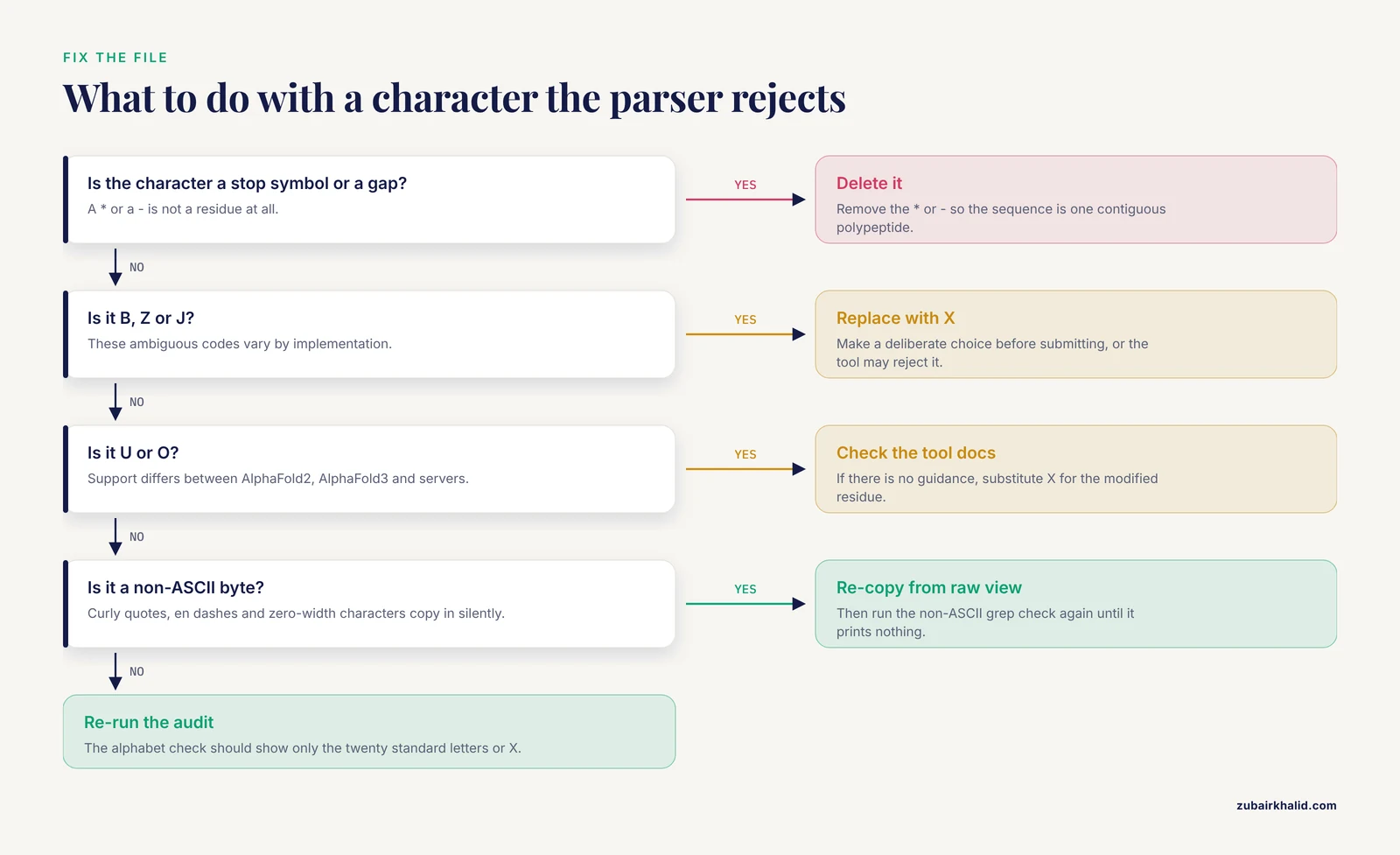
These are the errors seen most often, with the behavior you will observe and the fix.
Missing > on the header line. The parser reads your intended header as sequence. You get a prediction for a nonsense sequence starting with characters like sp|P69905, or an alphabet error. Fix by checking that line 1 of the file starts with >.
Spaces inside the sequence. Copied sequences sometimes carry spaces from column-formatted sources. Depending on the parser, spaces are stripped, rejected, or silently break the record into pieces. Fix by re-copying from a raw sequence view and re-running the alphabet audit.
Windows line endings. A file saved in Windows Notepad carries \r\n line breaks. Some parsers handle this, others append a carriage return to the last residue of each line or fail with a character error. Fix with dos2unix as shown in Step 4.
**The stop character .* Sequences translated straight from nucleotides often end with *. Some pipelines reject the file outright, others silently drop it. Remove it before submission.
Lowercase letters. Most AlphaFold implementations accept lowercase and convert to uppercase internally, and soft-masked genomic translations are a common source of lowercase input. The safe habit is still to normalize to uppercase, because a small number of downstream tools in the same pipeline treat case as meaningful:
grep -v '^>' demo.fasta | tr 'acdefghiklmnpqrstvwy' 'ACDEFGHIKLMNPQRSTVWY'Blank lines inside a record. Some parsers stop reading a sequence at the first blank line, truncating your protein without warning. Confirm with grep -c '^$' demo.fasta, which should print 0.
Non-ASCII characters. Curly quotes, en dashes copied from PDFs, and zero-width characters from web pages all land in files silently. The command grep -P '[^\x00-\x7F]' demo.fasta prints any line containing a non-ASCII byte and should print nothing.
Submit全长 sequences with unmodeled cofactors expected. AlphaFold predicts the protein chain. Bound waters, metal ions, glycans, and ligands are either absent or handled in limited ways depending on the version, so a "wrong" looking model may be a correct apo-protein prediction. This is a modeling limitation, not a formatting one, but it is the most common reason people believe their input failed when it did not.
Length limits. Web servers impose sequence length and per-day job limits that vary by service and change over time. Check the current documentation of your chosen server rather than relying on remembered numbers, and split very large proteins into domains when the biology permits.
A final limitation belongs here rather than in the FAQ. A formatted FASTA guarantees the prediction runs, not that the model is biologically correct. Low-confidence regions, novel folds with shallow MSAs, and multi-chain interfaces all require expert interpretation against experimental data where it exists.
Checking That Your Prediction Input Was Right
After submission, verify the round trip. The structure you receive should have exactly the number of residues you submitted (for a single-chain job, sequence length in equals chain length out, minus any positions the model explicitly leaves unmodeled). Open the output structure file and confirm the first residue is the first residue of your FASTA, not residue 2 or an offset fragment. If the interface shows the sequence back to you, as many do, compare it against your file directly:
grep -v '^>' demo.fasta | tr -d '\n' | fold -w60Paste the output side by side with the sequence displayed in the server's confirmation page and diff them by eye. Thirty seconds here prevents the classic failure of analyzing a model built from the wrong isoform.
Where to Go Next
With a validated FASTA in hand, the sensible path runs through the official documentation of your chosen tool. The AlphaFold Server from Google DeepMind documents its chain and token inputs for the current model version, and ColabFold documents its command-line options for batch runs and complex predictions. If your downstream question is about binding rather than folding alone, servers built on top of AlphaFold predictions extend the workflow. xBind, for instance, takes either your FASTA sequence or an existing monomer structure and predicts residue-level binding sites for protein-protein, protein-DNA, and protein-RNA interactions using ESM-2 language model embeddings combined with sequence and structure features, all through a configurable web interface [1]. The general lesson holds across this ecosystem: the FASTA is the foundation, and clean input is the cheapest quality improvement available anywhere in the structure prediction pipeline.
Frequently Asked Questions
Does AlphaFold accept lowercase letters in a FASTA file?
Most AlphaFold implementations accept lowercase and convert it to uppercase internally, but not every downstream tool in a pipeline does. Convert your sequence to uppercase before submission so behavior is predictable everywhere.
Can I submit just a sequence without a header line?
Some parsers accept a bare sequence, but a proper header line starting with > costs nothing and prevents the identifier from being read as sequence data. Always include one.
How do I format a FASTA for a multi-chain protein complex?
Put each chain in its own FASTA record within the same file, each with its own > header and a unique identifier. The parser assigns one chain per record in file order.
What should I do with selenocysteine (U) or other non-standard residues?
Check the documentation of your specific tool, because support differs between AlphaFold versions. When in doubt, replace the non-standard code with X so the position is treated as an unknown residue.
How long a sequence can I submit to a web-based AlphaFold server?
Length and job limits vary by server and change over time, so check the current documentation of the service you are using. For very large proteins, splitting into domains is often the more practical and more informative choice.
Does line wrapping matter in the FASTA file?
No modern parser requires it, but wrapping at 60 to 80 characters matches database convention and keeps the file readable. Either style is accepted by mainstream AlphaFold implementations.
Can I put a DNA or RNA sequence in the same FASTA as my protein?
Yes, as separate records, using only nucleotide characters in the nucleic acid records. Never mix nucleotide letters into a protein record or the reverse.
Why did my prediction run but the model looks wrong for part of the protein?
The most common cause is a genuinely disordered or low-confidence region rather than a formatting problem. Check the per-residue confidence values in the output and compare against known biology before suspecting the input.