What to Do with Old Paper Notebooks After ELN Migration
By Dr. Zubair Khalid, DVM, MS, PhD ·

Old paper notebooks remain the original raw record even after your lab moves to an electronic lab notebook (ELN), while the ELN becomes the forward-looking system where new experiments are created, signed, and stored. The rule of thumb is simple: keep and protect every paper notebook until you know your legal, regulatory, and institutional retention duties, digitize them so people can actually find the information, and only consider disposal after the people responsible for records at your organization say it is allowed.
This guide walks through every realistic option for legacy notebooks, compares them side by side, gives worked scenarios, and flags the mistakes that cost labs their data, their patents, or their compliance standing.
Why Paper Notebooks Still Matter After Migration
An electronic lab notebook changes where new records live, but it does not automatically change the legal status of old ones. Under Good Laboratory Practice (GLP), the set of quality rules that govern nonclinical safety studies, raw data includes the original laboratory records, and paper notebooks often are that original record for work done before migration. Good Clinical Practice, which governs clinical trials, treats source documents similarly. When regulators audit a study, they frequently want to see the original, contemporaneous record, not a copy of a copy.
The data integrity framework most labs borrow for this is ALCOA: records should be attributable, legible, contemporaneous, original, and accurate. A bound paper notebook with dated, signed pages scores well on originality and contemporaneity. A loose scan can score worse on both if the scan was made years later or the page order was disturbed. This is why digitization is an enhancement to paper retention, not automatically a replacement for it.
There is also the patent dimension. Since the United States moved to a first-inventor-to-file system under the America Invents Act, dated lab records matter most for proving inventorship and for documenting conception and reduction to practice. Notebooks with witnessed, dated entries remain evidence in interference and derivation proceedings. Destroying them to save shelf space can be an expensive decision.
Finally, there is the practical dimension. Old notebooks answer old questions. When a reviewer asks why a 2019 batch failed, when a former student's method needs to be repeated, or when a supplier change introduced an impurity, the answer is often in a notebook that nobody has opened in five years.
The Main Options at a Glance
Here are the realistic paths for legacy paper notebooks, compared on the criteria that decide most real-world choices.
| Option | What happens to the originals | Best suited for | Main drawback |
|---|---|---|---|
| Keep in place as the archive of record | Notebooks stay on lab or department shelves, indexed | Labs with space, low volume, no regulatory pressure | Vulnerable to water, fire, loss during moves |
| Digitize, then keep originals | High-quality scans create a searchable copy, originals retained | Most academic and industry labs, the default choice | Scanning takes time and needs quality control |
| Digitize, then move originals off-site | Scans stay local, boxes go to a records storage service | High-volume labs, regulated environments | Ongoing storage contracts and retrieval fees |
| Transfer custody to the institution | Notebooks become institutional records held by a records office or PI archive | Departing students and staff, closed labs | You lose direct access, retrieval depends on others |
| Digitize, then destroy originals | Shredding after verified scans and sign-off | Only where retention policy and law clearly allow | Irreversible, invalidates original-status arguments |
Most labs combine two options: digitize and keep in place for recent notebooks, then off-site storage or institutional transfer for older ones.
Option 1: Keep Originals in Place as the Archive of Record
The simplest answer to what to do with old paper lab notebooks after an ELN migration is often the right one: keep them, organize them, and leave them where trained people can reach them.
How to do it well
An unmanaged shelf of notebooks is not an archive. Before closing out the paper era, do three things.
First, inventory. Assign each notebook an identifier, record the owner, the approximate date range, the project, and its physical location in a simple register or spreadsheet that itself gets imported into the ELN or a linked document system. A notebook nobody can locate is functionally destroyed.
Second, close out loose ends. Confirm that every notebook has the owner's name, a start date, and signatures on completed pages. If your lab used a witness or co-signature convention for patent-relevant work, confirm the witnesses signed. Fixing gaps years later is awkward and sometimes impossible.
Third, protect physically. Keep notebooks off the floor, away from sinks and windows, in labeled archival boxes. Water is the most common killer of lab archives. A single plumbing failure can destroy a decade of records stored under a pipe.
Pros and cons
The advantages are strong. Original status is preserved, which matters for GLP inspections, patent evidence, and any dispute about what was actually observed. Cost is near zero. Access requires no IT dependency, no format migration, and no scanner.
The disadvantages are real too. Paper does not scale. Retrieval means walking to a shelf and paging through handwritten entries. Preservation conditions in a typical lab are mediocre. And when people leave, institutional memory about where a given notebook sits walks out with them unless the register exists.
This option works best for small and medium labs with modest notebook volume, stable space, and no imminent regulatory or litigation pressure.
Option 2: Digitize, Then Keep the Originals
This is the default recommendation for most labs, and for good reason. Scanning gives you searchability and off-site redundancy while the originals keep their status as the record of first resort.
Scan quality that actually holds up
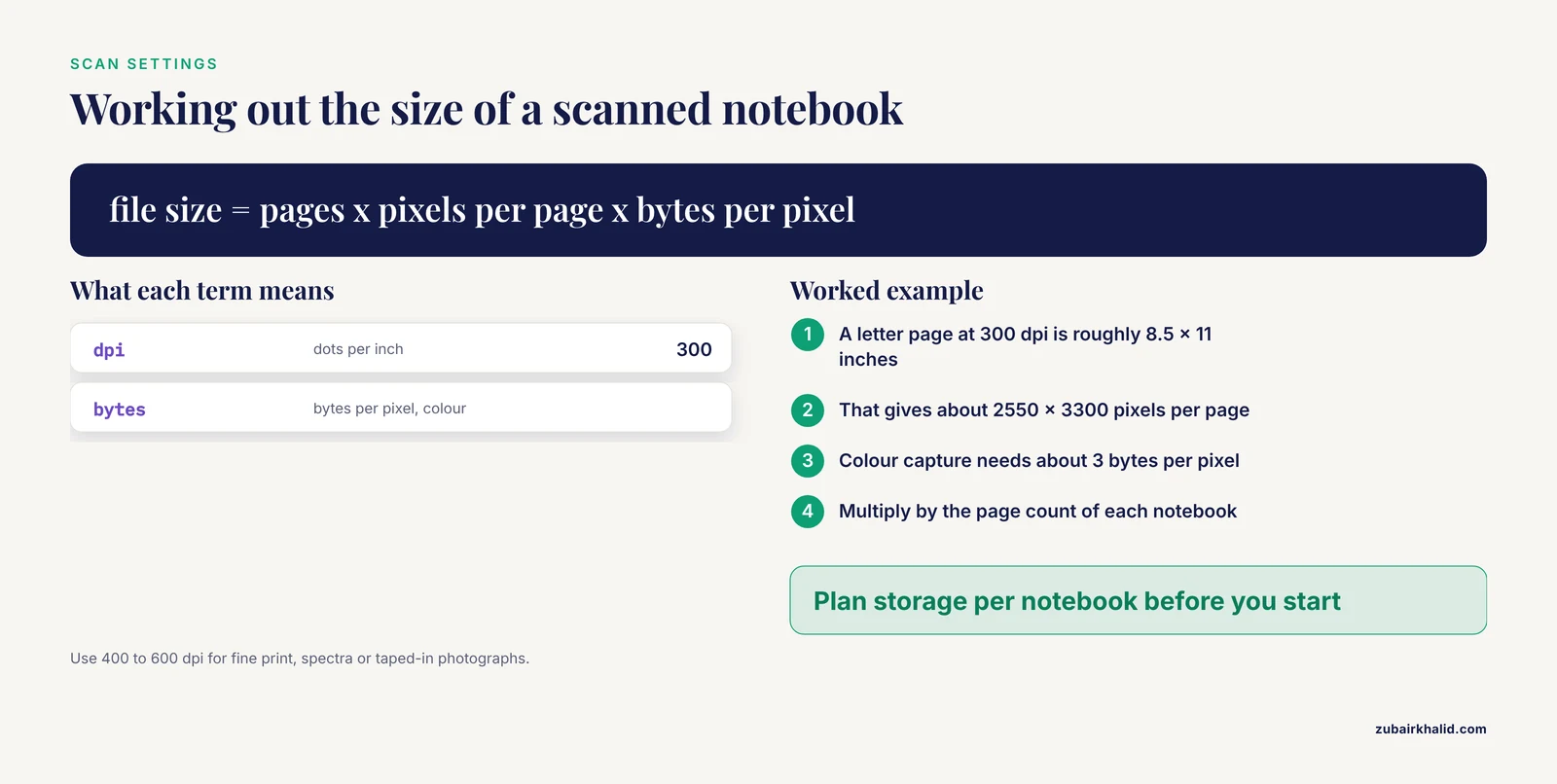
A poor scan is worse than no scan because it creates false confidence. Use these settings as a practical floor.
- Resolution of at least 300 dots per inch (dpi) for text and data tables. Use 400 to 600 dpi for pages with fine print, spectra printouts, or photographs taped into the notebook.
- Color or grayscale capture, never bitonal black-and-white alone, because pencil notes, faint ink, and colored highlight marks disappear in pure black-and-white scanning.
- A lossless or high-quality format. PDF/A, the archiving variant of the PDF standard designed for long-term preservation, is the usual target for multi-page documents.
- One file per notebook, or one file per logical section, named with the same identifier used in your register, for example NB-2019-014_JSmith_2019-03-to-2019-08.pdf.
Do not unravel bindings to feed pages through a sheet feeder unless you have explicit authorization, because destroying the binding destroys evidence that pages belonged together and were part of a bound, sequentially used notebook.
Indexing and metadata
The scan is only useful if people can find things in it. At minimum, record for each scanned notebook the notebook identifier, owner, date range, project, and storage location of both the file and the original. If your ELN supports attachments or external document references, link the scan record to the relevant project so a search in the ELN surfaces the legacy material. Optical character recognition (OCR), software that converts images of text into searchable text, helps with typed printouts pasted into notebooks but does poorly on handwriting, so do not promise anyone full-text search of handwritten pages.
Verification
Spot-check every scanned notebook against the original. Confirm the page count matches, no pages are skewed or blurred beyond reading, and both covers and any loose inserts were captured. Record who performed the check and when. In regulated environments this verification step should be documented the same way any critical step is documented.
Pros and cons
The advantages: searchable access from anywhere, a second copy that survives local disasters, and a smoother transition for people who never want to open a dusty box again. The disadvantages: scanning effort, storage of potentially large image files, and the risk that someone later treats the scan as disposable. Make clear in your data policy that the scan is a copy and the original remains the archival record.
Option 3: Digitize, Then Move Originals Off-Site
Labs with decades of notebooks, or labs operating under formal quality systems, often graduate from shelf storage to professional records management. Off-site storage vendors provide climate-controlled, access-controlled storage with barcode tracking, retrieval services, and certified destruction when the retention period ends.
How this works in practice
The lab packs notebooks in standard archival boxes, maintains a box-level inventory, and the vendor stores the boxes in an indexed facility. When someone needs a notebook, they request retrieval, and the vendor delivers the box or scans specific pages on demand. Retention schedules, the documented rules that say how long each record class must be kept before destruction, can be attached to each box so destruction happens on schedule with authorization.
Pros and cons
The advantages are space recovery, professional preservation conditions, chain-of-custody tracking, and a clean path to authorized destruction. For regulated organizations, a vendor with documented controls simplifies audit conversations about where raw data lives.
The disadvantages are recurring cost, dependence on a contract, and retrieval latency. A notebook that took thirty seconds to pull from a shelf might take a day or more to arrive from storage. Plan migration validation work accordingly, because any project that may need legacy data frequently should have those notebooks digitized first or kept closer at hand.
Option 4: Transfer Custody to the Institution or PI
When a student, postdoc, or staff scientist leaves, the question of who keeps the notebooks has one standard answer in most organizations: the notebooks stay with the laboratory, the principal investigator, or the institution. This is both customary practice and, at institutions that receive federal funding, consistent with the general principle that research records belong to the grantee institution, not the individual researcher.
What a clean handoff looks like
The departing researcher should not simply leave a pile. A proper transfer includes the register entry updated to name the receiving custodian, a signed short handoff note listing each notebook identifier and its condition, confirmation that any personal copies are indeed copies and not the original, and, where the lab policy allows, a digitized copy for the departing researcher's own future reference, subject to confidentiality and export-control rules.
Labs closing down entirely, for example when a PI retires or moves, face the same decision at larger scale. The options are institutional archive transfer, off-site storage under the department's account, or digitization with retention of the originals by the department. The one option that is almost never correct is discarding notebooks during an office cleanout.
Pros and cons
Custody transfer keeps original records under institutional stewardship with professional oversight and removes the burden from individuals. The drawbacks are reduced personal access and dependence on institutional records infrastructure, which varies widely in quality. A departing researcher who needs their old data later should request digitized copies before leaving, not after.
Option 5: Digitize, Then Destroy Originals
Destruction is the option people reach for too early. It is legitimate in some situations and a serious mistake in others.
When destruction can be defensible
Destruction is defensible when the organization's records retention schedule, written with input from legal counsel and quality or compliance staff, says the record class has met its retention requirement, when digitization has been verified complete and faithful, and when the destruction is authorized in writing and documented. Some non-regulated industrial contexts with short retention requirements fall into this category. Notebooks containing only failed screening experiments of no IP or regulatory significance may be candidates in organizations that have explicitly scoped them out of retention requirements.
Why destruction is usually the wrong call
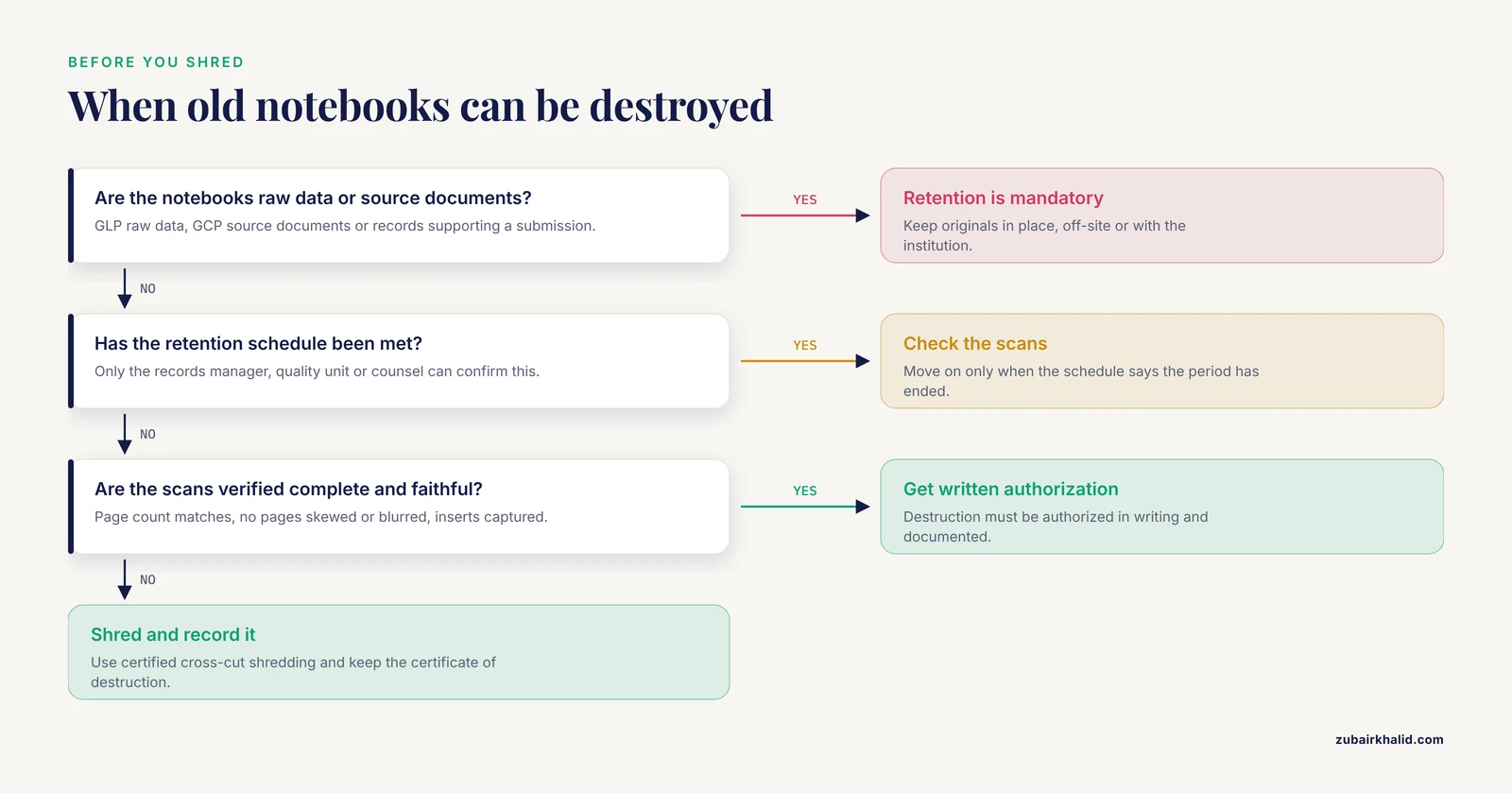
In most academic and regulated-industry settings, paper notebooks are raw data or source documents, and retention requirements commonly span many years, sometimes decades, and in some cases the life of the product or the life of the patent plus a period beyond it. Because these periods vary by jurisdiction, funding terms, contract terms, and record class, no universal number applies. The people who know the applicable period for your records are the records manager, quality unit, or counsel, not the bench scientist doing the cleanup.
Destroying originals also forfeits the originality advantage. A scan of a notebook is a copy, and copies are easier to challenge. If a patent dispute or data-integrity investigation ever hinges on a page, having the bound original with intact pages and signatures is materially stronger.
Finally, destruction is irreversible. Every year labs discover, too late, that a destroyed notebook contained the only record of a critical observation.
If destruction is authorized
Use certified cross-cut shredding or a vendor-provided secure destruction service that issues a certificate of destruction. Record what was destroyed, when, by whose authorization, and reference the verified scans in the register.
How to Choose: The Criteria That Decide Real Choices
With the options explained on their own terms, compare them against the five questions that actually determine the right answer for a given lab.
1. What is the legal and regulatory status of the notebooks?
If the notebooks are raw data under GLP, source documents under GCP, or records supporting a regulatory submission, retention is mandatory and originals carry weight. This points toward keep in place, off-site storage, or institutional transfer, and away from destruction. If the notebooks are informal scratch work with no regulatory or IP significance, the constraints loosen considerably.
2. How likely is future access, and by whom?
Ask who will need these notebooks and how often. If the answer is "rarely, but urgently, by people who were not here when they were written," then digitization is essential regardless of where the originals live. If the answer is "frequently, during method transfers and project restarts," keep the relevant notebooks close and digitize the high-use ones first.
3. What is the IP posture?
If the work behind the notebooks feeds patent filings, treat the notebooks as evidence. Originals with dated, witnessed entries stay. If the work is purely incremental, published long ago, or in a crowded field where the lab files no patents, the IP argument for retention weakens.
4. What can the lab sustain?
A shelf register maintained by one diligent person beats an elaborate scanning project that stalls at box three. Match the option to the lab's actual capacity for sustained administration. Small labs are usually best served by digitize-and-keep. Large regulated organizations usually need off-site storage with formal retention schedules.
5. What happens at the next disruption?
Moves, renovations, retirements, and grant endings destroy archives. Choose the option that survives the next transition. That usually means a written register in a shared system, custody assigned to a role rather than a person, and physical storage that professional movers can handle as labeled boxes.
Worked Scenarios
Scenario 1: An academic lab adopts an ELN mid-project
A university chemistry lab with fifteen years of accumulated notebooks moves to an ELN. New work goes into the ELN from day one. For the legacy notebooks, the lab does a one-time inventory into a shared register, scans the twelve notebooks tied to the active grant project at 400 dpi into PDF/A files linked from the ELN project pages, and shelves the rest in labeled archival boxes. The PI keeps the originals. Verification checklists sit in the register. Total added infrastructure: one register, one scanner, two afternoons of scanning per week for a month.
This lab chose digitize-and-keep because its notebooks are grant records with long retention expectations, its volume is manageable, and its IP output is active.
Scenario 2: A QC lab under a quality system
A quality control laboratory in a manufacturing organization migrates to an ELN validated for its use. Legacy notebooks are raw data subject to the company's retention schedule. The lab scans everything through a managed project with two-person verification, transfers the boxed originals to an off-site records storage vendor with box-level indexing, and attaches the retention schedule to each box so the vendor handles authorized destruction at end of retention. During the transition quarter, the two most recent years of notebooks stay on site to support investigations.
This lab chose digitize-then-off-site because volume made shelf storage impractical, the quality system demanded documented chain of custody, and the retention schedule created a defined end point.
Scenario 3: A departing postdoc with three notebooks
A postdoc finishing a fellowship has three personal notebooks covering a project the lab will continue. The lab's policy says notebooks are institutional records. The postdoc completes any unsigned pages and gets them witnessed, updates the register, hands the notebooks to the PI with a one-page transfer note, and requests digitized copies of pages covering methods she will need in her next position, which the lab provides after checking the request against confidentiality and intellectual property rules. She takes copies, not originals.
The key point in this scenario is sequencing. Every conversation about copies happens before the departure date, because access after leaving depends entirely on the institution's goodwill and policies.
Scenario 4: A startup cleaning house before a move
A biotech startup moving offices finds forty notebooks from its first five years. Before the move, the founder's team scans all of them, verifies the scans, and packs the originals into numbered boxes that go to a records storage vendor rather than into the moving truck with the furniture. Patents filed from this work are still in prosecution, so originals stay preserved, and the register notes which notebooks support which filings.
This lab chose digitize-then-off-site because a move is the single most common way archives are lost, and litigation or prosecution access to originals could plausibly be needed.
Carrying Notebook Habits Into the ELN
Migration is also the moment to carry forward the good parts of paper practice. A lab notebook template, the standardized page structure a lab uses so entries are consistent and complete, translates directly into ELN templates. A well-designed ELN template preserves what made paper notebooks work: a header with date and experimenter, a purpose statement, a materials and methods section, observations entered contemporaneously, a results section, and signature and witness fields where required.
When building ELN templates during migration, review a dozen legacy notebooks from different eras and note which sections people actually used and which they skipped. Templates that mirror real behavior get adopted. Templates that fight it get abandoned, and the lab ends up with the worst of both worlds, unstructured electronic entries and no paper fallback.
Also decide deliberately what stays paper. Some labs keep a single paper log for calibration records, sample receipt, or equipment sign-up where a laminated sheet at the bench is genuinely more practical, then transcribe or scan into the ELN. That is a defensible hybrid as long as the policy states which record is the original.
Common Mistakes and Limitations
These are the specific, avoidable errors that cause the most damage during and after migration.
- Treating the scan as a replacement rather than a copy. In most regulated and academic contexts the paper original remains the record that carries the most weight. State this in the lab's data policy so nobody discards originals on the assumption that the scan suffices.
- Scanning at low resolution in black and white. A 150 dpi bitonal scan can make pencil notes and light photocopies unreadable, which defeats the entire purpose. Use at least 300 dpi, and color for pages with images, spectra, or pencil.
- Skipping verification. Scans fail silently. Skewed pages, missed inserts, and truncated files are common. Without a documented check against the original, nobody discovers the gaps until the moment they matter.
- Discarding notebooks during departures or office moves. More legacy data is lost to cleanouts than to any other cause. Make retention during transitions the default and require explicit authorization for anything else.
- Keeping the register in one person's head or on a laptop that leaves with them. The register belongs in a shared, backed-up system with the same care applied to any important record.
- Ignoring bound integrity. Unbinding notebooks to feed a sheet-feed scanner destroys the physical evidence that the pages were sequentially used. Use overhead or flatbed capture for bound volumes.
- Assuming one retention period applies to everything. Retention requirements vary by record type, funder, contract, jurisdiction, and industry. Individual situations, especially those involving litigation holds, regulatory submissions, or patent prosecution, need a determination from the organization's records manager, quality unit, or counsel rather than a general rule.
- Migrating without migrating the templates. If the ELN ships with a generic template and nobody adapts it, researchers recreate paper habits informally and the electronic records become inconsistent. Invest the time in ELN templates that encode your lab notebook template conventions.
- Storing scans only on one drive. A digitization project that produces a single copy on one server has created a new single point of failure. Follow the same backup redundancy you apply to other irreplaceable data.
One limitation belongs at the top rather than in a bullet: this article gives general professional practice, not legal advice. Retention periods, ownership of records, and destruction authority are set by institutional policy, funder terms, contracts, and law, and they differ between organizations. Any decision to destroy originals, and any question about who may take copies of what, needs a determination from the people responsible for records and legal matters at your institution.
Frequently Asked Questions
Can I throw away paper lab notebooks once everything is in the ELN?
No, not without authorization. In most academic and regulated settings the notebooks are original raw data or source documents subject to retention requirements, and a scan is a copy rather than a replacement. Treat disposal as allowed only after the responsible records or compliance authority confirms the retention requirement is met and authorizes destruction in writing.
How long should old lab notebooks be kept?
There is no single universal period. Retention depends on the record class, the applicable regulatory framework, funder and contract terms, and any litigation or patent matters, and requirements commonly run for many years. Your institution's records retention schedule, maintained by the records manager or quality unit, is the authoritative answer for your specific notebooks.
Should I scan notebooks before or after ELN migration?
Scan the legacy notebooks that people will actively need as part of the migration itself, and scan the rest on a planned schedule afterward rather than never. The essential part is doing it deliberately, with adequate resolution, verified page counts, and a register entry, rather than as a rushed afterthought during a move.
Who owns my lab notebook when I leave the lab?
In most universities and companies, notebooks are records of the institution or employer and stay behind when a researcher departs. You can usually request copies of material you need, subject to confidentiality and intellectual property rules, and arranging that before your last day is far easier than after.
What scan settings work best for lab notebooks?
Use at least 300 dpi, color or grayscale rather than pure black and white, and a lossless or archival format such as PDF/A, with one file per notebook named to match your register. Scan bound volumes without unbinding them, and verify each completed scan against the original for page count and legibility.
Do I still need a paper lab notebook template after switching to an ELN?
You need the structure the template enforced, translated into an ELN template, even if you stop using paper for new work. Build ELN templates with the same elements that made paper notebooks useful, including date and experimenter fields, purpose, methods, contemporaneous observations, results, and signature or witness fields where your work requires them, and keep paper only for the specific bench tasks where your policy says paper remains the original record.