How to Run a Virtual Q&A Session for a Science Talk
By Dr. Zubair Khalid, DVM, MS, PhD ·

By the end of this guide, you will be able to plan a question-and-answer period for an online talk, choose a format that fits your audience, moderate the room with a script, recover from the most common platform errors, and evaluate whether the session actually worked. You will need a video platform with chat and screen sharing (Zoom, Microsoft Teams, Google Meet, or a webinar tool with a built-in Q&A queue), a co-host willing to moderate, a run-of-show document, and a stable internet connection with a wired backup if possible.
The question period is where a scientific presentation earns or loses its credibility. Delivery research on virtual presentations identifies Q&A alongside polls and storytelling as a core interactive tool for sustaining attention and participation [1]. Field experience points the same way. When the AMMSE 2020 materials science conference switched from oral to remote video presentations during the COVID-19 pandemic, the committee kept Q&A time inside the standard 15-minute presentation slot rather than cutting it. The format changes online. The expectation does not.
What You Need Before You Start
Gather these items at least a week before the talk:
- A platform with queueing tools. Zoom and most webinar platforms include a raise-hand feature, text chat, and (in webinar mode) a dedicated Q&A box where attendees submit questions privately to moderators. Teams and Meet rely on chat and hand-raising.
- A co-host or moderator. Running slides, reading chat, and listening for questions at the same time reliably fails. Structured workshop methodology in implementation science assigns a facilitator whose explicit job is to elicit and collect feedback, and this role carries over directly to virtual Q&A moderation [2].
- A run-of-show document. A timed outline of the talk, the Q&A window, and the closing, which you will build in the first step below.
- A question-collection channel set up in advance. Registration forms, an email address, or a chat channel where questions can arrive before the event.
- A recording plan. Announce whether the session is recorded, because recording changes how candid participants will be.
Why Virtual Q&A Needs Its Own Plan
In a physical seminar room, you can read faces, see raised hands, and sense when to move on. Online, all of those signals disappear or arrive seconds late. Virtual delivery research groups the problem into three areas: voice, camera presence, and interactive engagement, and treats Q&A as one of the interactive mechanisms that keeps remote audiences participating rather than merely watching [1].
Virtual formats also change who shows up. The ATLAS Virtual Visits program at CERN has delivered live, interactive tours of the detector and control room to global audiences since 2010, in participants' own languages, with no travel required, and quantitative data collected since January 2019 show the program growing substantially [3]. A global audience means your Q&A window may fall at 2 a.m. for some attendees, and that questions may arrive in text faster than in voice from non-native speakers. A session planned only for a local seminar room will leave those people out.
There is a third reason. Structured interaction produces measurably better outcomes than unstructured discussion. In a comparison of face-to-face and virtual grantsmanship workshops, the structured format, in which a facilitator deliberately maximizes the number of unique points raised by participants, worked in both delivery modes, and participants rated it as useful in each [2]. Structure, not physical presence, is what makes a Q&A productive.
Choosing a Q&A Format
The single most consequential decision is how questions enter and leave the queue. The table below summarizes the main options for a virtual Q&A science presentation.
| Format | How it works | Best for | Main risk |
|---|---|---|---|
| , - | , - | , - | , - |
| Open live voice | Attendees unmute in turn and ask aloud | Small groups under about 15 people | Long, rambling questions |
| Moderated queue | Hands raised or Q&A box submissions, moderator calls them | Webinars, large classes, conference sessions | Feels slower, needs a moderator |
| Chat-first | All questions typed in chat, speaker reads and answers | Non-native speakers, shy audiences | Speaker drowns in chat |
| Hybrid | Chat collected during the talk, live voice reserved for follow-ups | Most professional science talks | Requires clear rules |
| Async follow-up | Questions by email or form, answered in a written reply or a follow-up video | Time-zone-spread audiences | Losing live energy |
For most scientific presentations, the hybrid format is the right default. It mirrors what structured workshop methodology already shows: collect points in a controlled channel, then have a facilitator route them so the maximum number of distinct questions get airtime [2].
Step-by-Step: Running the Session
Step 1. Do the timing math before you build anything else
Decide the Q&A budget first, then fit the talk to it. Conference practice gives you a benchmark. AMMSE 2020 ran remote presentations at 15 minutes per talk including Q&A time, which means roughly three to four minutes of questions inside a 15-minute slot. Webinars usually allow a larger share.
A workable rule is to reserve 20 to 30 percent of the total slot for questions. Here is the calculation as code you can run or follow by hand:
def run_of_show(total_minutes, qa_fraction=0.25, buffer_minutes=3):
    qa = total_minutes * qa_fraction
    talk = total_minutes - qa - buffer_minutes
    return {
        "talk_minutes": round(talk),
        "qa_minutes": round(qa),
        "buffer_minutes": buffer_minutes,
        "questions_fit": round(qa / 3),  # ~3 min per substantive Q&A exchange
    }

print(run_of_show(60))
Expected output:
{'talk_minutes': 42, 'qa_minutes': 15, 'buffer_minutes': 3, 'questions_fit': 5}For a 60-minute webinar, that means about 42 minutes of talk, 15 minutes of Q&A, and 3 minutes of buffer. Fifteen minutes supports roughly five substantive exchanges. If your platform's hard cutoff is the end of the booking, the buffer is not optional. Cutting the talk short is recoverable. Failing to answer the person who waited longest is not.
Step 2. Design your research presentation slides with Q&A in mind
The last slide of your research presentation slides deck is not decoration. It is the backdrop for the entire question period. Build it to contain three things: a one-sentence summary of your main finding, your contact information, and a short "questions I expect" list if the talk is didactic. Keep it on screen through the whole Q&A so attendees who join late for the discussion have context.
Two presentation design choices pay off during questions:
- Number your slides and note the slide number on each. When a question refers to "the chart on slide 14," you can jump there in one click instead of paging through the deck while the room waits.
- Keep backup slides after your closing slide. Methods details, raw curves, and alternative analyses that you deliberately excluded from the main deck become your best answers during Q&A.
Practice matters here too. In a study of science and engineering graduate students who gave two consecutive presentations to a virtual audience in a VR simulator, the simulator scored eye contact, filler words, and fluency automatically, and students' speech fluency and audience-management skills improved between trials [4]. The lesson transfers to ordinary video practice: rehearse your Q&A transitions, not just your talk, and record yourself answering three anticipated questions.
Step 3. Assign roles: speaker, moderator, chat monitor
Three roles, two or three people.
- Speaker presents and answers. Nothing else.
- Moderator owns the queue, calls on questioners, enforces time, and redirects off-topic or hostile questions. This is the facilitator role that structured workshop formats treat as essential to maximizing the number of useful exchanges [2].
- Chat monitor (can be the moderator in small sessions) logs incoming chat, tags questions as done, parked, or follow-up, and posts links and logistics so the speaker never reads logistics aloud.
Step 4. Collect and seed questions before the event
Open a question channel at registration. Seed the queue with two or three prepared questions so the Q&A never opens to silence, and ask a colleague to submit the first real question. When questions come from a registration form, cluster them by theme before the talk so you can answer related questions together.
Step 5. Configure the platform before doors open
Set these at least 30 minutes ahead:
- Disable or enable attendee unmute according to your format. For moderated sessions, allow participants to unmute themselves only when called on.
- Open the Q&A box or chat and post the ground rules as a pinned message.
- Start the recording and confirm the recording indicator is visible to attendees.
- Turn on live captions if the platform supports them. The ATLAS program's decision to reach audiences in their own languages is a recognition that language access drives who participates [3]. Captions are the lowest-effort step in that direction.
- Close every other application on your machine and quit notification sources.
Step 6. Run the tech check
Log in as an attendee from a second device. Verify you can see the slides, hear audio, use chat, and raise your hand. Check your camera framing, since camera presence, posture, and eye contact are the body-language channel virtual delivery research identifies as the substitute for in-person presence [1]. Look at the camera lens when answering, not the screen. On the lens-to-screen offset, one practical trick is to place the participant gallery directly beneath your camera so your gaze lands near the lens naturally.
Step 7. Open the floor deliberately
Do not say "any questions" and wait. Say what will happen, then start the queue. A standard opening:
"We have about 15 minutes for questions. Type yours into the Q&A box, or raise your hand if you would like to ask aloud. The moderator will call on you in order, please keep your question under a minute, and I will answer each one. If we run out of time, unanswered questions go to the follow-up email."
If the audience is new to each other or to the platform, a warm-up poll or a single low-stakes question ("Where are you joining from?") lowers the activation energy for the first real question. Interactive warm-ups are part of the standard toolkit for virtual audience engagement [1], and outreach programs built entirely on videoconference, such as the language-science sessions that took guided discovery activities to elementary school students on Zoom, succeeded by making participation structured and predictable rather than open-ended [5].
Step 8. Handle each question with a repeat, route, bridge, park cycle
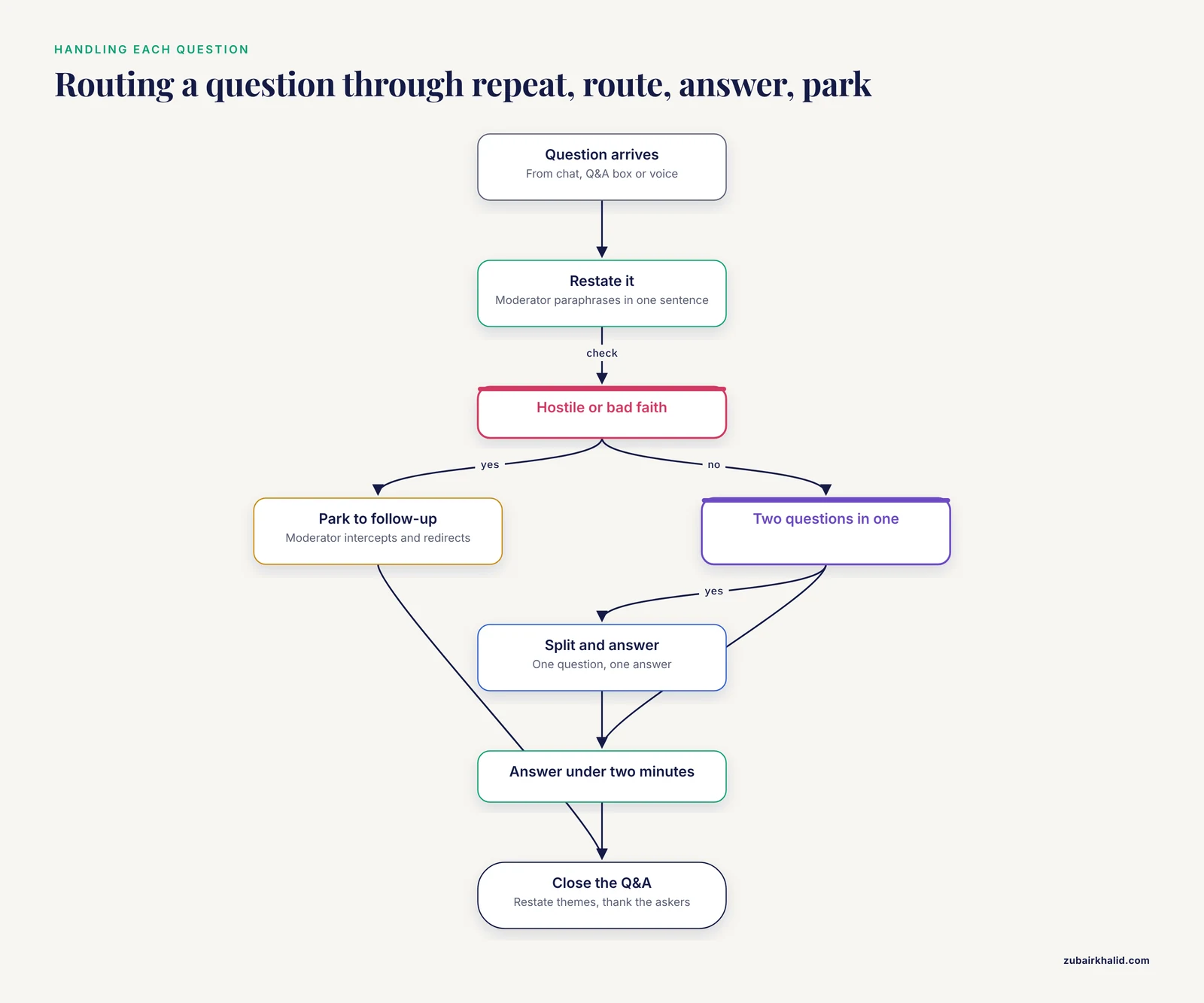
For every question:
- Repeat or restate it. The moderator restates the question in one sentence so everyone shares context and the audio has a clean version on the recording.
- Route it. If a question is really two questions, split it. If it belongs to a different talk, park it.
- Answer, then stop. One question, one answer, under about two minutes. If the asker wants more, invite a follow-up in the follow-up channel.
- Park unanswerable items honestly. "I do not have those data" is a complete answer when paired with "here is what I do know and where the answer might come from."
For a hostile or bad-faith question, the moderator intercepts: "Thanks for the comment. Let's take that to the follow-up channel so we can cover the queue." Workshop facilitation experience shows a facilitator who actively manages contributions is what keeps structured sessions productive rather than letting a single voice consume them [2].
Step 9. Close the Q&A on purpose
End with a summary answer rather than a cutoff. Restate the two or three themes that emerged, point to the follow-up channel, and thank the askers by name. Delivering the close on camera with deliberate pacing and a neutral, confident tone is a vocal-technique problem like any other in virtual delivery: tone, pace, and clarity are the levers the delivery literature singles out [1].
Step 10. Send follow-ups within 48 hours
Post the recording link, the unanswered (parked) questions with written answers, and a two-question feedback survey. Virtual programs that close the loop this way build durable engagement. The ATLAS Virtual Visits program pairs its live sessions with case studies of large-scale implementations and impact tracking on individual participants [3], and the A-TRAC multisite fellowship paired its webinar-based instruction with evaluation surveys across seven cohorts, producing documented outcomes including 78 oral or poster presentations by trainees [6]. A short survey after one talk is the same mechanism at smaller scale.
Moderator Scripts You Can Copy
OPENING
"We have [X] minutes for questions. Submit in the Q&A box or raise
your hand. One question per turn, under a minute. Unanswered
questions get written answers in the follow-up email."

CALLING ON A QUESTIONER
"[Name], the floor is yours. Please unmute and keep your question
under a minute."

RESTATING
"Let me make sure I have this. The question is [one-sentence
paraphrase]."

PARKING
"Good question, and it needs more than the time we have. I am
logging it for the follow-up email."

ENFORCING TIME
"We have time for two more questions, so let's take them now."

CLOSING
"Two themes came up repeatedly: [theme 1] and [theme 2]. The
recording and written answers to remaining questions go out within
48 hours. Thank you all."
Common Platform Errors and Their Fixes
"You are muted now" or the speaker answers in silence. The single most frequent virtual failure. Fix: pin a chat macro the moderator pastes instantly, and have the speaker glance at the mute icon before every answer. Practice the unmute-before-speak reflex during rehearsal.
"Please wait, the meeting host will let you in soon." Attendees stuck in a waiting room while the Q&A clock runs. Fix: assign the moderator or chat monitor as co-host with admission rights so waiting-room approval never depends on the speaker's hands being free.
"The connection is unstable" banner and choppy audio. Fix: speaker joins by wired ethernet, closes other applications, and keeps a phone dial-in as the audio fallback. If the speaker's video degrades, turn video off and keep audio and screen share. A stalled video costs attention, but a stalled audio track ends the session.
Chat scrolls faster than the speaker can read. Fix: the chat monitor tags each message as answered, parked, or logistics, and posts only logistics to the room. The speaker reads nothing from raw chat.
The hard cutoff arrives mid-answer. Fix: the moderator gives a visible countdown ("last question") at the 2-minute mark and the speaker's closing answer is preplanned to compress. This is why the buffer exists in the Step 1 calculation.
"Your audio is not being captured" on the recording. Fix: verify the recording indicator and a 10-second playback test during the tech check, before attendees arrive, not after the talk.
How to Check That the Session Worked
Three checks, in order of value:
- Count unique questions answered. The structured workshop methodology treats the number of unique points raised as a measure of the format working, because a facilitator's job is to maximize distinct contributions [2]. Log how many distinct questions the session surfaced and answered.
- Review the recording at 2x speed, watching only the Q&A. Did the moderator restate questions? Did any answer exceed two minutes? Did anyone wait visibly without being called?
- Send a two-question survey within 48 hours: "What question did you have that went unanswered?" and "What would make the discussion easier to join?" Virtual presentation activities measurably build participants' science communication self-efficacy when they are run and evaluated deliberately, which is the finding that emerged from a hybrid course-based research experience assessed under remote teaching conditions [7]. Your own survey is the same instrument at event scale.
Common Mistakes and Limitations
- Leaving Q&A until the leftover minutes. When the talk overruns, questions get cut, and the cut is always visible to the audience. Fix the budget in Step 1 and defend it.
- Running the Q&A with no moderator. A speaker who reads chat while answering answers nobody. Virtual delivery research treats engagement as a distinct skill set from content delivery [1], and someone must own it.
- Treating text chat as an informal afterthought. Chat-first formats serve non-native speakers and participants who process in writing, and a global audience may prefer text for language and bandwidth reasons. The ATLAS program's language-access commitment reflects exactly this participation barrier [3].
- Ignoring time zones. Publishing the session time in one zone only excludes part of the audience. Cross-time-zone planning is listed among the standard considerations for virtual professional delivery [1], and international virtual collaborations report communication friction when logistics are not planned, alongside high satisfaction when they are [8].
- Not rehearsing the Q&A at all. Presenters rehearse the talk and improvise the questions. The improvement observed between consecutive practice presentations [4] comes from repetition, and the Q&A deserves its own repetitions.
- Assuming silence means no questions. Silence usually means the entry cost is too high. Lower it with a seeded question and an explicit, simple rule for how to ask.
- Treating one format as universal. A format that suits a 12-person lab meeting fails in a 300-person webinar. Match the format to the audience size and the stakes.
- Skipping accessibility. Captions, camera framing that shows the speaker's face, and readable slides all widen who can participate. Virtual activities that succeeded with young audiences did so by making participation structured and visually supported [5].
One limitation to state plainly: a virtual Q&A is a communication exercise, not a substitute for the technical review your results need, and individual situations, such as clinical or regulatory questions raised by audience members, require referral to the appropriate professional channels rather than an on-the-spot answer.
Frequently Asked Questions
How much time should I leave for questions?
Reserve 20 to 30 percent of the total slot. In a 15-minute conference talk that means roughly 3 to 4 minutes, a benchmark consistent with remote conference practice where Q&A sits inside the presentation slot. In a 60-minute webinar, 12 to 15 minutes supports about four to five substantive exchanges.
What should I do if nobody asks anything?
Wait ten silent seconds, then use a seeded question. Ask a colleague to submit a prepared question, or pull one from the registration form. A low-stakes warm-up prompt also helps people cross the threshold into participating.
Do I really need a separate moderator?
Yes, for any session beyond a handful of people. Structured workshop formats assign facilitation as a distinct role precisely because it maximizes the number of useful, distinct contributions [2], and no speaker can present, monitor chat, and manage a queue simultaneously.
Should I read chat questions aloud?
Yes, always restate or paraphrase a written question before answering. The restatement gives the recording a clean audio version of the question and confirms to the asker that you read it correctly.
How do I handle a hostile question?
The moderator intercepts it before the speaker answers. Acknowledge it briefly, park it to the follow-up channel if it is bad faith, and move to the next questioner. Facilitator-managed redirection is standard practice in structured feedback formats [2].
Can I practice answering questions before the talk?
Yes, and it works. In a study of graduate students using a virtual presentation simulator, automatic feedback on eye contact and filler words correlated with measurable improvement between successive presentations [4]. Record yourself answering three anticipated questions and watch it back.
How do I include an audience spread across time zones and languages?
Publish the time in at least three zones, enable captions, and offer an async written Q&A channel for anyone the live window excludes. Global-access virtual programs reach audiences in their own languages and keep growing by removing exactly these barriers [3], and cross-cultural virtual collaborations report that communication logistics are their main friction point [8].
What happens to questions I cannot answer live?
Log them as parked, answer them in writing within 48 hours, and send them with the recording. Closing the loop with written answers and a short survey is how single events become a repeatable practice with measured outcomes.
Sources
- Delivering Your Virtual Presentation: Vocal Techniques, Body Language, and Audience Engagement
- A methodology for enhancing implementation science proposals: comparison of face-to-face versus virtual workshops
- Breaking barriers: the impact of ATLAS Virtual Visits in science communication
- VR Glasses for Developing Academic Presentation Skills at an EMI University
- Taking language science to zoom school: Virtual outreach to elementary school students
- Fostering Tobacco Regulatory Team Science through a multisite, virtual fellowship program for early-career researchers
- A Mixed-Methods Study of a Poster Presentation Activity, Students’ Science Identity, and Science Communication Self-Efficacy under Remote Teaching Conditions
- Fostering Global Learning through Virtual Internationalisation-at-Home: A Cross-Cultural Pharmaceutics and Biotechnology Collaboration between Ireland and India