Virtual Lab Meeting Best Practices for Research Teams
By Dr. Zubair Khalid, DVM, MS, PhD ·

By the end of this guide you will be able to set a meeting cadence that fits your lab, write an agenda people actually read, assign rotating roles, run the meeting so remote participants contribute rather than watch, capture decisions and action items in a shared document, and measure whether the whole system is working. You will need four things on hand before you start: a videoconferencing account your whole team can access, a shared document that everyone can edit live, a team chat channel for between-meeting follow up, and a shared calendar for the recurring invitation.
Lab meetings are the operating system of scientific collaboration. When they run well, a remote or hybrid team stays aligned, junior scientists get feedback, and tacit knowledge, the practical know-how that never appears in a protocol document, moves between people. When they run badly, they become a weekly hour that everyone endures.
Why Virtual Lab Meetings Need Their Own Playbook
The shift to online meetings exposed a gap in the literature. A scoping review of peer-reviewed, grey, and lay literature found scant guidance on running virtual academic meetings, so its authors built a framework called PrePARE, which covers the meeting cycle in five phases: Pre-planning considerations, Planning, Accomplishing conference goals through execution, gauging Response, and Engaging the target audience for future cycles [1]. The framework was modeled on the Plan, Do, Study, Act cycle used in quality improvement, which means it treats each meeting as an intervention you can refine the next time [1].
That cycle mindset matters more for a weekly lab meeting than for a one-off conference. A lab meeting repeats. Every improvement compounds. The sections below walk through each phase in order.
Adoption also has a human side. A mixed-methods study of professionals asked to adopt a new virtual tool found that performance expectancy (β = .411) and social influence (β = .372) were the strongest predictors of intention to use it, both significant at P < .001, and that successful implementation required robust training and institutional support [2]. In plain terms, people adopt virtual meeting practices when they believe the practices help them work and when respected colleagues visibly follow them. A principal investigator who runs tight, well-prepared meetings teaches the habit faster than any written policy.
Choose the Right Meeting Format Before Anything Else
Most labs run one meeting and try to make it serve five purposes. That is the root cause of meetings that drift past their end time. Split the work across formats instead.
| Meeting type | Typical length | Core question it answers | Standing output |
|---|---|---|---|
| Data progress update | 15-20 min per presenter | What did we try, and what happened | Updated action item list |
| Journal club | 30-45 min | Does this paper change our thinking | Annotated reference added to the shared library |
| Problem-solving clinic | 30-60 min | Where is this project stuck | Next diagnostic step, assigned by name |
| Manuscript or grant working session | 60-90 min | Is the argument sound | Paragraph-level revision assignments |
| Whole-lab check-in | 30 min | Are we aligned this month | One entry in the decision log |
A quality improvement collaborative run for independent primary care practices during the COVID-19 pandemic used bimonthly online meetings paired with monthly tailored coaching sessions, and every one of the seven participating sites had at least one member attend every online meeting [3]. The lesson generalizes: a less frequent, well-supported meeting beats a frequent, unsupported one. If your lab currently meets weekly with no preparation, consider weekly short check-ins plus one deeper session per month.
Virtual Lab Meeting Best Practices, Step by Step
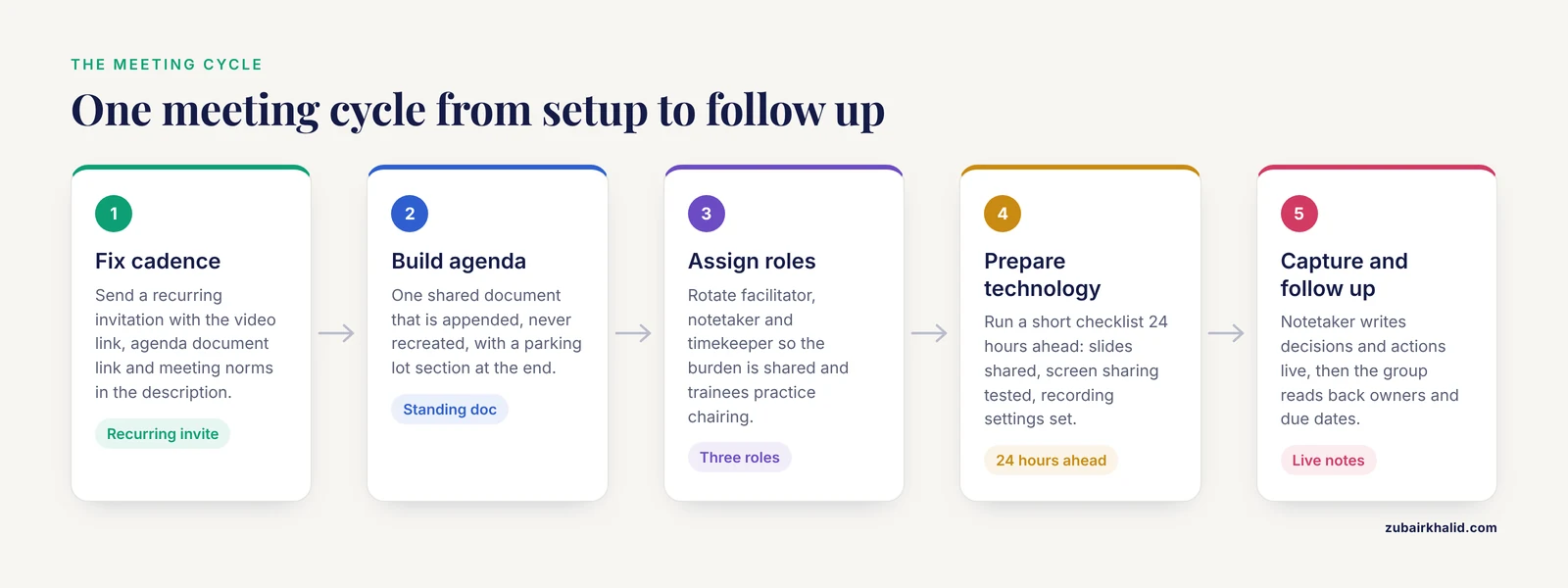
This walkthrough covers one full meeting cycle from setup through follow up. Follow it in order the first time, then keep only the steps that earn their keep.
Step 1. Fix the cadence and send a recurring invitation
Decide the frequency and duration first, then protect them. Send a recurring calendar invitation with the video link, the standing agenda document link, and the meeting norms embedded in the description. A recurring invitation with the agenda attached removes the weekly "what is the link again" message and makes attendance a default behavior rather than a weekly decision.
Set expectations in writing. The ReTOOL research training program, which moved fully online in 2020, created an online program agreement to set participation expectations and a weekly reporting form to confirm requirements were met [4]. A lab can do the same on one page: cameras expected for small groups or optional for large ones, notice required for absence, presenters post materials 24 hours in advance, and side conversations move to chat.
Step 2. Build a standing agenda template
Create one shared document that never gets recreated, only appended. Here is a plain-text template you can paste into a shared doc:
# Lab Meeting - [Date]

## Facilitator: [name]  |  Notetaker: [name]  |  Timekeeper: [name]

## 1. Wins and blockers (5 min)
- [round-robin, one sentence each]

## 2. Presenter: [name] (20 min)
- Question addressed:
- Methods used:
- Results:
- Feedback I want today:

## 3. Problem-solving clinic: [project name] (15 min)
- Stuck point:
- Decision needed:

## 4. Admin and logistics (5 min)
- Deadlines this week:
- Ordering, safety, compliance:

## Decisions made
-

## Action items
- [owner] - [task] - [due date]

## Parking lot
-
The parking lot column is the single highest-value line on the page. Any discussion that would derail the presenter gets captured there and scheduled, which protects the agenda without dismissing the question.
Step 3. Assign roles on a rotation
Three roles make a virtual meeting run: a facilitator who moves the agenda along, a notetaker who fills the decisions and action item sections live, and a timekeeper who announces the five-minute and one-minute marks for each block. Rotate all three so the burden is shared and so every trainee practices chairing a scientific discussion, a skill they will need for their own careers.
You can generate the rotation with a small script instead of assigning by hand. Save one lab member name per line in a file called presenters.txt, then run:
from pathlib import Path

members = [m.strip() for m in Path("presenters.txt").read_text().splitlines() if m.strip()]
for week in range(1, len(members) + 1):
    presenter = members[(week - 1) % len(members)]
    print(f"Week {week}: {presenter}")
With five names in the file, the expected output looks like this:
Week 1: Priya
Week 2: Marcus
Week 3: Elena
Week 4: Sam
Week 5: Jo
Post the rotation in the pinned channel message so nobody has to remember their week.
Step 4. Prepare the technology the day before
Run a short checklist 24 hours ahead:
- Confirm the presenter has shared slides or a document link in the agenda doc.
- Verify screen sharing works for the presenter, including any shared dataset or notebook view.
- Check that the recording setting and transcription setting are configured per your institutional policy, and that participants know recording is on.
- Test any shared tools you will use live, such as a code repository view or an analysis notebook.
Poor preparation is the most common failure point in virtual meetings, and the PrePARE framework places pre-planning considerations and planning ahead of execution for exactly this reason [1]. Ten minutes of technical checking prevents the first fifteen minutes of every meeting being consumed by audio problems.
Step 5. Run the meeting with remote-first participation
If any participant is remote, run the meeting as if everyone is. That means each person joins from their own device, so every face is the same size on screen and everyone can speak at equal volume. Hybrid rooms where a few people cluster around one microphone reliably silence the remote participants.
During discussion, the facilitator should call on people by name in a deliberate order rather than waiting for volunteers, because turn-taking cues that work in a room do not transmit through a video call. Use chat as a second channel for questions, and have the notetaker read outstanding chat questions aloud at each transition so nothing is lost.
Step 6. Capture decisions and actions live, in the shared doc
The notetaker types decisions and action items into the shared document while the conversation happens, on screen where everyone can see them. This practice gives the group a chance to correct the record immediately and eliminates the post-meeting reconstruction from memory.
Close every meeting with a two-minute read-back of the action item list, confirming the owner and due date of each item aloud. An action item without a name on it is a wish, not a task.
Step 7. Follow up and measure whether it is working
Send nothing after the meeting except a link to the notes, which are already complete because the notetaker wrote them live. Then close the loop on the PrePARE cycle by gauging response and engaging the team about the next cycle [1]. Two lightweight measurements work well:
- Attendance and participation. The virtual quality improvement collaborative evaluated engagement using meeting attendance and poll responses, and found that most respondents (9 of 11, or 82%) reported completing their monthly coaching touchpoint, evidence that paired structure keeps participation high [3]. A simple monthly poll to your lab, one question, anonymous, tells you whether the meeting format still serves them.
- Action item completion rate. Count the items closed before the next meeting versus carried over. If the carry-over rate stays high for a month, your agenda is overloaded or your due dates are fiction, and you should cut scope rather than add pressure.
Research Collaboration Tools That Pull the Weight
Tool choice matters less than tool discipline, but a few categories of research collaboration tools carry most of the load for a distributed lab:
- Videoconferencing platform with reliable breakout rooms for small-group discussion during longer sessions.
- Shared documents for the agenda, notes, and decision log, editable by everyone during the meeting.
- Team chat for quick follow ups, with one channel per project so context is searchable later.
- Project tracker or kanban board where action items live, so meeting outputs have an address.
- Reference manager with a shared group library so journal club papers accumulate into a lab-wide, annotated resource.
- Electronic lab notebook or shared protocol repository so methods discussed in meetings link to the actual written procedures.
Whatever you choose, the adoption evidence says make the benefit obvious and let visible colleagues model the behavior, because those two factors dominated intention to adopt in the study cited earlier. Rolling out three tools at once with no training does the opposite. Introduce one tool at a time, with a ten-minute demonstration inside a lab meeting rather than a link sent by email.
Protecting Tacit Knowledge in a Distributed Lab
The hardest thing to transfer in science is the judgment a senior researcher applies without thinking: when a data point looks wrong, when an assay is drifting, when a result is too clean. A rapid review of tacit knowledge mobilization in continuous improvement found that this knowledge moves best when the process is embedded in actual work practice, through observation, action learning, interviews, workshops, and reflective meetings, and that digital solutions can support externalization and transfer but do not replace direct engagement.
For a virtual lab, that finding translates into concrete design choices:
- Share your screen while you work during relevant agenda items, not just the polished results. Watching someone troubleshoot a pipeline or interpret an ambiguous gel teaches more than the slide summarizing it.
- Narrate decisions in the meeting. When you reject an approach, say why out loud, because the reason is the knowledge.
- Hold occasional sessions dedicated to failure analysis, where a presenter walks through an experiment that did not work and the group discusses the diagnostic reasoning. Reflective meetings of this kind are one of the documented mechanisms for moving tacit knowledge into shared practice.
- Write the conclusion of each troubleshooting story into the protocol document, so the next person inherits the judgment in written form.
Making Scientific Collaboration Work Across Time Zones and Career Stages
Distributed teams widen the pool of collaborators but also widen the range of circumstances people join from. A framework built from virtual research with older adults recommends constructing a virtual plan or protocol before the work begins, addressing the needs of participants and the research team together, with concrete tools rather than good intentions [5]. The same discipline improves lab meetings:
- Rotate meeting times if the team spans time zones, so the same people are not always taking the call at midnight or dawn.
- Record sessions for members who cannot attend live, and pair the recording with the written notes so absent members can catch up in fifteen minutes.
- Ask, once, in a survey rather than a meeting, what each member needs to participate fully, including captioning, connection bandwidth, or scheduling constraints, and build the answers into the standing format.
Good scientific collaboration habits are also career infrastructure. Trainees who learn to run an agenda, chair a discussion, and take ownership of action items are learning the management skills that separate productive principal investigators from overwhelmed ones.
What Research Exemplars Do Differently
A qualitative study interviewed 52 principal investigators at top research universities and the National Institutes of Health Intramural Research Program, each nominated as an exemplar of both high-impact research and professionalism, and used inductive thematic analysis to identify their routine practices [6]. The relevant pattern for meetings is that these investigators did not treat lab management as overhead squeezed between experiments. They built regular, predictable structures, including routine meetings and clear expectations for personnel, and they saw those structures as the mechanism that produced rigorous, reproducible work [6].
The practical takeaway is not any single trick but the stance behind it. The meeting is part of the research method. Decisions recorded in the meeting notes become part of the provenance of a project, the same way a reagent lot number does.
Virtual Lab Meetings That Don't Suck: The Short Version
If you read nothing else, apply these eight virtual lab meeting best practices tips:
- Split multiple purposes across multiple meeting formats instead of one sprawling weekly session.
- Use a standing agenda document with a parking lot section.
- Rotate facilitator, notetaker, and timekeeper roles among all members.
- Post materials 24 hours ahead and treat non-posting as the agenda item, not the meeting.
- Run remote-first: everyone on their own device, facilitator calls names deliberately.
- Write decisions and action items live in the shared doc, with owner and due date read back aloud at the end.
- Measure attendance, participation, and action item closure monthly, and change the format based on what you see.
- Introduce one collaboration tool at a time, demonstrated live inside the meeting.
Common Mistakes and Limitations
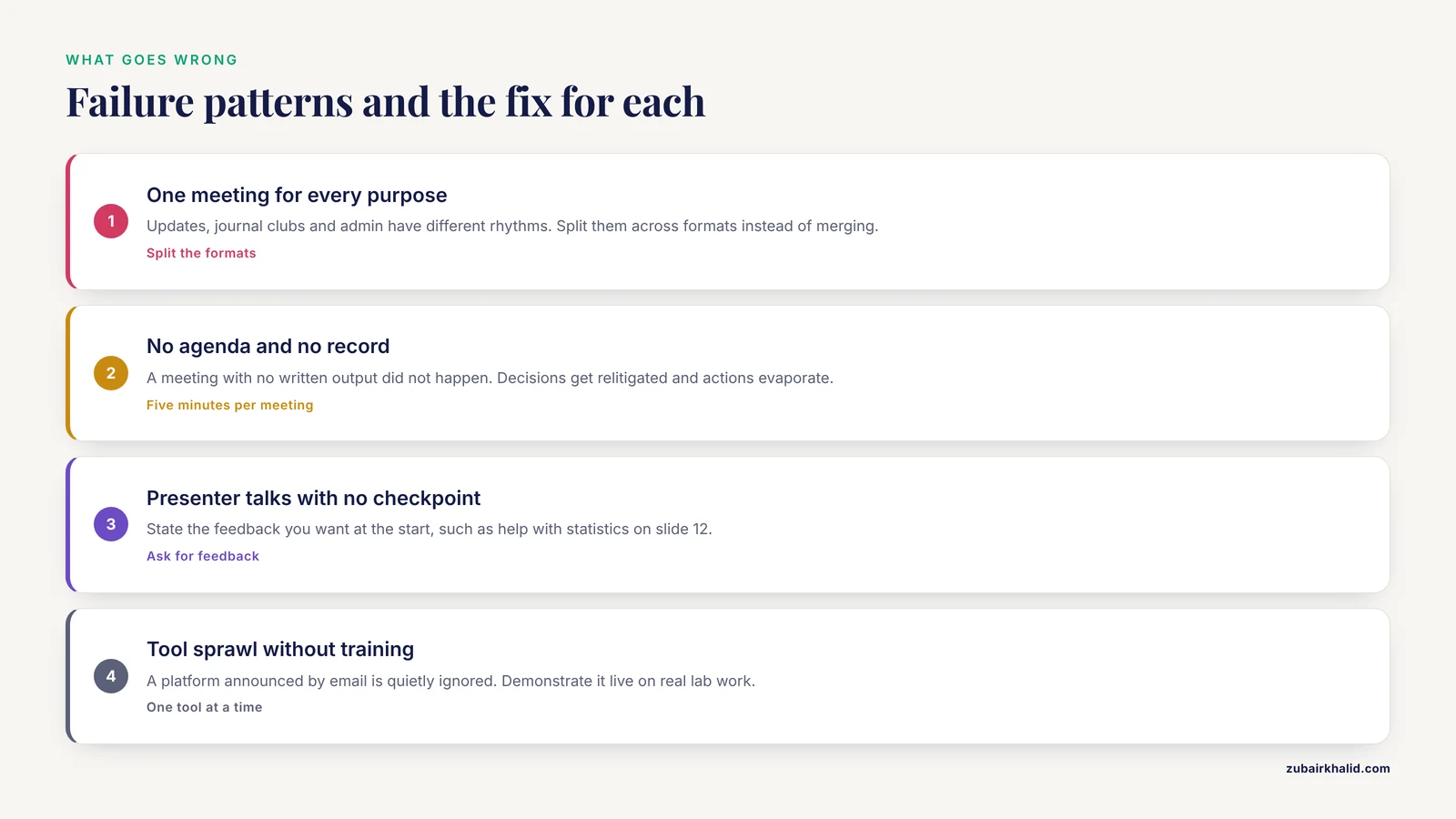
These are the failure patterns that recur in virtual research teams, with the fix for each.
One meeting trying to serve every purpose. Progress updates, journal clubs, and admin announcements have different rhythms. Merge them and you get a meeting that is too long for announcements and too shallow for science. Use the format table above and split.
No agenda, no notetaker, no record. A meeting with no written output did not happen, organizationally speaking. Decisions get relitigated, action items evaporate, and remote members who missed the call have no way back in. The standing document fixes this for the cost of five minutes per meeting.
The presenter talks for 45 minutes with no feedback checkpoint. State the kind of feedback you want at the start of your presentation ("I need help with the statistics on slide 12" or "Is this story publishable?"). An unfocused discussion helps neither the presenter nor the audience.
Hybrid meetings that privilege the room. When three people sit together and three join separately, the remote participants lose the side conversations and the nonverbal cues. If any member is remote, everyone joins from their own device. This single rule does more for inclusion than any other change.
Meetings scheduled purely by tradition. If the team meets weekly because it always has, but action items take two weeks to close, the cadence is wrong. Follow the quality improvement instinct: change one variable, in this case the frequency or the format, observe the effect on completion rate, and keep or discard the change [1].
Tool sprawl without training. Adoption research shows that belief in a tool's usefulness and social influence drive uptake, and that burdens are reduced by structured resources and support. A new platform announced by email with no demonstration will be quietly ignored. Demonstrate it live, in a meeting, on real lab work.
Assuming the virtual format is neutral. A framework for inclusive virtual research methods emphasizes that protocols for virtual participation lag behind the practice of virtual participation, and that teams should build an explicit plan addressing participant needs before the work starts [5]. For a lab meeting, that plan is one page of norms covering scheduling fairness, recording policy, and accessibility needs, written down and revisited every six months.
Ignoring the limits of the format itself. Virtual meetings transfer explicit information well and tacit skill poorly. The review of tacit knowledge mobilization found the most effective transfer is embedded in real work practice, with observation and hands-on engagement. If your lab is fully distributed, budget deliberate in-person or co-working time for skills that do not survive a video call, such as instrument calibration or surgical technique.
Frequently Asked Questions
How often should a research team hold a virtual lab meeting?
Once a week for a short check-in plus one deeper session per month is a defensible default, but the right cadence is the one your action item closure rate supports. Teams in the virtual quality improvement collaborative sustained full attendance on a bimonthly schedule with monthly coaching support, which shows that well-supported meetings need not be frequent [3].
How long should a virtual lab meeting last?
Thirty to sixty minutes for most formats, with fifteen to twenty minutes per presenter in a data update session. Attention and screen fatigue degrade sharply beyond an hour, so if the agenda needs more, add a meeting rather than extending one.
Should virtual lab meetings be recorded?
Yes, when your institutional policy permits and everyone knows recording is on, because recordings let members in other time zones catch up. Pair every recording with the written notes, since most people will skim the notes rather than watch the video.
How do you run a lab meeting when part of the team is in the room and part is remote?
Run it remote-first, with every participant on their own device and microphone, so all faces are equal on screen. If a shared room is unavoidable, put a dedicated camera and microphone on the room and appoint someone in the room to voice the chat questions.
What technology do we need for effective virtual lab meetings?
Four things: a videoconferencing platform, a shared editable document for the agenda and notes, a team chat channel, and a shared calendar. Add a project tracker and a shared reference library as the lab grows, one tool at a time with a live demonstration.
How do we handle time zones in an international research team?
Rotate the meeting time on a fixed schedule so the burden of inconvenient hours is shared rather than permanent, and record every session. Publish the rotation a quarter in advance on the shared calendar so people can plan their days.
How do we keep junior lab members engaged in virtual meetings?
Give them a named role, such as notetaker or journal club presenter, on the public rotation. Assigning visible responsibility converts passive attendees into contributors, and the facilitator should call on members by name in a deliberate order so quiet voices are invited in rather than waiting.
How do we know if our virtual lab meetings are working?
Track three numbers monthly: attendance, participation (who spoke or presented), and the proportion of action items closed before the next meeting. Share the trend with the team once a quarter and adjust the format based on what it shows.
Sources
- Maximizing virtual meetings and conferences: a review of best practices
- Why Only in the Lab? Understanding Counselors’ Technology Acceptance Intentions on Virtual Reality Exposure Therapy: A Mixed Methods Study
- Virtual quality improvement collaborative with primary care practices during COVID-19: a case study within a clinically integrated network
- Abstract PO-056: The ReTOOL training program for underrepresented minority students: Best practices for virtual training in midst of COVID-19
- A framework for increasing the inclusion of older adults in virtual research methods.
- The lab management practices of “Research Exemplars” that foster research rigor and regulatory compliance: A qualitative study of successful principal investigators