Virtual Environments for Research
By Dr. Zubair Khalid, DVM, MS, PhD ·
By the end of this article you will be able to create an isolated Python environment for one analysis, freeze its exact package versions, wrap the whole setup in a container, hand that container to a collaborator, and verify that a fresh machine reproduces your numbers. You will need a computer with Python 3 installed, a terminal, and Docker (Docker Desktop or the command-line engine). If you work in R, the same logic applies through renv and container snapshots, which I cover in a shorter pass.
A virtual environment is an isolated, recorded set of software: an interpreter, specific package versions, and the system libraries those packages need. Reproducible research means another person, or you in two years, can rerun your analysis and get the same result. The gap between those two sentences is where most computational projects fail. Reviews of scientific software practice show that results become hard to reproduce even when code and data are shared, because the surrounding software environment is undocumented, untested, and fragile [1]. Researchers who tried to re-execute legacy R text-analysis pipelines found the code and data intact but the environments decayed, and they could only recover the analyses by reconstructing package versions and system dependencies from archival snapshots and then containerizing them [2].
Why Environments Break, and What a Virtual Environment Fixes
Three failure modes account for most reproducibility problems.
Silent version drift. You install pandas today, your collaborator installs pandas in eight months, and the two versions differ in default behavior. Nothing warns you. The result changes.
Incomplete dependency records. A recent evaluation of AI coding assistants found that when agents write code, the dependency lists they produce are inconsistent, redundant, or incomplete, and that agreement between agents on the dependencies for identical tasks was as low as 7 percent. The study separated three layers: dependencies you declare, dependencies actually installed at runtime, and the necessary and sufficient set the code truly requires. Functional tests passed while the environments diverged [3]. Human researchers make the same class of error when they hand over code with a partial or guessed requirements file.
System-level dependencies that nobody records. Scientific software often sits on middleware, compilers, and libraries that the container or script does not capture. A containerized MPI application, for example, may run anywhere as a binary but still needs a cluster that provides the right interfaces for parallel execution, so the container alone does not make the computation reproducible [4].
A virtual environment attacks all three: it isolates the interpreter and packages, it produces a machine-readable record of versions, and, when combined with a container, it can carry the system libraries along.
The Main Types of Virtual Environments for Research
Pick the lightest tool that captures everything your analysis depends on.
| Tool | What it captures | Best for | Limits |
|---|---|---|---|
| Python venv | Interpreter version plus pinned packages in requirements.txt | Simple single-language analyses | Does not capture system libraries or non-Python tools |
| Conda / mamba | Python plus compiled libraries and non-Python tools in environment.yml | Data science stacks with binary dependencies | Solver conflicts, large files, imperfect cross-platform fidelity |
| renv (R) | R version plus package versions in a lockfile | R projects | System dependencies still live outside R |
| Docker | Full filesystem: OS, libraries, packages, code | Sharing complete, runnable analyses | Needs a pinned base image to be truly reproducible |
| Apptainer / Singularity | Container execution on shared clusters without root | HPC systems where you cannot install software | Same build caveats as Docker |
| Nix | Declarative, content-addressed package specification | HPC-AI stacks, no-root systems | Learning curve, gaps in some package sets |
Two clarifications prevent most confusion. First, containers help with deployment but do not by themselves guarantee reproducibility. If your Dockerfile starts from a floating tag such as python:latest, two builds a month apart can produce different environments. Pin the base image by digest or full version. Second, a lockfile with exact versions is stronger than a loose requirements file. Treat every version number as a measured quantity you report, the way you would report a reagent concentration.
Virtual Environments for Research Reproducibility, Step by Step
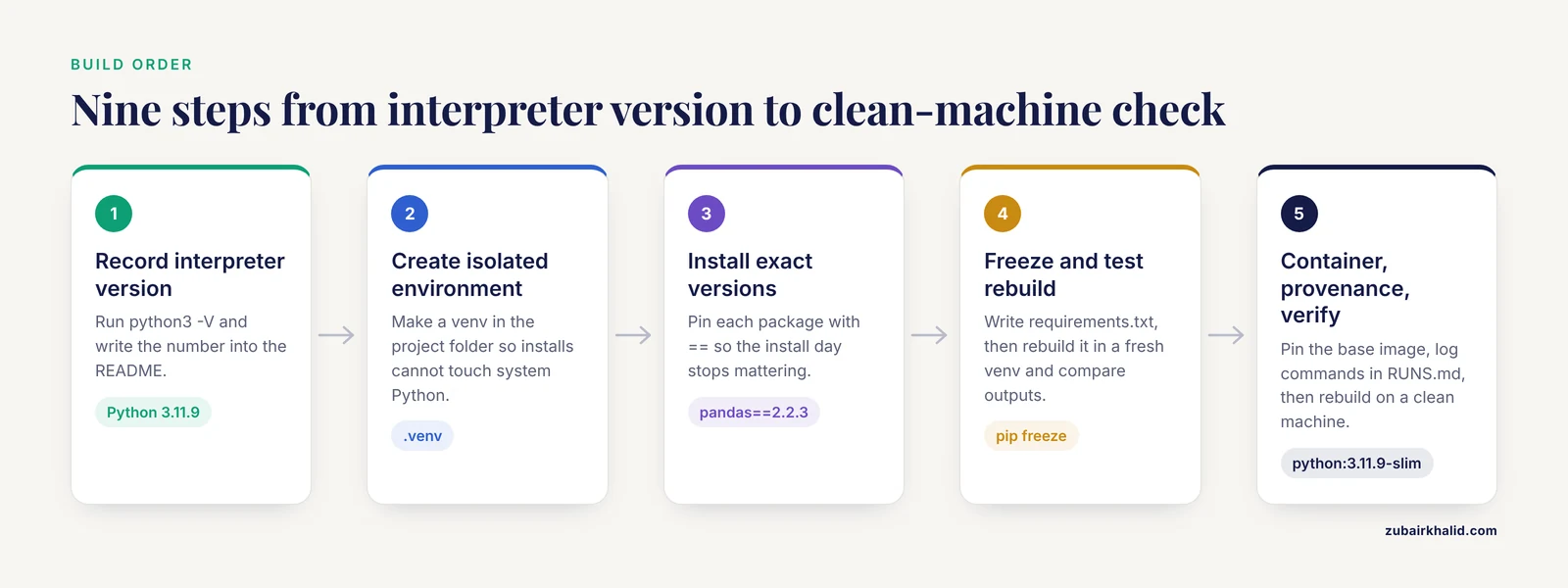
This walkthrough builds a small analysis environment, freezes it, containers it, and verifies it. Follow it in order on a test project before applying it to your real one.
Step 1: Record the interpreter version
Open a terminal and check Python:
python3 -VExpected output:
Python 3.11.9Write this number down or put it in your README. Interpreter version is part of your environment record, not an optional detail.
Step 2: Create an isolated environment
cd ~/projects/rna-counts
python3 -m venv .venv
source .venv/bin/activate
On Windows, activate with .venv\Scripts\activate typed in PowerShell. After activation your prompt gains a prefix, for example (.venv). Every install now lands inside this folder and cannot touch your system Python.
Step 3: Install exact versions
pip install "pandas==2.2.3" "numpy==1.26.4" "scikit-learn==1.5.2"Pinning with == is the reproducible habit. Installing without a version number records whatever happened to be newest on install day, which is a prediction about the future, not a record.
Step 4: Freeze the environment
pip freeze > requirements.txt
cat requirements.txt
Expected output (your exact list will include transitive dependencies):
numpy==1.26.4
pandas==2.2.3
scikit-learn==1.5.2
scipy==1.14.1
Commit this file to version control alongside your code. This one file converts a conversation ("I think I used pandas 2 something") into data.
Step 5: Test the rebuild path immediately
The freeze file is only trustworthy if a clean rebuild works. In a new directory:
python3 -m venv .venv-test
source .venv-test/bin/activate
pip install -r ../rna-counts/requirements.txt
Then run your analysis script against the rebuilt environment and compare the output numbers to your originals. If they match, your record is real. If they do not, you have caught the problem while you still remember the project.
Step 6: Capture system-level needs with a container
Python environments do not capture compilers, BLAS libraries, or other operating-system pieces. A Dockerfile does. Create a file named Dockerfile in your project root:
FROM python:3.11.9-slim
WORKDIR /work
COPY requirements.txt .
RUN pip install -r requirements.txt
COPY analysis.py .
CMD ["python", "analysis.py"]
Note the pinned base image, python:3.11.9-slim, not python:latest. Build and run it:
docker build -t rna-counts:1.0 .
docker run -it -v "$PWD":/work rna-counts:1.0
Expected output on a successful build ends with lines like:
Successfully built rna-counts:1.0
Successfully tagged rna-counts:1.0
The -v "$PWD":/work flag mounts your current directory into the container so results land back on your machine. For a stronger guarantee, record the image digest that docker images prints alongside the tag, since tags can be retargeted while digests cannot. Container researchers have formalized exactly this point: images used as units of computation need unique identification and reproducible build procedures, and widely used ad hoc build approaches often lack those safeguards.
Step 7: Record provenance alongside the environment
An environment tells you what software ran. Provenance tells you what was done with it. Work on provenance management in computational research argues for an explicit execution environment that provides a clear, traceable record of each computational experiment, including the software stack and the steps applied [5]. In practice that means a short RUNS.md file in the repository: the command you ran, input data filenames and checksums, the environment record (requirements.txt or the image digest), and the date. Systems such as SWIRRL automate this idea for shared research workspaces, keeping versioned, provenance-aware records of data and tools and letting users create executable snapshots of their environments [6]. Your RUNS.md is the manual, portable version of the same principle.
Step 8: Add a software bill of materials for larger projects
As a project accumulates open-source components, its dependency web grows past what a requirements file shows. A Software Bill of Materials (SBOM) is a generated inventory of every software component and dependency in a system. Empirical work shows SBOM tools can discover open-source components installed without an operating-system package manager and document component dependencies across diverse environments [7]. Generating an SBOM for a container image gives reviewers and future maintainers an auditable component list, which matters for both reproducibility and security response.
Step 9: Verify end to end on a clean target
Final verification means a machine (or account) that has never seen the project runs: clone the repository, build the container, run the analysis, and compare outputs to your committed result files. Frameworks for reproducible benchmarks do this formally: AIFaultBench recorded environment setup scripts and reproduction triggers for 770 real-world bugs and successfully reproduced 652 of them, 84.7 percent, under the recorded execution conditions [8]. That percentage is a realistic target, and the misses in such studies usually trace back to undocumented environment details, which is precisely what your records now cover.
Reproducibility Tips That Hold Up in Practice
Freeze at milestone moments, not at the end. Environment decay is gradual. The retrospective R study that inspired containerized reconstruction of historical environments worked because CRAN and Bioconductor archival snapshots existed to resolve dependency graphs at specific timestamps [2]. Your equivalent is a tagged commit with a frozen lockfile at every analysis milestone.
Write the environment file before you trust the project. A declarative description, one human-readable specification of data preparation, parameters, and dependencies that a tool can execute, is more robust than a pile of shell history. Work on declarative model specifications shows that automatically generating a self-contained bundle of models, configurations, metrics, and provenance data eliminates implicit dependencies [9].
On clusters without root access, use declarative or user-space tools. Production HPC systems often deny root and restrict internet access. Experience building an HPC-AI stack with Nix showed that traditional module-and-Conda approaches leak system libraries into builds and fail to compose across projects, while Nix's full isolation and flake-based composition unified C, Fortran, Python, MPI, and GPU components under one specification that also generated the deployment container. If Nix is unavailable, Apptainer wrapping a pinned image is the standard fallback.
For teaching labs, prebuild the environment for students. Systems that deliver laboratory activities through virtual appliances and containers let students replicate a controlled, reproducible setup on their own machines with minimal administrative overhead [10]. If you teach or onboard collaborators, ship the environment the same way you ship the code.
Log performance-relevant context when the environment affects measurement. If your results depend on execution characteristics such as latency or throughput, record the environment's performance properties too, since monitoring frameworks treat hardware, network, software, and reliability metrics as interacting quantities that shape observed behavior [11].
A Reproducibility Checklist
Run this reproducibility checklist before you publish, submit, or archive:
- Interpreter and language versions are written in the README.
- Every package is pinned to an exact version in a lockfile or freeze file.
- The lockfile was rebuilt in a fresh environment and the analysis was rerun.
- System-level dependencies are captured in a container built from a pinned base image.
- The container image digest is recorded, not just the tag.
- Input data files have checksums recorded next to them.
- A RUNS.md (or equivalent) lists the exact commands, in order, that produce each result.
- Generated outputs are compared against committed result files, and any differences are explained.
- The repository states the license and the licenses of key dependencies, or an SBOM is included for complex stacks.
- A collaborator, or you on a different machine, has completed steps 1 through 8 independently.
If you cannot check item 10, treat the project as unverified regardless of how careful the rest looks.
Common Mistakes and Limitations
Mistake: treating "runs on my machine" as a record. A working setup is not documentation. Undocumented environments are a core driver of what researchers call Reproducibility Debt, the accumulated fragility that makes results unreproducible even when code and data exist [1].
Mistake: trusting a declared dependency list. Declared and runtime-installed dependency sets routinely diverge, and functional tests do not catch the gap [3]. The fix is behavioral: rebuild from the declared list in a clean environment and check outputs, every time.
Mistake: assuming a container makes work reproducible. Containers encapsulate applications with their dependencies for consistency across environments [12], but a floating base image, unpinned installs inside the build, or reliance on cluster middleware outside the container each break the guarantee [4]. Pin the base image, pin the installs, and record anything the container expects from the host.
Mistake: ignoring container security. Encapsulation can mask vulnerabilities in base images and third-party libraries, and the shared host kernel in containerized environments increases the attack surface [12]. Pull base images from official sources, rebuild periodically with updated pinned versions, and scan images before sharing.
Mistake: confusing preservation with reproducibility. Long-term work on software execution preservation concludes that preserving binaries and pre-built execution environments is not enough, because preserving the ability to replicate a result is not the same as preserving the software itself [13]. Archive source, environment specifications, and provenance together, not just a saved image.
Mistake: over-recording with no maintenance plan. Environment records impose ongoing cost, and limited engineering practices in research settings are exactly why debt accumulates [1]. Right-size the effort: a two-script project needs a lockfile and a README, not an orchestration pipeline. Release-pipeline work emphasizes end-to-end dependency governance for complex multi-stage systems [14], which is the right level for large software projects and overkill for a thesis analysis.
Limitation to state honestly. Some dependencies resist capture. GPU drivers, licensed software, and external services may not fit inside your environment record, so say so in your README rather than implying full self-containment. And any environment you cannot rebuild from its own records is a hypothesis, not a result.
Frequently Asked Questions
What is a virtual environment in research?
An isolated, recorded set of software, including an interpreter, exact package versions, and needed system libraries, that belongs to one project. It keeps each project's dependencies separate and gives you a file you can share so others rebuild the same setup.
Do I need Docker if I already use conda?
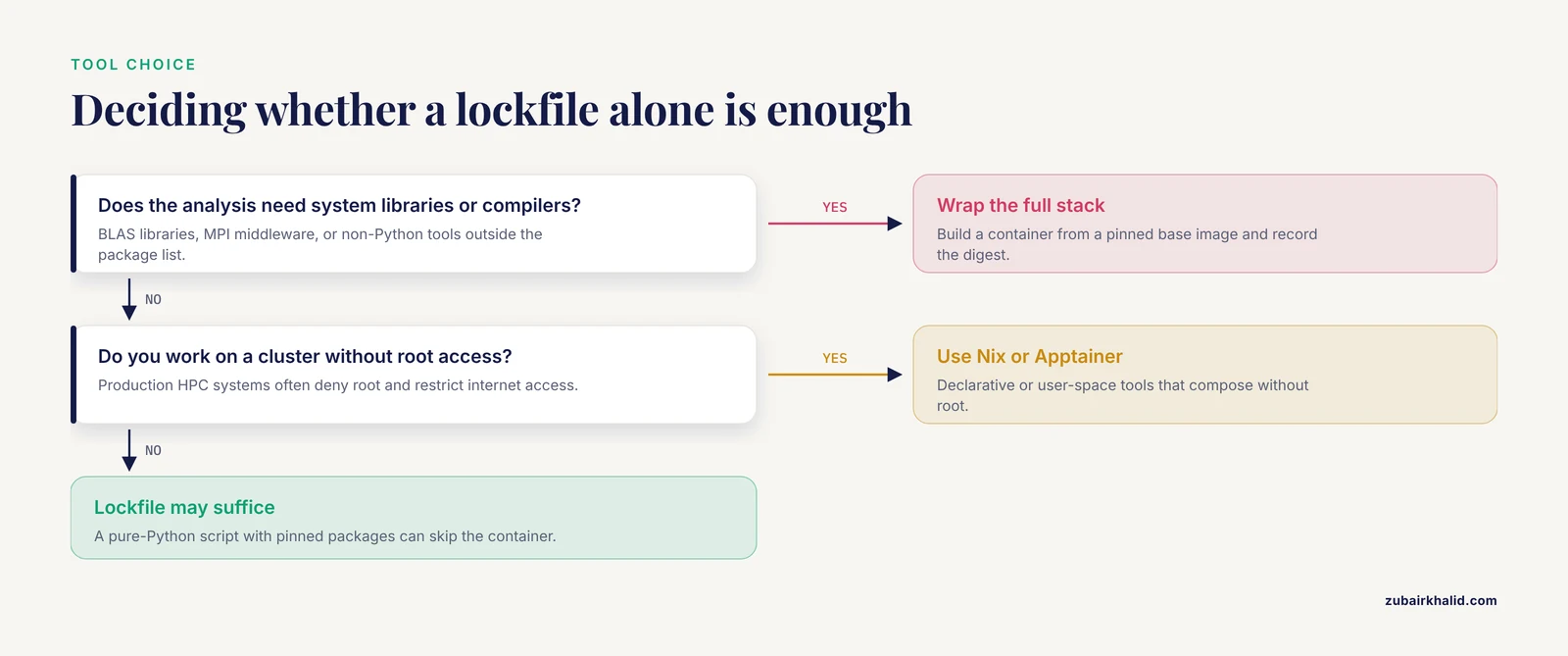
Often yes, if your analysis depends on system libraries, compilers, or tools outside Python. Conda captures the Python layer well, while a container built from a pinned base image captures the operating-system layer too. A pure-Python script with pinned packages may genuinely not need a container.
What is the difference between reproducibility and replication?
Reproducibility, in the computational sense used here, means rerunning the same analysis on the same data with the same code and getting the same numbers. Replication means running a new study, often with new data, to test whether the finding holds. Virtual environments address reproducibility directly and make replication easier by removing software as a confound.
How do I share my environment with a collaborator?
Commit the lockfile (requirements.txt or environment.yml) to version control, or push the built container image to a registry and share the image digest. Include a README with the interpreter version and the exact commands to rebuild and run.
Why does my code run on my laptop but fail on the cluster?
Your laptop has system libraries, middleware, or driver versions the cluster lacks, and none of them appeared in your dependency records. Scientific software commonly needs system foundations such as middleware and libraries that a code-only handoff does not carry. Wrap the full stack in a container or use a cluster-compatible declarative tool such as Nix or Spack.
How exact should version pinning be?
Exact. Pin every direct dependency to a specific version, and let your freeze or lockfile capture the transitive dependencies. Loose pins such as "pandas >= 1.0" describe a family of environments, not one environment, so they cannot guarantee a match.
What belongs on a reproducibility checklist?
Pinned package versions, recorded interpreter and system versions, checksummed input data, a step-by-step command log, a container built from a pinned base image with its digest recorded, a verified clean-machine rebuild, and stated licenses. The checklist in this article gives all ten items.
How long will my environment keep working?
Unmanaged, often only a few years, because packages are removed, renamed, or incompatible with new interpreters, a decay pattern documented in studies of legacy R pipelines [2]. Long-term studies also caution that stored binaries alone are not sufficient for durable reproducibility [13]. Your best protection is archiving source code, environment specifications, and provenance records together, and re-verifying the build periodically.
Sources
- Managing Reproducibility Debt in Scientific Software: A Practical Framework
- Temporal Dependency Archaeology: Reconstructing Historical R Environments for Reproducible Text Analysis Pipelines
- Code That Works, Environments That Don't: Measuring Environment Reproducibility in AI-Generated Software
- VCC: A framework for building containerized reproducible cluster software environments
- Managing Software Provenance to Enhance Reproducibility in Computational Research
- SWIRRL. Managing Provenance-aware and Reproducible Workspaces
- Enhancing Visibility of Components and Dependencies Across Diverse IT Environments with Open-Source Software-Bill-of-Materials Generation Tools
- AIFaultBench: A Reproducible Benchmark of Real-World Faults in AI Software Systems
- A DECLARATIVE APPROACH TO THE DESIGN AND REPRODUCIBLE LEARNING OF COMPLEX MODEL STRUCTURES FOR MONITORING SOFTWARE AGENTS
- A Linux/Unix-based System for Managing Dynamic Laboratory Environments
- OntOraculum: a semantic ontology for managing performance metrics in smart environments
- Managing Vulnerabilities in Containerized and Kubernetes Environments
- Supporting Long-term Reproducible Software Execution
- Orchestrating Complex Release Pipelines in DevOps: Strategies for Managing Dependencies, Automation, and Continuous Delivery