How to Prepare for a Virtual Dissertation Defense
By Dr. Zubair Khalid, DVM, MS, PhD ·

By the end of this guide you will be able to build a complete virtual dissertation defense plan: a backward timeline from your defense date, a tested hardware and network setup, a rehearsed presentation, a backup plan for every single point of failure, and a run sheet you can follow on the day. You will also know the most common mistakes doctoral candidates make in virtual defenses and how to avoid each one.
Here is what you need on hand before you start:
- Your dissertation in its near-final form, plus committee approval to schedule
- A computer with a working webcam, microphone, and your presentation software installed
- A videoconferencing account (Zoom, Microsoft Teams, Google Meet, or whatever your program uses) with the meeting link and passcode from your program coordinator
- A headset or external microphone, a phone or second device as a backup, and your slides exported as a PDF
- Access to your graduate program's defense policy document, which tells you how far in advance you must file paperwork and what your committee requires
Why the Defense Exists, and What Going Virtual Changes
The dissertation defense is a public scholarly examination, not a private paperwork step. Universities have held formal public defenses of doctoral theses for centuries. A well-documented example comes from the University of Basel in October 1674, when the Transylvanian physician Ferenc Pápai Páriz defended his Latin-language medical thesis on three gynecological cases as part of his inauguration as a doctor [1]. The structure of that event, a candidate presenting a completed written work and answering questions from faculty, is the same structure you will follow, just over a video call instead of in a Basel lecture hall.
Two things change when the defense goes virtual. First, the "room" now includes your equipment, so your preparation load doubles: you prepare your scholarship and you prepare your technology. Second, the permanence of the record increases. Pápai Páriz's thesis survives because it was printed and later translated and republished so historians could study it 350 years later [1]. Your virtual defense will likely be recorded by default, and that recording becomes part of your university's record. Treat the event as something that will be reviewed later, because it will be.
What does not change is the substance. Your committee has already read the dissertation. The defense asks whether you can defend its choices, explain its limitations, and answer questions about what you would do differently.
Virtual Dissertation Defense Preparation Step by Step
The following seven steps assume a defense roughly six weeks away. Compress the timeline if you have less time, but keep every step.
Step 1: Confirm the Format and Lock the Date
Ask your graduate coordinator these questions in writing:
- Which platform hosts the defense (Zoom, Teams, or Meet)?
- Which parts are open to the public and which are closed-session?
- Is a recording required, and who archives it?
- What is the deadline for submitting the dissertation draft to the committee, and what is the deadline for final submission after a pass?
- Do any committee members attend from a different time zone?
Put the defense date on your calendar and work backward from it. This is the core of dissertation planning in the final stretch: every remaining task, from formatting checks to practice talks, gets a date earlier than the defense, not the day of it.
Step 2: Finish the Dissertation and Get Sign-Off
A defense scheduled before the full draft reaches the committee is the single biggest self-inflicted risk in this process. Your committee cannot ask sharp questions about a chapter they received the night before, and some programs treat late delivery as grounds for postponement.
Work backward again. If your committee needs two weeks of reading time and your graduate school needs a week to process the post-defense paperwork, then the full draft must be complete about five weeks before the defense date. If you are still writing, finish the dissertation first and then schedule the defense. If you are struggling with the final chapters, the practical answer to how to finish a dissertation is to shrink the scope of the remaining problem, agree with your advisor on exactly what the final chapters must contain, and write those pages to that specification rather than to an imagined ideal.
A concrete finish plan looks like this in your calendar:
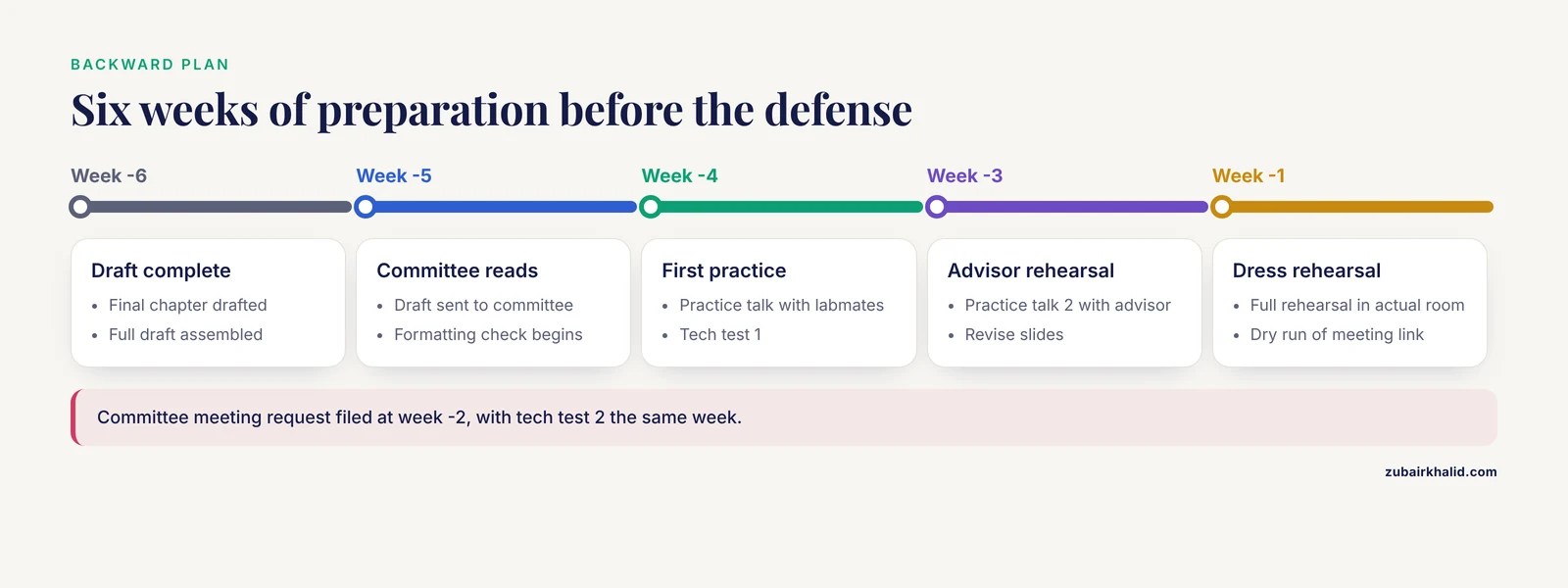
Week -6: Final chapter drafted, full draft assembled
Week -5: Draft sent to committee, formatting check against
         graduate school template begins
Week -4: Practice talk 1 with labmates, tech test 1
Week -3: Practice talk 2 with advisor, revise slides
Week -2: Committee meeting request filed, tech test 2
Week -1: Full rehearsal in the actual room, dry run of
         the meeting link with a colleague
Day 0:   Defense
Step 3: Build the Presentation
Most programs expect a 30 to 45 minute public presentation. Confirm your exact time limit with your coordinator, because the range varies by field and by university.
Do the pacing arithmetic before you design a single slide:
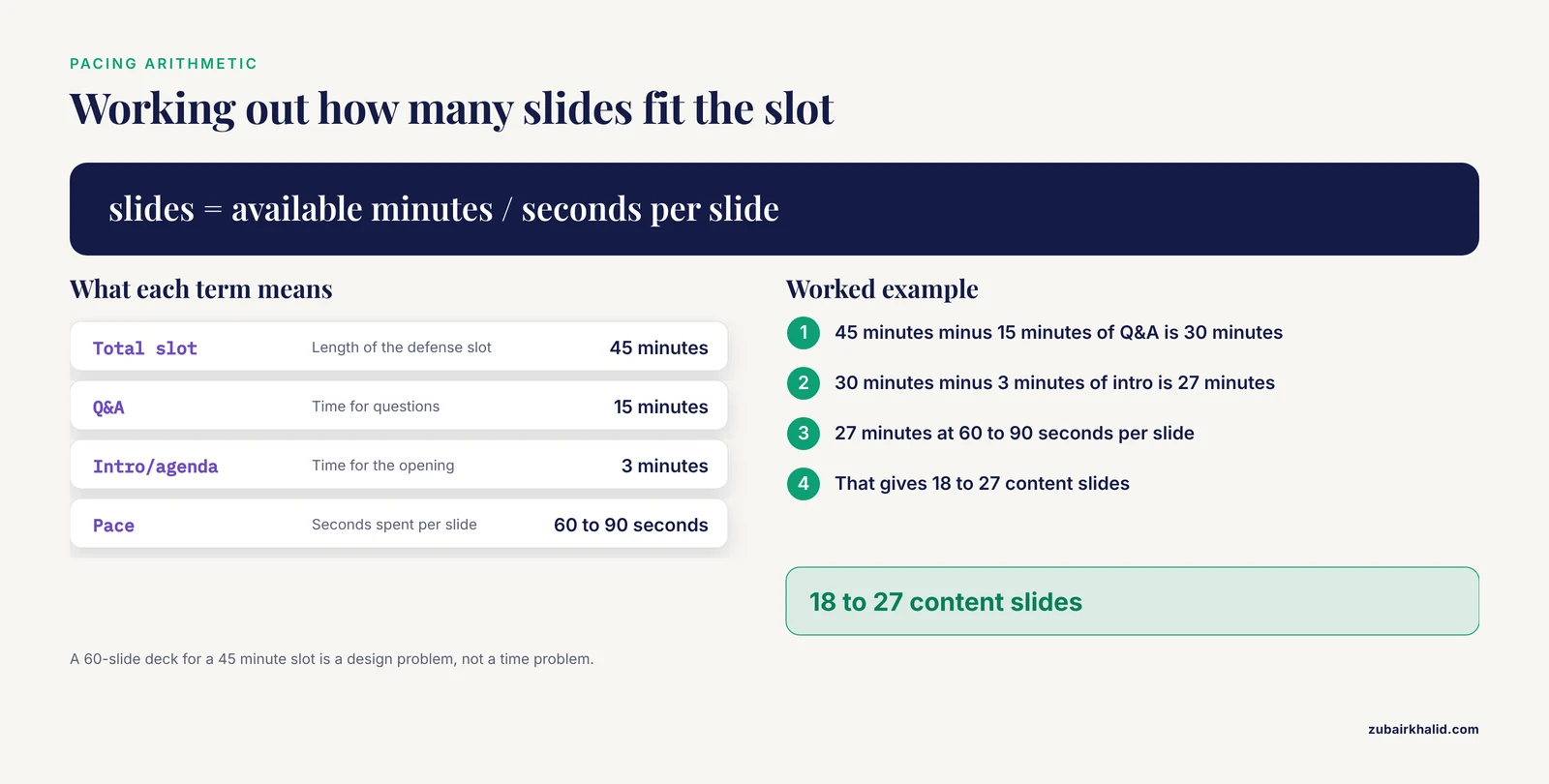
Total slot:        45 minutes
Minus Q&A:        -15 minutes
Minus intro/agenda: -3 minutes
Available:         27 minutes

27 minutes at 60 to 90 seconds per slide
= 18 to 27 content slides
If you have 60 slides for a 45 minute slot, you have a design problem, not a time problem. Cut slides or merge them.
Structure the talk for a mixed audience, because virtual public defenses often draw attendees from outside your subfield:
- One slide on the motivating question in plain language
- Two to four slides of background, only what is needed to follow the results
- One slide on your research questions or hypotheses
- Methods, presented at the level a non-specialist faculty member can follow
- Results, one main finding per slide
- Limitations and future work
- Acknowledgments, including funding sources if your program requires it
Export your final deck as a PDF in addition to the native format. PDF sharing behaves more predictably across platforms and versions than a live PowerPoint or Keynote share, and it removes font-substitution surprises if the host machine renders your deck instead of you.
Step 4: Set Up and Test Your Hardware and Network
This is the step most candidates underestimate. Run these checks at least twice, once in a quiet room and once in the actual room where you will defend.
Check your upload bandwidth. Video calls are asymmetric: you upload more than you download because you broadcast your camera and screen. Run a browser-based speed test, or check latency directly from the command line.
On Windows:
ping -n 10 zoom.usOn macOS or Linux:
ping -c 10 zoom.usExpected output looks like this:
Reply from 3.235.62.130: bytes=32 time=14ms TTL=114
Reply from 3.235.62.130: bytes=32 time=15ms TTL=114
Reply from 3.235.62.130: bytes=32 time=13ms TTL=114
...
Packets: Sent = 10, Received = 10, Lost = 0 (0% loss)
What the numbers mean:
- Latency (the time value): under roughly 50 ms is excellent, 50 to 100 ms is fine for a defense, and values that fluctuate wildly between 20 ms and 300 ms indicate an unstable connection.
- Packet loss: any sustained loss is a problem. Your video will stutter or freeze and your audio will drop syllables.
- Zero percent loss on 10 packets is a pass. If you see losses, switch to a wired connection.
The single highest-impact upgrade for a virtual defense is a wired ethernet connection to your router. If that is impossible, sit in the same room as the router and close every bandwidth-heavy application, including cloud sync clients, backups, and streaming services on other household devices.
Check your camera and microphone before the day, inside the meeting platform. Open your conferencing app, start a meeting alone, and use its built-in settings screen. Speak at the volume and distance you will use on the day and watch the input level meter. If your built-in microphone peaks below the middle of the meter, move closer or switch to a headset. Select your external microphone explicitly in the platform's device settings rather than trusting the default, because laptops frequently leave the internal microphone selected.
Frame your shot deliberately. Camera at eye level, light in front of you rather than behind you, a plain or tidy background, and your head and shoulders centered. Wear something you have tested on camera, because some patterns and fabrics strobe on video.
Prepare the backup chain. Every element of your setup needs a fallback, because you cannot pause a defense to fix your router.
| Component | Primary choice | Backup | When to switch |
|---|---|---|---|
| Internet | Wired ethernet | Phone hotspot, tested in advance | Any repeated freeze or drop |
| Audio | Wired headset | Laptop microphone and speakers | Headset disconnects or echoes |
| Slides | PDF screen share | PDF open on second device | Screen share fails |
| Power | Laptop on charger | Fully charged second battery or power bank | Outlet failure |
| Device | Primary laptop | Tablet or phone joining the same meeting | Laptop dies |
| Recording | Host-side platform recording | Local platform recording or a second device | Recording fails |
Test the phone hotspot by actually joining a video call through it, not by looking at signal bars. Know the exact meeting ID and passcode written on paper, in case your only copy lives in an email you cannot open.
Step 5: Rehearse Under Real Conditions
A rehearsal that does not mimic the real conditions teaches you almost nothing. Schedule at least three full run-throughs:
- Solo run with a timer. Talk through every slide out loud. Note where you exceed your pacing target. Reading your slides aloud is the fastest way to find sentences that sound written rather than spoken, which you should then rewrite.
- Rehearsal with friendly colleagues on a video call. They should interrupt with questions, because interruptions are what you need to practice. Practice the mechanics: unmuting, sharing the PDF, advancing slides, returning to the grid view.
- Full dress rehearsal in the actual room, on the actual network, with your advisor or a colleague playing the chair. Include the awkward parts. Practice what you say when a question confuses you ("Let me make sure I understand, are you asking about the model assumptions or the sample selection?"). Practice the pause you take before answering.
Record one rehearsal and watch it. You will find verbal tics, dead air, and slides you rush through that deserve more time. Almost every candidate is surprised by something in their own recording, and it is far better to discover it a week early than to hear about it from your committee.
Step 6: Prepare Your Documents and Room
Have open and within reach, in separate windows or printed:
- Your full dissertation, with sticky notes or bookmarks on the pages most likely to be questioned
- Your slide deck in both native and PDF formats
- A one-page list of your key numbers, effect sizes, and statistical results, so you are not scrolling for them under pressure
- A glass of water
- Your committee member names and faces, so you can address questioners correctly
If your program allows closed notes on screen, arrange them on a second monitor or a tablet placed below the webcam. Anything that pulls your eyes away from the camera during answers reads as disengagement, so keep reference material as close to the lens line as possible.
Step 7: Run the Defense Day
Thirty minutes before the start:
- Plug in power, plug in ethernet or confirm hotspot, plug in headset
- Join the meeting, confirm camera and microphone selection
- Close every unrelated application, including email, chat, and sync tools
- Do one last speed check
- Have your PDF open and ready to share, with a second window behind it so you can unshare cleanly
During the presentation, share only the slide window rather than your entire desktop. This prevents notifications, file names, and browser tabs from appearing in front of your committee and any public attendees. Turn on the platform's do-not-disturb setting so popups cannot appear mid-talk.
When the question period starts, your chair manages order of speakers. In virtual settings, committee members sometimes unmute over each other or their question arrives while you are mid-answer. If two questions overlap, answer them in sequence and confirm you got both. Restate each substantive question before answering it. This buys you thinking time, prevents you from answering the wrong question, and produces a cleaner recording.
Platform Settings and Parameters That Matter
| Parameter | Where it lives | Recommended setting | Why it matters |
|---|---|---|---|
| Microphone device | Audio settings | Your external headset, tested | Default selection often uses the laptop mic, which picks up room noise |
| Original sound / audio processing | Audio settings, advanced | Off for a headset in a quiet room | Noise suppression can clip consonants, which hurts clarity for technical terms |
| Screen share scope | Share dialog | Single window or PDF, not full desktop | Prevents notifications and private files from appearing |
| Virtual background | Video settings | Off or a plain static image | Movement-tracking backgrounds flicker when you gesture |
| HD video | Video settings | On if bandwidth allows | Committee members read your face for cues during long Q&A |
| Recording | Host settings | Cloud recording, host and participants announced | Most universities require the defense on the record |
| Waiting room | Security settings | Enabled by the host for closed sessions | Keeps the closed session truly closed |
If you are the one creating the meeting rather than the coordinator, schedule it with the passcode embedded in the link, enable the waiting room, and assign a co-host so a tech failure on your side does not end the meeting.
Handling the Question Period
Committee questions in a virtual defense follow the same logic as an in-person defense, with two added difficulties: audio lag makes interruptions awkward, and you cannot read the room's body language. Adjust with three habits.
First, count to two after every question before answering. The lag that makes interruptions painful also makes instant answers sound like you are talking over people. A deliberate pause reads as thoughtfulness.
Second, when a question has multiple parts, say so and take them in order. "You asked three things there. Let me start with the sample size." Written answers in your dissertation had the luxury of structure. Spoken answers need you to build the structure out loud.
Third, when you do not know something, say so precisely and say what you would do to find out. "I have not tested that interaction, and my guess from the data I have would be X, but that is a guess, not a result." Committees respect a candidate who knows the exact boundary of their own evidence. That boundary is one of the main things a defense exists to test.
Common Mistakes and Limitations
These are the failures that actually happen in virtual defenses, drawn from the recurring trouble spots candidates report to their graduate programs.
- Scheduling before the draft is done. If the committee receives the dissertation too late, they cannot examine it fairly, and some programs will postpone. Protect the reading window in your backward plan.
- Never testing the real room. A connection that is flawless in your kitchen can be unusable in the room you actually defend in. Run the full tech test where you will sit.
- Screen sharing the whole desktop. A single notification banner in front of your committee is embarrassing, and a file name on screen can leak unpublished content. Share a single window.
- No PDF fallback. Version mismatches between presentation software on two machines corrupt layouts. A PDF export renders identically everywhere.
- Overloading the talk. A 60-slide deck for a 45 minute slot means you will either rush your results or get cut off before limitations, and losing the limitations section invites harder questions.
- Reading slides verbatim. Committees notice within a minute. Slides carry keywords and figures, your voice carries sentences.
- Skipping the hotspot test. An untested hotspot with a capped data plan or weak signal in your defense room fails at the worst possible moment. Join a real video call through it beforehand.
- Ignoring time zones. A committee member joining from another zone who assumed a different start time is a real and common failure mode. State the time with the zone in every message.
- Forgetting the recording. Some programs require an archived recording for the graduate school. Confirm who records, verify it actually captured audio, and know where it goes afterward.
One limitation belongs here honestly: your graduate school's own policy governs the details that matter most, including who may attend, whether the public must be admitted, how voting works when members attend remotely, and what happens if the technology fails mid-defense. Requirements differ across universities, and this guide cannot substitute for your program's document. Read it first, then apply the steps above inside its rules. Individual edge cases, such as a committee member in a different country or an accommodation request, need your graduate coordinator, not a blog post.
A final framing thought. The dissertation you defend becomes a permanent scholarly record, in the same way that Pápai Páriz's 1674 Basel thesis survived three and a half centuries and was eventually translated and republished so that later scholars could study it [1]. The dissertation itself, not the slides or the platform, is what lasts. Virtual dissertation defense preparation exists to make sure nothing technical stands between your committee and that record on the day.
Frequently Asked Questions
How long should my virtual defense presentation be?
Most programs allot 30 to 45 minutes for the public presentation, followed by a longer closed question period. Confirm the exact split with your coordinator, then build 18 to 27 slides for a 45 minute slot at 60 to 90 seconds each.
What happens if my internet drops during the defense?
Rejoin immediately, and if reconnection fails, join by phone audio while the host switches your slides or shares the PDF from their side. Tell your chair your backup plan before the defense starts so the committee knows the procedure.
Should I record my virtual defense?
Follow your program's policy, which usually requires a recording for the graduate school archive. Even when optional, recording protects you if the committee later disagrees about what was said, and it gives you a document for revising the dissertation.
How far in advance should I start preparing?
Start full preparation about six weeks out: draft complete at six weeks, committee reading window at five, rehearsals and tech tests in weeks four through two, and a dress rehearsal in your actual room the week before.
What do I wear for a virtual defense?
Dress one step above a normal workday, typically business casual, and test the outfit on camera because some patterns flicker on video. You are on a webcam, so solid colors and a neat collar read better than patterns.
Can committee members attend remotely?
In most universities yes, though your program's policy determines whether remote members may vote and how the chair documents attendance. Ask your coordinator and confirm every member's attendance mode when you lock the date.
Do I need a professional microphone?
No, a wired headset or a basic external microphone is sufficient. What matters is that you test it inside the actual platform, select it explicitly in the audio settings, and keep it at a consistent distance from your mouth.
What if a committee member asks something I cannot answer?
Say directly that you do not know, state what you would need to find out, and connect it to what you do know. Committees test the boundary of your knowledge on purpose, and a precise admission with a plan reads far better than a bluff.
Sources
- [[Translation from Latin to Hungarian of the thesis of Ferenc Pápai Páriz at the 350th anniversary of his defense and medical inauguration at the University of Basel].](https://pubmed.ncbi.nlm.nih.gov/39550727/)